
H8T7M - Video camera Speco Technologies - Free user manual and instructions
Find the device manual for free H8T7M Speco Technologies in PDF.


| Product Type | Video Camera |
| Brand | Speco Technologies |
| Model | H8T7M |
| Image Sensor | 1/2.5" CMOS |
| Resolution | 8MP (3840×2160) |
| Video Output | AHD / TVI / CVI / CVBS (default HD-TVI) |
| Lens | 2.8~12mm motorized |
| IR Distance | 98~164 feet |
| Frame Rate | 15fps |
| Minimum Illumination | Color: 0.01 lux @F1.2, AGC ON; B/W: 0 lux with IR |
| Day & Night | ICR auto switch |
| Functions | OSD (UTC), DNR, AWB, BLC, HLC, AGC, Smart IR, Defect Correction, Image Setting, Contrast, Saturation, Sharpness |
| WDR | No |
| Power Supply | DC12V (±10%) |
| Power Consumption | IR OFF: < 2W; IR ON: < 4.5W |
| Ingress Protection | IP67 |
| Operating Temperature | -22°F ~ 122°F (-30°C ~ 50°C) |
| Dimensions | Φ4.38 × 3.92 inches (Φ111.3 × 99.6 mm) |
| Mounting | Ceiling or wall mount |
| Safety | Conform to local electrical codes; keep away from liquid; do not drop or expose to extreme conditions |
| Maintenance | Ensure good ventilation; clean with dry cloth; avoid dust and humidity |
Frequently Asked Questions - H8T7M Speco Technologies
User questions about H8T7M Speco Technologies
0 question about this device. Answer the ones you know or ask your own.
Ask a new question about this device
Download the instructions for your Video camera in PDF format for free! Find your manual H8T7M - Speco Technologies and take your electronic device back in hand. On this page are published all the documents necessary for the use of your device. H8T7M by Speco Technologies.
USER MANUAL H8T7M Speco Technologies
natural_image
Exterior view of a white space surveillance camera with multiple lenses and external modules (no visible text or symbols)H8D7M/H8B7M/H8T7M
User Manual
Thank you for purchasing our product. Speco Technologies is constantly developing and improving products. We reserve the right to modify product design and specifications without notice and without incurring any obligation.
Warnings
If the product does not work properly, please contact the dealer or where the product was purchased. Speco Technologies is not responsible for any problems caused by improper operation or repair.
- Keep away from liquid while in use.
■ All installation and operation here should conform to local electrical safety codes.
■ Make sure the power supply voltage is correct before using the camera.
■ Do not drop the camera or subject it to physical shock.
■ Do not use the device beyond specified voltage range.
- Do not place the camera in extremely hot, cold (the operating temperature shall be (-22^ 122^) , dusty or damp locations, and do not expose it to high electromagnetic radiation.
■ To avoid heat accumulation, good ventilation is required for operating environment.
Introduction
This camera series is the latest technology and advanced circuit design, which features high definition and sensitivity, low noise and distortion and supports HD video transmission with the common coaxial cable, ensuring the requirement of the HD monitoring in the traditional surveillance system.
● High Resolution
Adopt high performance sensor, providing high definition and clear image.
● High Transmission Performance
Real-time transmission with high speed and long distance.
● High Light Compensation (HLC)
Mask and compensation the high light area.
● DNR
Reduce noise from brightness and color signal.
● OSD
Access the camera settings which can be clearly displayed through the main menu.
● White Balance
Adjust the color temperature according to the environment automatically.
- ICR Auto Switch
The filter will filter infrared light during the daytime and change to normal at night to ensure a high sensitivity and clear image.
● AGC
Adjust the gain of amplifier, enabling the camera to output the standard video signal in different lighting condition.
● Backlight Compensation (BLC)
When the back of the captured object is too much bright, you can set BLC for the captured object to make it clearer.
Cables
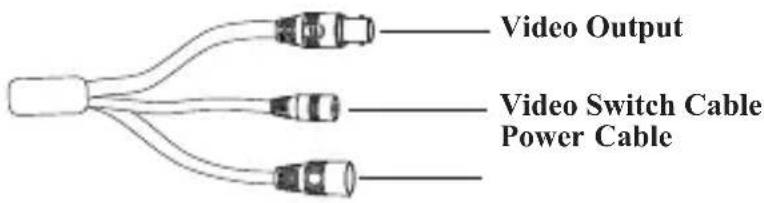
Video Switch: Four video output modes can be optional--AHD, TVI, CVI and CVBS (a) remove the cover of the video switch cable; (b) hold and press the button in the video switch cable for 5 seconds to switch the current video output.
Installation
Before you start, please make sure that the wall or ceiling is strong enough to withstand three times the weight of the camera. Please install and use the camera in the dry environment.
You'd better install back the lens cover or lower dome less than 4 hours after removing it.
The mounting types of cameras are only for reference.
▶Mounting for H8B7M
- Drill the screw holes and the cable hole on the wall according to the drill template.
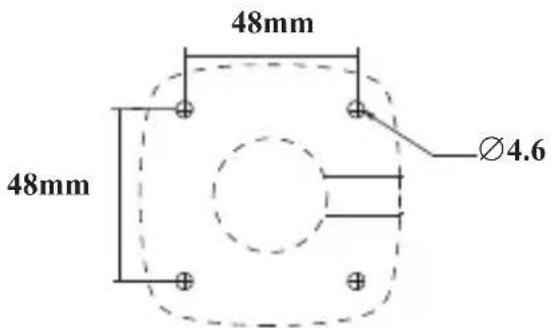
-
Route and connect the cables.
-
Secure the mounting base with camera to the wall with screws as shown below.

- Bracket adjustment. Before adjustment, preview the image of the camera on a monitor and then loosen the fixed ring to adjust the view angle of the camera. Tighten the fixed ring after the adjustment.
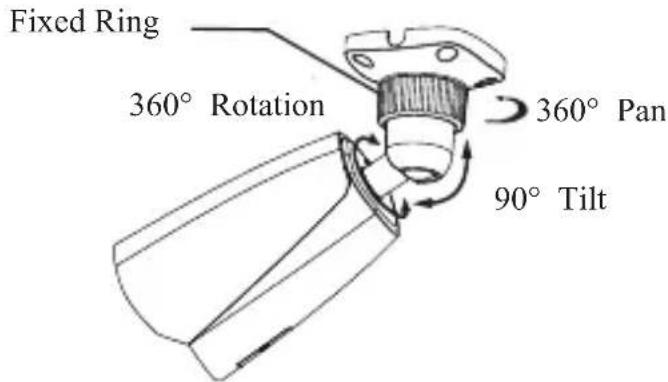
▶ Mounting for H8D7M
- Attach the drill template to the place where you want to fix the camera and then drill the screw holes and the cable hole on the wall according to the drill template.
- Rotate the trim ring anticlockwise to remove it from the camera.


-
Loosen the screws to open the lower dome. Then route and connect the cables.
-
Secure the camera to the wall with screws provided as shown below.

- Three-axis adjustment. Before adjustment, preview the image of the camera on a monitor and then adjust the camera according to the figure below to get an optimum angle.

- Install the lower dome back to the camera and fix it with screws. Then put the trim ring onto the lower dome and then rotate it clockwise until it is locked. Finally, remove the protection film softly.

▶Mounting for H8T7M
- Loosen the fixed screw to disassemble the camera.
Fixed Screw
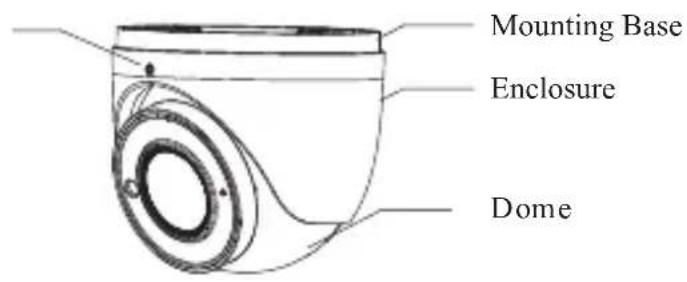
- Drill the screw holes and the cable hole on the wall according to the drill template.
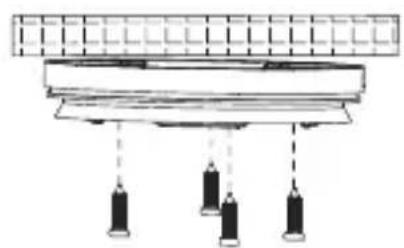
- Route and connect the cables. Then secure the mounting base to the ceiling or wall with the screws provided.
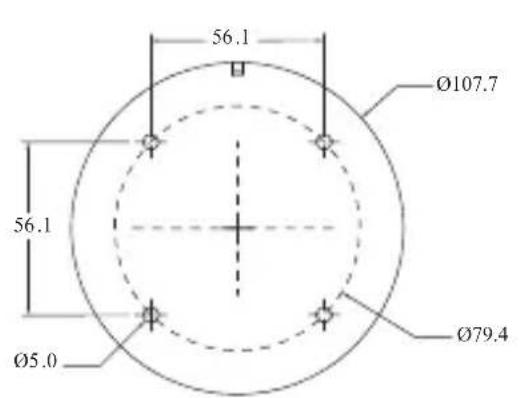
(mm)
natural_image
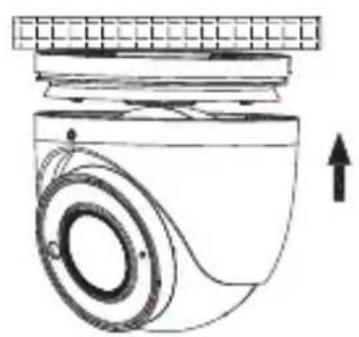
Pure electrical circuit lines without any symbols- Install the dome and enclosure to the mounting base and then adjust the dome to obtain an optimum view angle. Finally, secure the camera with the fixed screw.
natural_image
Technical line drawing of a mechanical component with no visible text or symbolsFixed screw

Specifications
| Specifications\Models | H8B7M | H8D7M | H8T7M |
| Camera | |||
| Image Sensor | 1/2.5" CM Ⓔ | ||
| Resolution | 8MP | ||
| Image size | 3840×2160 | ||
| Video Output | AHD/TVI/CVI/CVBS (*camera comes defaulted to HD-TVI) | ||
| Image System | PAL/NTSC | ||
| Electronic Shutter | Auto; 1/50s~1/100000s(PAL);1/60s~1/100000s (NTSC) | ||
| IR Distance (feet) | 98~164 | 65~98 | 98~164 |
| Frame Rate | 15fps | ||
| Min. Illumination | Color:0.01lux@F1.2, AGC ON; B/W: 0lux with IR | ||
| Lens | 2.8~12mm (motorized) | ||
| Lens Mount | D14 | ||
| S/N Ratio | ≥52dB(AGC OFF) | ||
| Ingress Protection | IP67 | IP67&IK10 | IP67 |
| Functions | |||
| Function Control | OSD (UTC control) | ||
| Day &Night | ICR | ||
| WDR | No | ||
| Digital NR | Yes | ||
| AGC | No | ||
| Auto White Balance | Yes | ||
| Defog | No | ||
| BLC | Yes | ||
| Contrast | Yes | ||
| Saturation | Yes | ||
| Sharpness | Yes | ||
| Smart IR | Yes | ||
| Image Setting | Yes | ||
| Defect Correction | Auto | ||
| Others | |||
| Power Supply | DC12V (± 10%) | ||
| Power Consumption | IR OFF: < 2W; IR ON : < 5.5W | IR OFF: < 2W; IR ON : < 5W | IR OFF: < 2W; IR ON : < 4.5W |
| Working Environment | -22 °F ~ 122 °F, 10 % ~ 90 %(relative humidity) | ||
| Dimensions (inch) | 8.57 3.17× × 3.17 | Φ5.55 3.94× | Φ4.38 3.92× |
Model: H8B7M/H8D7M/H8T7M
Federal Communications Commission (FCC) Statements
This device complies with Part 15 of the FCC Rules. Operation is subject to the following two conditions: (1) This device may not cause harmful interference, and (2) This device must accept any interference received, including interference that may cause undesired operation.
FCC Responsible Party:
Speco Technologies
200 New Highway
Amityville, NY 11701
www.specotech.com
Brand : Speco Technologies
Model : H8T7M
Category : Video camera