
AF-AA-SW - Monitor stand Atdec - Free user manual and instructions
Find the device manual for free AF-AA-SW Atdec in PDF.


| Product Type | Monitor Stand |
| Brand | Atdec |
| Model | AF-AA-SW |
| Compatible Screen Size | 19" to 32" |
| Maximum Load Capacity | 10 kg (22 lbs) |
| VESA Compatibility | 75x75mm and 100x100mm |
| Height Adjustment Range | 250 mm (9.8 in) |
| Tilt Range | -5° to +15° |
| Swivel Range | ±90° |
| Rotation (Landscape/Portrait) | Yes, 360° (with stop) |
| Material | Aluminum and Steel |
| Product Dimensions (WxDxH) | 150 x 150 x 450 mm |
| Weight (Stand Only) | 2.5 kg (5.5 lbs) |
| Mounting Method | Desk clamp or grommet mount |
| Desk Thickness Compatible | 10-75 mm (0.4-3 in) |
| Cable Management | Yes, integrated cable clips |
| Color | Black / Silver |
| Warranty | 5 years |
Frequently Asked Questions - AF-AA-SW Atdec
User questions about AF-AA-SW Atdec
0 question about this device. Answer the ones you know or ask your own.
Ask a new question about this device
Download the instructions for your Monitor stand in PDF format for free! Find your manual AF-AA-SW - Atdec and take your electronic device back in hand. On this page are published all the documents necessary for the use of your device. AF-AA-SW by Atdec.
USER MANUAL AF-AA-SW Atdec
natural_image
Technical line drawing of a mechanical tool assembly (no text or symbols)COMPONENT CHECKLIST
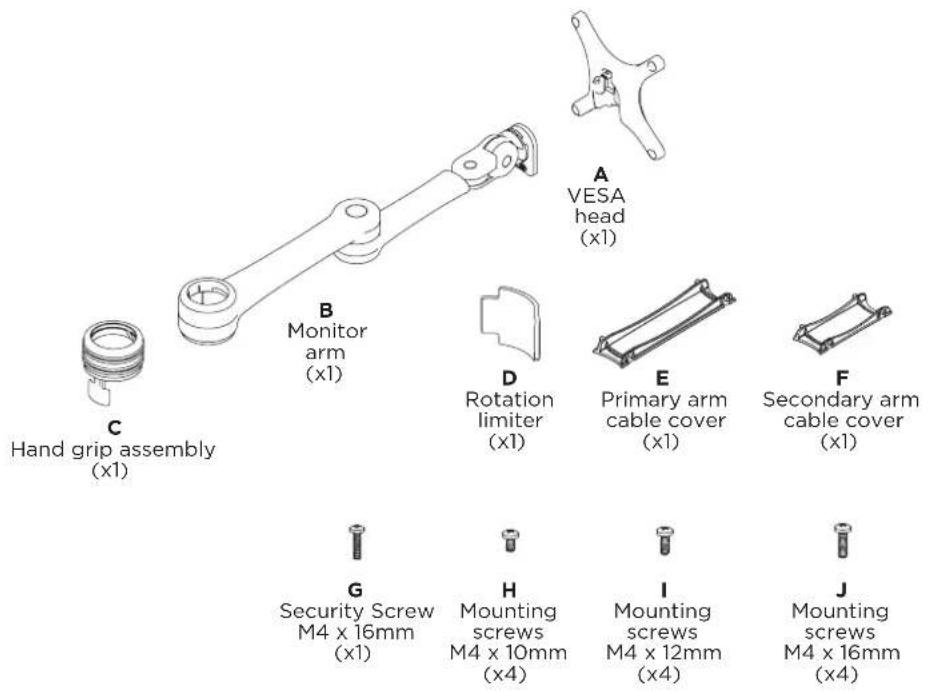

REQUIRED TOOLS
• Phillips Head Screwdriver
WEIGHT RANGE

IMPORTANT INFORMATION
! Please ensure this product is installed as per these installation instructions.
! This product is compatible with the range of AF Poles and arms.
! The manufacturer accepts no responsibility for incorrect installation.
1. Install VESA monitor head

2. Install arm assembly

3. Mounting Monitor

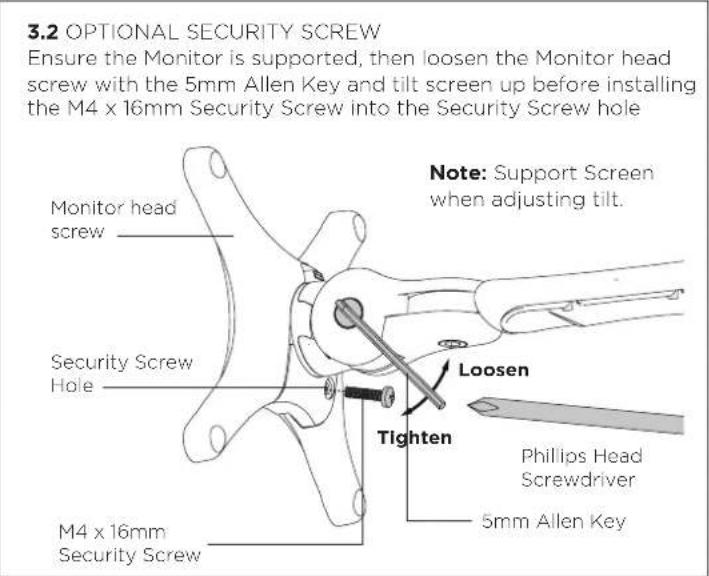
4. Adjusting Height

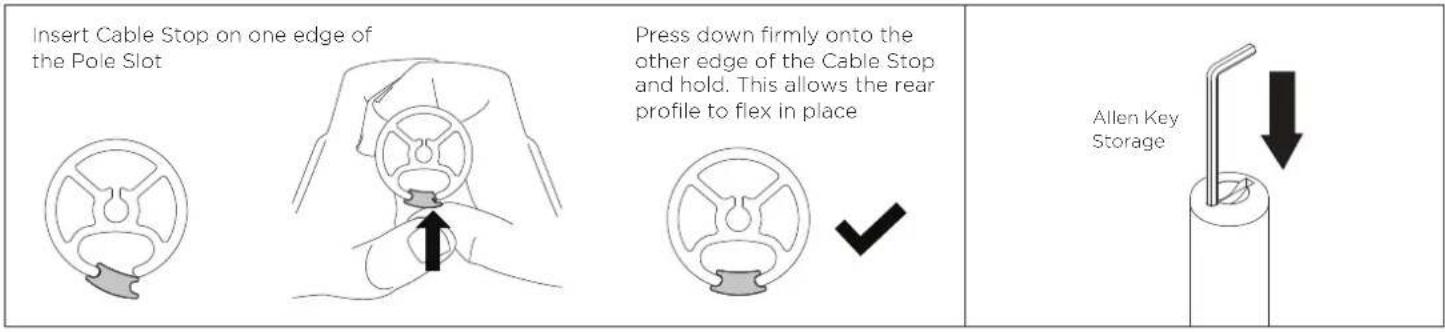
5. Cable Management

5. Cable Management (Cont)
Adjusting the Display Bracket
Portrait/ Landscape

natural_image
Simple line drawing of a stylized fish inside a dashed rectangular frame with curved arrows indicating rotation (no text or symbols)Tilt (Screen angle up/down)

Pan (Screen angle left/right)

natural_image
Diagram of a mechanical or electrical component with intersecting rods and a central rotating arrow (no text or symbols)No Allen Key necessary No Allen Key necessaryNote: Support Screen when adjusting tilt.
Brand : Atdec
Model : AF-AA-SW
Category : Monitor stand