
SPPOEO - Video camera Speco Technologies - Free user manual and instructions
Find the device manual for free SPPOEO Speco Technologies in PDF.


| Product Type | IP Security Camera |
| Model | SPPOEO |
| Image Sensor | 1/2.9" CMOS |
| Resolution | 2 Megapixels (1920x1080) |
| Lens | 2.8mm fixed |
| Field of View | 93° horizontal |
| Night Vision | Up to 30m (IR LEDs) |
| Power Supply | DC 12V or PoE (802.3af) |
| Power Consumption | ≤ 6W |
| Dimensions (W x H x D) | 70mm x 180mm x 70mm |
| Weight | 0.4 kg |
| Weatherproof Rating | IP66 |
| Operating Temperature | -20°C to 50°C |
| Video Compression | H.265 / H.264 |
| Frame Rate | 30 fps at 1080p |
| Audio | Built-in microphone (optional external) |
| Alarm I/O | 1 input, 1 output |
| Storage | MicroSD card up to 128GB (sold separately) |
| Network Interface | 10/100Mbps Ethernet (RJ-45) |
| Supported Protocols | TCP/IP, DHCP, HTTP, RTSP, ONVIF |
| Mounting | Wall or ceiling bracket |
| Included Accessories | Mounting screws, drill template, quick start guide |
| Maintenance | Clean lens with soft cloth; keep vents clear |
| Safety Certifications | CE, FCC, RoHS |
Frequently Asked Questions - SPPOEO Speco Technologies
User questions about SPPOEO Speco Technologies
0 question about this device. Answer the ones you know or ask your own.
Ask a new question about this device
Download the instructions for your Video camera in PDF format for free! Find your manual SPPOEO - Speco Technologies and take your electronic device back in hand. On this page are published all the documents necessary for the use of your device. SPPOEO by Speco Technologies.
USER MANUAL SPPOEO Speco Technologies
Surge Protector Series
User Manual
Model: SPPOEO
High Performance Outdoor 1G PoE Surge Protector
User Manual
SPPOEO
Introduction
SPPOEO is an in-line surge protector designed to protect a valuable outdoor PoE (Power over Ethernet) device from high voltage surges, with network bandwidth up to 1000Mbps.
Features
• Supports bandwidth up to 1000 Mbps.
• Supports IEEE 802.3 af, 802.3 at, 802.3bt PoE standard.
• Supports Mid-Span and End Span PoE.
- Meets IP66 Waterproof rating.
• Response time less than 1 ns.
Applications:
• Outdoor PoE Cameras
- Outdoor APs
• Outdoor Network device
• Computer Control Rooms
- Server Farms
• Manufacturing Facilities
• Transmitter and Receiver Stations
Installation View

User Manual
SPPOEO
Installation Guide:
| IP66 Waterproof Accessories | ||
| #1 |  | x 2 |
| #2 |  | x 2 |
| #3 |  | x 2 |
| #4 |  | x 2 |
| #5 |  | x 2 |
| #6 |  | x 1 |
- Assemble the waterproof connector.

[Unreadable]

User Manual
SPPOEO
- Put the cable set into the waterproof case and use the screw nut (#5) to fix it from inside.

natural_image
Pure electrical connector diagram without any text, numbers, or symbols- Use TIA/ EIA-568-B standard to make a RJ45 connector.
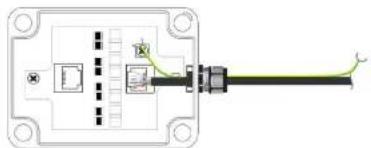
natural_image
Pure electrical connector diagram without any text, numbers, or symbols- Connect the network cables to RJ45 connectors.
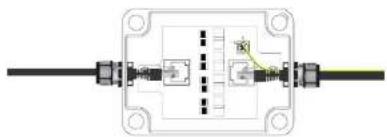
natural_image
Pure electrical connector diagram without any text, numbers, or symbols- Fix the grounding wire.
User Manual SPPOEO
- Put on the cover and screws to firmly fix the waterproof case.

Note:
Make sure the notch is matched.
User Manual
SPPOEO
Specifications
| ITEM NO. SPPOEO | |
| Support | |
| Compliance IEEE 802.3 af, 802.3 at, 802.3btIEC 61000-4-5, IEC 61000-4-2, EN61000-4-5 | |
| Network Bandwidth | 10/100/1000 Mbps |
| Response Time | Less than 0.7nS |
| ESD Protection | 30KV (Air)/ 30KV( Contact) |
| Lightning Protection | 10KA (8/20 us), 20KV (8/20 us) |
| Waterproof Rating | IP66 |
| Ports & Interfaces | |
| Equipment End | 1 x RJ45 |
| Cable End | 1 x RJ45 |
| Ambient Temperature | |
| Operation | -40 to 158°F (-40 to 70°C) |
| Storage | -40 to 194°F (-40 to 90°C) |
| Humidity | Up to 95% |
| Physical Characteristics | |
| Dimensions | 3.1 x 6.5 x 2.75" (80 x 166 x 70mm) |
| Weight | 0.5 Lbs (230g) |
Brand : Speco Technologies
Model : SPPOEO
Category : Video camera