
RKFN-1 - Computer cooler Auray - Free user manual and instructions
Find the device manual for free RKFN-1 Auray in PDF.


| Type | Computer CPU cooler |
| Dimensions (heatsink) | 130 x 100 x 160 mm |
| Dimensions (fan) | 120 x 120 x 25 mm |
| Weight | Approx. 600 g |
| Fan speed | 800 - 1800 RPM (PWM) |
| Airflow | 65 CFM max |
| Noise level | 25 dBA max |
| Material | Aluminum fins, copper heat pipes |
| Socket compatibility | Intel LGA 1200, 115x, 1700; AMD AM4, AM5 |
| Power consumption (fan) | 2 W |
| Connector | 4-pin PWM |
| Bearing type | Hydraulic |
| Color | Black |
| Included accessories | Thermal paste, mounting brackets, instructions |
| Certifications | CE, RoHS |
| Warranty | 2 years |
Frequently Asked Questions - RKFN-1 Auray
User questions about RKFN-1 Auray
0 question about this device. Answer the ones you know or ask your own.
Ask a new question about this device
Download the instructions for your Computer cooler in PDF format for free! Find your manual RKFN-1 - Auray and take your electronic device back in hand. On this page are published all the documents necessary for the use of your device. RKFN-1 by Auray.
USER MANUAL RKFN-1 Auray
Thank you for choosing Auray.
The Aurray RKFN-1 is a dedicated rack fan for the Aurray SVRK series of server racks, but its standard size and included mounting screws make it compatible with most other server racks. The fan creates an airflow of 80 cubic feet per minute that will prevent your equipment from overheating. Mounting holes on both sides of the fan let you use it as an exhaust fan to draw hot air out of the rack, or to blow cool air directly on your gear.
Precautions
- Please read and follow these instructions, and keep this manual in a
safe place. - Keep this unit away from water and any flammable gases or liquids.
- Do not attempt to disassemble or repair the equipment—doing so will
void the warranty, and Auray will not be responsible for any damage. - Clean the unit with only a soft, dry cloth.
• Make sure that this product is intact and that there are no missing
parts. - Keep this product away from children.
- Do not attempt to mount, unmount, or handle this product while it is
operating.
• All images are for illustrative purposes only.
Contents Include
- Rack fan
• Power cord
- Mounting screws (×4)
Specifications
Noise Level: 48 dBA
Cubic Feet per Minute: 80
Rotation Speed: 2300 +10% RPM
Speed Control: No
Power Requirement: 110 V
Rated Current: 0.15 A
Power Consumption: 13 W
Dimensions (H × W × D):
4.7×4.7×1.5 in (12×12×3.8 cm)
Weight: 1.3 lb. (500 g)
Installation
This fan is designed to be installed inside the top panel of most racks. With the proper cutouts, it can also be mounted to the outside of a rack. Use it as an exhaust fan to draw hot air out of the rack, or to blow cool air into the rack. Air flows toward the fan's label.
To attach the fan inside the neck, use the mounting screws that are included with the fan, and follow these steps:
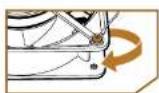
- Determine the airflow direction, and place the fan inside the rack's top panel. Align the fan with the mounting holes on the top panel.
Important! A ground cable is attached to the front side of the fan, and the fan is present to be installed for exhaust. If you want the fan to blow air into the rack, uncrive the ground cable, and attach it to the other side of the fan. This will allow the fan to mount flush to the top of your rack.
- Screw in the fan from the outside of the rack's top panel.


One-Year Limited Warranty
This Aurey product is warranted to the original purchaser to be free from detects in materials and workmanship under normal consumer use for a period of one (1) year from the original purchase date or thirty (30) days after replacement, whichever occurs later. The warranty provider's responsibility with respect to this limited warranty shall be limited solely to repair or replacement at the provider's discretion, of any product that fails during normal use of this product in its intended manner and in its intended environment. Inoperability of the product or part(s) shall be determined by the warranty provider. If the product has been discontinued, the warranty provider reserves the right to replace it with a model of equivalent quality and function.
This warranty does not cover damage or defect caused by misuse, neglect, accident, alteration, share, improper installation or maintenance. EXCEPT AS PROVIDED HEREIN, THE WARRANTY PROVIDER MAKES NEITHER ANY EXPRESS WARRANTIES NOR ANY IMPLIED WARRANTIES INCLUDING BUT NOT LIMITED TO ANY IMPLIED WARRANTY OF MERCHANTABILITY OR FITNESS FOR A PARTICULAR PURPOSE. This warranty provides you with specific legal rights, and you may also have additional rights that vary from state to state.
To obtain warranty coverage, contact the Aury Customer Service Department to obtain a return merchandise authorization ("TMA") number, and return the defective product to Aury along with the RMA number and proof of purchase. Shipment of the defective product is at the purchaser's own risk and expense.
For more information or to arrange service, visit www.auroyaudin.com or call Customer Service at 212-504-2353.
Product warranty provided by the Gradus Group. www.gradusgroup.com

AURAY® A. Grubus Group Brand
AUDITAY is a registered trademark of the Deutsche Tenny (2022) Deutsche Group LLC. All Rights Reserved.
Brand : Auray
Model : RKFN-1
Category : Computer cooler