
GLAP40WEEA11A - Air purifier Galanz - Free user manual and instructions
Find the device manual for free GLAP40WEEA11A Galanz in PDF.


| Product Type | Air Purifier |
| Model | GLAP40WEEA11A |
| Brand | Galanz |
| Dimensions (W x D x H) | 10.7" x 11.9" x 20.9" |
| Net Weight | 11.2 lbs |
| Rated Voltage | 110-240 V |
| Rated Power | 50 W |
| Applicable Area | Up to 875 sq. ft. |
| CADR (Clean Air Delivery Rate) | 400 m³/h (235 CFM) |
| Filter Type | Primary Filter + Carbon + True HEPA (3-Layered) |
| Number of Fan Speeds | 3 (Auto, Low, High) |
| Timer | 2H, 4H, 8H |
| Air Quality Sensor | PM2.5 detection with color indicator (Blue/Green/Yellow/Red) |
| Light Control | 3 levels (Standard, Soft, Off) |
| Smart Connectivity | Via Smart Life app (WiFi 2.4GHz) |
| Filter Replacement Reminder | Red flashing light |
| Packaging Contents | 1 x Air Purifier, 1 x True HEPA Filter, 1 x Power Cord, 1 x User Manual, 1 x Quick Start Guide |
| Safety Features | Unplug before maintenance; keep 12" clearance on back/sides, 20" above |
| Maintenance | Clean exterior with soft cloth; do not wash filter; replace when indicator activates |
| Warranty | 1 year in-home service warranty |
Frequently Asked Questions - GLAP40WEEA11A Galanz
User questions about GLAP40WEEA11A Galanz
0 question about this device. Answer the ones you know or ask your own.
Ask a new question about this device
Download the instructions for your Air purifier in PDF format for free! Find your manual GLAP40WEEA11A - Galanz and take your electronic device back in hand. On this page are published all the documents necessary for the use of your device. GLAP40WEEA11A by Galanz.
USER MANUAL GLAP40WEEA11A Galanz
natural_image
Close-up of a cylindrical container filled with a mesh grid pattern, no visible text or symbolsThank you for purchasing a Galanz product. Please read this manual carefully for correct usage and safety, and keep for future reference. For service, support and warranty information, call 800-562-0738.
© 2022 Galanz Americas Limited Company
CONTENTS
Safety Warnings.... 1
Air Purifier Overview.... 3
Getting Started 4
Instructions For Usage 5
Specifications 7
Maintenance and Cleaning.... 8
Packaging List.... 8
Trouble Shooting....9
Limited Warranty.... 10
Warranty Registration 11
Safety Warnings
READ ALL INSTRUCTIONS BEFORE USING YOUR GALANZ PRO AIR PURIFIER
■ Person with physical or mental disability, or without relevant experiences and skills (including children) should use it under guiding and instructing.
■ This product can not replace normal ventilation, daily dust collection or oil pumping when cooking.
■ Be sure to place and use the product on a firm, flat and horizontal surface. Do not place any items above the product.
■ Leave at least 12 inches of space on the back and sides of the product, and at least 20 inches of space above the product when using.
■ To prevent condensation from getting into or onto the product, do not place under an air conditioner.
■ Do not use this product when you are using an indoor spray repellent, or in a place filled with grease, flammable gas or chemical fumes.
SAFETY WARNING
■ Before connecting the power supply, please check whether the voltage of the product is consistent with the local power supply voltage.
■ Ensure both the filter and the back cover are properly installed before connecting to the power source.
■ Ensure the product socket is well connected to the plug when using. If not, the plug will be hot.
■ Please stop using if the plug, power cord or product is damaged. In order to avoid danger, the power cord must be replaced by a professional staff.
Safety Warnings
■ To prevent physical damage, do not inset fingers or foreign things into the product.
- Keep the air inlet/outlet free from being blocked.
■ Do not spray any flammable materials such as pesticides or perfumes around the product. Do not use hard objects to strike the product. Especially the air outlet and air inlet.
■ Please use the filter designed for this product.
■ Ensure the product is unplugged before moving, cleaning, maintaining and replacing the filter.
■ Do not pull the wire to move the machine.
■ To avoid electrical shock and fire, do not allow water or any other flammable liquid to get into the product.
HOUSEHOLD USE ONLY SAVE THESE INSTRUCTIONS
Air Purifier Overview
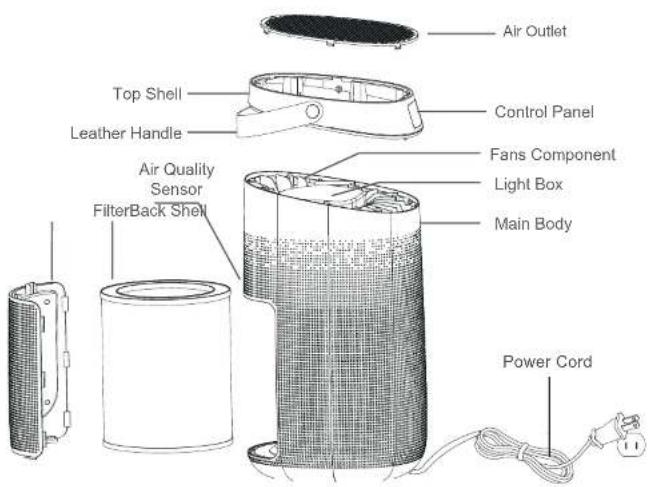
Getting Started
REMOVE THE PACKAGING FROM THE FILTER BEFORE USING
■ Press the switch shown in the red circle to take out the back cover.
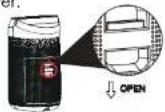
■ Pull the filter down and out to remove it from the machine, then remove the packaging from it.
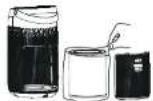
■ Once the packaging is removed from the filter, place the filter back into the air purifier and put on the back cover.

PLACE AND START CORRECTLY
■ Place the product on a firm, flat and horizontal surface, and leave at least 12 inches of space on the back and sides of the product, and at least 20 inches of space above the product.

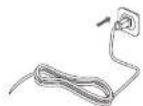
■ Check the plug and the power cord to ensure that the voltage of the product is compatible with the local power supply voltage.
Instructions For Usage
Connect the device to the power source. All of the indicator lights will flash once and all of the lights will be off except the power button. Once this happens, the machine will be in standby mode.
CONTROL PANEL
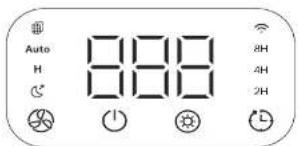

Mode Button

Power Button

Time ButtonLight Button
BUTTON OPERATION
■ Mode Button
When using the device, press the Mode Button to adjust the wind speed among the circulation of Auto-L-H mode. Every time you press the Mode Button, the machine will ring once.
*Press the Mode Button for 7 seconds to complete the filter reset.
■ Power Button
Every time you press the Power Button, the machine will beep once and then it will turn off or on.
*The background light will display the corresponding color according to the PM2.5 detection value. See sheet below;
| Number(PM2.5) | Air Quality Air | QualityLight | |
| ^1 | Goods75 | ug#UE | Good |
| 75~150 ug/m ^3 | Mildly polluted | YELLOW | Mildly polluted |
| ≥150 ug/m ^4 | Seriously polluted | RED | Seriously polluted |
*Note: If the machine is turned off without unplugging the power plug and then turned on again, the machine will work in the state before turning off by default.
Light Button
In the condition of working, press the Light Button to adjust the light among the circulation of Standard-Soft-Off. Every time you press the Light Button, the machine will beep once.
Instructions For Usage
■ Time Button
When using the appliance, press the Time Button to set the time among the circulation of 2H, 4H, and 8H. Each time you press the Time Button the machine will beep.
*Press the Time Button for 5 seconds to set up and reset the network.
MORE INSTRUCTIONS
Filter Replacement Reminder
When the air purifier detects that the filter reaches the saturation value, the filter indicator light flashes in red. After replacing the new filter, you need to press the Mode Button for about 7 seconds to cancel the alarm reminder.
Add A Device
Pressing the Time Button for 5 seconds causes the 🔊 icon to start flashing, which means you can start connecting the product to the APP.
MORE INSTRUCTIONS
■ Download & Registration
- Scan the QR code to download the "Smart Life" APP. You can also search "Smart Life" in either the APP store or Google Play to install the APP. Open the "Smart Life" APP, tap "Register" to register a "Smart Life" account with your phone number or E-mail. Then log into the APP.

■ Add Device
1.) Connect the mobile phone to the home wireless network, and turn on the mobile phone bluetooth (please select 2.4GHz WiFi network). 2.) Open the "Smart Life" APP.
Specifications
3.) Enter the homepage of the "Smart Life" APP. Click "+" to select to add a device, the APP will display manual addition and automatic discovery.
4.) Automatic discovery: When the corresponding authority is turned on, the device can be automatically discovered, and the device needs to be in the network configuration state and turned on.
5.) Manually add: select the name corresponding to the product, WIFI+Bluetooth mode.
①Bluetooth configuration:
When confirming that the WIFI indicator of the device is flashing quickly, click OK, and then wait for the connection. When "Successfully add 1 device" appears, it means the connection has been completed and your device will be listed in your APP list.
② Hotspot configuration network:
Click on the WIFI quick connection in the upper right corner to select the hotspot distribution network (compatibility mode). Confirm that the WIFI indicator of the device flashes slowly, click OK, and enter your home WIFI and WIFI password.
Next, click to connect to go to the WLAN setting interface of the phone, and then select the Wi-Fi network "SmartLife_XXXX" to connect it.
Your device will be listed in your APP list. Now you can control your smart device through the mobile APP anytime and anywhere.
*Make sure your mobile phone and smart device are connected to the same network at the time of first connecting. And make sure your smart device is under a network at the time of controlling.
SPECIFICATIONS
| Product Name | Pro Air Purifier | ||
| Product Size | W10.7" D11.9" H20.9 | 15G dMBase | |
| Rated Voltage | 110~240 V | Type Of Filter | Primary Filter=Carbon+HEPA |
| Rated Power | 50 W | Applicable Area | Up To 875 Sq.Ft. |
| Net Weight | 11.2 lbs | CADR | 400 m3/h (235 CFM) |
Maintenance & Packaging List
MAINTENANCE
When the Filter Replacement Reminder light is flashing red light, it is indicated that the filter needs to be replaced. Please use the filter designed for this product.
- Clean the filter regularly. Do not wash or reuse the filter.
- Ensure the machine is unplugged before replacing the filter.
- Please sterilize the filter under sunlight regularly.
- Do not use a vacuum cleaner to clean the filter or wash it directly.
CLEANING & STORAGE
- Ensure the machine is powered-off and unplugged before cleaning.
- Do not immerse the air purifier into water or any liquid.
- Do not use abrasive, corrosive or flammable cleansers (such as bleach or alcohol) to clean any part of the unit.
-
Do not use a vacuum cleaner to clean the filter or wash it directly.
-
Use a soft cloth with neutral cleanser to clean away any dust or debris from the surface of the machine.
- If you do not use the machine for a long time, ensure the machine is dry, store in a plastic bag and place in a cool and well-ventilated place.
Notice: Please don't drop any water into the machine when cleaning the air outlet.
▲WARNING: This equipment should be inspected frequently and collected dirt should be removed from it regularly to prevent excessive accumulation that may result in flashover or a risk of fire.
PACKAGING LIST
1 x Pro Air Purifier
1 x True HEPA Original 3-Layered Filter
1 x Power Cord
1 x User Manual
1 x Quick Start Guide
Trouble Shooting
| SITUATION | REASON |
| Not working | Is it plugged into a power socket? Is there a power outage?Is the fuse cut off?Is there any dust on the surface of the primary filter? |
| Poor performance | Is there any dust on the surface of the primary filter?Is there any obstacle blocking the air inlet/outlet. |
| Significant noise | Is there anything stuck in the fan in the air outlet?Is the machine tilted?Please set a lower grade of wind speed if the noise is too loud, or set low grade of wind speed when using in bedroom at night. |
| Foul odor coming from the machine | It is the normal phenomenon that the machine emits the smell of plastic for the first time.The machine will emit an unpleasant smell if the filter is dusty, so in this situation, please clean or replace the filter.If the burning smell emits from the machine, please unplug the power socket and contact customer service. |
| The Filter Replacement Reminder light is still flashing after replacing the filter | Please press the Wind Speed Button for 7s to reset the machine and the life counter of the filter will start. |
Limited Warranty
IN-HOME SERVICE FULL ONE YEAR WARRANTY
For 12 months from the date of original retail purchase, Galanz will repair or replace any part free of charge, including labor, that fails due to a defect in materials or workmanship. Galanz may replace or repair at their sole discretion any part, or sub system including the entire product. Product must be accessible, without encumbrance and installed properly to receive warranty repair service.
LIMITED WARRANTY
NOTE: This warranty commences on the date the item was purchased, or ownership assumed from a builder and the original purchase receipt must be presented to the authorized service representative before warranty repairs are rendered.
Exceptions: Commercial Use Warranty
90 days labor from date of original purchase 90 days parts from date of original purchase No other warranty applies.
FOR WARRANTY SERVICE
All service must be performed by a Galanz authorized service center. For service, please call 1-800-562-0738. Before calling please have available the following information: (a) Model number and serial number of your appliance. (b) The name and address of the dealer you purchased the unit from and the date of purchase. (c) A clear description of the problem. (d) A proof of purchase (sales receipt). This warranty covers home appliance services within the contiguous United States and where available in Alaska, Hawaii and Puerto Rico.
What is not covered by this warranty:
Replacement or repair of household fuses, circuit breakers, wiring or plumbing. A product whose original serial number has been removed or altered. Any service charges not specifically identified as normal such as normal service area or hours.
Replacement of light bulbs.
Damage to clothing.
Damage incurred in shipping
Damage caused by improper installation or maintenance.
Damage from misuse, abuse accident, fire, flood, or acts of nature. Damage from service other than an authorized Galanz dealer or service center.
Damage from incorrect electrical current, voltage or supply. Damage resulting from any product modification, alteration or adjustment not authorized by Galanz.
Adjustment of consumer operated controls as identified in the owner's manual.
Hoses, knobs, lint trays and all attachments, accessories and disposable parts.
Labor, service transportation, and shipping charges for the removal and replacement of defective parts beyond the initial 12-month period.
Damage from other than normal household use.
Any transportation and shipping charges.
THIS LIMITED WARRANTY IS GIVEN IN LIEU OF ALL OTHER WARRANTIES, EXPRESSED OR IMPLIED, INCLUDING BUT NOT LIMITED TO, THE WARRANTIES OF MERCHANTABILITY AND FITNESS FOR A PARTICULAR PURPOSE
The remedy provided in this warranty is exclusive and is granted in lieu of all other remedies.
This warranty does not cover incidental or consequential damages, so the above limitations may not apply to you.
Some states do not allow limitations on how long an implied warranty lasts, so the above limitations may not apply to you.
This warranty gives you specific legal rights, and you may have other rights, which vary from state to state.
Warranty Registration
Please mail this warranty card to the address below within 30 days of purchase.
Galanz Americas,55 Challenger Road,Suite 503,Ridgefield Park,NJ 07660.
PLEASE PRINT CLEARLY.
Name ____
Address
Cith ____ State ____ ZIP ____
Phone ____ Email ____
Model Number ____ Serial Number ____
Purchase Location
You muse attach a copy of your purchase receipt to validate your registration
Galanz
© 2021 Galanz Americas Limited Company
- CONTENTS
- Safety Warnings
- SAFETY WARNING
- HOUSEHOLD USE ONLY SAVE THESE INSTRUCTIONS
- Air Purifier Overview
- Getting Started
- Instructions For Usage
- BUTTON OPERATION
- ■ Mode Button
- ■ Power Button
- Light Button
- ■ Time Button
- MORE INSTRUCTIONS
- Filter Replacement Reminder
- Add A Device
- ■ Download & Registration
- ■ Add Device
- Specifications
- Maintenance & Packaging List
- MAINTENANCE
- CLEANING & STORAGE
- PACKAGING LIST
- Trouble Shooting
- Limited Warranty
- IN-HOME SERVICE FULL ONE YEAR WARRANTY
- FOR WARRANTY SERVICE
- What is not covered by this warranty:
- THIS LIMITED WARRANTY IS GIVEN IN LIEU OF ALL OTHER WARRANTIES, EXPRESSED OR IMPLIED, INCLUDING BUT NOT LIMITED TO, THE WARRANTIES OF MERCHANTABILITY AND FITNESS FOR A PARTICULAR PURPOSE
- Warranty Registration
- Galanz
Brand : Galanz
Model : GLAP40WEEA11A
Category : Air purifier