BG-PSC11X2-HDBT - Router BZBGear - Free user manual and instructions
Find the device manual for free BG-PSC11X2-HDBT BZBGear in PDF.


| Product Type | Wireless Router |
| Brand | BZBGear |
| Model | BG-PSC11X2-HDBT |
| Dimensions (W x D x H) | 200 x 150 x 30 mm |
| Weight | 400 g |
| Power Supply | 12V DC, 1A |
| Wireless Standards | IEEE 802.11ac/n/g/b/a |
| Frequency Band | 2.4 GHz and 5 GHz |
| Maximum Data Rate | Up to 1200 Mbps |
| Ethernet Ports | 4 x Gigabit LAN, 1 x Gigabit WAN |
| USB Ports | 1 x USB 2.0 |
| Antenna | 4 external antennas |
| Security | WPA/WPA2, WPS, Firewall |
| Management | Web-based GUI, mobile app |
| Maintenance | Firmware upgrade via web interface |
| Cleaning | Wipe with dry cloth, avoid liquids |
| Operating Temperature | 0°C to 40°C |
| Certifications | CE, FCC |
| Spare Parts Availability | Contact BZBGear support for replacement parts |
| Repairability | No user-serviceable parts inside; refer to authorized service |
Frequently Asked Questions - BG-PSC11X2-HDBT BZBGear
User questions about BG-PSC11X2-HDBT BZBGear
0 question about this device. Answer the ones you know or ask your own.
Ask a new question about this device
Download the instructions for your Router in PDF format for free! Find your manual BG-PSC11X2-HDBT - BZBGear and take your electronic device back in hand. On this page are published all the documents necessary for the use of your device. BG-PSC11X2-HDBT by BZBGear.
USER MANUAL BG-PSC11X2-HDBT BZBGear
Thank you for purchasing this product. For optimum performance and safety, please read these instructions carefully before connecting, operating or adjusting this product. Please keep this manual for future reference.
SURGE PROTECTION DEVICE RECOMMENDED
This product contains sensitive electrical components that may be damaged by electrical
Table of Content
Introduction 4
Features 4
Panel Descriptions ....5
Front Panel 5
Rear Panel 7
Remote Control Description....9
Application Diagram 10
Specifications 10
RS-232 Pin Assignment 11
RS232 and Telnet Commands....11
Package Contents....13
Maintenance....14
Warranty Policy....14
Limitations of Warranty....14
Exclusive Remedies....15
RMA Policy 15
Standard Replacement....15
Introduction
The BG-PSC11X2-HDBT is a multi-format video presentation scaler switch with audio. It features 11 inputs of various video formats including HDMI, VGA, Component, Composite, and HDBaseT with HDMI and HDBaseT outputs. Video can be scaled to various aspect ratios and resolutions from 640x480 up to 1920x1080 @ 60Hz.
Embedded splitter and dual switcher modes, it can work as 11:1x2 multiple splitter and 5x1 &11x1 dual switcher. It also features a switchable digital bypass output allowing any HDMI input to be directly bypassed via that HDMI output to cater for the 4K source. With advanced audio embedding and de-embedding, it can provide flexible audio signal integration. Each source can be switched to the HDMI output using the front-panel, IR remote control or RS-232 interface.
The BG-PSC11X2-HDBT integrates easily in various analog to digital applications such as when used in collaboration environments, lecture halls, conference rooms, classrooms, healthcare facilities and control centers.
Features
Panel Descriptions
Front Panel
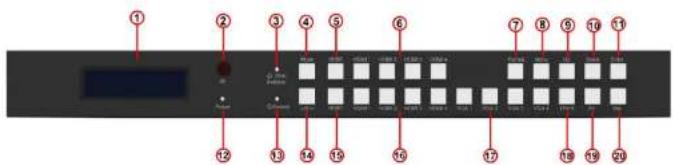
① LCD display---Show the status of input-output selection, EDID info and so on.
② IR receiver window----Receive the IR from the remote control of BG-PSC11X2-HDBT.
③ Dual switcher LED indicator---When the LED is lit, dual switcher mode is on. Output HDMI 1 is selected by HDBT/HDMI1/HDMI2/HDMI3/HDMI4 which works as 4K 5x1 switcher in by-pass mode; Output HDMI2 is selected by HDBT/HDMI1/HDMI2/HDMI3/HDMI4/VGA1/VGA2/VGA3/VGA4/YPbPr/AV, it will always be scaled & formatted output regardless of by-pass ON/OFF, works as scaling 11x1 switcher,
④ Mode button---Press to set Dual Switcher mode ON/OFF.
⑤ HDBT input selection button---Press to select the output 1 from HDBT input working as 4k
| IN3 | 3D | 7.1CH | |
| IN4 | 4K2K | NONE | |
| IN5 | D1024 | D1024=DVI 1024 x 768 | |
| IN6 | D1080 | D1080=DVI 1920 x 1080 | |
| IN7 | D1200 | D1200=DVI 1920 x 1200 | |
| IN8 | OUT1 | OUT1=Copy OUTPUT1 EDID to INPUTx | |
| IN9 | OUT2 | OUT2=Copy OUTPUT2 EDID to INPUTx | |
| IN10 | |||
| IN11 | |||
| ALL | ALL=Set EDID to ALL INPUTs | ||
Note: Volume can be changed by UP and Down button. During F/W mode, press Enter button will show the current F/W information.
⑨ Up selection button--- Press to change segment's value.
⑩ Down selection button---Press to change segment's value.
⑪ Enter button--- Press to confirm the settings.
⑫ Power LED indicator---Indicate the status of power.
⑬ Embed LED indicator ---When the LED is lit, embed mode is on. When embed in on, the L/R in will be embedded in to the HDMI outputs (The two outputs will be embedded with the L/R in audio and the volume is adjustable).
Rear Panel
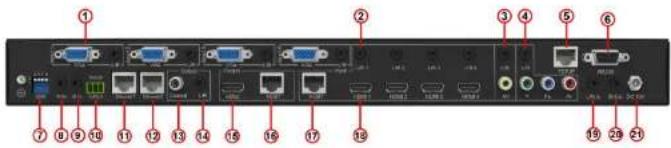
① VGA input 1 to 4--- VGA input 1 to 4 with L/R audio input.
② L/R In 1 to 4--- Connect to addition audio input to embed to HDMI output 1 to 4.
③ AV input--- AV input with L/R audio input.
④ YPbPr input--- YPbPr input with L/R audio input.
⑤ TCP/IP---Connect to Ethernet for control.
⑥ RS232 port--- DB9 connector for local control only.
⑦ DIP switcher---EDID settings.
[DIP]=0000: HDMI 1080p@60Hz, Audio 2CH PCM
[DIP]=1111: Copy EDID from HDMI output, i.e., EDID pass through
[DIP]=0001: HDMI 1080p@60Hz, Audio 5.1CH PCM/DTS/DOLBY
[DIP]=0010: HDMI 1080p@60Hz, Audio 7.1CH PCM/DTS/DOLBY/HD
[DIP]=0011: HDMI 1080i@60Hz, Audio 2CH PCM
[DIP]=0100: HDMI 1080i@60Hz, Audio 5.1CH PCM/DTS/DOLBY
[DIP]=0101: HDMI 1080i@60Hz, Audio 7.1CH PCM/DTS/DOLBY/HD
[DIP]=0110: HDMI 1080p@60Hz/3D, Audio 2CH PCM
⑬ Coaxial audio output --- It will always follow HDMI output 2.
⑭ L/R audio output--- It will always follow HDMI output 2.
⑮ HDMI output--- Connect to HDTV.
⑯ HDBT output---Connect to HDBT class A receiver
⑰ HDBT input--- Connect to HDBT class A transmitter.
⑩ HDMI input 1 to 4 ---Connect to HDMI sources
⑲ L/R In --- Connect to Global Audio Input to embed to both HDMI outputs.
⑳ IR Ext. --- Connect to IR receiver cable.
② DC 12V---Connect to 12V/5A power supply.
Remote Control Description
![graph TD A["Power"] --> B["HDMI1 OA"] B --> C["HDBT"] C --> D["HDMI1"] D --> E["HDMI2"] E --> F["HDMI3"] F --> G["HDMI4"] G --> H["1080p50"] H --> I["1280"] I --> J["1680"] K["Setting"] --> L["ByPass"] L --> M["Mute"] M --> N["Mode"] N --> O["Embed"] O --> P["Up"] P --> Q["Down"] R["Format"] --> S["…](/content/2026/06/1247159/images/be552a974db84f03472181976f538b51edd2176770b4f75ee20e2bda966de22a.jpg)
HDMI1 Out: Source selection for HDMI output 1 when in Matrix Switcher mode.
HDMI2/HDBT Out: Source selection for HDMI output 2 when in Matrix Switcher mode or when in Splitter mode
Format: Video output resolution selection. The BG-PSC11X2-HDBT includes in-built video scaler. Press the required resolution button on remote control to change the HDMI output video resolution.
Setting:
➢ Bypass: Audio on HDMI outputs is from HDMI input selected.
➢ Mute: Mutes the audio on all outputs (HDMI, Coaxial digital and Analogue audio)
➢ Mode: Switches between Matrix
Switcher mode and Splitter mode
Embed: Audio on HDMI outputs is from L/R Analogue audio input (3.5mm Jack)
Volume: Adjust the audio Volume on all outputs (HDMI, Coaxial digital and Analogue
Application Diagram
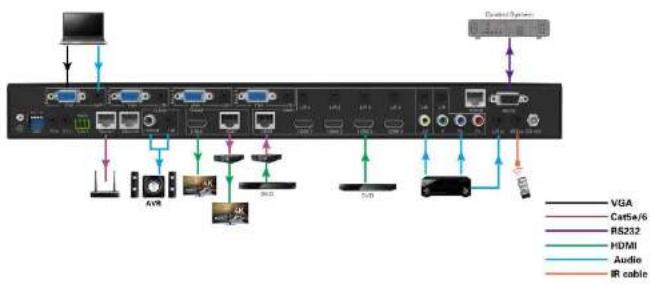
Specifications
| Bandwidth: | 10.2Gbps |
| Video Input Connectors: | 4x HDMI Type A, 4x VGA, 1x RJ45, 1xYPbPr, 1x AV |
| Video Output Connectors: | 1x HDMI Type A, 1x RJ45 |
| Audio Input Connectors: | 11x 3.5mm stereo jack |
| Audio Output Connectors: | 1x 3.5mm stereo jack,1x RCA (SPDIF) |
DC 222 serial port
1x DP 0 connector 1x 2 phoenixv terminal
RS-232 Pin Assignment
| BG-PSC11X2-HDBT | Remote Control Console | ||
| PIN | Assignment | PIN | Assignment |
| 1 | NC | 1 | NC |
| 2 | Tx | 2 | Rx |
| 3 | Rx | 3 | Tx |
| 4 | NC | 4 | NC |
| 5 | GND | 5 | GND |
| 6 | NC | 6 | NC |
| 7 | NC | 7 | NC |
| 8 | NC | 8 | NC |
| 9 | NC | 9 | NC |
Baud Rate: 57600 bps
Data Bit: 8-bit
Parity: None
Stop Bit: 1-bit
Flow Control: None
| 11 | RESET | Reset System To Default Setting (Should Type "Yes" To Confirm, "No" To Discard) |
| 12 | IR232 vv | Set IR And RS232 Connect To Remote Valens RX/TXvv=OFF: Disconnect With Valensvv=RRX: Remote Valens RXvv=RTX: Remote Valens TXvv=BOTH: Remote Valens RX and TX |
| 13 | OUT xx FR yy | Set OUTPUT:xx From INPUT:yyxx=00: Select All OUTPUT Portxx=[01...02]: Select One OUTPUT Portyy=[01...04]: HDMI Input 01 ~ 04yy=HDBT: HDBT/Valens Inputyy=AV: AV Input( Output 02 Only )yy=YPBPR: Component Input( Output 02 Only )yy=VGA1...VGA4: VGA Input( Output 02 Only ) |
| 14 | OUT BYP ON/OFF | Set HDMI Input Signal Through Scaler or Bypass |
| 15 | OUT SP/MX | Set OUTPUT To Splitter or Matrix Mode |
| 16 | OUT RES rr | Set Scaler Output Resolution (Change Output Resolution Will Effect EDID Setting)rr=01: 1080P@50Hzrr=02: 1080P@60Hzrr=03: 720P@50Hzrr=04: 720P@60Hzrr=05: 1280x1024@60Hzrr=06: 1024x768@60Hzrr=07: 1360x768@60Hz |
| 23 | VOL xx | Set Scaler Audio Volumexx=[00...30]: Volume Valuexx=+: Volume Increasexx=: Volume Decrease |
| 24 | EDID xx CP yy | Set Input:xx EDID Copy From Output:yyxx=00: Select All INPUT Portxx=01: Select HDBT INPUT Portxx=[02...05]: Select HDMI INPUT:01~04 Portyy=[01...02]: Select One OUTPUT Port |
| 25 | EDID xx DF zz | Set Input:xx EDID To Default EDID:zz(cmd: OUT RES rr Will Effect EDID Setting)xx=00: Select All INPUT Portxx=01: Select HDBT INPUT Portxx=[02...05]: Select HDMI INPUT:01~04 Portzz=00: PC 1080p, HDMI 1080p, 2CH PCMzz=01: PC 1080p, HDMI 1080p, 5.1CH PCM/DTS/DBzz=02: PC 1080p, HDMI 1080p, 7.1CH PCM/DTS/DB/HDzz=03: PC 1080i, HDMI 1080i, 2CH PCMzz=04: PC 1080i, HDMI 1080i, 5.1CH PCM/DTS/DBzz=05: PC 1080i, HDMI 1080i, 7.1CH PCM/DTS/DB/HDzz=06: PC 1080p, HDMI 3D, 2CH PCMzz=07: PC 1080p, HDMI 3D, 5.1CH PCM/DTS/DBzz=08: PC 1080p, HDMI 3D, 7.1CH PCM/DTS/DB/HDzz=09: PC 4K2K, HDMI 4K2K, 2CH PCMzz=10: PC 4K2K, HDMI 4K2K, 5.1CH PCM/DTS/DBzz=11: PC 4K2K, HDMI 4K2K, 7.1CH PCM/DTS/DB/HD |
Maintenance
Clean this unit with a soft, dry cloth. Never use alcohol, paint thinner or benzene to clean this unit.
Warranty Policy
BZBGEAR products are warranted against defects in material and workmanship for one year from the date of shipment. During the warranty period, BZBGEAR will, at its option, repair or replace products that prove to be defective. Repairs are warranted for the remainder of the original warranty.
For equipment under warranty, the owner is responsible for freight to BZBGEAR and all related customs, taxes, tariffs, insurance, etc. BZBGEAR is responsible for the freight charges only for return of the equipment from the factory to the owner. BZBGEAR will return the equipment by the same method (i.e., Air, Express, Surface) as the equipment was sent to BZBGEAR.
All equipment returned for warranty repair must have a valid RMA number issued prior to return and be marked clearly on the return packaging. BZBGEAR strongly recommends all equipment be returned in its original packaging.
BZBGEAR's obligations under this warranty are limited to repair or replacement of failed parts,
The warranty does not cover replacement or repair necessitated by loss or damage from any cause beyond the control of BZBGEAR, such as lightning or other natural and weather-related events or wartime environments.
The warranty does not cover any labor involved in the removal and or reinstallation of warranted equipment or parts on site, or any labor required to diagnose the necessity for repair or replacement.
The warranty excludes any responsibility by BZBGEAR for incidental or consequential damages arising from the use of the equipment or products, or for any inability to use them either separate from or in combination with any other equipment or products.
A fixed charge established for each product will be imposed for all equipment returned for warranty repair where BZBGEAR cannot identify the cause of the reported failure.
Exclusive Remedies
BZBGEAR's warranty, as stated is in lieu of all other warranties, expressed, implied, or statutory, including those of merchantability and fitness for a particular purpose. The buyer shall pass on to any purchaser, lessee, or other user of BZBGEAR's products, the aforementioned warranty, and shall indemnify and hold harmless BZBGEAR from any claims or liability of such purchaser, lessee, or user based upon allegations that the buyer, its agents, or employees have made additional warranties or representations as to product preference or use.
An RMA number must first be issued by sales. This RMA number will need to be referenced on the outside of the return shipment.
Upon receipt of the defective product, BZBGEAR will, at its discretion, either repair or replace the product and ship it out in the most expeditious manner possible. Subject to availability, the replacement product will be shipped on the business day following receipt of the defective product.
In the event the product returned to BZBGEAR has been discontinued (i.e. the product is no longer being manufactured by BZBGEAR but is still under warranty), BZBGEAR will, at its discretion, either repair or replace with recertified product.
Once you have obtained an RMA number
After obtaining an RMA number from BZBGEAR, you must send the product - freight prepaid - to BZBGEAR. The BZBGEAR RMA number must be prominently displayed on the outside of your package. If you send your product to BZBGEAR without the RMA number prominently displayed on the outside of the package, it will be returned to you unopened.
Please use a shipping company that can demonstrate proof of delivery. BZBGEAR does not accept responsibility for any lost shipments unless proof of delivery to BZBGEAR is provided.
Please note:
Product shipped to BZBGEAR must be properly packaged to prevent loss or damage in transit.
Warranty Information (Second Year Assurance)
BZBGEAR wants to assure you peace of mind. We're so confident in the quality of our products that along with the manufacturer's one-year limited warranty, we are offering free second-year warranty coverage upon registration*!
Taking advantage of this program is simple, just follow the steps below:
-
Register your product within 90 days of purchase by visiting BZBGEAR.com/warranty.
-
Complete the registration form. Provide all necessary proof of purchase details, including serial number and a copy of your sales receipt.
For questions, please call 1.888.660.2962 or email support@bzbgear.com.
For complete warranty information, please visit BZBGEAR.com/warranty or scan the QR code below.

Mission Statement
BZBGEAR manifests from the competitive nature of the audiovisual industry to innovate while keeping the customer in mind. AV solutions can cost a pretty penny, and new technology only adds to it. We believe everyone deserves to see, hear, and feel the advancements made in today's AV world without having to break the bank. BZBGEAR is the solution for small to medium-sized applications requiring the latest professional products in AV.
We live in a DIY era where resources are abundant on the internet. With that in mind, our team offers system design consultation and expert tech support seven days a week for the products in our BZBGEAR catalog. You'll notice comparably lower prices with BZBGEAR solutions, but the quality of the products is on par with the top brands in the industry. The unparalleled support from our team is our way of showing we care for every one of our customers. Whether you're an integrator, home theater enthusiast, or a do-it-yourselfer, BZBGEAR offers the solutions to allow you to focus on your project and not your budget.
- SURGE PROTECTION DEVICE RECOMMENDED
- TABLE OF CONTENT
- INTRODUCTION
- FEATURES
- PANEL DESCRIPTIONS
- FRONT PANEL
- REAR PANEL
- REMOTE CONTROL DESCRIPTION
- SETTING
- APPLICATION DIAGRAM
- SPECIFICATIONS
- MAINTENANCE
- WARRANTY POLICY
- EXCLUSIVE REMEDIES
- ONCE YOU HAVE OBTAINED AN RMA NUMBER
- PLEASE NOTE
- WARRANTY INFORMATION (SECOND YEAR ASSURANCE)
- MISSION STATEMENT
Brand : BZBGear
Model : BG-PSC11X2-HDBT
Category : Router