
HBT-C6POE-R - AV Transmitter Avenview - Free user manual and instructions
Find the device manual for free HBT-C6POE-R Avenview in PDF.


| Product Type | AV Transmitter |
| Model | HBT-C6POE-R |
| Brand | Avenview |
| Video Input | HDMI |
| Video Output | Over Cat5e/6 via HDBaseT |
| Max Resolution | 1080p @ 60Hz |
| Transmission Distance | Up to 100 meters |
| Power Supply | PoE (Power over Ethernet) or 12V DC 1A |
| Power Consumption | 5W |
| Dimensions (L x W x H) | 120 x 80 x 28 mm |
| Weight | 200 g |
| Operating Temperature | 0°C to 50°C |
| Storage Temperature | -20°C to 60°C |
| Connector Types | HDMI (Type A), RJ45, DC jack |
| LED Indicators | Power, Link, Signal |
| Supported Audio | Stereo, Dolby Digital |
| HDCP Compliance | HDCP 1.4 |
| Chassis Material | Metal |
| Mounting | Desktop or wall-mountable (bracket included) |
| Included Accessories | Power adapter, mounting screws, user manual |
| Safety Certifications | CE, FCC, RoHS |
| Warranty | 1 year limited |
Frequently Asked Questions - HBT-C6POE-R Avenview
User questions about HBT-C6POE-R Avenview
0 question about this device. Answer the ones you know or ask your own.
Ask a new question about this device
Download the instructions for your AV Transmitter in PDF format for free! Find your manual HBT-C6POE-R - Avenview and take your electronic device back in hand. On this page are published all the documents necessary for the use of your device. HBT-C6POE-R by Avenview.
USER MANUAL HBT-C6POE-R Avenview
HDBaseT HDMI CAT5/6/7Extender with POE/LAN/RS-232/ Bi-directional IR

Product Application & Market Sectors

Corporate House

Vorship

Military Resident


Education Industri


Medical Aviation

TABLE OF CONTENTS
I. GETTING STARTED ....
I.1 IMPORTANT SAFEGUARDS....
1.2 SAFETY INSTRUCTIONS
I.3 REGULATORY NOTICES FEDERAL COMMUNICATIONS COMMISSION (FCC) 2
2. INTRODUCTION....3
2.1 PACKAGE CONTENTS 4
2.2 BEFORE INSTALLATION....5
2.3 CABLE SPECIFICATIONS 5
3. APPLICATION DIAGRAM....6
4. PANEL DESCRIPTION....7
INPUT PANEL (Receiver, HBT-C6POE-R) Front....7
5. IR CABLE DEFINITIO....8
6 INSTALLATION (HRT-C6POF-R) 9
SECTION I: GETTING STARTED
I.1 IMPORTANT SAFEGUARDS
Please read all of these instructions carefully before you use the device. Save this manual for future reference.
What the warranty does not cover
• Any product, on which the serial number has been defaced, modified or removed.
• Damage, deterioration or malfunction resulting from:
- Accident, misuse, neglect, fire, water, lightning, or other acts of nature, unauthorized product modification, or failure to follow instructions supplied with the product.
• Repair or attempted repair by anyone not authorized by us.
• Any damage of the product due to shipment.
- Removal or installation of the product.
- Causes external to the product, such as electric power fluctuation or failure.
• Use of supplies or parts not meeting our specifications.
- Normal wear and tear.
• Any other causes which does not relate to a product defect.
- Removal, installation, and set-up service charges.
1.2 SAFETY INSTRUCTIONS
The HBT-C6POE-RHDBaseT HDMI CAT5/6/7 Receiver has been tested for conformance to safety regulations and requirements, and has been certified for international use. However, like all electronic equipments, the HBT-C6POE-R should be used with care. Read the following safety instructions to protect yourself from possible injury and to minimize the risk of damage to the unit
REGULATORY NOTICES FEDERAL COMMUNICATIONS COMMISSION (FCC)
This equipment has been tested and found to comply with Part 15 of the FCC rules. These limits are designed to provide reasonable protection against harmful interference in a residential installation.
Any changes or modifications made to this equipment may void the user's authority to operate this equipment.
Warning symbols Description

ONLY USE THE PROVIDED POWER CABLE OR POWER ADAPTER SUPPLIED. DO NOT TAMPER WITH THE ELECTRICAL PARTS. THIS MAY RESULT IN ELECTRICAL SHOCK OR BURN.

DO NOT TAMPER WITH THE UNIT. DOING SO WILL VOID THE WARRANTY AND CONTINUED USE OF THE PRODUCT.

THE VIDEO BOARDS ARE VERY SENSITIVE TO STATIC. PLEASE ENSURE IF RACK MOUNTED OR INSTALLED ON A SURFACE, IT SHOULD BE IN A GROUNDED ENVIROMENT.
2. INTRODUCTION
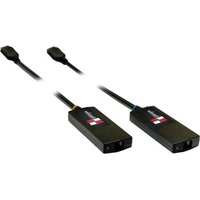
The Avenview HBT-C6POE-R HDBaseT Receiver CAT5/6/7 with POE, Bi-Directional IR and Ethernet has been designed to extend High Definition video and multi-channel digital audio formats to any HD Monitor.
Video Signals: 4K2K@30 (Ultra HD), 3D, Deep Color, and Full HD 1080p 36-bit color depth.
Audio signals: Lossless Multi-channel audio formats (DTS-HD Master Audio, Dolby TrueHD).
Data Signals: Bi-Directional IR signals 30 KHz to 50 KHz over CAT5/6.
The HBT-C6POE-R includes one (1) unit: Receiving unit (Rx) HBT-C6POE-R with one (1) UTP output port which allows the user to extend video and audio up to 100m (330ft). The HBT-C6POE-R also allows bi-directional IR control of the source connected to the unit from the users IR remote control at the monitor side.
The bonus features with this device it can support PoE (Power over the CATx cable to the RX) also Internet (100Mbps Ethernet service when connected to a Router). These features has been added to this unit to give the installer and user a complete solution with the new trends in online streaming, network connected devices and new demand in Smart TV, Ultra HD monitors and content.
- INPUT: HDMI with 3D & 4Kx2K, 1080p,HDCP and DVI compliant
- VIDEO BANDWIDTH: From 300MHz / 9 Gbps
- PC RESOLUTIONS: Up to VGA to WUXGA
- HD RESOLUTIONS: Up to 4Kx2K (3840x2160@30Hz and 4096x2160@24Hz)1080p (1920x1080@60Hz)
- AUDIO SUPPORTED: LPCM 7.1CH, Dolby TrueHD, Dolby Digital Plus and DTS-HD Master Audio
- AUDIO TRANSMISSION: (32-192kHz sample rate)
- SUPPORTS: CEC bypass
- DISTANCE: Up to 100 meters through CAT6e/6a/7 cables
- ETHERNET TRANSMISSION: Rate up to 100Mbps
- UNCOMPRESSED VIDEO: 1080p, 60 Hz, 36-bit
- SERVICE: USB for Manufacturer USE ONLY
2.1 PACKAGE CONTENTS
| I | HBT-C6POE-R | XI |  |
| IR EXTENDER | XI |  | |
| IR BLASTER | XI |  | |
 | |||
2.2 BEFORE INSTALLATION
- Put the product in an even and stable location. If the product falls down or drops, it may cause an injury or malfunction.
- Don't place the product in too high temperature (over 50°C), too low temperature (under 0°C) or high humidity.
- Use the DC power adapter with correct specifications and supplied with the unit. If improper power supply is used the unit may malfunction and cause a fire.
- Do not twist or pull by force ends of the UTP cable. It can cause malfunction.
2.3 CABLE SPECIFICATIONS
Cable Type Range Pixel clock rate Video Data Rate Supported Video
| CAT5e/6 100m | <=225MHz <=5.3Gbps | (HD Video) | Up to 1080p, 60Hz, 36 bits, 3D (Data rates lower than 5.3 Gbps or below 225 Mhz TMDS clock). | |
| 70m | >225MHz | >5.3Gbps (Ultra HD Video) | 4K2K, 30Hz video formats | |
| CAT6A/7 | 100m | >225MHz | >5.3Gbps (Ultra HD Video) | 4K2K, 30Hz video formats |
3. APPLICATION DIAGRAM
HBT-C6POE-SP4
LAYOUT 1

4K2K (3840X2160) = 75m (165 feet) CAT6E 250MHz 4K2K (3840X2160) = 100m (330 feet) CAT6A 500-625MHz 1080p(1920x1080) = 100m (330 feet) CAT6E 250MHz 1080p(1920x1080) = 110m (360 feet) CAT6A 500-625MHz
CABLE INDEX
Input / Output
CAT 5E/6A/7
Internet / LAN
IR Signal
4. PANEL DESCRIPTION
INPUT PANEL (Receiver, HBT-C6POE-R) Front

| 1. HDMI OUT: Connect to HDMI display Max 35ft via HDMI Cable or cascade with another Avenview type Transmitter | 2. 2. LAN: Connect to Internet service sharing rate of 100Mbps within the link of Transmitter |
| 3. 3. RS-232: Connect to a device that has the ability to Receive control commands via RS232 only with compatible Transmitters. | |
INPUT PANEL (Receiver HBT-C6POE-R) Rear

5. IR CABLE DEFINITIO

IR Sockets
- IR BLASTER: plug in the IR blaster to the HBT-C6POE-R to emit all IR command signals received from the IR Extender plugged into the Rx (Monitor Side) to control the devices corresponding to the IR signals. Example: Set Top Box or DVD player (The Source).
- IR EXTENDER: plug in the IR Extender into the (RX) Receiver (Monitor Side) to receive all IR command signals from the IR remote controls of the corresponding source. Example: Set Top Box or DVD player (IR Remote Control).
6. INSTALLATION (HBT-C6POE-R)
To setup Avenview HBT-C6POE-R please follow these steps for connecting to a device:
I. Turn off all devices including monitors / TV
2. Connect to a HDMI source (such as a Blu-Ray Disc player) to the Transmitter HBT-C6POE-SP4/8 or Matrix 4x4/8x8
3. Connect HBT-C6POE-R 100m or HBT-C6POE-RL 60m with a CAT5/6/7 cable with shielded ends, then connect to display with HDMI cable.
4. Plug in the IR BLASTER: into IR out and the blinker on the IR eye (Source)
5. Plug in Power for the Tx.
6. Plug in the IR Extender to IR IN to receive IR Signals from Remote
7. Power on the HDMI display
8. Power on HDMI Sources.
Notice
NOTE: The QUALITY and TRANSMISSION of the video signals depends on the characteristics and quality of the UTP cables. Higher resolutions and longer transmission distances require low skew cables (<25ns/100m) for best performance.
Unshielded CAT6 with metal RJ-45 connectors is recommended.

7. GENERAL TROUBLESHOOTING
| PROBLEM POSSIBLE SOLUTION | |
| NO IMAGE | Check if connection to the source and the display are correct.Ensure that display device supports 480p, 720p and 1080p 4K@30 resolutionTerminated to 568B standard with Shielded Ends RecommendedHigh Quality CAT5/6/7 Cable helps signal transmissionPlease use the supplied power supply-DC 24V 2.7ACheck LED Link light see (Section 3 Panel Description)Check LED Sync light see (Section 3 Panel Description |
| EDID ISSUE | EDID MODE-TV: The default factory setting is on TV. The unit will detect the 1st CAT5e/6/7 output's EDID. When obtained a (4K2K) Ultra HD 3840x2160 EDID the signal is transmitted.If the 1st CAT5e/6/7 output is without a Ultra HD 3840x2160 EDID the unit will detect all output's EDID and Transmit the signal that all outputs can accept.EDID MODE-STD: Switch to STD to use built-in EDID if the display has No Image. STD EDID's video at 1080p@60Hz and audio at LPCM 2CH. |
| SET-TOP BOXNO PICTURE | HDBaseT and HDMI 1.3 standards support CLOCK STRETCHING for i2c buss protocolExample set top boxes like Scientific Atlantic results no picture. This can be resolved by swapping out the box for a newer version that supports HDMI 1.3 not HDMI 1.2 |
| Ensure the UTP cable is run within the wall away from EMI and High Voltage power Lines.Please check manual of device to ensure proper placement of IR Blaster on IR | |
SPECIFICATIONS
| Item Description | |
| UNITS HBT-C6POE-R | |
| UNIT DESCRIPTION HDBaseT HDMI | MI Receiver |
| HDMI COMPLIANCE YES HDBaseT | |
| HDCP Yes | |
| VIDEO BANDWIDTH Single-link 340 MHz [10.2Gbps] | |
| SUPPORTED RESOLUTIONS | 480i / 480p / 720p / 1080i / 1080p60 /4K@30 Up to Ultra HD (3840x2160@24/25/30Hz)4K2K-(4096x2160@24Hz) |
| CEC SUPPORT ALLOWS CEC BYPASS | |
| CAT5/6/7 CABLE | 4K2K: (3840X2160@30Hz) ~ 75meter (250feet) (CAT6e) /100meter (330feet) (CAT6a) FULL HD: (1080p) ~ 100meter (330feet) |
| AUDIO SUPPORT LPCM 7.1CH, Dolby TrueHD, Dolby Digital Plus and DTS-HD Master Audio | |
| INPUT TMDS SIGNAL | 1.2 Volts (peak-to-peak) |
| INPUT DDC SIGNAL | 5 Volts (peak-to-peak, TTL) |
| ESD PROTECTION | Human body model — ±8kV (air-gap discharge)& ±4kV (contact discharge) |
| INPUT | 1x 3.5mm IR Extender1x CAT5e/6/7 |
| OUTPUT | 1x RS-2321x 3.5mm IR1x LAN port1x HDMI |
| HDMI CONNECTOR | Type A (19 pin female) |
Notice
- All HDMI over CAT5 transmission distances are measured using Belden CAT6A (625MHz), 4-Pair, U/UTP-Unshielded, Riser-CMR, Premise Horizontal Cable, 23 AWG Solid Bare Copper Conductors, Polyolefin Insulation, Patented Double-H spline, Ripcord, PVC Jacket using Quantum 980 signal HDMI Video Generator Module Video Pattern Testing.
-
- The transmission length is largely affected by the type of category cables, also the type of HDMI sources, and the type of HDMI display. The testing result shows solid UTP cables (usually in the form of 300m or 1000ft bulk cable) can transmit a lot longer signals than stranded UTP cables (usually in the form of patch cords). Shielded STP connectors are better suit than unshielded UTP connectors. A solid UTP CATSe cable shows longer transmission length than stranded STP CAT6 cable. For long extension users, solid cables are your only choice.
-
- EIAiTIA-568-B termination (T568B) for category cables is recommended for better performance.
-
- To reduce the interference among the unshielded twisted pairs of wires in category cable, you can use shielded STP cables with shielded connector to improve EMI problems, which occurs in long transmission.
-
- Because the quality of the category cables has the major effects in how long transmission distance will be made and how good is the received display, the actual transmission length is subject to your category cables. For resolution greater than 1080i or 1280x1024, a solid CAT6 cable is the only viable choice.
PERFORMANCE GUIDE FOR HDMI OVER CATEGORY CABLE TRANSMISSION
PERFORMANCE RATING TYPE OF CATEGORY CABLE
WIRING LDING CAT5 CAT5E CAT6
Notes
Overview Warranty Certificate
AVENVIEW CORP. ("Avenview") warrants Aveniew-branded product(s) contained in the original packaging against defects in materials and workmanship when used normally in accordance with Aveniew's enclosed manual guidelines for a period of THREE (3) YEARS from the date of original retail purchase - Warranty Period. Aveniew's published guidelines include but are not limited to information contained in technical specifications, user manuals and service communications.
LABOR. During the Warranty Period of THREE (3) YEARS, Aveniew will repair or replace the product(s) at no cost using new or used parts equivalent to next performance and reliability if the product(s) is determined to have able by Aveniew's published guidelines. Cost of Labor applicable to product(s) after Warranty Period. For labor costs, please contact: support@aveniew.com.
PARTS During the Warranty Period of THREE (3) YEARS, Overview will supply new or retail replacements in exchange for defective parts of the product(s) at no cost if the product(s) is determined to have able by Overview's published guidelines. Cost of Parts applicable to product(s) after Warranty Period. For part(s) costs, please contact support@aventview.com.
To obtain Warranty: (a) proof of purchase in the form of a bill of sale or received invoice reflecting that the registered product(s) is within warranty period must be presented to obtain warranty service; (b) product(s) must be registered at time of purchase. Failure to do so will result in applicable parts and labor charges. Returning product(s) must be shipped in Avenview's original packaging or in packaging pertaining equal degree of protection to Aveniew's. Both Avenview and purchaser are responsible for freight charges and brokerages when shipping the product(s) to the receiver.
NOT COVERED BY THIS WARRANTY
This warranty does not apply to any non-Averview branded product(s); non-registered Averiew product(s). This warranty does not apply: (a) to cosmetic damage. Including but not limited to scratchers, cents and broken cords; (b) to damage caused by use with another product; (c) to damage caused by accident, abuse, misuse, liquid contact, fire, earthquake or other external cause; (d) to damage caused by operating the Averiew product(s); outside Averiew's manuals or guidelines; (e) to damage caused by service performed by anyone who is not a representative of Averiew at an Avenue authorized personnel; (f) to defects caused by normal wear and tear or otherwise due to the normal aging of the Averiew product(s), or (g) if any serial number has been removed or defeced from the Averiew product(s).
AVENVIEW IS NOT LIABLE FOR DIRECT, SPECIAL, INCIDENTAL OR CONSEQUENTIAL DAMAGES RESULTING FROM ANY BREACH OF WARRANTY OR CONDITION, OR UNDER ANY OTHER LEGAL THEORY, INCLUDING BUT NOT LIMITED TO LOSS OF USE, LOSS OF REVENUE, LOSS OF ACTUAL OR ANTICIPATED PROFITS (INCLUDING LOSS OF PROFITS ON CONTRACTS); LOSS OF THE USE OF MONEY; LOSS OF ANTICIPATED SAYINGS; LOSS OF BUSINESS; LOSS OF OPPORTUNITY; LOSS OF GOODWILL; LOSS OF REPUTATION; LOSS OF, DAMAGE TO COMPROMISE OR CORRUPTION OF DATA; OR ANY INDIRECT OR CONSEQUENTIAL LOSS OR DAMAGE REPAIR OR REPLACEMENT AS PROVIDED UNDER, THIS WARRANTY IS THE EXCLUSIVE REMEDY OF THE CONSUMER.
Avenview
AV Connectivity, Distribution And Beyond...
TECHNICAL SUPPORT
CONTACT US

Phone: I (866) 508 0269
Email: support@avenview.com

USA Head Office Avenview Corp. 275 Woodward Avenue Kenmore, NY 14217


- Product Application & Market Sectors
- TABLE OF CONTENTS
- SECTION I: GETTING STARTED
- I.1 IMPORTANT SAFEGUARDS
- What the warranty does not cover
- SAFETY INSTRUCTIONS
- REGULATORY NOTICES FEDERAL COMMUNICATIONS COMMISSION (FCC)
- Warning symbols Description
- INTRODUCTION
- PACKAGE CONTENTS
- BEFORE INSTALLATION
- CABLE SPECIFICATIONS
- APPLICATION DIAGRAM
- HBT-C6POE-SP4
- PANEL DESCRIPTION
- INPUT PANEL (Receiver, HBT-C6POE-R) Front
- INPUT PANEL (Receiver HBT-C6POE-R) Rear
- IR CABLE DEFINITIO
- IR Sockets
- INSTALLATION (HBT-C6POE-R)
- To setup Avenview HBT-C6POE-R please follow these steps for connecting to a device:
- Notice
- GENERAL TROUBLESHOOTING
- SPECIFICATIONS
- Overview Warranty Certificate
- NOT COVERED BY THIS WARRANTY
- Avenview
- TECHNICAL SUPPORT
Brand : Avenview
Model : HBT-C6POE-R
Category : AV Transmitter