
3D Series TD-050ED - Wristwatch Carson - Free user manual and instructions
Find the device manual for free 3D Series TD-050ED Carson in PDF.


| Product Type | Digital Watch |
| Series | 3D Series |
| Model | TD-050ED |
| Brand | Carson |
| Display Type | LCD digital display with backlight |
| Case Material | Resin/Plastic |
| Band Material | Silicone/Rubber |
| Case Diameter | 45 mm |
| Case Thickness | 12 mm |
| Weight | Approx. 50 g |
| Water Resistance | 30 meters (splash proof) |
| Power Source | 1 x CR2032 lithium battery |
| Battery Life | Approximately 2 years |
| Functions | Time, date, day of week, stopwatch, countdown timer, alarm, backlight |
| Accuracy | +/- 30 seconds per month |
| Operating Temperature | -10°C to 50°C (14°F to 122°F) |
| Maintenance | Clean with a soft dry cloth; avoid contact with solvents or chemicals |
| Battery Replacement | Remove back cover with a small screwdriver; replace with new CR2032 |
| Safety Precautions | Keep battery away from children; do not expose to extreme heat |
| Spare Parts Available | Straps and batteries |
| Warranty | 1 year limited warranty |
Frequently Asked Questions - 3D Series TD-050ED Carson
User questions about 3D Series TD-050ED Carson
0 question about this device. Answer the ones you know or ask your own.
Ask a new question about this device
Download the instructions for your Wristwatch in PDF format for free! Find your manual 3D Series TD-050ED - Carson and take your electronic device back in hand. On this page are published all the documents necessary for the use of your device. 3D Series TD-050ED by Carson.
USER MANUAL 3D Series TD-050ED Carson
Innovation In Quality Optics
INSTRUCTIONS
Congratulations on selecting your new Carson binoculars!
With reasonable care, your binoculars will provide you with years of enjoyment.
In order to achieve optimum performance, please read the instructions carefully on the proper use and care of your binoculars.
Specifications
| Model | TD-832ED | TD-842ED | TD-042ED | TD-042EDMO | |
| Magnification | 8x | 8x | 10x | 10x | 1C |
| Objective Lens Diameter | 32mm | 42mm | 42mm | 50mm | |
| Prism | BAK-4 | BAK-4 | BAK-4 | BAK-4 | |
| Lens Coating | Fully | Multi-Coated | FullyMulti-Coated | FullyMulti-Coated | Multi-Coated |
| Field of View | 392 feet | 341 feet | 314 feet | 314 feet | 262 feet |
| Eye Relief | 19.5mm | 19.5mm | 16mm | 16mm | 20mm |
| Close Focus | 6.6 feet | 9.8 feet | 9.8 feet | 9.8 feet | 13.1 feet |
| O-Ring Sealed | Yes | Yes | Yes | Yes | Yes |
| Phase Coated | Yes | Yes | Yes | Yes | Yes |
| Waterproof / Fogproof | Yes | Yes | Yes | Yes | Yes |
| ED Glass Objective Lens | Yes | Yes | Yes | Yes | Yes |
| Weight | 1.2 lbs. | 1.4 lbs. | 1.5 lbs. | 1.5 lbs. | 1.7 lbs. |
| Dimensions | 4.9" x 4.8" x 1.8" | 5.5" x 5" x 2" | 5.5" x 5" x 2" | 5.5" x 5" x 2" | 6.8" x 5.3" x 2.5" |

Prism System
Your Carson 3D binoculars feature a roof prism system. The prisms overlap closely allowing the objective (front) lenses to line up directly with the eyepieces. The result is a slim, streamlined shape in which the lenses and prisms that magnify and correct the image are in a straight line.

Eye Adjustments
How to adjust for distance between your eyes: The distance between the eyes, called "interpupillary distance," varies from person to person. To achieve perfect alignment of lens to eye, follow these simple steps:
- Hold your binoculars in the normal viewing position
- Grasp each barrel firmly. Move the barrels closer together or farther apart until you see a single circular field.
Always reset your binoculars to this position before using.

ED Glass
Your Carson 3D-ED binoculars contain ED Glass (extra low dispersion glass) in their lenses. This ED Glass helps prevent chromatic aberration (fringes of color that appear around the viewing image).
Focusing your binoculars:
Carson 3D binoculars have a center focus wheel and an independent right diopter eyepiece to account for small differences in the strength of each eye. Please follow the steps below to focus properly:
- Adjust the interpupillary distance.
- Rotate the right eyepiece to its index mark and sight on a fixed distant object.
- Cover the right objective (front) lens with your hand, then rotate the central focusing wheel until the image in the left eyepiece is sharp.
- Cover the left objective (front) lens with your hand then rotate the right eyepiece until the image is sharp. (Note this setting for future use.)
- Image should now be focused to your individual eyestrength.
Twist-Up Eyecups
Your Carson 3D binocular features twist-up eyecups designed to exclude extraneous light. If you do not wear eyeglasses, you may choose to twist the eyecups out to block stray light and reflections from your view.
If you are an eyeglass wearer, lowering the eyecups will bring your eyes closer to the binocular lenses, providing an improved field of view.
Waterproofing

All Carson 3D binoculars are nitrogen purged and o-ring sealed to protect your binocular from water damage. They are designed to protect against accidental splashing, rain or even full submersion in up to 1 meter of water for up to 5 minutes.
Optical Coatings
All 3D binoculars feature fully multi-coated optics, meaning that all glass surfaces have multiple coatings applied to them to prevent internal reflection and light loss. This results in images that are brighter, sharper and higher in contrast.
As light travels through a roof prism binocular, it becomes slightly out of phase. balance and delity. Your 3D binoculars are phase coated to correct this problem into phase and therefore resulting in more accurate color reproduction.
Attaching the Neck Strap
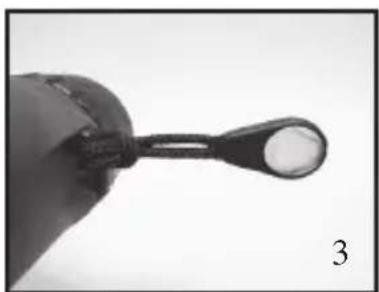
All 3D binoculars come with both a neck strap and a shoulder harness. You can to hold your binocular depending on your personal preference.
To attach the neck strap:
- Thread the end of the strap up through the strap clip on the side of your binoc
- Thread the strap through the rst loop of the plastic strap piece.
- Continue to thread the strap through the second loop of the plastic strap piece.
- Adjust the strap to the desired length and pull tight.
- Slide the plastic cu over the loose end of the neck strap.

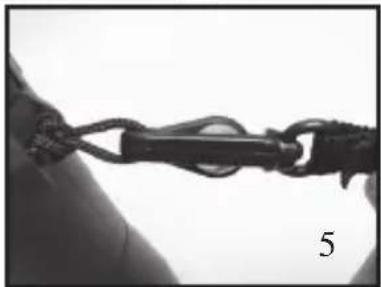
Attaching the Shoulder Harness
To attach the shoulder harness:
- Remove the security buttons from the quick release hooks on your binocular harness.
- Slide the security button loop upward through the strap clips on each side of your binocular.
- Feed the security button through the loop and tighten.
- Attach quick release hook onto loop.
- Slide security button into center of quick release hook.



Using the BinoArmor Deluxe™ binocular wrap
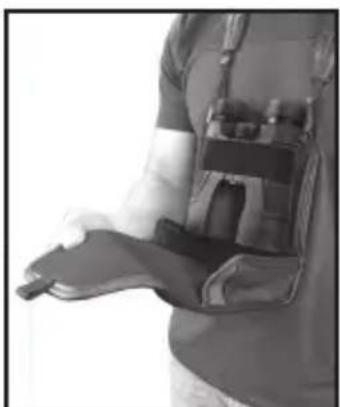
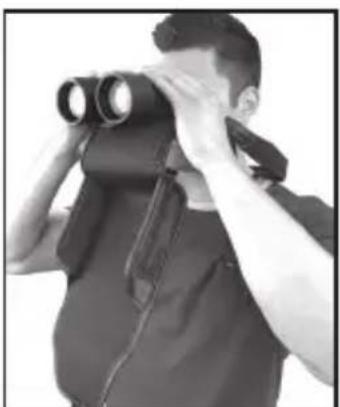
Your 3D binocular features a BinoArmor Deluxe™ protective binocular wrap.
This wrap is designed to protect your binocular from damage, while also keeping the lenses safe from scratching and exposure to dust and debris.
To use the protective wrap:
- Place binoculars under elastic band and position as shown.
- Close wrap around binoculars and secure with magnetic closure.
- To use binoculars open the flap and pull away from body.
- Binoculars can be used instantly without removing wrap.


Use of a Tripod Adapter
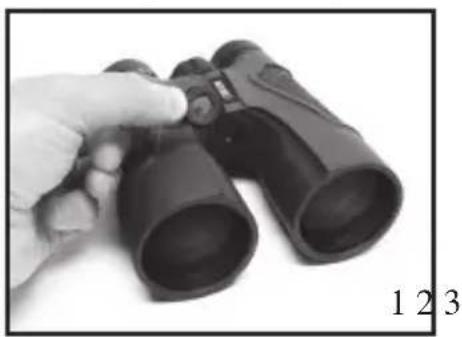
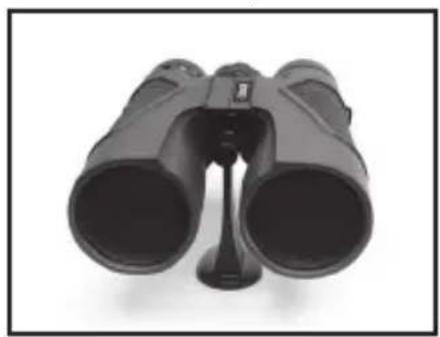
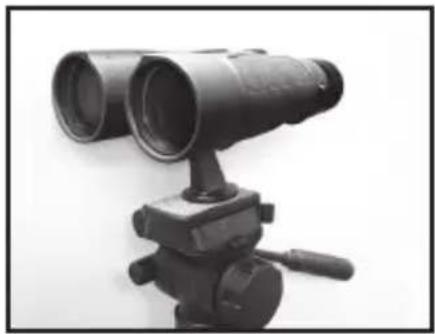
All Carson 3D binoculars are compatible with most standard binocular tripod adapters. To attach a tripod adapter to your binoculars:
- Twist the tripod adapter cap (located at the hinge in between the binocular barrels) counterclockwise and remove it.
- Attach the binocular tripod adapter into the threaded hole in the binocular turning it clockwise until tight.
- Attach the bottom of the tripod adapter to your tripod.
Note: Tripod and adapter are not included with your 3D binoculars.
Instructions for Care
Like any fine optical instrument, your binoculars should be given sensible care. Keep the binoculars in the included protective wrap when not in use. Do not drop or violently jar your binoculars. This may cause the internal optical components of your binoculars to become misaligned resulting in a double image when looking through them.
Cleaning
Cleaning must be done safely and carefully to avoid scratching the lenses and permanently damaging your binoculars. Safe cleaning can be accomplished by following the procedure below:
- Blow away any dust or debris on the lens (or use a soft lens brush).
- To remove dirt, grease or fingerprints, clean with a soft cotton cloth, rubbing in a circular motion. Use of a coarse cloth or unnecessary rubbing may scratch the lens surface and eventually cause permanent damage.
- For a more thorough cleaning, use a Carson C6 ® lens cleaning product.
- IMPORTANT: Never attempt to clean your binoculars internally or try to take them apart.
CARSON LIFETIME LIMITED WARRANTY
This Carson product is warranted to be free from defects in material and workmanship. Carson will, at its option and without charge, either repair any part or assembly of parts found to be defective in material or workmanship, or replace this Carson product with a Carson product of comparable value and condition, subject to the limitations and exclusions noted herein.
This warranty extends to the original purchaser only and is not assignable or transferable. It shall not apply to any product that has been subject to misuse, abuse, negligence or accident, or to any defects or damage directly or indirectly caused by the use of unauthorized replacement parts and/or service performed by unauthorized personnel.
This warranty gives you specific legal rights, and you may also have other rights which could vary from state to state. Some states do not allow limitations on the life of an implied warranty and/or do not allow excluding or limiting incidental or consequential damages. If so, the above limitations or exclusions may not apply to you.
WARRANTY PROCEDURE
Call or write for authorization. Before returning any product for a warranty claim, a Return Authorization (RA) number must be obtained. No merchandise will be accepted without an RA, and failure to obtain an RA will prevent or delay processing of the warranty claim. To obtain an RA call 631-963-5000, or write to Carson Warranty Service, 2070 5th Avenue, Ronkonkoma, NY 11779 with a description of the problem. Include your name, address and telephone number.
Package the return carefully. Shippers will not reimburse for damages due to insufficient packaging, even if the merchandise is insured. Print the RA number prominently on the top of the package.
Prepay shipping. Insure the package. Send it to Carson Warranty Service, 2070 5th Avenue, Ronkonkoma,NY 11779, together with a check in the amount of \$15.00 to cover the cost of handling. Merchandise must be shipped prepaid. Carson will not accept merchandise C.O.D.

Carson Optical • 2070 5th Avenue, Ronkonkoma, New York 11779 • U.S.A.
©2016 Carson Optical


- INSTRUCTIONS
- CONGRATULATIONS ON SELECTING YOUR NEW CARSON BINOCULARS
- PRISM SYSTEM
- EYE ADJUSTMENTS
- ED GLASS
- FOCUSING YOUR BINOCULARS
- TWIST-UP EYECUPS
- WATERPROOFING
- OPTICAL COATINGS
- ATTACHING THE NECK STRAP
- ATTACHING THE SHOULDER HARNESS
- USING THE BINOARMOR DELUXE™ BINOCULAR WRAP
- USE OF A TRIPOD ADAPTER
- INSTRUCTIONS FOR CARE
- CLEANING
- CARSON LIFETIME LIMITED WARRANTY
- WARRANTY PROCEDURE
Brand : Carson
Model : 3D Series TD-050ED
Category : Wristwatch