
Blauwe Engel II 8A52200X - Boiler Atag - Free user manual and instructions
Find the device manual for free Blauwe Engel II 8A52200X Atag in PDF.


| Product Type | Condensing modulating boiler (with or without hot water facility) |
| Brand | Atag |
| Model | Blauwe Engel II 8A52200X |
| Energy Class | SEDBUK Class A |
| Efficiency | High condensing efficiency |
| Combustion Type | Room sealed, premix gas/air with ceramic burner |
| Heat Exchanger Material | Stainless steel |
| Control Panel | Program keys with indicator lights, digital display |
| Flow Temperature Adjustment | Yes (default 85°C, adjustable via mode key) |
| Installation Types | Radiators, underfloor heating, convectors (4 preset types) |
| Water Pressure Range | Optimal 1-2 bar; minimum 0.7 bar |
| Power Supply | 230V / 50Hz |
| Integrated Hot Water | Optional with calorifier and thermostat mixing valve (60°C) |
| Dimensions (approx.) | Height 800 mm, Width 440 mm, Depth 370 mm |
| Weight (approx.) | 55 kg |
| Safety Features | Frost protection, pump anti-stick, overheat protection, reset key |
| Maintenance | Clean casing with normal cleanser |
| Ventilation | Built-in fan for combustion air intake |
| Condensate Drainage | Automatic to waste |
| Warranty | Refer to installer or manufacturer |
Frequently Asked Questions - Blauwe Engel II 8A52200X Atag
User questions about Blauwe Engel II 8A52200X Atag
0 question about this device. Answer the ones you know or ask your own.
Ask a new question about this device
Download the instructions for your Boiler in PDF format for free! Find your manual Blauwe Engel II 8A52200X - Atag and take your electronic device back in hand. On this page are published all the documents necessary for the use of your device. Blauwe Engel II 8A52200X by Atag.
USER MANUAL Blauwe Engel II 8A52200X Atag
ReliabilityInnovations
ATAG
Contents
Introduction 3
Boiler description ....3
The boiler 4
Program keys with indication lights 4
The boiler display 5
The food reading 5
Choosing a technical or a Good reading 5
The technical reading 0 49....5
The reset key 5
Adjusting the flow water temperature 6
Adjusting the type of installation....6
Replenishing or complete filling up of the installation 7
Turning the boiler off 7
Introduction
Congratulations with the choice you have made, in choosing an ATAG Blauwe Engel S-HR heating boiler. This can be an boiler with or without hot water facility.
While developing the ATAG Blauwe Engel S-HR it has been taken into account that the boiler adjusts and adapts itself to the required temperatures. This means that in most practical situations no needless and / or difficult adjustments are necessary in order to supply the boiler, the heating installation and domestic hot water facility with heat. It's of course possible to adjust for each installation type different settings. In most situations the installer will deliver the boiler ready for you to use.
Despite the intelligence and the operational comfort of the boiler, for you as a user, it can be beneficial to know about the operation of the boiler.
Description of the boiler
The ATAG Blauwe Engel S-HR is a room sealed condensing and modulating central heating boiler which is designed with or without hot water facility.
A built in ventilating fan sucks in the combustion air from outside and provides for a complete premixing of gas and air.
The gas mixture is lead through a ceramic burner which is above the heat exchanger.
Due to the small flame height a compact construction is possible. After the combustion gasses have passed through the stainless heat exchanger, they are flued to outside.
Any condensation formed is drained away to waste.
The S-HR-T is an boiler designed with an integrated hot water facility and is provided with a calorifier and a thermostat mixing valve at the right hand side which supplies a constant water temperature of 60° C.
The unit anticipates the heat required by the heating installation and/or hot water facility. By doing so as low a possible heat input is given for the required output.
The boiler is provided with an electrical ignition and energy saving pump start to prevent waste of energy. Furthermore the revolutions per minute of this circulation pump will adjust itself to the amount required by the installation. As a result unnecessary system noise is prevented.
When the boiler has been out of operation for a longer period of time the circulation pump will periodically start to prevent sticking when an outside sensor has been connected to the unit. The circulation pump will start automatically when there is a chance of frost to prevent danger of freezing.
The efficiency of the boiler is very high and the radiation convection and standby losses very low. The emission of noxious substances is far below the fixed standards so the boiler meets the requirements of SEDBUK Class A.
The boiler
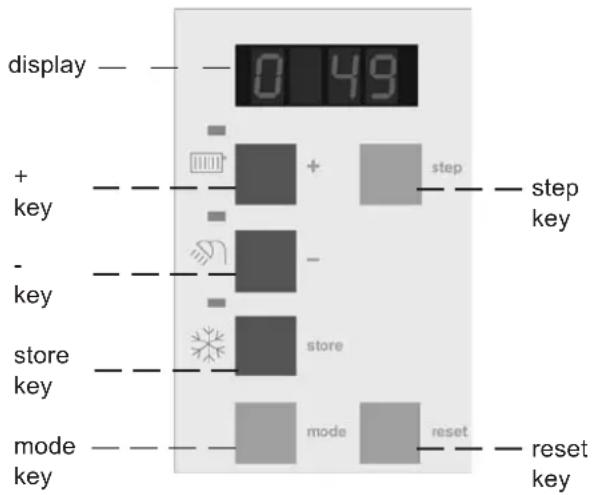
The casing of the boiler consists of metal and synthetic material which can be cleaned with a normal cleanser. At the left front side of the boiler is an opening door panel. You can already see a part of the control lights and the display through the dark transparent window. After opening the door, the control panel with the function keys is clearly visible. The control panel is provided with a number of push-buttons with corresponding lights. The meaning of these push-buttons is explained hereunder.

Program keys with indication lights

Press this key in order to turn on and off the central heating program. This program will become active when the ☐key is pushed and the indication light is illuminated. In this case the boiler will activate the burner when the room thermostat is calling for heat.

Press this key in order to turn on and off the hot water program. This function only works in the case of an boiler on which a hot water facility is connected. This programm will become active when the 🔍 key is pushed and the indication light is illuminated. In this case the boiler will activate the burner when the calorifier thermostat is calling for heat.

Press this key in order to let the circulation pump circulate according to the automatic switch program or continually via the central heating installation. The circulation pump will circulate continually via the central heating installation when the key ✿ is pushed and the indication light is illuminated. In most situations the program can stay on automatic, so that the circulation pump starts functioning as desired for central heating or hot water. If an outside sensor is connected to the unit the pump will start automatically in case of a low outside temperature in order to reduce the chance of freezing.
At severe frost:
It is possible when there is no outside sensor connected, to choose manually to let the circulation pump circulate continually to reduce the chance of freezing in the case when there are pipes (garage, attic or other cold spaces / rooms) which are sensitive to frost.
Operating instructions S-HR series page 4
The boiler display
The reading of the boiler display can be done in two ways.
The [reading]
During this reading the display will only show what is necessary. Under normal circumstances the display will give a food reading and if a fault is established this will be reflected with the E for error and a certain number code.
Choosing a technical or a Reading.
In order to switch from a 6000000000000000000000000000000000000000000000000000000000000
To return to the Food reading the step key should be pushed for 5 seconds again.

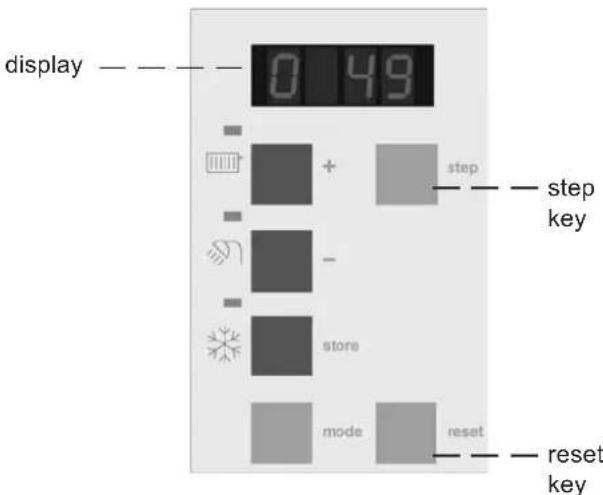
The technical reading 0 49
During this reading the display will show in which operating status the boiler is active. The technical reading 0.49 is being repeated every 2 seconds by the reading of the waterpressure P1.9.
The first figure of the technical reading 0.49 tes the status in which the boiler is active and the third and fourth figure indicate the water temperature of the boiler. In case of the reading P1.9 the character P stands for pressure which represents the waterpressure. The third and fourth figure indicate the water-pressure in bar. When a fault occurs it will be shown by the E of Error with a number code.
The Reset key
The control panel is provided with a reset key. When a fault occurs it will be shown by the flashing E of Error with a number code after which the boiler is shut down. After pressing the reset key you can try to start the boiler again. If the defect keeps returning contact your installer.
Adjusting the flow water temperature
For the user who has chosen the technical reading according to page 5 you can easily adjust the flow water temperature to his or her own wish. In order to adjust the flow water temperature the following actions have to be taken.
Push the mode key briefly. The display will show the text PARR which means that in this chapter adjustments can be made. Then push the step key. The display will now show 185 The first figure indicates which adjustment is being shown and the third and the fourth figure shows the value of this adjustment. The standard adjustment is 85°C flow water temperature. By means of the + or - key this value can be changed. This changed value has to be stored by means of the store key. If after this, the mode key is pushed briefly the technical reading 049 is shown again.
The flow water temperature that has been adjusted only applies to the central heating and is independent of the hot water facility for the calorifier.
Adjusting the type of installation
The boiler is designed in such a way that it will adjust itself automatically to what is necessary for a normal heating system. In some cases the installation may have convectors or complete underfloor heating. One can easily choose for the type of heating installation adjustments that belong to the system such as maximum water-flow temperature or for the warming up of the installation after a night period.
In order to be able to adjust this, one needs to push the step key again after the adjustment of the maximum water-flow temperature is showing the reading 1 85. After this the display will show the reading 2 01. This means that in this case adjustment 1 is active, and that, for this installation type 1 has been chosen.
Described below is which installation type can be chosen. By means of the + or the - key the desired installation type can be chosen.
The choice has to be confirmed with the store key after which one can return by means of the mode key to the Good reading or the technical reading 0.49
When a type of installation has been chosen with a low water-flow temperature it is possible that in case of a severe winter period the temperature of the heating system will need to be increased slightly. In such situations the installation choice may need to be changed, so that a higher flow temperature can be chosen.
| noitallatsnleclohc | metsysgnitaehlartnecfoepyt | retaeru | |
| 1 | radiators and air heating convectors | 85°C | |
| 2 | radiators with large surface areas or underfloor heating | 70°C | |
| 3 | underfloor heating with radiators for extra heating | 60°C | |
| 4 | complete underfloor heating | 50°C | |
More adjustments are defined in the installation instructions.
Operating instructions S-HR series page 6
Replenishing or complete filling up of the installation
The installation functions at an optimum water pressure of between 1 and 2 bar. If the step key is pushed briefly, the water pressure can be shown. After this the waterpressure P1.9 is shown. When the step key is pushed again briefly one will return to the Good 0.49 reading. When the water pressure drops below 1 bar the display will automatically show the text FILL. This FILL text is being interchanged with the normal display reading Good. The Brain thermostat will show the text "Waterpressure too low - no disorder - fill water". Through out this the boiler will only function at a reduced output. When the water pressure is sufficiently high again (above 1,5 bar) the FILL text will disappear and the boiler will return to the normal act. If the water pressure drops further and comes below 0,7 bar the display will show a flashing FILL text. The Brain thermostat will show the text "Waterpressure too low - disorder - fill water". After this the boiler is switched off and will only function again when the waterpressure comes above 1,5 bar.
Turning the boiler off
Holiday period:
Adjust the Brain thermostat to the holiday period. See the thermostat manual for this operation. When there is no Brain thermostat present the room thermostat or the regulation on the night temperature can be adjusted and the hot water facility can be switched off by means of the program key on the control panel.
Activities: Switch off the three program keys
When these are activated. When the boiler is being drained
one should take into account that a part of the heating water will stay in the boiler. When the situation of frost danger arises one should take care that the remaining central heating water in the boiler will not freeze.
Operating instructions S-HR series page 7
The company reserves the right to change the specifications and dimensions without prior notice.
E. & O. E.


ATAG Heating UK Ltd. • Unit 3 • Beaver Trade Park • Quarry Lane Chichester West Sussex PO19 8NY Phone: 01243 815 770 • Fax 01243 839 596 • E-mail: info@atagcommercial.co.uk • Internet: www.atagcommercial.co.uk
- CONTENTS
- INTRODUCTION
- DESCRIPTION OF THE BOILER
- THE BOILER
- PROGRAM KEYS WITH INDICATION LIGHTS
- AT SEVERE FROST
- THE BOILER DISPLAY
- THE [READING]
- CHOOSING A TECHNICAL OR A READING
- THE TECHNICAL READING 0 49
- THE RESET KEY
- ADJUSTING THE FLOW WATER TEMPERATURE
- ADJUSTING THE TYPE OF INSTALLATION
- REPLENISHING OR COMPLETE FILLING UP OF THE INSTALLATION
- TURNING THE BOILER OFF
- HOLIDAY PERIOD
Brand : Atag
Model : Blauwe Engel II 8A52200X
Category : Boiler