Need for Speed Carbon (Xbox 360) - Video game EA - Free user manual and instructions
Find the device manual for free Need for Speed Carbon (Xbox 360) EA in PDF.


| Product Type | Video Game |
| Platform | Xbox 360 |
| Genre | Racing, Action |
| Developer | EA Black Box |
| Publisher | Electronic Arts |
| Release Year | 2006 |
| Game Modes | Single-player, Multiplayer (split-screen), Online (Xbox Live) |
| Maximum Players | Up to 20 (Race Wars) |
| Manual Languages | English |
| Manual Pages | 6 |
| Online Features | Xbox Live multiplayer, marketplace, leaderboards |
| Storage | Xbox 360 Hard Drive or Memory Unit (autosave or manual) |
| Controller Support | Xbox 360 Controller (default configurable) |
| Safety Warnings | Photosensitive seizures risk; stop and consult doctor if symptoms occur |
| Warranty | 90 days for defective recording medium or manual |
Frequently Asked Questions - Need for Speed Carbon (Xbox 360) EA
User questions about Need for Speed Carbon (Xbox 360) EA
0 question about this device. Answer the ones you know or ask your own.
Ask a new question about this device
Download the instructions for your Video game in PDF format for free! Find your manual Need for Speed Carbon (Xbox 360) - EA and take your electronic device back in hand. On this page are published all the documents necessary for the use of your device. Need for Speed Carbon (Xbox 360) by EA.
USER MANUAL Need for Speed Carbon (Xbox 360) EA


WARNING
Before playing this game, read the Xbox 360 Instruction Manual and any peripheral manuals for important safety and health information. Keep all manuals for future reference. For replacement manuals, see www.xbox.com/support or call Xbox Customer Support (see inside of back cover).
Important Health Warning About Playing Video Games
Photosensitive Seizures
A very small percentage of people may experience a seizure when exposed to certain visual images, including fl ashing lights or patterns that may appear in video games. Even people who have no history of seizures or epilepsy may have an undiagnosed condition that can cause these "photosensitive epileptic seizures" while watching video games.
These seizures may have a variety of symptoms, including lightheadedness, altered vision, eye or face twitching, jerking or shaking of arms or legs, disorientation, confusion, or momentary loss of awareness. Seizures may also cause loss of consciousness or convulsions that can lead to injury from falling down or striking nearby objects.
Immediately stop playing and consult a doctor if you experience any of these symptoms. Parents should watch for or ask their children about the above symptoms—children and teenagers are more likely than adults to experience these seizures. The risk of photosensitive epileptic seizures may be reduced by taking the following precautions:
- Sit farther from the television screen.
- Use a smaller television screen.
- Play in a well-lit room.
- Do not play when you are drowsy or fatigued.
If you or any of your relatives have a history of seizures or epilepsy, consult a doctor before playing
COMPLETE CONTROLS
The controls listed below are the default configuration. Change your controller configuration in the Controls section of the Options menu.
GENERAL GAMEPLAY
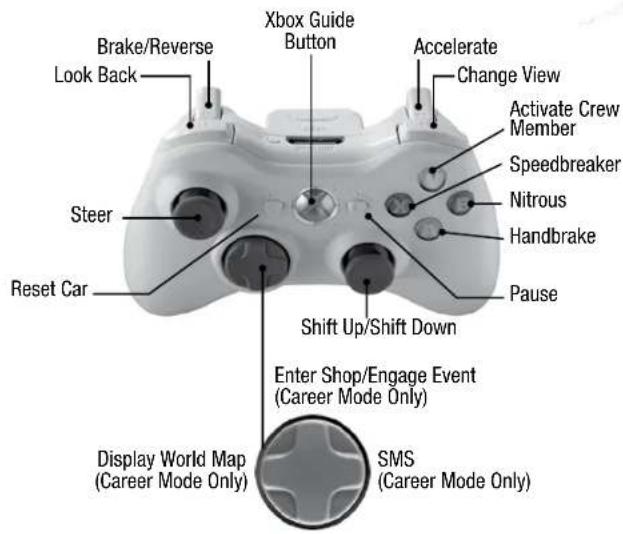
NOTE: Default options are listed in bold type.
Check out EA online at www.ea.com.
PLAYING THE GAME
Jump into the action with a Quick Race, take over the city in Career mode, or earn medals in the Challenge Series. What are you waiting for? Get moving!
MY ALIAS
You are prompted to create an Alias before you can begin your career or save any changes. Your game progress is automatically saved to your Alias, once you create it.
MAIN MENU
Career See p. 5.
My Cars Add cars to your garage and customize them with visual and performance upgrades you've unlocked. Visit Xbox Live marketplace to download new cars and parts to use in Career mode and throughout the game. Upload a photo of your creation to NeedforSpeed.com and share it with the EA Nation.
Challenge Series See p. 6.
Quick Race Get right to business with a race that doesn't count toward your Career mode progress. Choose Xbox Live to find an online opponent. You can also race the current Xbox Live leader on virtually any track by selecting CURRENT LEADER'S SHADOW from the Shadow option
Quick Match The fastest way to jump right into a race against live opponents via Xbox Live.
Custom Match Set up an Xbox Live race with your preferred settings and seek others with similar preferences.
Reward Cards Accumulate Reward Cards by achieving the in-game and Xbox Live accomplishments described on-screen. Each icon is composed of four achievements that you must complete to obtain the reward.
Statistics Keep track of all your progress in the game and online including the best times in each race course and your cumulative Pursuit stats.
Options Personalize your options including audio, video, gameplay, and Xbox Live settings. You can also access the Options menu by pausing the game.


SAVING AND LOADING
The game automatically saves and loads your progress to your Xbox 360 Hard Drive or Xbox 360 Memory Unit. You can turn Autosave off in the Gameplay section of the Options menu. You can also manually save your game at any point by selecting SAVE in the Career Main Menu.
HBOX LIVE®
Play anyone and everyone, anytime, anywhere on Xbox Live. Build your profile (your gamer card). Chat with your friends. Download content at Xbox Live Marketplace. Send and receive voice and video messages. Get connected and join the revolution.
REGISTRATION AND SUBSCRIPTION REQUIRED TO ACCESS ONLINE FEATURES. EA TERMS & CONDITIONS AND FEATURE UPDATES ARE FOUND AT WWW.EA.COM. INTERNET CONNECTION REQUIRED. YOU MUST BE 13+ TO REGISTER ONLINE. EA MAY RETIRE ONLINE FEATURES AFTER 30 DAYS NOTICE POSTED ON WWW.EA.COM.
CONNECTING
Before you can use Xbox Live, connect your Xbox console to a high-speed Internet connection and sign up to become an Xbox Live member. For more information about connecting, and to determine whether Xbox Live is available in your region, go to www.xbox.com/live.
FAMILY SETTINGS
These easy and flexible tools enable parents and caregivers to decide which games young game players can access based on the content rating. For more information, go to www.xbox.com/familysettings.
PLAYING ONLINE
Link your Gamertag to your EA Online Account at NeedforSpeed.com to benefit from rapid sign-in and the display of all your accomplishments, car photos, and stats on EA Nation.
All you have to do to enter an Xbox Live match is set up a Quick Race or Challenge Series event, and then select the Xbox Live option. Some events like Pursuit Tag and Pursuit Knockout are only available on Xbox Live. See Challenge Series on p. 6 for more details.
ONLINE XP
Any time you play an Xbox Live game you earn Online XP points towards your next level-up! The higher you rank in Online races, the more points you earn. As your Online XP level increases, exclusive cars and customization parts are unlocked.
ONLINE RACE MODES
Pursuit Tag
One driver is the racer and everyone else is a cop in this timed mode. The racer must try to elude the police for as long as possible to win. To become the racer, you must bust the current racer first.
Pursuit Knockout
The last driver to finish each lap returns as a cop and must slow the progress of the remaining racers. As a cop you earn points for making contact with any of the remaining cars.
CAREER MODE
In an all-out war for the city, you and your crew must risk everything to take over rival neighborhoods one block at a time. As the police turn up the heat, the battle ultimately shifts to Carbon Canyon, where territories and reputations can be lost on every perilous curve.
CAR CLASSES
Muscle. Exotic. Tuner. Which class will you represent? Each has strengths and weaknesses. For example, Tuners dominate in the turns, while Exotics put your speedometer to the test. Choose a class then decide between an Automatic or Manual transmission to begin your quest for urban domination.
YOUR CREW
Fortunately, you don't have to do all the work on your own. You've got a crew to back you up. In most events, you can take wingmen with you and use them to help you win races.
RECRUITING CREW MEMBERS
After you defeat a rival crew boss or on certain other occasions, rival crews may offer to join your crew. Select MY CREW in the Safe House to review all your crew management options. Here you are able to read bios for each crew member and see what kind of skills and bonuses they would add to your crew if you hire them.
ROLES
The three types of wingmen—Blockers, Drafters, and Scouts—each have unique roles to help you win races. Blockers get in the way of other drivers to slow them down and throw them off their lines. Drafters give you a second of speed boost for every second you stay behind them. Scouts show you alternate paths around and through the race course.
SKILLS
Your crew members may also have certain skills to help you out along the way. Fixers prevent your heat level from increasing and give you a little extra cash when you win races. Mechanics provide discounts on performance parts and give you a nitrous or Speedbreaker boost in races. Fabricators allow you to unlock certain Autosculpt™ parts in the Customization menu and let you buy certain visual parts at a discount.
SAFE HOUSE MENU
World Map Use the map to enter races and review how much territory you own. Each territory is owned by a rival crew, and has a target number of races you need to win before you unlock events against the crew boss. You need to beat the boss to take control of the territory.
Free Roam Cruise around the city, enter races, outrun the cops, or accept a rival crew challenge in an open-world race.
Customization Cash in your winnings to upgrade your cars with standard parts or use your imagination to create the car of your dreams with Autosculpt. Once you've picked out your parts, select SHOPPING CART to purchase and install them on your vehicle. Visit Xbox Live marketplace to download new cars and parts to use in Career Mode and throughout the game.
Car Select Choose any car you own for your next race. You can also sell your cars for cash here.
Crew Hire and fire crew members, watch their bio videos, and view their cars. You can also personalize your crew logo.
CHALLENGE SERIES
Get behind the wheel and test your skills or see how you stack up against other drivers online. Work your way up to the Gold Medal events by taking home the Bronze and Silver medals. Beat the Gold events to unlock car parts and vinyls to use in your Career and Online. Circuit, Sprint, and Speedtrap events can be played in Co-op mode on Xbox Live or split-screen.
Canyon Duel
Go head to head against a single opponent down a perilous canyon road. Keep on eye on the Duel meter in the upper right of your screen. If you fall behind for too long, you automatically lose.
Canyon Race Take on three other drivers in a race to the bottom of a canyon.
Checkpoint Reach certain checkpoints on the track before time expires to earn bonus time to finish the event.
Canyon Checkpoint This is just like a regular Checkpoint event, only with the added dangers of the canyon.
Canyon Drift Reach a target score to win this event. Earn points by drifting around corners—the longer the drift and the faster your speed, the more points you earn. Earn multipliers by maintaining a clean run and not hitting the walls.
Pursuit Evasion Evade the police for the specified amount of time to earn a medal. The meter in the upper right of your screen shows how close you are to either getting busted or evading the pursuit, as well as how many cars are hunting you down. If you fill the evasion meter, you earn a cooldown period—the pursuit is over when the cooldown meter is full. However, if you are spotted again before the cooldown meter fills, the pursuit resumes.
Trade Paint Avoid being busted by the police and take some of them out while you're at it. Ram into their cars to disable them.
Circuit Race on traditional lap-based courses with barriers to help keep you on track.
Sprint Drive as fast as you can in a point-to-point race.
Drift Like the Canyon Drift, you need to reach a certain score to earn your medal by drifting around corners. You earn multipliers for linking drifts around multiple corners.
Speedtrap Race through a number of speedtraps in a point-to-point race. The driver with the highest cumulative speed at the end of the race is the winner.
Race Wars It's you against nineteen other drivers in a three-lap race.

WARRANTY INFORMATION
If the defect in the Recording Medium or Manual resulted from abuse, mistreatment or neglect, or if the Recording Medium or Manual is found to be defective after 90 days from the date of purchase, choose one of the following options to receive our replacement instructions:
Online: http://warrantyinfo.ea.com
Automated Warranty Information: You can contact our automated phone system 24 hours a day for any and all warranty questions:
US 1 (650) 628-1900
EA WARRANTY MAILING ADDRESS
Electronic Arts Customer Warranty
P.O. Box 9025
Redwood City, CA 94063-9025
Package Cover Illustration: Kevin Marburg; Jamie Clark; Petrol
© 2006 Electronic Arts, EA, the EA logo, Need for Speed and Autosculpt are trademarks or registered of Electronic Arts Inc. in the U.S. and/or other countries. All Rights Reserved. Aston Martin, DB9 and the Aston Martin logo are trademarks owned and licensed by Aston Martin Lagonda © 2006 Aston Martin Lagonda. Trademarks, design patents and copyrights are used with the approval of the owner AUDI AG. The BMW logo, wordmark and model designations are trademarks of BMW AG and are used under license. DaimlerChrysler, Three Pointed Star in a Ring and Three Pointed Star in a Laurel Wreath and Mercedes-Benz are Trademarks of and licensed courtesy of DaimlerChrysler AG and are used under license to Electronic Arts. Chrysler *, Plymouth *, Hemi* and related logos, vehicle model names and trade dresses are trademarks of DaimlerChrysler Corporation and are used under license. ©DaimlerChrysler Corporation 2006. Dodge and HEMI are trademarks of DaimlerChrysler Corporation. Dodge Viper SRT-10, Dodge Challenger Concept, Dodge Challenger, Dodge Charger SRT8, Dodge Charger R/T, Dodge HEMI and their trade dress are used under license by Electronic Arts. © DaimlerChrysler Corporation 2006. Alfa Romeo is a registered trademark owned by Fiat Auto S.p.A. Under license from Fiat Auto S.p.A. Ford Oval and nameplates are registered trademarks owned and licensed by Ford Motor Company, Shelby & GT-500* are registered trademarks and intellectual property of Carroll Shelby and Carroll Shelby Licensing Inc. and are used under license. Jaguar, XK and the Leaper Device are trademarks owned and licensed by Jaguar Cars Limited © 2006 Jaguar Cars Limited. General Motors Trademarks used under license to Electronic Arts. The trademarks Lamborghini, Gallardo, Murciélago and all associated logos are used under license of Lamborghini ArtiMarca S.p.A., Italy. Elise, Europa S, Lotus and Lotus Round Device are registered trade marks of Group Lotus plc. Mazda, Mazdaspeed, RX-8, RX-7, Mazdaspeed3 and all other associated marks, emblems and designs are used under approval of Mazda Motor Corporation. The McLaren name and logo are trademarks of McLaren Group Limited. Mitsubishi, Eclipse, and Lancer Evolution names, emblems and body designs are trademarks and/or intellectual property rights of MITSUBISHI MOTORS CORPORATION and used under license to Electronic Arts Inc. "NISSAN" and the names, logos, marks and designs of the NISSAN products are trademarks and/or intellectual property rights of NISSAN MOTOR CO., LTD. and used under license to Electronic Arts Inc. Pagani, Zonda F and designs are trademarks and/or other intellectual property of Pagani Automobili and are used under license to Electronic Arts. Porsche, the Porsche crest, 911, Carrera are registered trademarks of Dr. Ing. h.c. F. Porsche AG. Licensed under certain patents. RENAULT Official License Products are vehicle models and trademarks protected by intellectual property laws. Used with permission from RENAULT. All rights reserved. SUBARU trademarks and body designs are properties of FUJI HEAVY INDUSTRIES, LTD. and used under license to ELECTRONIC ARTS INC. Trademarks, design patents and copyrights are used with the permission of the owner VOLKSWAGEN AG. Toyota, Lexus, Supra, Corolla, MR2, Altezza, Sprinter TRUENO, IS300 and associated symbols, emblems and designs are intellectual property of Toyota Motor Corporation and used with permission.
The names and logos of all after market car part companies are trademarks of their respective owners and are used by permission. Koenigsegg CCX names, emblems & body designs are trademark and/or intellectual property rights of Koenigsegg Automotive AB and used under license to EA. Vauxhall, Monaro, all related Emblems, and vehicle model body design are Vauxhall Motor Company Limited Trademarks used under license to Electronic Arts Inc. CASTROL, SYNTEC, UNLOCK THE POWER, GTX, MAXIMUM PROTECTION AGAINST SLUDGE BUILD UP and SYNTEC BLEND are trademarks of Castrol Ltd. Cooper and the Cooper Tires logo are trademarks of Cooper Tire & Rubber Company.
© 2006 Progressive Direct Insurance Company. All rights reserved. RenderWare is a trademark or registered trademark of Criterions Software Ltd. Portions of this software are Copyright 1998-2006 Criterion Software Ltd. and its Licensors. DTS interactive technology licensed by Digital Theater Systems, Inc. All other trademarks are the property of their respective owners. EA "Is an Electronic Arts" brand. Microsoft, Xbox, Xbox 360, Xbox Live, the Xbox logos, and the Xbox Live logo are either registered trademarks or trademarks of Microsoft Corporation in the U.S. and/or in other countries.
This product contains software technology licensed from On2 Technologies, Inc. On2 technology © 2003 On2 Technologies, Inc. All rights reserved.
- WARNING
- IMPORTANT HEALTH WARNING ABOUT PLAYING VIDEO GAMES
- PHOTOSENSITIVE SEIZURES
- COMPLETE CONTROLS
- PLAYING THE GAME
- MY ALIAS
- MAIN MENU
- SAVING AND LOADING
- HBOX LIVE®
- CONNECTING
- FAMILY SETTINGS
- PLAYING ONLINE
- ONLINE XP
- ONLINE RACE MODES
- CAREER MODE
- CAR CLASSES
- YOUR CREW
- RECRUITING CREW MEMBERS
- ROLES
- SKILLS
- SAFE HOUSE MENU
- CHALLENGE SERIES
- CANYON DUEL
- WARRANTY INFORMATION
- EA WARRANTY MAILING ADDRESS
Brand : EA
Model : Need for Speed Carbon (Xbox 360)
Category : Video game