
SA-65 - Keyboard CASIO - Free user manual and instructions
Find the device manual for free SA-65 CASIO in PDF.


| Product Type | Keyboard |
| Brand | Casio |
| Model | SA-65 |
| Keyboard Size | 37 keys, 3 octaves (mini-size) |
| Polyphony | 4 notes maximum |
| Built-in Tones | 100 |
| Rhythm Patterns | 30 (RHYTHM, FREE SESSION, FUNNY) |
| Song Bank Tunes | 10 (with melody off function) |
| Tuning | Fixed, A4 = approx. 442 Hz |
| Speakers | Two 8.0 cm, output 0.5W + 0.5W |
| Display | LCD with staff notation, note/beat indicators |
| Power Supply | Five AA-size batteries or AC adaptor (AD-1, 7.5V DC) |
| Battery Life | Approximately 6 hours (R6P/SUM-3 manganese) |
| Power Consumption | 7.5V, 2.3W |
| Dimensions (W x D x H) | 65.0 x 21.1 x 7.4 cm (25 5/8 x 8 5/16 x 2 15/16 in) |
| Weight | Approximately 1.6 kg (3.53 lbs) without batteries |
| Cleaning Instructions | Wipe with soft cloth dampened in mild detergent solution; avoid solvents |
| Safety Precautions | Use only specified AC adaptor; avoid water, high heat, disassembly |
| Spare Parts / Repairability | Only use CASIO AD-1 adaptor; contact authorized service for repairs |
Frequently Asked Questions - SA-65 CASIO
User questions about SA-65 CASIO
0 question about this device. Answer the ones you know or ask your own.
Ask a new question about this device
Download the instructions for your Keyboard in PDF format for free! Find your manual SA-65 - CASIO and take your electronic device back in hand. On this page are published all the documents necessary for the use of your device. SA-65 by CASIO.
USER MANUAL SA-65 CASIO
Be sure to read this User's Guide and keep it on hand for future reference. Parents or guardians should make sure that young children using this instrument are familiar with the contents of this User's Guide.
GUIDELINES LAID DOWN BY FCC RULES FOR USE OF THE UNIT IN THE U.S.A. (not applicable to other areas)
NOTICE
This equipment has been tested and found to comply with the limits for a Class B digital device, pursuant to Part 15 of the FCC Rules. These limits are designed to provide reasonable protection against harmful interference in a residential installation. This equipment generates, uses and can radiate radio frequency energy and, if not installed and used in accordance with the instructions, may cause harmful interference to radio communications. However, there is no guarantee that interference will not occur in a particular installation. If this equipment does cause harmful interference to radio or television reception, which can be determined by turning the equipment off and on, the user is encouraged to try to correct the interference by one or more of the following measures:
- Reorient or relocate the receiving antenna.
- Increase the separation between the equipment and receiver.
- Connect the equipment into an outlet on a circuit different from that to which the receiver is connected
- Consult the dealer or an experienced radio/TV technician for help.
FCC WARNING
Changes or modifications not expressly approved by the party responsible for compliance could void the user's authority to operate the equipment.
Important Information for Parents!
Parents should please note the following important information before letting children use this product.
- Before using the optional AD-1 Adaptor to power the unit, be sure to check the AC Adaptor for any damage first. Carefully check the power cord for breakage, cuts, exposed wire and other serious damage. Never let children use an AC adaptor that is seriously damaged.
- Never attempt to recharge batteries.
- Do not use rechargeable batteries.
- Never mix batteries of different types.
- Never mix old batteries with new ones.
- Use only the batteries recommended in this manual or equivalent batteries.
- Always make sure that positive (+) and negative (−) poles are facing correctly as indicated near the battery compartment.
- Remove batteries as soon as they show any sign of going dead.
- Do not short-circuit the battery terminals.
• The product is not intended for children under 3 years. - Use only CASIO AD-1 adaptor.
• The AC adaptor is not a toy. - Be sure to disconnect the AC adaptor before cleaning the product.

CE
CASIO ELECTRONICS CO., LTD.
Unit 6, 1000
North Circular Road
London NW2 7JD, U.K.
This mark is valid in the EU countries only.
Please keep all information for future reference.
E-2
D


Low Batteries
Any of the symptoms listed below can indicate that battery power is too low. Replace batteries
as soon as possible whenever you experience any of the following.
• Dim power indicator
- Low sound volume
• Distorted sound
- Loss of output when playing at loud volume
- Sudden power loss when playing at loud volume
- Sudden output of sound when no keyboard key is pressed
• Output of a tone different from the one that is selected
• Incorrect play of patterns or built-in tunes
- Sudden loss of sound output
- Dim display figures
- Dimming of display figures when playing at loud volume
Features
□100 built-in tones
□30 built-in rhythm patterns
□10 built-in Song Bank tunes
□Play along with Song Bank tune accompaniments
☐Tempo and beat display indicators, plus staff notation of notes played
Contents
Safety Precautions E-4
Care of your keyboard E-7
Power Supply ...... E-8
Battery Power E-8
AC Power E-9
General Guide..... E-10
Display Indicators.... E-12
Playing Patterns E-13
Using the Song Bank E-14
To listen to a Song Bank tune ...... E-14
To play along with a Song Bank tune E-15
Troubleshooting E-16
Specifications E-16 _E-3
Safety Precautions
Symbols
Various symbols are used in this user's guide and on the product itself to ensure that the product is used safely and correctly, and to prevent injury to the user and other persons as well as damage to property. Those symbols along with their meanings are shown below.

DANGER
This symbol indicates information that, if ignored or applied incorrectly, creates the danger of death or serious personal injury.

WARNING
This indication stipulates matters that have the risk of causing death or serious injury if the product is operated incorrectly while ignoring this indication.

CAUTION
This indication stipulates matters that have the risk of causing injury as well as matters for which there is the likelihood of occurrence of physical damage only if the product is operated incorrectly while ignoring this indication.
Symbol Examples

This triangle symbol ( means that the user should be careful. (The example at left indicates electrical shock caution.)

This circle with a line through it ( ) means that the indicated action must not be performed. Indications within or nearby this symbol are specifically prohibited. (The example at left indicates that disassembly is prohibited.)

The black dot (●means that the indicated action must be performed. Indications within this symbol are actions that are specifically instructed to be performed. (The example at left indicates that the power plug must be unplugged from the electrical socket.)

DANGER
Alkaline Batteries
Perform the following steps im- mediately if fluid leaking from alkaline batteries ever gets into your eyes.
- Do not rub your eyes! Rinse them with water.
- Contact your physician immediately.
Leaving alkaline battery fluid in your eyes can lead to loss of sight.

WARNING

Smoke, Strange Odor, Overheating
Continued use of the product while it is emitting smoke, a strange odor, or heat creates the risk of fire and electric shock. Take the following steps immediately.
- Turn off power.
- If you are using the AC adaptor for power, unplug it from the wall outlet.
- Contact your original retailer or an authorized CASIO Service Provider.
AC Adaptor
Misuse of the AC adaptor creates the risk of fire and electric shock. Always make sure you observe the following precautions.
- Be sure to use only the AC adaptor that is specified for this product.
- Use only a power source whose voltage is the within the rating marked on the AC adaptor.
- Do not overload electrical outlets and extension cords.
AC Adaptor
Misuse of the AC adaptor's electric cord can damage or break it, creating the risk of fire and electric shock. Always make sure you observe the following precautions.
- Never place heavy objects on the cord or subject it to heat.
- Never try to modify the cord or subject it to excessive bending.
- Never twist or stretch the cord.
- Should the electric cord or plug become damaged, contact your original retailer or authorized CASIO Service Provider.
AC Adaptor
Never touch the AC adapter while your hands are wet. Doing so creates the risk of electric shock.
Batteries
Misuse of batteries can cause them to leak, resulting in damage to nearby objects, or to explode, creating the risk of fire and personal injury. Always make sure you observe the following precautions.
- Never try to take batteries apart or allow them to become shorted.
- Never expose batteries to heat or dispose of them by incineration.


- Never mix old batteries with new ones.
- Never mix batteries of different types.
- Do not charge the batteries.
- Make sure the positive (+) and negative (−) ends of the batteries are facing correctly.
Do not incinerate the product. Never throw the product into fire. Doing so can cause it to explode, creating the risk of fire and personal injury.
Water and Foreign Matter
Water, other liquids, and foreign matter (such as pieces of metal) getting into the product create the risk of fire and electric shock. Take the following steps immediately.
- Turn off power.
- If you are using the AC adaptor for power, unplug it from the wall outlet.
- Contact your original retailer or an authorized CASIO Service Provider.
Disassembly and Modification Never try to take this product apart or modify it in any way. Doing so creates the risk of electric shock, burn injury, or other personal injury. Leave all internal inspection, adjustment, and maintenance up to your original retailer or authorized CASIO Service Provider.
Dropping and Impact
Continued use of this product after it has been damaged by dropping or subjecting it to strong impact creates the risk of fire and electric shock. Take the following steps immediately.


[Non-Text]
- Turn off power.
- If you are using the AC adaptor for power, unplug it from the wall outlet.
- Contact your original retailer or an authorized CASIO Service Provider.
![CASIO SA-65 - [Non-Text] - 1](/content/2026/06/1239006/images/36d5c7467ee68bd25c8e9e190e96fc6657c821ac556e90345989648cea8b4a63.jpg)
Plastic Bags
Never place the plastic bag the product comes in over your head or in your mouth. Doing so creates the risk of suffocation. Particular care concerning this precaution is required where small children are present.

Location
Avoid locating the product on an unstable stand, on an uneven surface, or any other unstable location. An unstable location can cause the product to fall over, creating the risk of personal injury.

AC Adaptor
Misuse of the AC adaptor creates the risk of fire and electric shock. Always make sure you observe the following precautions.
- Do not locate the electric cord near a stove or other sources of heat.
- Never pull on the cord when unplugging from the electrical outlet. Always grasp the AC adaptor when unplugging.

AC Adaptor
Misuse of the AC adaptor creates the risk of fire and electric shock. Always make sure you observe the following precautions.
- Insert the AC adaptor into the wall outlet as far as it will go.
- Unplug the AC adaptor from the wall outlet during lightening storms or before leaving on a trip or other long-term absence.
- At least once a year, unplug the AC Adaptor from the wall outlet and wipe away any dust that is built up in the area around the prongs of the plug.

Relocating the Product
Before relocating the product, always unplug the AC adaptor from the wall outlet. Leaving the AC adaptor plugged in creates the risk of damage to the power cord, fire, and electric shock.

Cleaning
Before cleaning the product, always unplug the AC adaptor from the wall outlet first. Leaving the AC adaptor plugged in creates the risk of damage to the AC adaptor, fire, and electric shock.

Batteries
Misuse of batteries can cause them to leak resulting in damage to nearby objects, or to explode, creating the risk of fire and personal injury. Always make sure you observe the following precautions.
- Use only batteries that are specified for use with this product.
- Remove batteries from the product if you do not plan to use it for a long time.

Location
Avoid the following locations for this product. Such locations create the risk of fire and electric shock.
- Areas subject to high humidity or large amounts of dust
• In food preparation areas or other areas subject to oil smoke - Near air conditioning equipment, on a heated carpet, in areas exposed to direct sunlight, inside of a vehicle parked in the sun, or any other area that subjects the product to high temperatures

Display Screen
- Never push on the display screen's LCD panel or subject it to strong impact. Doing so can cause the LCD panel's glass to crack, creating the risk of personal injury.

- Should the LCD panel ever crack or break, never touch the liquid inside of the panel. LCD panel liquid can cause skin irritation.
- Should LCD panel liquid ever get inside your mouth, immediately wash out your mouth with water and contact your physician.
- Should LCD panel liquid ever get into your eyes or onto your skin, rinse with clear water for at least 15 minutes, and then contact a physician.
Sound Volume
Do not listen to music at very loud volumes for long periods. High volume settings can damage your hearing.

Care of your keyboard
Avoid heat, humidity or direct sunlight.
Do not overexpose the instrument to direct sunlight, or place it near an air conditioner, or in any extremely hot place.
Do not use near a TV or radio.
This instrument can cause video or audio interference with TV and radio reception. If this happens, move the instrument away from the TV or radio.
Do not use lacquer, thinner or similar chemicals for cleaning.
Clean the keyboard with a soft cloth dampened in a weak solution of water and a neutral detergent. Soak the cloth in the solution and squeeze until it is almost dry.
Avoid use in areas subjected to temperature extremes.
Extremely high or low temperature can cause figures on the LCD screen to become dim and difficult to read. This condition should correct itself when the keyboard is brought back to normal temperature.
NOTE
You may notice lines in the finish of the case of this keyboard. These lines are a result of the molding process used to shape the plastic of the case. They are not cracks or breaks in the plastic, and are no cause for concern.
D
E-7
Power Supply
The two-way power supply of this keyboard lets you use either batteries or household AC power. Always be sure to turn off power whenever you are not using the keyboard.
Battery Power
Be sure to turn keyboard power off before loading batteries.
Battery Replacement
- Remove the battery compartment cover.
- Load five AA-size batteries, making sure their (+) and (−) ends are facing correctly as shown below.
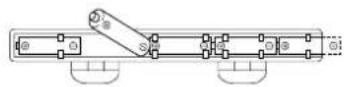
- Insert the tabs of the battery compartment cover into their holes, and then close the cover.
- Loading batteries while power is turned on will cause the keyboard to malfunction. If this happens, turn power off and then back on again.
Battery Life
Approximately six hours with R6P (SUM-3) manganese batteries (normal temperature and optimum volume setting). Note that battery life can be shortened by playing at high volume or by very cold temperatures.
Any of the symptoms listed below can indicate that battery power is too low. Replace batteries as soon as possible whenever you experience any of the following.
- Dim power indicator
- Low sound volume
- Distorted sound
- Loss of output when playing at loud volume
- Sudden power loss when playing at loud volume
- Sudden output of sound when no keyboard key is pressed
- Output of a tone different from the one that is selected
- Incorrect play of patterns or built-in tunes
- Sudden loss of sound output
- Dim display figures
- Dimming of display figures when playing at loud volume




CAUTION!
Misuse of batteries can cause them to burst and leak fluid, creating the danger of personal injury, or damage to or discoloration of clothing, furniture, etc. Be sure to note the following important precautions whenever handling batteries.
- Make sure that the (+) and (−) ends of the batteries are facing as indicated by the markings on the keyboard.
- Be sure to remove batteries from the keyboard whenever you do not plan to use it for a long time, such as before going on a trip, etc.
- Never mix batteries of different types.
- Never mix old batteries with new ones.
- Never dispose of batteries by burning them. Never allow the (+) and (−) ends of batteries to become connected to each other, do not try to take batteries apart, and do not expose batteries to heat.
- Remove batteries from the keyboard immediately after they show signs of losing power.
- Never recharge batteries.
AC Power
Use only the AC adaptor model specified for this keyboard.
AC Adaptor Model: AD-1


WARNING!
• Take care to avoid damage to the power cord. Never place heavy objects on the cord and keep it away from heat. A damaged power cord creates the danger of fire and electrical shock.
- Use only the AC adaptor model specified for this keyboard. Use of any other AC adaptor model creates the danger of fire and electrical shock.

CAUTION!
• Always unplug the AC adaptor from the power outlet if you do not plan to use the keyboard for a long time, such as when leaving on a trip, etc.
- When not using the keyboard, turn off power and unplug the AC adaptor from the power outlet.
IMPORTANT!
- Be sure that keyboard power is turned off before connecting or disconnecting the AC adaptor to it.
- The AC adaptor may become warm to the touch after long-term use. This is normal and does not indicate malfunction.

natural_image
Color calibration bar and dot matrix (no text or symbols)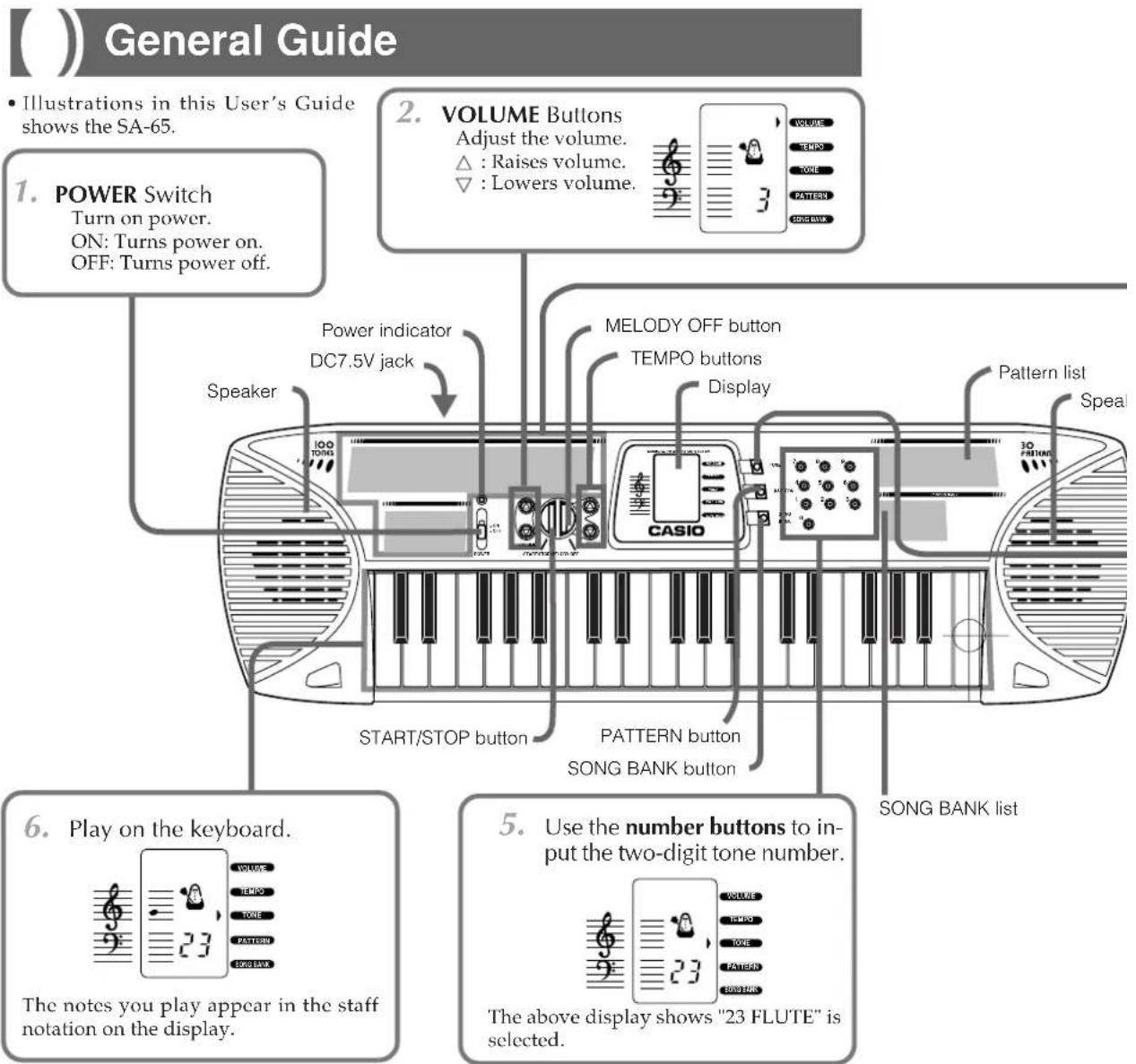
NOTES
- The tone "00 PIANO" is always selected whenever you turn on power.
• Volume can be set to a value from 1 to 5. The volume level is always set to 5 whenever you turn on power. - Whenever you first press either the or VOLUME button the current setting value appears on the display. Press one of the buttons while the current setting is displayed to actually change the volume setting.
E-10
D
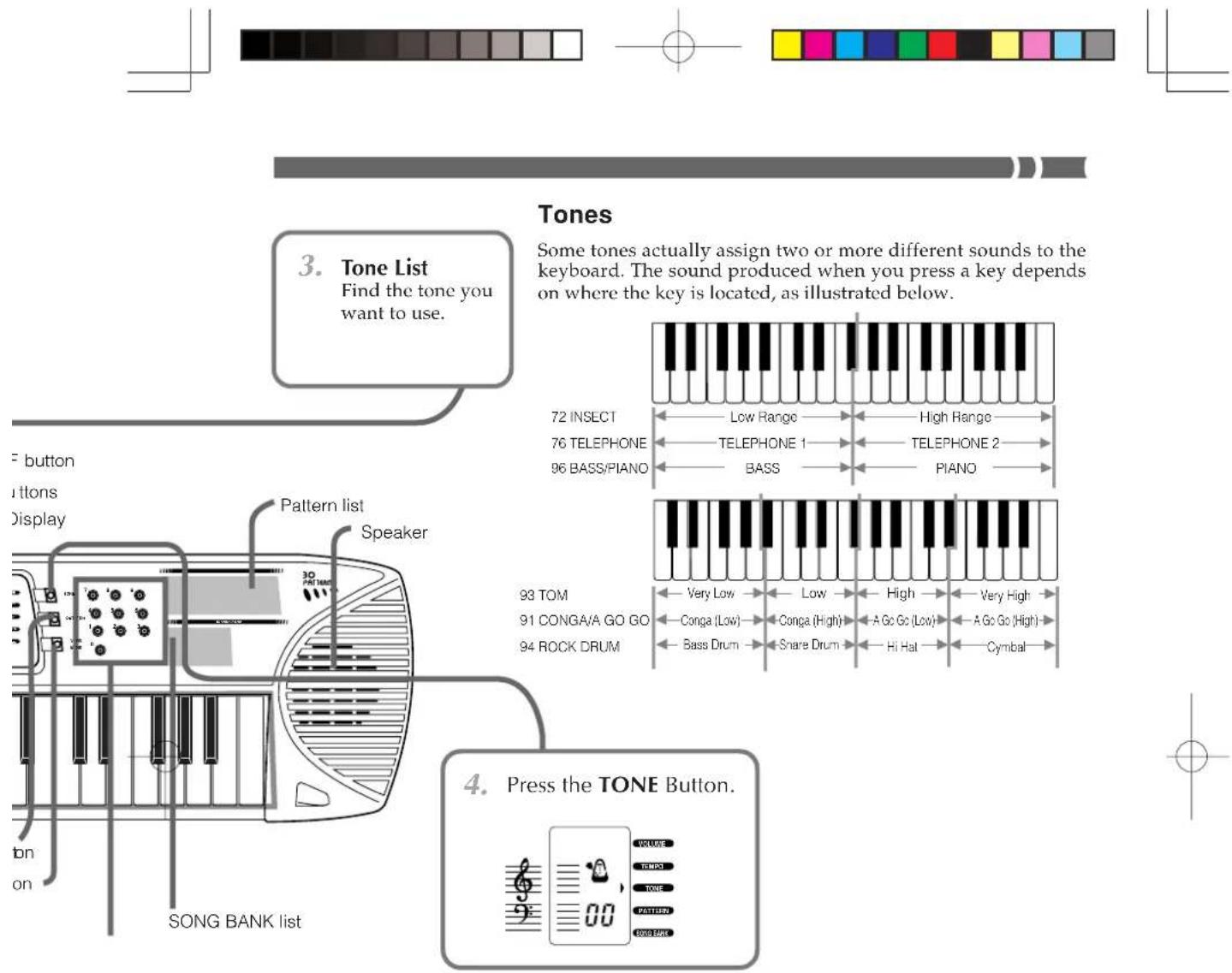
Polyphony
This keyboard can play up to four notes at the same time when there is no pattern or Song Bank tune being played. Even if you press more than four keys, only four notes will sound at the same time.
Digitally Sampled Tones
This keyboard features a number of digitally sampled tones, which are digital recordings of musical instruments. Actually, three recordings are made for each tone, covering the low range, middle range, and high range.
- The point where the key to the left falls in one range and the key to the right falls in a different range is called a "split point." With some tones, you may notice a very slight difference in tone quality or volume between the two keys at a split point. This is an unavoidable result of the sampling process, and does not indicate malfunction of the keyboard.
- The sounds of some tones do not change pitch no matter which keyboard key you press.
D
E-11
Display Indicators
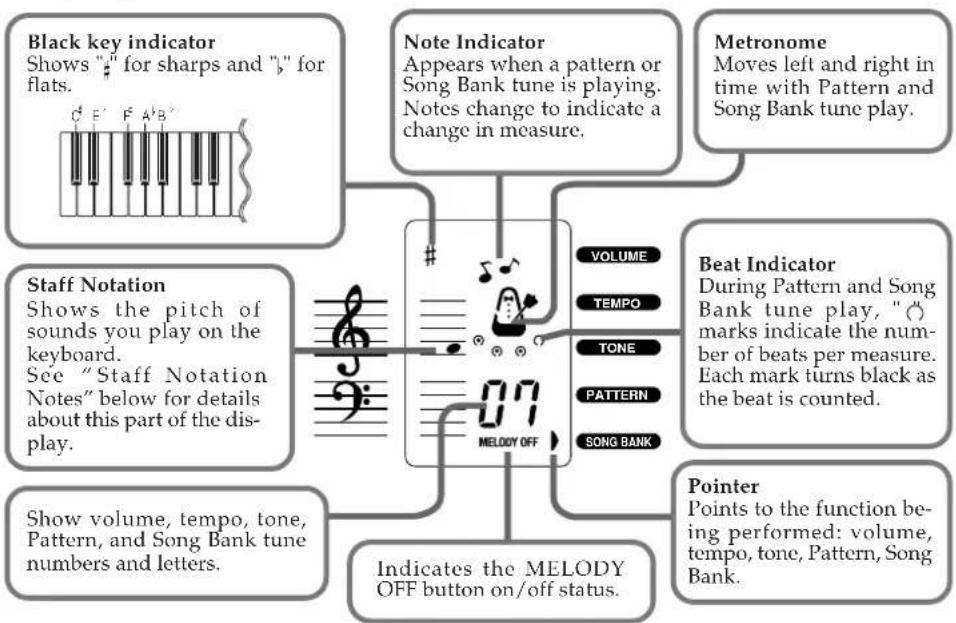
flowchart
graph TD
    A["Black key indicator\nShows "# for sharps and ", " for flats."] --> B["Note Indicator\nAppears when a pattern or Song Bank tune is playing.\nNotes change to indicate a change in measure."]
    C["Staff Notation\nShows the pitch of sounds you play on the keyboard.\nSee "Staff Notation Notes" below for details about this part of the display."] --> B
    D["Note Indicator\nMeatronome\nMoves left and right in time with Pattern and Song Bank tune play."] --> B
    E["Beat Indicator\nDuring Pattern and Song Bank tune play, ", " marks indicate the number of beats per measure.\nEach mark turns black as the beat is counted."] --> B
    F["Pointer\nPoints to the function being performed: volume,\ntempo, tone, Pattern, Song Bank."] --> G["Indicates the MELODY OFF button on/off status."]
    B --> H["MELODY OFF"]
    B --> I["VOLUME\nTEMPO\nTONE\nPATTERN\nSONG BANK"]
Staff Notation Notes
How notes appear on the display depends on how many keys you press when playing on the keyboard, and whether the MELODY OFF button is on or off when playing a Song Bank tune.
- Pressing One Key
When you press one keyboard key, the note you play appears in the staff notation.
- Pressing Two or More Keys
| Keys pressed | Maximum Number of Notes Displayed | Sequence |
| White keys only | 4 | All notes appear when played. |
| Including one or more black keys | 4 | One-by-one starting from lowest note and progressing to highest note. |
- Song Bank Play
Melody notes appear on the display as Song Bank tunes play. Even when the melody is turned on or off using the MELODY OFF button, the length of each melody note is indicated.
Playing Patterns
This keyboard features a total of 30 built-in patterns. There are 10 patterns each under three categories: RHYTHM, FREE SESSION, FUNNY.
RHYTHM: Percussion instrument rhythm patterns FREE SESSION: Automatic chord progressions to match rhythms FUNNY: Unique sound effects
- Find the pattern you want to use in the Pattern List.
- Press the PATTERN button.
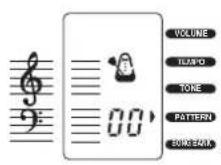
- Use the number buttons to input the two-digit pattern number.
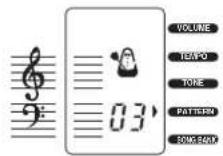
The above display shows "03 ROCK" is selected.
- Press the START/STOP button to start play of the pattern.

- Use the TEMPO buttons to adjust the tempo.
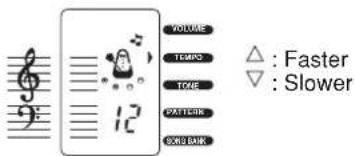
- Press the START/STOP button to stop play.
NOTES
- The tone "00 16BEAT" is always selected whenever you turn on power.
- Input of any value greater than 29 is ignored.
- You can change to a different pattern while a previously selected pattern is playing.
Tempo Settings
- Whenever you first press either the or TEMPO button the current setting value appears on the display. Press one of the TEMPO buttons while the current setting is displayed to actually change the tempo setting.
• Each press of a TEMPO button changes the setting one step within the range of 1 (J = 40) to 16 (J = 249).
• The tempo is always set to 8 (♩ = 132) whenever you turn on power.
Using the Song Bank
You can enjoy simply listening to the 10 built-in Song Bank tunes or you can turn off the melody part and play along on the keyboard.
To listen to a Song Bank tune
-
Find the tune you want to listen to in the Song Bank list.
-
Press the SONG BANK button.

- Use the number buttons to input the two-digit tune number.
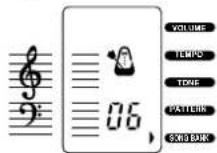
The above display shows "06 SILENT NIGHT" is selected.
- Press the START/STOP button to start play of the tune.
→The tune continues to repeat until you stop it.

- Press the START/STOP button to stop play.
NOTES
- Inputting a single digit number (from 1 to 9) in step 3 of the above procedure causes all of the Song Bank tunes to play back in sequence. The indicator "RL" (all) appears on the display to indicate that all tunes will be played.
- All Song Bank tune play "RL" is the default whenever you turn on keyboard power.
- Only values in the range of 00 to 09 can be input.
- With the above procedure, playing along on the keyboard does not produce any sound.
- You can change to a different Song Bank tune while a previously selected tune is playing.
- See "Staff Notation Notes" in the General Guide for details on how melody notes appear on the display after you start play in step 4.
Changing the Melody Tone of a Song Bank Tune
- You can change the melody tone of a Song Bank tune after you start playing it (in step 4 of the above procedure). To do so, press the TONE button and then use the number buttons to input the two-digit number for the tone you want to change to.
E-14


To play along with a Song Bank tune
- Perform steps 1 through 3 under "To listen to a Song Bank tune" to select the tune you want.
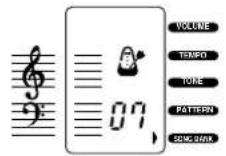
- Press the MELODY OFF button.
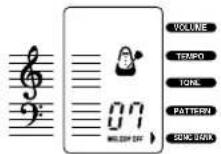
- Press the START/STOP button. →The keyboard will play an introductory count and then start play the accompaniment part of the tune. The tune continues to repeat until you stop it.
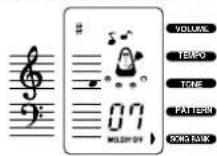
The staff notation shows melody notes.
- Press the START/STOP button to stop play.
NOTES
- Notes you play on the keyboard along with Song Bank tune accompaniment do not appear on the display.
• The MELODY OFF button is operational only while Song Bank tune play is stopped. - Pressing the MELODY OFF button while the "RL" (all) indicator is on the display turns off the melody part for all the Song Bank tunes.
- See "Staff Notation Notes" in the General Guide for details on how melody notes appear on the display after you start play in step 3.
Changing the Melody Tone of a Song Bank Tune
You can change the melody tone of a Song Bank tune after you start playing it (in step 2 of the above procedure).
About the pre-tune count
- Note that the pre-tune count sounds only when the MELODY OFF button is on (melody part is turned off).
- An audible count sounds for a number of beats before a Song Bank tune starts to play.
- The final beat of the count (the last beat before the tune starts to play) is a higher pitch than the other beats. It is indicated in the following example by "△".
* The lengths of the pre-tune counts are also indicated in the musical scores that come with this keyboard.
Example: ▼▼△…… Indicates a 3-beat count.
Troubleshooting
| Problem | Possible Cause | Action |
| No sound | Power supply problem | Check the following points.Make sure the (+) and (−) ends of batteries are facing correctly.Check for dead batteries.Make sure the AC adaptor is connected correctly. |
| Any of the following symptoms while batteries are being used. | Dead batteries | Replace batteries with new ones or change to AC power. |
| Dim power indicatorLow sound volumeDistorted soundLoss of output when playing at loud volumeSudden power loss when playing at loud volumeSudden output of sound when no keyboard key is pressedOutput of a tone different from the one that is selectedIncorrect play of patterns or built-in tunesSudden loss of sound outputDim display figuresDimming of display figures when playing at loud volume | ||
| Staff notation notes appear one-by-one when keyboard keys are pressed simultaneously | Simultaneous play of white and black keys | No action necessary |
Specifications
Keyboard: 37 keys, 3 octaves (mini-size)
Polyphony: 4 notes maximum
Tones: 100
Patterns: 30 (RHYTHM, FREE SESSION, FUNNY)
Song Band: 10 tunes; melody off
Tuning: Fixed; A4 = approx. 442Hz
Speakers: Two; 8.0cm (output: 0.5W + 0.5W)
Input Terminals: AC adaptor (7.5V DC)
Power Supply: Two-way
- Five AA-size batteries
Battery Life: Approximately six hours on R6P (SUM-3) manganese batteries
- AC Adaptor (AD-1)
Power Consumption: 7.5V—2.3W
Dimensions: 65.0(W) x 21.1(D) x 7.4(H) cm
$$ (2 5 ^ {5} / _ {8} \times 8 ^ {5} / _ {1 6} \times 2 ^ {1 5} / _ {1 6} \text { inch }) $$
Weight: Approximately 1.6kg(3.53lbs) (without batteries)
- Design and specifications are subject to change without notice.
E-16

natural_image
Color palette bar with grayscale and RGB swatches, no text or symbols present
This recycle mark indicates that the packaging conforms to the environmental protection legislation in Germany.
- NOTICE
- FCC WARNING
- Important Information for Parents!
- Low Batteries
- Features
- Contents
- Safety Precautions
- Symbols
- DANGER
- WARNING
- CAUTION
- Symbol Examples
- Alkaline Batteries
- Smoke, Strange Odor, Overheating
- AC Adaptor
- Batteries
- Water and Foreign Matter
- Dropping and Impact
- [Non-Text]
- Plastic Bags
- Location
- Relocating the Product
- Cleaning
- Display Screen
- Sound Volume
- Care of your keyboard
- Avoid heat, humidity or direct sunlight.
- Do not use near a TV or radio.
- Do not use lacquer, thinner or similar chemicals for cleaning.
- Avoid use in areas subjected to temperature extremes.
- NOTE
- Power Supply
- Battery Power
- Battery Replacement
- Battery Life
- CAUTION!
- AC Power
- WARNING!
- IMPORTANT!
- NOTES
- Polyphony
- Digitally Sampled Tones
- Display Indicators
- Staff Notation Notes
- Playing Patterns
- Tempo Settings
- Using the Song Bank
- To listen to a Song Bank tune
- Changing the Melody Tone of a Song Bank Tune
- To play along with a Song Bank tune
- About the pre-tune count
- Specifications
Brand : CASIO
Model : SA-65
Category : Keyboard