
Tiamat 7.1 - Headset RAZER - Free user manual and instructions
Find the device manual for free Tiamat 7.1 RAZER in PDF.


| Product Type | Circumaural Gaming Headset |
| Brand | Razer |
| Model | Tiamat 7.1 |
| Audio Technology | True 7.1 Surround Sound with 10 individual drivers |
| Drivers (Subwoofer) | 2 x 40mm Neodymium with Titanium Coated Diaphragm |
| Drivers (Center/Front) | 2 x 30mm Neodymium each |
| Drivers (Side/Rear) | 2 x 20mm Neodymium each |
| Frequency Response | 20 – 20,000 Hz (all drivers) |
| Impedance | Subwoofer: 16 Ω; Others: 32 Ω |
| Sensitivity | Subwoofer: 116 dB ± 3 dB; Center/Front: 123 dB ± 3 dB; Side/Rear: 120 dB ± 3 dB |
| Microphone | Unidirectional, 50 – 16,000 Hz, -36 dB ± 2 dB sensitivity, 50 dB SNR |
| Cable | Braided Fiber Sheath |
| Control Unit | Audio Control Unit with Volume, Channel Selector, Mute, 7.1/2.0 toggle, Headphone/Speaker toggle |
| PC Connection | 3.5mm jacks (Front, Center/Subwoofer, Rear, Side, Microphone) + Gold-plated USB connector |
| Power | USB powered via control unit |
| Compatibility | PC with 7.1 sound card for full surround; stereo sound card for 2.0 mode |
| Package Contents | Headset, Audio Control Unit, Speakers Connector, Quick Start Guide, Master Guide |
| Cleaning | Soft cloth or cotton swab with warm water; no soap or harsh cleaners |
| Operating Temperature | 0°C to 40°C (32°F to 104°F) |
| Warranty | 1 year limited manufacturer's warranty (upon registration at razerzone.com) |
Frequently Asked Questions - Tiamat 7.1 RAZER
User questions about Tiamat 7.1 RAZER
0 question about this device. Answer the ones you know or ask your own.
Ask a new question about this device
Download the instructions for your Headset in PDF format for free! Find your manual Tiamat 7.1 - RAZER and take your electronic device back in hand. On this page are published all the documents necessary for the use of your device. Tiamat 7.1 by RAZER.
USER MANUAL Tiamat 7.1 RAZER
Behold the Razer Tiamat 7.1, the world's rst circumaural gaming headset with 10 individual drivers built-in to deliver the ulmate 7.1 Surround Sound experience. Dominate deathmatches when you can hear incoming enemy footsteps to prevent backstabs and pinpoint enemy locaons through gunre with absolute precision. No other surround sound headset has been engineered to produce such lifelike posional audio geared for the ulmate taccal advantage.
Total audio mastery in your hands. Set the volume, audio posioning and bass depth as you want via the audio control unit. Whether it's congured to blast a full frontal wall of sound or scaled down to simple stereo, get the right level of intensity for your gaming audio every me.
MASTER GUIDE
CONTENTS
- Package Contents
- System & Hardware Requirements
- Key Features
- Technical Specicaons
- Registering Your Razer Tiamat 7.1
- Seng Up Your Razer Tiamat 7.1
- Using Your Razer Tiamat 7.1
- Safety and Maintenance
- Legalese
1. PACKAGE CONTENTS
• Razer Tiamat 7.1 Surround Sound Analog Gaming Headset
• Audio Control Unit
- Speakers Connector
- Quick Start Guide
- Master Guide
2. SYSTEM & HARDWARE REQUIREMENTS
PC
- USB port
- Earphone-out
- Microphone-in
Required for 7.1 Surround Sound:
- Earphone-out /Front
- Center/Subwoofer
- Rear Surround
- Side Surround


3. KEY FEATURES

A Adjustable Padded Headband
B True 7.1 Surround Sound
C Removable Earcup Cover
D Retractable Microphone
E Braided Fiber Sheath Cable
F Sound Channel Selector
G Volume Control
H Audio Mute Buon
I Microphone Mute Buon
J Headphone / Speakers Toggle
K 7.1 / 2.0 Channel Toggle
L PC Connector
- Earphone-out/Front
- Microphone-in
- Center/Subwoofer
- Rear Surround
- Side Surround
• Gold-plated USB connector
M Speakers Connector
- Audio-out/Front
- Center/Subwoofer
- Rear Surround
- Side Surround
4. TECHNICAL SPECIFICATIONS
HEADPHONES
- Subwoofer:
Drivers : 2 x 40mm Neodymium Magnets
with Titanium Coated Diaphragm
Frequency response : 20 - 20,000 Hz
Impedance : 16 Ω
Sensitivity @ 1kHz : 116dB ± 3dB
- Center
Drivers : 2 x 30mm Neodymium Magnets
Frequency response : 20 - 20,000 Hz
Impedance : 32 Ω
Sensitivity @ 1kHz : 123dB ± 3dB
- Front:
Drivers : 2 x 30mm Neodymium Magnets
Frequency response : 20 - 20,000 Hz
Impedance : 32 Ω
Sensitivity @ 1kHz : 123dB ± 3dB
- Side:
Drivers : 2 x 20mm Neodymium Magnets
Frequency response : 20 - 20,000 Hz
Impedance : 32Ω
Sensitivity @ 1kHz : 120dB ± 3dB
- Rear:
Drivers : 2 x 20mm Neodymium Magnets
Frequency Response : 20 - 20,000 Hz
Impedance : 32 Ω
Sensitivity @ 1kHz : 120dB ± 3dB
MICROPHONE
• Frequency response: 50 – 16,000 Hz
- Sensitivity @ 1kHz: -36 dB ± 2dB
• Signal-to-noise rao: 50 dB
- Pick-up paern: Unidireconal
5. REGISTERING YOUR RAZER TIAMAT 7.1
Please visit www.razerzone.com/registraon/ for online product registraon.
What you'll get:
- 1 year limited manufacturer's warranty.
• Free online technical support at www.razersupport.com.
6. SETTING UP YOUR RAZER TIAMAT 7.1
7.1 SOUND SETUP

flowchart
graph TD
    A["PC with 7.1 Sound Card"] --> B["Output"]
    B --> C["Main Control Unit"]
    C --> D["PC with 7.1 Sound Card"]
    D --> E["Optional Audio Out/Front"]
    D --> F["Optional Center/Sub-woofer"]
    D --> G["Optional Rear Surround"]
    D --> H["Optional Side Surround"]
2.0 SOUND SETUP

flowchart
graph TD
    A["Headset/Headphones"] --> B["Amplifier"]
    B --> C["Central Control Unit"]
    C --> D["PC with Stereo Sound Card"]
    D --> E["Optional Audio-out/Front"]
    E --> F["Output to Headset/Speaker"]
    style A fill:#f9f,stroke:#333
    style B fill:#ccf,stroke:#333
    style C fill:#cfc,stroke:#333
    style D fill:#fcc,stroke:#333
    style E fill:#cff,stroke:#333
    style F fill:#ffc,stroke:#333
7.1 CHANNEL ADJUSTMENT

Make sure 7.1 Mode is selected.
Select MAIN VOL or a specific channel
Rotate the Volume Control
2.0 VOLUME ADJUSTMENT


Make sure 7.1 Mode is deselected.
Select MAIN VOL
Rotate the Volume Control
MUTING THE AUDIO VOLUME
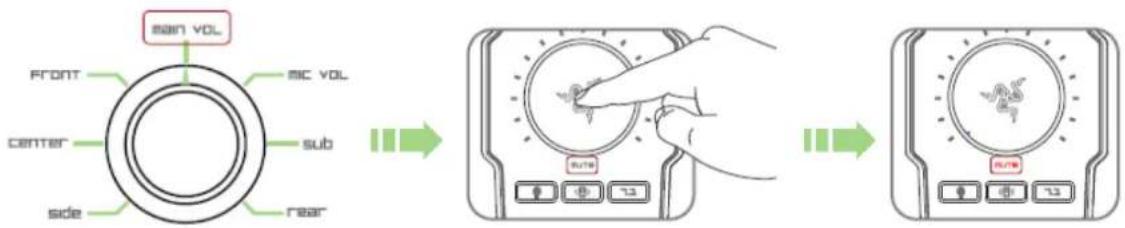
Select MAIN VOL
Press the Audio Mute buon
MICROPHONE VOLUME ADJUSTMENT
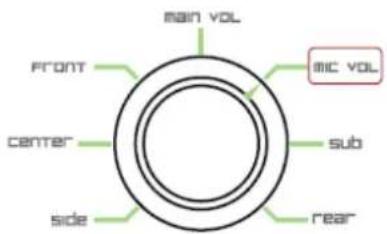


Select MIC VOL Rotate the Volume Control
- Press the Microphone Mute Buon

- Select MIC VOL then press the Audio Mute buon
RESETTING TO FACTORY DEFAULT
To reset the Razer Tiamat 7.1 to factory default sengs, press and hold the Audio Mute buon for 5 seconds while the Razer Tiamat 7.1 is connected to a computer that is powered on.
8. SAFETY AND MAINTENANCE
SAFETY GUIDELINE
In order to achieve maximum safety while using your Razer Tiamat, we suggest that you adopt the following guidelines:
-
Should you have trouble operang the device properly and troublesomeong does not work, unplug the device and contact the Razer hotline or go to www.razersupport.com for support. Do not aempt to service or x the device yourself at any me.
-
Do not take apart the device (doing so will also void your warranty) and do not aempt to service it yourself or operate it under abnormal current loads.
-
Keep your device away from liquid, humidity or moisture. Operate your device only within the specified temperature range of 0irc C ( 32irc F) to 40irc C ( 104irc F). Should you operate it in a temperature that is beyond this range, unplug and switch o the device in order to let the temperature stabilize within the opmal temperature range.
-
The device isolates external ambient sounds even at low volumes, resulting in lowered awareness of your external surroundings. Please remove the device when engaging in any advies that requires acve awareness of your surroundings.
-
Excessively loud listening volumes damage your hearing over extended periods of me. The legislaon of certain countries allows a maximum permissible sound pressure level of 86dB to aect your hearing for the duraon of a working day. Therefore, please reduce your volume level to a comfortable level for longer usage period. Take good care of your hearing.
MAINTENANCE AND USE
There is a lile regular maintenance to keep the Razer Tiamat in opmum condion. Once a month we recommend you unplug the device from the USB port and clean the Razer Tiamat with a so cloth or coon swab. Use a lile warm water but no soap or harsh cleaning agents.
9. LEGALESE
COPYRIGHT AND INTELLECTUAL PROPERTY INFORMATION
©2011 Razer USA Ltd. Patent Pending. All Rights Reserved. Razer™, the Razer Triple-Headed Snake logo, the Razer distressed word logo and other trademarks contained herein are trademarks or registered trademarks of Razer USA Ltd and/or its aliated or associated companies, registered in the United States and/or other countries. Windows and the Windows logo are trademarks of the Microso group of companies.
Razer USA Ltd (“Razer”) may have copyright, trademarks, trade secrets, patents, patent applicaons, or other intellectual property rights (whether registered or unregistered) concerning the product in this Master Guide. Furnishing of this Master Guide does not give you a license to any such copyright, trademark, patent or other intellectual property right. The Razer Tiamat (the “Product”) may dier from pictures whether on packaging or otherwise. Razer assumes no responsibility for such dierences or for any errors that may appear. Informaon contained herein is subject to change without noce.
LIMITED PRODUCT WARRANTY
For the latest and current terms of the Limited Product Warranty, please visit http://warranty.razerzone.com.
LIMITATION OF LIABILITY
Razer shall in no event be liable for any lost prots, loss of informaon or data, special, incidental, indirect, punive or consequential or incidental damages, arising in any way out of distribuon of, sale of, resale of, use of, or inability to use the Product. In no event shall Razer's liability exceed the retail purchase price of the Product.
COSTS OF PROCUREMENT
For the avoidance of doubt, in no event will Razer be liable for any costs of procurement unless it has been advised of the possibility of such damages, and in no case shall Razer be liable for any costs of procurement liability exceeding the retail purchase price of the Product.
GENERAL
These terms shall be governed by and construed under the laws of the jurisdicon in which the Product was purchased. If any term herein is held to be invalid or unenforceable, then such term (in so far as it is invalid or unenforceable) shall be given no eect and deemed to be excluded without invalidang any of the remaining terms. Razer reserves the right to amend any term at any me without noce.



- MASTER GUIDE
- CONTENTS
- PACKAGE CONTENTS
- SYSTEM & HARDWARE REQUIREMENTS
- PC
- KEY FEATURES
- L PC Connector
- TECHNICAL SPECIFICATIONS
- HEADPHONES
- MICROPHONE
- REGISTERING YOUR RAZER TIAMAT 7.1
- SETTING UP YOUR RAZER TIAMAT 7.1
- SOUND SETUP
- SOUND SETUP
- CHANNEL ADJUSTMENT
- VOLUME ADJUSTMENT
- MUTING THE AUDIO VOLUME
- MICROPHONE VOLUME ADJUSTMENT
- RESETTING TO FACTORY DEFAULT
- SAFETY AND MAINTENANCE
- SAFETY GUIDELINE
- MAINTENANCE AND USE
- LEGALESE
- COPYRIGHT AND INTELLECTUAL PROPERTY INFORMATION
- LIMITED PRODUCT WARRANTY
- LIMITATION OF LIABILITY
- COSTS OF PROCUREMENT
- GENERAL
Brand : RAZER
Model : Tiamat 7.1
Category : Headset