
MultiPhone 3530 DUO - Mobile Phone PRESTIGIO - Free user manual and instructions
Find the device manual for free MultiPhone 3530 DUO PRESTIGIO in PDF.


| Product Type | Smartphone |
| Brand | Prestigio |
| Model | MultiPhone 3530 DUO |
| Dimensions (H x W x D) | 148 x 74 x 8.25 mm |
| Weight | 165 g |
| Battery Capacity | 2500 mAh |
| Display Type | HD IPS |
| Display Size | 5.3 inches |
| Display Resolution | 720 x 1280 pixels |
| Processor | Quad-core 1.3 GHz |
| RAM | 1 GB |
| Internal Storage | 8 GB eMMC |
| Expandable Storage | Micro SDHC/SDXC up to 32 GB |
| Operating System | Android 5.0 (Lollipop) |
| Rear Camera | 13 MP with flash |
| Front Camera | 5 MP |
| SIM Support | Dual SIM (standby mode) |
| 2G Bands | 850/900/1800/1900 MHz |
| 3G Bands | 900/2100 MHz |
| Wi-Fi | 802.11 b/g/n |
| Bluetooth | 4.0 with A2DP |
| GPS | GPS, A-GPS |
| Battery Type | Lithium-ion, removable |
| Charging Port | Micro USB |
| Earphone Jack | 3.5 mm |
Frequently Asked Questions - MultiPhone 3530 DUO PRESTIGIO
User questions about MultiPhone 3530 DUO PRESTIGIO
0 question about this device. Answer the ones you know or ask your own.
Ask a new question about this device
Download the instructions for your Mobile Phone in PDF format for free! Find your manual MultiPhone 3530 DUO - PRESTIGIO and take your electronic device back in hand. On this page are published all the documents necessary for the use of your device. MultiPhone 3530 DUO by PRESTIGIO.
USER MANUAL MultiPhone 3530 DUO PRESTIGIO
You may find detailed warranty information at: www.prestigio.com/support/warranty-terms.
©Copyright 2014 Prestigio. Allrights reserved.
Inside your package

natural_image
Line drawings of various electronic components including a smartphone, battery pack, plug, and socket (no text or symbols)- Prestigio
MultiPhone - USBcable
- Battery
-
Adapter
• Travel adapter(for UK only) -
Quick start guide
• Legal& safety notices - Warrantycard
Your phone at a glance

- Front camera
- Earpiece
- Rearcamera
- Flash
-
Volumebutton
-
Powerbutton
- Speaker
- Microphone
- MicroUSB port
- Earphonejack
Buttons
The back, start and searchkeys help you navigate your phone.
- Tap ☐ to openalist of options available on the current screen. To open the list of recent apps, tap and hold
- Tap to return to the home screen.
- Tap toreturn to theprevious screen.

Do not cover the antenna area with your hands or other objects. This may cause connectivity problems or drain the battery.

Pleasereadthe "Legaland safety notices" in your package before use.
Getting started

Installation
Power on your phone
Home screens
List menu
Congratulations on your purchase and welcome to Prestigio. To get the most from your product and enjoy all that Prestigio has to offer, please visit: www.prestigio.com/catalogue/MultiPhones
For more details about your product, please visit: www.prestigio.com/support
Installation
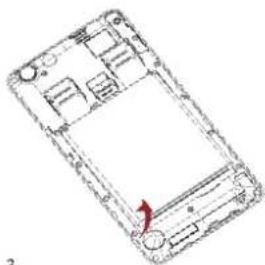
Follow the steps below to prepare your phone for using. Remember to turn off your mobile phone before removing the rear panel.

2
Take out the battery.
natural_image
Line drawing of a smartphone front panel with internal compartments and a red arrow indicating a location (no text or symbols present)3
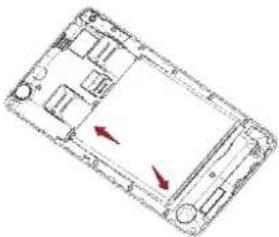
Insert the SIM card.


Menu

Back
Troubleshooting

Next

www.prestigio.com
4
Insertamemorycard.

5 Insert the battery into the battery compartment.
natural_image
Diagram of a smartphone showing internal compartments and two red arrows indicating movement or force (no text or symbols present)6
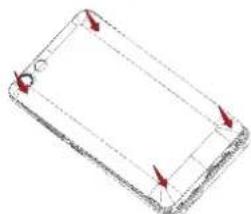
Puttherearpanelback.
natural_image
Pure 3D wireframe diagram of a rectangular object with arrows indicating direction (no text or symbols)- The use of incompatible SIM cards, manually cut SIM cards, or SIM card adapters may damage the cards or the device, and it may corrupt the data stored on the cards.
- Scratching or bending of the SIM cards may result in the loss of contacts and information, so be careful when handling, inserting, or removing the cards.

Frequent writing and erasing of data shortens the lifespan of memory cards.
Dual SIM standby

The device supports two SIM cards for voice calls and data connection. During a voice call or datatransfer via one SIM card, the other SIM card becomes inactive (not registered with your mobile network operator). This means that you cannot receive incoming calls or use data connection via the inactive SIM card. When the call or datatransfer ends, both SIM cards will become active and show on the list of registered networks.
Power on your phone
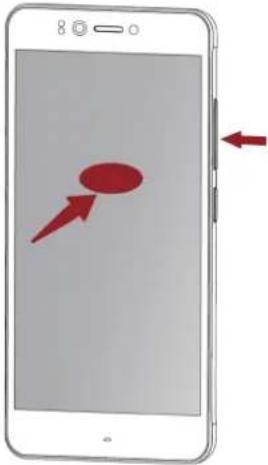
7 Press and hold the power button for a few seconds.

natural_image
Diagram of a smartphone with a power button and a circular icon (no text or symbols)When turning on the device for the first time, follow the on-screen instructions to set up your device.

To turn off your phone, press and hold the power key, and and then tap Power off on the pop-up screen.
Home screens
Your home screen is the starting point to access all of your phone's features. The home screen can have multiple panels. Toviewother panels, swipe left for right.
Tap toreturn to the home screen. Your phone's homescreen consists of the following:
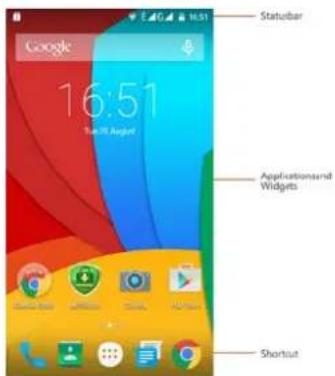
Personaliseyour wallpaper
Pickyour favouritephotos your Homewallpaper.
Choose from the available wallpapers, or use any photo you have taken with the camera.
- On the home screen, tap
→Wallpaper.
- Selectan image andtap Setwallpaper.
Addanappicontohome screen
- On the home screen, tap menu.
889 to open the list
-
Tapand hold anapplication icon.
-
Dragit into a panel preview.
Remove anitem on homescreen
- Tapand hold an item to remove.
- Dragthe item to the Remove option.
- When the Remove option turns red, release the item.
List menu
All your apps'icons can be found on the list menu.
On the home screen, tapto
open the list menu.
Tap or to return to the home screen. Your phone's listmenu consists of the following:
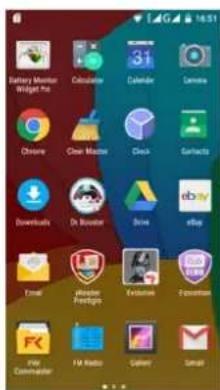
Applications
Fingertips
Only use your fingers to use the touch screen.

- To open an application, to select an menu item, to press anon-screen button, or to enter a characterising the on-screen keyboard, tap it with a finger.
- Tapandhold anitem for more than 2 seconds to access available options.
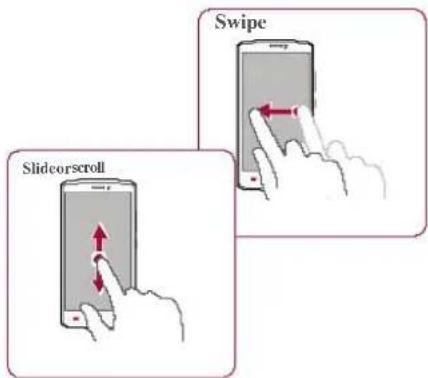
- Quickly swipe your finger vertically or horizontally across the screentogoto other homepages, scroll throughdocuments, and more.
- Slide your finger vertically across the screen to open drop-down menu. Drag up or down to scroll.
Prestigio


Fingertips
Chargethe battery
Connect to your PC
Rotatethe screen
Lockandunlock the screen
Use the notifications panel
Enter text
Systemupdate
Status icons

Menu

Back
Troubleshooting
Next


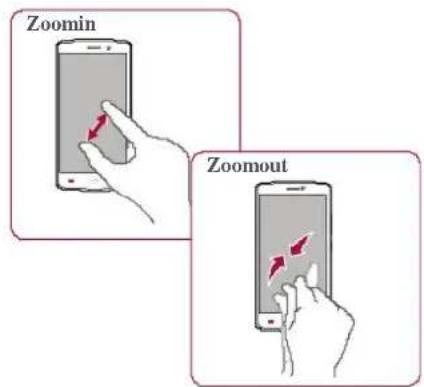
- Spreadtwofingers apart on aweb page, map, orimage to zoom in apart.
- Pinch two fingers together on a webpage, map, or image to zoom out a part.
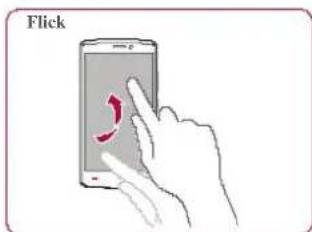
- Flick left oright on the home screen or the applicationsscreen to secanother panel. Flick upordownto scroll through a webpageor a list, such as contacts.
Chargethe battery
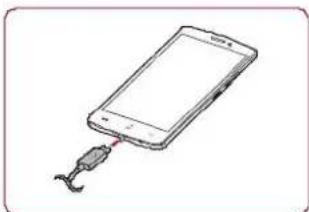
A new battery is partially charged. The battery iconat the upper-right corner shows the level of charging status.
natural_image
Simple line drawing of a smartphone with a cable inserted into its port (no text or symbols)- Plug the small end of the charger into the micro USB port of the device, and plug the large end of the charger into an electric socket.
- After being fully charged, disconnect the device from the charger. First unplug the charger from the device, and then unplug it from the electric socket.

Always use authentic accessories to optimise your battery performance. Non-authentic accessories (eg. chargers) can damage your battery and even your phone.
ConnecttoyourPC
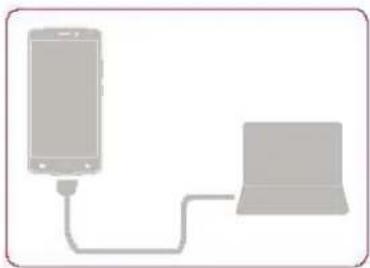
Youmay need to connect your phoneto a PC in order to complete activation. Your phone's micro USB port allows you to exchange media and other files with a PC.
natural_image
Simple line drawing of a smartphone connected to a laptop via a cable (no text or symbols)Loadfiles from your PC
- Connectyourphoneto the PC withthe included USBcable.
- Openthe notifications panel, and thentap Connected as amediadevice > Media device (MTP).
- Transfer files between your phone and the PC.
Rotatethe screen
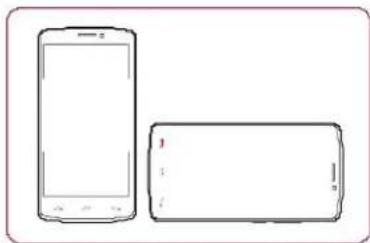
Formany screens, you can automatically change the screen orientation from portrait to landscape by turning your phones sideways. When entering text, you can turn your phone sideways to bring up a bigger keyboard.
natural_image
Line drawing of a smartphone and its blank screen (no text or symbols)
Toprevent the display fromrotating automatically, openthe notifications paneland deselect Autorotation.

- Some applications donotallow screenrotation.
• Some applications display a different screendepending on the orientation.
Lock and unlock the screen
When notin use, lock your phonetoprevent unwanted operations and save the battery power.
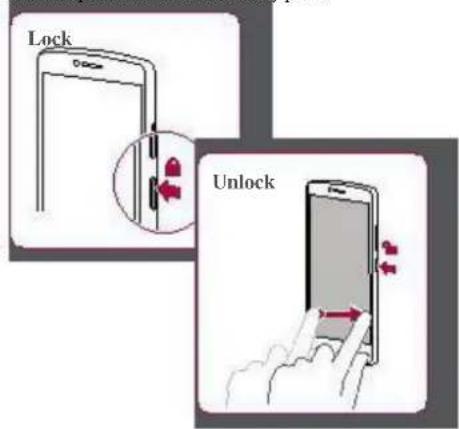
Autolock
You can set atimespan for the screentobe locked automatically.
- On the list menu, tap Sleep.

Settings>Display>
2. Select your desired time span.
Setscreenlock pattern
Protect your personal information and prevent others from using your phone without your
permission bysetting a screen lock pattern. PIN.or
password.
- On the listmenu,tap Screenlock.

Settings>Security>

When your phone is locked, Your phone can still:
- Receivecalls, text messages, and other updates.
- Play music.
- Adjust thevolume.
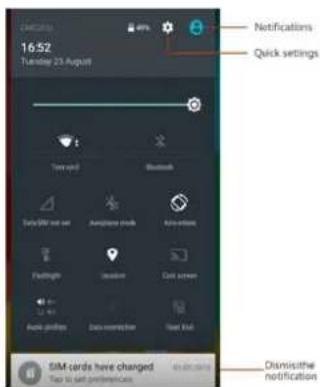
Use the notifications panel
Slidedown from the top of the screen to open thenotificationspanel. When you get a new notification, you can open it to see what event or new info you have received. You can also quickly accesssettings from it. Itallows you to easily turn airplane mode, Wi-Fi, and Bluetooth on and off. It also provides ashortcut to set the brightness and orientation of your screen.
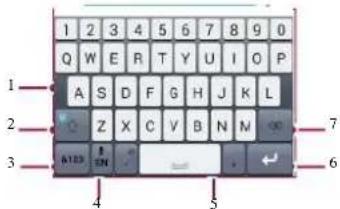
Entertext
Usetheon-screen keyboard to enter text, such as contact information, mail, and web addresses.
Enter text by voice
You also can enter the text by activating the voice input feature and then speak into the microphone.
Your phonedisplays what you speak.
Voic etyping: tap on the screen.
Copyandpaste text
- Tapa word, drag the circles before and after the word to highlight the section you want to copy, and tap.
- Topastethetext, tap and hold at the point where you want to paste the text. Tap Paste.
Systemupdate
Your phone can check and notify you if there is a new upgrade available. You can also manually check if there is an available update. You can set this
optionin Settings> About phone >updates.

Donotpress any keys while the device is upgrading.
Statusicons
The icons in the status bar at the top of the screen give information about your phone:
| Silent modactivated | 3Gnetworkconnected | ||
| Vibrationmode activated | Wi-Ficonnected | ||
| Airplane mode activated | Roaming (outside of | ||
| Battery power level | Bluetooth isactivated | ||
| Callsin progress | ConnectedtoPC | ||
| microphone connected | |||
| connected | |||
| GPRSnetworkconnected | NoSIMcarddetected | ||
| EDGEnetwork connected | Alarmis set | ||
| HSPA network connected |
Learntouse calling functions, such asmaking and answeringcalls, using options available during a call orcustomising and usingcall-related features.
Calls
Makeandend a call
- On the home screen or list menu, tap
Phone.
- Tap to open the dialpad.
- Enter thephonenumber, and thentap.
- Tap to end a call.
Answer acall
When you receive a phone call from a contact, the incoming call screen appears. Topick up the phone, Slide to.
Silence arincoming call
When acall comes in press the power button or volumebutton to mutethe ringing sound without rejecting the call
Setup aconference call
If network is available, you can make the first callor acceptacall. Then simply dialcach subsequent call to additto the conference.
- Duringa call, tap
to make a call to another
person. - Thesecond number is dialled, and the first call is put on hold at this time.
- Tap to add the contact to a conference call.

Makesure your SIM cardisenabled with conferencecalling service. Contact your mobile operator for details.
Makeanemergency call
Insome regions, you can make emergencycalls even if you donot have a SIM card installed or your SIM card has been blocked.
- On the home screen, tap
Phone.
- Tap 甲toopen the dialpad.
- Dial the emergency number for your location, and then tap.

If you are out of base station coverage, you will not be able to make an emergency call.

InEurope, the standard emergency numbers 112; inthe UK, itis 999.
Contacts
Contacts are stored in one of the two available phone books: SIM phone book (located on your SIM card) or the Smartphone book (located on your phone).
• To view your contacts, tap home screen or list menu.
People on the
Searchfor a contact
- Scrollupor down the contact list.
- Tap and enter the first few letters of the name in the searchbar.
- Select the contact from the option list.
Addanew contact
Methodone:
-
On thdomescreenor list menu, tap Phone.
-
Tap to open the dial pad.
- Entera number, tap
- Adddetails as desired.
- TapDone tofinish andsave.
Methodtwo:
- Goto People to view the contact list.
- Tap to add a new contact.
Import/Export contacts
- Goto People to view the contact list.
- Tap : >Import/export.
- Select the contacts storage.
- Follow the prompt to finish.
Delete contacts
- Goto People to view the contact list.
- Tap : >Delete contact
- Choosethe contacts youwish toremove.
- TapOK to delete the contacts.
Contactgroups
You can group your contacts as different groups. For different groups, you can used different identifications, and send message to a group.
Addcontacts to a group
- Goto People to view the contact list.
- Tap 🧑 to viewcontact groups.
- Tap ♣ to add contact to agroup.
- Enter your group's name, and tap contacts.
Messageslet youexchangetext messageswith otherSMS and MMS devices viayour cellular connection. Your sent and received messages are neatly grouped into conversations, bycontactname orphonenumber.
Senda message
Onthe homescreenor list menu,tap
Messaging.And thentap → to startcomposing a
new message. 2

- Enteraphonenumber
- Addpicture/video/audio/slideshow
- Moreoptions
- Addarecipient from your contacts list
- Send the message

There is a limit on the number of characters for a single text message (displayed above the send button). If you exceed the limit, your text message will be delivered as one but will be billed as more than one message.
www.prestigio.com
Checkyour message
Depending on your notification settings, your phone plays a sound, vibrates, or displays the message briefly in the status bar when you receive anew message.
- On the homescreen orlist menu, tap Messaging To check a message, tap a conversation.
Reply to a message
- On the messages screen, tap the conversation containing the message.
- In the text box, enter yourmessage.
- Tap ▶ to send the message.
Forward ordeletea message
- On the messages screen, tap the conversation containing the message.
- Tapand hold amessage.
- In the pop-up window, select Forwardor Delete.
Deletea conversation
- On the home screen or list menu, tap
Messaging to display the messages screen. - Tapandhold acontactor phonenumber.
- Tap the bottomofthescreen.
Use this application to send or view email messages. Learntosendor view email messages via your personal or company email account.
Setup an email account
- On the home screen or list menu, tap and doone of the following:
- If this is your first time adding an email account in Mail, move to then next step.
-
If you have already added an email account, thentap > Settings> addaccount.
-
Enter the email address and password for your email account.

When you finish setting up the email account, the email messages will download to your device.
Delete an email account
- Goto ⚙️ Settings> Accounts.
- Tap the email account your want to delete.
- Tap ^* >Remove account.

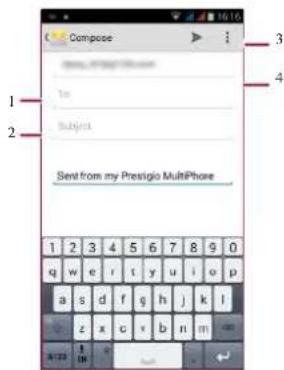
- Enter arecipient
- Enter the mail subject
- Moreoptions
- Send themail
Viewyour mails
- Onthe email inbox, tap thereisa new mail.

tocheck whether
- Tapthe desired mail toread it.
- Use
Searchfor a mail
- Tap to display the searchbar.
- Chooseasearchoption inthe drop-down list.
- Enter the first few letters of the mail sender or subject in the search bar.
- Select the mail from the list.
Reply to a mail
- Onthe email inbox, tapthe email message.
- Tap ,andthen composeyourmail.
- Tap to send the mail.
Delete mails
• Tapthe mailyou wish to delete and then tap

With your phone, you cantake both photos and videos as desired. In addition to a rear camera, there is acamera on the front for video calls and self-portraits.
- Touse the camera, on the home screen or list menu, tap Camera.
Yourcamera at a galance
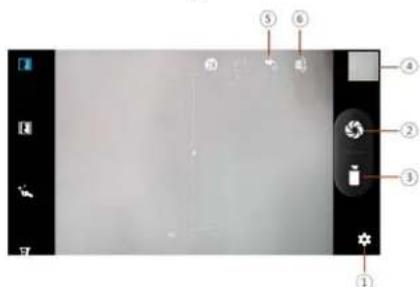
- Phone/ videosettings
- Capturephoto
- Videorecording
- Imagepreview
- Flashsettings
- Switchbetweenfront/rear camera
Takea photo
- Tum on the camera.
- Changethe camera setting if necessary.
- Point the camera at what you want to capture.
- Tap ☐ tocapture the photo.
Takeaphoto of yourself
- Turnon the camera.
- On the screen, tap
- Tap ☐ tocapture the photo.

Take a panoramic photo
You can capture anything wide on all objects in a single photo with your phone.
- Turnon the camera.
-
Scroll down the capture modes, and then tap
-
When you are ready to take the first shot, tap

- A directional arrow appears. Pan your phone as smoothly as youcan.
- The camerawill stitch the shots intoasingle photo.
Recorda video
- Turn on the camera.
- When you are ready to start recording, tap
- Tostoprecording, tap.
Photo and video settigns
Before you take a photoor record a video, customise your photo/videosettings.
| Generalsettings | |
| GPSlocationinfo | AttachaGPS location tag tothe photo. |
| Exposure | This determines how muchlight thecamera's sensor receives. |
| Scenemode | Select your desiredscene mode. |
| White balance | Select anappropriate white balance, so images have atrue-to-life colour range. |
| Anti-flicker | Select a bandioavoidthe impacts onphotos caused byflickers fromlighting sources. |
| Restore defaults | Restore todefault settings. |
| Photosettings | |
| Zeroshutter delay | The ZSD(zeroshutter delay)functionhelps youcapturephotos immediately. |
| Face detection | Set the idealexposure andclarity of faces. |
| Selftimer | Select alime span forshutter delay to take a self-portrait. |
| Picturesize | Select from various standard sizes for your picture. |
| Previcwsize | Setthe preview screen ratio before you take a photo. |
| ISO | AnISO value indicates the light sensitivity of your camera's imaging sensor. Higher values are for fast-moving or poorly-fit objects. |
| Video settings | |
| EIS | TheEIS (Electronic Image Stabilization) function helps reduce blurring associated with themotion of acamera during exposure |
| Time lapse interval | Setthe time lapse interval to adjust the speed of your video output. |
| Video quality | Setthe quality level for videos as this setting will affect your file size. |
Your phone provides several multimedia for your entertainment. You can view your photogallery, enjoy music, and watch videos.
Gallery
Viewyour photos
- Onthe home screenorlist menu,tap
Gallery
- Browseanalbum or a group of photos.
- Tap phototo viewit full-screen.
Zoom in and out
Spreadtwo fingers apartonany place to zoomin. Pinch to zoomout, or double-taptor return.
Edit your photos
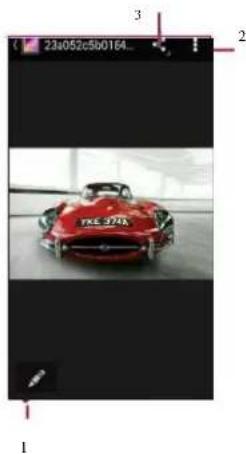
When viewing a photo, use the keyson the screen to edit the photos.
natural_image
Red convertible car with black grille and green accents displayed indoors (no visible text or symbols)- Edit the photo
- Morcoptions
- Share your photo
Video player
You can use the video player on your phone to watch videos.
Watch a video
- On the home screenorlist menu, tap Videos.
- Select the video that you want to watch.
- Tapthe on-screenkeys to control the video playback.
- Press the volume button to adjust the sound.
- Tap to select more options.
Musicplayer
You can listen to your favourite music with the music player. Themusic appisacentral hub for your favourite music whether it is stored in your phoneor streamed through a music service.
Listento music
- Onthehome screenor list menu,tap Music.
- Tapa song from the list, or tap to find your desired song.
- Tapthe on-screen keys to control the music playback.
- Pressthe volumebutton to adjust the sound.
- Tap to select more options.
FMradio
You can listento radio programs with your phone.

You must connect aheadset before using the FM radio on your phone.
Listento aradiostation
- On the some screen or list menu, tap Radio.
FM
- Tap: >Search. It will startscanning automatically and save the available channels.
- Usethecon-screen keysto control playback:
- Press the volume button to adjust the sound.
- Tap : toselectmore options.
You can connect your phone to the Internet and browsea webpage.
Connect to the Internet
Your phone connects to the Internet whenever necessary, using a Wi-Fi connection (if available) or your mobile operator's data connection.
Data connection
You can use your mobile operator's data connection.
Turnon dataconnection
-
Goto Settings >More...>Mobile networks >Data connection.
-
Taptoturn on oroff data connection.

Someapps and services may transfer data over your mobile operator's cellular network, which may result in additional fees. Contact your mobile operator for details.
Turn ondataroaming
Connect to your mobile operator's partner networks and access dataservices when you are out
of your mobile operator's coverage area.
- Goto Settings>Data usage.
- Tap : >Data roaming to turniton or off.

Using data services while roaming maybe costly. Check with your mobile operator for dataroaming rates before you use dataroaming.
Use your phone as a wireless router Share your data connection with other devices by turning your phone into a wireless router.
- Goto Settings >More... > Tethering& portablehotspot.
- Taptoturn onportable Wi-Fi hotspot.

The other device uses data from your dataplan, which may result in data traffic costs. For info on availability and costs, contact your network service provider.
Wi-Fi
Connect the device to a Wi-Fi network to use the Internet or share media files with other devices.
Connect to a wireless network
- Go to ⚙ Settings> Wi-Fi.
- Makesure Wi-Fi is switched to On.
- The Wi-Fi section will show the list of networks detected.
- Tap the desired Wi-Fi network you want to connect to.
- If you selected a secured network, you will be asked to enter then network key or password.
Webbrowse
You can use your phoneto browse websites. Before browsing a website, please confirm that you have turnon data connection or Wi-Fi.
Browse a web page
- On the home screen or list menu, tap Browser.
- Enter yoursearchkeywords or aweb page address.

- The previous web page
- Thenextweb page
- Webpagepreview
- ViewBookmarks, History and Savedpages.
Prestigio


Connect tothe Internet
Web browse
Webpage preview

- ViewBookmarks
- Opena new page
- Close theweb page

Menu
Troubleshooting


Back
Ncxt

Yourphone can connect to incompatible Bluetooth device for exchanging data. Bluetooth creates a direct wireless connection between two devices overshort distances.
Pairwitha Bluetoothdevice
- Go to ⚙ Settings >Bluetooth.
- Make sureBluetooth isswitched toOn.
- Alist of available Bluetooth devices will appear.
- Tap the device you wish to connect with.
- The pairing is made if your pairing request is accepted by the other device.
Receive data viaBluetooth
- Make sureBluetooth isswitched toOn.
- Tap your phonemodel to make it visible to all nearby Bluetooth devices.
- Accept the request and pair with the other Bluetooth device(s).
- Slide to open notifications panel, tap Accept.
Send datavia Bluetooth
- Select the file you want to share.
- Tap to send the file via Bluetooth.
- Select adeviceto startsending the file.

The files received via Bluetooth are stored in the Bluetooth folder.
Play store

Searchandinstallan app Uninstall anapp
Use the Google Play Store to purchase and download applications and games that are able to run on your phone. Choose from a wide variety of free and paid apps ranging from productivity apps, entertainment, to games.

- A Google Wallet™ payment service is required to purchase a paidapp. You will be asked to confirm the method of payment when you purchascan app.
- The availability of Store and the selection of items available for download depend on your region.
Search and installan app
-
Browseapplications bycategory,ortap searchwith a keyword.
-
Selectan application to viewinformation.
-
Todownload it, tap Install.
- If there is a charge for the application, tap the price, and follow the prompt to complete the purchase.

UseaWi-Fi connection to download large files.
Uninstallanapp
- Onthe listmenu,tap
Playstore.
-
Tap △>My Apps.
-
Select anapp you want to uninstall.
-
Tap Uninstall

Menu
Troubleshooting


Back
Next

Use this application to pinpoint the location of your phone, search for places, or get directions.
Use Googlemaps
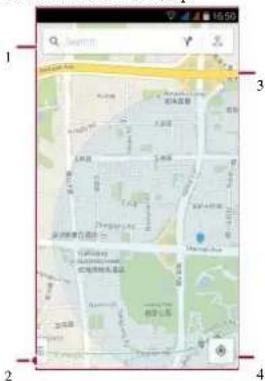
GoogleMaps lets you track your current location and received detailed directions to your destination. It also provides a search tool where you can locate places of interest or an address amap, or view locations at street level.
- On the homescreen or listmenu, tap
Maps.
- findanaddress or place
- Mapsettings
- Getdirections
- Show your location
Finda location

to find your

If you are in an area where there are a lot of surrounding buildings, Locations may have a hard time pinpointing your location.
Searchfor a place
You can search for aname of an establishment, street, or city. Suggested matches will be shown while you type.
- On the Mapsscreen, tap

-
Enter the place you want to search for.
-
Select the desired place in theresult list.
Getdirections
Getdetailed directionsto where you want togo.
- On the Maps screen, tap together directions.
- Enteryour start point and endpoint.
- Select the desired place in the result list.
- Choose how you want to get to your destination.
- Themapopens showing the route to your destination.
Maps settings
You can set up the GoogleMaps, tap
Settings
while viewing the maps.
Googlesearch
Usethis application to search not only the Internet, but also apps and contents on your phone.
- Onthehome screenorlist menu,tap Google.
Searchonthe web oryour phone
-
Tapthe search field, and then enter akeyword.
-
Selectone of the suggested keywords that appear.
Searchwith your voice
UseGoogle Voice Search to find information on the web justbyspeaking to your phone.
- On the home screenorlist menu, tap search.
- If the Google search bins available on the Homescreen, you can also tap.
-
Speaka keyword or phrase when Speak now appears on the screen.
-
Selectoneof the suggestedkeywords that appear.
-
If what you are searching for is in the list, tap the item to open it in its compatible app. Otherwise, tap Retry to search again.
Alarm
You can set upone or more alarms.
Setan alarm
-
On the home screen or list menu, tap
-
On the clock screen, tap
-
Tap + toadda new alarm.
-
Set thealarmtime, and then tap Done.
-
If you want the alarm formultiple days, tap Repeat.
Turn off analarm
- Select the alarm, and drag the check button to Off.
Stop analarm
When the alarm sounds,
- Slideto: the alarm stops.
- Slide to Z^2 : the alarm will sound again after a specific length of time.
Delete an alarm
• Tap the alarm, and then tap.
Calendar
You can create events and make plans on your calendar.
Create anevent
- On the home screenorlist menu, tap Calendar.
- Select adate, and then tap >New event.
- Editreminder settings.
- TapDoncto save the event.
Manage your events
Editan event
You can only edit events you have created.
- While viewing your calendar, tap the event your want to edit.
- Tap, and then make changes to the event.
- TapDone.
Deleteanevent
- Select the event yourwant todelete and then tap 🔒.

Quadcore 1.3GHz

RAM1GB+8GB eMMC

Android 5.0 (Lollipop)

Micro SDHC/SDXC≤32GB

5.3" HD IPS
720x1280

5 MP+13 MP

UMTS: 900/2100 MHz
GSM:850/900/1800
/1900 MHz

Wi-Fi(802.11 b/g/n),3G,
Bluetooth4.0 A2DP

GPS,A-GPS

2500mAh

148*74*8.25(H*W*D)

165g
Troubleshooting
Thephone does not switch on
Remove/reinstall the battery. Then charge the phone until the battery icon stops scrolling. Unplug the charger and try to switch the phone on.
Thedisplayshows IMS1failure
Thisproblem is related to your subscription. Contact your operator.
Thenetwork symbol isnotdisplayed
The network connection is lost. Either you are in a radio shadow (in atunnel or between tall buildings) or you are outside the network coverage area. Try from another place, try to reconnect to the network (especially when abroad), or contact your network operator for assistance/information.
The touchscreen respond slowly or improperly If your device has a touch screen and the touch screen is not responding properly, try the following:
- Remove any protective covers from the touch screen. Protective covers may prevent the device from recognizing your inputs and are not recommended for touch screendevices.
- Ensure that your hands are clean and dry when tapping the touch screen.
- Restart your devicdo clearany temporary
softwarebugs.
- Ensure that your device software is upgraded to the latest version.
- If the touch screen is scratched or damaged, take it to your local dealer.
Your batteryseems to over heat
You might be using a charger that was not intended for use with your phone. Makes sure you always use the authentic accessory shipped with your phone.
You can not send text messages
Some networks do not allow message exchanges with other networks. First check that you have entered the number of your SMScentre, or contact your operator for detailed information on this subject.
You feel that you have missed some calls Check your call divert options.
Thedisplay showsSIM failure
Check that the SIM card has been inserted correctly. If the problem persists, your SIM card may be damaged. Contact your operator.
You phone is not charging
If the battery is completely flat, it might take several minutes of precharge (up to 5 minutes in some cases) before the charging icon is displayed on the screen.
The picture captured with the phone camera is not clear
Makesure that the camera lens on both sides is clean.
You rdevicefreezesorhasfatal errors
If your device freezes othangs, you may need to close programs or reset the device to regain functionality. If your device is frozen and unresponsive, remove the battery and try to switch the phone on. The device reboots automatically.
If this does not solve the problem, perform a factory datareset. On the list menu, tap Settings > Backup &reset> Factory datareset.
Others cannot hear you speaking on a call
- Ensure that you are not covering the built-in microphone.
- Ensure that the microphone is close to your mouth.
- If using a headset, ensure that it is properly
connected.
AnotherBluetooth device is not located
- Ensure that the Bluetooth wireless feature is activated on your device.
- Ensure that the Bluetooth wireless feature is activated on the device you wish to connect to, if necessary.
- Ensure that your device and the other Bluetooth device are within the maximum Bluetooth range(10m).
- Inside your package
- Your phone at a glance
- Buttons
- Getting started
- Installation
- Dual SIM standby
- Power on your phone
- Home screens
- Personaliseyour wallpaper
- Addanappicontohome screen
- Remove anitem on homescreen
- List menu
- Fingertips
- Chargethe battery
- ConnecttoyourPC
- Loadfiles from your PC
- Rotatethe screen
- Lock and unlock the screen
- Autolock
- Select your desired time span.
- Setscreenlock pattern
- Use the notifications panel
- Entertext
- Enter text by voice
- Copyandpaste text
- Systemupdate
- Statusicons
- Calls
- Makeandend a call
- Phone.
- Answer acall
- Silence arincoming call
- Setup aconference call
- Makeanemergency call
- Contacts
- Searchfor a contact
- Addanew contact
- Methodone:
- Methodtwo:
- Import/Export contacts
- Delete contacts
- Contactgroups
- Addcontacts to a group
- Senda message
- Checkyour message
- Reply to a message
- Forward ordeletea message
- Deletea conversation
- Setup an email account
- Delete an email account
- Viewyour mails
- Searchfor a mail
- Reply to a mail
- Delete mails
- Takea photo
- Take a panoramic photo
- Recorda video
- Photo and video settigns
- Gallery
- Viewyour photos
- Zoom in and out
- Edit your photos
- Video player
- Watch a video
- Musicplayer
- Listento music
- FMradio
- Listento aradiostation
- Connect to the Internet
- Data connection
- Wi-Fi
- Webbrowse
- Browse a web page
- Pairwitha Bluetoothdevice
- Receive data viaBluetooth
- Send datavia Bluetooth
- Play store
- Search and installan app
- Uninstallanapp
- Use Googlemaps
- Finda location
- Searchfor a place
- Getdirections
- Maps settings
- Googlesearch
- Searchonthe web oryour phone
- Searchwith your voice
- Alarm
- Stop analarm
- Calendar
- Create anevent
- Manage your events
- Editan event
- Deleteanevent
- Troubleshooting
- Thephone does not switch on
- Thedisplayshows IMS1failure
- Thenetwork symbol isnotdisplayed
- softwarebugs.
- Your batteryseems to over heat
- You can not send text messages
- Thedisplay showsSIM failure
Brand : PRESTIGIO
Model : MultiPhone 3530 DUO
Category : Mobile Phone