
KAWHTENOISA - White noise machine Kogan - Free user manual and instructions
Find the device manual for free KAWHTENOISA Kogan in PDF.


| Product Type | White Noise Machine |
| Brand | Kogan |
| Model | KAWHTENOISA |
| Power Input | 5V 1A |
| Power Consumption | 3W |
| Battery Capacity | 1800mAh / 3.7V |
| Working Time | 10-20 hours (depending on usage) |
| Charging Time | 4 hours |
| Standby Time | 80 days |
| Sound Options | 22 white noise sounds, 5 yoga music tracks, 5 alpha wave sounds |
| Timer Settings | 30, 60, 90, 120, 180 minutes (auto-off after 14h default) |
| Light Modes | Steady, slow flashing, ambient color cycling (7 colors) |
| Light Brightness Levels | 3 levels |
| Controls | Touch-sensitive buttons (power, volume, timer, light, sound modes) |
| Connectivity | USB-C charging port, 3.5mm audio port for earphones |
| Memory Function | Saves last sound settings |
| Operating Temperature | 10°C to 50°C |
| Dimensions (approx.) | 120 x 120 x 50 mm |
| Weight (approx.) | 250 g |
| Safety Precautions | Do not disassemble; avoid extreme temperatures and humidity |
Frequently Asked Questions - KAWHTENOISA Kogan
User questions about KAWHTENOISA Kogan
0 question about this device. Answer the ones you know or ask your own.
Ask a new question about this device
Download the instructions for your White noise machine in PDF format for free! Find your manual KAWHTENOISA - Kogan and take your electronic device back in hand. On this page are published all the documents necessary for the use of your device. KAWHTENOISA by Kogan.
USER MANUAL KAWHTENOISA Kogan
Soothing White Noise Machine
KAWHTENOISA
Safety & Warnings
- Use the device in strict accordance with the instructions in this user guide. Do not disassemble the main unit or cable.
- Keep the device in a safe place to prevent damage during use or storage.
- Do not store or use the device in extreme temperatures. The suitable operating temperature is between 10irc C and 50irc C.
- Do not store or use the device in a humid environment.
Components
- White Noise Machine.
• USB-C to USB-A Charging Cable. - User Guide.
Overview

1 Yoga Music
2 Alpha Wave
3 White Noise
4 Reduce Volume
5 Increase Volume
6 Volume On/Off

7 Timer
8 Light Mode
9 Ambient Light Mode
10 Light Brightness
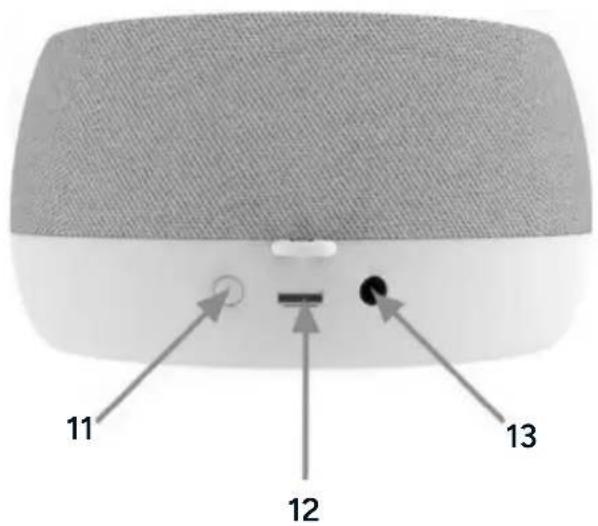
11 Power
12 USB-C Port
13 Audio Port
Operation
Charging
- If the battery is low for an extended period, the device will enter sleep mode. In this state, it cannot be powered on or display information. Charge the device for 10 minutes to reactivate it.
- Connect one end of the provided charging cable to the USB-C port on the device, and the other end to a USB power adaptor.
- The remaining battery level is shown as five bars in the centre of the screen, with each bar representing 20% of the charge. While charging, the bars will flash. When fully charged, all 5 bars will stop flashing.
Note:
Do not connect earphones while the device is charging.
Power On/Off
Press and hold the 'Power' button for 3 seconds to switch the device on or off.
Connect Earphones
Plug earphones into the audio port for private listening without disturbing others.
Yoga Music Mode
Includes 5 calming yoga music tracks designed for relaxation and meditation.
1 Early morning meditation
4 Music box lullaby
2 Forrest birdcall meditation
5 Ocean piano music
3 Night insect meditation
Alpha Wave Mode
Provides 5 alpha wave sounds to enhance concentration and focus.
White Noise Mode
Offers 22 white noise options, such as fan sounds, rain, ocean waves, and more, to aid relaxation and sleep.
1 Fan 1 12 Bonfire
2 Fan 2 13 Rain 1
3 Washing machine 14 Rain 2
4 White noise 15 Thunder
5 Vacuum cleaner 16 Flowing water
6 Leaves blowing in the wind 17 Sea wave
7 Foetal heartbeat 18 Ocean
8 Heartbeat 19 Train
9 Insects 20 Hairdryer
10 Birds 21 Air conditioner
11 Wood fire 22 Wind
Reduce Volume
Each press lowers the volume in 5% increments.
Increase Volume
Each press raises the volume in 5% increments.
Volume On/Off
Mutes or unmutes the sound output.
Timer
Set the timer to automatically turn off the device after 30, 60, 90, 120, or 180 minutes. If no timer is selected, playback will automatically stop after 14 hours by default.
Light Mode
Toggles between a soft, slow flashing light effect and a steady, constant light.
Ambient Light Mode
Cycles through 7 different ambient light colours: warm yellow, blue, red, aurora blue, yellow, orange, and colour gradient.
Light Brightness
Adjusts the brightness of the ambient light between three levels to suit your preference.
Touch Controls
All buttons are touch-sensitive and require a single press. The button indicator will remain on for 3 seconds before turning off automatically.
Memory Function
The device will automatically save your last sound settings for future use.
Specifications
Input 5V 1A
Working current 30-150mA
Power 3w
Battery capacity
1800mAh/3.7V
Working time 10-20hrs
Charging time 4hrs
Standby time
80 days
Troubleshooting
| Cannot power on. Charge the sound machine. | |
| Cannot charge. | Check if the power supply and cable are functioning properly. |
| No ambient light. | Ensure the light button is turned on. |
| No sound. | Verify if the sound is muted. |
| Powers off during use. | Check if the timer has expired. |
Notes
Need more information?
We hope that this user guide has given you the assistance needed for a simple set-up.
For the most up-to-date guide for your product, as well as any additional assistance you may require, head online to help.Kogan.com.
kogan.com
- Soothing White Noise Machine
- Safety & Warnings
- Components
- Overview
- Operation
- Charging
- Note:
- Power On/Off
- Connect Earphones
- Yoga Music Mode
- Alpha Wave Mode
- White Noise Mode
- Reduce Volume
- Increase Volume
- Volume On/Off
- Timer
- Light Mode
- Ambient Light Mode
- Light Brightness
- Touch Controls
- Memory Function
- Specifications
- Troubleshooting
- Notes
- Need more information?
Brand : Kogan
Model : KAWHTENOISA
Category : White noise machine