
PJ-1G-90W - Unspecified AIRLIVE - Free user manual and instructions
Find the device manual for free PJ-1G-90W AIRLIVE in PDF.


| Product Type | Gigabit Ethernet 802.3bt PoE Injector |
| Model | PJ-1G-90W |
| PoE Standard | IEEE 802.3af (15.4W), 802.3at (30W), 802.3bt (90W) |
| Max PoE Power Output | 90W |
| Data Rate | 10/100/1000 Mbps (auto-negotiation) |
| Input Voltage | AC 100-240V |
| Operating Temperature | -20°C to +50°C |
| Cable Distance | Up to 100m (UTP/STP) |
| Ports | 1x Data In (RJ-45), 1x PoE Out (RJ-45) |
| Enclosure | Seamless ultrasonic bonding for protection |
| Applications | PTZ cameras, digital signage, PoE LEDs, all-in-one PCs |
| Compliance | CE marked; WEEE compliant |
| Mounting | Desktop or wall-mount (optional) |
| Power Supply | Internal AC adapter (included) |
| LED Indicators | Power, PoE status |
Frequently Asked Questions - PJ-1G-90W AIRLIVE
User questions about PJ-1G-90W AIRLIVE
0 question about this device. Answer the ones you know or ask your own.
Ask a new question about this device
Download the instructions for your Unspecified in PDF format for free! Find your manual PJ-1G-90W - AIRLIVE and take your electronic device back in hand. On this page are published all the documents necessary for the use of your device. PJ-1G-90W by AIRLIVE.
USER MANUAL PJ-1G-90W AIRLIVE
PJ-1G-30W, PJ-2.5G-30W, PJ-5G-30W
PJ-1G-90W

Aug. 9, 2021
Ver. 1.0
Copyright & Disclaimer
No part of this publication may be reproduced in any form or by any means, whether electronic, mechanical, photocopying, or recording without the written consent of AirLive Technology Corp.
AirLive Technology Corp has made the best effort to ensure the accuracy of the information in this user's guide. However, we are not liable for the inaccuracies or errors in this guide. Please use with caution. All information is subject to change without notice
All Trademarks are properties of their respective holders.
Disposal
| This marking indicates that this product should not be disposed with other household wastes throughout the EU. To prevent possible harm to the environment or human health from uncontrolled waste disposal, recycle it responsibly to promote the sustainable reuse of material resources. To return your used device, please use the return and collection systems or contact the retailer where the product was purchased. They can take this product for environmentally safe recycling. |
C€
Table of Contents
1. Overview.... 2
1.1 Connecting PJ-1G-30W, PJ-2.5G-30W, PJ-5G-30W 3
1.2 Connecting PJ-1G-90W 4
1
Overview

PJ-1G-30W, PJ-2.5G-30W, PJ-5G-30W
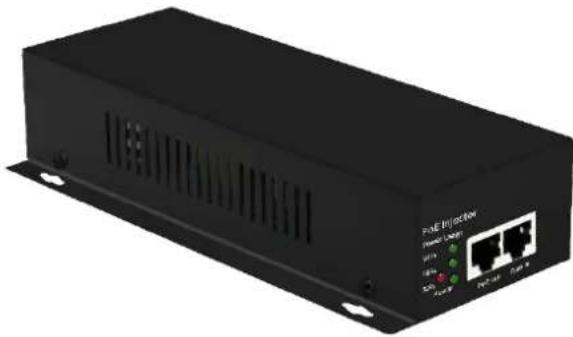
PJ-1G-90W
Ethernet 802.3at PoE Injector (PJ-1G-30W, PJ-2.5G-30W, PJ-5G-30W)
The AirLive PJ-1G/2.5G/5G-30W Gigabit Ethernet POE Injector is fully compatible with IEEE802.3af (15.4W) and IEEE802.3at (30W). The POE port supports a maximum output power of 30W, and the port supports 10/100/1000 (1G model), 2.5G (2.5G model) and 5G (5G) self-adaption. It supports AC 100-240V voltage input; the working temperature range is -20°C +50°C , seamless ultrasonic bonding, better protection effect. It takes the electricity from the power source and the data from the Ethernet network and then combines them into a signal that can be transmitted through the UTP/STP cable up to 100m .
The product can be widely used in IP Camera, AP, 30W PoE PC-Panel, AP, digital signage display system, PoE LED, etc. Its reliable hardware design can ensure your automation system runs without interruption and stability.
Gigabit Ethernet 802.3bt PoE Injector (PJ-1G-90W)
The AirLive PJ-1G-90W Gigabit Ethernet POE Injector is fully compatible with IEEE802.3af (15.4W) IEEE802.3at (30W) and IEEE802.3bt (90W). The POE port supports a maximum output power of 90W, and the port supports 10/100/1000 self-adaption. It supports AC 100-240V voltage input; the working temperature range is -20°C +50°C , seamless ultrasonic bonding, better protection effect. It takes the electricity from the power source and the data from the Ethernet network and then combines them into a signal that can be transmitted through the UTP/STP cable up to 100m .
The product can be widely used in PTZ high-speed dome, PC-Panel, compact computer, all-in-one computer, digital signage display system, PoE LED, etc. Its reliable hardware design can ensure your automation system runs without interruption and stability.
1.1 Connecting PJ-1G-30W, PJ-2.5G-30W, PJ-5G-30W
Power on the device by connecting the AC cable first. Connect a RJ-45 cable from a switch/router to the PoE Injector's port called Data In, this is Data only. From the PoE Injector's PoE Out port a RJ-45 cable can now be used to Power On and transfer Data for, for example a PoE Camera or Access Point. The PoE Out port has both Power and Data.
![graph LR A["Power"] --> B["IP Camera"] B --> C["Switch"] D["Data In"] --> B E["PoE Out"] --> B F["Data In"] --> B](/content/2026/06/1230447/images/4005ab9fa4d9e70a2ea8242982c722397dd784d6cbe197e92571eef886849e9b.jpg)
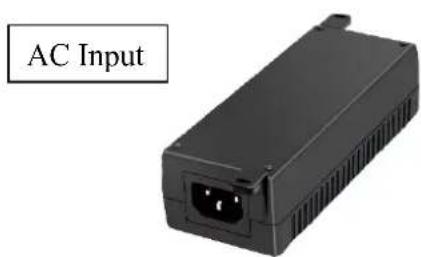
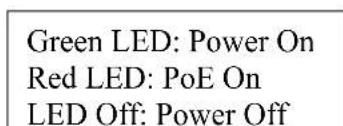

1.2 Connecting PJ-1G-90W
Power on the device by connecting the AC cable first. Connect a RJ-45 cable from a switch/router to the PoE Injector's port called Data In, this is Data only. From the PoE Injector's PoE Out port a RJ-45 cable can now be used to Power On and transfer Data for, for example a PoE Digital Signage device or an Access Point. The PoE Out port has both Power and Data.
![graph TD A["PoE Injector"] -->|Power Out| B["Switch"] B -->|Data In| C["Digital Signage"] C -->|PoE Out| D["Switch"] D -->|Data In| E["Switch"] style A fill:#f9f,stroke:#333 style B fill:#ccf,stroke:#333 style C fill:#cfc,stroke:#333 style D fill:#fcc,stroke:#333](/content/2026/06/1230447/images/a956890e70202b446e116a349ea5278cc21206b64916a7b1dede46eece80f178.jpg)


For more detailed specifications please see the datasheet. The datasheets can be found online on www.airlive.com
** Specifications are subject to change and improvement without notice.


Brand : AIRLIVE
Model : PJ-1G-90W
Category : Unspecified