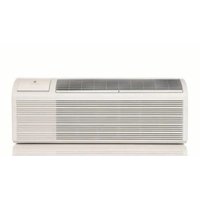
ZoneAire Premier PDH15R5SG - Air conditioner Friedrich - Free user manual and instructions
Find the device manual for free ZoneAire Premier PDH15R5SG Friedrich in PDF.


| Product Type | Packaged Terminal Air Conditioner (PTAC) with Heat Pump |
| Model Number | ZoneAire Premier PDH15R5SG |
| Cooling Capacity | Approximately 15,000 BTU/hr |
| Heating Capacity (Electric) | 5.0 kW (approx. 17,060 BTU/hr) |
| Power Supply | 265V, 30A, 60Hz |
| Refrigerant Type | R32 (Flammable, A2L classification) |
| Wall Sleeve Dimensions (WxHxD) | 42" x 16" x 13-3/4" |
| Weight (Approximate) | 120 lbs |
| Fan Speeds | High, Low, Auto |
| Control Type | Touchpad with LED indicators; optional 24V wall thermostat |
| Energy Management / Front Desk Control | Yes (24VAC input) |
| Condensate Drain Kit | External or internal drain kit available (PXDR10) |
| Air Filter Type | Reusable, washable (two per chassis) |
| Remote Thermostat Compatibility | Yes, single-stage cool, dual-stage heat (e.g., Friedrich RT7) |
| Warranty | 2 years parts and labor; 5 years on sealed refrigeration system |
| Safety Features | LCDI power cord (230V models), random compressor restart, freeze protection, defrost protection |
| Self-Diagnostics | Yes, error codes (F1–FJ, etc.) displayed on digital display |
Frequently Asked Questions - ZoneAire Premier PDH15R5SG Friedrich
User questions about ZoneAire Premier PDH15R5SG Friedrich
0 question about this device. Answer the ones you know or ask your own.
Ask a new question about this device
Download the instructions for your Air conditioner in PDF format for free! Find your manual ZoneAire Premier PDH15R5SG - Friedrich and take your electronic device back in hand. On this page are published all the documents necessary for the use of your device. ZoneAire Premier PDH15R5SG by Friedrich.
USER MANUAL ZoneAire Premier PDH15R5SG Friedrich
ZoneAire Premier® R-32 Series PTAC Packaged Terminal Air Conditioners & Heat Pumps
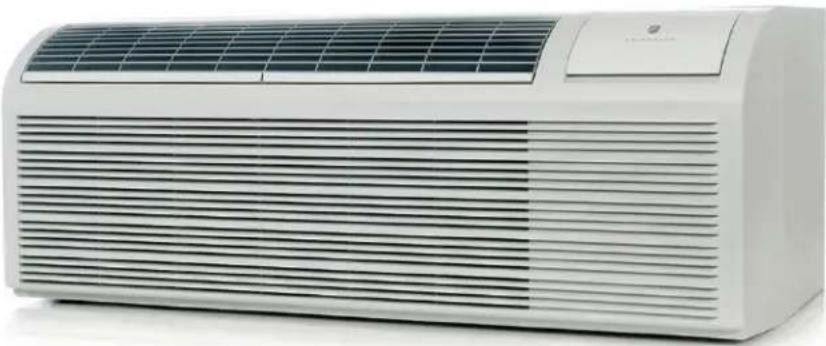
Chassis Models
RECOGNIZE THIS SYMBOL AS AN INDICATION OF IMPORTANT SAFETY INFORMATION!
WARNING
THESE INSTRUCTIONS ARE INTENDED AS AN AID TO QUALIFIED SERVICE PERSONNEL FOR PROPER INSTALLATION, ADJUSTMENT AND OPERATION OF THIS UNIT. READ THESE INSTRUCTIONS THOROUGHLY BEFORE ATTEMPTING INSTALLATION OR OPERATION. FAILURE TO FOLLOW THESE INSTRUCTIONS MAY RESULT IN IMPROPER INSTALLATION, ADJUSTMENT, SERVICE OR MAINTENANCE, POSSIBLY RESULTING IN FIRE, ELECTRICAL SHOCK, CARBON MONOXIDE POISONING, EXPLOSION, PROPERTY DAMAGE, PERSONAL INJURY OR DEATH.
▲WARNING
PROPOSITION 65 WARNING: THIS PRODUCT CONTAINS CHEMICALS KNOWN TO THE STATE OF CALIFORNIA TO CAUSE CANCER, BIRTH DEFECTS OR OTHER REPRODUCTIVE HARM.
DO NOT DESTROY THIS MANUAL. PLEASE READ CAREFULLY AND KEEP IN A SAFE PLACE FOR FUTURE REFERENCE BY A SERVICEMAN.


⚠️CAUTION: Do Not Operate Equipment During Active Stages Of Construction
To ensure proper operation, Friedrich requires that all equipment is not operated during active construction phases. This includes active stages of completing framing, drywalling, spackling, sanding, painting, flooring, and moulding in the equipment's designated conditioning space. The use of this equipment during construction could result in premature failure of the components and/or system and is in violation of our standard warranty guidelines. The operation of newly installed equipment during construction will accelerate the commencement and/or termination of the warranty period.
Register your Air Conditioner
Model information can be found on the name plate. Please complete and mail the owner registration card furnished with this product, or register online at www.friedrich.com.
A. IMPORTANT SAFETY AND GENERAL INFORMATION .... 3
A.1 Introduction....3
A.2 · Safety Warnings .... 3
A.3 Warning For Using R32 Refrigerant....5
A.4 Importance of a Quality Installation....7
A.5 Product Inspection ....7
A.5 Model Identification Guide 7
A.6 Unit Features....7
B. SPECIFICATIONS 9
B.1 Major Components and Dimensions 9
B.2 Product Data Information 9
C. INSTALLATION OF THE UNIT....10
C.1 Pre-Installation Checkpoints....10
C.3 Choosing a Location....11
C.4 Install Unit 13
C.4.2 External Drain Kit Installation 14
C.4.3 Wall Sleeve Installation Instructions (PDXWS)....15
C.4.4 Standard Grille Instructions....19
C.5 Chassis Install 20
E. ELECTRICAL....22
E.1 Electrical Safety Information....22
E.2 Power Cord LCDI Test 22
For your future convenience, record the model information.
Model Number ____
Serial Number
E.3 Electrical Wiring....23
E.4 How To Connect....25
F. REMOTE THERMOSTATS.... 26
F.1 Install Thermostat....26
F.2 Terminal Connections....27
J. STARTUP AND OPERATION....27
J.1 Final Inspection 27
J.2 Air Flow Selection and Adjustment....28
J.3 Dip Switches 29
J.4 Control Panel Operation....30
J.5 Allocation Mode....31
M. TROUBLESHOOTING....32
M.1. Troubleshooting Tips 32
M.2 Diagnostic Codes....33
P. ACCESSORIES....34
R. INFORMATION FOR THE OWNER....36
R.2 Routine Maintenance ....36
R.3 Qualification Of Workers 36
R.3 Warranty 37
A. IMPORTANT SAFETY AND GENERAL INFORMATION
A.1 Introduction
This booklet contains the installation and operating instructions for your Air Conditioning unit. There are some precautions that should be taken to ensure proper operation. Improper installation can result in unsatisfactory operation or dangerous conditions.
Read this booklet and any instructions packaged with separate equipment required to make up the system prior to installation. Give this booklet to the owner and explain its provisions. The owner should retain this booklet for future reference.
A.2 · Safety Warnings

WARNING: The manufacturer's warranty does not cover damage or defect to the air conditioner caused by the attachment use of any components, accessories or devices (other than those orized by the manufacturer) into, onto or in conjunction with the

air conditioner. You should be aware that the use of unauthorized components, accessories or devices may adversely affect the operation of the air conditioner and may also endanger life and property. The manufacturer disclaims any responsibility for such loss or injury resulting from the use of such unauthorized components, accessories or devices.

WARNING: Electrical Shock Hazard
Disconnect all power to the unit before starting maintenance. All electrical connections and wiring MUST be installed by a qualified electrician and conform to the National Code and all local codes which have jurisdiction. Failure to do so can result in property damage, severe electrical shock or death.

WARNING: Read Installation Manual

Please read this manual thoroughly prior to equipment installation or operation. It is the installer's responsibility to properly apply and install the equipment. Installation must be in conformance with the NFPA 70-2023 national electric code or current edition, International Mechanic code 2021 or current edition, and any other local or national codes.

WARNING: Safety First
Do not remove, disable, or bypass this unit's safety devices. Doing so may cause fire, injuries, or death.

A2L R-32


WARNING ADVERTANCIA ATTENTION

• RISK OF FIRE OR EXPLOSION
- FLAMMABLE REFIGERANT
USED
- REPAIRS MAY ONLY BE PERFORMED BY TRAINED PERSONNEL
• CONSULT SERVICE
MANUAL BEFORE
ATTEMPTING REPAIRS. ALL
SAFETY PRECAUIONS MUST
BE FOLLOWED
• DO NOT PUNCTURE TUBING
• DISPOSE OF UNIT
PROPERLY IN ACCORDANCE
WITH FEDERAL OR LOCAL
REGULATIONS
• ONLY USE A2L APPROVED SERVICE EQUIPMENT
A. IMPORTANT SAFETY AND GENERAL INFORMATION
Read All Instructions and Cautionary Markings Before Operation and Installation to prevent death or injury to the user, other people, or property damage, the following instructions must be followed. Incorrect operation due to ignoring of instructions may cause death, harm or damage.
WARNING: This symbol indicates the possibility of a hazard to personnel.
CAUTION: This symbol indicates the possibility of property damage or serious consequences.
WARNING:
- Installation must be performed according to the installation instructions. Improper installation can cause water leakage, electrical shock, or fire.
- Use only the included accessories and parts, and specified tools for the installation. Using nonstandard parts can cause water leakage, electrical shock, fire, and injury or property damage.
- Make sure that the outlet you are using is grounded and has the appropriate voltage. The power cord is equipped with a three-prong grounding plug to protect against shock. Voltage information can be found on the nameplate of the appliance.
- Your appliance must be used in a properly grounded wall receptacle. If the wall receptacle you intend to use is not adequately grounded or protected by a time delay fuse or circuit breaker (the fuse or circuit breaker needed is determined by the maximum current of the appliance. The maximum current is indicated on the model nameplate located on the appliance, have a qualified electrician install the proper receptacle.
- Install the appliance on a flat, sturdy surface. Failure to do so could result in damage or excessive noise and vibration.
- The appliance must be kept free from obstruction to ensure proper function and to mitigate safety hazards.
- The unit should not be in contact with any equipment that will transmit vibration to the unit. Any excessive vibration or pulsation to the unit could result in damage to the refrigerant tubing.
- Do not modify the length of the power cord or use an extension cord to power the appliance.
- Do not share a single outlet with other electrical appliances. Improper power supply can cause fire or electrical shock.
- Do not install your air conditioner in a wet room such as a bathroom or laundry room. Too much exposure to water can cause electrical components to short circuit.
- Do not install the appliance in a location that may be exposed to combustible gas, as this could cause fire.
- Do not operate the appliance if it has been dropped or damaged.
- Do not touch the appliance with wet or damp hands or when barefoot.
- If the air conditioner is knocked over during use, turn off the appliance and unplug it from the main power supply immediately. Visually inspect the appliance to ensure there is no damage. If you suspect the appliance has been damaged, contact a technician or customer service for assistance.
- In a thunderstorm, the power must be cut off to avoid damage to the machine due to lightning. Your air conditioner should be used in such a way that it is protected from moisture. e.g. condensation, splashed water, etc. Do not place or store your air conditioner where it can fall or be pulled into water or any other liquid. Unplug immediately if it occurs.
- All wiring must be performed strictly in accordance with the wiring diagram located inside of the appliance.
-
The appliance's circuit board(PCB) is designed with a fuse to provide overcurrent protection. The specifications of the fuse are printed on the circuit board, such as: T 3.15A/250V, etc.
-
After proper installation, condensate will not overflow during normal use. If the fan hits the built-up water and the sound annoys you, please remove the cap located at the back of the air conditioner to drain the water away.
CAUTION:
- This appliance is not intended for use by persons (including children) with reduced physical, sensory or mental capabilities or lack of experience and knowledge, unless they have been given supervision or instruction concerning use of the appliance by a person responsible for their safety. Children should be supervised to ensure that they do not play with the appliance. Children must be supervised around the appliance at all times.
- If the supply cord is damaged, it must be replaced by the manufacturer, its service agent or similarly qualified persons in order to avoid a hazard.
- Prior to cleaning or other maintenance, the appliance must be disconnected from the supply mains.
- Never use this appliance if it is not working properly, or if it has been dropped or damaged.
- Do not run cord under carpeting. Do not cover cord with throw rugs, runners, or similar coverings. Do not route cord under furniture or appliances. Arrange cord away from traffic area and where it will not be tripped over.
- Do not operate with a damaged cord, plug, power fuse or circuit breaker. Discard the appliance or return to an authorized service facility for examination and/or repair.
- To reduce the risk of fire or electric shock, do not use this fan with any solid-state speed control device.
- The appliance shall be installed in accordance with national wiring regulations.
- Contact the authorized service technician for repair or maintenance of this appliance.
- Contact the authorized installer for installation of this appliance.
- Do not cover or obstruct the inlet or outlet grilles.
- Do not use this product for functions other than those described in this instruction manual.
- Before cleaning, turn off the power and unplug the appliance.
- Disconnect the power if strange sounds, smell, or smoke comes from it.
- Do not press the buttons on the control panel with anything other than your fingers.
- Do not operate or stop the appliance by inserting or pulling out the power cord plug.
- Do not use hazardous chemicals to clean or come into contact with the appliance.
- Do not use the appliance in the presence of flammable substances or vapour such as alcohol, insecticides, petrol, etc.
- Always contact a qualified person to carry out repairs. If the power supply cord is damaged, it must be replaced with a new power supply cord obtained from the product manufacturer and not repaired.
- Hold the plug by the head of the power plug when taking it out.
- Turn off the product when not in use.
A. IMPORTANT SAFETY AND GENERAL INFORMATION
A.3 Warning For Using R32 Refrigerant
For R32 refrigerant models:
- Appliance shall be installed, operated and stored in a room with a floor area larger than 43 sq ft.
- Appliance shall not be installed in an unventilated space, if that space is smaller than 43 sq ft.
- Compliance with national gas regulations shall be observed.
- Keep ventilation openings clear of obstruction.
- The appliance shall be stored so as to prevent mechanical damage from occurring.
-
A warning that the appliance shall be stored in a well-ventilated area where the room size corresponds to the room area as specified for operation.
-
Any person who is involved with working on or opening a refrigerant system must be certified for refrigerant handling as required by local, state, and federal regulations.
-
Servicing shall only be performed as recommended by the equipment manufacturer. Maintenance and repair requiring the assistance of other skilled personnel shall be carried out under the supervision of the person competent in the use of flammable refrigerants.
-
Please follow the instruction carefully to handle, install, clear, and service the air conditioner to avoid any damage or hazard. Flammable Refrigerant R32 is used within air conditioner. When maintaining or disposing the air conditioner, the refrigerant (R32) shall be recovered properly, and shall not be discharged to air directly.
-
No any open fire or device like a switch which may generate spark/arcing shall be around the air conditioner to avoid causing ignition of the flammable refrigerant used.
-
Please follow the instruction carefully to store or maintain the air conditioner to prevent mechanical damage from occurring.
- Flammable refrigerant R32 is used in air conditioner. Please follow the instruction carefully to avoid any hazard.
- For specific information on the type of gas and the amount of refrigerant used, refer to the model nameplate on the unit.

CAUTION: Risk of fire/flammable materials
(Required for R32 units only)

WARNING: low burning velocity material
(For R32 models apply to IEC60335-2-40:2018)
Note about Fluorinated Gases
-
Fluorinated greenhouse gases are contained in hermetically sealed equipment. For specific information on the type, the amount and the Co2 equivalent in tonnes of the fluorinated greenhouse gas(on some models), please refer to the relevant label on the unit itself.
-
Installation, service, maintenance and repair of this unit must be performed by a certified technician.
-
Product uninstallation and recycling must be performed by a certified technician.
For Household Use Only Read And Save These Instructions
- Transport of equipment containing flammable refrigerants:
See transport regulations. - Marking of equipment using signs:
See local regulations. - Disposal of equipment using flammable refrigerants:
See national regulations. - Storage of equipment/appliances:
The storage of equipment should be in accordance with the manufacturer's instructions. - Storage of packed (unsold) equipment:
Storage package protection should be constructed such that mechanical damage to the equipment inside the package will not cause a leak of the refrigerant charge. The maximum number of pieces of equipment permitted to be stored together will be determined by local regulations.
- Information on servicing:
1) Checks to the area:
Prior to beginning work on systems containing flammable refrigerants, safety checks are necessary to ensure that the risk of ignition is minimized. For repair to the refrigerating system, the following precautions shall be complied with prior to conducting work on the system.
2) Work procedure:
Work shall be undertaken under a controlled procedure so as to minimize the risk of a flammable gas or vapour being present while the work is being performed.
3) General work area:
All maintenance staff and others working in the local area shall be instructed on the nature of work being carried out. Work in confined spaces shall be avoided. The area around the workspace shall be sectioned off. Ensure that the conditions within the area have been made safe by control of flammable material.
4) Checking for presence of refrigerant:
The area shall be checked with an appropriate refrigerant detector prior to and during work, to ensure the technician is aware of potentially flammable atmospheres. Ensure that the leak detection equipment being used is suitable for use with flammable refrigerants, i.e. non-sparking, adequately sealed or intrinsically safe.
5) Presence of fire extinguisher:
If any hot work is to be conducted on the refrigeration equipment or any associated parts, appropriate fire extinguishing equipment shall be available to hand. Have a dry powder or CO2 fire extinguisher adjacent to the charging area.
6) No ignition sources:
No person carrying out work in relation to a refrigeration system which involves exposing any pipe work that contains or has contained flammable refrigerant shall use any sources of ignition in such a manner that it may lead to the risk of fire or explosion. All possible
ignition sources, including cigarette smoking, should be kept sufficiently far away from the site of installation, repairing, removing and disposal, during which flammable refrigerant can possibly be released to the surrounding space. Prior to work taking place,
the area around the equipment is to be surveyed to make sure that there are no flammable hazards or ignition risks. No Smoking signs shall be displayed.
7) Ventilated area:
Ensure that the area is in the open or that it is adequately ventilated before breaking into the system or conducting any hot work. A degree of ventilation shall continue during the period that the work is carried out. The ventilation should safely disperse any released refrigerant and preferably expel it externally into the atmosphere.
8) Checks to the refrigeration equipment:
Where electrical components are being changed, they shall be fit for the purpose and to the correct specification. At all times the manufacturer's maintenance and service guidelines shall be followed. If in doubt consult the manufacturer's technical department for assistance. The following checks shall be applied to installations using flammable refrigerants:
a. The charge size is in accordance with the room size within which the refrigerant containing parts are installed;
b. The ventilation machinery and outlets are operating adequately and are not obstructed;
c. If an indirect refrigerating circuit is being used, the secondary circuit shall be checked for the presence of refrigerant; Marking to the equipment continues to be visible and legible. Markings and signs that are illegible shall be corrected;
d. Refrigeration pipe or components are installed in a position where they are unlikely to be exposed to any substance which may corrode refrigerant containing components, unless the components are constructed of materials which are inherently resistant to being corroded or are suitably protected against being so corroded.
9) Checks to electrical devices:
Repair and maintenance to electrical components shall include initial safety checks and component inspection procedures. If a fault exists that could compromise safety, then no electrical supply shall be connected to the circuit until it is satisfactorily dealt with. If the fault cannot be corrected immediately but it is necessary to continue operation, an adequate temporary solution shall be used. This shall be reported to the owner of the equipment so all parties are advised. Initial safety checks shall include:
a. That capacitors are discharged: this shall be done in a safe manner to avoid possibility of sparking;
b. That there no live electrical components and wiring are exposed while
A. IMPORTANT SAFETY AND GENERAL INFORMATION
charging, recovering or purging the system;
c. That there is continuity of earth bonding.
- Repair to intrinsically safe components:
Do not apply any permanent inductive or capacitance loads to the circuit without ensuring that this will not exceed the permissible voltage and current permitted for the equipment in use. Intrinsically safe components are the only types that can be worked on while live in the presence of a flammable atmosphere. The test apparatus shall be at the correct rating. Replace components only with parts specified by the manufacturer. Other parts may result in the ignition of refrigerant in the atmosphere from a leak.
- Cabling:
Check that cabling will not be subject to wear, corrosion, excessive pressure, vibration, sharp edges or any other adverse environmental effects. The check shall also take into account the effects of aging or continual vibration from sources such as compressors or fans.
- Detection of flammable refrigerants
Under no circumstances shall potential sources of ignition be used in the searching for or detection of refrigerant leaks. A halide torch (or any other detector using a naked flame) shall not be used.
- Leak detection methods:
The following leak detection methods are deemed acceptable for systems containing flammable refrigerants. Electronic leak detectors shall be used to detect flammable refrigerants, but the sensitivity may not be adequate, or may need re-calibration. (Detection equipment shall be calibrated in a refrigerant-free area.) Ensure that the detector is not a potential source of ignition and is suitable for the refrigerant used. Leak detection equipment shall be set at a percentage of the LFL of the refrigerant and shall be calibrated to the refrigerant employed and the appropriate percentage of gas (25 % maximum) is confirmed. Leak detection fluids are suitable for use with most refrigerants but the use of detergents containing chlorine shall be avoided as the chlorine may react with the refrigerant and corrode the copper pipe-work. If a leak is suspected, all naked flames shall be removed/extinguished. If a leakage of refrigerant is found which requires brazing, all of the refrigerant shall be recovered from the system, or isolated (by means of shut off valves) in a part of the system remote from the leak. Oxygen free nitrogen (OFN) shall then be purged through the system both before and during the brazing process.
- Removal and evacuation
When breaking into the refrigerant circuit to make repairs or for any other purpose conventional procedures shall be used. However, it is important that best practice is followed since flammability is a consideration. The following procedure shall be adhered to: Remove refrigerant; Purge the circuit with inert gas; Evacuate; Purge again with inert gas; Open the circuit by cutting or brazing. The refrigerant charge shall be recovered into the correct recovery cylinders. The system shall be flushed with OFN to render the unit safe. This process may need to be repeated several times. Compressed air or oxygen shall not be used for this task. Flushing shall be achieved by breaking the vacuum in the system with OFN and continuing to fill until the working pressure is achieved, then venting to atmosphere, and finally pulling down to a vacuum. This process shall be repeated until no refrigerant is within the system. When the final OFN charge is used, the system shall be vented down to atmospheric pressure to enable work to take place. This operation is absolutely vital if brazing operations on the pipe-work are to take place. Ensure that the outlet for the vacuum pump is not close to any ignition sources and there is ventilation available.
- Charging procedures:
In addition to conventional charging procedures, the following requirements shall be followed. Ensure that contamination of different refrigerants does not occur when using charging equipment. Hoses or lines shall be as short as possible to minimise the amount of refrigerant contained in them. Cylinders shall be kept upright. Ensure that the refrigeration system is earthed prior to charging the system with refrigerant. Label the system when charging is complete (if not already). Extreme care shall be taken not to overfill the refrigeration system. Prior to recharging the system it shall be pressure tested with OFN. The system shall be leak tested on completion of charging but prior to commissioning. A follow up leak test shall be carried out prior to leaving the site.
- Decommissioning:
Before carrying out this procedure, it is essential that the technician is
completely familiar with the equipment and all its detail. It is recommended good practice that all refrigerants are recovered safely. Prior to the task being carried out, an oil and refrigerant sample shall be taken in case analysis is required prior to re-use of reclaimed refrigerant. It is essential that electrical power is available before the task is commenced.
a. Become familiar with the equipment and its operation.
b. Isolate system electrically.
c. Before attempting the procedure ensure that: Mechanical handling equipment is available, if required, for handling refrigerant cylinders; All personal protective equipment is available and being used correctly; The recovery process is supervised at all times by a competent person; Recovery equipment and cylinders conform to the appropriate standards.
d. Pump down refrigerant system, if possible.
e. If a vacuum is not possible, make a manifold so that refrigerant can be removed from various parts of the system.
f. Make sure that cylinder is situated on the scales before recovery takes place.
g. Start the recovery machine and operate in accordance with manufacturer's instructions.
h. Do not overfill cylinders. (No more than 80 % volume liquid charge).
i. Do not exceed the maximum working pressure of the cylinder, even temporarily.
j. When the cylinders have been filled correctly and the process completed, make sure that the cylinders and the equipment are removed from site promptly and all isolation valves on the equipment are closed off.
k. Recovered refrigerant shall not be charged into another refrigeration system unless it has been cleaned and checked.
- Labeling:
Equipment shall be labelled stating that it has been de-commissioned and emptied of refrigerant. The label shall be dated and signed. Ensure that there are labels on the equipment stating the equipment contains flammable refrigerant.
- Recovery:
When removing refrigerant from a system, either for servicing or decommissioning, it is recommended good practice that all refrigerants are removed safely. When transferring refrigerant into cylinders, ensure that only appropriate refrigerant recovery cylinders are employed. Ensure that the correct number of cylinders for holding the total system charge is available. All cylinders to be used are designated for the recovered refrigerant and labeled for that refrigerant (i.e. special cylinders for the recovery of refrigerant).
Cylinders shall be complete with pressure relief valve and associated shut-off valves in good working order. Empty recovery cylinders are evacuated and, if possible, cooled before recovery occurs. The recovery equipment shall be in good working order with a set of instructions concerning the equipment that is at hand and shall be suitable for the recovery of flammable refrigerants. In addition, a set of calibrated weighing scales shall be available and in good working order. Hoses shall be complete with leak-free disconnect couplings and in good condition. Before using the recovery machine, check that it is in satisfactory working order, has been properly maintained and that any associated electrical components are sealed to prevent ignition in the event of a refrigerant release. Consult manufacturer if in doubt. The recovered refrigerant shall be returned to the refrigerant supplier in the correct recovery cylinder, and the relevant Waste Transfer Note arranged. Do not mix refrigerants in recovery units and especially not in cylinders. If compressors or compressor oils are to be removed, ensure that they have been evacuated to an acceptable level to make certain that flammable refrigerant does not remain within the lubricant. The evacuation process shall be carried out prior to returning the compressor to the suppliers. Only electric heating to the compressor body shall be employed to accelerate this process. When oil is drained from a system, it shall be carried out safely.
NOTE: Check the appliance regularly and refer to TROUBLESHOOTING or contact our customer support if it shows any of the following signs:
- Power cord or plug is damaged.
- Loud noise, unusual smell or excessive heat.
A. IMPORTANT SAFETY AND GENERAL INFORMATION
A.4 Importance of a Quality Installation
Optimal system performance and longevity depend upon a quality and proper installation. Failure to properly install this unit could result in undesirable operation and subsequent faults and potential failures.
Carefully follow all guidelines listed in the manual and industry best practices. Conform to all local code requirements. Contact your local technical representative with any questions or concerns.
A.5 Product Inspection
Upon receiving the unit, inspect it for any damage from shipment. Claims for damage, either shipping or concealed, should be filed immediately with the shipping company. IMPORTANT: Check the unit model number, Cooling size, electrical characteristics, and accessories to determine if they are correct.
A.5 Model Identification Guide
![graph TD A["PDH"] --> B["09"] B --> C["K"] C --> D["3"] D --> E["SG"] E --> F["R3"] F --> G["-A"] H["Voltage K: 230/208 R: 265V"] --> C I["Approximate Cooling BTU/HR"] --> B J["Heater Size: 0: 0Kw 3: 3.4Kw 5: 5Kw"] --> D K["Series"] --> E L["R32"] --> F M["Minor Engineering Revision"] --> F N["Hidde…](/content/2026/06/1230282/images/ae535e6eabedb8e2664ed8f048498d20e516f36bf7a0202d8f7bbdbb635ccb90.jpg)
Figure A.5 (Model Identification Guide)
A.6 Unit Features
This Premium unit has many exciting features which are different than those found on standard PTAC models. The owner must be familiar with these features in order to fully understand the operation and capability of the unit.
Intelligence-Your Premium unit has an on board computer that utilizes real time diagnostics to prolong the life of your unit. There is an LED indicator on the control board, behind the front panel, that will flash an error code if the unit has detected some kind of fault condition. In many cases, the unit will automatically clear the fault condition and continue operating with no interruption. In some cases, the condition cannot be cleared and the unit will require service. In those cases, an "Fx" failure mode will be displayed on the digital display. For a detailed list of all error codes and "Fx" conditions, see section M.2, 6-Status LED Indicator Definitions for further details.
Memory-Your Premium unit also has memory. If power is lost, all of the control settings (setpoint, mode, fanspeed, on/off and configuration) are remembered. So when power is restored, the unit will start back up in the mode (and configuration) it was in, when power was lost.
Premium Sound-The unit has 2 fan motors. The outdoor fan motor will run at minimum speed for 10 seconds before the compressor start to reduce any compressor starting noise.
Random Compressor Restart-To help prevent power surges after a power outage (from many of your PTACS starting at the same time), the compressor is equipped with a 2:45 to 3:15 random restart delay feature. Whenever the unit is plugged in, or power has been restarted, a random compressor restart will occur.
Compressor Protection-To prevent short cycling of the compressor and maximize it's life, there is a random start-up delay of 3 minutes on the compressor and a minimum compressor run time of 3 minutes.
A. IMPORTANT SAFETY AND GENERAL INFORMATION
Automatic Room Freeze Protection—automatically keeps the temperature in the room from getting too cold, where water pipes might freeze. If the unit is configured for the freeze protection feature to be active (which is the default condition), then whenever power is supplied to the unit, and the unit senses the temperature is below 40° F, the fan motor and electric heater are turned on, and will warm the room to 50° F. If Freeze protection is not required, change the configuration switch to turn the feature off (see section J.3 Dip switches on unit configuration).
Automatic defrost protection -When the outdoor temperature gets too cold (approx. 28°F ) and the unit can no longer effectively heat with the compressor, the unit will automatically switch to electric heating. The unit will then heat with electric heat until the outside temperature rises enough (approx. 40°F ), so the compressor can be used again.
Automatic Quick Warmup (for heat pump models only)-If the room temperature falls to 5°F below the set point temperature, the reverse cycle heat is shut off and the electric strip heat is turned on for one cycle, until heating is satisfied.
LED Indicator's and Buttons The touch pad has buttons for POWER, UP, DOWN, COOL, HEAT, CONSTANT FAN, HIGH, LOW and AUTO. It also has LEDs that correspond to the mode, fan speed and setpoint operation, to indicate the unit's status. The LEDs above the CONSTANT FAN, COOL, and HEAT mode buttons indicate what operating mode is active. The LEDs above the LOW, AUTO, and HIGH buttons indicate the fan speed that is selected. The LED above the power button is the unit On/Off status LED. If the unit is in ON mode, the LED will be blue. If the unit is OFF, the LED will go out.
Configure Fan to Optimize Selected Application Unit can be optimized to selected application by configuring the fan to run in continuous mode or cycle on and off with the compressor and electric heater. In cycle mode, fan will continue to run for a while after compressor or electric heater stops in order blow off any residual heat or cool left on coil.
Unit Configuration There are many different configuration possibilities, through both dip switches and the digital keypad, that allow you to configure the unit for your exact application. See section J.3 on unit configuration for more details. Following are the configuration selections that have not previously been mentioned:
Temperature Display The unit can display in either °For °C
Indoor Temperature Sensor Biasing Optimize the room temperature sensor reading to your exact application (one for cooling and an other for heating).
Emergency Heat (for Heat Pump Only) Disable the compressor during heating mode operation (heat only with Electric Heat).
Display Setpoint or Room Temperature The unit can be configured to display the room temperature or setpoint only, during heating and cooling modes. See section J.3 on unit configuration for more details.
Limit the Setpoint Range The unit can be configured to limit the controlling setpoint range. The display will always show the complete setpoint range, but the controlling setpoint will be limited to the configured minimum and maximum setpoint selected. See section J.3 on unit configuration for more details.
Energy Management (Sometimes known as Front Desk Control) an input is provided so that the unit can be manually disabled from a different location. If the unit detects 24vac on this input, it will automatically turn itself off. If no voltage is detected on the input, the unit will run normally.
Wall Thermostat Control A wired wall thermostat can be connected to the unit. If it is, the unit must be configured to disable the keypad. See section J.3 on wired inputs and unit configuration for more details.
B. SPECIFICATIONS
B.1 Major Components and Dimensions
| Coil tube sheets | ||||
| Outdoor orifice | PDXWS Wall Sleeve Dimensions 16" H x 42" x W x 134 " D | |||
| Wire screen | ||||
| Front Cover Dimensions 16" H x 42" x W x 374 " D | ||||
| Discharge grille | Cut-out Dimensions 161/4 × 421/4 | |||
| Accessory outdoor grille | ||||
| Basepan | Accessory wall sleeve | |||
| Front panel | Indoor coil | |||
Figure B.1 (Major Components and Dimensions)
B.2 Product Data Information
Operation Environment
Operating Temperature Range
Indoor side DB/WB(°F) Outdoor side DB/WB(°F)
Maximum cooling 80/67 115/75
Maximum RC Heating 80/ - 75/65
Maximum Electric Heating 77/ - 77/ -
Ambient temperature range(outdoor temperature) for cooling is 64-115°F,
Ambient temperature range(outdoor temperature) for heat pump is 55-75°F,
Ambient temperature range(outdoor temperature) for Electric Heating is 19-77°F.
C. INSTALLATION OF THE UNIT
C.1 Pre-Installation Checkpoints
C.1.1 Before attempting any installation, carefully consider the following points:
Before attempting any installation, carefully consider the following points:
- Inspect all components and accessories for damage before and after installation.
- Remove the cardboard wall sleeve support and grill weatherboard.
• Check for proper wall sleeve installation in accordance with the wall sleeve installation instructions. - Check for a subbase kit or other means of structural support which is required for ALL installations projecting more than 8" into room.
• Install the recommended Condensate Drain Kits for complete condensate removal. - Ensure that the chassis is installed in a 16" high x 42" wide wall sleeve that is no deeper than 13 3/4 ". A baffle kit is required if the sleeve exceeds that depth.
- Ensure that chassis and chassis front cover are installed and secured properly.
• Ensure that drapes, bed, bedspread, furniture, etc. DO NOT block either return or discharge air grilles. - Inspect the condenser air inlet and outlet for any obstructions (shrubbery, etc.)
- Ensure that 'reset' button is pressed on LCD device (only on 230V models)
C.1.2 Important Considerations
- Before installing the appliance, you must read the manual carefully to get the safety information and notes.
- Unit refrigerant charge amount: refer to unit name plate marking.
- A leak test must be done after the installation is completed.
- It is a must to do the safety inspection before maintaining or repairing an air conditioner using combustible refrigerant in order to ensure that the fire risk is reduced to minimum.
- It is necessary to operate the machine under a controlled procedure in order to ensure that any risk arising from the combustible gas or vapor during the operation is reduced to minimum.

C.1.3 Introduction to R32 Refrigerants
- Site Safety

Open Flames
Prohibited

Ventilation Necessary
- Operation Safety

Mind Static Electricity

Must Wear
Protective Clothing
and Anti-Static
Gloves

Don't Use
Mobile Phone
- Installation Safety

- Refrigerant Leak Detector
- Appropriate Installation Location
- The left picture is the schematic diagram of a refrigerant leak detector.
C.1.4 Additional Notes:
- The installation site should be in a well-ventilated condition.
- The sites for installing and maintaining an air conditioner using Refrigerant R32 should be free from open fire or welding, smoking, drying oven or any other heat source higher than 1000°F which easily produces open fire.
- When installing an air conditioner, it is necessary to take appropriate anti-static measures such as wear anti-static clothing and/or gloves.
- It is necessary to choose the site convenient for installation or maintenance wherein the air inlets and outlets of the indoor and outdoor units should be not surrounded by obstacles or close to any heat source or combustible and/or explosive environment.
- If the indoor unit suffers refrigerant leak during the installation, all the personnel should go out till the refrigerant leaks completely for 15 minutes. If the product is damaged, it is a must to carry such damaged product back to the maintenance station and it is prohibited to weld the refrigerant pipe or conduct other operations on the user's site.
- It is necessary to choose the place where the inlet and outlet air of the indoor unit is even.
C.3 Choosing a Location Installation Clearances
Improper installation of the Air Conditioner can cause poor performance and premature wear of the unit.
Ensure that the PTAC unit is installed with proper clearances as shown if figure C.3. The distance between the air conditioner 1 foot and the around obstacles should meet the requirement as below: over 3.5 feet (upper side), over 2 inches (left side), over 2 inches (right side), over 3 feet (front side) and over 3 feet (rear side). Ensure plug is accessible and no obstructions or enclosures are within clearances limits to allow for proper airflow.
Ensure no open flames, or surfaces that will exceed 1000 degrees farenheit are within 5 feet of the unit.
Observe all warnings in this manual when choosing a location for your air conditioner.


C. INSTALLATION OF THE UNIT
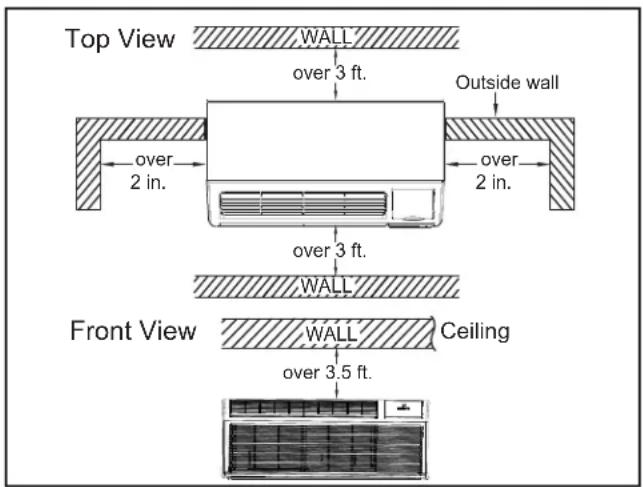
Figure C.3.1 (Clearance Limits)
| WARNING | |
| A2L R-32 | Do not use means to accelerate the defrosting process or to clean, other than those recommended by the manufacturer. The appliance shall be stored in a room without continuously operating ignition sources. (for example; open flames, an operating gas appliance, or an operating electric heater). Do Not Pierce or Burn Be aware that refrigerants may not contain an odor |
| WARNING | |
| Refrigeration System Under High Pressure Do not puncture, heat, expose to flame or incinerate. Only certified refrigeration technicians should service this equipment. R32 systems operate at higher pressures than R22 equipment. Appropriate safe service and handling practices must be used. Only use gauge sets designed for use with R32. Do not use standard R22 gauge sets.. | |
C. INSTALLATION OF THE UNIT
C.3 Installation Clearances (Continued)
For proper PTAC unit performance and maximum operating life refer to the minimum installation clearances below:
PTAC units should be installed no closer than 12" apart when two units are side by side. If three or more PTAC units are to operate next to one another allow a minimum of 36" between units. Also, a vertical clearance of 60" should be maintained between units installed. In the interior of the room the unit should be located a minimum of 1/4"

VIEW: OUTSIDE BUILDING ELEVATION
Figure C.3.2 (Installation Clearances)
For PTACs on the ground floor or anytime obstructions are present, use the following guidelines:
The above suggestions are for reference only and do not represent all possible installations. Please contact Friedrich for information regarding affects of other installation arrangements. By following these simple recommendations you can be confident that your Friedrich PTAC will provide years of worry free operation.
For minor obstructions such as lamp poles or small shrubbery a clearance of 12" from the outdoor louver should be maintained. For major obstructions such as a solid fence, wall or other heat rejecting device like a condensing unit, a minimum distance of 36" should be kept.

Figure C.3.3 (Installation Clearances)
C. INSTALLATION OF THE UNIT
C.4 Install Unit
C.4.1 Install Internal Drain Kit (If applicable)
- The PXDR10 Drain Kit if applicable, must be installed before the wall sleeve is installed into the wall.
NOTE: Determine whether drain will be located within the wall, on the indoor side, or will drain to the exterior of the building. Follow appropriate instructions below depending on your particular type of installation.
Internal Drain
NOTE: If installing an internal drain, you MUST install a drain kit on the wall sleeve before the wall sleeve is installed.
- Locate the drain within the "Preferred" area of best drainage. Maintain at least a 1/2 " clearance from the embossed area.
- Using the mounting plate with the 1/2 " hole as a template, mark and drill two, 3/16" mounting holes and a 1/2 " drain hole in the sleeve bottom.
- Remove the backing from the gasket and mount it on the flat side of the mounting plate. (See Figure C.4.2). Insert the drain tube through the hole in the gasket and mounting plate
so the tube flange will be against the wall sleeve.
- Position the assembly beneath the drilled holes and secure it with #10-24 x ½" machine screws and lock nuts provided. Seal the tops of the screws with silicone caulking.
- Use 1/2 " I.D. copper tube, PVC pipe, or vinyl hose (obtained locally) to connect the internal drain tube to the drain system in the building.
- Referring to C.4.2 locate and assemble the (2) two cover plates and gaskets over the drain holes at the rear of the wall sleeve. Attach them with the #10 sheet metal screws provided. Make certain that the four overflow slots at the rear of the wall sleeve are not blocked (See drawing of the back of the sleeve Figure C.4.2).
- If a deep wall extension (PDXWSEXT) is used, after installing the field supplied flashing, caulk as required. Be sure to caulk around the flashing and the wall sleeve where the hole was drilled for the drain tube.

Figure C.4.1 (Internal Drain Kit)
| PXDR10 | |
| QUANTITY DESCRIPTION | |
| 2 | COVER PLATES |
| 1 | MOUNTING PLATE |
| 1 | DRAIN TUBE |
| 3 | MOUNTING PLATE GASKET |
| 4 | #10 X 1/2” SHEET METAL SCREWS |
| 2 | #10-24 X 1/2” MACH. SCREWS |
| 2 | #10-24 X 1/2” LOCKNUTS |
C. INSTALLATION OF THE UNIT
C.4.2 External Drain Kit Installation
When using an external drain system, the condensate is removed through either of two drain holes on the back of the wall sleeve. Select the drain hole which best meets your drainage situation and install the drain kit. Seal off the other with a cover plate.
Drain Tube Installation
- Peel the backing tape off the gaskets and apply the sticky side to one cover plate and one mounting plate as shown in Details A and B.
- Place the drain tube through the gasket and the mounting plate with the flange toward the wall sleeve.
- Attach the drain tube assembly to one of the two drain holes at the rear of the wall sleeve. The large flange on the mounting plate is positioned at the bottom of the sleeve facing toward the sleeve, Detail B. When the drain tube is positioned at the desired angle, tighten the screws.
Cover Plate Installation
- Mount the foam gasket to the cover plate. Using two #10 x ½" sheet metal screws (provided), attach the cover plate to the remaining drain hole. Make certain the large flange on the plate
is positioned at the bottom of the sleeve.
- Discard the additional cover plate, gasket, machine screws, and locknuts.
NOTICE
If the wall sleeve has not been installed, the drain tube must be rotated to a horizontal position until after the sleeve is installed. Tighten the mounting plate screws when the tube is in the proper position. Make certain that the four overflow slots at the rear of the wall sleeve are not blocked (See Figure C.4.2).
When sealing the sleeve on the outside of the building, be careful NOT to let the sealant block the two condensate drain holes or the four overflow slots at the bottom flange of the sleeve.
Potential property damage can occur if instructions are not followed.

Figure C.4.2 (External Drain Kit Installation)
C.4.3 Wall Sleeve Installation Instructions (PDXWS)
NOTE: Insure that the unit is only installed in a wall structurally adequate to support the unit including the sleeve, chassis and accessories. If the sleeve projects more than 8" into the room, a subbase or other means of support MUST be used. Please read these instructions completely before attempting installation.
The following instructions apply ONLY to walls less than 13 1/4 in depth.

NOTICE
DO NOT allow any pitch toward the inside.
Flashing on all 4 sides of the opening is recommended.
Potential property damage can occur if instructions are not followed.
C. INSTALLATION OF THE UNIT
NOTE: If the wall is thicker than 13 1/4" a deep wall sleeve or wall sleeve extension MUST be used. The deep wall sleeve may be special ordered through your Sales Representative.
-
The PXDR10 Drain Kit (optional for new construction) see page 10 if applicable, must be installed before the wall sleeve is installed into the wall.
-
From inside the building, position the wall sleeve in the opening and push it into the wall until it protrudes at least 1/4 " on the outside. Do not allow sleeve to be pulled. (See Figure C.4.2).
-
Position the wall sleeve with a slight tilt towards the outside to facilitate condensate drainage. It should be level side-to-side and the front should be 1/4 bubble higher than the back.

NOTE: All 230/208V units are manufactured with a 67" power cord and all 265V units with a 27 1/2" power cord.
Figure C.4.3.1 (Typical Wall Sleeve Installation)
C. INSTALLATION OF THE UNIT
C.4.3 Wall Sleeve Installation Instructions (PDXWS)(Cont)

Figure C.4.3.2 (Panel Wall)
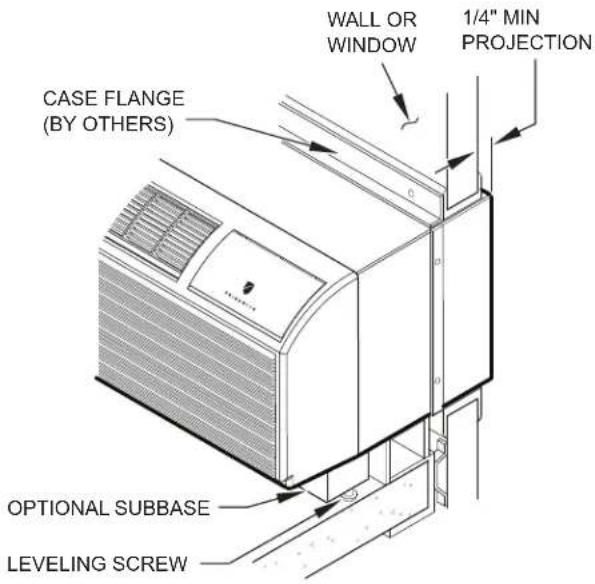
Figure C.4.3.3 Curtain Wall

Figure C.4.3.4 Frame and Brick Veneer

Figure C.4.3.5 Block and Brick Veneer
NOTE: Follow all wall system manufacturer installation instructions. For sunrooms and modular buildings, adhere to their installation instructions for supporting and sealing sleeve to their frames. All wall and window/wall installations must provide for proper drainage. In applications where the drain holes on the PTAC wall sleeve are not exposed beyond the wall an internal drain system is recommended. It is the installer's responsibility to ensure there is adequate drainage for the PTAC unit.
C. INSTALLATION OF THE UNIT
C.4.3 Wall Sleeve Installation Instructions (PDXWS)(Cont)

NOTE: The Wall Sleeve must be horizontally level (side-to-side) and pitched 1/4 bubble to the outside when installed in an opening. The mounting hole location should be approximately 2-4" from the top and bottom of the sleeve.
Figure C.4.3.6 Wall Sleeve Attachment

| Dimension* | AAllow for wall finishing(Minimum) | BAllow for floor finishingM in. Max.(Front-to-Back) | CAllow for proper drainage | |
| No Accessories | 1/4 " | 1/4 " | --- | --- |
| With Subbase 1-3/4" 3-1/2" 5" | --- | |||
| With Lateral Duct 3/4" | 1/4 " | --- | --- | |
| Wall Sleeve Tilt 1/4 " | ---- | |||
* If more than one accessory is to be used, use the maximum dimension. If the wall thickness is more than 13-3/4''-(A+1/4'' ), a sleeve extension must be used.
Figure C.4.3.7 Block and Brick Veneer
C. INSTALLATION OF THE UNIT
C.4.3 Wall Sleeve Installation Instructions (PDXWS)
-
Drill two 3/16" holes through each side of the sleeve approximately 4" from top and 4" from bottom of sleeve. Screw four #10 x 1" screws (included) or appropriate fasteners for your installation, through the holes in the sides of the wall sleeve.
-
Apply sealant around the wall sleeve where it projects through the inside and outside wall surfaces. Apply the sealant to the screw heads or the tops of the fasteners used in Step #5.
-
If the chassis and exterior grille are to be installed later, leave the weatherboard and center support in place, otherwise remove and dispose of them. (See Figure C.4.4).
-
Provide a support lintel if the wall sleeve is installed in a concrete or masonry wall (See Figure C.4.3.8).

NOTE: Construct wall opening to comply with all applicable building codes.
Figure C.4.3.8 Lintel Installation
C. INSTALLATION OF THE UNIT
C.4.4 Standard Grille Instructions
- Remove the center support and weatherboard if still installed in the sleeve.
- Insert six plastic grommets into the grille openings from the outside of the grille as shown in Figure C.4.4.
- Insert two #8 x 3/8/8 " sheet metal screws (provided) in the top two outside edge plastic grommets, and tighten them half way into the grommets.
- Grasp the grille by the attached plastic handles. Position it with the condensate drain knockouts facing down.
From inside the building, maneuver the grille through the wall sleeve and pull toward you until the screw heads are inserted into the keyhole slots at the top of the wall sleeve. Tighten the two screws completely. - Insert the remaining screws into the remaining holes and tighten securely.


Figure C.4.4 Standard Grille Instructions
C. INSTALLATION OF THE UNIT
C.5 Chassis Install
C.5.1 Chassis Install Preparation
NOTE: Check to be sure the wall sleeve, extension (if used), grille, and drain kit are installed properly before chassis installation.
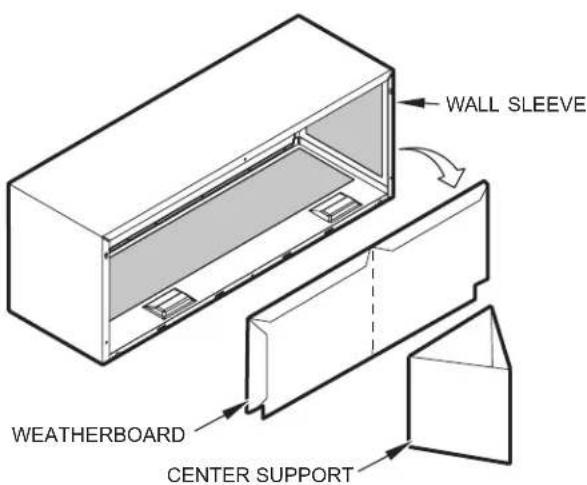
- Remove the weatherboard and center support from the sleeve (if still in place). Be sure an outdoor grille is attached.
NOTE: Use a wall sleeve adapter kit (PXSE) if installing a P-Series chassis in a T-Series sleeve.
- If the control door is not installed, follow these steps:
a. From the front cover, slide the right control door pin into the hole on the right side of the front cover.
b. Slide the left door pin into the hole on the left side of the front cover opening.
c. Snap cover into place.

NOTE: To avoid breaking the door or hinge pins, do not apply excessive force when installing.
IMPORTANT: When installing a Friedrich PTAC into an existing sleeve, it is important to ensure that the unit is installed completely. Inspection of the air seal between the condenser air baffles and around the indoor mounting flange is recommended.
In some cases additional gaskets or baffling may be required.
C. INSTALLATION OF THE UNIT
C.5.2 Chassis Install
- Carefully remove shipping tape from the front panel and vent door. See Fig. C.5.2.1
- Remove shipping screw from the vent door, if present. See Fig. C.5.2.2
- Remove front panel. See Fig. C.5..2..3
- Lift unit level and slide unit into wall sleeve until foam seal rests firmly against front of wall sleeve.
- Secure with four screws (supplied) through the unit flange holes. See Fig.C.5.2.4
- Reinstall front panel. See Fig. C.5.2.5
CAUTION
Unit Damage Hazard
Failure to follow this caution may result in equipment damage or improper operation.
Failure to remove shipping tape and screw will prevent fresh air vent door from opening and may result in damage to vent door cable.

Fig.C.5.2.1–Shipping Tape Location
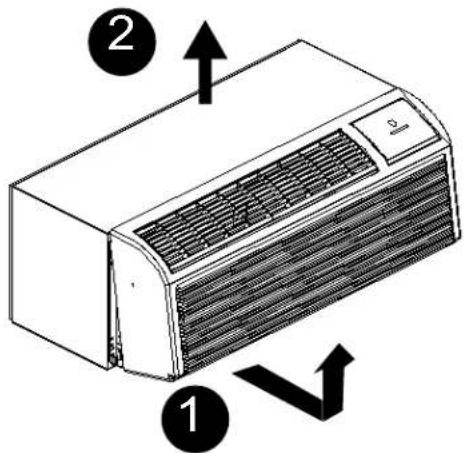
Pull out at the bottom to release it from the tabs (1). Then lift up (2).
Fig. C.5.2.3—Removing Front Panel

Fig. C.5.2.4 – Securing Unit

Fig. C.5.2.2–Shipping Screw Location

Place tabs over top rail(1). Push Inward at bottom until panel snaps into place(2).
Fig. C.5.2.5 – Replacing Front Panel
E. ELECTRICAL
E.1 Electrical Safety Information
| WARNING | |
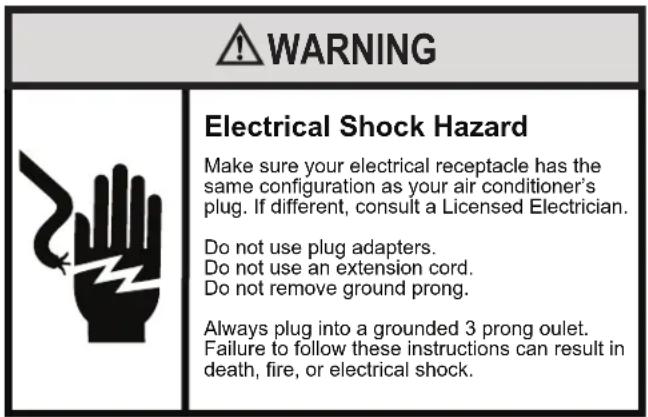
| Electrical Shock Hazard Make sure your electrical receptacle has the same configuration as your air conditioner's plug. If different, consult a Licensed Electrician. Do not use plug adapters. Do not use an extension cord. Do not remove ground prong. Always plug into a grounded 3 prong outlet. Failure to follow these instructions can result in death, fire, or electrical shock. | |
Make sure the wiring is adequate for your unit.
If you have fuses, they should be of the time delay type. Before you install or relocate this unit, be sure that the amperage rating of the circuit breaker or time delay fuse does not exceed the amp rating listed in Figure E.1.1. Must be installed on a single circuit with designated receptacle.
DO NOT use an extension cord.
The cord provided will carry the proper amount of electrical power to the unit; an extension cord may not.
Make sure that the receptacle is compatible with the air conditioner cord (Refer to Figure E.1.1)
| Table 1 Receptacles and Fuse Types | ||||||
| Voltage | 230V | 265V | ||||
| Amps | 15 | 20 | 30 | 15 | 20 | 30 |
| Heater Size | 1.5/2.5kw | 3.5kw | 5kw | 1.5/2.5kw | 3.5kw | 5kw |
| Receptacles | ||||||
| NEMA#Receptacle | 6-15R | 6-20R | 6-30R | 7-15R | 7-20R | 7-30R |
| NEMA#Plug | 6-15P | 6-20P | 6-30P | 7-15P | 7-20P | 7-30P |
Figure E.1.1 (Receptacles and Fuses)
| FUSE/CIRCUIT BREAKER | Use ONLY type and size fuse or HACR circuit breaker indicated on unit's rating plate. Proper current protection to the unit is the responsibility of the owner. Specification of fuse on the main board: T3.15AH250V(unit: 208/230V) T3.15A 350VAC(unit: 265V) |
| GROUNDING | Unit MUST be grounded from branch circuit through service cord to unit, or through separate ground wire provided on permanently connected units. Be sure that branch circuit or general purpose outlet is grounded. The field supplied outlet must match plug on service cord and be within reach of service cord. Refer to Table 1 for proper receptacle and fuse type. Do NOT alter the service cord or plug. Do NOT use an extension cord. |
| RECEPTACLE | The field supplied outlet must match plug on service cord and be within reach of service cord. Refer to Table 1 for proper receptacle and fuse type. Do NOT alter the service cord or plug. Do NOT use an extension cord. |
E.2 Power Cord LCDI Test
All Friedrich 230/208V PTAC units are shipped from the factory with a Leakage Current Detection Interrupter (LCDI) equipped power cord. The LCDI device meets the UL and NEC requirements for cord connected air conditioners.
To test your power supply cord:
- Plug power supply cord into a grounded 3 prong outlet.
- Press RESET.
- Press TEST ( listen for click; Reset button trips and pops out).
- Press and release RESET
a. Listen for click; Reset button latches and remains in.
b. Check that the green indicator light is on once reset.
c. The power supply cord is ready for operation.
NOTE: The LCD device is not intended to be used as a switch.
Once plugged in the unit will operate normally without the need to reset the LCDI device.
If the LCDI device fails to trip when tested or if the power supply cord is damaged it must be replaced with a new supply cord obtained from the product manufacturer, and must not be repaired.

Figure E.2.1 (Test LCDI)
| MODEL HEATER Kw POWER | CORD KIT VOLTAGE AMPERAGE RECEPTACLE | ||||
| PDH09K PDH12K | 2.5 PXPC23015A | 208/230 15 NEMA 6-15r | |||
| 3.5 | PXPC23020A (STD) | 208/230 | 20 | NEMA 6-20r | |
| 5.0 PXPC23030 | 208/230 30 NEMA 6-30r | ||||
| PDH09R PDH12R | 2.5 PXPC26515 | 265 | 15 NEMA 7-15r | ||
| 3.5 | PXPC26520A (STD) | 265 | 20 | NEMA 7-20r | |
| 5.0 PXPC26530 | 265 | 30 NEMA 7-30r | |||
Figure E.2.2 Power Cord Kits
E.3 Electrical Wiring
E.3.1 Power Cord Installation
All 265V PTAC/PTHP units come with a factory installed non-LCDI power cord for use in a subbase. If the unit is to be hard-wired refer to the instructions below.
NOTE: It is recommended that the PXSB subbase assembly, the PXCJA conduit kit (or equivalent) be installed on all hardwire units. If installing a flush-floor mounted unit, make sure the chassis can be removed from the sleeve for service and maintenance.
POWER CONNECTION OPTIONS
Appropriate power cord accessory kit is determined by the voltage, and amperage of the branch circuit. The 265v unit does not come with a power cord (or hard wire kit). An accessory power cord kit must be ordered to connect the unit to the outlet. If the unit is to be hard wired, an accessory hard wire kit must be ordered.
IMPORTANT: For 265V units, if power cord accessory option is selected, the cord is only 18" long and must plug into the accessory electrical 265V subbase. Be sure that your outlet matches the appropriate blade configuration of the plug and that it is within reach of the service cord. All wiring, including installation of the receptacle, must be in accordance with the NEC and local codes, ordinances and regulations. National codes require the use of an arc fault or leakage current detection device on all 208/230V power cords. Be sure to select the correct cord for your installation.
Wire Size
Use recommended wire size given in Table E.1.2 and install a single branch circuit. All wiring must comply with local and national codes. All units are designed to operate off ONE single branch circuits only.
NOTE: Use copper conductors only. Prepare the 265V (or 230V) power cord for connection to the chassis' power cord connector by cutting the cord to the appropriate length.
| NAMEPLATE AMPS | AWG WIRE SIZESingle circuit from main box. Based on copper wire at 140°F temperature rating. |
| 7.0 to 12 14 | |
| 12.1 to 16 12 | |
| 16.1 to 24 10 |
Table E.1.2
Grounding
For safety and protection, the unit is grounded through the service cord plug or through separate ground wire provided on hard wired units. Be sure that the branch circuit or general purpose outlet is grounded.
VOLTAGE SUPPLY
Check voltage supply at outlet. For satisfactory results, the voltage range must always be within the ranges found on the data information plate.
Cord-connected Units
The 250V- field supplied outlet must match the plug for the standard 208/230V- units and be within reach of the service cord. The standard cord-connected 265V- units require an accessory electrical subbase for operation. Refer to Table E.1.1 for proper receptacle and fuse type.
Power Cord Protection
The power cord for 230/208V units provide power cord fire protection. Unit power automatically disconnects when unsafe conditions are detected. Power to the unit can be restored by pressing the reset button on plug head. Upon completion of unit installation for 230/208V models, an operational check should be performed using the TEST/RESET buttons on the plug head.
NOTE: The 265V models do not incorporate this feature as they require use of the electrical subbase accessory. To install the line voltage power leads and conduit to chassis, follow the instructions below and refer to.
E. ELECTRICAL
E.3.1 Power Cord Installation (Cont)
PXCJA Conduit Kit is required with this setup.
Follow the removal process of the chassis's junction box.
Route the cut ends of harness through the conduit connector assembly and flex conduit sleeve. Be sure to use the supplied conduit bushing to prevent damage to the cord by the conduit.
The cord should pass through the Locknut, Spacer, Chassis Junction Box, Conduit Connector, Bushing, then the Conduit Sleeve. See Figure E.3.2.
Route the cut ends of the power cord through the elbow connector at the other end of the conduit. Tighten screws on elbow connector to secure conduit sleeve.
Fasten and secure the elbow connector to the wall junction box cover with locknut. Place and mount the wall junction box with the four wall mounting screws making sure to pass the wall lines through the junction box. Connect and join all wall lines with the stripped ends using wire nuts. Tighten both screws of the wall junction box cover to junction box.
- Follow steps 4-6 in Section E.4 and refer to Figure E.4.2.

Figure E.3.2 (Wall Connection)

Figure E.3.1 (265v Power Cord)

Figure E.3.3 (Harness Connector)
E.4 How To Connect
IMPORTANT: Please Read The Following Electrical Safety Data Carefully
| WARNING | |
| Electrical Shock and/or Unit Operation and Damage Hazard Failure to follow this warning could result in personal injury or death and/or unit damage. ·Follow the National Electrical Code (NEC) or local codes and ordinances. ·For personal safety, this unit MUST BE properly grounded. ·Protective devices (fuses or circuit breakers) acceptable for unit installations are specified on the nameplate of each unit. ·Do not use an extension cord with this unit. ·Aluminum wiring in the building may present special problems - consult a qualified electrician. ·When unit is in STOP position, there is still voltage to the electrical controls. ·Disconnect power to unit before servicing by: 1. Removing power cord (if it has one) from wall receptacle. 2. Removing branch circuit fuses or turning circuit breakers off at panel. | |
- Remove front panel. See Figure C.5.2.3.
- Remove junction box.
- Remove junction box cover by removing three screws from front. Remove junction box by taking out top, rear and side screws. See Figure E.4.1.

Figure E.4.1 (Junction Box)
- Connect accessory power supply cord or hard wire connector to unit connector. See Figure E.4.2.
- Units must be installed using the appropriate power supply kit. See Table E.2.2 (Power Connection Chart). These connections must be followed.
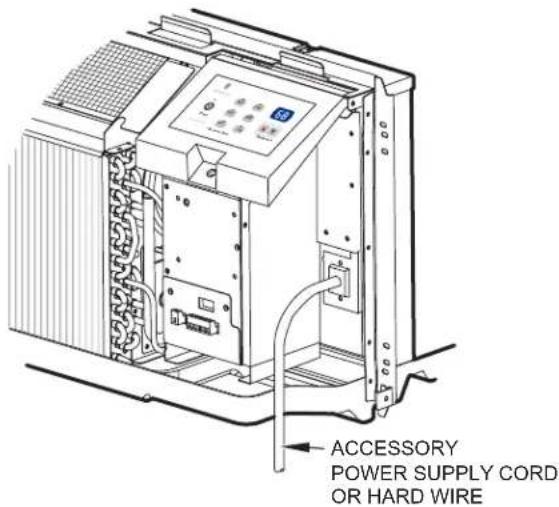
Figure E.4.2 (Power Connection)
See Table E.2.2 for power cord accessory options and ratings.
-
Reinstall junction box and cover.
-
Use wire clamp to attach power cord to basepan. Secure with screws (included) See Figure 27.
-
Replace junction box and cover with screws removed from Step 2. Tighten securely.
-
Replace front panel. See Figure 24.
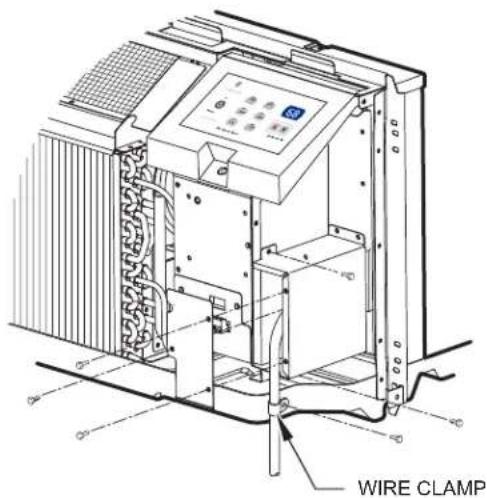
Figure E.4.3 (Wire Clamp)
F. REMOTE THERMOSTATS
F.1 Install Thermostat
All PZ model PTAC units are factory configured to be controlled by either the chassis mounted Smart Center or a 24v remote wall mounted thermostat.
The thermostat may be auto or manual changeover as long as the control configuration matches that of the PTAC unit.
ALL PDH Models require a single stage cool, dual stage thermostat with an O reversing valve control. The Freidrich RT6 thermostat is applicable.
Install thermostat Approximately 5 ft. from the floor.
Install thermostat close to or in a frequently used room, preferably on an inside wall.
The Thermostat should NOT be mounted:
Close to a window, on an outside wall, or next to a door leading outside. Where it can be exposed to direct sunlight or heat, such as the sun, a lamp, fireplace, or any ther temperatureradiating object which may cause a false reading.
Close to or in the direct airflow of supply registers and/or return air grilles.
Any areas with poor air circulation, such as a corner, behind a door, or an alcove.
WARNING

Electrical Shock Hazard
Make sure your electrical receptacle has the same configuration as your air conditioner's plug. If different, consult a Licensed Electrician.
Do not use plug adapters.
Do not use an extension cord.
Do not remove ground prong.
Always plug into a grounded 3 prong oulet.
Failure to follow these instructions can result in death, fire, or electrical shock.
WALL THERMOSTAT TERMINAL
IMPORTANT: Only trained, qualified personnel should access electrical panel on unit and install electrical accessories. Please contact your local electrical contractor, dealer, or distributor for assistance.
Thermostat Wire Routing
Thermostat wire is field supplied. Recommended wire gauge is 18 to 20 gauge solid thermostat wire. NOTE: It is recommended that extra wires are run to unit in case any are damaged during installation. Thermostat wire should always be routed around or under, NEVER through, the wall sleeve. The wire should then be routed behind the front panel to the easily accessible terminal connector.

THERMOSTAT WIRE ROUTING
(UNDER SLEEVE, BEHIND FRONT PANEL)
Fig. F.1.1 -Proper Wire Routing Beneath Unit

Fig. F.1.2-Terminal Connector Removal and Replacement
Wiring Thermostat To Unit
Wire wall thermostat input as defined in Fig. F.2.2
NOTE: Terminal connector can be removed and replaced to simplify the wiring.
NOTE: For heat pump models, anytime there is a second-stage call for heating from the wall thermostat, the unit will automatically switch over to electric heating.
Install Thermostat Wiring
-
Ensure that power is disconnected.
-
Pull terminal connector to remove
NOTE: Terminal connector can be removed and replaced to simplify thermostat wiring.
-
Connect wires from the thermostat to terminals on unit terminal connector.
-
Reinstall terminal connector.
-
Ensure that unit is configured for wall thermostat enable.
-
Replace control panel label with wall thermostat label(included).
-
Restore power to unit.
NOTE: Refer to Table J.3.3 (Dip Switch Functions) to set the thermostat mode.
NOTE: Refer to thermostat installation instructions for details on installing wall thermostat.
NOTE: For thermostats that have only one fan speed output (on or auto), the fan speed is determined by how the terminal connector is wired. If Low fan is desired, wire the G output from the thermostat to GL on the unit's terminal block. If Hi fan is desired, wire the G output from the thermostat to GH on the unit's terminal block.
NOTE: After proper installation, if your thermostat is not working properly, refer to the Trouble Shooting section.
F. REMOTE THERMOSTATS
F.2 Terminal Connections
The wall thermostat terminal block is located behind the front panel and is easily accessible on front of control panel.

Fig. F.2.1 - Terminal Connector and Status LED Location

NOTES:
1. Use terminal "0" for heat pump unit connection only.
2. Terminal "C" (common) is typically only required for digital thermostats.

CAUTION
UNIT DAMAGE HAZARD
Failure to follow this caution may result in equipment damage or improper operation.
Improper wiring may damage unit electronics. Common busing is not permitted. Damage or erratic operation may result.
| TERMINAL | DESIGNATION |
| R | 24VAC |
| W | Electric Heat |
| Y | Compressor |
| O | Reversing Valve |
| GH | High Fan |
| GL | Low Fan |
| C | Common |
NOTE: Any errant input combinations will be captured as thermostat wiring failures and will light the STATUS LED indicator on main board (see Intelligent Self--Checking Control section).
ENERGY MANAGEMENT INPUT (FRONT DESK CONTROL)
The controller can handle a switch signal from remote energy management input, called EM signal or front desk control. Input must be 24VAC. If system receives a 24VAC signal, it will turn unit off; otherwise, the unit runs in normal control. This function will be disabled under Freeze Guard protection. See Fig. F.2.1 and Fig. F.2.2 for terminal connections.
J.1 Final Inspection
- Inspect and ensure that all components and accessories have been installed properly and that they have not been damaged during the installation progress.
- Check the condensate water drain(s) to ensure that they are adequate for the removal of condensate water, and that they meet the approval of the end user.
- Ensure that all installation instructions concerning clearances around the unit have been adhered to. Check to ensure that the unit air filter, indoor coil, and outdoor coil are free from any obstructions.
- Inspect the unit for any damage to the coils and tubing that could cause a leak.
- Ensure that the circuit breaker(s) or fuse(s) and supply circuit wire size have been sized correctly. If the unit was supplied with a power supply cord, insure that it is stored properly.
- Ensure that the entire installation is in compliance with all applicable national and local codes and ordinances having
- Secure components and accessories, such as a decorative front cover.
- Start the unit and check for proper operation of all components in each mode of operation.
• Instruct the owner or operator of the units operation, and the manufacturer's Routine Maintenance.
NOTE: A log for recording the dates of maintenance and/or service is recommended.
Present the owner or operator of the equipment with the Installation & Operation Manual, all accessory installation instructions, and the name, address, and telephone number of the Authorized Friedrich Warranty Service Company in the area for future reference if necessary. Inspect the unit for any damage to the coils and tubing that could cause a leak.
J.2 Air Flow Selection and Adjustment
VENTILATION CONTROL
The ventilation control lever is located at left side of unit, behind front panel.
NOTE: The vent door shipping hardware must be removed before using vent control lever. See Installation Instructions.
When set at close POSITION, only the air inside the room is circulated and filtered.
When set at open POSITION, some outdoor air will be drawn into room. This will reduce heating or cooling efficiency.
EnergyTip : Keep the vent control at POSITION. Room air will be filtered and circulated.

Figure J.2.1 (Ventilation Control Location)
ADJUSTING AIR DIRECTION
To adjust air direction:
- Remove front panel.
- Remove louver screws that hold louver insert in place (from back side of front panel). See Fig. J.2.2
- Turn louver insert and rotate 180° See Fig. J.2.3
- Replace louver insert.
- Replace screws and front panel.
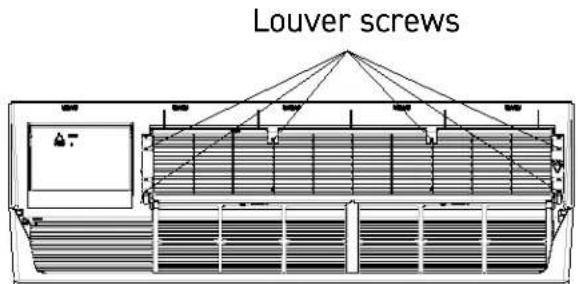
Figure J.2.2 (Backside of Front Panel)


Figure J.2.3 (Adjusting Louvers)
J.3 Dip Switches
Auxiliary dip switch controls are located behind front panel, through an opening below the control panel.
To access, remove front panel.
Dip switches are accessible without opening the control box. Unit must be powered OFF to effectively change their status.
Factory settings for dip switches will be in the DOWN position. See Table 5-Dip Switch Functions for functions of each dipswitch position.
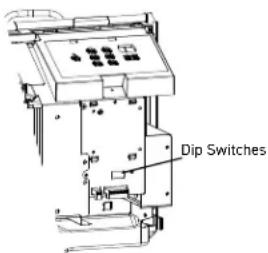
Figure J.3.1 (Dipswitch Location on Unit)

Figure J.3.2 (Dip Switches)
Table J.3.3 (DIP SWITCH FUNCTIONS)
| No. UP DOWN REMARKS DEFAULT | ||||||
| 1 DOWN | Electric Heat Only | Heat Pump | For Heat Pump unit only. | |||
| 2 DOWN | Wall Thermostat Enable | Control Panel Enable | ||||
| 6*5 | UP*UP68-75°F | UP*DOWN63-80°F | DOWN*UP65-78°F | DOWN*DOWN61-86°F(full range) | Two configurations (5*6) combine to select set point range.When set point limit set, display al ways shows full range. | DOWN*DOWN61-86°F |
| 7 | Freeze Guard Disable | Freeze Guard Enable | DOWN | |||
Electric Heating Only/Emergency Heat (For Heat Pump Units Only)
This setting is typically used for Emergency Heating.
Wall Thermostat Enable
A wired wall thermostat can be connected to the unit. If it is, this dipswitch must be moved to the Wall Thermostat Enable Position, before the wall thermostat will begin control.
Setpoint Temperature Limits
Provides a restricted range of temperature control.
Room Freeze Protection
If unit senses a room temperature below 40° F, the fan motor and electric strip heat will turn on and warm the room to 50° F. The fan stops a short time after the temperature is satisfied.
J.4 Control Panel Operation
IMPORTANT: When unit is first started, high humidity conditions can cause condensation to form on discharge grille. Keep doors and windows closed .Room humidity will decrease and moisture will evaporate.

Figure J.4.1
ABOUT THE CONTROLS ON YOUR UNIT
NOTE: In case of a power failure, the unit will remember the last programmed settings and will restart to those settings.
-
When the unit is in off mode, turn on the unit by Power; if pressing up/down button, dual-8 will off after indoor temperature displays for 15s; if pressing mode button, controller will resume to related state, and operation indication lamp will on (mode button including cooling mode button, heating mode button and fan mode button)
-
Every button is valid when the unit is on.
• Power: It will shift when the unit is Power by Power.
- Cooling mode button: when the unit is on, it will run under cooling mode; when the unit is off, press cooling mode button, controller is on and runs under cooling mode.
- Heating mode button: when the unit is on, it will run under heating mode; when the unit is off, press heating mode button, controller is on and runs under heating mode.
- Constant Fan button: when the unit is on, it will run under fan mode; when the unit is off, press fan mode button, controller is on and runs under fan mode.
- Low speed button: when the unit is on, low fan will be chose if pressing low fan button.
- High speed button: when the unit is on, high fan will be chose if pressing high fan button.
- Auto speed button: When the unit is on, press Auto button, the unit will run at the mode automatically adjusted according to ambient temperature.
- UP/DOWN: Adjust preset temperature 61-86°F 16-30°C by UP/DOWN.
Allocation mode will be started up if pressing the buttons of low speed and Setpoint down for 5S when the unit is on in 30S. After entering into allocation mode, adjust temperature compensation by buttons which leads the unit in on/off condition, and it acts after it overloads 3S; if ambient temperature changing leads the unit in on/off condition, it will act after exit allocation mode.
Under allocation mode: Choose below 4 allocation modes by low speed button.
First Mode: Fahrenheit/Celsius display mode
The Fahrenheit/Celsius display mode will be shifted if pressing Setpoint up or Setpoint down.
F means Fahrenheit display mode C means Celsius display mode.
Second Mode: Adjust cooling temperature compensation value mode
Press Setpoint up/Setpoint down will increase/decrease compensation temperature 1°F(or °C).
The adjust range of indoor ambient temperature compensation value is -6°F +6°F(-3°C +3°C)
(cooling mode LED is on.)
Third Mode: Adjust heating temperature compensation value mode
Press Setpoint up/Setpoint down will increase/decrease compensation temperature 1°F (or °C)
The adjustment range of indoor ambient temperature compensation value is -6°F +6°F(-3°C +3°C)
(heating mode LED is on.)
The temperature compensation is default 0 and allocates different compensation value under cooling and heating mode, the compensation value can not be adjusted under fan mode
Forth Mode: Display shift of preset temperature and ambient temperature under heating and cooling mode. Display of preset temperature and ambient temperature can be shifted if pressing Setpoint up or Setpoint down. Preset temperature display: dual-8 displays SP, after exiting allocation mode, preset temperature will display under heating and cooling mode.
Ambient temperature display: dual-8 displays AA, after exit allocation mode, ambient temperature will display under heating and cooling mode.
In below situation: preset temperature will display 10S, then display ambient temperature.
-
Press mode button. (mode button includes: cooling mode button, heating mode button)
-
Energization after power off.
-
Turn off the unit after turn on unit.
-
EM off after on.
-
Adjust preset temperature by Setpoint up and Setpoint down.
Exiting measure of allocation mode: for above allocation mode, there is no button action if pressing mode button (including cooling mode button, fan mode button and heating mode button) or in 30S, the unit will exit allocation mode.
M. TROUBLESHOOTING
M.1. Troubleshooting Tips
| SYMTOM POSSIBLE CAUSES SOLUTIONS | ||
| UNIT DOES NOT START · Unit may have become unpluggedFuse may have blownCircuit breaker may have been trippedUnit may be off or in wall thermostat mode.Check section on dipswitch settings to verify dipswitches are set properly.Unit may be in a protection or diagnostic failure mode.See section on Intelligent Self-checkingControl. | · Check that plug is plugged securely in wall receptacle.Note : Plug has a test/reset button on it. Make sure that the plug has not tripped.Replace the fuse. See Note 1.Reset circuit breaker. See Note 1.Turn unit on (bottom right button on keypad).Note: If the unit turns on, the LED will be green. If the unit is off, the LED will be red. If there is no LED on, there is a problem with power or damage to the control. | |
| UNIT NOT COOLING/HEATING ROOM | Unit air discharge section is blockedTemperature setting is not high or low enough Note:Setpoint limits may not allow the unit to heat or cool the room to the temperature desired.Check section on dipswitch settings.Unit air filters are dirty.Room is excessively hot or cold when unit is started.Vent door left openUnit may be in a protection or diagnostic failure mode.Check section on Intelligent Self-checking Control.Compressor is in time delay. There is a protective time delay (approx. 3 minutes) on starting the compressor after a power outage (or restarting after it has been turned off), to prevent tripping of the compressor overload. | · Make sure that curtains, blinds or furniture are not restricting orblocking unit airflow.Reset to a lower or higher temperature setting.Remove and clean filters.Allow sufficient amount of time for unit to heat or cool the room.Start heating or cooling early before outdoor temperature, cookingheat or gatherings of people make room uncomfortable.Close vent door.Check dipswitch settings for desired comfort.Wait approximately 3 minutes for compressor to start |
| DISPLAY HAS STRANGENUMBERS/CHARACTERSON IT | The unit may be in a diagnostic condition.The unit may be set for C (instead of F). | · Check Intelligent Self-checking Control section to determine if unit has had a failure.See the keypad configuration section. |
| UNIT MAKING NOISES · Clicking, gurgling and whooshing noises are normal duringoperation of unit. | ||
| WATER DRIPPINGOUTSIDE | If a drain kit has not been installed, condensation runoff during very hot and humid weather is normal.See Note 2. If a drain kit has been installed and is connected to a drain system, check gaskets and fittings around drain for leaks and plugs. | |
| WATER DRIPPING INSIDE · Wall sleeve is not installed level · Wall sleeve must be installed level for proper drainage of condensation. Check that installation is level and make any necessary adjustments. | ||
| ICE OR FROST FORMS ONINDOOR COIL | Low outdoor temperatureDirty filters | · When outdoor temperature is approximately 55 F or below, frost may form on the indoor coil when unit is in Cooling mode. Switch unit to FAN operation until ice or frost melts.Remove and clean filters. |
| COMPRESSORPROTECTION | Power may have cycled, so compressor is in a restart protection. | · Random Compress or restart - Whenever the unit is plugged in, or power has been restarted, a random compressor restart will occur. After a power outage, the compressor will restart after approximately 3 minutes.Compress or Protection-To prevent short cycling of the compressor, there is a random startup delay of 3 minutes and a minimum compressor run time of 3 minutes. |
| NOTES:1.If circuit breaker is tripped or fuse is blown more than once,contact a qualified electrician.2.If unit is installed where condensation drainage could drip in an undesirable location,an accessory drain kit should be installed and connected to drain system | ||
M.2 Diagnostic Codes
STATUS LED Indicator Definitions
INTELLIGENT SELF--CHECKING CONTROL
Your PTAC has a computer board that continuously checks key components of the unit to ensure they are operating properly. Under normal operation, unit status indicator (STATUS, on main PCB), light is steadily ON. If there is a major problem, the unit will shut down and display a diagnostic failure code on the unit's display. If it is only a minor failure and unit is correcting the fault by itself, the diagnostic code will be flashed on the status LED that can easily be seen when the front panel is removed (see Fig. C.5.2.3). Failure STATUS codes are defined in the table below.
| Diagnostic Code | Description Status Indicator | |
| F1 | Indoor ambient temperature sensor is open circuited or short-circuited. | Dual-8 nixie tube displays“F1” and STATUS indicator will flash once and off 3s circularly. |
| F2 Indoor | tube temperature sensor is open circuited or short-circuited. | Dual-8 nixie tube displays“F2” and STATUS indicator will flash twice and off 3s circularly. |
| F3 | Outdoor ambient temperature sensor is open circuited or short-circuited. | Dual-8 nixie tube displays“F3”. |
| F4 | Outdoor tube temperature sensor is open circuited or short-circuited. | Dual-8 nixie tube displays“F4” and STATUS indicator will flash four times and off 3s circularly. |
| FJ Malfunction of temperature sensor at air outlet. Dual-8 nixie tube displays “FJ”. | ||
| FP | Low temperature prevention protection. Dual-8 nixie tube displays “FP”. | |
| Wrong wire connection indication for wired controller. STATUS indicator will flash nine times and off 3s circularly. | ||
| High temperature prevention protection for evaporator. STATUS indicator will flash eight times and off 3s circularly. | ||
| High temperature prevention protection for outdoor condenser. | STATUS indicator will flash six times and off 3s circularly. | |
| Freeze prevention protection for evaporator. STATUS indicator will flash five times and off 3s circularly. | ||
| Frost prevention (heat pump). STATUS indicator will flash seven times and off 3s circularly. | ||
| F0 Freon- | acking protection. Dual-8 nixie tube displays “F0”. | |
| H3 Overload detection protection. Dual-8 nixie tube displays “H3”. | ||
| E5 Overcurrent protection of compressor. | Dual-8 nixie tube displays “E5”. | |
| A2 | Malfunction protection for electric heating Relay for Compressor or heater is broken. | Dual-8 nixie tube displays “A2”. |
| U5 | Unbalanced Electric Current detected between Null line and live line. | Dual-8 nixie tube displays “U5”. |
| A0 Electric heater combination wrong. | Dual-8 nixie tube displays “A0”. | |
| A4 Electric heater current abnormal. | Dual-8 nixie tube displays “A4”. | |
| C7 Temperature limiter protection time too long or fured. | Dual-8 nixie tube displays “C7”. | |
For advanced troubleshooting and repair by qualified service technicians:
Scan this QR code to be linked to our professional support page where you can locate the Service Manual.

P. ACCESSORIES
| New Construction Accessories | ||
| PDXWSA | WALL SLEEVE Galvanized zinc coated steel is prepared in an 11-step process, then powder coated with a polyester finish and cured in an oven for exceptional durability. The wall sleeve is insulated for sound absorption and thermal efficiency, 16" High x 42" Wide x 13 3/4" Deep. |  |
| PDXWSEXT | DEEP WALL SLEEVE EXTENSION For use when the wall is thicker than 13 1/4"deep. The wall sleeve may be special ordered through your Sales Representative and will be cut to your specific depth requirements.. | |
| PXGA | GRILLE Standard, stamped aluminium, anodized to resist chalking and oxidation. |  |
| PXAA | ARCHITECTURAL GRILLES Consist of heavy-gauge 6063-T5 aluminum alloy: | |
| PXBG | PXAA - Clear, extruded aluminum | |
| PXSC | PXBG - Beige acrylic enamel | |
| PXSC - Also available in custom colors. |  | |
| PXSE | SLEEVE EXTENSION RETROFIT KIT Galvanized zinc coated steel, 2.4" sleeve extension attached to the room side of the sleeve to allow for the installation of a PD-Series Friedrich PTAC in a T-Series sleeve. | 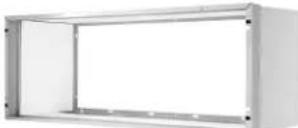 |
| PXSBA | DECORATIVE SUBBASE Provides unit support for walls less than six inches thick. Includes leveling legs, side filler panels and mounting brackets for electrical accessories. Accepts circuit breaker, power disconnect switch, or conduit kit. |  |
| ELECTRICAL SUBBASE Provides unit support for walls less than six inches thick. Includes leveling legs, side filler panels, mounting brackets, a plug-in receptacle and field-wiring access. The subbase also includes electrical knockouts for a power disconnect switch or circuit breaker. | ||
| PXSB23020 - Electrical Subbase - 230V 15 & 20APXSB23030 - Electrical Subbase - 230V 30APXSB26515 - Electrical Subbase - 265V 15APXSB26520 - Electrical Subbase - 265V 20APXSB26530 - Electrical Subbase - 265V 30A |  | |
| POWER CORDS | PXPC23015A LCDI 230V 15A Cord - 2.5 kW 6 ft. lengthPXPC23020A LCDI 230V 20A Cord - 3.5 kW 6 ft. lengthPXPC23030 LCDI 230V 30A Cord - 5.0 kW 6 ft. lengthPXPC26515A Non-LCDI 265V 15A Cord - 2.5 kW 18 inch lengthPXPC26520A Non-LCDI 265V 20A Cord - 3.5 kW 18 inch lengthPXPC26530 Non-LCDI 265V 30A Cord - 5.0 kW 18 inch length |  |
| PXCJA | CONDUIT KIT WITH JUNCTION BOX Hard wire conduit kit with junction box for 208/230V and 265V units (subbase not required). Kit includes a means of quick disconnect for easy removal of the chassis. *Required for 265V installations. |  |
| PDXDAA | LATERAL DUCT ADAPTER Attaches to the Friedrich PTAC/PTHP unit to direct up to 35% of the total airflow to a second room. The unit mounted duct plenum features a front mounted aluminum grille that has two positions to provide the most optimal air direction. The air may be directed to either the left or the right of the unit through the supplied 3.5 H" x 7 W" x 47" L plenum. Plenum may be cut to length by the installer. Kit includes duct plenum, front grille, 47" duct extension, duct discharge grille, duct end cap and all necessary mounting hardware. |  |
| PDXDEA | LATERAL DUCT EXTENSION Additional 3.5 H" x 7" W x 47" L plenum for use with the LATERAL DUCT ADAPTER. A maximum of 3 duct extensions total may be used. Note: Ducted airflow is reduced as duct length is increased. | |
| PXFTA | REPLACEMENT FILTER PACK These are original equipment return air filters. They are reusable and can be cleaned by vacuuming, washing, or blowing out, and are sold in convenient ten-packs. (Two filters per chassis). | 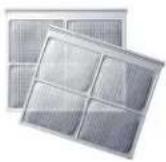 |
| PXDR10 | CONDENSATE DRAIN KIT Attaches to the bottom of the wall sleeve for internal draining of condensate or to the rear wall sleeve flange for external draining. Recommended on all units to remove excess condensate. Packaged in quantities of ten. |  |
| RT7 | DIGITAL REMOTE WALL THERMOSTAT Single stage cool, single stage heat for PDE models or single stage cool, dual stage heat for PDH model thermostat features high/low fan speed switch. Thermostat is hard wired and can be battery powered or unit powered. Features backlit display and multiple configuration modes. For use on PD-series Friedrich PTACs and Vert-I-Paks. |  |
| RT7P |  | |
| WRT2 | DIGITAL THERMOSTAT Wireless, single stage, wall-mounted digital thermostat with two fan speeds. Features backlit display and multiple configuration modes. |  |
| PDXRTA | REMOTE THERMOSTAT ESCUTCHEON KIT This kit contains ten escutcheons that can be placed over the factory control buttons when a remote wall mounted thermostat is used. The escutcheon directs the guest to the wall thermostat for operation and retains the LED window to display error codes and diagnostic information. |  |
| FRIEDRICHLINK® ENERGY MANAGEMENT THERMOSTAT Integrated occupancy sensor uses a combination of motion and thermal sensing technologies for accurate occupancy detection. Reliable occupancy detection allows saving energy when rooms are unoccupied. Energy saving presets eliminate the guesswork and make it easy to adjust the energy saving settings. |  | |
| EMWRT2 | Wireless thermostat with occupancy sensor. | |
| EMRT2 | Wired thermostat with occupancy sensor. | |
R. INFORMATION FOR THE OWNER
R.2 Routine Maintenance
Preventative maintenance is essential to proper unit oeration, efficiency and longevity. To ensure equipment operates properly, it must be properly maintained. Equipment operation should be checked and verified several times during each year. During regular unit inspection and maintenance, follow the guidelines below:
Clean basepan and outdoor vent filter.
Clean or install new indoor-air inlet filter(s).
Clean wall sleeve and outdoor grille.
Inspect cord and receptacle.
Clean outdoor orifice and fan.
Clean indoor coil.(Never use high pressure spray on coils.)
Clean indoor fan, wire screen and front panel.
Secure electrical connections.
Ensure front panel is properly mounted and not damaged.
Ensure wall sleeve is installed properly.
Ensure heat and cool cycles operate properly.
Front panel and case
Turn unit off and disconnect power supply.
To clean, use water and a mild detergent. Do not use bleach or abrasives. Some commercial cleaners may damage the plastic parts.
Outdoor coil
Coil on outdoor side of unit should be checked regularly. Unit will need to be removed to inspect dirt build-up that will occur on the inside of the coil. If clogged with dirt or soot, coil should be professionally cleaned.
Note: never use a high-pressure spray on coil.
Clean inside and outside of outdoor coils regularly.
R.3 Qualification Of Workers
Qualification of the working personnel for maintenance, service and repair operations should according to UL 60335-2-40 CAN/CSA-C22.2 No. 60335-2 -40-19 Annex HH.. Every working procedure that affects safety means shall only be carried out by competent persons according to Annex HH. Special training additional to usual refrigerating equipment repair procedures is required when equipment with FLAMMABLE REFRIGERANTS is affected.

Figure R.2.1 (Outdoor Coil)

CAUTION
UNIT DAMAGE HAZARD
Failure to follow this caution may result in equipment damage or improper operation.
Do not operate unit without filters in place. If a filter becomes torn or damaged, it should be replaced immediately.
Operating without filters in place or with damaged filters will allow dirt and dust to reach indoor coil and reduce cooling, heating, airflow and efficiency of unit. Airflow restriction may cause damage to unit.
The most important thing you can do to maintain unit efficiency is to clean the filters at least every 30 days (or sooner depending on application).
Clogged filters reduce cooling, heating and airflow.
Keeping filters clean will:
Decrease cost of operation.
Save energy. Prevent clogged indoor coil.
Reduce risk of premature component failure.
To Clean Air Filters:
Vacuum off heavy soil.
Run water through filters.
Dry thoroughly before replacing.

Dirty Filter - Needs Cleaning Clogged Filter - Greatly Reduces
Cooling, Heating and Airflow
Figure R.2.2 (Identifying A Dirty Or Clogged Filter)
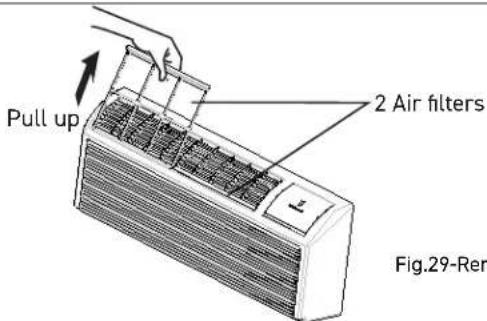
Removing Air Filter
Push down

Replacing Air Filter
Figure R.2.3 (Replacing The Air Filter)
R. INFORMATION FOR THE OWNER
R.3 Warranty

FRIEDRICH
Friedrich Air Conditioning Co.
10001 Reunion Place, San Antonio, TX 78216
800.541.6645
www.friedrich.com
ZONEAIRE® • PREMIER R-32 SERIES
PACKAGED TERMINAL AIR CONDITIONERS LIMITED WARRANTY
SAVE THIS CERTIFICATE gives you specific rights. You may also have other rights which may vary from state to state and province to province
In the event that your unit needs servicing, contact your nearest authorized service center. If you do not know the nearest service center, ask the company that installed your unit or contact us - see address and telephone number above. To obtain service and/or warranty parts replacement, you must notify an authorized FRIEDRICH Air Conditioning Co. service center, distributor, dealer, or contractor of any defect within the applicable warranty period.
When requesting service: please have the model and serial number from your unit readily available.
Unless specified otherwise herein, the following applies:
FRIEDRICH PACKAGED TERMINAL AIR CONDITIONERS AND HEAT PUMPS
LIMITED WARRANTY - TWO YEARS (Twenty-four (24) months from the date of installation). Any part found to be defective in the material or workmanship will be repaired or replaced free of charge by our authorized service center during the normal working hours; and
LIMITED WARRANTY - THIRD THROUGH FIFTH YEAR (Sixty (60) months from the date of installation). ON THE SEALED REFRIGERATION SYSTEM. Any part of the sealed refrigeration system that is defective in material or workmanship will be repaired or replaced free of charge (excluding freight charges) by our authorized service center during normal working hours. The sealed refrigeration system consists of the compressor, metering device, evaporator, condenser, reversing valve, check valve, and the interconnecting tubing.
These warranties apply only while the unit remains at the original site and only to units installed inside the continental United States, Alaska, Hawaii, Puerto Rico, Mexico and Canada. The warranty applies only if the unit is installed and operated in accordance with the printed instructions and in compliance with applicable local installation and building codes and good trade practices. For international warranty information, contact the Friedrich Air Conditioning Company - International Division.
Any defective part to be replaced must be made available to FRIEDRICH in exchange for the replacement part. Reasonable proof must be presented to establish the date of install, otherwise the beginning date of this certificate will be considered to be our shipment date plus sixty days. Replacement parts can be new or remanufactured. Replacement parts and labor are only warranted for any unused portion of the unit's warranty.
We will not be responsible for and the user will pay for:
- Service calls to:
A) Instruct on the unit operation. B) Replace house fuses or correct house wiring. C) Clean or replace filters. D) Remove the unit from its installed location when not accessible for service required. E) Correct improper installations.
-
Parts or labor provided by anyone other than an authorized service center.
-
Damage caused by:
A) Accident, abuse, negligence, misuse, riot, fire, flood, or acts of God. B) Operating the unit where there is a corrosive atmosphere containing Chlorine, Fluorine, or any damaging chemicals (other than in a normal residential environment). C) Unauthorized alteration or repair of the unit, which in turn affects its stability or performance. D) Failing to provide proper maintenance and service. E) Using an incorrect power source. F) Faulty installation or application of the unit. G) Operation of the unit during construction.
We shall not be liable for any incidental, consequential, or special damages or expenses in connection with any use or failure of this unit. We have not made and do not make any representation or warranty of fitness for a particular use or purpose and there is no implied condition of fitness for a particular use or purpose. We make no expressed warranties except as stated in this certificate. No one is authorized to change this certificate or to create for us any other obligation or liability in connection with this unit. Any implied warranties shall last for one year after the original purchase date. Some states and provinces do not allow limitations on how long an implied warranty or condition lasts, so the above limitations or other rights and remedies provided by law.
Performance of Friedrich's Warranty obligation is limited to one of the following methods:
- Repair of the unit
- A refund to the customer for the prorated value of the unit based upon the remaining warranty period of the unit.
- Providing a replacement unit of equal value
The method of fulfillment of the warranty obligation is at the sole discretion of Friedrich Air Conditioning.
In case of any questions regarding the provisions of this warranty, the English version will govern.
- ZONEAIRE PREMIER® R-32 SERIES PTAC PACKAGED TERMINAL AIR CONDITIONERS & HEAT PUMPS
- CHASSIS MODELS
- RECOGNIZE THIS SYMBOL AS AN INDICATION OF IMPORTANT SAFETY INFORMATION
- WARNING
- ▲WARNING
- ⚠️CAUTION: DO NOT OPERATE EQUIPMENT DURING ACTIVE STAGES OF CONSTRUCTION
- REGISTER YOUR AIR CONDITIONER
- IMPORTANT SAFETY AND GENERAL INFORMATION
- A.1 INTRODUCTION
- A.2 · SAFETY WARNINGS
- WARNING: ELECTRICAL SHOCK HAZARD
- WARNING: READ INSTALLATION MANUAL
- WARNING: SAFETY FIRST
- A2L R-32
- WARNING ADVERTANCIA ATTENTION
- A.3 WARNING FOR USING R32 REFRIGERANT
- NOTE ABOUT FLUORINATED GASES
- FOR HOUSEHOLD USE ONLY READ AND SAVE THESE INSTRUCTIONS
- A.4 IMPORTANCE OF A QUALITY INSTALLATION
- A.5 PRODUCT INSPECTION
- A.5 MODEL IDENTIFICATION GUIDE
- A.6 UNIT FEATURES
- SPECIFICATIONS
- B.1 MAJOR COMPONENTS AND DIMENSIONS
- B.2 PRODUCT DATA INFORMATION
- OPERATION ENVIRONMENT
- INSTALLATION OF THE UNIT
- C.1 PRE-INSTALLATION CHECKPOINTS
- C.1.1 BEFORE ATTEMPTING ANY INSTALLATION, CAREFULLY CONSIDER THE FOLLOWING POINTS
- C.1.2 IMPORTANT CONSIDERATIONS
- C.1.3 INTRODUCTION TO R32 REFRIGERANTS
- C.1.4 ADDITIONAL NOTES
- C.3 CHOOSING A LOCATION INSTALLATION CLEARANCES
- C.3 INSTALLATION CLEARANCES (CONTINUED)
- FOR PTACS ON THE GROUND FLOOR OR ANYTIME OBSTRUCTIONS ARE PRESENT, USE THE FOLLOWING GUIDELINES
- C.4 INSTALL UNIT
- C.4.2 EXTERNAL DRAIN KIT INSTALLATION
- DRAIN TUBE INSTALLATION
- COVER PLATE INSTALLATION
- NOTICE
- C.4.3 WALL SLEEVE INSTALLATION INSTRUCTIONS (PDXWS)
- C.4.3 WALL SLEEVE INSTALLATION INSTRUCTIONS (PDXWS)(CONT)
- C.4.4 STANDARD GRILLE INSTRUCTIONS
- C.5 CHASSIS INSTALL
- C.5.1 CHASSIS INSTALL PREPARATION
- C.5.2 CHASSIS INSTALL
- CAUTION
- UNIT DAMAGE HAZARD
- ELECTRICAL
- E.1 ELECTRICAL SAFETY INFORMATION
- MAKE SURE THE WIRING IS ADEQUATE FOR YOUR UNIT
- DO NOT USE AN EXTENSION CORD
- MAKE SURE THAT THE RECEPTACLE IS COMPATIBLE WITH THE AIR CONDITIONER CORD (REFER TO FIGURE E.1.1)
- E.2 POWER CORD LCDI TEST
- E.3 ELECTRICAL WIRING
- E.3.1 POWER CORD INSTALLATION
- POWER CONNECTION OPTIONS
- WIRE SIZE
- GROUNDING
- VOLTAGE SUPPLY
- CORD-CONNECTED UNITS
- POWER CORD PROTECTION
- E.3.1 POWER CORD INSTALLATION (CONT)
- E.4 HOW TO CONNECT
- IMPORTANT: PLEASE READ THE FOLLOWING ELECTRICAL SAFETY DATA CAREFULLY
- REMOTE THERMOSTATS
- F.1 INSTALL THERMOSTAT
- THE THERMOSTAT SHOULD NOT BE MOUNTED
- ELECTRICAL SHOCK HAZARD
- WALL THERMOSTAT TERMINAL
- F.2 TERMINAL CONNECTIONS
- ENERGY MANAGEMENT INPUT (FRONT DESK CONTROL)
- J.1 FINAL INSPECTION
- J.2 AIR FLOW SELECTION AND ADJUSTMENT
- VENTILATION CONTROL
- ADJUSTING AIR DIRECTION
- J.3 DIP SWITCHES
- J.4 CONTROL PANEL OPERATION
- ABOUT THE CONTROLS ON YOUR UNIT
- TROUBLESHOOTING
- M.2 DIAGNOSTIC CODES
- STATUS LED INDICATOR DEFINITIONS
- ACCESSORIES
- INFORMATION FOR THE OWNER
- R.2 ROUTINE MAINTENANCE
- R.3 QUALIFICATION OF WORKERS
- R.3 WARRANTY
- FRIEDRICH
- ZONEAIRE® • PREMIER R-32 SERIES
- PACKAGED TERMINAL AIR CONDITIONERS LIMITED WARRANTY
- FRIEDRICH PACKAGED TERMINAL AIR CONDITIONERS AND HEAT PUMPS
Brand : Friedrich
Model : ZoneAire Premier PDH15R5SG
Category : Air conditioner