
Livebass-2 - Loudspeaker Orava - Free user manual and instructions
Find the device manual for free Livebass-2 Orava in PDF.


| Product Type | Gaming Headset (Headphones with Microphone) |
| Model | Livebass-2 |
| Brand | Orava |
| Dimensions (W x H x D) | 210 x 195 x 95 mm |
| Weight | 390 g |
| Cable Length | 2.2 m |
| Power Supply | USB (DC 5 V) |
| Headphone Type | Closed, dynamic |
| Driver Diameter | 50 mm |
| Frequency Range | 20 Hz - 20 kHz |
| Impedance | 32 Ω ± 15% |
| Sensitivity | 6 dB ± 3 dB |
| Rated Power | 20 mW |
| Microphone Type | Omnidirectional, electret capacitor |
| Microphone Dimensions | 6 x 2.2 mm |
| Microphone Sensitivity | -42 dB ± 3 dB |
| Microphone Frequency Response | 100 - 16 kHz |
| Connectors | USB, 3.5 mm jack (via included reducer) |
| Controls | Volume control, microphone on/off button |
| Operating Temperature | +5 to +40 °C |
| Cleaning | Soft cloth slightly moistened with water; no solvents |
| Safety Notices | Do not use at high volume for long periods; avoid hearing damage |
| Accessories Included | Headphones, user manual, 3.5 mm reduction cable |
Frequently Asked Questions - Livebass-2 Orava
User questions about Livebass-2 Orava
0 question about this device. Answer the ones you know or ask your own.
Ask a new question about this device
Download the instructions for your Loudspeaker in PDF format for free! Find your manual Livebass-2 - Orava and take your electronic device back in hand. On this page are published all the documents necessary for the use of your device. Livebass-2 by Orava.
USER MANUAL Livebass-2 Orava
natural_image
Black-and-white photo of a pair of military-style headsets with camouflage and white branding, no visible text or symbols.Gaming headphones with USB and microphone
Intended use of the device
- The device is intended for personal listening to the content of audio files, to the extent determined by technical and operational parameters and functions, safety and user instructions and the external influence of the operating environment.
- ORAVA electrical appliances are manufactured in accordance with the state of the art and recognized safety regulations. Nevertheless, incorrect and unprofessional use or use contrary to the intended purpose may create a risk of injury or endanger the life of the user or a third party, resp. damage to equipment and other property.
Special safety instructions. Read carefully!
The following symbols and their meanings have been used on the device and in the accompanying documentation to warn of possible dangers:

This symbol alerts users to the risk of failure to observe the safety instructions when using and operating the equipment:
Danger of serious injury or death! Danger of equipment damage or other property damage!

This symbol alerts users to:
Avoid listening at high volume and for a long time! Using the headphones or earphones at high volume levels and for extended periods of time may damage your hearing.
If you are exposed to sound with an intensity of more than 85 dB for a long time, your hearing may be adversely affected.
Volume above 85 dB for 8 hours, or 100 dB for 15 minutes is a danger.
The manufacturer recommends that you do not set the volume level of the device higher than the middle level of the setting range.
Transport/Carrying
- When transporting and carrying, be careful when moving to avoid tipping over, falling and damaging the device.
Danger of damaging the device!
Unpacking/Packaging
- Unpack the device and accessories before putting them into operation and dispose of all parts that increase the packaging materials, labels and tags.
- Store packaging materials in a safe place or keep them out of the reach of children and incompetent persons.
Danger of serious injuries! Danger of suffocation!
Inspection/Commissioning
- The Office initially recommended several other control devices. Use the device only with accessories supplied and approved by the manufacturer.
- Never use the device if it is incomplete, damaged or its parts or accessories are damaged during use (e.g. a subsequent fall).
Danger of serious injuries!
- Before commissioning, check and assemble the device according to the instructions in the “Before use” section.
- Never clean the device in a way that could immerse the liquid and allow the liquid to flow into the device.
- Clean only parts of the device with a damp cloth and wipe dry or allow to dry.
Keep the device clean and dry.
Warning!
- If the device has been stored at lower temperatures, it must first be acclimatized (about 12 to 1 hour) before further use to remove any water inside the housing, solidify moving parts and maintain the mechanical strength of the plastic parts.
Operation/Use Warning!
- This device may only be used with original and undamaged parts and accessories.
You can read about suitability and correct use in the section "Use".
Danger of serious damage to health!
Warning!
- The device must be kept dry.
-
Do not use or place the device near containers containing water. If the device falls into water, turn it off and allow it to dry completely.
-
If the device subsequently shows signs of malfunction or damage, take it to a specialist garage for inspection.
- Never overload the device beyond the limits set by the technical parameters!
-
Do not expose the device to:
-
direct sunlight, sources producing excessive heat,
- vibration and mechanical stress,
- chemical pollutants,
- water and excessive humidity,
- insects, plants,
- aggressive environmental influences.
Danger of serious injuries!
There is a risk of damage to the device or other property damage!
- When using the device, the perception of ambient noise is limited. Therefore, do not operate any vehicles or machines while using it.
Operating environment safety
- Do not use the device in an industrial or outdoor environment.
• Always keep the operating environment of the device clean and well lit. - Do not place the device on an unstable surface. Overturning or dropping the device may result in personal injury or damage to the device.
-
Do not expose the device to:
-
electromagnetic fields,
- direct sunlight, sources and equipment producing excessive heat,
- falls, vibrations and mechanical stress,
- excessive dust,
- water and excessive humidity,
- insects,
- aggressive environmental influences.
- Exposure to the above effect may adversely affect its operation or cause irreversible damage.
- The operating environment of the device must always comply with the specified basic characteristics.
- Do not use the device in areas with flammable liquids, gases or dust. The device can be a source of sparks, which can result in the ignition of dust or fumes.
Characteristics of the operating environment
- Ambient temperature: +5 - +40 °C
- Humidity: 5 - 85%
- Altitude: < 2 000 m
- Occurrence of water: occasional condensation of water or the presence of water vapor. 5. Occurrence of foreign bodies: the amount and type of dust are not significant
Description of parts
1 adjustable head bridge
2 right handset
3 microphones
4 left handset
5 On/Off microphone
6 volume control
7 3.5 mm jack reduction


Headphone connection
The headphones allow you to listen to the sound from the connected external device.
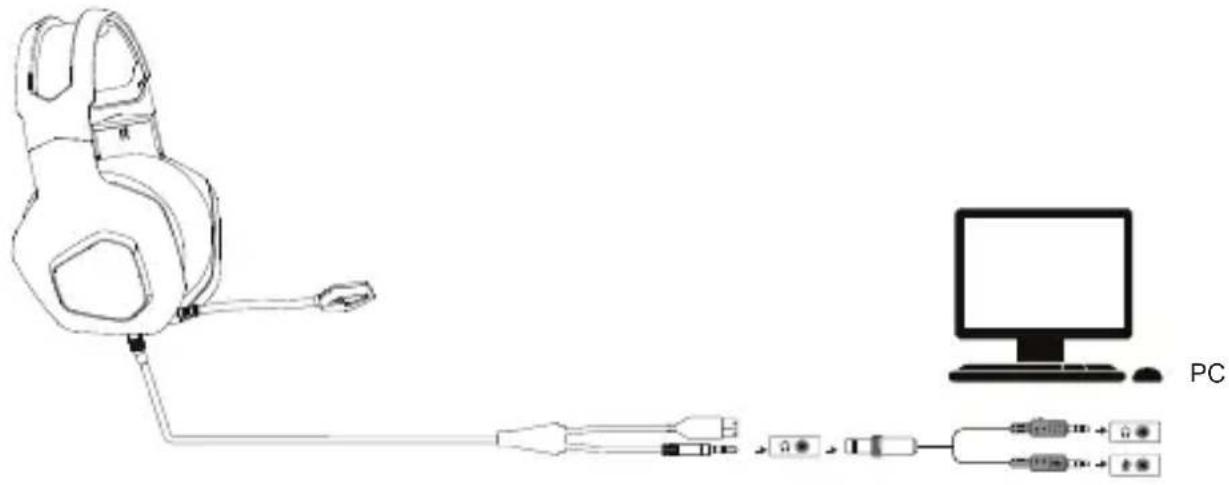
PC connection
- Connect the USB cable to the computer, then connect the reducer (7) to the 3.5 mm jack and connect it to the PC - audio link (green) and microphone (red).
- Use the button (5) to switch the microphone on/off.
- Use the control (6) to adjust the volume.
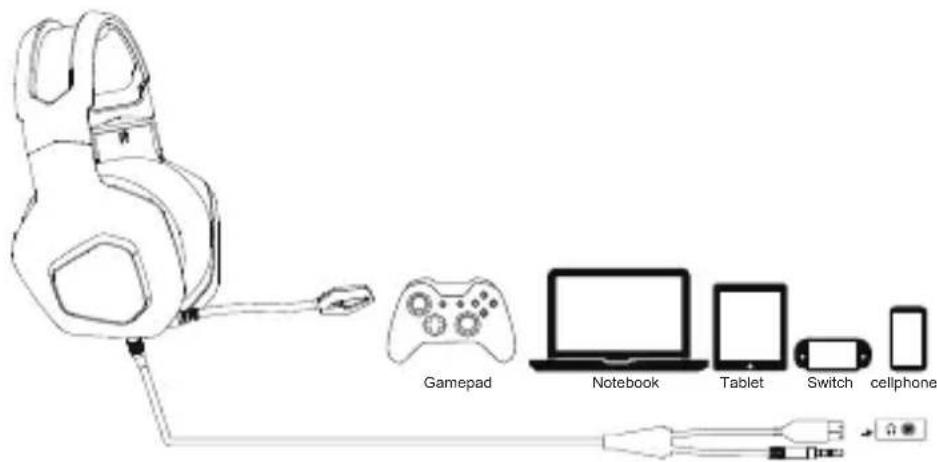
Connect to other devices
- Connect the 3.5 mm jack connector to devices such as Xbox, PS, notebook, mobile or tablet.
- Use the button (5) to switch the microphone on/off.
- Use the control (6) to adjust the volume.
Troubleshooting
It is recommended that you connect this device directly to a USB port on your computer.
When connecting a device via a USB hub (hub), make sure that your USB hub (hub) and the USB port on the computer to which it is connected are capable of supplying enough power to power all devices connected to the same USB hub (hub).
Maintenance and information
Cleaning the surface of the device
Use a soft cloth slightly moistened with water to clean the surface of the device and controls.
Do not use any type of abrasive pad, scouring powder, or solvent, such as thinner, petrol, or alcohol.
Headphones have a quality construction and design and should therefore be handled with care. The following suggestions will help you protect your warranty coverage.
- Keep the headphones dry. Precipitation, humidity, and all types of liquids or moisture and condensates contain minerals that cause corrosion of electronic circuits. When the headphones get wet, allow them to dry completely.
- Do not use or store the headphones in dusty, dirty areas. Its moving parts and electronics can be damaged.
- Do not store headphones in hot areas. High temperatures can shorten the life of electronic circuits, damage batteries, and warp or melt certain plastics.
- Do not store headphones in a cold environment. When the headphones warm up to operating temperature, condensation may form inside the headphones and damage electronic circuits.
- Do not attempt to open the headphones.
- Do not drop, knock, or shake the headphones.
Rough handling can break internal circuit boards and fine mechanics. - Do not color the headphones. Paint can clog moving parts and prevent proper operation.
Warning!
Listening at high volume may damage your hearing. For road safety, do not use the device while driving or cycling.
Technical specifications
Microphone
Type: omnidirectional, electret capacitor
Dimensions: 6 x 2.2 mm
Sensitivity: - 42 dB ± 3dB
Frequency: 100 - 16 kHz
Headphones
Type: closed stereo headphones
Rated power: 20 mW
Headphone speakers: closed, dynamic, 2x drivers with a diameter of 50 mm
Frequency range of reproduction: 20 Hz - 20 kHz
Impedance: 32 ohm ± 15%
Sensitivity: 6 dB ± 3 dB
Generall
Dimensions (W x H x D): 210 x 195 x 95 mm
Weight: 390 g
Cable length: 2,2 m
Connectors:
USB connector (power supply - DC 5 V - light)
Supplied accessories:
headphones (1 pc)
instructions (1 pc)
3.5 mm reduction (1 pc)
We reserve the right to make changes!
Producer:
ORAVA retail 1, a.s.
Seberíniho 2
821 03 Bratislava
Slovenská republika
Importer:
ORAVA retail 1, a.s. Seberiniho 2
821 03 Bratislava
Slovenská republika
ORAVA distribution CZ, s.r.o. Ostravská 494
739 25 Sviadnov
Ceská republika
natural_image
Symbol of a trash bin crossed with no text or numbers, representing waste sorting or disposal (no text present)DISPOSAL OF USED ELECTRICAL AND ELECTRONIC EQUIPMENT
The symbol on the product or on its packaging indicates that this product does not belong to household waste. It is necessary to take it to a collection point for electrical recycling and electronic equipment.
By ensuring proper disposal of this product, you will help prevent negative consequences
to the environment and human health that would otherwise be caused by inappropriate disposal of this product. For more detailed information about recycling of this product, please contact your local authority, your household waste disposal service or the shop where you purchased the product.

This product meets all the essential requirements of the EU directives that apply to it.
DECLARATION OF CONFORMITY
Short text Declaration of Conformity:
ORAVA retail 1, a.s. hereby declares that the LiveBass 2 C/B Gaming complies with the essential requirements and other relevant conditions of Directive 2014/53/EU of the European Parliament and of the Council. The full text of the Declaration of Conformity is available at: www.orava.eu
- Intended use of the device
- Special safety instructions. Read carefully!
- Transport/Carrying
- Unpacking/Packaging
- Inspection/Commissioning
- Warning!
- Operation/Use Warning!
- Operating environment safety
- Characteristics of the operating environment
- Description of parts
- Headphone connection
- PC connection
- Connect to other devices
- Troubleshooting
- Maintenance and information
- Cleaning the surface of the device
- Technical specifications
- Microphone
- Headphones
- Generall
- Connectors:
- Supplied accessories:
- Producer:
- Importer:
- DISPOSAL OF USED ELECTRICAL AND ELECTRONIC EQUIPMENT
- DECLARATION OF CONFORMITY
Brand : Orava
Model : Livebass-2
Category : Loudspeaker