
Q4 - Equalizer Radial Engineering - Free user manual and instructions
Find the device manual for free Q4 Radial Engineering in PDF.


| Product Type | Semi-parametric equalizer for 500 series racks |
| Number of Bands | 4 (Low-shelf, Lo-mid, Hi-mid, High-shelf) |
| Low-shelf Frequency | 100 Hz, fixed |
| Lo-mid Range | 300 Hz – 2.4 kHz, sweepable |
| Hi-mid Range | 1 kHz – 8 kHz, sweepable |
| High-shelf Frequency | 10 kHz, fixed |
| Boost/Cut Range | ±12 dB per band |
| Q Control | Selectable wide (musical) or narrow (surgical) per mid band |
| Circuit Type | All discrete class-A state variable filters |
| Frequency Response | 20 Hz – 20 kHz ±0.5 dB (EQ flat) |
| Maximum Input Level | +21 dBu |
| Maximum Output Level | +18 dBu |
| THD+N | 0.03% @ +4 dBu output |
| Dynamic Range | >95 dB (EQ active) |
| Input Impedance | 20 kΩ balanced |
| Output Impedance | 150 Ω balanced |
| Omniport Function | Unbalanced insert I/O via 1/4" TRS (Tip=input, Ring=output) |
| Power Requirement | ±16 V DC, 80 mA (via 500 series rack) |
| Dimensions (HxWxD) | 5.25" x 1.5" x 6.6" (13.34 x 3.81 x 16.75 cm) |
| Weight | 0.7 lb (316 g) |
| Warranty | 3 years, transferable |
| Safety Warning | Do not hot-swap modules; no user-serviceable parts inside |
Frequently Asked Questions - Q4 Radial Engineering
User questions about Q4 Radial Engineering
0 question about this device. Answer the ones you know or ask your own.
Ask a new question about this device
Download the instructions for your Equalizer in PDF format for free! Find your manual Q4 - Radial Engineering and take your electronic device back in hand. On this page are published all the documents necessary for the use of your device. Q4 by Radial Engineering.
USER MANUAL Q4 Radial Engineering
*▲□ ◆✿✿
Radial® engineering
*□◆※▼□▼※★◆▲※
[Non-Text]
Table of Contents Page
Overview....1
Features 2
Getting Started ....3
Ominiport....3
Adjusting the EQ Filters....4
Specifications ....5
Block Diagram 5
Radial Limited Warranty ....Back Cover
Congratulations on your purchase of the Radial Q4 state-variable class-A equalizer. Although designed to be intuitive and easy to use, we recommend that you take a minute to read this short manual to make sure you take full advantage of the many features that are built in. Should you find yourself asking a question that is not addressed, we invite you to view the Q4 FAQ page on our web site. This is where we post the latest hints and of course questions from users. If you still do not find what you are looking for, feel free to send an email to info@radialeng.com and we will do our very best to respond to you in short order.
Now get ready to EQ like you have never EQ'd before!

WARNING NOTICE TO USER!
Although preventative safety measures have been designed into Radial 500 series products we strictly advise against hot-swapping modules or plugging and unplugging them when the Workhorse or other 500 series rack is powered on. Hot swapping can cause connection sparks at the card-edge connector that could send damaging transients to other equipment. This also greatly reduces the life span of the contacts. Damage due to hot-swapping is not covered under warranty. There are no user serviceable parts inside.
OVERVIEW
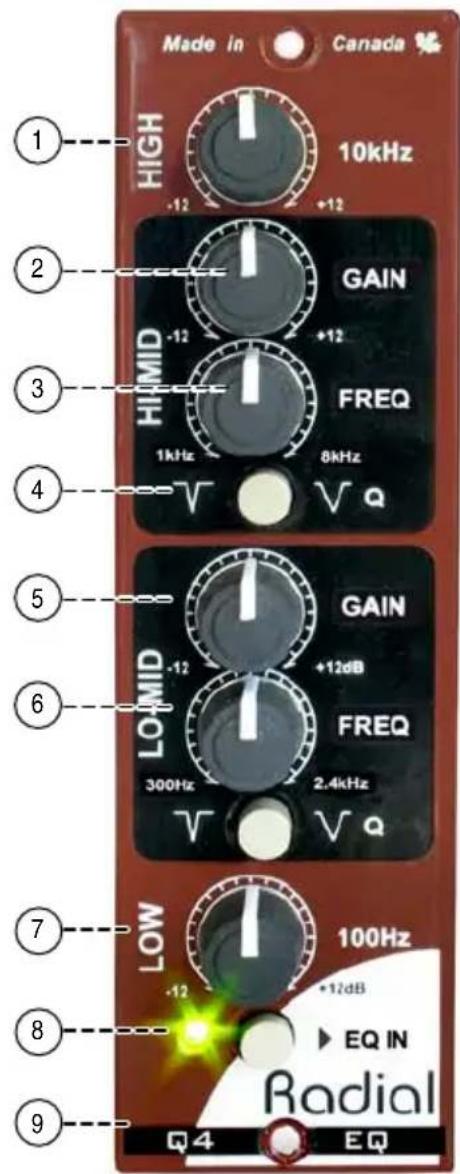
The Radial Q4 is a semi-parametric EQ designed for 500 series power racks. The low and high bands are fixed shelf type filters for easy manipulation of the bass and treble spectrums. The mid band is divided into lo-mid and hi-mid ranges and controlled via two semi-parametric filters with sweepable frequency and gain. These feature a carefully sculpted overlap for maximum flexibility and selectable Q settings for wide or narrow bandwidth filters for precise control.


line
| Frequency (Hz) | Value (μ, dB) | | -------------- | ------------- | | 20 | 0 | | 50 | 0 | | 100 | 0 | | 200 | 0 | | 500 | 0 | | 1k | 0 | | 2.5x10 | 0 | | 5x10 | 0 | | 10x10 | 0 | | 20x10 | -15 | | 50x10 | -10 | | 100x10 | -5 | | 200x10 | 0 |
line
| Frequency (Hz) | Current (dB) | | -------------- | ------------ | | 20.20/60 | 0 | | 100.20/50 | 0 | | 200.50/1x | 0 | | 2k.5x10k | 0 | | 1k | -15 | | 0 | -15 |
line
| Hz | u (dB) | | -------- | ------ | | 20.26e-05| -18.0 | | 50.10e-05| -16.0 | | 100.20e-05| -14.0 | | 200.50e-05| -12.0 | | 500.1x-05| -10.0 | | 26.9x-10k| -8.0 |FEATURE SET
-
HIGH: 10kHz shelving control lets you enhance high-frequencies to add sparkle or air or soften the top end to warm up overly aggressive tracks.
-
HI-MID GAIN: Used to adjust the amount of mid boost or cut being applied to the signal. Up to 12dB of boost or cut is available.
-
HI-MID FREQ: Lets you sweep the upper mid band between 1kHz to 8kHz to find the optimum center frequency.
-
Q: Lets you set the bandwidth of the mid-range frequency controls. Wider (V or outward position) for more musicality or narrower (V or inward position) for surgical precision.
-
LO-MID GAIN: Used to adjust the amount of mid boost or cut being applied to the signal. Up to 12dB of boost or cut is available.
-
LO-MID FREQ: Lets you sweep the lower mid band between 300Hz to 2.4kHz to find the optimum center frequency.
-
LOW: 100Hz shelving control lets you boost or cut low-frequencies to remove excessive bass or tighten up a loose sounding track.
-
EQ-IN: Turns on the equalizer or acts as a bypass so you can compare the wet post EQ effect with the dry pre-EQ signal.
-
OMNIPORT: Conf i gured as a TRS in-out connection. This lets you patch to and from the insert point of your mixing console using a single 1/4" TRS cable.
GETTING STARTED
Although the Q4 is easy to use, we suggest you follow these simple instructions before using it. As with all audio equipment, always ensure all levels are turned down and equipment is turned off before making any connections or inserting the Q4 into a 500 series power rack. This common practice ensures turn-on transients will not damage more sensitive components such as tweeters. Use the supplied screws to secure the module in your 500 series rack to ensure it does not accidentally dislodge. Do not overtighten as this can strip the screw or power rack.
Making connections
The Q4 is designed to process balanced line level signals using the XLR connectors on your 500 series power rack. With the Radial Workhorse, this is augmented with 14 TRS connectors, D-Subs and the feed switch. The Q4 also generates an unbalanced signal to feed the Workhorse mix-buss and 8 channel mixer.

BALANCED REAR PANEL INPUT (RADIAL WORKHORSE RACK)

BALANCED REAR PANEL OUTPUT (RADIAL WORKHORSE RACK)
Connect the XLR output on the back of your 500 series power rack to your audio system so that you can audition the Q4. We recommend that you first listen to the Q4 without running it through other audio signal processors until you have had a chance to familiarize yourself with the sound and functions. Using your own voice to test is always best as it really gives you a familiar starting place.
Omniport
If you are using the Q4 in a Radial Workhorse power rack the Omniport feature will be available. In this instance with the Q4, the 1/4" TRS Omniport jack is an unbalanced insert-style input/output. This lets you connect to and from your mixer insert point using a single TRS cable.

Omniport I/O to unbalanced insert (RADIAL WORKHORSE RACK)
ADJUSTING THE EQ
Once connected, power on your audio system. Depressing the EQ-IN button near the bottom of the face plate will activate the LED and let you know that the Q4 is powered. Start with all of the knobs set to the 12 o'clock position and the Q set wide (outward position).
The Q4 has four filter bands. These have been carefully designed to provide a wide range of effects that will enhance an instrument, voice or program track. Experiment with each filter band separately and return it to the 12 o'clock position (0dB) before moving to the next band. This way you will hear each filter in isolation which will help train your ear to its use.
Start your experimentation with the high and low frequency shelving filters. These simple filters offer +/-12dB of cut or boost. These filters are called 'shelving type' because they gradually increase amplitude from a fixed frequency to the limit of the audio spectrum. Their charted frequency response curves also happen to look like a shelf at the high and low ends.
The more complex parametric filters need another approach. Set the GAIN control to the 3 o'clock position (+9dB boost) and sweep the filter using the FREQ control. This technique will help you zero in on a certain frequency range by ear. Once the frequency is identified, reduce the gain back according to taste. This same technique is also used to identify problematic frequencies. Again, boost the GAIN control and sweep the FREQ knob to find the frequency you don't want then set the filters GAIN to the 9 o'clock position (-9dB cut) to reduce the amplitude. This may seem counter intuitive but our ears are more sensitive to a frequency boost so use that fact to help you tune the frequency range and then cut the gain to remove it.
Adjusting the Q control
The Q control lets you choose between a smooth EQ effect when set wide or a more radical effect when set narrow. To hear how the Q control affects your signal path, try setting the LO-MID filter to a frequency that is in the middle of your voice range and cutting the signal by setting the gain to -9dB. Toggle the Q from wide to narrow then repeat the test by boosting the same frequency. The wide-Q setting is generally used for tone shaping as it affects a wider range of frequencies. The narrow-Q is used more like a surgical tool to cleanly attenuate a very small band of frequencies.
Using the Q4
Although there are no rules when it comes to using an equalizer, there are some guide lines you can observe. First, watch your gain. Each filter can add gain when set to boost. If several bands are boosted you may overdrive the input of the following device such as your recording interface. In such cases, lower the output level of the device driving the Q4 to compensate.
Second, it is often wise to ‘taketh EQ away than to givith’. Meaning, cut unwanted frequencies rather than boost to achieve the results you are after. For instance, if you think the sound needs to be ‘brighter’, try cutting the LOWs first to see if that works. This means you will be lowering the amplitude so you will have to increase the output level of the device driving the Q4 to compensate and maintain unity gain.
Third, your equalizer adjustments may vary depending on whether you are recording, mixing-down, or using the Q4 live. When recording, it's common to use a parametric EQ to band-limit a track. For instance, you may want to cut most of the low frequencies when recording a mandolin to remove rumble in your recording. When mixing your recorded tracks the four filters give you total control with warm, natural, analog sound. Used live, the Q4 can help eliminate feedback by using a narrow Q setting.
RADIAL Q4 500 SERIES MODULE SPECIFICATIONS
Circuit Type......All discrete class-A state variable filters
Frequency Response ......HI-shelf: +/-12dB at 10kHz (Fixed filter)
LOW-shelf: +/-12dB at 100Hz (Fixed filter)
HI-MID: +/-12dB from 1kHz \~ 8kHz (Variable fi Iter)
LO-MID: +/-12dB from 300Hz \~ 2.4kHz (Variable filter)
Maximum Input ....+21dBu
Maximum Output ....+18dBu
THD + N 0.03% (+4dBu output)
Dynamic Range ....>95dB (EQ Active)
Equivalent Input Noise......-95du/-75dBu (Bypass ON/Active - All controls 12 o'clock)
Noise ......-95du/-75dBu (Bypass ON/Active - All controls 12 o'clock)
Gain ....+4.8dB (Controls all at 12 o'clock)
Intermod Distortion ....0.07% (+4dBu output)
CMR Ratio ....>64dB (at 55Hz)
Input Impedance ....20K Balanced
Output Impedance ....150 Ohms Balanced
Omniport Function ....Unbalanced Input/Output 1/4" TRS (Input = Tip. Output = Ring)
Power Requirement ....+/- 16V (Workhorse or 500 series compatible power frame
Current Draw 80mA
XLR Configuration:....Follows AES spec: pin-1 ground, pin-2 hot (+), pin-3 cold (-)
Size: 5.25" x 1.5" x 6.6" (13.34 x 3.81 x 16.75cm)
Weight: 0.7 lb (316 g)
Warranty: 3 years, transferable
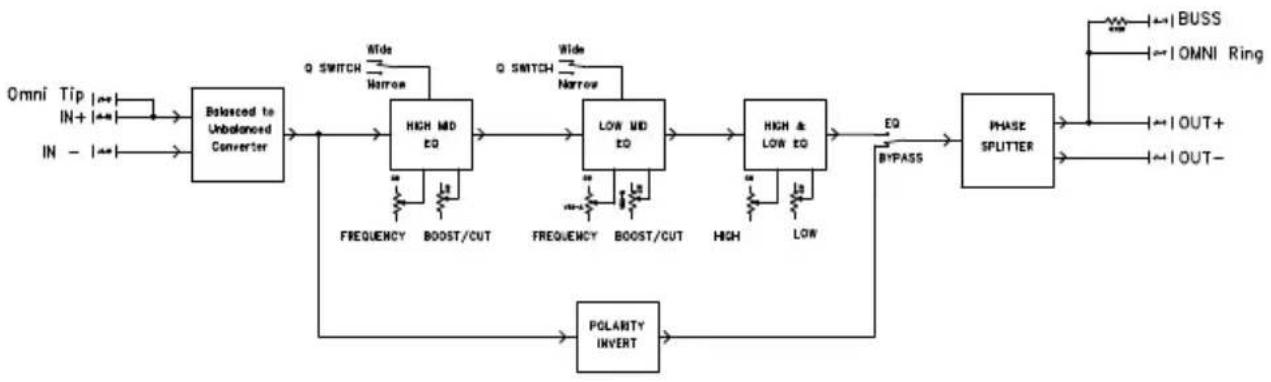
Q4 Block Diagram
flowchart
graph LR
    A["Omni Tip IN+ IN-"] --> B["Balanced to Unbalanced Converter"]
    C["FREQUENCY"] --> D["HIGH MD EQ"]
    E["BOOST/CUT"] --> D
    F["FREQUENCY"] --> G["LOW MD EQ"]
    H["BOOST/CUT"] --> G
    I["LOW"] --> G
    J["Polarity Invert"] --> K["HIGH & LOW EQ"]
    L["BI-PASS"] --> M["PHASE SPLITTER"]
    N["BUSS"] --> M
    O["OMNI Ring"] --> M
    P["OUT+"] --> M
    Q["OUT-"] --> M
    D --> G
    G --> M
    M --> K
    K --> L
    L --> M
THREE YEAR TRANSFERABLE LIMITED WARRANTY
RADIAL ENGINEERING LTD. ("Radial") warrants this product to be free from defects in material and workmanship and will remedy any such defects free of charge according to the terms of this warranty. Radial will repair or replace (at its option) any defective component(s) of this product (excluding finish and wear and tear on components under normal use) for a period of three (3) years from the original date of purchase. In the event that a particular product is no longer available, Radial reserves the right to replace the product with a similar product of equal or greater value. In the unlikely event that a defect is uncovered, please call 604-942-1001 or email service@radialeng.com to obtain an RA number (Return Authorization number) before the 3 year warranty period expires. The product must be returned prepaid in the original shipping container (or equivalent) to Radial or to an authorized Radial repair center and you must assume the risk of loss or damage. A copy of the original invoice showing date of purchase and the dealer name must accompany any request for work to be performed under this limited and transferable warranty. This warranty shall not apply if the product has been damaged due to abuse, misuse, misapplication, accident or as a result of service or modification by any other than an authorized Radial repair center.
THERE ARE NO EXPRESSED WARRANTIES OTHER THAN THOSE ON THE FACE HEREOF AND DESCRIBED ABOVE. NO WARRANTIES WHETHER EXPRESSED OR IMPLIED, INCLUDING BUT NOT LIMITED TO, ANY IMPLIED WARRANTIES OF MERCHANTABILITY OR FITNESS FOR A PARTICULAR PURPOSE SHALL EXTEND BEYOND THE RESPECTIVE WARRANTY PERIOD DESCRIBED ABOVE OF THREE YEARS. RADIAL SHALL NOT BE RESPONSIBLE OR LIABLE FOR ANY SPECIAL, INCIDENTAL OR CONSEQUENTIAL DAMAGES OR LOSS ARISING FROM THE USE OF THIS PRODUCT. THIS WARRANTY GIVES YOU SPECIFIC LEGAL RIGHTS, AND YOU MAY ALSO HAVE OTHER RIGHTS, WHICH MAY VARY DEPENDING ON WHERE YOU LIVE AND WHERE THE PRODUCT WAS PURCHASED.

This product is intended for professional use only. The user should be familiar and experienced with the 500 series rack and module format
Radial Engineering Ltd.
1588 Kebet Way, Port Coquitlam BC V3C 5M5
tel: 604-942-1001 • fax: 604-942-1010
info@radialeng.com • www.radialeng.com

Brand : Radial Engineering
Model : Q4
Category : Equalizer