
BG-OMNITALK - Conference Headset BZBGear - Free user manual and instructions
Find the device manual for free BG-OMNITALK BZBGear in PDF.


| Product Type | USB/Bluetooth Desktop Conference Speakerphone |
| Dimensions | 160mm x 160mm x 38mm (6.3" x 6.3" x 1.5") |
| Weight | 1 lb (0.45 kg) |
| Power Supply | USB DC 12V @ 500mA |
| Battery | 2400mAh Lithium; Talk time: up to 6 hours; Music time: up to 8 hours; Charge time: approx. 3 hours |
| Microphone | 2x professional array; Omni-directional (360° pickup); Sensitivity: -29dBFS; Pickup range: 16.4 ft (5m) |
| Speaker | 5W / 95dB |
| Bluetooth | BT 5.0 |
| Frequency Range | 100Hz - 22kHz |
| Audio Features | Full duplex, AEC (Acoustic Echo Cancellation), Noise reduction |
| Connections | USB Type-C, 3.5mm stereo audio, Bluetooth |
| System Compatibility | Windows 7/8/10/11, Mac OS 10.7+, Chrome OS V29.015+ |
| Application Support | Skype, FaceTime, Zoom, Microsoft Teams, Google Hangouts, OBS, Xsplit, etc. |
| Operating Temperature | 0°C - 50°C |
| Storage Temperature | -10°C - 60°C |
| Operating Humidity | 20% - 85% RH (non-condensing) |
| Package Contents | BG-OMNITALK unit, USB Type-C cable, Bluetooth dongle, OTG adapter, User Manual |
| Cleaning | Clean only with a soft dry microfiber cloth |
| Safety Precautions | Do not expose to rain or moisture; unplug during storms; do not open case; avoid heavy pressure, vibration, immersion |
| Warranty | 3-year warranty (extended to 5 years for cameras upon registration) |
| Country of Origin | Not specified |
Frequently Asked Questions - BG-OMNITALK BZBGear
User questions about BG-OMNITALK BZBGear
0 question about this device. Answer the ones you know or ask your own.
Ask a new question about this device
Download the instructions for your Conference Headset in PDF format for free! Find your manual BG-OMNITALK - BZBGear and take your electronic device back in hand. On this page are published all the documents necessary for the use of your device. BG-OMNITALK by BZBGear.
USER MANUAL BG-OMNITALK BZBGear
USB/BluetoothDesktopConferenceSpeakerphone with360°AudioPickupupto16ft
UserManual

TableofContents
Statement 4
Safety Precaution 4
Introduction 5
Features 5
Package Contents 5
Specifications 6
Panel Descriptions 7
LED Status 8
Connections 8
Application Example 10
Tech Support 11
Warranty 11
Mission Statement 12
Copyright 12
Statement
Please read these instructions carefully before connecting, operating, or configuring this product. Please save this manual for future reference.
SafetyPrecaution
- To prevent damaging this product, avoid heavy pressure, strong vibration, or immersion during transportation, storage, and installation.
- The housing of this product is made of organic materials. Do not expose to any liquid, gas, or solids which may corrode the shell.
- Do not expose the product to rain or moisture.
- Unplug this device during lightning storms
- Clean only with a soft dry microfiber cloth.
- To prevent the risk of electric shock, do not open the case. Installation and maintenance should only be carried out by qualified technicians.
- Do not use the product beyond the specified temperature, humidity, or power supply specifications.
- This product does not contain parts that can be maintained or repaired by users. Damage caused by dismantling the product without authorization from BZBGEAR is not covered under the warranty policy.
- Installation and use of this product must strictly comply with local electrical safety standards.
- Only use accessories specified by the manufacture
- Product specifications may be subject to technical upgrades without further notice
- Do not hot plug when it is working.
Introduction
The BG-OMNITALK Bluetooth Conference Speakerphone is a robust audio solution designed to cater to modern communication requirements. With its 360° omni-directional microphone array, 5-meter voice pickup range, and seamless integration with popular conferencing applications, this speakerphone is perfect for a wide range of uses, from business meetings and online conferences to distance education.
The built-in battery also means that the BG-OMNITALK is portable and can be used when and where you need it at a moment's notice. At full charge the device talk time can last for up to 6 hours thanks to its 2400mA battery.
Features
• 360° Omni-directional Microphone
- Microphone pick up range up to 16ft (5 meters)
• 2400mA battery for up to 6 hours of use
- Portable and lightweight
- Easy and intuitive functionality
- Bluetooth capable
- Works with all major conferencing systems such as Zoom, Skype, Teams, etc.
- 3.5mm stereo audio output to connect to external speakers
PackageContents
- 1 x BG-OMNITALK
- 1 x USB Type-C Cable
- 1 x User Manual
• 1 x Bluetooth Dongle
- 1 x OTG Adapter
Specifications
| TechnicalSpecifications | |
| Bluetooth | BT 5.0 |
| Battery | Battery Size: 2400mA LithiumMusic: up to 8 hoursCalls: up to 6 hoursCharge time: approximately 3 hours |
| Connection Types | USB, 3.5mm Stereo AUX, Bluetooth |
| Pickup Range | 16.4 feet (5m) |
| Mics | 2x professional mics array |
| Microphone Type | Omni-directional (360° pickup) |
| Microphone Sensitivity | -29dBFS |
| Noise Reduction | Yes |
| Full Duplex Audio | Yes |
| AEC | Yes |
| Frequency Range | 100Hz - 22kHz |
| Speaker | 5W/95dB |
| Physical Connections | 1 x USB Type-C, 1 x 3.5mm audio port |
| System Compatibility | Windows 7/8/10/11 or above, Mac OS 10.7 or above, Chrome OS V29.015 or above |
| Application Support | Software: Skype, FaceTime, Zoom, Microsoft Teams, Google Hangouts, OB Xsplit, etc. |
| Work Temperature | 0° -- 50°C |
| Storage Temperature | -10° -- +60°C |
| Work Humidity | 20% -- 85% RH (non-condensing) |
| Power Supply | USB: DC12v @ 500mA |
| Product Size (LxWxH) | 160mm x 160mm x 38mm |
| Product Weight | 1lb |
PanelDescriptions


| Volume button | Reduce/Increase volume | |
 | Answer/Hang up | Answer/Hang up when calling |
| [SZT6] | Microphone mute button | ON/OFF Microphone mute |
 | Bluetooth button | Turn ON/OFF Bluetooth function |
 ON/OFF ON/OFF | Press ON/OFF button, speaker and microphone will mute, microphone and speaker LED status will be red; press ON/OFF button again, microphone and speaker will be on, microphone and speaker LED indicator will turn green.Power ON/OFF button: ON/OFF(Long press) MUTE/UNMUTE(Short press) | |
LEDStatus


| Bluetooth Status Indicator | Blue light flashing | Bluetooth is in pairing mode |
| Green light on | Bluetooth is connected | |
| Microphone Status Indicator | Red light on | Microphone is muted |
| Green light on | Microphone is working normally | |
| Power Status Indicator | Green light on | Unit is powered on and charged |
| Red light flashing | Battery is low and a voice will prompt | |
| Speaker Status Indicator | Green light on | Speaker working normally |
| Red light on | Speaker mute |
Connections
USBConnection

natural_image
Line drawing of a circular appliance with buttons and a handle (no text or symbols)
USB connection

natural_image
Simple black-and-white icon of a laptop computer with no text or symbols- It is recommended to use the original USB cable when connecting the speakerphone to a computer or another compatible device.
- When the device is connected to a computer, it will automatically power on and will power off automatically after 10 minutes of inactivity or if no source is detected.
BluetoothConnection
flowchart
graph TD
    A["Device with sensor icons"] --> B["Bluetooth connection"]
    C["Laptop"] --> D["Computer"]
    E["Tower tower"] --> F["Smartphone"]
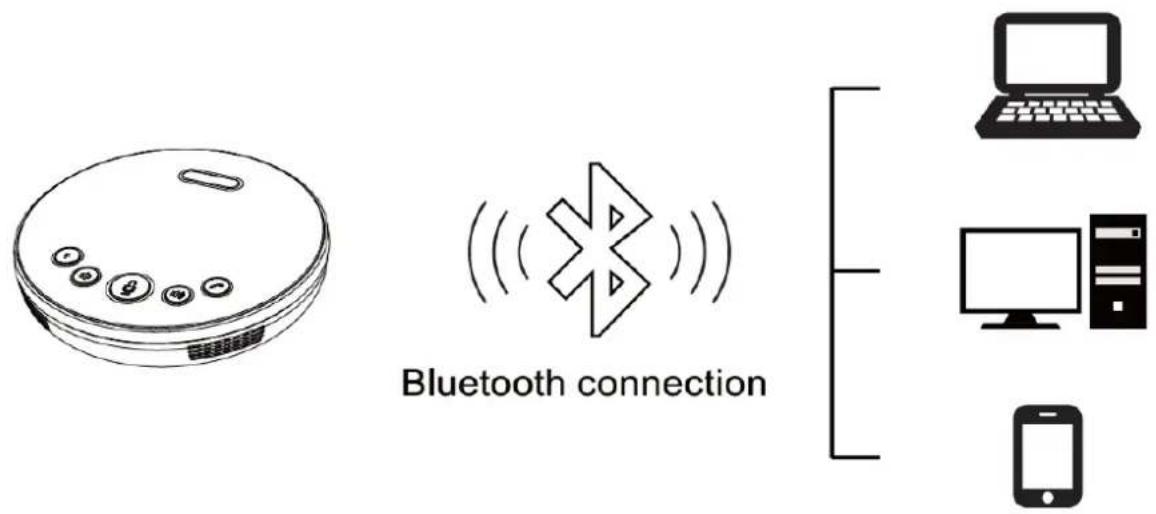
- When the device is in its normal state, press and hold the button to turn on Bluetooth pairing. The Bluetooth status indicator will begin to flash.
- Enable Bluetooth on the device you wish to connect to the BG-OMNITALK and let it scan for the device.
- Select the BG-OMNITALK from the list of devices to connect to. After pairing is complete, the Bluetooth status indicator will be illuminated solid.
- Each time the BG-OMNITALK is turned on, it will automatically pair with the last connected device if it is available and in range.
- To turn Bluetooth off, press and hold the button.
3.5mmStereoConnection

- Connect the BG-OMNITALK to either headphones or an external audio system using a 3.5mm stereo audio cable.
ApplicationExample
BG-Omnitalk Connection Diagram

flowchart
graph TD
    A["BG-Omnitalk"] -->|Wireless Signal| B["Laptop/PC"]
    B --> C["Bluetooth"]
BZB2GEAR
USB-C
TechSupport
Have technical questions? We may have answered them already!
Please visit BZBGEAR's support page (bzbgear.com/support) for helpful information and tips regarding our products. Here you will find our Knowledge Base (bzbgear.com/knowledge-base) with detailed tutorials, quick start guides, and step-by-step troubleshooting instructions. Or explore our YouTube channel, BZB TV (youtube.com/c/BZBTVchannel), for help setting up, configuring, and other helpful how-to videos about our gear.
Need more in-depth support? Connect with one of our technical specialists directly:
Phone
1.888.499.9906
support@bzbgear.com
LiveChat
bzbgear.com
Warranty
BZBGEAR Pro AV products and cameras come with a three-year warranty. An extended two-year warranty is available for our cameras upon registration for a total of five years.
For complete warranty information, please visit bzbgear.com/warranty.
For questions, please call 1.888.499.9906 or email support@bzbgear.com.
MissionStatement
BZBGEAR is a breakthrough manufacturer of high-quality, innovative audiovisual equipment ranging from AVoIP, professional broadcasting, conferencing, home theater, to live streaming solutions. We pride ourselves on unparalleled customer support and services. Our team offers system design consultation, and highly reviewed technical support for all the products in our catalog. BZBGEAR delivers quality products designed with users in mind.
Copyright
All the contents in this manual and its copyright are owned by BZBGEAR. No one is allowed to imitate, copy, or translate this manual without BZBGEAR's permission. This manual contains no guarantee, standpoint expression or other implies in any form. Product specification and information in this manual is for reference only and subject to change without notice.
Allrightsreserved. No reproducing is allowed without acknowledgement.
Brand : BZBGear
Model : BG-OMNITALK
Category : Conference Headset