
PIWRFUB - Stair Ramp Aid Chief - Free user manual and instructions
Find the device manual for free PIWRFUB Chief in PDF.


| Product Type | Large Flat Panel In-Wall Mount |
| Brand | Chief |
| Model | PIWRFUB |
| Max Weight Capacity | 200 lbs (90.72 kg) |
| Maximum Drywall Thickness | 5/8" (1.6 cm) |
| Lateral Shift Adjustment | Up to 3.5" (right or left from center) |
| Display Height Adjustment | Up to 1" |
| Roll Adjustment | Up to 2° (left/right leveling) |
| Yaw (Swivel) Adjustment | Up to 40.3° from center |
| Pitch (Tilt) Adjustment | Adjustable via two screws |
| Extend/Retract Tension | Pre-set, adjustable for display weight |
| Mounting Method | In-wall, attaches to studs |
| Required Tools | Hex-Head Wrench, Open-Ended Wrench |
| Included Components | Mount enclosure, upper/lower rails, spacers, fasteners, covers, end caps, cable clips, trim (optional) |
| Compatible Interface Bracket | Listed interface bracket (sold separately) for display |
| Display Mounting | ClickConnect™ mechanism, four mounting buttons |
| Cable Management | Built-in cable tie clips and covers |
| Lockable Security | Holes for padlock; pin and nut can be moved for permanent lock |
| Environmental Rating | Suitable for use in environmental air space per NEC Section 300.22(C) |
| Temperature Range | 40°F – 120°F (4°C – 49°C) |
| Installation | By qualified personnel only |
| Care and Cleaning | Wipe with dry cloth; avoid solvents |
| Warranty | Refer to manufacturer |
| Safety Compliances | Designed to support 5x combined weight; meets NEC standards |
Frequently Asked Questions - PIWRFUB Chief
User questions about PIWRFUB Chief
0 question about this device. Answer the ones you know or ask your own.
Ask a new question about this device
Download the instructions for your Stair Ramp Aid in PDF format for free! Find your manual PIWRFUB - Chief and take your electronic device back in hand. On this page are published all the documents necessary for the use of your device. PIWRFUB by Chief.
USER MANUAL PIWRFUB Chief
INSTALLATION INSTRUCTIONS

natural_image
Technical line drawing of a mechanical assembly with mounting brackets and internal components (no text or symbols)Large Flat Panel In-Wall Mount
DISCLAIMER
Milestone AV Technologies, and its affiliated corporations and subsidiaries (collectively, "Milestone"), intend to make this manual accurate and complete. However, Milestone makes no claim that the information contained herein covers all details, conditions or variations, nor does it provide for every possible contingency in connection with the installation or use of this product. The information contained in this document is subject to change without notice or obligation of any kind. Milestone makes no representation of warranty, expressed or implied, regarding the information contained herein. Milestone assumes no responsibility for accuracy, completeness or sufficiency of the information contained in this document.
Chief® and ClickConnect™ are trademarks of Milestone AV Technologies. All rights reserved.

IMPORTANT WARNINGS AND TIONS!

WARNING: A WARNING alerts you to the possibility of serious injury or death if you do not follow the instructions.

CAUTION: A CAUTION alerts you to the possibility of damage or destruction of equipment if you do not follow the corresponding instructions.

WARNING: Failure to read, thoroughly understand, and follow all instructions can result in serious personal injury, damage to equipment, or voiding of factory warranty! It is the installer's responsibility to make sure all components are properly assembled and installed using the instructions provided.

WARNING: Failure to provide adequate structural strength for the installation of this kit can result in serious personal injury or damage to equipment! It is the installer's responsibility to make sure the structure to which this kit is attached can support five times the combined weight of all equipment. Reinforce the structure as required before installing the component. The wall to which the mount is being attached may have a maximum drywall thickness of 5/8" (1.6cm).

WARNING: Exceeding the weight capacity can result in serious personal injury or damage to equipment! It is the installer's responsibility to make sure the combined weight of all components attached to this mount does not exceed 200 lbs (90.72 kg).
NOTES:
- SUITABLE FOR USE IN OTHER ENVIRONMENTAL AIR SPACE IN ACCORDANCE WITH SECTION 300.22, (C) OF THE NATIONAL ELECTRICAL CODE.
- The equipment shall be installed and assembled by qualified service personnel.
- The maximum specified ambient temperature of the cabinet system is 40^ - 120^ ( 4^ - 49^ ).
- Minimum spacings between the accessories and components and the housing for Information Technology Communication Equipment shall be maintained for safe operation of the equipment when installed in accordance with the National Electric Code, ANSI/NFPA 70-1999. Refer to communication equipment manufacturer's specifications for minimum spacings.
PIWRF Series contains the following models:
• PIWRF
• PIWRFUB
DIMENSIONS
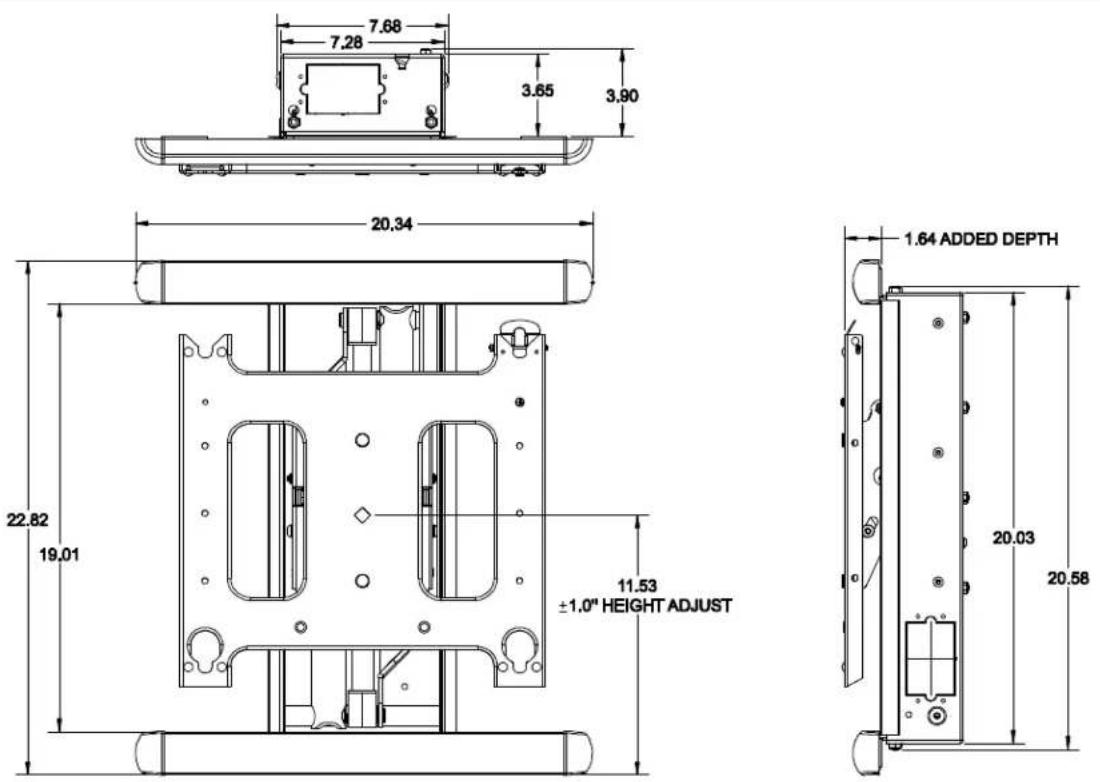
LEGEND
Tighten Fastener
| Apretar elemento de fijación |
| Befestigungsteil festziehen |
| Apertar fixador |
| Serrare il fissaggio |
| Bevestiging vastdraaien |
| Serrez les fixations |

Loosen Fastener
| Aflojar elemento de fijación |
| Befestigungsteil lösen |
| Desapertar fixador |
| Allentare il fissaggio |
| Bevestiging losdraaien |
| Desserrez les fixations |

Hex-Head Wrench
| Llave de cabeza hexagonal |
| Sechskantschlüssel |
| Chave de cabeça sextavada |
| Chiave esagonale |
| Zeskantsleutel |
| Clé à tête hexagonale |

Open-Ended Wrench
| Llave de boca |
| Gabelschlüssel |
| Chave de bocas |
| Chiave a punte aperte |
| Steeksleutel |
| Clé à fourche |

Adjust
| Ajustar |
| Einstellen |
| Ajustar |
| Regolare |
| Afstellen |
| Ajuster |
TOOLS REQUIRED FOR INSTALLATION AND PARTS

Figure 1
Installation

WARNING: IMPROPER INSTALLATION CAN RESULT IN DEATH OR SERIOUS PERSONAL INJURY! This accessory should be installed by qualified personnel only.

WARNING: IMPROPER INSTALLATION CAN LEAD TO MOUNT FALLING CAUSING SEVERE PERSONAL INJURY OR DAMAGE TO EQUIPMENT! DO NOT deviate from installation instructions provided. DO NOT substitute hardware.
The PIWRF Series is designed to accommodate up to 3-1/2" of lateral shift adjustment (right or left display offset from center of studs). This is accomplished by aligning the upper and lower mounting studs on the housing with either the right hand or left hand mounting holes in the upper and lower mounting brackets. (See Figure 3)
IMPORTANT ! : Using the lateral shift feature will impact the location of the Listed J-Box [not included] installation on the housing. If housing lateral shift is used any Listed J-box must be installed to the side opposite the direction of adjustment.
- Determine desired mounting location and locate studs using a stud finder or similar method.
- Accurately locate center of studs.
- Determine desired lateral shift required. (See Figure 3)
- Using a level mark housing opening location on wall using the dimensions identified. (See Figure 2)

Figure 2

Figure 3

WARNING: ELECTRICAL SHOCK HAZARD! CUTTING OR DRILLING INTO ELECTRICAL WIRES OR CABLES CAN CAUSE DEATH OR SERIOUS PERSONAL INJURY! ALWAYS make certain area behind mounting surfaces is free of electrical wires and cables before cutting, drilling, or installing fasteners.

WARNING: EXPLOSION AND FIRE HAZARD! CUTTING OR DRILLING INTO GAS PLUMBING CAN CAUSE DEATH OR SERIOUS PERSONAL INJURY! ALWAYS make certain area behind mounting surfaces is free of gas, water, waste, or any other plumbing before cutting, drilling, or installing fasteners.
- Cut drywall on outside edge of lines and remove.
- Assemble upper and lower mounting rails (B) to mount (A) in slots that correspond to the desired lateral shift offset identified during Step 3 above using four flanged nuts (K) assembled to mount (A). (See Figure 3) and (See Figure 4)

Figure 4
- Install J-box(s) [not included] and route all in-wall cables and wiring to mount enclosure keeping in mind the lateral shift offset determined during Step 3 above. (See Figure 3)

WARNING: IMPROPER INSTALLATION CAN LEAD TO MOUNT FALLING CAUSING SEVERE PERSONAL INJURY OR DAMAGE TO EQUIPMENT! Wiring of equipment must be performed by properly trained and certified persons following all applicable codes.
- Slide mount (A) enclosure into opening in wall. (See Figure 5)

Figure 5
- Place spacers (C) provided between wall and upper and lower mounting rails (B) if required. (See Figure 6)

Figure 6
- Secure mount to studs using four flat washers (F2) and four lag screws (F1). (See Figure 7)

Figure 7
Cover and Trim Installation
Cover Installation
To install covers:
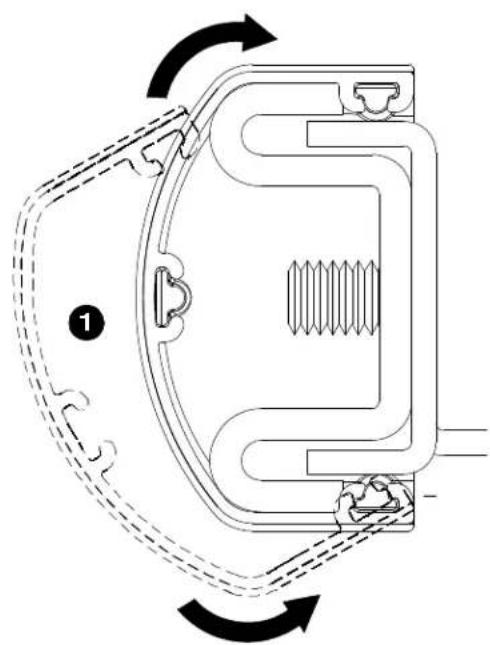
- Install upper and lower wall channel covers (E) by tipping cover top down and positioning as shown in end view of figure below. (See Figure 8)
- Tap firmly across bottom of channels to lock in place as shown in figure below. (See Figure 8)
- Install four R.H. and L.H. end caps (D) by aligning tabs on end caps (D) with slots in wall channel covers (E) and sliding tabs in until end caps (D) are flush with wall channel covers (E). (See Figure 8)
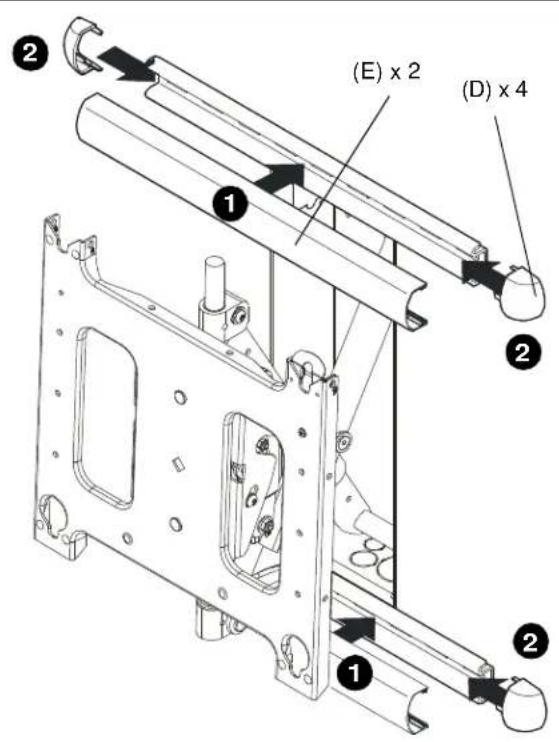
natural_image
Technical diagram of a mechanical component with directional arrows indicating rotational motion (no text or symbols)Figure 8
Trim Installation
To install optional trim;
- Orient two trim pieces (G) as shown in figure below. (See Figure 9)
- Slide slat in trim edge over lip in mount enclosure and press trim (G) onto enclosure. (See Figure 9)

Figure 9
Display Installation

WARNING: IMPROPER INSTALLATION CAN LEAD TO MOUNT FALLING CAUSING SEVERE PERSONAL INJURY OR DAMAGE TO EQUIPMENT! DO NOT install display in a manner other than that specified by the manufacturer. Certain displays may require the use of an interface bracket for proper installation of the display. If an interface bracket is not installed or there are any other questions regarding the installation of the display, immediately contact a Chief Customer Service representative

WARNING: IMPROPER INSTALLATION CAN LEAD TO MOUNT FALLING CAUSING SEVERE PERSONAL INJURY OR DAMAGE TO EQUIPMENT. Displays can weigh in excess of 40 lbs (18.1kg). ALWAYS use two people and proper lifting techniques when installing display.

WARNING: IMPROPER INSTALLATION CAN LEAD TO MOUNT FALLING CAUSING SEVERE PERSONAL INJURY OR DAMAGE TO EQUIPMENT. Make sure mounting buttons on display are properly seated in mounting holes in faceplate.
- Install Listed interface bracket following the installation instructions provided with the interface bracket.
- Move mount faceplate to extended position by grasping faceplate and pulling outward away from wall. (See Figure 10)
- While supporting both sides of display, align four mounting buttons on display or interface bracket with four mounting holes in faceplate. (See Figure 10)
- Lower display into place listening for audible "click" to ensure recessed area of mounting buttons are properly seated in lower area of mounting holes and ClickConnect mechanism has engaged. (See Figure 10) and (See Figure 11)

Figure 10
NOTE: Holes are provided in the faceplate for use with a padlock or similar locking device, if desired. In addition, the pin and nut may be removed from the upper holes and moved to the lower holes for use as a more permanent locking device. (See Figure 11)

Figure 11
CABLE MANAGEMENT

WARNING: IMPROPER INSTALLATION CAN LEAD TO SERIOUS PERSONAL INJURY OR DAMAGE TO EQUIPMENT! Make sure cables do not run through pinch points.
- Locate and install cable tie clips (J) where desired for proper cable routing. (See Figure 12)

Figure 12
- Route cables down arms on mount. (See Figure 13)
- Position cable covers (L) over arm and cable and press cable covers (L) down onto arms to secure cables. (See Figure 13)

WARNING: IMPROPER INSTALLATION CAN LEAD TO SERIOUS PERSONAL INJURY OR DAMAGE TO EQUIPMENT! DO NOT route cables through holes in faceplate.

Figure 13
ADJUSTMENTS
Pitch Tension Adjustment
To adjust display pitch tension:
- With display installed, tighten or loosen two screws, one on each side. (See Figure 14)
- Check for desired tension.
- Repeat Steps 1 and 2 until desired tension is obtained.

Figure 14
Roll Adjustment
The mount allows for the horizontal alignment (Roll) of the display to be adjusted up to 2^ right or left to level the display after installing.
To adjust Roll:
- Loosen the roll tension adjustment nut located on the back side of the faceplate assembly. (See Figure 15)
- Level display.
NOTE: If display will not level slightly loosen top nut as well. - Tighten roll tension adjustment nut. (See Figure 15)

Figure 15
Extend/Retract Tension Adjustment
Arm Extend and Retract tension is pre-set at the factory and is adjusted to accommodate displays with weights near the top of the mount's capacity.
If smaller displays are used it may be difficult to reposition the display after mounting. Arm Extend and Retract tension can be adjusted to compensate for smaller display by:
The display must be mounted prior to adjusting swing arm tension.
- With display installed, tighten or loosen adjustment screw using hex wrench. (See Figure 16)
-
Check for desired tension.
-
Repeat Steps 1 and 2 until desired tension is obtained.
NOTE: If changing from a smaller display to a larger display it may be necessary to increase tension.

Figure 16
Display Height Adjustment
The mount is designed to accommodate up to 1" of display height adjustment.
To adjust display height:
- With display installed, loosen adjustment locking screw using hex wrench. (See Figure 17)
- Adjust display height by turning adjustment nut in desired direction. (See Figure 17)
- Tighten adjustment locking screw when display is at desired height. (See Figure 17)

Figure 17
YAW Tension Adjustment
The mount is designed to accommodate up to 40.3° of travel to left and right of center.
To adjust YAW tension:
- With display installed, loosen adjustment screw using hex wrench. (See Figure 18)
- Check for desired tension.
- Repeat Steps 1 and 2 until desired tension is obtained.
NOTE: If changing from a smaller display to a larger display may be necessary to increase tension.
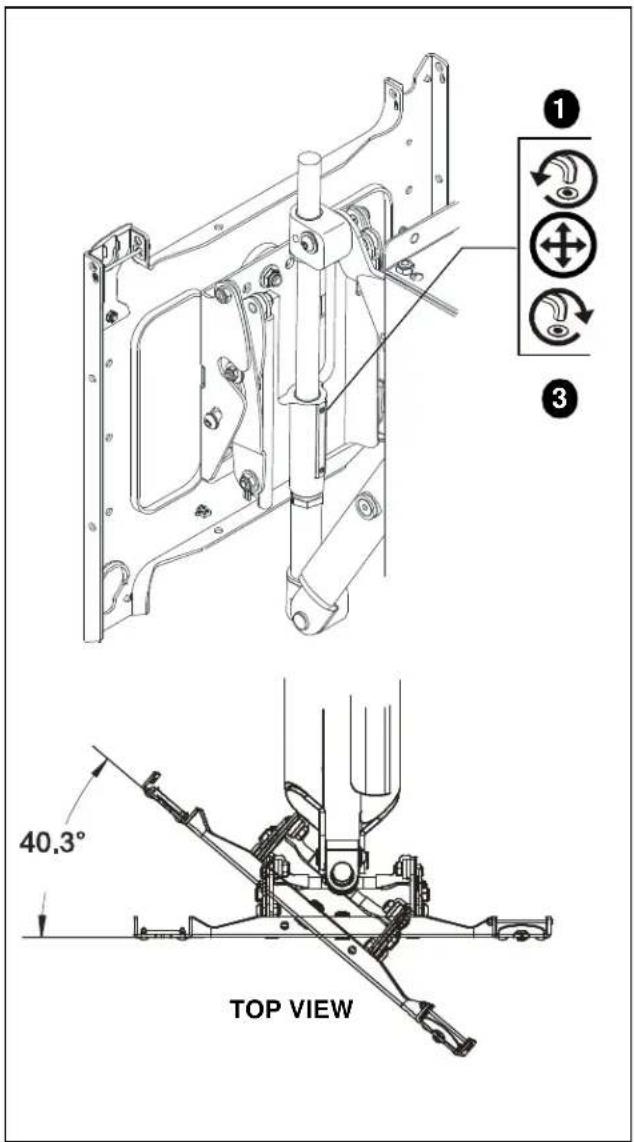
Figure 18
- INSTALLATION INSTRUCTIONS
- DISCLAIMER
- IMPORTANT WARNINGS AND TIONS!
- NOTES:
- TOOLS REQUIRED FOR INSTALLATION AND PARTS
- Installation
- Cover and Trim Installation
- Cover Installation
- Trim Installation
- Display Installation
- CABLE MANAGEMENT
- ADJUSTMENTS
- Pitch Tension Adjustment
- Roll Adjustment
- Extend/Retract Tension Adjustment
- Display Height Adjustment
- YAW Tension Adjustment
Brand : Chief
Model : PIWRFUB
Category : Stair Ramp Aid