
PND110 - Unspecified Atlona - Free user manual and instructions
Find the device manual for free PND110 Atlona in PDF.


| Brand | Atlona |
| Model | PND110 |
| Product Type | Table Top Box, Tilt Up (pop-up connectivity box) |
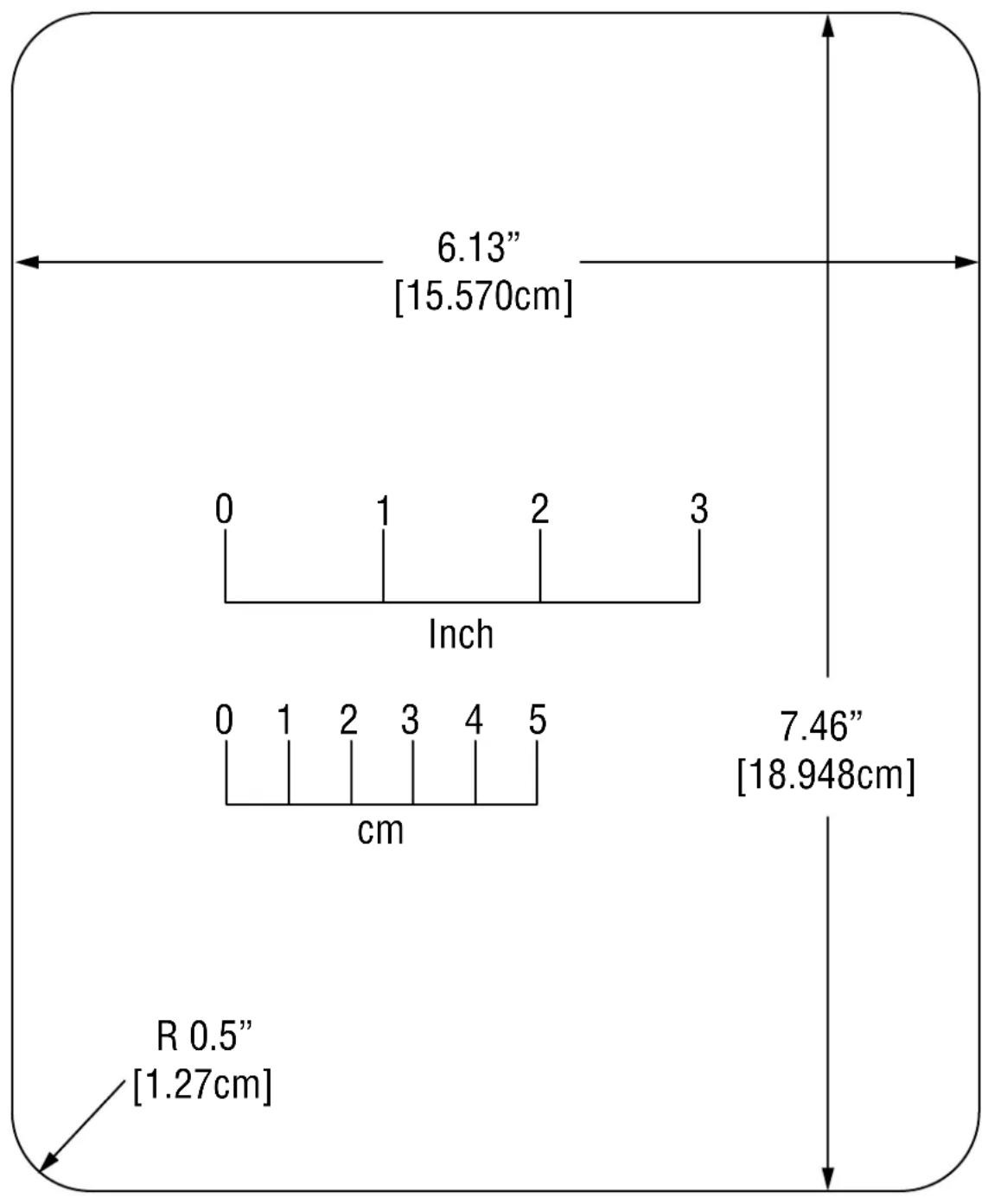
| Dimensions (Cut-out) | Length: 6.13 in (15.570 cm), Height: 7.46 in (18.948 cm), Corner Radius: 0.5 in (1.27 cm) |
| Included Parts | Table Top Box, Plate, Mini-Com Faceplate, NetKey Faceplate, Mounting Brackets (2), Mounting Screws (4), Table Securing Screws (2), Wing Nuts (2), Cable Clamps & Screws (2), Fastener Tool |
| Operation | Press top to open; press again to close and lock flush with table surface |
| Cleaning | Use only a dry cloth. Do not use strong detergents, solvents, alcohol, or water. |
| Safety Precautions | Do not expose to water or moisture. Avoid direct sunlight, heat sources, and steam. Do not place heavy objects on top. Use GFCI outlets. Keep fingers away from openings (sharp edges). |
| Installation Requirements | Requires cut-out template (dimensions provided). Mount using provided brackets and screws. Route cables carefully. |
| Power | Disconnect power cord to turn off. Power outlet should be near equipment and easily accessible. |
| Faceplate Compatibility | Compatible with Mini-Com and NetKey faceplates (included) |
| Repairability | Faceplates are replaceable; internal components not user-serviceable. |
Frequently Asked Questions - PND110 Atlona
User questions about PND110 Atlona
0 question about this device. Answer the ones you know or ask your own.
Ask a new question about this device
Download the instructions for your Unspecified in PDF format for free! Find your manual PND110 - Atlona and take your electronic device back in hand. On this page are published all the documents necessary for the use of your device. PND110 by Atlona.
USER MANUAL PND110 Atlona
natural_image
Technical line drawing of an electronic device housing with mounting brackets and internal components (no text or symbols)Parts Included:
(1) Table Top Box
(1) Plate
(1) Mini-Com Faceplate
(1) NetKey Faceplate
(2) Mounting Brackets
(4) Mounting Screws
(2) Table Securing Screws
(2) Wing Nuts
(2) Cable Clamps & Screws
(1) Fastener Tool
Installation Precautions
- For best results, place the Table Top Box, Tilt Up in a dry area away from dust.
• To prevent fire or shock, do not expose this unit to water or moisture. Do not place the unit in direct sunlight, near heaters or heat-radiating appliances, or near any liquid. Exposure to direct sunlight, smoke, or steam can harm internal components. - Handle carefully; dropping or jarring can damage the bezel.
- Never place fingers inside the opening on either side of the unit. This action could cause injury due to sharp edges inside.
- Do not place heavy objects on top of the Table Top Box, Tilt Up. Do not use excessive force to push down on the top of the unit.
- Disconnect the power cord to turn off the power. This supplies power to the socket on the pop up panel. The power outlet should be installed near the equipment and be easily accessible.
- We recommend using wall outlets with a Ground Fault Circuit Interrupter (GFCI) for maximum protection.
• Install all cables according to the instructions found herein. Do not force or pull any cable that is attached to the Table Top Box, Tilt Up.
Cleaning
- Surfaces should be cleaned with a dry cloth. Never use strong detergents or solvents such as alcohol or thinner. Do not use a wet cloth or water to clean the unit.
Operation
- The Table Top Box, Tilt Up will open easily when the top is pressed down and then released.
- When the Table Top Box, Tilt Up is not in use, simply press the top down until it is level with the surface of the table and then release. The unit will remain hidden until needed again.


For Technical Support: www.panduit.com/resources/install_maintain.asp
![Operator Interface Tabletop Min. thickness 0.5" [1.27cm] Max. thickness 3.5" [8.89cm] Mounting Brackets (2) Wing Nuts (2) Table securing screws (2)](/content/2026/06/1229692/images/de905b2316935cd7ba52a72b1c94a1f70d6650c7f38b8986d5a23699406dc535.jpg)
Tilt Up Table Top Box cut-out template
other
| Dimension | Value | | --------- | ----------- | | Length | 6.13" [15.570cm] | | Height | 7.46" [18.948cm] | | R | 0.5" [1.27cm] |


Brand : Atlona
Model : PND110
Category : Unspecified