
ZRA-BH12DSM - Tracking SONY - Free user manual and instructions
Find the device manual for free ZRA-BH12DSM SONY in PDF.


| Product Type | Spare Part Kit for Display Cabinet |
| Compatible Models | ZRD-BH12D, ZRD-BH15D, ZRD-CH12D, ZRD-CH15D, ZRD-C12A, ZRD-C15A, ZRD-B12A, ZRD-B15A |
| Kit Contents | Spare parts for display cabinet (refer to Sony sales contact) |
| Cleaning Method | Use soft anti-static cloth; do not wet. For heavy soil, consult Sony personnel. |
| Storage Conditions | Dry, well-ventilated environment; ensure completely dry before packing |
| Safety Precaution | Avoid condensation; do not operate if condensation present |
| Burn-in Warning | Permanent burn-in may occur from prolonged still images |
| Defective Pixels | Very small proportion may be stuck or flash; not malfunction |
| Magnetic Field Warning | Strong magnets; keep medical device users away |
| 3D Viewing Precaution | Take breaks; children under 6 supervised; stop if discomfort |
| General Precaution | Do not get wet; if foreign matter, turn off and contact service |
| Maintenance | Periodic cleaning and service by qualified personnel |
| Network Security | Use secure network; change default password |
| Software Licenses | Contains GPL/LGPL software; source available at URL |
| Documentation | Operating instructions included; also installation manual |
Frequently Asked Questions - ZRA-BH12DSM SONY
User questions about ZRA-BH12DSM SONY
0 question about this device. Answer the ones you know or ask your own.
Ask a new question about this device
Download the instructions for your Tracking in PDF format for free! Find your manual ZRA-BH12DSM - SONY and take your electronic device back in hand. On this page are published all the documents necessary for the use of your device. ZRA-BH12DSM by SONY.
USER MANUAL ZRA-BH12DSM SONY
Display Cabinet Display Controller
Operating Instructions
Before operating the unit, please read this manual and the supplied Before Using This Unit document thoroughly and retain it for future reference.
ZRD-CH12D/ZRD-CH15D/ZRD-BH12D/ZRD-BH15D
ZRD-C12A/ZRD-C15A/ZRD-B12A/ZRD-B15A
ZRCT-300
ZRK-CH12D/ZRK-CH15D/ZRK-BH12D/ZRK-BH15D
ZRA-CH12DSM/ZRA-CH15DSM/ZRA-BH12DSM/ZRA-BH15DSM
ZRA-1DSC
ZRA-1DSK
Table of Contents
Please Read This First 3
Manual Structure ....3
Condensation 3
Security 3
Burn-in 3
Defective pixels 4
General Precautions 4
Precautions on viewing and displaying 3D images .... 4
Precautions on the environment when displaying 3D images .... 4
Precautions regarding the effect on medical devices 4
Precautions on visually induced motion sickness (VIMS) and postural instability ....5 Other precaution ....5
Overview 6
System Configuration Diagram ...... 6
Parts Identification 7
Display Cabinet 7
ZRCT-300 Display Controller 9
Turning the Power On/Off .....11
Turning the Power On 11
Turning the Power Off 12
Selecting the Video Input 13
Changing the Display Starting Positions of Pictures 14
Configuring the Input Level and Signal Format for HDMI Inputs 15
Displaying a Black Picture on the Screen 15
Adjusting the Picture Quality .....16
Displaying 3D Video 19
Displaying the test pattern for each Display
Cabinet 20
Displaying the selected test pattern on a Display Cabinet 21
Synchronizing with External Sync
Signals 22
Inputting External Sync Signals .....22
Enabling External Synchronization .....22
Synchronizing with the camera being used for shooting 22
Using Network Features ......24
Displaying the Control Window of the Display Controller with a Web Browser ....25
Setting the Control Protocol of the Display Controller ....26
Troubleshooting 27
Error Codes 29
Display Cabinets 29
Display Controllers ....30
Cleaning and Storage ....31
Display Cabinets 31
Display Controllers ....31
Signal Formats ......31
2D Inputs 31
3D Inputs 32
Supported Signal Formats for a Single Controller 33
NOTICES AND LICENCES FOR SOFTWARE
USED IN THIS PRODUCT 35
Trademarks
- Products or system names appearing in this document are trademarks or registered trademarks of their respective owners. Further, the ^ or ^TM symbols are not used in the text.
- The terms HDMI and HDMI High-Definition Multimedia Interface, and the HDMI Logo are trademarks or registered trademarks of HDMI Licensing Administrator, Inc. in the United States and other countries.
- DisplayPort is a trademark or registered trademark of Video Electronics Standards Association in the United States and other countries.
- Reproduction or duplication, in whole or part, of the operation manual supplied with the system without the authorization of the right holder is prohibited under copyright law.
- Note that the specifications of the system are subject to change for improvement without prior notice.
Please Read This First
For ZRK-CH12D/ZRK-CH15D/ZRK-BH12D/ZRK-BH15D, ZRD-CH12D/ZRD-CH15D/ZRD-BH12D/ZRD-BH15D and ZRCT-300 are included.
ZRA-CH12DSM/ZRA-CH15DSM/ZRA-BH12DSM/ZRA-BH15DSM, and ZRA-1DSC are the spare part kits of the Display Cabinet. ZRA-1DSK is a setup kit for installing the display. For details regarding the acquisition of these kits, consult a Sony sales contact.
Manual Structure
This product includes the following manuals to be used according to the situation.
Before Using This Unit (ZRD-CH12D/ZRD-CH15D/ZRD-BH12D/ZRD-BH15D, ZRD-C12A/ZRD-C15A/ZRD-B12A/ZRD-B15A, ZRCT-300)
This includes important safety precautions, specifications, etc.
Before Using This Unit (ZRK-CH12D/ZRK-CH15D/ZRK-BH12D/ZRK-BH15D)
This includes important safety precautions, specifications, etc.
Installation Manual
This includes information on installation, initial setup, equipment adjustment procedures, etc. Refer to this manual when changing equipment settings or performing readjustments after installation as well.
Operating Instructions (this document)
This includes information on video input selection, picture quality adjustment, parts identification, etc. Refer to this manual when performing general operations.
Service Manual
This is intended for use by service personnel and includes information on diagnosing malfunctions and instructions on repair.
Condensation
If the unit is suddenly taken from a cold to a warm location, or if ambient temperature suddenly rises, moisture may form on the outer surface of the unit and/or inside of the unit. This is known as condensation. If condensation occurs, turn off the unit and wait until the condensation clears before operating the unit.
Operating the unit while condensation is present may damage the unit.
Security
- SONY WILL NOT BE LIABLE FOR DAMAGES OF ANY KIND RESULTING FROM A FAILURE TO IMPLEMENT PROPER SECURITY MEASURES ON TRANSMISSION DEVICES, UNAVOIDABLE DATA LEAKS RESULTING FROM TRANSMISSION SPECIFICATIONS, OR SECURITY PROBLEMS OF ANY KIND.
- Depending on the operating environment, unauthorized third parties on the network may be able to access the unit. When connecting the unit to the network, be sure to confirm that the network is protected securely.
- This unit is equipped with a maintenance function performed via a network. Maintenance may be performed with your consent.
- From a safety standpoint, when using the unit connected with the network, it is strongly recommended to access the Control window via a Web browser and change the access limitation settings from the factory preset values.
Also, it is recommended that you set a password with a sufficiently long character string that is hard to guess by others, and that you store it safely. - Do not browse any other website in the Web browser while making settings or after making settings. Since the login status remains in the Web browser, close the Web browser when you complete the settings to prevent unauthorized third parties from using the unit or harmful programs from running.
- When connecting this product to a network, connect via a system that provides a protection function, such as a router or firewall. If connected without such protection, security issues may occur.
Burn-in
Permanent burn-in may occur if a still image is displayed for a prolonged period of time. Playing a video with moving images may reduce the severity of burn-in once it occurs, but it will not remove the burn-in completely.
Defective pixels
Thus a very small proportion of pixels may be "stuck," either always off (black), always on (red, green, or blue), or flashing. In addition, such "stuck" pixels may appear spontaneously over a long period of use due to the physical characteristics of the organic light-emitting diodes.
Such occurrences do not indicate a malfunction.
General Precautions
- Avoid getting the product wet. In the event of accidental contact with liquids, do not turn on the power, and contact a service representative.
- If an error or malfunction occurs or if foreign matter enters the interior of the product, turn off the power and discontinue use, and contact a service representative.
- Do not subject the front panel of the Display Cabinets to damage or shocks.
- Request cleaning and maintenance periodically from a service representative.
Precautions on viewing and displaying 3D images
- Do not use the 3D glasses other than for watching 3D images.
- While watching 3D images, a viewer may experience unpleasant symptoms such as eye fatigue, tiredness, and feeling sick.
When watching 3D images, it is recommended to take breaks periodically. The length and frequency of the necessary breaks will vary depending on the content being displayed and the physical condition of the viewer.
If the viewer watching 3D images experiences any unpleasant symptoms, stop watching 3D images until the viewer recovers, and consider recommending that the viewer consults a doctor if necessary.
Note that the vision of children (especially those under 6 years old) is still in the developmental stage.
Adults should supervise their children to ensure that they are following the above precautions.
If the content is watched at a closer distance than expected, the fatigue and other effects described above may be severer.
Take measures such as considering the length,
content, and interval of the displayed content, and posting of warning signs.
- Not for viewing by children without proper adult supervision.
Precautions on the environment when displaying 3D images
Flickering or flashing under some fluorescent or LED lighting, etc.
When the viewer uses the 3D glasses and watch the 3D images under some fluorescent or LED lighting, etc., flickering or flashing lights may be observed.
This flickering or flashing may trigger epileptic seizures or blackouts (photosensitivity) in a very small percentage of individuals.
If the viewer experiences such flickering or flashing, IMMEDIATELY take off the 3D glasses and stop watching the 3D images.
This flickering or flashing may trigger previously undetected epileptic symptoms or seizures in persons who have no history of prior seizures or epilepsy.
If the viewer experiences any of the following health symptoms while using the 3D glasses, IMMEDIATELY take off the 3D glasses and stop watching the 3D images and consider recommending that the viewer consults a doctor before resuming: dizziness, altered vision, eye or muscle twitches, loss of awareness, disorientation, seizures, or any involuntary movement or convulsion.
Do not turn on these lights (light sources) when using 3D glasses.
Be sure to inform the contractor who undertakes the installation or maintenance work about these effects.
Precautions regarding the effect on medical devices
The display cabinet uses strong magnets. There are areas where the magnetic flux density is likely to be 300 mT or more on the surface that is touched during installation or maintenance work.
This may seriously affect medical devices such as defibrillators, pacemakers, and programmable shunt valves for hydrocephalus treatment.
Keep users of these medical devices away from areas where installation and maintenance work is being performed or where display cabinets are stored.
There is also magnetic flux leakage from the viewing surface, which may affect users of these medical devices when they approach the display cabinet.
Take measures such as posting warning signs depending on the installation conditions. Be sure to inform the contractor who undertakes the installation or maintenance work about these effects. (ZRD-CH12D/ZRD-CH15D/ZRD-BH12D/ZRD-BH15D/ZRD-C12A/ZRD-C15A/ZRD-B12A/ZRD-B15A only)
Precautions on visually induced motion sickness (VIMS) and postural instability
Depending on the displayed content, display size, and viewing location (distance), a viewer may experience VIMS symptoms such as postural instability or nausea.
The symptoms of VIMS may be severer after some time rather than during or immediately after viewing. Take measures such as posting warning signs.
Furthermore, the movement in one direction in a wide part of the image may induce postural instability. Pay close attention to the displayed contents and installation location (direction) when installing the product in a position where it can be seen from stairs, escalators, landings, or other places that are considered dangerous when posture is unstable.
Other precaution
The fan is a consumable part that will need periodic replacement.
When operating at room temperature, a normal replacement cycle will be about 4 years.
However, this replacement cycle represents only a general guideline and does not imply that the life expectancy of this part is guaranteed. For details on parts replacement, contact your dealer. (ZRCT-300 only)
Notes
- Always verify that the unit is operating properly before use. SONY WILL NOT BE LIABLE FOR DAMAGES OF ANY KIND INCLUDING, BUT NOT LIMITED TO, COMPENSATION OR REIMBURSEMENT ON ACCOUNT OF THE LOSS OF PRESENT OR PROSPECTIVE PROFITS DUE TO FAILURE OF THIS UNIT, EITHER DURING THE WARRANTY PERIOD OR AFTER EXPIRATION OF THE WARRANTY, OR FOR ANY OTHER REASON WHATSOEVER.
- SONY WILL NOT BE LIABLE FOR CLAIMS OF ANY KIND MADE BY USERS OF THIS UNIT OR MADE BY THIRD PARTIES.
- SONY WILL NOT BE LIABLE FOR THE TERMINATION OR DISCONTINUATION OF ANY SERVICES RELATED TO THIS UNIT THAT MAY RESULT DUE TO CIRCUMSTANCES OF ANY KIND.
Overview
You can connect the Display Cabinets based on the installation location and intended use, convert the video content signals that are input to the Display Controller based on the array size, and output the signals onto the Display Cabinets. 4K2K video can be controlled via a single display controller. Control of the Display Cabinets is performed from a computer on which Display Control Software is installed. Daisy-chain connections can be configured between Display Cabinets using a power cord (not supplied) and a Category 7 cable (not supplied). (For details on the number of Display Cabinets that can be connected, refer to the Installation Manual.)
Caution
When connecting the Display Controller to a network, use a network that is built to control and regulate access from the Internet, such as a LAN. Direct connection from the Internet increases security risk.
System Configuration Diagram
Configuration example of the entire system

flowchart
graph TD
    A["Video content transmitters"] --> B["Matrix switcher"]
    B --> C["Video processor"]
    C --> D["Display Controller"]
    D --> E["Display Controller"]
    E --> F["Control (LAN)"]
    E --> G["Hub"]
    H["VPN router"] --> I["Controller PC (Display Control Software installed)"]
    I --> J["Array (Display Cabinets)"]
    J --> K["Display Controller"]
    K --> L["Display Controller"]
    L --> M["Display Controller"]
    M --> N["Display Controller"]
    N --> O["Display Controller"]
    O --> P["Display Controller"]
    P --> Q["Display Controller"]
    Q --> R["Display Controller"]
    R --> S["Display Controller"]
    S --> T["Display Controller"]
    T --> U["Display Controller"]
    U --> V["Display Controller"]
    V --> W["Display Controller"]
    W --> X["Display Controller"]
    X --> Y["Display Controller"]
    Y --> Z["Display Controller"]
    Z --> AA["Display Controller"]
    AA --> AB["Display Controller"]
    AB --> AC["Display Controller"]
    AC --> AD["Display Controller"]
    AD --> AE["Display Controller"]
    AE --> AF["Display Controller"]
    AF --> AG["Display Controller"]
    AG --> AH["Display Controller"]
    AH --> AI["Display Controller"]
    AI --> AJ["Display Controller"]
    AJ --> AK["Display Controller"]
    AK --> AL["Display Controller"]
    AL --> AM["Display Controller"]
    AM --> AN["Display Controller"]
    AN --> AO["Display Controller"]
    AO --> AP["Display Controller"]
    AP --> AQ["Display Controller"]
    AQ --> AR["Display Controller"]
    AR --> AS["Display Controller"]
    AS --> AT["Display Controller"]
    AT --> AU["Display Controller"]
    AU --> AV["Display Controller"]
    AV --> AW["Display Controller"]
    AW --> AX["Display Controller"]
    AX --> AY["Display Controller"]
    AY --> AZ["Display Controller"]
    AZ --> BA["Display Controller"]
    BA --> BB["Display Controller"]
    BB --> BC["Display Controller"]
    BC --> BD["Display Controller"]
    BD --> BE["Display Controller"]
    BE --> BF["Display Controller"]
    BF --> BG["Display Controller"]
    BG --> BH["Display Controller"]
    BH --> BI["Display Controller"]
    BI --> BJ["Display Controller"]
    BJ --> BK["Display Controller"]
    BK --> BL["Display Controller"]
    BL --> BM["Display Controller"]
    BM --> BN["Display Controller"]
    BN --> BO["Display Controller"]
    BO --> BP["Display Controller"]
    BP --> BQ["Display Controller"]
    BQ --> BR["Display Controller"]
    BR --> BS["Display Controller"]
    BS --> BT["Display Controller"]
    BT --> BU["Display Controller"]
    BU --> BV["Display Controller"]
    BV --> BW["Display Controller"]
Parts Identification
Display Cabinet
ZRD-CH12D/ZRD-CH15D/ZRD-BH12D/ZRD-BH15D
Left/Right

ZRD-C12A/ZRD-C15A/ZRD-B12A/ZRD-B15A
Left/Right


Caution
Do not connect the OUT and IN connectors to a hub. The input/output signals for these connectors are unique to the product and are not Ethernet signals. In particular, be aware that connecting these connectors to a PoE injector hub may result in damage to the product.
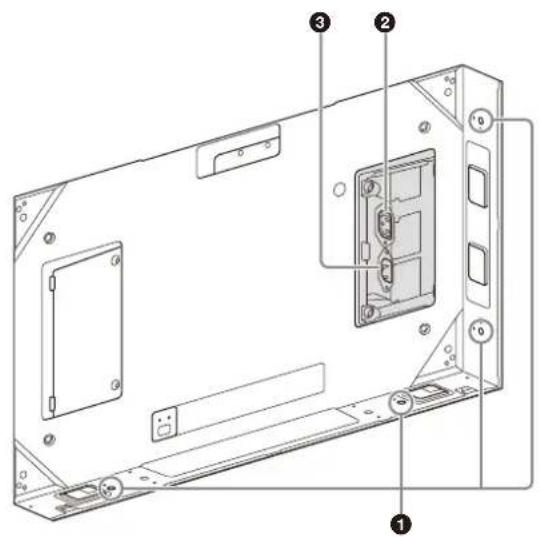
① Cabinet joints
Connect to other Display Cabinets. ZRD-CH12D/ZRD-CH15D/ZRD-BH12D/ZRD-BH15D: There are two cabinet joints on the right side, left side, top and bottom. ZRD-C12A/ZRD-C15A/ZRD-B12A/ZRD-B15A: There is one cabinet joint on the right side, one on the left side, two on top, and two on the bottom.
② PWR OUT (AC power output) connector (ZRD-CH12D/ZRD-CH15D/ZRD-BH12D/ZRD-BH15D)
\~ OUT (AC power output) connector (ZRD-C12A/ZRD-C15A/ZRD-B12A/ZRD-B15A)
Use a power cord (not supplied) to connect this connector to the PWR IN (AC power input) connector or IN (AC power input) connector on the succeeding Display Cabinet in the daisy-chain connection.
This connector is not used for the last Display Cabinet in the daisy-chain connection.
③ PWRN (AC power input) connector (ZRD-CH12D/ZRD-CH15D/ZRD-BH12D/ZRD-BH15D)
\~ IN (AC power input) connector (ZRD-C12A/ZRD-C15A/ZRD-B12A/ZRD-B15A)
Use a power cord (not supplied) to connect this connector to the PWR OUT (AC power output) connector or OUT (AC power output) connector on the preceding Display Cabinet in the daisy-chain connection. For the first Display Cabinet in the daisy-chain connection, use a power cord (not supplied) to connect this connector to the circuit breaker.
4 OUT (abinet output) connector (RJ-45)
Use a Category 7 cable (not supplied) to connect this connector to the IN (cabinet input) connector on the succeeding Display Cabinet in the daisy-chain connection. This connector is not used for the last Display Cabinet in the daisy-chain connection.
⑤ IN(cabinet input) connector (RJ-45)
Use a Category 7 cable (not supplied) to connect this connector to the OUT (cabinet output) connector on the preceding Display Cabinet in the daisy-chain connection. For the first Display Cabinet in the daisy-chain connection, use a Category 7 cable (not supplied) to connect this connector to the OUTPUT connector on the Display Controller.
6 POWER indicator (ZRD-CH12D/ZRD-CH15D/ZRD-BH12D/ZRD-BH15D only)
Indicates the power supply status of the Display Cabinet.
When the Display Cabinet does not work properly after turning the power off and on, contact your local Sony representative.
| Indicator Status |
| Off The Display Cabinet is tumed off. |
| Lit red The Display Cabinet is in standby mode. |
| Lit orange Power error occurred on the Display Cabinet. |
| Lit green The Display Cabinet is turned on (normal operating status). |
7 STATUS indicator (ZRD-CH12D/ZRD-CH15D/ZRD-BH12D/ZRD-BH15D only)
Indicates the system status of the Display Cabinet.
For details, see "Troubleshooting" (page 27) and "Error Codes" (page 29).
| Indicator Status |
| Off The Display Cabinet is in standby mode. |
| Blinking red An error occurred on the Display Cabinet. |
| Lit orange The Display Cabinet is turned off. |
| Blinking orange A warning occurred on the Display Cabinet. |
| Lit green The Display Cabinet is turned on (normal operating status). |
8 TEST switch (ZRD-CH12D/ZRD-CH15D/ZRD-BH12D/ZRD-BH15D only)
By using the switch, the test pattern can be displayed without connecting the controller.
Operation Description
Press and hold While in standby mode: Turns the power on and displays the test pattern. When the power is turned on: Goes into standby mode.
Operation Description
Press While in standby mode:
None
When the power is turned
on: Changes the test
pattern.
ZRCT-300 Display Controller
Front

① ⏻ (power) switch
Turns the Display Controller on/off.
◆ for details, see "Turning the Power On/Off" (page 11).
② MAINTENANCE connector (USB, Type A)
This connector is used for maintenance servicing.
③ Intake vent
Do not block the intake vent, as doing so will result in interior heat buildup which may result in fire or malfunction.
4 ERROR indiator
Blinks when warnings occur, and lights when errors occur.
◆ For details, see "Troubleshooting" (page 27) and "Error Codes" (page 29).
5 STATUS indicator
Indicates the power status of the Display Cabinets.
The indicator lights green when all the Display Cabinets that are connected to the Display Controller according to the Display Cabinet layout settings are turned on. If any of the Display Cabinets are turned off according to the Display Cabinet layout settings, the indicator turns off.
◆ dr details on the Display Cabinet layout settings, consult your system administrator.
6 POWER indicator
Indicates the power status of the Display Controller.
| Indicator Status |
| Off The Display Controller is turned off. |
| Lit orange The Display Controller is in standby mode. |
| Lit green The Display Controller is turned on (normal operating status). |
| Indicator Status |
| Blinking green The Display Controller is starting up or shutting down. |
| Lit red The forced standby mode has been entered.◆ of details, see “Entering the forced standby mode” (page 28) in the “Troubleshooting.” |
Rear

Caution
Do not connect the OUTPUT, LINK IN, and LINK OUT connectors to a hub. The input/output signals for these connectors are unique to the product and are not Ethernet signals. In particular, be aware that connecting these connectors to a PoE injector hub may result in damage to the product.
① OUTPUT connectors 1 to 12 (RJ-45)
Use a Category 7 cable (not supplied) to connect this connector to the IN (cabinet input) connector on the Display Cabinet you want to control (first Display Cabinet in the daisy-chain connection).
② LINK IN connector (RJ-45)
Use this when using multiple Display Controllers to control the Display Cabinets. Use a Category 7 cable (not supplied) to connect this connector to the LINK OUT connector on the Display Controller you want to link.
③ INK OUT connector (RJ-45)
Use this when using multiple Display Controllers to control the Display Cabinets. Use a Category 7 cable (not supplied) to connect this connector to the LINK IN connector on the Display Controller you want to link.
4 3D SYNC OUT connector (mini-DIN, 3-pin)
Outputs 3D sync signals.
⑤ Exhaust vent/fan
Do not block the exhaust vent, as doing so will result in interior heat buildup which may result in fire or malfunction.
⑥ ∼ IN (AC power input) connector
Use a power cord (not supplied) to connect this connector to the circuit breaker.
⑦ (earth) terminal
Connect this to the earth conductor of the system.
Caution
Failure to connect the system to the protective earth may result in electric shock. Be sure to connect to the earth conductor, even during operation inspections.
⑧ REF IN(external reference signal input) connector (BNC)
Inputs external reference signals used for synchronization. For details, refer to the Installation Manual.
9 3D SYNC IN connector (mini-DIN, 3-pin)
Inputs 3D sync signals.
⑩ CRL (control) connector 2 (Mini-USB, Type B)
Use this to connect to the controller PC via a USB (SERIAL) connection. Use a USB cable (not supplied) to connect this to a USB port on the controller PC.
⑪ CRL (control) connector 1 (RJ-45)
Use this to connect to the controller PC via an Ethernet (LAN) connection.
Use an Ethernet cable (Category 5, not supplied) to connect this to a LAN port on the controller PC.
⑫ DisplayPort (video input) connectors 1 and 2
Connect these to the video processor.
13 HDMI (video input) connectors 1 and 2
Connect these to the video processor.
Caution
When inputting 4K-equivalent HDMI signals, use a cable that is marked with the Premium High Speed HDMI logo and is within 3 m in length.
We recommend using Premium High Speed HDMI cables that are within 3 m in length even when you are not inputting 4K-equivalent HDMI signals.
Turning the Power On/Off
Turning the Power On
You can turn on the system's power using one of three methods. Consult your system administrator regarding which method to use.
- Turning the power on via the Display Controller
- Turning the power on via Display Control Software
- Turning the power on by connecting the power cord to the Display Controller
Caution
Always connect the Display Cabinet's power cord to the circuit breaker.
If pictures are not displayed within 5 minutes of turning on the system's power, try turning the system's power off and then on again.
Note
If a startup delay is configured in the [Function] - [System Settings] - [Cabinet Power On Delay] setting of Display Control Software, the Display Cabinets will turn on according to the configured delay.
Turning the power on via the Display Controller
1Press and hold the power switch on the Display Controller for about 2 seconds.
Turn on all the Display Controllers by pressing each of their power switches.

When a Display Controller turns on, its POWER indicator lights green.
When a Display Cabinet turns on, its STATUS indicator lights green.
To enter standby mode
Press the power switch on a Display Controller twice to set the Display Controller and Display Cabinets to standby mode. To return to the power ON state, press the power switch again.
Note
If you press the power switch only once in the power ON state, the POWER indicator will blink red for 2 seconds, but the standby mode will not be entered. You can enter standby mode by pressing the power switch again while the indicator is still blinking red.
2Turn on the video source equipment.
Turning the power on via Display Control Software
The initial settings must be configured beforehand to turn the power on via Display Control Software. For details, consult your system administrator.
1 Start the controller PC, and start Display Control Software.
2Click [Power ON] in the main screen.

Under default settings, all Display Controllers and Display Cabinets will turn on. When a Display Controller turns on, its POWER indicator lights green. When a Display Cabinet turns on, its STATUS indicator lights green.
When you click [Standby]
The power status of all connected Display Controllers and Display Cabinets will enter standby mode, and the main screen will remain displayed. Click [Power ON] to turn the power on again.
3Turn on the video source equipment.
Turning the power on by connecting the power cord to the Display Controller
When [Function] - [System Settings] - [Direct Array Power On] is set to [ON] in Display Control Software beforehand, simply connecting the Display Controller's power cord will turn on the Display Controller and Display Cabinets.
1 Connect the power cord to the ∼ IN connector on the Display Controller. When a Display Controller turns on, its POWER indicator will switch from blinking red/orange to remaining lit green. When a Display Cabinet turns on, its STATUS indicator lights green.
2Turn on the video source equipment.
Turning the Power Off
You can turn off the system's power using one of two methods.
- Turning the power off via the Display Controller - Turning the power off via Display Control Software
Turning the power off via the Display Controller
1Turn off the video source equipment.
2Press the power switch on the Display Controller twice. The Display Controller and Display Cabinets will enter standby mode.
3If necessary, disconnect the AC power supply.
Turning the power off via Display Control Software
1Turn off the video source equipment.
2Click [Standby] in the main screen of Display Control Software. The Display Controller and Display Cabinets will enter standby mode.
3If necessary, disconnect the AC power supply.
Setting only the power of the Display Cabinet to off
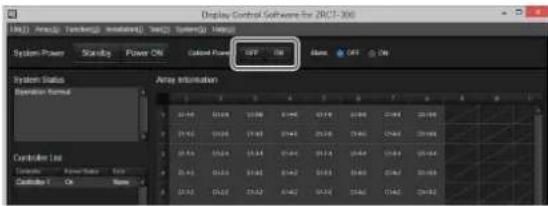
You can set only the power of the Display Cabinet to off without disconnecting the video signal transmitter and the Display Controller. It is only valid when the system is turned on.
Click [OFF] in [Cabinet Power] on the main screen of Display Control Software. If [ON] is selected, the Display Cabinet will turn on.
Turning the power off automatically
When [Function] - [System Settings] - [Auto Power Saving] is set to [ON] in Display Control Software and no signal is detected from the selected input, the Display Controller and Display Cabinets enter standby mode.
Selecting the Video Input
Select the video signals that will be input. The settings configured on the primary controller will be applied to all the other Display Controllers, including the subordinate controllers (hereafter referred to as "sub controllers"). Sub controllers cannot be configured individually.
Caution
If the a primary controller is not configured via Display Control Software or the primary controller is not turned on at the time the [Input Settings] screen is displayed, video input selection cannot be performed. In addition, the video input settings will not be applied to the sub controllers if they are not turned on.
1Select [Input Settings] in the [Array] menu on the main screen of Display Control Software.
2Select the input channel in [Input Select], and click [OK] or [Apply]. The video input changes.

[HDMI1]: Use HDMI connector 1 to display pictures.
[HDMI2]: Use HDMI connector 2 to display pictures.
[DisplayPort (Single1)]: Use DisplayPort connector 1 to display the picture.
[DisplayPort (Single2)]: Use DisplayPort connector 2 to display the picture.
◆ ∅r details on the supported video signals for display, see "Signal Formats" (page 31).
[DisplayPort (Dual)]: Use two DisplayPort connectors to display pictures as large as 4K 100p/120p.
Note
If you are only inputting single-stream signals that are 50p/60p or lower, we recommend clicking [Detailed Input Settings] and clearing the [High Frame Rate Mode] checkbox in the [Detailed Input Settings] screen.
3Click [OK] or [Apply] to apply the settings.
The setting values will be registered to the Display Controller and saved to Display Control Software.
Changing the Display Starting Positions of Pictures
You can change the display positions for each picture.
For example, you can move a low-resolution picture from the top left of the screen to the center.
1Click [Detailed Input Settings] in the [Input Settings] screen.
The [Detailed Input Settings] screen appears.

2Click the tab ([DisplayPort (Single1)], [DisplayPort (Single2)], [DisplayPort (Dual)], [HDMI1], or [HDMI2]) of the video signal for which you want to change the display starting position.
3 Use the sliders and buttons for [H Position] and [V Position] to specify the horizontal and vertical positions.
The settings are reflected in the picture immediately after they are configured. For details, refer to the Installation Manual.
4Click [Close].
The [Detailed Input Settings] screen closes.
Configuring the Input Level and Signal Format for HDMI Inputs
1Select [HDMI1] or [HDMI2] for [Input Select] in the [Input Settings] screen, and click [OK] or [Apply].
The video input changes.
2Click [Common Input Settings].
The [Common Input Settings] screen appears.
The settings configured on the primary controller will be applied to all the other Display Controllers, including the sub controllers. Sub controllers cannot be configured individually.

3Configure each setting.
[Dynamic Range]: Select the video input level for HDMI connectors 1 and 2.
• [Auto]: Determine the video input level automatically.
• [Limited]: Select this when the video input level is between 16 to 235.
• [Full]: Select this when the video input level is between 0 to 255.
[HDMI Signal Format]: Select the video signal format.
• [Enhanced Format]: Display pictures in a higher definition HDMI format.
- [Standard Format]: Display pictures in a standard HDMI format.
Caution
Select [Standard Format] when an input device that does not support HDMI 2.0 is connected.
4When you are finished configuring settings, click [Close].
Caution
The items in the [Common Input Settings] screen cannot be configured when an input channel other than HDMI is selected in [Input Select].
Displaying a Black Picture on the Screen
When switching the video signals, use this function when you do not want to display the image at the moment of switching. Even when displaying images from multiple Display Controllers, all images are switched at the same time.
Click [ON] in [Blank] on the main screen of Display Control Software. If [OFF] is selected, images from the video signal source will be displayed.

Note
Set [Blank] to [ON] in standby mode, click [Power ON] to display the black picture on the screen, and start the system. After that, set [Blank] to [OFF] to display the images.
Adjusting the Picture Quality
Adjust the contrast, brightness, and other picture quality settings.
The settings configured on the primary controller will be applied to all the other Display Controllers, including the sub controllers. Sub controllers cannot be configured individually.
Caution
If the a primary controller is not configured via Display Control Software or the primary controller is not turned on at the time the [Picture Settings] screen is displayed, picture quality adjustment cannot be performed. In addition, the picture quality settings will not be applied to the sub controllers if they are not turned on.
1Select [Picture Settings] in the [Array] menu on the main screen of Display Control Software.
2Configure each setting.
The values currently configured on the primary controller are displayed on the [Picture Settings] screen.
The settings are reflected in the picture immediately after they are configured.

[Picture Mode]: Select from [Mode1] to [Mode100] to display the setting values for [Contrast] to [Color Temperature Settings]. If necessary, change the values for [Contrast] to [Color Temperature Settings]. The setting values are identical for each mode under factory default settings. [Copy From]: The setting value from other Picture Modes can be copied to the selected Picture Mode. [Rename]: A desired name can be assigned to the selected Picture Mode.
[Contrast]: Use the slider and Buttons to adjust the contrast. Setting range: 0 to 1000 Default value: 600
[Brightness]: Use the slider and buttons to adjust the brightness. Setting range: 0 to 1000 Default value: 500
[Gamma]: Select the gamma correction value.
• [1.8]
• [2.2] (default value)
• [2.4]
• [2.6]
• [ DICOM SIM ]
- [Custom6] to [Custom10]
Caution
- This product is not a medical device. The device cannot be used for medical examinations, even when [DICOM SIM] is selected.
- The [Gamma] settings will be disabled if [HDR] is set to a setting other than [Off].
- [Custom6] to [Custom10] are settings used for maintenance services.
[HDR]: Select the playback mode for HDR (high dynamic range) content. This setting takes priority over the value set for [Gamma] except when [Off] is selected.
- [SMPTE ST 2084]: Display SMPTE ST 2084 standard HDR images in a format suitable for the display cabinet model selected in [Cabinet Allocation]. (For details, refer to the Installation Manual.)
- [SMPTE ST 2084 (Sim.)]: Display SMPTE ST 2084 standard HDR images scaled to the maximum brightness for the display cabinet.
- [ITU-R BT.2100 (HLG)]: Display the HLG (Hybrid Log Gamma) image specified by recommendation ITU-R BT.2100.
• [S-Log3]: Display S-Log3 HDR images.
- [S-Log3 (Live)]: Display the HDR image with system gamma added to the S-Log3 input signals.
- [SMPTE ST 2084 (B/BH Series)]: Display SMPTE ST 2084 standard HDR images formatted for ZRD-BH12D/B12A or ZRD-BH15D/B15A.
- [SMPTE ST 2084 (C/CH Series)]: Display SMPTE ST 2084 standard HDR images formatted for ZRD-CH12D/C12A or ZRD-CH15D/C15A.
• [ Off ]
[HDMI Auto Setting]: When HDMI input is selected, automatically identify HDR content and display them in the appropriate HDR format.
Caution
- [HDMI Auto Setting] is available in Display Control Software v01.01.00 or later.
- When the [HDMI Auto Setting] setting is enabled, images may be displayed with the settings configured in [HDR].
- When SMPTE ST 2084 input signal is automatically identified, if the setting value configured in [HDR] is [SMPTE ST 2084 (B/BH Series)], [SMPTE ST 2084 (C/CH Series)], or [SMPTE ST 2084 (Sim.)], images are displayed with these settings. For the setting values other than these, images are displayed with the settings configured in [LED Model].
- When an input channel other than HDMI is input, automatic signal identification is not possible. If this is the case, images are displayed according to the mode set for [HDR].
- Even when the input channel is set to HDMI, HDR content may not be automatically identified depending on the input signal. When this is the case, images are displayed according to the mode set for [HDR].
- To automatically set the color space, select [Auto(HDMI)] for [Color Space].
[Color Space]: Select the color space.
- [sRGB]: Display the picture using the sRGB color space standard.
- [Native]: Display the picture with the Display Cabinet's color space of the three primary color chromaticity points.
- [AdobeRGB]: Display the picture using the Adobe RGB color space standard.
-
[DCI_P3]: Display the picture using the DCI color space standard.
• [BT.2020]: Display the picture using the BT.2020 color space standard. -
[S-Gamut]/[S-Gamut3]/[S-Gamut3.Cine]: Display the picture using the color space defined by Sony.
- [Custom9] to [Custom10]
- [Auto(HDMI)]: During HDMI input, automatically set the color space based on the additional input signal information.
Caution
- [AdobeRGB], [DCI_P3], and [BT.2020] do not include the entirety of the color spaces defined by their respective standards.
- [Custom9] to [Custom10] are settings used for maintenance services.
- [Auto(HDMI)] is available in Display Control Software v01.01.00 or later.
- When [Auto(HDMI)] is selected, if an input channel other than HDMI is input or additional information cannot be obtained from the HDMI input signal, images are displayed in sRGB.
[Transfer Matrix]: Set the transfer matrix for HDMI input.
• Auto
• BT.601
• BT.709
• BT.2020
[Light Output]: Select the output strength to use during low light-source output. The light-source output becomes stronger in order from [Step1] to [Step6].
[Color Temperature Settings]: Select the color temperature in [Color Temperature].
- If you selected [D93], [D65], [D50] or [DCI], proceed to step 4.
- If you selected [User1] to [User40], proceed to step 3.
[Copy From]: The setting value from another [Color Temperature] can be copied to the selected [Color Temperature].
Caution
Copying is not possible when D93/D65/D50/DCI is selected.
[Rename]: A desired name can be assigned to the selected [Color Temperature].
Caution
A desired name cannot be assigned when D93/D65/D50/DCI is selected.
3Configure the Gain and Bias values.
These settings can only be configured when [Color Temperature Settings] is set to a setting value from [User1] to [User40] in step 2.
Use the slider and buttons to adjust the Gain and Bias values. [Gain]
Setting range: 0 to 1023
Default value: (value equivalent to D65) [Bias]
Setting range: -512 to 511
Default value: 0
Note
The output brightness after adjusting the image quality is displayed in [Adjustment Light Level] as a ratio to the maximum brightness.
4Set the Advanced Picture function.
Select [Advanced Picture] to display the [Advanced Picture Settings] screen.

[Normal]: Display the picture faithfully according to the input signal.
[Advanced]: Change the settings of the Reality Creation, Motionflow, and Wide Mode functions.
Default value: Normal
Caution
- When using the [Reality Creation] or [Global Scaling] function with multiple Display Controllers, it is necessary to set the cabinet placement address with this in mind. For details, refer to the Installation Manual.
• Even when [Advanced] is selected, images are displayed in [Normal] in the following cases.
- The frame rate of the input signal is higher than 60p.
- [3D Frame Sequential Mode] or [3D Dual Input Mode] is selected in the [3D Settings] screen.
[Reality Creation]: Adjust the definition and noise processing. (Super resolution function)
• [ON]: Change the settings of the Reality Creation function to improve the texture and sense of detail.
[Reality]: Use the slide lever and ☐ to adjust the definition. (default value: 20) [Clarity]: Use the slide lever and ☐ to adjust the noise processing. (default value: 1)
• [OFF]: Turn off the Reality Creation function.
- Default value: ON
[Motionflow]
• [OFF]: Turn off the Motionflow function.
• [1] to [5]: The larger the setting value, the smoother the motion.
- Default value: 2
Caution
- Depending on the picture, changing the settings may have no effect.
- When using multiple Display Controllers, the [Motionflow] function cannot be used (depending on the picture, parts of the picture may appear disjointed or not continuous). Have [OFF] selected for the [Motionflow] function when using multiple Display Controllers.
[Wide Mode]
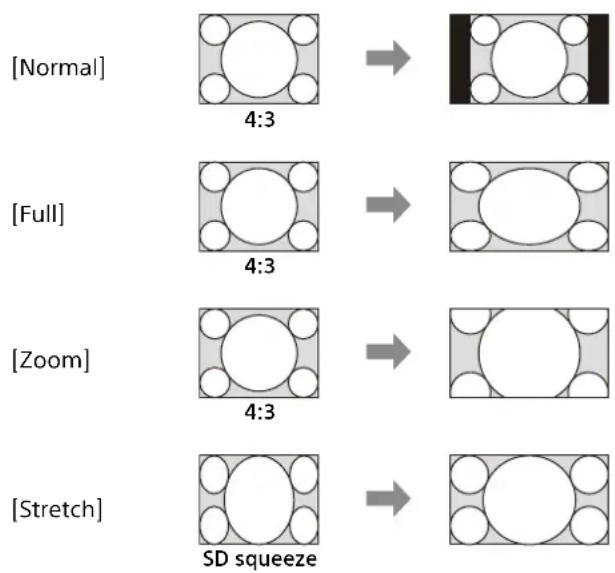
- [Normal]: Fit an image into the screen size without being cut off while its aspect ratio is maintained.
• [Full]: Fit an image into the screen size without being cut off by changing its aspect ratio. - [Zoom]: Cut off an image to fit into the screen size with its aspect ratio maintained.
-
[Stretch]: Display standard TV signals (SD signals) in a 16:9 aspect ratio. For signals other than standard TV signals, the display will be the same as Normal.
-
[Native]: Display the input image in dot-by-dot format.
- Default value: Normal
Caution
- Squeezed standard TV signals are displayed properly when set to [Stretch].
- Note that compressing or stretching the screen using the Wide Mode function, etc., for purposes of profit or public viewing may infringe on the rights of authors protected under copyright law.
Display example
flowchart
graph LR
    A["Normal"] --> B["4:3"]
    B --> C["Full"]
    C --> D["4:3"]
    D --> E["Zoom"]
    E --> F["4:3"]
    F --> G["Stretch"]
    G --> H["SD squeeze"]
[Global Scaling]
• [OFF]: Perform scaling for each screen on each Display Controller.
• [ON]: Perform scaling across multiple Display Controller screens.
- Default value: OFF
Caution
When using the [Global Scaling] function, input the same video signals to all Display Controllers.
5When you are finished configuring settings, click [Close].
Displaying 3D Video
Note
In this document, the signals for the left and right eyes are referred to as the L and R signals respectively.
For details, refer to the Installation Manual.
Caution
3D video display is not supported for HDMI signals.
3D frame sequential mode:
This mode alternately inputs the two video signals (L signal and R signal) to the DisplayPort connector and outputs the 3D image from the Display Cabinet.
Generated 3D sync signals based on 3D sync signal inputs from the 3D SYNC IN connector are output from the 3D SYNC OUT connector according to the picture output's timing.
3D dual input mode:
This mode simultaneously inputs the two video signals (L signal and R signal) to the DisplayPort connector and outputs 3D images from the Display Cabinet.
Internally generated 3D sync signals are output from the 3D SYNC OUT connector according to the picture output's timing.
Select [3D Settings] in the [Array] menu on the main screen of Display Control Software to display the [3D Settings] screen.
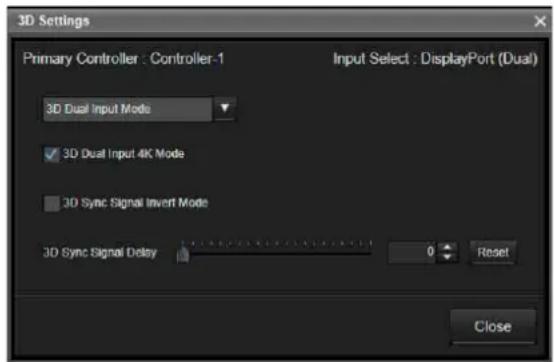
3D Format: Select from the drop-down list.
[3D Dual Input 4K Mode]: Clear this checkbox for 3D video other than 4K. It works only if [3D Dual Input Mode] is set.
[3D Sync Signal Invert Mode]: Select this checkbox to invert the L and R signals.
[3D Sync Signal Delay]: Use the slider or buttons to adjust the phase (when 3D video is not displayed properly). Moving the slider also changes the number value. Clicking [Reset] restores the default value.
Note
Inversion and phase adjustments can be configured for both mixed L/R and separated L/R. The settings are reflected in the picture immediately after they are configured.
Displaying the test pattern for each Display Cabinet
Display Control Software allows you to display the test pattern for the specified Display Cabinet.
Caution
- The test pattern for each Display Cabinet can be displayed in Display Control Software v01.01.00 or later.
- Test patterns cannot be displayed if the primary controller is not set with Display Control Software or if the primary controller is in a state other than on.
Select [Function] in the main Display Control Software screen, then select [Cabinet Test Pattern].

The cabinet test pattern display settings screen is displayed.

[Cabinet Test Pattern]: From the drop-down list, select the test pattern to display on the display cabinet. [Red]/[Green]/[Blue]/[White]/[Custom1] - [Custom4] can be selected.
Note
RGB can be set individually for [Custom1] to [Custom4] to change the pattern and display color.
[Edit]: When a pattern between [Custom1] and [Custom4] is selected from the [Cabinet Test Pattern] drop-down list, the [Edit] button becomes pressable. When [Edit] is pressed, the [Cabinet Test Pattern Custom Settings] screen is displayed.
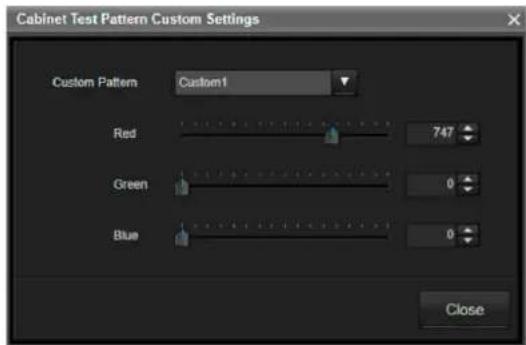
The colors of the selected Custom pattern can be adjusted.
[Red]/[Green]/[Blue] can each be adjusted to a value ranging from 0 to 1023.
The default value differs depending on the pattern that is selected between [Custom1] and [Custom4].
The adjusted values are saved and applied the next time Display Control Software is started up.
Displaying the selected test pattern on a Display Cabinet
To specify a Display Cabinet and display/hide the test pattern
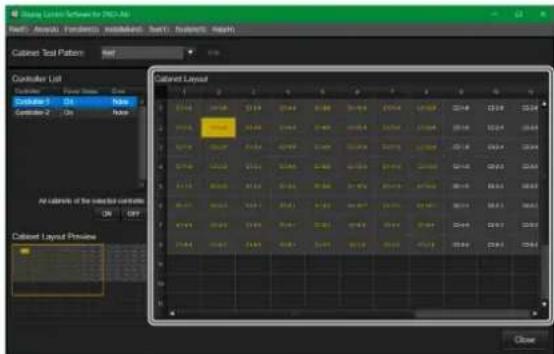
Under [Cabinet Layout], click the grid for the Display Cabinet on which you wish to display the selected test pattern.
The test pattern can be displayed/hidden by clicking the grid for that Display Cabinet.
Display Cabinet grid display status:
0148 : The test pattern display on the Display Cabinet is OFF. (The test pattern is not displayed.)
: The test pattern display on the Display Cabinet is ON. (The test pattern is displayed.)
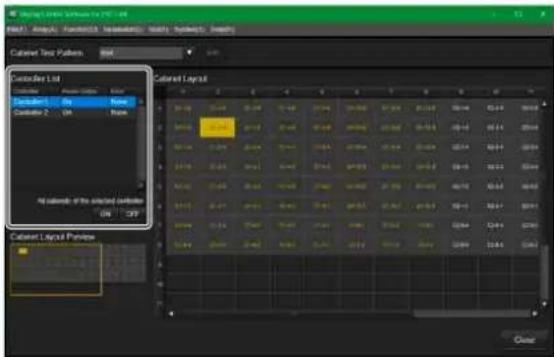
Selecting a Display Controller to display/hide the test patterns on all the Display Cabinets
The test patterns on all the Display Cabinets connected to the selected Display Controller can be displayed (ON)/hidden (OFF) by selecting a Display Controller under [Controller List], then selecting [ON] or [OFF] for [All cabinets of the selected controller].
Synchronizing with External Sync Signals
Inputting External Sync Signals
Input the external sync signal to the REF IN (external sync signals input) connector on the primary controller via a BNC cable.
Note
The following external sync signals are supported.
• HD tri-level sync (0.6 Vp-p/75Ω/negative sync)
- SD black burst/composite sync (0.286 Vp-p/75Ω/negative sync)
Enabling External Synchronization
Caution
If a primary controller is not configured with Display Control Software or the primary controller is not turned on, the external synchronization cannot be enabled.
1Select [Function] in the main screen of Display Control Software, and then select [Sync Settings].
2Select [External Sync Signal] for [Sync Signal Selection] in the [Sync Settings] screen.
External synchronization is enabled immediately.
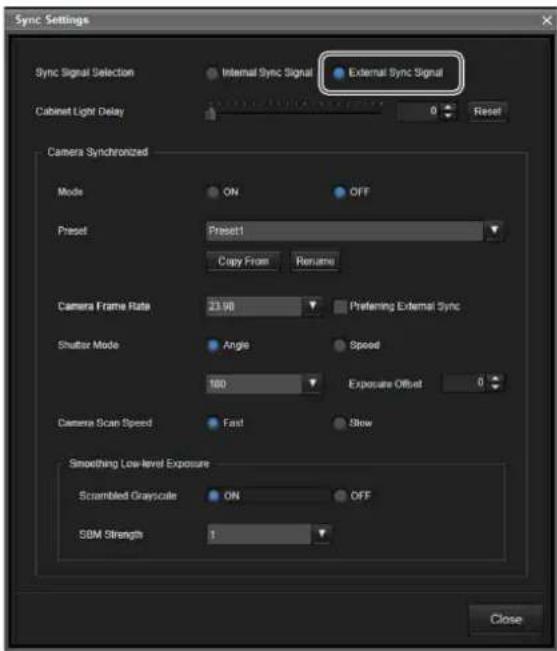
Adjusting the light-up delay time for Display Cabinets
Use the slider and buttons for [Cabinet Light Delay] under [Sync] to specify the light-up delay time (0 to 4000).
Synchronizing with the camera being used for shooting
You can make changes to the settings under [Camera Synchronized] in the [Sync Settings] screen to reduce the appearance of black bars that may occur in captured images when shooting an LED display.
Caution
This function is not available when the Display Cabinet is ZRD-CH12D/ZRD-CH15D/ZRD-BH12D/ZRD-BH15D.
Notes
- The settings for synchronization with the camera being used for shooting are available in Display Control Software v01.01.00 or later.
- Input an external sync signal to the camera and controller, enable the external sync setting, then enable the mode.

[Camera Synchronized]: Configure the synchronization with the camera being used for shooting.
These setting items are used to reduce artifacts that may occur in captured images when shooting LED display.
- [Mode]: Select whether to enable/disable the synchronization settings for shooting with the camera.
[OFF]: Disable the settings for synchronization with the camera being used for shooting.
[ON]: Enable the settings for synchronization with the camera being used for shooting. Default value: OFF
- [Preset]: Displays the setting values from [Camera Frame Rate] to [Smoothing Low-level Exposure] when selecting one of [Preset1] to [Preset100]. When shipped from the factory, all modes are set to the same setting.
[Copy From]: Copy setting values from other Presets to the selected Preset. [Rename]: Give a unique name to the selected Preset.
- [Camera Frame Rate]: Select from the following to set the frame rate for the camera being used for shooting. [23.98] (Default value)/[24]/[25]/[29.97]/[47.95]/[50]/[59.94]
• [Preferring External Sync]: Set whether to give priority to the external sync signal when the video input sync signal is different from the external sync signal.
Check this checkbox to give priority to the external sync signal.
Default: Unchecked
Caution
This setting is available when [Camera Frame Rate] is set to [23.98] and the input signal is 29.97/59.94/119.88 fps, or when [Camera Frame Rate] is set to [24] and the input signal is 30/60/120 fps.
- [Shutter Mode]: Select the shutter mode from the following.
[Angle]: This mode allows you to select the shutter angle. Select the shutter angle from the following.
[72]/[90]/[180] (Default value)/[360] [Speed]: This mode allows you to select the shutter speed. Select the shutter speed from the following.
[1/50]/[1/60] (Default value)/[1/100]/[1/120]/[1/250]
Default value: Angle
Caution
This setting takes effect when [Mode] is set to [ON].
- [Exposure Offset]: Make fine adjustments to the shutter angle. Fine adjustment is also possible when the shutter speed is selected.
Setting range: -9 to 0 Default value: 0
- [Camera Scan Speed]: Select the scan speed of the camera being used for shooting.
[Fast]: Select when the scan speed of the camera being used for shooting is fast. [Slow]: Select when the scan speed of the camera being used for shooting is slow. Default value: Fast
- [Smoothing Low-level Exposure]: This is the setting item to reduce or eliminate unevenness, such as striped patterns, that may occur in captured images when shooting dark images.
[Scrambled Grayscale]: Enable/disable the gradation display (dithering) function based on the number of flashes within a single frame.
When enabled, gradation in dark areas is improved, but unevenness in images becomes more visible.
When disabled, gradation in dark areas is degraded, but unevenness in images
becomes less visible.
[OFF]: Disable the dithering function.
[ON]: Enables the dithering function.
Default value: ON
[SBM Strength]: Adjust the intensity of SBM processing to reduce unevenness in images when using the synchronous mode of camera shooting.
As the numeric value increases, unevenness in images becomes less visible, but flickering in dark images becomes more visible.
Select the optimum value while visually checking the images captured by the camera.
Setting range: 1 to 5
Default value: 1
Using Network Features
Connection to the network allows you to operate the following features:
- Changing the password.
- Setting the ADCP protocol.
- Setting the support network monitoring protocol (SNMP).
- Setting the Art-Net.
Notes
- When connecting the Display Controller with the network, consult with the network administrator. The network must be secured.
- When connecting the Display Controller to a network, use a network that is built to control and regulate access from the Internet, such as a LAN. Direct connection from the Internet increases security risk.
- SONY WILL NOT BE LIABLE FOR DAMAGES OF ANY KIND RESULTING FROM A FAILURE TO IMPLEMENT PROPER SECURITY MEASURES ON TRANSMISSION DEVICES, UNAVOIDABLE DATA LEAKS RESULTING FROM TRANSMISSION SPECIFICATIONS, OR SECURITY PROBLEMS OF ANY KIND.
- Depending on the operating environment, unauthorized third parties on the network may be able to access the unit. When connecting the unit to the network, be sure to confirm that the network is protected securely.
- When using the Display Controller connected with the network, access the control window via a Web browser. It is recommended to change the password regularly.
- When the setting on the Web browser is completed, close the Web browser to log out.
- The menu displays used for the explanation below may be different depending on the model you are using.
- Supported Web browsers are Microsoft Edge (Chromium), Google Chrome, Safari.
- The menu displays only English.
- If the browser of your computer is set to [Use a proxy server] when you have access to the Display Controller from your computer, click the check mark to set accessing without using a proxy server.
- IPv6 is not supported.
- For security reasons, when using the SNMP services, it is recommended to restrict third-party access by entering the IP address of the host receiving SNMP packets under [Host address list] in the settings.
Displaying the Control Window of the Display Controller with a Web Browser
1Connect the LAN cable.
2 Start a web browser on the computer, enter the following in the address field, then press the Enter key on your computer.
http://xxx.xxx.xxx.xxx (xxx.xxx.xxx.xxx: IP address for the Display Controller)
When you access the Web page for the first time, input "admin" as the user name and "Adm1nS0ny" as the password in the authentication dialog.
When you log in for the first time, the window that prompts you to change the password is displayed. Follow the instructions on the screen to change the password.
The name of the administrator is preset to "admin."


Entry area for [Administrator]
The password can be changed in the Password page. When you change the password, input a new password.
The password of the administrator and user should be 8 to 16 characters that includes both alphabet and numeric characters. Alphabet is case-sensitive.
The default password "Adm1nS0ny" cannot be set as a new password.
Note
If you forget your password, consult with qualified Sony personnel.
At that time, we may contact you with a special password to reset your password. (However, since the password is for reconfiguration, the available range is limited.)
Setting the Control Protocol of the Display Controller
Change the settings for the control protocol on the Advanced Menu. Entered values will not be applied unless you click on [Apply].
1Set ADCP.
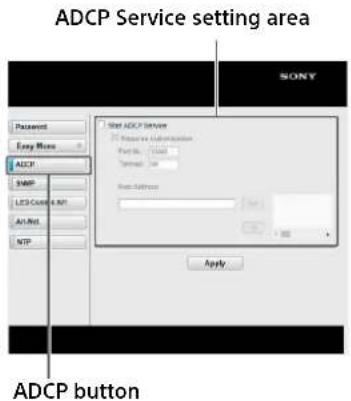
Start ADCP Service: Set ADCP to enabled or disabled. Items for ADCP are enabled only when this function is enabled.
-Requires Authentication: Set the authentication for ADCP to enabled or disabled. The password is the same as that of the Web page administrator.
-Port No.: Input the server port of ADCP. The factory default setting is "53595."
-TimeOut: Inp ut the time (seconds) until ADCP communication is terminated in case it is disconnected. The factory default setting is "60."
-Host Address: Input the IP address that the ADCP server is allowed to receive. If no IP address is input, receiving commands will be allowed from any IP address. From the moment the IP address is input, access will be allowed only from that input IP address. For security reasons, it is recommended to input an IP address to restrict access.
2Press the LED Control API button to open the LED Control API page.
LED Control API Service setting area

Start LED Control API Service: Set the LED Control API function on or off. The factory default setting is off.
Requires Authentication: Set the LED Control API authentication function on or off.
PSK (Pre-Shared Key) (for authentication): Enter the PSK (Pre-Shared Key). Only a string alphanumeric characters with a length of 8 to 63 characters can be entered.
3Press the Art-Net button to open the Art-Net settings page.
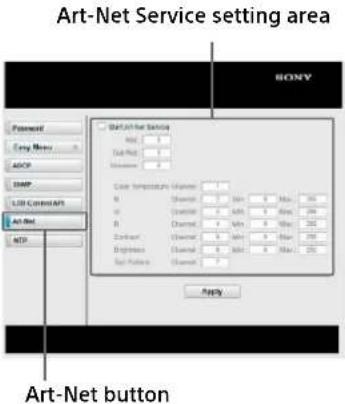
Start Art-Net Service: Set the Art-Net function on or off. The factory default setting is off.
Net: Set the Net part (bits 14-8) of the Art-Net Port-Address (15 bits).
Sub-Net: Set the Sub-Net part (bits 7-4) of the Art-Net Port-Address (15 bits).
Universe: Set the Universe part (bits 3-0) of the Art-Net Port-Address (15 bits).
Channel: Set the DMX channel values assigned to each of the following functions. Color Temperature, R, G, B, Contrast, Brightness, Test Pattern
Min: Set the minimum DMX value for each of the following functions. R, G, B, Contrast, Brightness
Max: Set the maximum DMX value for each of the following functions. R, G, B, Contrast, Brightness
Art-Net™ Designed by and Copyright Artistic Licence Holdings Ltd
4Press the NTP button to open the NTP setting page.
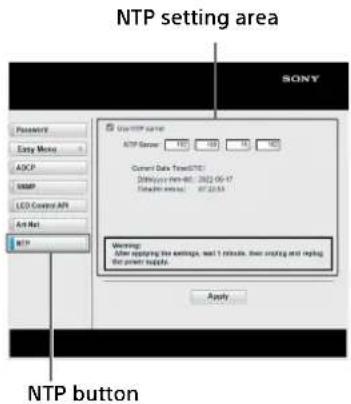
Use NTP server: Set the function for synchronizing the time with the specified NTP server on/off. The factory default setting is Off.
NTP Server: Set the IPv4 address of the NTP Server. Press [Apply] to apply the settings to the Display Controller.
Caution
After changing the settings, the Display Controller must be turned off and on.
Note
When the connection to the specified NTP Server is successful, the current time of the system will be reflected in [Current Date Time].
Troubleshooting
Be sure to conduct a check before requesting assistance. If the problem persists, contact your local Sony representative.
Checking the status of the system and devices
You can check the status of the system, Display Controllers, Display Cabinets, and other devices in the main screen.
![[System Status] [Array Information] Display Control Software ZACT-308 System Power Standby Power On Current Power OFF OK Block OFF On System Status Controller Working Array Information Controller List Controller 1 On Control 1 Controller List](/content/2026/06/1229573/images/a2dca2a1583c5bf5f0cb35de9c60f4695cd22aee6d033152863831b61405840c.jpg)
[System Status]
Displays the status of the system and Display Controllers.
• [Operation Normal]: Operation is normal.
- [Controller Error]: Device operation has stopped due to an error. The Display Controllers and Display Cabinets have entered standby mode, and picture display has stopped.
For details on the error, check the [Error] column under [Controller List].
- [Controller Warning]: Device operation continues but a warning (fan error, picture sync error, etc.) has occurred. Check the details of the warning, and resolve the problem as soon as possible. For details on the warning, check the [Error] column under [Controller List].
- [Backup Incomplete Warning]: Displayed when the settings for the connected Display Controller have not been completely backed up. Select [Back Up Controller Data] under [Tool] in the menu to perform the backup again.
- [Version Mismatch Warning]: The version of the software on the connected Display Controller is not the latest version. The Display Controller and Display Cabinet need to be updated promptly.
- [No Backup Warning]: Displayed when the settings for the connected Display Controller have not been backed up at all. Select [Back Up Controller Data] under [Tool] in the menu to perform the backup again.
[Controller List]
Displays the status of each Display Controller.
[Power Status]: “-” indicates that communication with the Display Controller is not possible.
[Error]: "None" indicates that there are no errors or warning.
If an error or warning occurs, see "Error Codes" (page 29), and resolve the problem as soon as possible.
Note
You can view information on a Display Controller by double-clicking its controller number or by right-clicking it and selecting [Controller Info.].
[Array Information]
Displays the status of each Display Cabinet.
(gray): The Display Cabinet is turned on.
(black): The Display Cabinet is turned off.
(maroon): An error has occurred on the Display Cabinet.
(ccher): A warning has occurred on the Display Cabinet.
( black ): A Display Cabinet does not exist.
Note
You can view information on a Display Cabinet by double-clicking within its frame or by right-clicking it and selecting [Cabinet Info.].
If the controller PC is slow
By suspending the connection to the Display Controllers, you can avoid slow communication responses that may occur when using other applications, for example.
Select [Disconnect] in the [System] menu on the main screen of Display Control Software to suspend communication with the Display Controllers.

The following dialog box is displayed while communication is suspended.
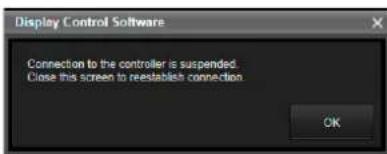
To reestablish connection
Close the dialog box.
Entering the forced standby mode
If the controller PC hangs, for example, you can force Display Controllers and Display Cabinets into standby mode.
1 Press and hold the power switch on the Display Controller for at least 5 seconds.
The forced standby mode is entered, and the POWER indicator lights red.
2 Press and hold the power switch again for about 2 seconds.
After the POWER indicator blinks red/orange, the normal standby mode is entered. The Display Cabinets will also enter the normal standby mode.
Error Codes
When a system error or warning occurs, verify the error code as follows.
For Display Cabinets:
Under [Array Information] in the main screen, double-click within the frame of the Display Cabinet or right-click it and select [Cabinet Info.] to display the [Cabinet Information] screen and the error code.
For Display Controllers:
Under [Controller List] in the main screen, double-click the Display Controller number or right-click it and select [Controller Info.] to display the [Controller Information] screen and the error code.
Display Cabinets
Errors
| Error code Category Definition Solution | |||
| 100 Power AC Power Supply/HUB Board/RCS Board | Contact your local Sony representative. | ||
| 111 | Temperature | Temperature (RCS) | Check the device environment and remove any obstructions from the intake vent. If the problem persists, contact your local Sony representative. |
| 113 Temperature (Module_1~Module_12) | |||
| 150 | System | Update (Cabinet FPGA) | Perform update again. If the problem persists, contact your local Sony representative. |
Warnings
| Warning code | Category | Definition | Solution |
| 311 | Temperature | Temperature (RCS) | Check the device environment and remove any obstructions from the intake vent. If the problem persists, contact your local Sony representative. |
| 313 | Temperature (Module_1~Module_12) | ||
| 321 | Board | RCS Board | Turn the power off and turn it on again. If the problem persists, contact your local Sony representative. |
| 330 | Connection | Connection (Module_1~Module_12) | Contact your local Sony representative. |
| 331 | Communication | Communication (Video Input Signal/RS485) | Check that all cables are properly connected. If the problem persists, contact your local Sony representative. |
Display Controllers
Errors
| Error code Category Description Solution | |||
| 001 | Power | CPU power supply error | Contact your local Sony representative. |
| 002 VIF power supply error | |||
| 003 PIF power supply error | |||
| 012 | Temperature | VIF temperature error | Check the device environment and remove any obstructions from the fan and intake vent. If the problem persists, contact your local Sony representative. |
| 013 PIF temperature error | |||
| 023 | Board determination | PIF determination error | Contact your local Sony representative. |
| 050 | System | System version error | |
Warnings
| Warning code | Category | Description | Solution |
| 212 | VIF | Temperature warning | Check the device environment and remove any obstructions from the fan and intake vent. If the problem persists, contact your local Sony representative. |
| 213 | PIF | ||
| 214 PS | |||
| 215 | Fan (Front) | Rotation stop warning / speed warning | Check the device environment and remove any foreign objects that may be obstructing the fan. If the problem persists, contact your local Sony representative. |
| 216 Fan (Rear) | |||
| 230 | System | Controller configuration data mismatch warning | Check the LED pitch size of the display cabinet, the installation conditions and wiring conditions including the model names, and the settings of the Display Control Software. If there is no problem, turn the power back on. If the problem persists, contact your local Sony representative. |
| 233 PIF | VIF signal connection warning / Link connection warning / Sync connection warning | ||
| 240 | System | Update warning (CPU / VIF / PIF) | Perform update again. If the problem persists, contact your local Sony representative. |
| 401 | Auto Power Saving | Auto power saving warning | Input a signal to the selected input, or set [System Setting] - [Auto Power Saving] to [OFF] in Display Control Software (without a signal, the unit will automatically be in standby mode to save power). |
| 430 | System | Cabinet model selection mismatched | Select the correct model again for the Display Cabinet via Display Control Software. |
Cleaning and Storage
Display Cabinets
Caution
Do not wet the surface of the Display Cabinets.
Daily cleaning
- Use a soft anti-static cloth that does not produce lint when cleaning the surface of the Display Cabinets. (Recommended cloth: savina MX wiping cloth made by KB SEIREN, LTD.)
- ZRD-CH12D/ZRD-CH15D/ZRD-BH12D/ZRD-BH15D: If the surface is heavily soiled, consult with qualified Sony personnel. ZRD-C12A/ZRD-C15A/ZRD-B12A/ZRD-B15A: If the surface is heavily soiled, use ethyl alcohol (close to 100%).
- Use commercially available anti-static dust blowers to clean joints.
Storage (for transportation)
- Make sure the Display Cabinets are completely dry before packing them.
- Store the Display Cabinets in dry, well-ventilated environments.
Display Controllers
Daily cleaning
- Use a cloth that has been dampened with a neutral detergent and thoroughly wrung out to wipe the device clean. Never use solvents, such as benzene and thinners.
Storage
- Do not store in environments where condensation may occur inside the device.
Signal Formats
The system supports the following video signals.
2D Inputs
DisplayPort (Single Input)
| Resolution | Input frame rate 1) | Input bit length | Input color sampling |
| 3840 × 2160 2) | 60p/50p/30p/25p/24p | 8-/10-bit RGB 4:4:4 | |
| 2560 × 1440 | 60p | 8-/10-bit | RGB 4:4:4 |
| 1920 × 2160 | 120p 2)/100p 2)/60p/30p/25p 2)/24p 2) | 8-/10-bit RGB 4:4:4 | |
| 1920 × 1080 | 120p/100p/60p/50p | 8-/10-bit RGB 4:4:4 | |
DisplayPort (Dual Input)
| Resolution | Input frame rate1) | Input bit length | Input color sampling |
| 3840 × 21602) | 120p/100p | 8-/10-bit RGB | 4:4:4 |
HDMI port 3)
| Resolution Input frame rate 4) | Input bit length | Input color sampling |
| 4096 × 2160 60p/50p/30p/25p/24p | 12-bit YCbCr 4:2:2 | |
| 3840 × 2160 60p/50p 8-bit RGB | ||
| 3840 × 2160 60p/50p 10-/12-bit YCbCr | ||
| 3840 × 2160 30p/25p/24p | 10-/12-bit RGB | |
| 3840 × 2160 30p/25p/24p | 8-bit RGB 4:4:4/YCbCr 4:4:4 | |
| 3840 × 2160 30p/25p/24p | 12-bit YCbCr 4:2:2 | |
| 1920 × 1080 60p/50p 8-/10-/12-bit | RGB 4:4:4/YCbCr 4:4:4 | |
| 1920 × 1080 60p/50p | 12-bit | YCbCr 4:2:2 |
| 1920 × 1080 30p/25p/24p | 8-/10-/12-bit | RGB 4:4:4/YCbCr 4:4:4 |
| 1920 × 1080 30p/25p/24p | 12-bit YCbCr 4:2:2 | |
| 1280 × 720 60p/50p 8-/10-/12-bit | RGB 4:4:4/YCbCr 4:4:4 | |
| 1280 × 720 60p/50p | 12-bit | YCbCr 4:2:2 |
| 1024 × 768 60p 8-/10-/12-bit | RGB 4:4:4/YCbCr 4:4:4 | |
| 1024 × 768 60p 12-bit YCbCr 4:2:2 | ||
| 800 × 600 60p 8-/10-/12-bit | RGB 4:4:4/YCbCr 4:4:4 | |
| 800 × 600 60p 12-bit YCbCr 4:2:2 | ||
| 720 × 480 60p 8-/10-/12-bit | RGB 4:4:4/YCbCr 4:4:4 | |
| 720 × 480 60p 12-bit YCbCr 4:2:2 | ||
| 720 × 576 50p 8-/10-/12-bit | RGB 4:4:4/YCbCr 4:4:4 | |
| 720 × 576 50p 12-bit YCbCr 4:2:2 | ||
| 640 × 480 60p 8-/10-/12-bit | RGB 4:4:4/YCbCr 4:4:4 | |
| 640 × 480 60p | 12-bit | YCbCr 4:2:2 |
*1 1,000/1,001 frame rate is also supported for 120p/60p/30p/24p.
*2 Refer to the Installation Manual for details on input signals and settings.
*3 Converted to RGB 4:4:4, 8-/10-bit for display (8-bit is displayed for 8-bit inputs only).
*4 1,000/1,001 frame rate is also supported for 60p/30p/24p.
*5 Use a Premium High Speed HDMI cable when using this input signal.
*6 Converted to YCbCr 4:2:2, 10-/12-bit first, and then converted to RGB 4:4:4, 10-bit for display.
3D Inputs
Frame sequential mode
DisplayPort (Single Input)
| Resolution | Input frame rate1) | Input bit length | Input color sampling |
| 3840 × 2160 | 60p2) | 8-/10-bit | RGB 4:4:4 |
| 1920 × 2160 | 120p2)/100p2)/60p | 8-/10-bit | RGB 4:4:4 |
| 1920 × 1080 | 120p/100p/60p | 8-/10-bit | RGB 4:4:4 |
DisplayPort (Dual Input)
| Resolution | Input frame rate1) | Input bit length | Input color sampling |
| 3840 × 21602) | 120p/100p | 8-/10-bit | RGB 4:4:4 |
3D dual input mode
DisplayPort (Dual Input)
| Resolution | Input frame rate1) | Input bit length | Input color sampling |
| 3840 × 21602) | 60p/50p | 8-/10-bit | RGB 4:4:4 |
| 1920 × 2160 | 60p/50p | 8-/10-bit | RGB 4:4:4 |
| 1920 × 1080 | 60p/50p | 8-/10-bit | RGB 4:4:4 |
*1 1,000/1,001 frame rate is also supported for 120p/60p/30p/24p.
*2 Refer to the Installation Manual for details on input signals and settings.
Supported Signal Formats for a Single Controller
| Resolution Frequency | Color sampling | DisplayPort input | |||
| Single Input Dual Input | |||||
| DP1 or DP2 DP1 and DP2 | |||||
| SST MST SST MST | |||||
| 3840 × 2160 | 120/119.88 RGB 4:4:4 - - - | 8-/10-bit (Square Division) | |||
| 100 RGB 4:4:4 - - - | 8-/10-bit (Square Division) | ||||
| 60/59.94 RGB 4:4:4 - | 8-/10-bit (V split) | 8-/10-bit (V split) | 8-/10-bit (Square Division) | ||
| 50 RGB 4:4:4 - | 8-/10-bit (V split) | 8-/10-bit (V split) | 8-/10-bit (Square Division) | ||
| 30 - 8-/10-bit | 8-/10-bit (V split) | 8-/10-bit (V split) | 8-/10-bit (Square Division) | ||
| 29.97 - - | 8-/10-bit (V split) | 8-/10-bit (V split) | 8-/10-bit (Square Division) | ||
| 25 RGB 4:4:4 - | 8-/10-bit (V split) | 8-/10-bit (V split) | - | ||
| 24/23.98 | RGB 4:4:4 - | 8-/10-bit (V split) | 8-/10-bit (V split) | ||
| 2560 × 1440 | 60 | RGB 4:4:4 | 8-/10-bit | - | - |
| 1920 × 1080 | 120/119.88 | RGB 4:4:4 | 8-/10-bit | - | - |
| 100 | RGB 4:4:4 | 8-/10-bit | - | - | |
| 60/59.94 | RGB 4:4:4 | 8-/10-bit | - | - | |
| 50 | RGB 4:4:4 | 8-/10-bit | - | - | |
| 30/29.97 | RGB 4:4:4 - - - - | ||||
| 25 RGB 4:4:4 - - - - | |||||
| 24/23.98 | RGB 4:4:4 - - - - | ||||
| Resolution Frequency Color sampling | HDMI input | ||
| Single input | |||
| HDMI1 or HDMI2 | |||
| 3840 × 2160 | 60/59.94 | RGB 4:4:4/YCbCr 4:4:4/YCbCr 4:2:0 8-bit | |
| YCbCr 4:2:2 12-bit | |||
| 50 | RGB 4:4:4/YCbCr 4:4:4/YCbCr 4:2:0 8-bit | ||
| YCbCr 4:2:2 12-bit | |||
| 30/29.97 | RGB 4:4:4/YCbCr 4:4:4 8-/10-/12-bit | ||
| YCbCr 4:2:2 12-bit | |||
| 25 | RGB 4:4:4/YCbCr 4:4:4 8-/10-/12-bit | ||
| YCbCr 4:2:2 12-bit | |||
| 24/23.98 | RGB 4:4:4/YCbCr 4:4:4 8-/10-/12-bit | ||
| YCbCr 4:2:2 12-bit | |||
| 1920 × 1080 | 60/59.94 | RGB 4:4:4/YCbCr 4:4:4 8-/10-/12-bit | |
| YCbCr 4:2:2 12-bit | |||
| 50 | RGB 4:4:4/YCbCr 4:4:4 8-/10-/12-bit | ||
| YCbCr 4:2:2 12-bit | |||
| 30/29.97 | RGB 4:4:4/YCbCr 4:4:4 8-/10-/12-bit | ||
| YCbCr 4:2:2 12-bit | |||
| 25 | RGB 4:4:4/YCbCr 4:2:2 12-bit | ||
| YCbCr 4:2:2 12-bit | |||
| 24/23.98 | RGB 4:4:4/YCbCr 4:4:4 8-/10-/12-bit | ||
| YCbCr 4:2:2 12-bit | |||
| 1280 × 720 | 60/59.94 | RGB 4:4:4/YCbCr 4:4:4 8-/10-/12-bit | |
| YCbCr 4:2:2 12-bit | |||
| 50 | RGB 4:4:4/YCbCr 4:4:4 8-/10-/12-bit | ||
| YCbCr 4;2:2 12-bit | |||
| 1024 × 768 60/59.94 | RGB 4:4:4/YCbCr 4:4:4 8-/10-/12-bit | ||
| YCbCr 4:2:2 12-bit | |||
| 800 × 600 60/59.94 | RGB 4:4:4/YCbCr 4:4:4 8-/10-/12-bit | ||
| YCbCr 4:2:2 12-bit | |||
| 720 × 480 60/59.94 | RGB 4:4:4/YCbCr 4:4:4 8-/10-/12-bit | ||
| YCbCr 4:2:2 12-bit | |||
| 720 × 576 50 | RGB 4:4:4/YCbCr 4:4:4 8-/10-/12-bit | ||
| YCbCr 4:2:2 12-bit | |||
| 640 × 480 60/59.94 | RGB 4:4:4/YCbCr 4:4:4 8-/10-/12-bit | ||
| YCbCr 4:2:2 12-bit | |||
NOTICES AND LICENCES FOR SOFTWARE USED IN THIS PRODUCT
Notifications Related to GNU GPL/LGPL-applicable Software
This product contains the following software that has received a GNU General Public License ("GPL" below) or GNU Lesser General Public License ("LGPL" below). We hereby inform you that you have the right to obtain, alter, and redistribute the software source code in accordance with the attached GPL/LGPL conditions.
Package list:
bash
busybox
bzip2
cantest
dbus
devmem2
diffutils
e2fsprogs
ethtool
findutils
hostapd
hotplug
i2c-tools
input-utils
iproute
iso-codes
linux kernel-3.14.52
kobs-ng
libattr
libcap
libcap-ng
libgcrypt
libgpg-error
libkmod
libnl
libtermcap
libtool
libusb
libusb-compat-0.1
logrotate
Irzsz
LVM2_libdevmapper
Izo
make
mtd-utils
ndisc6
net-tools
nfs-utils
pciutils
procinfo
procps
psmisc
skell
socat
u-boot
udev
usbutils
util-linux
uuc
The source code is available on our website. It can be downloaded from the following URL: http://oss.sony.net/Products/Linux/ Please refrain from contacting us regarding the contents of the source code.
GNU GENERAL PUBLIC LICENSE
Version 2, June 1991
Copyright © 1989, 1991 Free Software Foundation, Inc., 51 Franklin Street, Fifth Floor, Boston, MA 02110-1301 USA Everyone is permitted to copy and distribute verbatim copies of this license document, but changing it is not allowed.
Preamble
The licenses for most software are designed to take away your
freedom to share and change it. By contrast, the GNU General Public License is intended to guarantee your freedom to share and change free software-to make sure the software is free for all its users. This General Public License applies to most of the Free Software Foundation's software and to any other program whose authors commit to using it. (Some other Free Software Foundation software is covered by the GNU Library General Public License instead.) You can apply it to your programs, too.
When we speak of free software, we are referring to freedom, not price. Our General Public Licenses are designed to make sure that you have the freedom to distribute copies of free software (and charge for this service if you wish), that you receive source code or can get it if you want it, that you can change the software or use pieces of it in new free programs; and that you know you can do these things.
To protect your rights, we need to make restrictions that forbid anyone to deny you these rights or to ask you to surrender the rights. These restrictions translate to certain responsibilities for you if you distribute copies of the software, or if you modify it.
For example, if you distribute copies of such a program, whether gratis or for a fee, you must give the recipients all the rights that you have You must make sure that they, too, receive or can get the source code. And you must show them
these terms so they know their rights.
We protect your rights with two steps: (1) copyright the software, and (2) offer you this license which gives you legal permission to copy, distribute and/or modify the software.
Also, for each author's protection and ours, we want to make certain that everyone understands that there is no warranty for this free software. If the software is modified by someone else and passed on, we want its recipients to know that what they have is not the original, so that any problems introduced by others will not reflect on the original authors' reputations.
Finally, any free program is threatened constantly by software patents. We wish to avoid the danger that redistributors of a free program will individually obtain patent licenses, in effect making the program proprietary. To prevent this, we have made it clear that any patent must be licensed for everyone's free use or not licensed at all.
The precise terms and conditions for copying, distribution and modification follow.
TERMS AND CONDITIONS FOR COPYING, DISTRIBUTION AND MODIFICATION
- This License applies to any program or other work which contains a notice placed by the copyright holder saying it may be distributed under the terms of this General Public
License. The "Program", below, refers to any such program or work, and a "work based on the Program" means either the Program or any derivative work under copyright law: that is to say, a work containing the Program or a portion of it, either verbatim or with modifications and/or translated into another language. (Hereinafter, translation is included without limitation in the term "modification".) Each licensee is addressed as "you".
Activities other than copying, distribution and modification are not covered by this License; they are outside its scope. The act of running the Program is not restricted, and the output from the Program is covered only if its contents constitute a work based on the Program (independent of having been made by running the Program). Whether that is true depends on what the Program does.
- You may copy and distribute verbatim copies of the Program's source code as you receive it, in any medium, provided that you conspicuously and appropriately publish on each copy an appropriate copyright notice and disclaimer of warranty; keep intact all the notices that refer to this License and to the absence of any warranty; and give any other recipients of the Program a copy of this License along with the Program.
You may charge a fee for the physical act of transferring a copy, and you may at your option offer warranty
protection in exchange for a fee.
- You may modify your copy or copies of the Program or any portion of it, thus forming a work based on the Program, and copy and distribute such modifications or work under the terms of Section 1 above, provided that you also meet all of these conditions:
a) You must cause the modified files to carry prominent notices stating that you changed the files and the date of any change.
b) You must cause any work that you distribute or publish, that in whole or in part contains or is derived from the Program or any part thereof, to be licensed as a whole at no charge to all third parties under the terms of this License.
c) If the modified program normally reads commands interactively when run, you must cause it, when started running for such interactive use in the most ordinary way, to print or display an announcement including an appropriate copyright notice and a notice that there is no warranty (or else, saying that you provide a warranty) and that users may redistribute the program under these conditions, and telling the user how to view a copy of this License.(Exception: if the Program itself is interactive but does not normally print such an announcement, your work based on the Program is not required to print an announcement.)
These requirements apply to the modified work as a whole. If identifiable sections of that
work are not derived from the Program, and can be reasonably considered independent and separate works in themselves, then this License, and its terms, do not apply to those sections when you distribute them as separate works. But when you distribute the same sections as part of a whole which is a work based on the Program, the distribution of the whole must be on the terms of this License, whose permissions for other licensees extend to the entire whole, and thus to each and every part regardless of who wrote it.
Thus, it is not the intent of this section to claim rights or contest your rights to work written entirely by you; rather, the intent is to exercise the right to control the distribution of derivative or collective works based on the Program.
In addition, mere aggregation of another work not based on the Program with the Program (or with a work based on the Program) on a volume of a storage or distribution medium does not bring the other work under the scope of this License.
- You may copy and distribute the Program (or a work based on it, under Section 2) in object code or executable form under the terms of Sections 1 and 2 above provided that you also do one of the following:
a) Accompany it with the complete corresponding machine-readable source code, which must be distributed under the terms of Sections 1 and 2 above on a medium customarily used for software interchange; or,
b) Accompany it with a written offer, valid for at least three years, to give any third party, for a charge no more than your cost of physically performing source distribution, a complete machine-readable copy of the corresponding source code, to be distributed under the terms of Sections 1 and 2 above on a medium customarily used for software interchange; or,
c) Accompany it with the information you received as to the offer to distribute corresponding source code. (This alternative is allowed only for noncommercial distribution and only if you received the program in object code or executable form with such an offer, in accord with Subsection b above.)
The source code for a work means the preferred form of the work for making modifications to it. For an executable work, complete source code means all the source code for all modules it contains, plus any associated interface definition files, plus the scripts used to control compilation and installation of the executable. However, as a special exception, the source code distributed need not include anything that is normally distributed (in either source or binary form) with the major components (compiler, kernel, and so on) of the operating system on which the executable runs, unless that component itself accompanies the executable.
If distribution of executable or object code is made by offering access to copy from a designated place, then offering
equivalent access to copy the source code from the same place counts as distribution of the source code, even though third parties are not compelled to copy the source along with the object code.
-
You may not copy, modify, sublicense, or distribute the Program except as expressly provided under this License. Any attempt otherwise to copy, modify, sublicense or distribute the Program is void, and will automatically terminate your rights under this License. However, parties who have received copies, or rights, from you under this License will not have their licenses terminated so long as such parties remain in full compliance.
-
You are not required to accept this License, since you have not signed it. However, nothing else grants you permission to modify or distribute the Program or its derivative works. These actions are prohibited by law if you do not accept this License. Therefore, by modifying or distributing the Program (or any work based on the Program), you indicate your acceptance of this License to do so, and all its terms and conditions for copying, distributing or modifying the Program or works based on it.
-
Each time you redistribute the Program (or any work based on the Program), the recipient automatically receives a license from the original licensor to copy, distribute or modify the Program subject to these terms and conditions. You
may not impose any further restrictions on the recipients' exercise of the rights granted herein. You are not responsible for enforcing compliance by third parties to this License.
- If, as a consequence of a court judgment or allegation of patent infringement or for any other reason (not limited to patent issues), conditions are imposed on you (whether by court order, agreement or otherwise) that contradict the conditions of this License, they do not excuse you from the conditions of this License. If you cannot distribute so as to satisfy simultaneously your obligations under this License and any other pertinent obligations, then as a consequence you may not distribute the Program at all. For example, if a patent license would not permit royalty-free redistribution of the Program by all those who receive copies directly or indirectly through you, then the only way you could satisfy both it and this License would be to refrain entirely from distribution of the Program.
If any portion of this section is held invalid or unenforceable under any particular circumstance, the balance of the section is intended to apply and the section as a whole is intended to apply in other circumstances.
It is not the purpose of this section to induce you to infringe any patents or other property right claims or to contest validity of any such
claims; this section has the sole purpose of protecting the integrity of the free software distribution system, which is implemented by public license practices. Many people have made generous contributions to the wide range of software distributed through that system in reliance on consistent application of that system; it is up to the author/donor to decide if he or she is willing to distribute software through any other system and a licensee cannot impose that choice.
This section is intended to make thoroughly clear what is believed to be a consequence of the rest of this License.
-
If the distribution and/or use of the Program is restricted in certain countries either by patents or by copyrighted interfaces, the original copyright holder who places the Program under this License may add an explicit geographical distribution limitation excluding those countries, so that distribution is permitted only in or among countries not thus excluded. In such case, this License incorporates the limitation as if written in the body of this License.
-
The Free Software Foundation may publish revised and/or new versions of the General Public License from time to time. Such new versions will be similar in spirit to the present version, but may differ in detail to address new problems or concerns.
Each version is given a distinguishing version number. If the Program specifies a
version number of this License which applies to it and "any later version", you have the option of following the terms and conditions either of that version or of any later version published by the Free Software Foundation. If the Program does not specify a version number of this License, you may choose any version ever published by the Free Software Foundation.
- If you wish to incorporate parts of the Program into other free programs whose distribution conditions are different, write to the author to ask for permission. For software which is copyrighted by the Free Software Foundation, write to the Free Software Foundation; we sometimes make exceptions for this. Our decision will be guided by the two goals of preserving the free status of all derivatives of our free software and of promoting the sharing and reuse of software generally.
NOWARRANTY
- BECAUSE THE PROGRAM IS LICENSED FREE OF CHARGE, THERE IS NO WARRANTY FOR THE PROGRAM, TO THE EXTENT PERMITTED BYAPPLICABLE LAW. EXCEPTWHEN OTHERWISE STATED IN WRITING THE COPYRIGHT HOLDERS AND/OR OTHER PARTIES PROVIDE THE PROGRAM "AS IS" WITHOUT WARRANTY OF ANY KIND, EITHER EXPRESSED OR IMPLIED, INCLUDING, BUT NOT LIMITED TO, THE IMPLIED WARRANTIES OF MERCHANTABILITY AND FITNESS FOR A PARTICULAR
PURPOSE. THE ENTIRE RISK AS TO THE QUALITY AND PERFORMANCE OF THE PROGRAM IS WITH YOU. SHOULD THE PROGRAM PROVE DEFECTIVE, YOU ASSUME THE COST OF ALL NECESSARY SERVICING, REPAIR OR CORRECTION.
- IN NO EVENT UNLESS REQUIRED BYAPPLICABLE LAW OR AGREED TO INWRITING WILLANY COPYRIGHT HOLDER, OR ANY OTHER PARTY WHO MAY MODIFY AND/OR REDISTRIBUTE THE PROGRAM AS PERMITTED ABOVE, BE LIABLE TO YOU FOR DAMAGES, INCLUDING ANY GENERAL, SPECIAL, INCIDENTAL OR CONSEQUENTIAL DAMAGES ARISING OUT OF THE USE OR INABILITY TO USE THE PROGRAM (INCLUDING BUT NOT LIMITED TO LOSS OF DATA OR DATABASEING RENDERED INACCURATE OR LOSSES SUSTAINED BY YOU OR THIRD PARTIES OR A FAILURE OF THE PROGRAM TO OPERATE WITH ANY OTHER PROGRAMS), EVEN IF SUCH HOLDER OR OTHER PARTY HAS BEEN ADVISED OF THE POSSIBILITY OF SUCH DAMAGES.
END OF TERMS AND CONDITIONS
How to Apply These Terms to Your New Programs
If you develop a new program, and you want it to be of the greatest possible use to the public, the best way to achieve this is to make it free software which everyone can redistribute and change under these terms.
To do so, attach the following notices to the program. It is safest to attach them to the start of each source file to most effectively convey the exclusion of warranty; and each file should have at least the "copyright" line and a pointer to where the full notice is found.
One line to give the program's name and a brief idea of what it does.
Copyright (C)
This program is free software; you can redistribute it and/or modify it under the terms of the GNU General Public License as published by the Free Software Foundation; either version 2 of the License, or (at your option) any later version.
This program is distributed in the hope that it will be useful, but WITHOUT ANY WARRANTY; without even the implied warranty of MERCHANTABILITY or FITNESS FOR A PARTICULAR PURPOSE. See the GNU General Public License for more details.
You should have received a copy of the GNU General Public License along with this program; if not, write to the Free Software Foundation, Inc., 59 Temple Place, Suite 330, Boston, MA02111-1307 USA Also add information on how to contact you by electronic and paper mail.
If the program is interactive, make it output a short notice like this when it starts in an interactive mode: Gnomovision version 69, Copyright (C) year name of author Gnomovision comes with ABSOLUTELY NO WARRANTY; for details type 'show w'. This is free software, and you are welcome to redistribute it under certain
conditions; type 'show c' for details.
The hypothetical commands 'show w' and 'show c' should show the appropriate parts of the General Public License. Of course, the commands you use may be called something other than 'show w' and 'show c'; they could even be mouse-clicks or menu items--whatever suits your program.
You should also get your employer (if you work as a programmer) or your school, if any, to sign a "copyright disclaimer" for the program, if necessary. Here is a sample; alter the names: Yoyodyne, Inc., hereby disclaims all copyright interest in the program 'Gnomovision' (which makes passes at compilers) written by James Hacker. signature of Ty Coon, 1 April 1989
Ty Coon, President of Vice This General Public License does not permit incorporating your program into proprietary programs. If your program is a subroutine library, you may consider it more useful to permit linking proprietary applications with the library. If this is what you want to do, use the GNU Library General Public License instead of this License.
GNU Lesser General Public License
Version 2.1, February 1999
Copyright (C) 1991, 1999 Free Software Foundation, Inc. 59 Temple Place, Suite 330, Boston, MA02111-1307 USA Everyone is permitted to copy and distribute verbatim copies of this license document, but changing it is not allowed.
[This is the first released version of the Lesser GPL. It also counts as the successor of the GNU Library Public License, version 2, hence the version number 2.1.]
Preamble
The licenses for most software are designed to take away your freedom to share and change it. By contrast, the GNU General Public Licenses are intended to guarantee your freedom to share and change free software--to make sure the software is free for all its users. This license, the Lesser General Public License, applies to some specially designated software packages-typically libraries--of the Free Software Foundation and other authors who decide to use it. You can use it too, but we suggest you first think carefully about whether this license or the ordinary General Public License is the better strategy to use in any particular case, based on the explanations below.
When we speak of free software, we are referring to freedom of use, not price. Our General Public Licenses are designed to make sure that you have the freedom to distribute copies of free software (and charge for this service if you wish); that you receive source code or can get it if you want it; that you can change the software and use pieces of it in new free programs; and that you are informed that you can do these things.
To protect your rights, we need to make restrictions that forbid distributors to deny you these rights or to ask you to surrender these rights.
These restrictions translate to certain responsibilities for you if you distribute copies of the library or if you modify it. For example, if you distribute copies of the library, whether gratis or for a fee, you must give the recipients all the rights that we gave you. You must make sure that they, too, receive or can get the source code. If you link other code with the library, you must provide complete object files to the recipients, so that they can relink them with the library after making changes to the library and recompiling it. And you must show them these terms so they know their rights.
We protect your rights with a two-step method: (1) we copyright the library, and (2) we offer you this license, which gives you legal permission to copy, distribute and/or modify the library.
To protect each distributor, we want to make it very clear that there is no warranty for the free library. Also, if the library is modified by someone else and passed on, the recipients should know that what they have is not the original version, so that the original author's reputation will not be affected by problems that might be introduced by others.
Finally, software patents pose a constant threat to the existence of any free program. We wish to make sure that a company cannot effectively restrict the users of a free program by obtaining a restrictive license from a patent holder. Therefore, we insist that any patent license obtained for a version of the library must be consistent with the full freedom of use specified in this license.
Most GNU software, including some libraries, is covered by the ordinary GNU General Public License. This license, the GNU Lesser General Public License, applies to certain designated libraries, and is quite different from the ordinary General Public License. We use this license for certain libraries in order to permit linking those libraries into non-free programs.
When a program is linked with a library, whether statically or using a shared library, the combination of the two is legally speaking a combined work, a derivative of the original library. The ordinary General Public License therefore permits such linking only if the entire combination fits its criteria of freedom. The Lesser General Public License permits more lax criteria for linking other code with the library.
We call this license the "Lesser" General Public License because it does Less to protect the user's freedom than the ordinary General Public License. It also provides other free software developers Less of an advantage over competing non-free programs. These disadvantages are the reason we use the ordinary General Public License for many libraries. However, the Lesser license provides advantages in certain special circumstances. For example, on rare occasions, there may be a special need to encourage the widest possible use of a certain library, so that it becomes a de-facto standard. To achieve this, non-free programs must be allowed to use the library. Amore frequent case is that a free library does the same job as widely used non-free libraries. In this case, there is little to gain by limiting the free library to free software only, so we use the Lesser General Public License.
In other cases, permission to use a particular library in non-free programs enables a greater number of people to use a large body of free software. For example, permission to use the GNU C Library in non-free programs enables many more
people to use the whole GNU operating system, as well as its variant, the GNU/Linux operating system. Although the Lesser General Public License is Less protective of the users' freedom, it does ensure that the user of a program that is linked with the Library has the freedom and the wherewithal to run that program using a modified version of the Library. The precise terms and conditions for copying, distribution and modification follow. Pay close attention to the difference between a "work based on the library" and a "work that uses the library". The former contains code derived from the library, whereas the latter must be combined with the library in order to run.
TERMS AND CONDITIONS FOR COPYING, DISTRIBUTION AND MODIFICATION
- This License Agreement applies to any software library or other program which contains a notice placed by the copyright holder or other authorized party saying it may be distributed under the terms of this Lesser General Public License (also called "this License"). Each licensee is addressed as "you". A "library" means a collection of software functions and/or data prepared so as to be conveniently linked with application programs (which use some of those functions and data) to form executables. The "Library", below, refers to any such software library or work which has been distributed under these terms. A "work based on the Library" means either the Library or any derivative work under copyright law: that is to say, a work containing the Library or a portion of it, either verbatim or with modifications and/or translated straightforwardly into another language. (Hereinafter, translation is included without limitation in the term "modification".) "Source code" for a work means the preferred form of the work for making modifications to it. For a library, complete source code means all the source code for all modules it contains, plus any associated interface definition files, plus the scripts used to control compilation and installation of the library.
Activities other than copying, distribution and modification are not covered by this License; they are outside its scope. The act of running a program using the Library is not restricted, and output from such a program is covered only if its contents constitute a work based on the Library (independent of the use of the Library in a tool for writing it). Whether that is true depends on what the Library does and what the program that uses the Library does.
- You may copy and distribute verbatim copies of the Library's complete source code as you receive it, in any medium, provided that you conspicuously and appropriately publish on each copy an appropriate copyright notice and disclaimer of warranty; keep intact all the notices that refer to this License and to the absence of any warranty; and distribute a copy of this License along with the Library.
You may charge a fee for the physical act of transferring a copy, and you may at your option offer warranty protection in exchange for a fee.
- You may modify your copy or copies of the Library or any
portion of it, thus forming a work based on the Library, and copy and distribute such modifications or work under the terms of Section 1 above, provided that you also meet all of these conditions: a) The modified work must itself be a software library. b) You must cause the files modified to carry prominent notices stating that you changed the files and the date of any change. c) You must cause the whole of the work to be licensed at no charge to all third parties under the terms of this License. d) If a facility in the modified Library refers to a function or a table of data to be supplied by an application program that uses the facility, other than as an argument passed when the facility is invoked, then you must make a good faith effort to ensure that, in the event an application does not supply such function or table, the facility still operates, and performs whatever part of its purpose remains meaningful. (For example, a function in a library to compute square roots has a purpose that is entirely well-defined independent of the application.
Therefore, Subsection 2d requires that any application-supplied function or table used by this function must be optional: if the application does not supply it, the square root function must still compute square roots.)
These requirements apply to the modified work as a whole. If identifiable sections of that work are not derived from the Library, and can be reasonably considered independent and separate works in themselves, then this License, and its terms, do not apply to those sections when you distribute them as separate works. But when you distribute the same sections as
part of a whole which is a work based on the Library, the distribution of the whole must be on the terms of this License, whose permissions for other licensees extend to the entire whole, and thus to each and every part regardless of who wrote it.
Thus, it is not the intent of this section to claim rights or contest your rights to work written entirely by you; rather, the intent is to exercise the right to control the distribution of derivative or collective works based on the Library. In addition, mere aggregation of another work not based on the Library with the Library (or with a work based on the Library) on a volume of a storage or distribution medium does not bring the other work under the scope of this License. 3. You may opt to apply the terms of the ordinary GNU General Public License instead of this License to a given copy of the Library. To do this, you must alter all the notices that refer to this License, so that they refer to the ordinary GNU General Public License, version 2, instead of to this License. (If a newer version than version 2 of the ordinary GNU General Public License has appeared, then you can specify that version instead if you wish.) Do not make any other change in these notices.
Once this change is made in a given copy, it is irreversible for that copy, so the ordinary GNU General Public License applies to all subsequent copies and derivative works made from that copy.
This option is useful when you wish to copy part of the code of the Library into a program that is not a library.
- You may copy and distribute the Library (or a portion or derivative of it, under Section 2) in object code or executable form under the terms of Sections 1 and 2 above provided that you accompany it with the complete corresponding machine-readable source code, which must be distributed under the terms of Sections 1 and 2 above on a medium customarily used for software interchange.
If distribution of object code is made by offering access to copy from a designated place, then offering equivalent access to copy the source code from the same place satisfies the requirement to distribute the source code, even though third parties are not compelled to copy the source along with the object code.
- A program that contains no derivative of any portion of the Library, but is designed to work with the Library by being compiled or linked with it, is called a "work that uses the Library". Such a work, in isolation, is not a derivative work of the Library, and therefore falls outside the scope of this License.
However, linking a “work that uses the Library” with the Library creates an executable that is a derivative of the Library (because it contains portions of the Library), rather than a “work that uses the library”. The executable is therefore covered by this License. Section 6 states terms for distribution of such executables.
When a “work that uses the Library” uses material from a header file that is part of the Library, the object code for the work may be a derivative work of the Library even though the source code is not. Whether this is true is especially significant if the work can be linked without the Library, or if the work is itself a library. The threshold for this to be true is not precisely defined by law. If such an object file uses only numerical parameters, data structure layouts and accessors, and small macros and small inline functions (ten lines or less in length), then the use of the object file is unrestricted, regardless of whether it is legally a derivative work. (Executables containing this object code plus portions of the Library will still fall under Section 6.)
Otherwise, if the work is a derivative of the Library, you may distribute the object code for the work under the terms of Section 6. Any executables containing that work also fall under Section 6, whether or not they are linked directly with the Library itself.
- As an exception to the Sections above, you may also combine or link a “work that uses the Library” with the Library to produce a work containing portions of the Library, and distribute that work under terms of your choice, provided that the terms permit modification of the work for the customer's own use and reverse engineering for debugging such modifications. You must give prominent notice with each copy of the work that the Library is used in it and that the Library and its use are covered by this License. You must supply a copy of this License. If the work during execution displays copyright notices, you must include the copyright notice for the Library among them, as well as a reference directing the user to the copy of this License. Also, you must do one of these things:
a) Accompany the work with the complete corresponding machine-readable source code for the Library including whatever changes were used in the work (which must be distributed under Sections 1
and 2 above); and, if the work is an executable linked with the Library, with the complete machine-readable "work that uses the Library", as object code and/or source code, so that the user can modify the Library and then relink to produce a modified executable containing the modified Library. (It is understood that the user who changes the contents of definitions files in the Library will not necessarily be able to recompile the application to use the modified definitions.) b) Use a suitable shared library mechanism for linking with the Library. Asuitable mechanism is one that (1) uses at run time a copy of the library already present on the user's computer system, rather than copying library functions into the executable, and (2) will operate properly with a modified version of the library, if the user installs one, as long as the modified version is interface-compatible with the version that the work was made with. c) Accompany the work with a written offer, valid for at least three years, to give the same user the materials specified in Subsection 6a, above, for a charge no more than the cost of performing this distribution. d) If distribution of the work is made by offering access to copy from a designated place, offer equivalent access to copy the above specified materials from the same place. e) Verify that the user has already received a copy of these materials or that you have already sent this user a copy. For an executable, the required form of the "work that uses the Library" must include any data and utility programs needed for reproducing the executable from it. However, as a special exception, the materials to be distributed need not include anything that is normally distributed (in either source or binary form) with the major components (compiler, kernel, and so on) of the operating system on which the executable runs, unless that component itself accompanies the executable. It may happen that this requirement contradicts the license restrictions of other proprietary libraries that do not normally accompany the operating system. Such a contradiction means you cannot use both them and the Library together in an executable that you distribute. 7. You may place library facilities that are a work based on the Library side-by-side in a single library together with other library facilities not covered by this License, and distribute such a combined library, provided that the separate distribution of the work based on the Library and of the other library facilities is otherwise permitted, and provided that you do these two things: a) Accompany the combined library with a copy of the same work based on the Library, uncombined with any other library facilities. This must be distributed under the terms of the Sections above. b) Give prominent notice with the combined library of the fact that part of it is a work based on the Library, and explaining where to find the accompanying uncombined form of the same work. 8. You may not copy, modify, sublicense, link with, or distribute the Library except as expressly provided under this License. Any attempt otherwise to copy, modify, sublicense, link with, or distribute the Library is void, and will automatically terminate your rights under this License. However, parties who have received copies, or rights,
from you under this License will not have their licenses terminated so long as such parties remain in full compliance. 9. You are not required to accept this License, since you have not signed it. However, nothing else grants you permission to modify or distribute the Library or its derivative works. These actions are prohibited by law if you do not accept this License. Therefore, by modifying or distributing the Library (or any work based on the Library), you indicate your acceptance of this License to do so, and all its terms and conditions for copying, distributing or modifying the Library or works based on it. 10. Each time you redistribute the Library (or any work based on the Library), the recipient automatically receives a license from the original licensor to copy, distribute, link with or modify the Library subject to these terms and conditions. You may not impose any further restrictions on the recipients' exercise of the rights granted herein. You are not responsible for enforcing compliance by third parties with this License. 11. If, as a consequence of a court judgment or allegation of patent infringement or for any other reason (not limited to patent issues), conditions are imposed on you (whether by court order, agreement or otherwise) that contradict the conditions of this License, they do not excuse you from the conditions of this License. If you cannot distribute so as to satisfy simultaneously your obligations under this License and any other pertinent obligations, then as a consequence you may not distribute the Library at all. For example, if a patent license would not permit royalty-free
redistribution of the Library by all those who receive copies directly or indirectly through you, then the only way you could satisfy both it and this License would be to refrain entirely from distribution of the Library. If any portion of this section is held invalid or unenforceable under any particular circumstance, the balance of the section is intended to apply, and the section as a whole is intended to apply in other circumstances. It is not the purpose of this section to induce you to infringe any patents or other property right claims or to contest validity of any such claims; this section has the sole purpose of protecting the integrity of the free software distribution system which is implemented by public license practices. Many people have made generous contributions to the wide range of software distributed through that system in reliance on consistent application of that system; it is up to the author/donor to decide if he or she is willing to distribute software through any other system and a licensee cannot impose that choice. This section is intended to make thoroughly clear what is believed to be a consequence of the rest of this License. 12. If the distribution and/or use of the Library is restricted in certain countries either by patents or by copyrighted interfaces, the original copyright holder who places the Library under this License may add an explicit geographical distribution limitation excluding those countries, so that distribution is permitted only in or among countries not thus excluded. In such case, this License incorporates the limitation as if written in the body of this License. 13. The Free Software Foundation may publish revised and/or new versions of the Lesser General Public License from time to time. Such new versions will be similar in spirit to the present version, but may differ in detail to address new problems or concerns. Each version is given a distinguishing version number. If the Library specifies a version number of this License which applies to it and "any later version", you have the option of following the terms and conditions either of that version or of any later version published by the Free Software Foundation. If the Library does not specify a license version number, you may choose any version ever published by the Free Software Foundation. 14. If you wish to incorporate parts of the Library into other free programs whose distribution conditions are incompatible with these, write to the author to ask for permission. For software which is copyrighted by the Free Software Foundation, write to the Free Software Foundation; we sometimes make exceptions for this. Our decision will be guided by the two goals of preserving the free status of all derivatives of our free software and of promoting the sharing and reuse of software generally.
NOWARRANTY
- BECAUSE THE LIBRARY IS LICENSED FREE OF CHARGE, THERE IS NO WARRANTY FOR THE LIBRARY, TO THE EXTENT PERMITTED BYAPPLICABLE LAW. EXCEPTWHEN OTHERWISE STATED IN WRITING THE COPYRIGHT HOLDERS AND/OR OTHER PARTIES PROVIDE THE LIBRARY "AS IS" WITHOUT WARRANTY OF ANY KIND, EITHER EXPRESSED OR
IMPLIED, INCLUDING, BUT NOT LIMITED TO, THE IMPLIED WARRANTIES OF MERCHANTABILITY AND FITNESS FOR A PARTICULAR PURPOSE. THE ENTIRE RISK AS TO THE QUALITY AND PERFORMANCE OF THE LIBRARY IS WITH YOU. SHOULD THE LIBRARY PROVE DEFECTIVE, YOU ASSUME THE COST OF ALL NECESSARY SERVICING, REPAIR OR CORRECTION. 16. IN NO EVENT UNLESS REQUIRED BY APPLICABLE LAW OR AGREED TO INWRITING WILLANY COPYRIGHT HOLDER, OR ANY OTHER PARTY WHO MAY MODIFY AND/OR REDISTRIBUTE THE LIBRARYAS PERMITTED ABOVE, BE LIABLE TO YOU FOR DAMAGES, INCLUDING ANY GENERAL, SPECIAL, INCIDENTAL OR CONSEQUENTIAL DAMAGES ARISING OUT OF THE USE OR INABILITY TO USE THE LIBRARY (INCLUDING BUT NOT LIMITED TO LOSS OF DATA OR DATA BEING RENDERED IN ACCURATE OR LOSSES SUSTAINED BY YOU OR THIRD PARTIES OR A FAILURE OF THE LIBRARY TO OPERATE WITH ANY OTHER SOFTWARE), EVEN IF SUCH HOLDER OR OTHER PARTY HAS BEEN ADVISED OF THE POSSIBILITY OF SUCH DAMAGES.
END OF TERMS AND CONDITIONS
How to Apply These Terms to Your New Libraries
If you develop a new library, and you want it to be of the greatest possible use to the public, we recommend making it free software that everyone can redistribute and change. You can do so by permitting redistribution under these terms (or, alternatively, under the terms of the ordinary General Public License).
To apply these terms, attach the following notices to the library. It is safest to attach them to the start of each source file to most effectively convey the exclusion of warranty; and each file should have at least the "copyright" line and a pointer to where the full notice is found.
Copyright (C)
This library is free software; you can redistribute it and/or modify it under the terms of the GNU Lesser General Public License as published by the Free Software Foundation; either version 2.1 of the License, or (at your option) any later version.
This library is distributed in the hope that it will be useful, but WITHOUT ANY WARRANTY; without even the implied warranty of MERCHANTABILITY or FITNESS FOR A PARTICULAR PURPOSE. See the GNU Lesser General Public License for more details.
You should have received a copy of the GNU Lesser General Public License along with this library; if not, write to the Free Software Foundation, Inc., 59 Temple Place, Suite 330, Boston, MA02111-1307 USA Also add information on how to contact you by electronic and paper mail.
You should also get your employer (if you work as a programmer) or your school, if any, to sign a "copyright disclaimer" for the library, if necessary. Here is a sample; alter the names:
Yoyodyne, Inc., hereby disclaims all copyright interest in the library `Frob' (a library for tweaking knobs) written by James Random Hacker. signature of Ty Coon, 1 April 1990
Ty Coon, President of Vice
That's all there is to it!
Notification of MIT
libffi
Copyright (c) 1996-2014
Anthony Green, Red Hat, Inc and others.
ncurses
Copyright (c) 1998-2012,2018
Free Software Foundation, Inc.
mtdev
Copyright (c) 2010 Henrik Rydberg
Copyright (c) 2010 Canonical Ltd.
expat
Copyright (c) 1998-2000 Thai Open Source Software Center Ltd and Clark Cooper Copyright (c) 2001-2017 Expat maintainers
libxml2
Copyright (C) 1998-2012 Daniel Veillard. All Rights Reserved.
Parson
Copyright (c) 2012 - 2014
Krzysztof Gabis
http-parser
http_parser.c is based on src/ http/ ngx_http_parse.c from NGINX copyright?Igor Sysoev. Additional changes are licensed under the same terms as NGINX and copyright Joyent, Inc. and other Node contributors. All rights reserved.
Permission is hereby granted, free of charge, to any person obtaining a copy of this software and associated documentation files (the "Software"), to deal in the Software without restriction, including without limitation the rights to use, copy, modify, merge, publish, distribute, sublicense, and/or sell copies of the Software, and to permit
persons to whom the Software is furnished to do so, subject to the following conditions:
The above copyright notice and this permission notice shall be included in all copies or substantial portions of the Software.
THE SOFTWARE IS PROVIDED "AS IS", WITHOUT WARRANTY OF ANY KIND, EXPRESS OR IMPLIED, INCLUDING BUT NOT LIMITED TO THE WARRANTIES OF MERCHANTABILITY, FITNESS FOR A PARTICULAR PURPOSE AND NONINFRINGEMENT. IN NO EVENT SHALL THE AUTHORS OR COPYRIGHT HOLDERS BE LIABLE FOR ANY CLAIM, DAMAGES OR OTHER LIABILITY, WHETHER IN AN ACTION OF CONTRACT, TORT OR OTHERWISE, ARISING FROM, OUT OF OR IN CONNECTION WITH THE SOFTWARE OR THE USE OR OTHER DEALINGS IN THE SOFTWARE.
The Academic Free License v. 2.1
This Academic Free License (the "License") applies to any original work of authorship (the "Original Work") whose owner (the "Licensor") has placed the following notice immediately following the copyright notice for the Original Work:
Licensed under the Academic Free License version 2.1
1) Grant of Copyright License. Licensor hereby grants You a worldwide, royalty-free, non-exclusive, perpetual, sublicenseable license to do the following: a) to reproduce the Original Work in copies; b) to prepare derivative works ("Derivative Works") based upon the Original Work;
c) to distribute copies of the Original Work and Derivative Works to the public; d) to perform the Original Work publicly; and e) to display the Original Work publicly.
2) Grant of Patent License. Licensor hereby grants You a world-wide, royalty-free, non-exclusive, perpetual, sublicenseable license, under patent claims owned or controlled by the Licensor that are embodied in the Original Work as furnished by the Licensor, to make, use, sell and offer for sale the Original Work and Derivative Works.
3) Grant of Source Code License. The term "Source Code" means the preferred form of the Original Work for making modifications to it and all available documentation describing how to modify the Original Work. Licensor hereby agrees to provide a machine-readable copy of the Source Code of the Original Work along with each copy of the Original Work that Licensor distributes. Licensor reserves the right to satisfy this obligation by placing a machine-readable copy of the Source Code in an information repository reasonably calculated to permit inexpensive and convenient access by You for as long as Licensor continues to distribute the Original Work, and by publishing the address of that information repository in a notice immediately following the copyright notice that applies to the Original Work.
4) Exclusions From License Grant. Neither the names of Licensor, nor the names of any contributors to the Original Work, nor any of their trademarks or service marks, may be used to endorse or
promote products derived from this Original Work without express prior written permission of the Licensor. Nothing in this License shall be deemed to grant any rights to trademarks, copyrights, patents, trade secrets or any other intellectual property of Licensor except as expressly stated herein. No patent license is granted to make, use, sell or offer to sell embodiments of any patent claims other than the licensed claims defined in Section 2. No right is granted to the trademarks of Licensor even if such marks are included in the Original Work. Nothing in this License shall be interpreted to prohibit Licensor from licensing under different terms from this License any Original Work that Licensor otherwise would have a right to license.
5) This section intentionally omitted.
6) Attribution Rights. You must retain, in the Source Code of any Derivative Works that You create, all copyright, patent or trademark notices from the Source Code of the Original Work, as well as any notices of licensing and any descriptive text identified therein as an "Attribution Notice." You must cause the Source Code for any Derivative Works that You create to carry a prominent Attribution Notice reasonably calculated to inform recipients that You have modified the Original Work.
7) Warranty of Provenance and Disclaimer of Warranty. Licensor warrants that the copyright in and to the Original Work and the patent rights granted herein by Licensor are owned by the Licensor or are sublicensed to You under the terms of this License with the permission of the contributor(s)
of those copyrights and patent rights. Except as expressly stated in the immediately proceeding sentence, the Original Work is provided under this License on an "AS IS" BASIS and WITHOUT WARRANTY, either express or implied, including, without limitation, the warranties of NONINFRINGEMENT, MERCHANTABILITY or FITNESS FOR A PARTICULAR PURPOSE. THE ENTIRE RISK AS TO THE QUALITY OF THE ORIGINAL WORK IS WITH YOU. This DISCLAIMER OF WARRANTY constitutes an essential part of this License. No license to Original Work is granted hereunder except under this disclaimer.
8) Limitation of Liability. Under no circumstances and under no legal theory, whether in tort (including negligence), contract, or otherwise, shall the Licensor be liable to any person for any direct, indirect, special, incidental, or consequential damages of any character arising as a result of this License or the use of the Original Work including, without limitation, damages for loss of goodwill, work stoppage, computer failure or malfunction, or any and all other commercial damages or losses. This limitation of liability shall not apply to liability for death or personal injury resulting from Licensor's negligence to the extent applicable law prohibits such limitation. Some jurisdictions do not allow the exclusion or limitation of incidental or consequential damages, so this exclusion and limitation may not apply to You.
9) Acceptance and Termination. If You distribute copies of the Original Work or a Derivative Work, You must make a reasonable effort under the
circumstances to obtain the express assent of recipients to the terms of this License. Nothing else but this License (or another written agreement between Licensor and You) grants You permission to create Derivative Works based upon the Original Work or to exercise any of the rights granted in Section 1 herein, and any attempt to do so except under the terms of this License (or another written agreement between Licensor and You) is expressly prohibited by U.S. copyright law, the equivalent laws of other countries, and by international treaty. Therefore, by exercising any of the rights granted to You in Section 1 herein, You indicate Your acceptance of this License and all of its terms and conditions.
10) Termination for Patent Action. This License shall terminate automatically and You may no longer exercise any of the rights granted to You by this License as of the date You commence an action, including a cross-claim or counterclaim, against Licensor or any licensee alleging that the Original Work infringes a patent. This ermination provision shall not apply for an action alleging patent infringement by combinations of the Original Work with other software or hardware.
11) Jurisdiction, Venue and Governing Law. Any action or suit relating to this License may be brought only in the courts of a jurisdiction wherein the Licensor resides or in which Licensor conducts its primary business, and under the laws of that jurisdiction excluding its conflict-of-law provisions. The application of the United Nations Convention on Contracts for the International Sale of Goods is expressly
excluded. Any use of the Original Work outside the scope of this License or after its termination shall be subject to the requirements and penalties of the U.S. Copyright Act, 17 U.S.C. A§ 101 et seq., the equivalent laws of other countries, and international treaty. This section shall survive the termination of this License.
12) Attorneys Fees. In any action to enforce the terms of this License or seeking damages relating thereto, the prevailing party shall be entitled to recover its costs and expenses, including, without limitation, reasonable attorneys' fees and costs incurred in connection with such action, including any appeal of such action. This section shall survive the termination of this License.
13) Miscellaneous. This License represents the complete agreement concerning the subject matter hereof. If any provision of this License is held to be unenforceable, such provision shall be reformed only to the extent necessary to make it enforceable.
14) Definition of "You" in This License. "You" throughout this License, whether in upper or lower case, means an individual or a legal entity exercising rights under, and complying with all of the terms of, this License. For legal entities, "You" includes any entity that controls, is controlled by, or is under common control with you. For purposes of this definition, "control" means (i) the power, direct or indirect, to cause the direction or management of such entity, whether by contract or otherwise, or (ii) ownership of fifty percent (50%) or more of the outstanding shares, or (iii)
beneficial ownership of such entity.
15) Right to Use. You may use the Original Work in all ways not otherwise restricted or conditioned by this License or by law, and Licensor promises not to interfere with or be responsible for such uses by You. This license is Copyright (C) 2003-2004 Lawrence E. Rosen. All rights reserved. Permission is hereby granted to copy and distribute this license without modification. This license may not be modified without the express written permission of its copyright owner.
END OF ACADEMIC FREE LICENSE.
HAL
HAL is licensed to you under your choice of the Academic Free License version 2.1, or the GNU General Public License version 2. Both licenses are included here. Some individual source code files and/or binaries may be under the GPL only or under the LGPG. Each source code file is marked with the proper copyright
D-Bus
D-Bus is licensed to you under your choice of the Academic Free License version 2.1, or the GNU General Public License version 2 (or, at your option any later version). Both licenses are included here. Some of the standalone binaries are under the GPL only; in particular, but not limited to, tools/dbus-cleanup-sockets.c and test/decode-gcov.c.
Each source code file is marked with the proper copyright information - if you find a file that isn't marked please bring it to our attention.
boost
Boost Software License - Version 1.0 - August 17th, 2003
Permission is hereby granted, free of charge, to any person or organization obtaining a copy of the software and accompanying documentation covered by this license (the "Software") to use, reproduce, display, distribute, execute, and transmit the Software, and to prepare derivative works of the Software, and to permit third-parties to whom the Software is furnished to do so, all subject to the following:
The copyright notices in the Software and this entire statement, including the above license grant, this restriction and the following disclaimer, must be included in all copies of the Software, in whole or in part, and all derivative works of the Software, unless such copies or derivative works are solely in the form of machine-executable object code generated by a source language processor.
THE SOFTWARE IS PROVIDED "AS IS", WITHOUT WARRANTY OF ANY KIND, EXPRESS OR IMPLIED, INCLUDING BUT NOT LIMITED TO THE WARRANTIES OF MERCHANTABILITY, FITNESS FOR A PARTICULAR PURPOSE, TITLE AND NONINFRINGEMENT. IN NO EVENT SHALL THE COPYRIGHT HOLDERS OR ANYONE DISTRIBUTING THE SOFTWARE BE LIABLE FOR ANY DAMAGES OR OTHER LIABILITY, WHETHER IN CONTRACT, TORT OR OTHERWISE, ARISING FROM, OUT OF OR IN CONNECTION WITH THE SOFTWARE OR THE USE OR OTHER DEALINGS IN THE SOFTWARE.
bzip2
Copyright (C) 1996-2010 Julian R Seward. All rights reserved.
Redistribution and use in source and binary forms, with or without modification, are permitted provided that the following conditions are met:
- Redistributions of source code must retain the above copyright notice, this list of conditions and the following disclaimer.
- The origin of this software must not be misrepresented; you must not claim that you wrote the original software. If you use this software in a product, an acknowledgment in the product documentation would be appreciated but is not required.
- Altered source versions must be plainly marked as such, and must not be misrepresented as being the original software.
- The name of the author may not be used to endorse or promote products derived from this software without specific prior written permission.
THIS SOFTWARE IS PROVIDED BY THE AUTHOR ``AS IS'' AND ANY EXPRESS OR IMPLIED WARRANTIES, INCLUDING, BUT NOT LIMITED TO, THE IMPLIED WARRANTIES OF MERCHANTABILITY AND FITNESS FOR A PARTICULAR PURPOSE ARE DISCLAIMED. IN NO EVENT SHALL THE AUTHOR BE LIABLE FOR ANY DIRECT, INDIRECT, INCIDENTAL, SPECIAL, EXEMPLARY, OR CONSEQUENTIAL DAMAGES (INCLUDING, BUT NOT LIMITED TO, PROCUREMENT OF SUBSTITUTE GOODS OR SERVICES; LOSS OF USE, DATA, OR PROFITS; OR BUSINESS
INTERRUPTION) HOWEVER CAUSED AND ON ANY THEORY OF LIABILITY, WHETHER IN CONTRACT, STRICT LIABILITY, OR TORT (INCLUDING NEGLIGENCE OR OTHERWISE) ARISING IN ANY WAY OUT OF THE USE OF THIS SOFTWARE, EVEN IF ADVISED OF THE POSSIBILITY OF SUCH DAMAGE.
dhcp
Copyright (c) 2004-2018 by Internet Systems Consortium, Inc. ("ISC") Copyright (c) 1995-2003 by Internet Software Consortium
THE SOFTWARE IS PROVIDED "AS IS" AND ISC DISCLAIMS ALL WARRANTIES WITH REGARD TO THIS SOFTWARE INCLUDING ALL IMPLIED WARRANTIES OF MERCHANTABILITY AND FITNESS. IN NO EVENT SHALL ISC BE LIABLE FOR ANY SPECIAL, DIRECT, INDIRECT, OR CONSEQUENTIAL DAMAGES OR ANY DAMAGES WHATSOEVER RESULTING FROM LOSS OF USE, DATA OR PROFITS, WHETHER IN AN ACTION OF CONTRACT, NEGLIGENCE OR OTHER TORTIOUS ACTION, ARISING OUT OF OR IN CONNECTION WITH THE USE OR PERFORMANCE OF THIS SOFTWARE.
Internet Systems Consortium, Inc. 950 Charter Street Redwood City, CA 94063 info@isc.org https://www.isc.org/
SOFTWARE DEVELOPED BY THE OPENSSL PROJECT FOR USE IN THE SSL TOOLKIT
Copyright (c) 1998-2018 The OpenSSL Project. All rights reserved.
Redistribution and use in source and binary forms, with or without modification, are permitted provided that the following conditions are met:
-
Redistributions of source code must retain the above copyright notice, this list of conditions and the following disclaimer.
-
Redistributions in binary form must reproduce the above copyright notice, this list of conditions and the following disclaimer in the documentation and/or other materials provided with the distribution.
-
All advertising materials mentioning features or use of this software must display the following acknowledgment: "This product includes software developed by the OpenSSL Project for use in the OpenSSL Toolkit. (http://www.openssl.org/)"
-
The names "OpenSSL Toolkit" and "OpenSSL Project" must not be used to endorse or promote products derived from this software without prior written permission. For written permission, please contact openssl-core@openssl.org.
-
Products derived from this software may not be called "OpenSSL" nor may "OpenSSL" appear in their names without prior written permission of the OpenSSL Project.
-
Redistributions of any form whatsoever must retain the following acknowledgment: "This product includes software developed by the OpenSSL Project for use in the OpenSSL
Toolkit (http://www.openssl.org/)”
THIS SOFTWARE IS PROVIDED BY THE OpenSSL PROJECT "AS IS" AND ANY EXPRESSED OR IMPLIED WARRANTIES, INCLUDING, BUT NOT LIMITED TO, THE IMPLIED WARRANTIES OF MERCHANTABILITY AND FITNESS FOR A PARTICULAR PURPOSE ARE DISCLAIMED. IN NO EVENT SHALL THE OpenSSL PROJECT OR ITS CONTRIBUTORS BE LIABLE FOR ANY DIRECT, INDIRECT, INCIDENTAL, SPECIAL, EXEMPLARY, OR CONSEQUENTIAL DAMAGES (INCLUDING, BUT NOT LIMITED TO, PROCUREMENT OF SUBSTITUTE GOODS OR SERVICES; LOSS OF USE, DATA, OR PROFITS; OR BUSINESS INTERRUPTION) HOWEVER CAUSED AND ON ANY THEORY OF LIABILITY, WHETHER IN CONTRACT, STRICT LIABILITY, OR TORT (INCLUDING NEGLIGENCE OR OTHERWISE) ARISING IN ANY WAY OUT OF THE USE OF THIS SOFTWARE, EVEN IF ADVISED OF THE POSSIBILITY OF SUCH DAMAGE. This product includes cryptographic software written by Eric Young (eay@cryptsoft.com). This product includes software written by Tim Hudson (tjh@cryptsoft.com).
Original SSLeay License
Copyright (C) 1995-1998 Eric Young (eay@cryptsoft.com) All rights reserved. This package is an SSL implementation written by Eric Young (eay@cryptsoft.com). The implementation was written so as to conform with Netscapes SSL.
This library is free for commercial and non-commercial use as long as the following conditions are
adhered to. The following conditions apply to all code found in this distribution, be it the RC4, RSA, Ihash, DES, etc., code; not just the SSL code. The SSL documentation included with this distribution is covered by the same copyright terms except that the holder is Tim Hudson (tjh@cryptsoft.com).
Copyright remains Eric Young's, and as such any Copyright notices in the code are not to be removed. If this package is used in a product, Eric Young should be given attribution as the author of the parts of the library used. This can be in the form of a textual message at program startup or in documentation (online or textual) provided with the package.
Redistribution and use in source and binary forms, with or without modification, are permitted provided that the following conditions are met:
-
Redistributions of source code must retain the copyright notice, this list of conditions and the following disclaimer.
-
Redistributions in binary form must reproduce the above copyright notice, this list of conditions and the following disclaimer in the documentation and/or other materials provided with the distribution.
-
All advertising materials mentioning features or use of this software must display the following acknowledgement: "This product includes cryptographic software written by Eric Young (eay@cryptsoft.com)". The word 'cryptographic' can be left out if the routines from the library being used are not cryptographic related:-).
-
If you include any Windows specific code (or a derivative
thereof) from the apps directory (application code) you must include an acknowledgement: "This product includes software written by Tim Hudson (tjh@cryptsoft.com)".
THIS SOFTWARE IS PROVIDED BY ERIC YOUNG "AS IS" AND ANY EXPRESS OR IMPLIED WARRANTIES, INCLUDING, BUT NOT LIMITED TO, THE IMPLIED WARRANTIES OF MERCHANTABILITY AND FITNESS FOR A PARTICULAR PURPOSE ARE DISCLAIMED. IN NO EVENT SHALL THE AUTHOR OR CONTRIBUTORS BE LIABLE FOR ANY DIRECT, INDIRECT, INCIDENTAL, SPECIAL, EXEMPLARY, OR CONSEQUENTIAL DAMAGES (INCLUDING, BUT NOT LIMITED TO, PROCUREMENT OF SUBSTITUTE GOODS OR SERVICES; LOSS OF USE, DATA, OR PROFITS; OR BUSINESS INTERRUPTION) HOWEVER CAUSED AND ON ANY THEORY OF LIABILITY, WHETHER IN CONTRACT, STRICT LIABILITY, OR TORT (INCLUDING NEGLIGENCE OR OTHERWISE) ARISING IN ANY WAY OUT OF THE USE OF THIS SOFTWARE, EVEN IF ADVISED OF THE POSSIBILITY OF SUCH DAMAGE.
The license and distribution terms for any publicly available version or derivative of this code cannot be changed. i.e. this code cannot simply be copied and put under another distribution license [including the GNU Public License.]
Python(R)
Python ^® is a registered trademark of the Python Software Foundation.
tcpdump
License: BSD
Redistribution and use in source and binary forms, with or without modification, are permitted provided that the following conditions are met:
-
Redistributions of source code must retain the above copyright notice, this list of conditions and the following disclaimer.
-
Redistributions in binary form must reproduce the above copyright notice, this list of conditions and the following disclaimer in the documentation and/or other materials provided with the distribution.
-
The names of the authors may not be used to endorse or promote products derived from this software without specific prior written permission.
THIS SOFTWARE IS PROVIDED ``AS IS'' AND WITHOUT ANY EXPRESS OR IMPLIED WARRANTIES, INCLUDING, WITHOUT LIMITATION, THE IMPLIED WARRANTIES OF MERCHANTABILITY AND FITNESS FOR A PARTICULAR PURPOSE.
lighttpd
Copyright (c) 2004, Jan Kneschke, incremental All rights reserved.
Redistribution and use in source and binary forms, with or without modification, are permitted provided that the following conditions are met:
- Redistributions of source code must retain the above copyright notice, this list of conditions and the following disclaimer.
- Redistributions in binary form must reproduce the above copyright notice, this list of conditions and the following disclaimer in the documentation and/or other materials provided with the distribution.
- Neither the name of the 'incremental' nor the names of its contributors may be used to endorse or promote products derived from this software without specific prior written permission.
THIS SOFTWARE IS PROVIDED BY THE COPYRIGHT HOLDERS AND CONTRIBUTORS "AS IS" AND ANY EXPRESS OR IMPLIED WARRANTIES, INCLUDING, BUT NOT LIMITED TO, THE IMPLIED WARRANTIES OF MERCHANTABILITY AND FITNESS FOR A PARTICULAR PURPOSE ARE DISCLAIMED. IN NO EVENT SHALL THE COPYRIGHT OWNER OR CONTRIBUTORS BE LIABLE FOR ANY DIRECT, INDIRECT, INCIDENTAL, SPECIAL, EXEMPLARY, OR CONSEQUENTIAL DAMAGES (INCLUDING, BUT NOT LIMITED TO, PROCUREMENT OF SUBSTITUTE GOODS OR SERVICES; LOSS OF USE, DATA, OR PROFITS; OR BUSINESS INTERRUPTION) HOWEVER CAUSED AND ON ANY THEORY OF LIABILITY, WHETHER IN CONTRACT, STRICT LIABILITY, OR TORT (INCLUDING NEGLIGENCE OR OTHERWISE) ARISING IN ANY WAY OUT OF THE USE OF THIS SOFTWARE, EVEN IF ADVISED OF THE POSSIBILITY OF SUCH DAMAGE.
libpcap
License: BSD
Redistribution and use in source and binary forms, with or without modification, are permitted provided that the following conditions are met:
-
Redistributions of source code must retain the above copyright notice, this list of conditions and the following disclaimer.
-
Redistributions in binary form must reproduce the above copyright notice, this list of conditions and the following disclaimer in the documentation and/or other materials provided with the distribution.
-
The names of the authors may not be used to endorse or promote products derived from this software without specific prior written permission.
THIS SOFTWARE IS PROVIDED ``AS IS'' AND WITHOUT ANY EXPRESS OR IMPLIED WARRANTIES, INCLUDING, WITHOUT LIMITATION, THE IMPLIED WARRANTIES OF MERCHANTABILITY AND FITNESS FOR A PARTICULAR PURPOSE.
pcre
PCRE LICENCE
PCRE is a library of functions to support regular expressions whose syntax and semantics are as close as possible to those of the Perl 5 language.
Release 8 of PCRE is distributed under the terms of the "BSD" licence, as specified below. The documentation for PCRE, supplied in the "doc" directory,
is distributed under the same terms as the software itself. The basic library functions are written in C and are freestanding. Also included in the distribution is a set of C++ wrapper functions, and a justin-time compiler that can be used to optimize pattern matching. These are both optional features that can be omitted when the library is built.
THE BASIC LIBRARY FUNCTIONS
Written by: Philip Hazel Email local part: ph10 Email domain: cam.ac.uk
University of Cambridge Computing Service, Cambridge, England.
Copyright (c) 1997-2018 University of Cambridge All rights reserved.
PCRE JUST-IN-TIME COMPILATION SUPPORT
Written by: Zoltan Herczeg Email local part: hzmester Emain domain: freemail.hu Copyright(c) 2010-2018 Zoltan Herczeg All rights reserved.
STACK-LESS JUST-IN-TIME COMPILER
Written by: Zoltan Herczeg Email local part: hzmester Emain domain: freemail.hu Copyright(c) 2010-2018 Zoltan Herczeg All rights reserved.
THE C++ WRAPPER FUNCTIONS
Contributed by: Google Inc. Copyright (c) 2007-2012, Google Inc. All rights reserved.
THE "BSD" LICENCE
Redistribution and use in source and binary forms, with or without modification, are permitted provided that the following conditions are met:
* Redistributions of source code must retain the above copyright notice, this list of conditions and the following disclaimer.
* Redistributions in binary form must reproduce the above copyright notice, this list of conditions and the following disclaimer in the documentation and/or other materials provided with the distribution.
* Neither the name of the University of Cambridge nor the name of Google Inc. nor the names of their contributors may be used to endorse or promote products derived from this software without specific prior written permission.
THIS SOFTWARE IS PROVIDED BY THE COPYRIGHT HOLDERS AND CONTRIBUTORS "AS IS" AND ANY EXPRESS OR IMPLIED WARRANTIES, INCLUDING, BUT NOT LIMITED TO, THE IMPLIED WARRANTIES OF MERCHANTABILITY AND FITNESS FOR A PARTICULAR PURPOSE ARE DISCLAIMED. IN NO EVENT SHALL THE COPYRIGHT OWNER OR CONTRIBUTORS BE LIABLE FOR ANY DIRECT, INDIRECT, INCIDENTAL, SPECIAL, EXEMPLARY, OR CONSEQUENTIAL DAMAGES (INCLUDING, BUT NOT LIMITED TO, PROCUREMENT OF SUBSTITUTE GOODS OR SERVICES; LOSS OF USE, DATA, OR PROFITS; OR BUSINESS INTERRUPTION) HOWEVER CAUSED AND ON ANY THEORY OF LIABILITY, WHETHER IN CONTRACT, STRICT LIABILITY, OR TORT (INCLUDING NEGLIGENCE OR OTHERWISE) ARISING IN ANY WAY OUT OF THE USE OF THIS SOFTWARE,
EVEN IF ADVISED OF THE POSSIBILITY OF SUCH DAMAGE. End
portmap
Copyright (c) 1990 The Regents of the University of California. All rights reserved.
Redistribution and use in source and binary forms, with or without modification, are permitted provided that the following conditions are met:
-
Redistributions of source code must retain the above copyright notice, this list of conditions and the following disclaimer.
-
Redistributions in binary form must reproduce the above copyright notice, this list of conditions and the following disclaimer in the documentation and/or other materials provided with the distribution.
-
All advertising materials mentioning features or use of this software must display the following acknowledgement: This product includes software developed by the University of California, Berkeley and its contributors.
-
Neither the name of the University nor the names of its contributors may be used to endorse or promote products derived from this software without specific prior written permission.
THIS SOFTWARE IS PROVIDED BY THE REGENTS AND CONTRIBUTORS ``AS IS'' AND ANY EXPRESS OR IMPLIED WARRANTIES, INCLUDING, BUT NOT LIMITED TO, THE IMPLIED WARRANTIES OF MERCHANTABILITY AND
FITNESS FOR A PARTICULAR PURPOSE ARE DISCLAIMED. IN NO EVENT SHALL THE REGENTS OR CONTRIBUTORS BE LIABLE FOR ANY DIRECT, INDIRECT, INCIDENTAL, SPECIAL, EXEMPLARY, OR CONSEQUENTIAL DAMAGES (INCLUDING, BUT NOT LIMITED TO, PROCUREMENT OF SUBSTITUTE GOODS OR SERVICES; LOSS OF USE, DATA, OR PROFITS; OR BUSINESS INTERRUPTION) HOWEVER CAUSED AND ON ANY THEORY OF LIABILITY, WHETHER IN CONTRACT, STRICT LIABILITY, OR TORT (INCLUDING NEGLIGENCE OR OTHERWISE) ARISING IN ANY WAY OUT OF THE USE OF THIS SOFTWARE, EVEN IF ADVISED OF THE POSSIBILITY OF SUCH DAMAGE.
Sun RPC is a product of Sun Microsystems, Inc. and is provided for unrestricted use provided that this legend is included on all tape media and as a part of the software program in whole or part. Users may copy or modify Sun RPC without charge, but are not authorized to license or distribute it to anyone else except as part of a product or program developed by the user.
SUN RPC IS PROVIDED AS IS WITH NO WARRANTIES OF ANY KIND INCLUDING THE WARRANTIES OF DESIGN, MERCHANTABILITY AND FITNESS FOR A PARTICULAR PURPOSE, OR ARISING FROM A COURSE OF DEALING, USAGE OR TRADE PRACTICE.
Sun RPC is provided with no support and without any obligation on the part of Sun Microsystems, Inc. to assist in its use, correction, modification or enhancement.
SUN MICROSYSTEMS, INC. SHALL HAVE NO LIABILITY WITH
RESPECT TO THE INFRINGEMENT OF COPYRIGHTS, TRADE SECRETS OR ANY PATENTS BY SUN RPC OR ANY PART THEREOF.
In no event will Sun Microsystems, Inc. be liable for any lost revenue or profits or other special, indirect and consequential damages, even if Sun has been advised of the possibility of such damages.
Sun Microsystems, Inc. 2550 Garcia Avenue Mountain View, California 94043
zlib
Copyright (C) 1995-2017 Jean-loup Gailly and Mark Adler
This software is provided 'as-is', without any express or implied warranty. In no event will the authors be held liable for any damages arising from the use of this software.
Permission is granted to anyone to use this software for any purpose, including commercial applications, and to alter it and redistribute it freely, subject to the following restrictions:
-
The origin of this software must not be misrepresented; you must not claim that you wrote the original software. If you use this software in a product, an acknowledgment in the product documentation would be appreciated but is not required.
-
Altered source versions must be plainly marked as such, and must not be misrepresented as being the original software.
-
This notice may not be removed or altered from any source distribution.
ruby
Copyright (C) 1993-2013
Yukihiro Matsumoto. All rights reserved.
Redistribution and use in source and binary forms, with or without modification, are permitted provided that the following conditions are met:
-
Redistributions of source code must retain the above copyright notice, this list of conditions and the following disclaimer.
-
Redistributions in binary form must reproduce the above copyright notice, this list of conditions and the following disclaimer in the documentation and/or other materials provided with the distribution.
THIS SOFTWARE IS PROVIDED BY THE AUTHOR AND CONTRIBUTORS ``AS IS'' AND ANY EXPRESS OR IMPLIED WARRANTIES, INCLUDING, BUT NOT LIMITED TO, THE IMPLIED WARRANTIES OF MERCHANTABILITY AND FITNESS FOR A PARTICULAR PURPOSE ARE DISCLAIMED. IN NO EVENT SHALL THE AUTHOR OR CONTRIBUTORS BE LIABLE FOR ANY DIRECT, INDIRECT, INCIDENTAL, SPECIAL, EXEMPLARY, OR CONSEQUENTIAL DAMAGES (INCLUDING, BUT NOT LIMITED TO, PROCUREMENT OF SUBSTITUTE GOODS OR SERVICES; LOSS OF USE, DATA, OR PROFITS; OR BUSINESS INTERRUPTION) HOWEVER CAUSED AND ON ANY THEORY OF LIABILITY, WHETHER IN CONTRACT, STRICT LIABILITY, OR TORT (INCLUDING
NEGLIGENCE OR OTHERWISE) ARISING IN ANY WAY OUT OF THE USE OF THIS SOFTWARE, EVEN IF ADVISED OF THE POSSIBILITY OF SUCH DAMAGE.
popt
Copyright (c) 1998 Red Hat Software
Permission is hereby granted, free of charge, to any person obtaining a copy of this software and associated documentation files (the "Software"), to deal in the Software without restriction, including without limitation the rights to use, copy, modify, merge, publish, distribute, sublicense, and/or sell copies of the Software, and to permit persons to whom the Software is furnished to do so, subject to the following conditions:
The above copyright notice and this permission notice shall be included in all copies or substantial portions of the Software.
THE SOFTWARE IS PROVIDED "AS IS", WITHOUT WARRANTY OF ANY KIND, EXPRESS OR IMPLIED, INCLUDING BUT NOT LIMITED TO THE WARRANTIES OF MERCHANTABILITY, FITNESS FOR A PARTICULAR PURPOSE AND NONINFRINGEMENT. IN NO EVENT SHALL THE X CONSORTIUM BE LIABLE FOR ANY CLAIM, DAMAGES OR OTHER LIABILITY, WHETHER IN AN ACTION OF CONTRACT, TORT OR OTHERWISE, ARISING FROM, OUT OF OR IN CONNECTION WITH THE SOFTWARE OR THE USE OR OTHER DEALINGS IN THE SOFTWARE.
Except as contained in this notice, the name of the X
Consortium shall not be used in advertising or otherwise to promote the sale, use or other dealings in this Software without prior written authorization from the X Consortium.
schedutils
BSD License
Redistribution and use in source and binary forms, with or without modification, are permitted provided that the following conditions are met:
Redistributions of source code must retain the above copyright notice, this list of conditions and the following disclaimer.
Redistributions in binary form must reproduce the above copyright notice, this list of conditions and the following disclaimer in the documentation and/or other materials provided with the distribution.
THIS SOFTWARE IS PROVIDED BY THE AUTHOR ``AS IS'' AND ANY EXPRESS OR IMPLIED WARRANTIES, INCLUDING, BUT NOT LIMITED TO, THE IMPLIED WARRANTIES OF MERCHANTABILITY AND FITNESS FOR A PARTICULAR PURPOSE ARE DISCLAIMED. IN NO EVENT SHALL THE AUTHOR BE LIABLE FOR ANY DIRECT, INDIRECT, INCIDENTAL, SPECIAL, EXEMPLARY, OR CONSEQUENTIAL DAMAGES (INCLUDING, BUT NOT LIMITED TO, PROCUREMENT OF SUBSTITUTE GOODS OR SERVICES; LOSS OF USE, DATA, OR PROFITS; OR BUSINESS INTERRUPTION) HOWEVER CAUSED AND ON ANY THEORY OF LIABILITY, WHETHER IN CONTRACT, STRICT LIABILITY,
OR TORT (INCLUDING NEGLIGENCE OR OTHERWISE) ARISING IN ANY WAY OUT OF THE USE OF THIS SOFTWARE, EVEN IF ADVISED OF THE POSSIBILITY OF SUCH DAMAGE.
libevent
Libevent is available for use under the following license, commonly known as the 3-clause (or "modified") BSD license:
Copyright (c) 2000-2007 Niels Provos
provos@citi.umich.edu Copyright (c) 2007-2012 Niels Provos and Nick Mathewson
Redistribution and use in source and binary forms, with or without modification, are permitted provided that the following conditions are met:
-
Redistributions of source code must retain the above copyright notice, this list of conditions and the following disclaimer.
-
Redistributions in binary form must reproduce the above copyright notice, this list of conditions and the following disclaimer in the documentation and/or other materials provided with the distribution.
-
The name of the author may not be used to endorse or promote products derived from this software without specific prior written permission.
THIS SOFTWARE IS PROVIDED BY THE AUTHOR ``AS IS'' AND ANY EXPRESS OR IMPLIED WARRANTIES, INCLUDING, BUT NOT LIMITED TO, THE IMPLIED WARRANTIES OF MERCHANTABILITY AND FITNESS FOR A PARTICULAR PURPOSE ARE DISCLAIMED.
IN NO EVENT SHALL THE AUTHOR BE LIABLE FOR ANY DIRECT, INDIRECT, INCIDENTAL, SPECIAL, EXEMPLARY, OR CONSEQUENTIAL DAMAGES (INCLUDING, BUT NOT LIMITED TO, PROCUREMENT OF SUBSTITUTE GOODS OR SERVICES; LOSS OF USE, DATA, OR PROFITS; OR BUSINESS INTERRUPTION) HOWEVER CAUSED AND ON ANY THEORY OF LIABILITY, WHETHER IN CONTRACT, STRICT LIABILITY, OR TORT (INCLUDING NEGLIGENCE OR OTHERWISE) ARISING IN ANY WAY OUT OF THE USE OF THIS SOFTWARE, EVEN IF ADVISED OF THE POSSIBILITY OF SUCH DAMAGE.
Portions of Libevent are based on works by others, also made available by them under the three-clause BSD license above. The copyright notices are available in the corresponding source files; the license is as above. Here's a list:
log.c: Copyright (c) 2000 Dug Song dugsong@monkey.org Copyright (c) 1993 The Regents of the University of California.
strlcpy.c: Copyright (c) 1998 Todd C. Miller Todd.Miller@courtesan.com
win32select.c: Copyright (c) 2003 Michael A. Davis mike@datanerds.net
evport.c: Copyright (c) 2007 Sun Microsystems
ht-internal.h: Copyright (c) 2002 Christopher Clark
minheap-internal.h: Copyright (c) 2006 Maxim Yegorushkin
The arc4module is available under the following, sometimes called the "OpenBSD" license:
Copyright (c) 1996, David Mazieres dm@uun.org
Copyright (c) 2008, Damien Miller djm@openbsd.org
Permission to use, copy, modify, and distribute this software for any purpose with or without fee is hereby granted, provided that the above copyright notice and this permission notice appear in all copies.
THE SOFTWARE IS PROVIDED "AS IS" AND THE AUTHOR DISCLAIMS ALL WARRANTIES WITH REGARD TO THIS SOFTWARE INCLUDING ALL IMPLIED WARRANTIES OF MERCHANTABILITY AND FITNESS. IN NO EVENT SHALL THE AUTHOR BE LIABLE FOR ANY SPECIAL, DIRECT, INDIRECT, OR CONSEQUENTIAL DAMAGES OR ANY DAMAGES WHATSOEVER RESULTING FROM LOSS OF USE, DATA OR PROFITS, WHETHER IN AN ACTION OF CONTRACT, NEGLIGENCE OR OTHER TORTIOUS ACTION, ARISING OUT OF OR IN CONNECTION WITH THE USE OR PERFORMANCE OF THIS SOFTWARE.
The Windows timer code is based on code from libutp, which is distributed under this license, sometimes called the "MIT" license.
Copyright (c) 2010 BitTorrent, Inc.
Permission is hereby granted, free of charge, to any person obtaining a copy of this software and associated documentation files (the "Software"), to deal in the Software without restriction, including without limitation the rights to use, copy, modify, merge, publish, distribute, sublicense, and/or sell copies of the Software, and to permit persons to whom the Software is furnished to do so, subject to the following conditions:
The above copyright notice and this permission notice shall be included in all copies or substantial portions of the Software.
THE SOFTWARE IS PROVIDED "AS IS", WITHOUT WARRANTY OF ANY KIND, EXPRESS OR IMPLIED, INCLUDING BUT NOT LIMITED TO THE WARRANTIES OF MERCHANTABILITY, FITNESS FOR A PARTICULAR PURPOSE AND NONINFRINGEMENT. IN NO EVENT SHALL THE AUTHORS OR COPYRIGHT HOLDERS BE LIABLE FOR ANY CLAIM, DAMAGES OR OTHER LIABILITY, WHETHER IN AN ACTION OF CONTRACT, TORT OR OTHERWISE, ARISING FROM, OUT OF OR IN CONNECTION WITH THE SOFTWARE OR THE USE OR OTHER DEALINGS IN THE SOFTWARE.
libnfsidmap
Copyright (c) 2004 The Regents of the University of Michigan. All rights reserved.
Marius Aamodt Eriksen
J. Bruce Fields
Redistribution and use in source and binary forms, with or without modification, are permitted provided that the following conditions are met:
- Redistributions of source code must retain the above copyright notice, this list of conditions and the following disclaimer.
- Redistributions in binary form must reproduce the above copyright notice, this list of conditions and the following disclaimer in the documentation and/or other materials provided with the distribution.
- Neither the name of the University nor the names of its contributors may be used to endorse or promote products derived from this software without specific prior written permission.
THIS SOFTWARE IS PROVIDED ``AS IS'' AND ANY EXPRESS OR IMPLIED WARRANTIES, INCLUDING, BUT NOT LIMITED TO, THE IMPLIED WARRANTIES OF MERCHANTABILITY AND FITNESS FOR A PARTICULAR PURPOSE ARE DISCLAIMED. IN NO EVENT SHALL THE REGENTS OR CONTRIBUTORS BE LIABLE FOR ANY DIRECT, INDIRECT, INCIDENTAL, SPECIAL, EXEMPLARY, OR CONSEQUENTIAL DAMAGES (INCLUDING, BUT NOT LIMITED TO, PROCUREMENT OF SUBSTITUTE GOODS OR SERVICES; LOSS OF USE, DATA, OR PROFITS; OR BUSINESS INTERRUPTION) HOWEVER CAUSED AND ON ANY THEORY OF LIABILITY, WHETHER IN CONTRACT, STRICT LIABILITY, OR TORT (INCLUDING NEGLIGENCE OR OTHERWISE) ARISING IN ANY WAY OUT OF THE USE OF THIS SOFTWARE, EVEN IF ADVISED OF THE POSSIBILITY OF SUCH DAMAGE.
spdlog
The MIT License (MIT)
Copyright (c) 2016 Gabi Melman.
Permission is hereby granted, free of charge, to any person obtaining a copy of this software and associated documentation files (the "Software"), to deal in the Software without restriction, including without limitation the rights to use, copy, modify, merge, publish, distribute, sublicense, and/or sell copies of the Software, and to permit persons to whom the Software is furnished to do so, subject to the following conditions:
The above copyright notice and this permission notice shall be included in all copies or substantial portions of the Software.
THE SOFTWARE IS PROVIDED "AS IS", WITHOUT WARRANTY OF ANY KIND, EXPRESS OR IMPLIED, INCLUDING BUT NOT LIMITED TO THE WARRANTIES OF MERCHANTABILITY, FITNESS FOR A PARTICULAR PURPOSE AND NONINFRINGEMENT. IN NO EVENT SHALL THE AUTHORS OR COPYRIGHT HOLDERS BE LIABLE FOR ANY CLAIM, DAMAGES OR OTHER LIABILITY, WHETHER IN AN ACTION OF CONTRACT, TORT OR OTHERWISE, ARISING FROM, OUT OF OR IN CONNECTION WITH THE SOFTWARE OR THE USE OR OTHER DEALINGS IN THE SOFTWARE.
net-snmp
Various copyrights apply to this package, listed in various separate parts below. Please make sure that you read all the parts.
---- Part 1: CMU/UCD copyright notice: (BSD like) ----
Copyright 1989, 1991, 1992 by Carnegie Mellon University
Derivative Work - 1996, 1998-2000
Copyright 1996, 1998-2000 The Regents of the University of California
All Rights Reserved
Permission to use, copy, modify and distribute this software and its documentation for any purpose and without fee is hereby granted, provided that the above copyright notice appears in all copies and that both that copyright notice and this permission notice appear in supporting documentation, and that the name of CMU and The Regents of the University of California not be used in advertising or publicity pertaining to distribution of the software without specific written permission.
CMU AND THE REGENTS OF THE UNIVERSITY OF CALIFORNIA DISCLAIM ALL WARRANTIES WITH REGARD TO THIS SOFTWARE, INCLUDING ALL IMPLIED WARRANTIES OF MERCHANTABILITY AND FITNESS. IN NO EVENT SHALL CMU OR THE REGENTS OF THE UNIVERSITY OF CALIFORNIA BE LIABLE FOR ANY SPECIAL, INDIRECT OR CONSEQUENTIAL DAMAGES OR ANY DAMAGES WHATSOEVER RESULTING FROM THE LOSS OF USE, DATA OR PROFITS, WHETHER IN AN ACTION OF CONTRACT,
NEGLIGENCE OR OTHER TORTIOUS ACTION, ARISING OUT OF OR IN CONNECTION WITH THE USE OR PERFORMANCE OF THIS SOFTWARE.
---- Part 2: Networks Associates Technology, Inc copyright notice (BSD) ----
Copyright (c) 2001-2003, Networks Associates Technology, Inc All rights reserved.
Redistribution and use in source and binary forms, with or without modification, are permitted provided that the following conditions are met:
* Redistributions of source code must retain the above copyright notice, this list of conditions and the following disclaimer.
* Redistributions in binary form must reproduce the above copyright notice, this list of conditions and the following disclaimer in the documentation and/or other materials provided with the distribution.
* Neither the name of the Networks Associates Technology, Inc nor the names of its contributors may be used to endorse or promote products derived from this software without specific prior written permission.
THIS SOFTWARE IS PROVIDED BY THE COPYRIGHT HOLDERS AND CONTRIBUTORS ``AS IS'' AND ANY EXPRESS OR IMPLIED WARRANTIES, INCLUDING, BUT NOT LIMITED TO, THE IMPLIED WARRANTIES OF MERCHANTABILITY AND FITNESS FOR A PARTICULAR PURPOSE ARE DISCLAIMED. IN NO EVENT SHALL THE COPYRIGHT HOLDERS OR
CONTRIBUTORS BE LIABLE FOR ANY DIRECT, INDIRECT, INCIDENTAL, SPECIAL, EXEMPLARY, OR CONSEQUENTIAL DAMAGES (INCLUDING, BUT NOT LIMITED TO, PROCUREMENT OF SUBSTITUTE GOODS OR SERVICES; LOSS OF USE, DATA, OR PROFITS; OR BUSINESS INTERRUPTION) HOWEVER CAUSED AND ON ANY THEORY OF LIABILITY, WHETHER IN CONTRACT, STRICT LIABILITY, OR TORT (INCLUDING NEGLIGENCE OR OTHERWISE) ARISING IN ANY WAY OUT OF THE USE OF THIS SOFTWARE, EVEN IF ADVISED OF THE POSSIBILITY OF SUCH DAMAGE.
---- Part 3: Cambridge Broadband Ltd. copyright notice (BSD) ----
Portions of this code are copyright (c) 2001-2003, Cambridge Broadband Ltd. All rights reserved.
Redistribution and use in source and binary forms, with or without modification, are permitted provided that the following conditions are met:
* Redistributions of source code must retain the above copyright notice, this list of conditions and the following disclaimer.
* Redistributions in binary form must reproduce the above copyright notice, this list of conditions and the following disclaimer in the documentation and/or other materials provided with the distribution.
* The name of Cambridge Broadband Ltd. may not be used to endorse or promote products derived from this software without specific prior written permission.
THIS SOFTWARE IS PROVIDED BY THE COPYRIGHT HOLDER ``AS IS'' AND ANY EXPRESS OR IMPLIED WARRANTIES, INCLUDING, BUT NOT LIMITED TO, THE IMPLIED WARRANTIES OF MERCHANTABILITY AND FITNESS FOR A PARTICULAR PURPOSE ARE DISCLAIMED. IN NO EVENT SHALL THE COPYRIGHT HOLDER BE LIABLE FOR ANY DIRECT, INDIRECT, INCIDENTAL, SPECIAL, EXEMPLARY, OR CONSEQUENTIAL DAMAGES (INCLUDING, BUT NOT LIMITED TO, PROCUREMENT OF SUBSTITUTE GOODS OR SERVICES; LOSS OF USE, DATA, OR PROFITS; OR BUSINESS INTERRUPTION) HOWEVER CAUSED AND ON ANY THEORY OF LIABILITY, WHETHER IN CONTRACT, STRICT LIABILITY, OR TORT (INCLUDING NEGLIGENCE OR OTHERWISE) ARISING IN ANY WAY OUT OF THE USE OF THIS SOFTWARE, EVEN IF ADVISED OF THE POSSIBILITY OF SUCH DAMAGE.
---- Part 4: Sun Microsystems, Inc. copyright notice (BSD) ----
Copyright © 2003 Sun Microsystems, Inc., 4150 Network Circle, Santa Clara, California 95054, U.S.A. All rights reserved.
Use is subject to license terms below.
This distribution may include materials developed by third parties.
Sun, Sun Microsystems, the Sun logo and Solaris are trademarks or registered trademarks of Sun Microsystems, Inc. in the U.S. and other countries.
Redistribution and use in source and binary forms, with or without modification, are
permitted provided that the following conditions are met:
* Redistributions of source code must retain the above copyright notice, this list of conditions and the following disclaimer.
* Redistributions in binary form must reproduce the above copyright notice, this list of conditions and the following disclaimer in the documentation and/or other materials provided with the distribution.
* Neither the name of the Sun Microsystems, Inc. nor the names of its contributors may be used to endorse or promote products derived from this software without specific prior written permission.
THIS SOFTWARE IS PROVIDED BY THE COPYRIGHT HOLDERS AND CONTRIBUTORS ``AS IS'' AND ANY EXPRESS OR IMPLIED WARRANTIES, INCLUDING, BUT NOT LIMITED TO, THE IMPLIED WARRANTIES OF MERCHANTABILITY AND FITNESS FOR A PARTICULAR PURPOSE ARE DISCLAIMED. IN NO EVENT SHALL THE COPYRIGHT HOLDERS OR CONTRIBUTORS BE LIABLE FOR ANY DIRECT, INDIRECT, INCIDENTAL, SPECIAL, EXEMPLARY, OR CONSEQUENTIAL DAMAGES (INCLUDING, BUT NOT LIMITED TO, PROCUREMENT OF SUBSTITUTE GOODS OR SERVICES; LOSS OF USE, DATA, OR PROFITS; OR BUSINESS INTERRUPTION) HOWEVER CAUSED AND ON ANY THEORY OF LIABILITY, WHETHER IN CONTRACT, STRICT LIABILITY, OR TORT (INCLUDING NEGLIGENCE OR OTHERWISE) ARISING IN ANY WAY OUT OF THE USE OF THIS SOFTWARE, EVEN IF ADVISED OF THE POSSIBILITY OF SUCH DAMAGE.
---- Part 5: Sparta, Inc copyright notice (BSD) ----
Copyright (c) 2003-2009, Sparta, Inc All rights reserved.
Redistribution and use in source and binary forms, with or without modification, are permitted provided that the following conditions are met:
* Redistributions of source code must retain the above copyright notice, this list of conditions and the following disclaimer.
* Redistributions in binary form must reproduce the above copyright notice, this list of conditions and the following disclaimer in the documentation and/or other materials provided with the distribution.
* Neither the name of Sparta, Inc nor the names of its contributors may be used to endorse or promote products derived from this software without specific prior written permission.
THIS SOFTWARE IS PROVIDED BY THE COPYRIGHT HOLDERS AND CONTRIBUTORS ``AS IS'' AND ANY EXPRESS OR IMPLIED WARRANTIES, INCLUDING, BUT NOT LIMITED TO, THE IMPLIED WARRANTIES OF MERCHANTABILITY AND FITNESS FOR A PARTICULAR PURPOSE ARE DISCLAIMED. IN NO EVENT SHALL THE COPYRIGHT HOLDERS OR CONTRIBUTORS BE LIABLE FOR ANY DIRECT, INDIRECT, INCIDENTAL, SPECIAL, EXEMPLARY, OR CONSEQUENTIAL DAMAGES (INCLUDING, BUT NOT LIMITED TO, PROCUREMENT OF SUBSTITUTE GOODS OR SERVICES; LOSS OF USE, DATA,
OR PROFITS; OR BUSINESS INTERRUPTION) HOWEVER CAUSED AND ON ANY THEORY OF LIABILITY, WHETHER IN CONTRACT, STRICT LIABILITY, OR TORT (INCLUDING NEGLIGENCE OR OTHERWISE) ARISING IN ANY WAY OUT OF THE USE OF THIS SOFTWARE, EVEN IF ADVISED OF THE POSSIBILITY OF SUCH DAMAGE.
---- Part 6: Cisco/BUPTNIC copyright notice (BSD) ----
Copyright (c) 2004, Cisco, Inc and Information Network Center of Beijing University of Posts and Telecommunications. All rights reserved.
Redistribution and use in source and binary forms, with or without modification, are permitted provided that the following conditions are met:
* Redistributions of source code must retain the above copyright notice, this list of conditions and the following disclaimer.
* Redistributions in binary form must reproduce the above copyright notice, this list of conditions and the following disclaimer in the documentation and/or other materials provided with the distribution.
* Neither the name of Cisco, Inc, Beijing University of Posts and Telecommunications, nor the names of their contributors may be used to endorse or promote products derived from this software without specific prior written permission.
THIS SOFTWARE IS PROVIDED BY THE COPYRIGHT HOLDERS AND CONTRIBUTORS ``AS IS'' AND ANY EXPRESS OR IMPLIED WARRANTIES, INCLUDING, BUT NOT LIMITED TO, THE IMPLIED WARRANTIES OF
MERCHANTABILITY AND FITNESS FOR A PARTICULAR PURPOSE ARE DISCLAIMED. IN NO EVENT SHALL THE COPYRIGHT HOLDERS OR CONTRIBUTORS BE LIABLE FOR ANY DIRECT, INDIRECT, INCIDENTAL, SPECIAL, EXEMPLARY, OR CONSEQUENTIAL DAMAGES (INCLUDING, BUT NOT LIMITED TO, PROCUREMENT OF SUBSTITUTE GOODS OR SERVICES; LOSS OF USE, DATA, OR PROFITS; OR BUSINESS INTERRUPTION) HOWEVER CAUSED AND ON ANY THEORY OF LIABILITY, WHETHER IN CONTRACT, STRICT LIABILITY, OR TORT (INCLUDING NEGLIGENCE OR OTHERWISE) ARISING IN ANY WAY OUT OF THE USE OF THIS SOFTWARE, EVEN IF ADVISED OF THE POSSIBILITY OF SUCH DAMAGE.
---- Part 7: Fabasoft R&D Software GmbH & Co KG copyright notice (BSD) ----
Copyright (c) Fabasoft R&D Software GmbH & Co KG, 2003 oss@fabasoft.com Author: Bernhard Penz
Redistribution and use in source and binary forms, with or without modification, are permitted provided that the following conditions are met:
* Redistributions of source code must retain the above copyright notice, this list of conditions and the following disclaimer.
* Redistributions in binary form must reproduce the above copyright notice, this list of conditions and the following disclaimer in the documentation and/or other materials provided with the distribution.
* The name of Fabasoft R&D Software GmbH & Co KG or any
of its subsidiaries, brand or product names may not be used to endorse or promote products derived from this software without specific prior written permission.
THIS SOFTWARE IS PROVIDED BY THE COPYRIGHT HOLDER ``AS IS'' AND ANY EXPRESS OR IMPLIED WARRANTIES, INCLUDING, BUT NOT LIMITED TO, THE IMPLIED WARRANTIES OF MERCHANTABILITY AND FITNESS FOR A PARTICULAR PURPOSE ARE DISCLAIMED. IN NO EVENT SHALL THE COPYRIGHT HOLDER BE LIABLE FOR ANY DIRECT, INDIRECT, INCIDENTAL, SPECIAL, EXEMPLARY, OR CONSEQUENTIAL DAMAGES (INCLUDING, BUT NOT LIMITED TO, PROCUREMENT OF SUBSTITUTE GOODS OR SERVICES; LOSS OF USE, DATA, OR PROFITS; OR BUSINESS INTERRUPTION) HOWEVER CAUSED AND ON ANY THEORY OF LIABILITY, WHETHER IN CONTRACT, STRICT LIABILITY, OR TORT (INCLUDING NEGLIGENCE OR OTHERWISE) ARISING IN ANY WAY OUT OF THE USE OF THIS SOFTWARE, EVEN IF ADVISED OF THE POSSIBILITY OF SUCH DAMAGE.
---- Part 8: Apple Inc. copyright notice (BSD) ----
Copyright (c) 2007 Apple Inc. All rights reserved.
Redistribution and use in source and binary forms, with or without modification, are permitted provided that the following conditions are met:
- Redistributions of source code must retain the above copyright notice, this list of conditions and the following disclaimer.
- Redistributions in binary form must reproduce the above
copyright notice, this list of conditions and the following disclaimer in the documentation and/or other materials provided with the distribution.
- Neither the name of Apple Inc. ("Apple") nor the names of its contributors may be used to endorse or promote products derived from this software without specific prior written permission.
THIS SOFTWARE IS PROVIDED BY APPLE AND ITS CONTRIBUTORS "AS IS" AND ANY EXPRESS OR IMPLIED WARRANTIES, INCLUDING, BUT NOT LIMITED TO, THE IMPLIED WARRANTIES OF MERCHANTABILITY AND FITNESS FOR A PARTICULAR PURPOSE ARE DISCLAIMED. IN NO EVENT SHALL APPLE OR ITS CONTRIBUTORS BE LIABLE FOR ANY DIRECT, INDIRECT, INCIDENTAL, SPECIAL, EXEMPLARY, OR CONSEQUENTIAL DAMAGES (INCLUDING, BUT NOT LIMITED TO, PROCUREMENT OF SUBSTITUTE GOODS OR SERVICES; LOSS OF USE, DATA, OR PROFITS; OR BUSINESS INTERRUPTION) HOWEVER CAUSED AND ON ANY THEORY OF LIABILITY, WHETHER IN CONTRACT, STRICT LIABILITY, OR TORT (INCLUDING NEGLIGENCE OR OTHERWISE) ARISING IN ANY WAY OUT OF THE USE OF THIS SOFTWARE, EVEN IF ADVISED OF THE POSSIBILITY OF SUCH DAMAGE.
---- Part 9: ScienceLogic, LLC copyright notice (BSD) ----
Copyright (c) 2009, ScienceLogic, LLC All rights reserved.
Redistribution and use in source and binary forms, with or without modification, are
permitted provided that the following conditions are met:
* Redistributions of source code must retain the above copyright notice, this list of conditions and the following disclaimer.
* Redistributions in binary form must reproduce the above copyright notice, this list of conditions and the following disclaimer in the documentation and/or other materials provided with the distribution.
* Neither the name of ScienceLogic, LLC nor the names of its contributors may be used to endorse or promote products derived from this software without specific prior written permission.
THIS SOFTWARE IS PROVIDED BY THE COPYRIGHT HOLDERS AND CONTRIBUTORS ``AS IS'' AND ANY EXPRESS OR IMPLIED WARRANTIES, INCLUDING, BUT NOT LIMITED TO, THE IMPLIED WARRANTIES OF MERCHANTABILITY AND FITNESS FOR A PARTICULAR PURPOSE ARE DISCLAIMED. IN NO EVENT SHALL THE COPYRIGHT HOLDERS OR CONTRIBUTORS BE LIABLE FOR ANY DIRECT, INDIRECT, INCIDENTAL, SPECIAL, EXEMPLARY, OR CONSEQUENTIAL DAMAGES (INCLUDING, BUT NOT LIMITED TO, PROCUREMENT OF SUBSTITUTE GOODS OR SERVICES; LOSS OF USE, DATA, OR PROFITS; OR BUSINESS INTERRUPTION) HOWEVER CAUSED AND ON ANY THEORY OF LIABILITY, WHETHER IN CONTRACT, STRICT LIABILITY, OR TORT (INCLUDING NEGLIGENCE OR OTHERWISE) ARISING IN ANY WAY OUT OF THE USE OF THIS SOFTWARE, EVEN IF ADVISED OF THE POSSIBILITY OF SUCH DAMAGE.
pyYAML
Copyright (c) 2006 Kirill Simonov
Permission is hereby granted, free of charge, to any person obtaining a copy of this software and associated documentation files (the "Software"), to deal in the Software without restriction, including without limitation the rights to use, copy, modify, merge, publish, distribute, sublicense, and/or sell copies of the Software, and to permit persons to whom the Software is furnished to do so, subject to the following conditions:
The above copyright notice and this permission notice shall be included in all copies or substantial portions of the Software.
THE SOFTWARE IS PROVIDED "AS IS", WITHOUT WARRANTY OF ANY KIND, EXPRESS OR IMPLIED, INCLUDING BUT NOT LIMITED TO THE WARRANTIES OF MERCHANTABILITY, FITNESS FOR A PARTICULAR PURPOSE AND NONINFRINGEMENT. IN NO EVENT SHALL THE AUTHORS OR COPYRIGHT HOLDERS BE LIABLE FOR ANY CLAIM, DAMAGES OR OTHER LIABILITY, WHETHER IN AN ACTION OF CONTRACT, TORT OR OTHERWISE, ARISING FROM, OUT OF OR IN CONNECTION WITH THE SOFTWARE OR THE USE OR OTHER DEALINGS IN THE SOFTWARE.
flup
Copyright (c) 2005, 2006 Allan Saddi allan@saddi.com All rights reserved.
Redistribution and use in source and binary forms, with or without modification, are permitted provided that the following conditions are met:
-
Redistributions of source code must retain the above copyright notice, this list of conditions and the following disclaimer.
-
Redistributions in binary form must reproduce the above copyright notice, this list of conditions and the following disclaimer in the documentation and/or other materials provided with the distribution.
THIS SOFTWARE IS PROVIDED BY THE AUTHOR AND CONTRIBUTORS ``AS IS'' AND ANY EXPRESS OR IMPLIED WARRANTIES, INCLUDING, BUT NOT LIMITED TO, THE IMPLIED WARRANTIES OF MERCHANTABILITY AND FITNESS FOR A PARTICULAR PURPOSE ARE DISCLAIMED. IN NO EVENT SHALL THE AUTHOR OR CONTRIBUTORS BE LIABLE FOR ANY DIRECT, INDIRECT, INCIDENTAL, SPECIAL, EXEMPLARY, OR CONSEQUENTIAL DAMAGES (INCLUDING, BUT NOT LIMITED TO, PROCUREMENT OF SUBSTITUTE GOODS OR SERVICES; LOSS OF USE, DATA, OR PROFITS; OR BUSINESS INTERRUPTION) HOWEVER CAUSED AND ON ANY THEORY OF LIABILITY, WHETHER IN CONTRACT, STRICT LIABILITY, OR TORT (INCLUDING NEGLIGENCE OR OTHERWISE) ARISING IN ANY WAY OUT OF THE USE OF THIS SOFTWARE, EVEN IF ADVISED OF THE POSSIBILITY OF SUCH DAMAGE
libnode
Copyright (c) 2012, Plenluno All rights reserved.
Redistribution and use in source and binary forms, with or without modification, are permitted provided that the following conditions are met:
* Redistributions of source code must retain the above copyright notice, this list of conditions and the following disclaimer. * Redistributions in binary form must reproduce the above copyright notice, this list of conditions and the following disclaimer in the documentation and/or other materials provided with the distribution.
THIS SOFTWARE IS PROVIDED BY THE COPYRIGHT HOLDERS AND CONTRIBUTORS "AS IS" AND ANY EXPRESS OR IMPLIED WARRANTIES, INCLUDING, BUT NOT LIMITED TO, THE IMPLIED WARRANTIES OF MERCHANTABILITY AND FITNESS FOR A PARTICULAR PURPOSE ARE DISCLAIMED. IN NO EVENT SHALL THE COPYRIGHT OWNER OR CONTRIBUTORS BE LIABLE FOR ANY DIRECT, INDIRECT, INCIDENTAL, SPECIAL, EXEMPLARY, OR CONSEQUENTIAL DAMAGES (INCLUDING, BUT NOT LIMITED TO, PROCUREMENT OF SUBSTITUTE GOODS OR SERVICES; LOSS OF USE, DATA, OR PROFITS; OR BUSINESS INTERRUPTION) HOWEVER CAUSED AND ON ANY THEORY OF LIABILITY, WHETHER IN CONTRACT, STRICT LIABILITY, OR TORT (INCLUDING NEGLIGENCE OR OTHERWISE) ARISING IN ANY WAY OUT OF THE USE OF THIS SOFTWARE, EVEN IF ADVISED OF THE POSSIBILITY OF SUCH DAMAGE.
picojson
Copyright 2009-2010 Cybozu Labs, Inc. Copyright 2011-2014 Kazuho Oku All rights reserved.
Redistribution and use in source and binary forms, with or without modification, are permitted provided that the following conditions are met:
- Redistributions of source code must retain the above copyright notice, this list of conditions and the following disclaimer.
- Redistributions in binary form must reproduce the above copyright notice, this list of conditions and the following disclaimer in the documentation and/or other materials provided with the distribution.
THIS SOFTWARE IS PROVIDED BY THE COPYRIGHT HOLDERS AND CONTRIBUTORS "AS IS" AND ANY EXPRESS OR IMPLIED WARRANTIES, INCLUDING, BUT NOT LIMITED TO, THE IMPLIED WARRANTIES OF MERCHANTABILITY AND FITNESS FOR A PARTICULAR PURPOSE ARE DISCLAIMED. IN NO EVENT SHALL THE COPYRIGHT HOLDER OR CONTRIBUTORS BE LIABLE FOR ANY DIRECT, INDIRECT, INCIDENTAL, SPECIAL, EXEMPLARY, OR CONSEQUENTIAL DAMAGES (INCLUDING, BUT NOT LIMITED TO, PROCUREMENT OF SUBSTITUTE GOODS OR SERVICES; LOSS OF USE, DATA, OR PROFITS; OR BUSINESS INTERRUPTION) HOWEVER CAUSED AND ON ANY THEORY OF LIABILITY, WHETHER IN
CONTRACT, STRICT LIABILITY, OR TORT (INCLUDING NEGLIGENCE OR OTHERWISE) ARISING IN ANY WAY OUT OF THE USE OF THIS SOFTWARE, EVEN IF ADVISED OF THE POSSIBILITY OF SUCH DAMAGE.
pyftpdlib
Copyright (C) 2007-2016
Giampaolo Rodola'
All Rights Reserved
Permission to use, copy, modify, and distribute this software and its documentation for any purpose and without fee is hereby granted, provided that the above copyright notice appear in all copies and that both that copyright notice and this permission notice appear in supporting documentation, and that the name of Giampaolo Rodola' not be used in advertising or publicity pertaining to distribution of the software without specific, written prior permission.
Giampaolo Rodola' DISCLAIMS ALL WARRANTIES WITH REGARD TO THIS SOFTWARE, INCLUDING ALL IMPLIED WARRANTIES OF MERCHANTABILITY AND FITNESS, IN NO EVENT Giampaolo Rodola' BE LIABLE FOR ANY SPECIAL, INDIRECT OR CONSEQUENTIAL DAMAGES OR ANY DAMAGES WHATSOEVER RESULTING FROM LOSS OF USE, DATA OR PROFITS, WHETHER IN AN ACTION OF CONTRACT, NEGLIGENCE OR OTHER TORTIOUS ACTION, ARISING OUT OF OR IN CONNECTION WITH THE USE OR PERFORMANCE OF THIS SOFTWARE.
rucio
Apache License
Version 2.0, January 2004
http://www.apache.org/licenses/
TERMS AND CONDITIONS FOR USE, REPRODUCTION, AND DISTRIBUTION
- Definitions.
"License" shall mean the terms and conditions for use, reproduction, and distribution as defined by Sections 1 through 9 of this document.
"Licensor" shall mean the copyright owner or entity authorized by the copyright owner that is granting the License.
"Legal Entity" shall mean the union of the acting entity and all other entities that control, are controlled by, or are under common control with that entity. For the purposes of this definition, "control" means (i) the power, direct or indirect, to cause the direction or management of such entity, whether by contract or otherwise, or (ii) ownership of fifty percent (50%) or more of the outstanding shares, or (iii) beneficial ownership of such entity.
"You" (or "Your") shall mean an individual or Legal Entity exercising permissions granted by this License.
"Source" form shall mean the preferred form for making modifications, including but not limited to
software source code, documentation source, and configuration files.
"Object" form shall mean any form resulting from mechanical transformation or translation of a Source form, including but not limited to compiled object code, generated documentation, and conversions to other media types.
"Work" shall mean the work of authorship, whether in Source or Object form, made available under the License, as indicated by a copyright notice that is included in or attached to the work (an example is provided in the Appendix below).
"Derivative Works" shall mean any work, whether in Source or Object form, that is based on (or derived from) the Work and for which the editorial revisions, annotations, elaborations, or other modifications represent, as a whole, an original work of authorship. For the purposes of this License, Derivative Works shall not include works that remain separable from, or merely link (or bind by name) to the interfaces of, the Work and Derivative Works thereof.
"Contribution" shall mean any work of authorship, including the original version of the Work and any modifications or additions to that Work or Derivative Works thereof, that is intentionally submitted to Licensor for inclusion in the Work by the copyright owner or by an individual or Legal Entity authorized to
submit on behalf of the copyright owner. For the purposes of this definition, "submitted" means any form of electronic, verbal, or written communication sent to the Licensor or its representatives, including but not limited to communication on electronic mailing lists, source code control systems, and issue tracking systems that are managed by, or on behalf of, the Licensor for the purpose of discussing and improving the Work, but excluding communication that is conspicuously marked or otherwise designated in writing by the copyright owner as "Not a Contribution."
"Contributor" shall mean Licensor and any individual or Legal Entity on behalf of whom a Contribution has been received by Licensor and subsequently incorporated within the Work.
-
Grant of Copyright License. Subject to the terms and conditions of this License, each Contributor hereby grants to You a perpetual, worldwide, non-exclusive, no-charge, royalty-free, irrevocable copyright license to reproduce, prepare Derivative Works of, publicly display, publicly perform, sublicense, and distribute the Work and such Derivative Works in Source or Object form.
-
Grant of Patent License. Subject to the terms and conditions of this License, each Contributor hereby grants to You a perpetual, worldwide, non-exclusive, no-charge, royalty-free,
irrevocable (except as stated in this section) patent license to make, have made, use, offer to sell, sell, import, and otherwise transfer the Work, where such license applies only to those patent claims licensable by such Contributor that are necessarily infringed by their Contribution(s) alone or by combination of their Contribution(s) with the Work to which such Contribution(s) was submitted. If You institute patent litigation against any entity (including a cross-claim or counterclaim in a lawsuit) alleging that the Work or a Contribution incorporated within the Work constitutes direct or contributory patent infringement, then any patent licenses granted to You under this License for that Work shall terminate as of the date such litigation is filed.
- Redistribution. You may reproduce and distribute copies of the Work or Derivative Works thereof in any medium, with or without modifications, and in Source or Object form, provided that You meet the following conditions:
(a) You must give any other recipients of the Work or Derivative Works a copy of this License; and
(b) You must cause any modified files to carry prominent notices stating that You changed the files; and
(c) You must retain, in the Source form of any Derivative Works that You
distribute, all copyright, patent, trademark, and attribution notices from the Source form of the Work, excluding those notices that do not pertain to any part of the Derivative Works; and
(d) If the Work includes a "NOTICE" text file as part of its distribution, then any Derivative Works that You distribute must include a readable copy of the attribution notices contained within such NOTICE file, excluding those notices that do not pertain to any part of the Derivative Works, in at least one of the following places: within a NOTICE text file distributed as part of the Derivative Works; within the Source form or documentation, if provided along with the Derivative Works; or, within a display generated by the Derivative Works, if and wherever such third-party notices normally appear. The contents of the NOTICE file are for informational purposes only and do not modify the License. You may add Your own attribution notices within Derivative Works that You distribute, alongside or as an addendum to the NOTICE text from the Work, provided that such additional attribution notices cannot be construed as modifying the License.
You may add Your own copyright statement to Your modifications and may provide additional or different license terms and conditions for use, reproduction, or distribution of Your modifications, or for any such Derivative Works as a whole, provided Your use,
reproduction, and distribution of the Work otherwise complies with the conditions stated in this License.
-
Submission of Contributions. Unless You explicitly state otherwise, any Contribution intentionally submitted for inclusion in the Work by You to the Licensor shall be under the terms and conditions of this License, without any additional terms or conditions. Notwithstanding the above, nothing herein shall supersede or modify the terms of any separate license agreement you may have executed with Licensor regarding such Contributions.
-
Trademarks. This License does not grant permission to use the trade names, trademarks, service marks, or product names of the Licensor, except as required for reasonable and customary use in describing the origin of the Work and reproducing the content of the NOTICE file.
-
Disclaimer of Warranty. Unless required by applicable law or agreed to in writing, Licensor provides the Work (and each Contributor provides its Contributions) on an "AS IS" BASIS, WITHOUT WARRANTIES OR CONDITIONS OF ANY KIND, either express or implied, including, without limitation, any warranties or conditions of TITLE, NON-INFRINGEMENT, MERCHANTABILITY, or FITNESS FOR A PARTICULAR PURPOSE. You are solely
responsible for determining the appropriateness of using or redistributing the Work and assume any risks associated with Your exercise of permissions under this License.
-
Limitation of Liability. In no event and under no legal theory, whether in tort (including negligence), contract, or otherwise, unless required by applicable law (such as deliberate and grossly negligent acts) or agreed to in writing, shall any Contributor be liable to You for damages, including any direct, indirect, special, incidental, or consequential damages of any character arising as a result of this License or out of the use or inability to use the Work (including but not limited to damages for loss of goodwill, work stoppage, computer failure or malfunction, or any and all other commercial damages or losses), even if such Contributor has been advised of the possibility of such damages.
-
Accepting Warranty or Additional Liability. While redistributing the Work or Derivative Works thereof, You may choose to offer, and charge a fee for, acceptance of support, warranty, indemnity, or other liability obligations and/or rights consistent with this License. However, in accepting such obligations, You may act only on Your own behalf and on Your sole responsibility, not on behalf of any other Contributor, and only if You agree to
indemnify, defend, and hold each Contributor harmless for any liability incurred by, or claims asserted against, such Contributor by reason of your accepting any such warranty or additional liability.
END OF TERMS AND CONDITIONS
APPENDIX: How to apply the Apache License to your work.
To apply the Apache License to your work, attach the following boilerplate notice, with the fields enclosed by brackets "[]" replaced with your own identifying information. (Don't include the brackets!) The text should be enclosed in the appropriate comment syntax for the file format. We also recommend that a file or class name and description of purpose be included on the same "printed page" as the copyright notice for easier identification within third-party archives.
Copyright [yyyy] [name of copyright owner]
Licensed under the Apache License, Version 2.0 (the "License"); you may not use this file except in compliance with the License. You may obtain a copy of the License at
http://www.apache.org/licenses/LICENSE-2.0
Unless required by applicable law or agreed to in writing, software distributed under the License is distributed on an "AS IS" BASIS, WITHOUT WARRANTIES OR CONDITIONS OF ANY KIND, either express or implied.
See the License for the specific language governing permissions and limitations under the License.
yaml-cpp
Copyright (c) 2008 Jesse Beder.
Permission is hereby granted, free of charge, to any person obtaining a copy of this software and associated documentation files (the "Software"), to deal in the Software without restriction, including without limitation the rights to use, copy, modify, merge, publish, distribute, sublicense, and/or sell copies of the Software, and to permit persons to whom the Software is furnished to do so, subject to the following conditions:
The above copyright notice and this permission notice shall be included in all copies or substantial portions of the Software.
THE SOFTWARE IS PROVIDED "AS IS", WITHOUT WARRANTY OF ANY KIND, EXPRESS OR IMPLIED, INCLUDING BUT NOT LIMITED TO THE WARRANTIES OF MERCHANTABILITY, FITNESS FOR A PARTICULAR PURPOSE AND NONINFRINGEMENT. IN NO EVENT SHALL THE AUTHORS OR COPYRIGHT HOLDERS BE LIABLE FOR ANY CLAIM, DAMAGES OR OTHER LIABILITY, WHETHER IN AN ACTION OF CONTRACT, TORT OR OTHERWISE, ARISING FROM, OUT OF OR IN CONNECTION WITH THE SOFTWARE OR THE USE OR OTHER DEALINGS IN THE SOFTWARE.
- Display Cabinet Display Controller
- Operating Instructions
- Table of Contents
- Please Read This First 3
- Overview 6
- Parts Identification 7
- Turning the Power On/Off .....11
- Selecting the Video Input 13
- Adjusting the Picture Quality .....16
- Displaying 3D Video 19
- Displaying the test pattern for each Display
- Cabinet 20
- Synchronizing with External Sync
- Signals 22
- Using Network Features ......24
- Troubleshooting 27
- Error Codes 29
- Cleaning and Storage ....31
- Signal Formats ......31
- NOTICES AND LICENCES FOR SOFTWARE
- USED IN THIS PRODUCT 35
- Trademarks
- Please Read This First
- Manual Structure
- Before Using This Unit (ZRD-CH12D/ZRD-CH15D/ZRD-BH12D/ZRD-BH15D, ZRD-C12A/ZRD-C15A/ZRD-B12A/ZRD-B15A, ZRCT-300)
- Before Using This Unit (ZRK-CH12D/ZRK-CH15D/ZRK-BH12D/ZRK-BH15D)
- Installation Manual
- Operating Instructions (this document)
- Service Manual
- Condensation
- Security
- Burn-in
- Defective pixels
- General Precautions
- Precautions on viewing and displaying 3D images
- Precautions on the environment when displaying 3D images
- Precautions regarding the effect on medical devices
- Precautions on visually induced motion sickness (VIMS) and postural instability
- Other precaution
- Notes
- Overview
- Caution
- System Configuration Diagram
- Parts Identification
- Display Cabinet
- ① Cabinet joints
- ② PWR OUT (AC power output) connector (ZRD-CH12D/ZRD-CH15D/ZRD-BH12D/ZRD-BH15D)
- ③ PWRN (AC power input) connector (ZRD-CH12D/ZRD-CH15D/ZRD-BH12D/ZRD-BH15D)
- OUT (abinet output) connector (RJ-45)
- ⑤ IN(cabinet input) connector (RJ-45)
- POWER indicator (ZRD-CH12D/ZRD-CH15D/ZRD-BH12D/ZRD-BH15D only)
- STATUS indicator (ZRD-CH12D/ZRD-CH15D/ZRD-BH12D/ZRD-BH15D only)
- TEST switch (ZRD-CH12D/ZRD-CH15D/ZRD-BH12D/ZRD-BH15D only)
- Operation Description
- ZRCT-300 Display Controller
- Front
- ① ⏻ (power) switch
- ② MAINTENANCE connector (USB, Type A)
- ③ Intake vent
- ERROR indiator
- STATUS indicator
- POWER indicator
- Rear
- ① OUTPUT connectors 1 to 12 (RJ-45)
- ② LINK IN connector (RJ-45)
- ③ INK OUT connector (RJ-45)
- 3D SYNC OUT connector (mini-DIN, 3-pin)
- ⑤ Exhaust vent/fan
- ⑥ ∼ IN (AC power input) connector
- ⑦ (earth) terminal
- ⑧ REF IN(external reference signal input) connector (BNC)
- 3D SYNC IN connector (mini-DIN, 3-pin)
- ⑩ CRL (control) connector 2 (Mini-USB, Type B)
- ⑪ CRL (control) connector 1 (RJ-45)
- ⑫ DisplayPort (video input) connectors 1 and 2
- HDMI (video input) connectors 1 and 2
- Turning the Power On/Off
- Turning the Power On
- Note
- Turning the power on via the Display Controller
- 1Press and hold the power switch on the Display Controller for about 2 seconds.
- To enter standby mode
- 2Turn on the video source equipment.
- Turning the power on via Display Control Software
- Start the controller PC, and start Display Control Software.
- 2Click [Power ON] in the main screen.
- When you click [Standby]
- 3Turn on the video source equipment.
- Turning the power on by connecting the power cord to the Display Controller
- Turning the Power Off
- Turning the power off via the Display Controller
- Turning the power off via Display Control Software
- Setting only the power of the Display Cabinet to off
- Turning the power off automatically
- Selecting the Video Input
- 3Click [OK] or [Apply] to apply the settings.
- Changing the Display Starting Positions of Pictures
- 1Click [Detailed Input Settings] in the [Input Settings] screen.
- Use the sliders and buttons for [H Position] and [V Position] to specify the horizontal and vertical positions.
- 4Click [Close].
- Configuring the Input Level and Signal Format for HDMI Inputs
- Displaying a Black Picture on the Screen
- Adjusting the Picture Quality
- 1Select [Picture Settings] in the [Array] menu on the main screen of Display Control Software.
- 2Configure each setting.
- 3Configure the Gain and Bias values.
- 4Set the Advanced Picture function.
- [Reality Creation]: Adjust the definition and noise processing. (Super resolution function)
- [Motionflow]
- [Wide Mode]
- [Global Scaling]
- 5When you are finished configuring settings, click [Close].
- Displaying 3D Video
- 3D frame sequential mode:
- 3D dual input mode:
- Displaying the test pattern for each Display Cabinet
- Displaying the selected test pattern on a Display Cabinet
- Display Cabinet grid display status:
- Selecting a Display Controller to display/hide the test patterns on all the Display Cabinets
- Synchronizing with External Sync Signals
- Inputting External Sync Signals
- Enabling External Synchronization
- Adjusting the light-up delay time for Display Cabinets
- Synchronizing with the camera being used for shooting
- Using Network Features
- Displaying the Control Window of the Display Controller with a Web Browser
- 1Connect the LAN cable.
- Start a web browser on the computer, enter the following in the address field, then press the Enter key on your computer.
- Setting the Control Protocol of the Display Controller
- 1Set ADCP.
- 2Press the LED Control API button to open the LED Control API page.
- 3Press the Art-Net button to open the Art-Net settings page.
- 4Press the NTP button to open the NTP setting page.
- Troubleshooting
- Checking the status of the system and devices
- ZACT-308
- [System Status]
- [Controller List]
- [Array Information]
- If the controller PC is slow
- To reestablish connection
- Entering the forced standby mode
- Error Codes
- For Display Cabinets:
- For Display Controllers:
- Display Cabinets
- Display Controllers
- Cleaning and Storage
- Daily cleaning
- Storage (for transportation)
- Storage
- Signal Formats
- 2D Inputs
- 3D Inputs
- Frame sequential mode
- 3D dual input mode
- NOTICES AND LICENCES FOR SOFTWARE USED IN THIS PRODUCT
- Notifications Related to GNU GPL/LGPL-applicable Software
- Package list:
- GNU GENERAL PUBLIC LICENSE
- Version 2, June 1991
- Preamble
- TERMS AND CONDITIONS FOR COPYING, DISTRIBUTION AND MODIFICATION
- NOWARRANTY
- END OF TERMS AND CONDITIONS
- How to Apply These Terms to Your New Programs
- GNU Lesser General Public License
- Version 2.1, February 1999
- How to Apply These Terms to Your New Libraries
- Notification of MIT
- The Academic Free License v. 2.1
- HAL
- D-Bus
- boost
- bzip2
- dhcp
- Python(R)
- tcpdump
- lighttpd
- libpcap
- pcre
- THE BASIC LIBRARY FUNCTIONS
- PCRE JUST-IN-TIME COMPILATION SUPPORT
- STACK-LESS JUST-IN-TIME COMPILER
- THE C++ WRAPPER FUNCTIONS
- THE "BSD" LICENCE
- portmap
- zlib
- ruby
- popt
- schedutils
- libevent
- libnfsidmap
- spdlog
- net-snmp
- pyYAML
- flup
- libnode
- picojson
- pyftpdlib
- rucio
- yaml-cpp
Brand : SONY
Model : ZRA-BH12DSM
Category : Tracking