pure:verb - Audio software Sonible - Free user manual and instructions
Find the device manual for free pure:verb Sonible in PDF.


| Product Type | Audio Software Plug-in |
| Brand | Sonible |
| Model | pure:verb |
| Category | Reverb Effect |
| Platforms | Windows 10+ (64-bit), macOS 10.12+ |
| CPU | Intel Core i5 or Apple M1 |
| RAM | 4 GB minimum |
| OpenGL Version | 3.2+ |
| Supported Plug-in Formats | VST2, VST3, Audio Unit, AAX |
| Licensing Options | Machine-based (2 computers) or iLok USB dongle (1st gen not supported) |
| Trial Period | Full-featured demo for a limited time (see website) |
| Internet Connection | Required for trial and initial license activation only |
| Learning Feature | Automatically analyzes input signal and creates a tailored reverb profile |
| Reverb Modes | Normal, Infinite, Reverse, Bounce |
| Controls | Synthetic (0-100), Mix (0-100%), Size (small to large) |
| Visual Feedback | Reverb display with moving circles for size visualization |
| Settings Page | Accessible via cogwheel icon for additional adjustments |
| Installation | Automatically placed in default plug-in folders per format |
| User Account Required | Yes, at sonible.com for license management |
Frequently Asked Questions - pure:verb Sonible
User questions about pure:verb Sonible
0 question about this device. Answer the ones you know or ask your own.
Ask a new question about this device
Download the instructions for your Audio software in PDF format for free! Find your manual pure:verb - Sonible and take your electronic device back in hand. On this page are published all the documents necessary for the use of your device. pure:verb by Sonible.
USER MANUAL pure:verb Sonible
gauge
| Category | Value | | ------------ | ----- | | Synthetic | 0 | | Size | 26 | | Mix | 50 |
pure:verb
Reverb, spot on
Contents
Welcome to pure:verb 3
Install 4
Authorization 5
User interface 6
Getting started 7
Fine-tuning 8
Settings page 9
3We
pure:verb makes it incredibly easy to create a reverb effect that matches the characteristics of any source material.
The plug-in enables you to create reverb effects that are an impeccable fit for any input signal, and offers a straightforward yet powerful control set for shaping its sound. pure:verb analyzes the spectral characteristics of the input audio before building building a flawless reverb profile that fits like a glove. The computed reverb automatically takes care of boomy low-ends, muddy mids and harsh high-ends – all that's left to do is to let creativity and a sonic vision lead you towards pinning down the desired vibe.
System requirements
CPU
Intel Core i5
AppleM1
RAM
4GB
Operating systems
Windows 10+ (64 bit)
Mac OS 10.12+
OpenGL Version 3.2+

You will need admin privileges to successfully install the pure:verb plug-in.
Mac OSX
To start the installation process, please open the disk image sonible_pureverb_osx_x.x.x.dmg. This will mount the image and open a finder window showing the content of the installation package.
To install pure:verb on your system, run the installation file pureverb.pkg.
The installer will now guide you through the necessary steps to install pure:verb on your computer. pure:verb will automatically be installed in the default locations for audio plug-ins.
Default folders:
Audio Unit
/Library/Audio/Plug-Ins/Components/
VST
/Library/Audio/Plug-Ins/VST/
VST3
/Library/Audio/Plug-Ins/VST3/
AAX
/Library/Application Support/Avid/Audio/Plug-Ins/
Windows
To start the installation process, extract the downloaded zip-file sonible_pureverb_win_x.x.x.zip onto your hard disk and run the installer.
The installer will now guide you through the necessary steps to install pure:verb on your computer. pure:verb will automatically be installed in the default locations for audio plug-ins.
Default folders:
VST3
C:\Program Files\Common Files\VST3\
VST
C:\Program Files\Common Files\VST\
AAX
C:\Program Files\Common Files\Avid\Audio\Plug-Ins
Licensing system
You can select between two licensing systems: machine-based or iLok (USB dongle).
By creating a user account on www.sonible.com and registering your products – if they are not already visible in your Dashboard, you can manage your plug-in activations.
Machine-based
Each license key allows you to install pure:verb on two computers with unique system IDs. These system IDs are computed during license activation.
The same license can be used by multiple users, but each user has to individually unlock the full version of pure:verb under their account.
In case a system-ID is changed (e.g. replacement of the hard drive), you can revoke/activate the plug-in next to the respective system-ID in the Dashboard of your sonible user account.
iLok
If you want to transfer one activation to your iLok, just make sure the plug-in is registered in your sonible user account. Click on the button „transfer to iLok“ next to the plug-in in your Dashboard and follow the instructions.
Note: 1st gen iLok dongles and the iLok Cloud are currently not supported.
Unlocking
If you purchased a license for pure:verb online, you receive your license key via email.
Machine-based unlocking
When opening pure:verb for the first time, a notification window will be displayed asking you to unlock pure:verb with a valid license key.
Please make sure that your computer is connected to the internet before starting the registration process. Enter your license key and click „register." The plug-in will now communicate with our server to check if the license is valid. If it is – enjoy! :)
iLok
If you transferred your license to an iLok, simply attach the iLok to your computer. The plug-in will then be automatically registered – enjoy!
If you don't receive the email within minutes please check your junk folder first before contacting our support (support@sonible.com).
Trial version
To run pure:verb in demo-mode, simply click "try" and you will then be able to use pure:verb for a couple of days without any limitations. (Please refer to our website to find out more about the current demo period of pure:verb) When the demo period expires, you will need to purchase a full license in order to continue using the plug-in.
Internet connection requirements
sonible plug-ins only need an internet connection during the trial period and for initial license activation. During the trial period, the plug-in needs to go online every time it is used. Once the license of your plug-in has successfully been activated, an internet connection is no longer needed.

My Licenses
| Product | License Key | Type | Description | Status | Date | Action |
| pure:verb Download | xxxx-xxxx-xxxx-xxxx | PC | XXXXXX | active | 2000-00-00 | revoke |
| not activated | transfer to iLok |
6Use

pure:verb is equipped with a unique learning feature that ensures that every reverb computed by the plug-in fits to the spectral and temporal characteristics of your input signal:
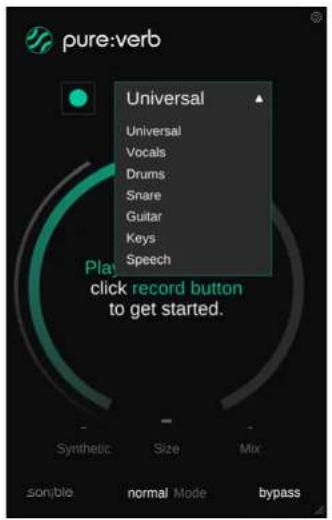
1. Profile
A profile calibrates the processing of pure:verb to a specific sound source. You can always start the learning process with the "Universal" profile and switch to a more specific profile later.
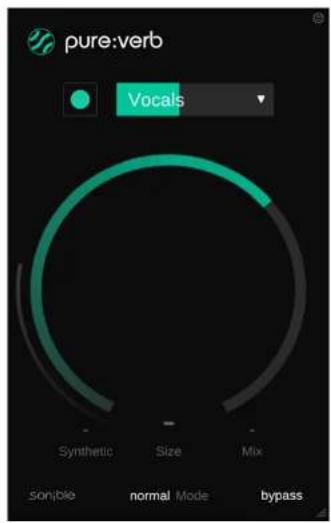
2. Playback & learning
pure:verb needs an incoming audio signal for the learning process. Once the playback has started, click the green record button and let pure:verb listen to your signal.

3. Done!
When the learning process is finished, pure:verb automatically sets and unlocks all plug-in parameters.
Hint: If you want the plug-in to learn from a different section of your input signal, you can simply start the audio playback from there and click the learn button again. Please note that you should always restart the learning process when you swap input signals (e.g. use a different sample), otherwise, the reverb effect will no longer fit to your signal.
While the intelligent processing of pure:verb allows to instantly find a reverb space for your signal, the plug-in also allows you to fine-tune the results to match your sonic vision.

With the synthetic parameter, you can give your reverb a more artificial character.
Value close to 0
A synthetic value close to 0 leads to a natural reverb that sounds as if the reverberated signal was recorded in a real environment. The reverb will give your signal finishing touches without changing its character too much. It works very well when working with acoustic instruments or clean vocals.
Value close to 100
A synthetic value close to 100 leads to an artificial reverb that doesn't try to simulate an actual room but rather plays with different reverb characteristics. Use an artificial sounding reverb if you want to intentionally change the character of a signal and make the reverb audible as a distinctly creative effect.
In normale mode, pure:verb acts like a "typical" reverb effect. This mode is the right choice if you simply want to place your source signal in a (realistic) virtual reverb space.
Infinite
In infinite mode, pure:verb will generate an infinite reverb time. This mode is great if you want to create interwoven layers of ambient sounds.
Reverse
In reverse mode, the reverb effect is reversed. This mode creates interesting "imploding" sound effects, particularly for transient sounds like drums.
Bounce
In bounce mode, the reverb effect is bouncing back and forth. This mode helps to generate nice rhythmic patterns, particularly when using large values for size.
The mix parameter controls the relation of dry (direct) and wet (reverberated) signal. The higher the value, the higher the proportion of the wet signal. When using pure:verb as an insert effect, you typically want to use mix values between 10% and 50%. When using pure:verb as a send effect, you may stick to a mix value of 100% (only wet signal), since the output will later be mixed with the dry signal inside the mixer of your DAW.
The size parameter allows you to control the size of the virtual reverb space. The moving circles of the reverb display visualize the impact on the resulting reverb effect.
Small size value
A small reverb space (small size value) will lead to a quite short reverb time. This leads to an intimate reverb effect that gives your sound a warm and personal touch. Small reverb spaces are great if you work with soft vocals or solo instruments where you want to preserve the intimacy and definition of the signal.
Large size value
A large reverb space (large size value) will lead to a longer reverb time and generate a more immersive and dense reverb effect. A large reverb space is great if you want to fully immerse your signal in a dense and vibrant reverb, for example when working with synth pads or orchestral sounds.
To visit the settings page, click the little cogwheel in the upper right corner.

www.sonible.com/pureverb
sonible GmbH
Haydngasse 10/1
8010 Graz
Austria
phone: +43 316 912288
contact@sonible.comAll spe
©2023, sonible GmbH. All rights reserved.
Engineered & designed by sonible in Austria.
www.sonible.com
- pure:verb
- Contents
- System requirements
- CPU
- RAM
- Operating systems
- Mac OSX
- Audio Unit
- VST
- VST3
- AAX
- Windows
- Licensing system
- Machine-based
- iLok
- Unlocking
- Machine-based unlocking
- Trial version
- Internet connection requirements
- Profile
- Playback & learning
- Done!
- Value close to 0
- Value close to 100
- Infinite
- Reverse
- Bounce
- Small size value
- Large size value
Brand : Sonible
Model : pure:verb
Category : Audio software