
FO8K-DP-50-MM - Computer Accessories and Peripherals Avenview - Free user manual and instructions
Find the device manual for free FO8K-DP-50-MM Avenview in PDF.


| Product Type | 8K DisplayPort 1.4 Extender over Fiber Optic Cable |
| Model | FO8K-DP-50-MM |
| Cable Length | 50 meters (164 feet) |
| Supported Resolution | Up to 8K@60Hz (7680x4320) |
| Data Rate | Up to 8.1 Gbps per lane (HBR3) |
| Video Bandwidth | 5.4 Gbps (HBR2) / 8.1 Gbps (HBR3) per lane |
| Connector Type | Male 20-pin DisplayPort plug (both ends) |
| DisplayPort Compliance | VESA v1.2a and v1.4 |
| HDCP Support | DPCP & HDCP compliant |
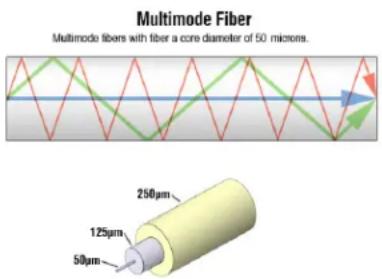
| Fiber Type | 50/125 μm multi-mode glass fiber |
| Optical Source | 1x4 Array 850nm Multi-mode VCSEL |
| Power Supply | +3.3V, max 3.6V (bus-powered) |
| Power Consumption | 0.3W |
| Dimensions (each end) | 2.95 x 1.0 x 0.8 inches (75 x 25 x 20 mm) |
| Weight (50m cable) | Approx. 1565 g (3.45 lbs) |
| Operating Temperature | 32° to 122°F (0° to 50°C) |
| Storage Temperature | -4° to 158°F (-20° to 70°C) |
| Relative Humidity | 20~80% RH (non-condensing) |
| Laser Safety Class | Class 2 Laser Product (<1 mW, 400-780 nm) |
| Cleaning Instructions | Unplug before cleaning; use dry cloth only, no liquid cleaners |
| Warranty | 3 years limited warranty (parts and labor) |
| Spare Parts / Repairability | Not user-serviceable; contact Avenview support for repairs |
Frequently Asked Questions - FO8K-DP-50-MM Avenview
User questions about FO8K-DP-50-MM Avenview
0 question about this device. Answer the ones you know or ask your own.
Ask a new question about this device
Download the instructions for your Computer Accessories and Peripherals in PDF format for free! Find your manual FO8K-DP-50-MM - Avenview and take your electronic device back in hand. On this page are published all the documents necessary for the use of your device. FO8K-DP-50-MM by Avenview.
USER MANUAL FO8K-DP-50-MM Avenview
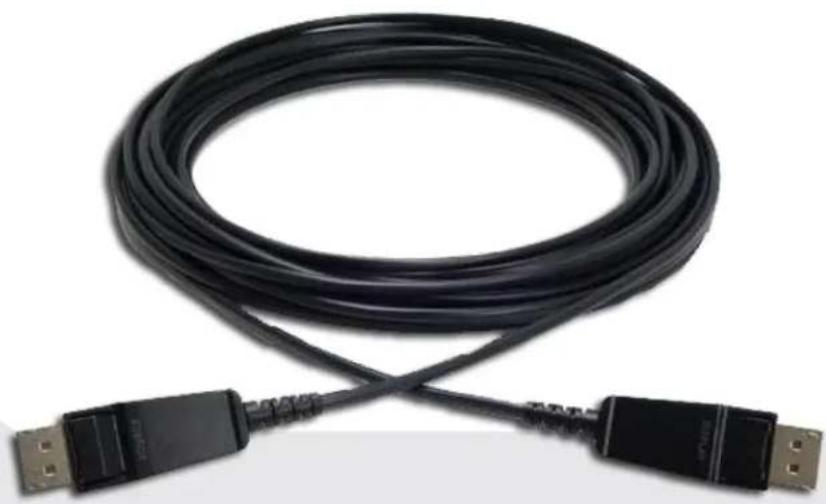
8K DisplayPort 1.4 Extender over Fiber Optic Cable
natural_image
Coiled black USB cable with connectors, no visible text or symbols
Model #: FO8K-DP-XX-MM
Product Application & Market Sectors

Corporate Hou

Worship

Military Reside


Education Indu


Medical Aviatic

TABLE OF CONTENTS
- GETTING STARTED.... 1
1.1 IMPORTANT SAFEGUARDS.... 1
1.2 SAFETY INSTRUCTIONS.... 1
1.3 REGULATORY NOTICES FEDERAL COMMUNICATIONS COMMISSION (FCC)...... 2
- INTRODUCTION.... 3
2.1 MODEL DESCRIPTION.... 3
2.2 PACKAGE CONTENTS.... 4
2.3 BEFORE INSTALLATION....4
-
OPTICAL FIBER HAZARD....4
-
INSTALLATION....5
-
SPECIFICATIONS....6
-
DISPLAYPORT PIN ASSIGNMENT....7
-
FO8K-DP-XX-MM CABLE CONSTRUCTION....8
-
MECHANICAL SPECIFICATIONS....9
-
GENERAL TROUBLESHOOTING.... 11
1.1 IMPORTANT SAFEGUARDS
Please read all of these instructions carefully before you use the Fiber Optic cable. Save this manual for future reference.
What the warranty does not cover
- Any product, on which the serial number has been defaced modified or removed.
- Damage, deterioration or malfunction resulting from:
- Accident, misuse, neglect, fire, water, lightning, or other acts of nature, unauthorized product modification, or failure to follow instructions supplied with the product.
• Repair or attempted repair by anyone not authorized by us. - Any damage of the product due to shipment.
- Removal or installation of the product.
- Causes external to the product, such as electric power fluctuation or failure.
• use of supplies or parts not meeting our specifications.
• Normal wear and tear. - Any other causes which does not relate to a product defect.
- Removal, installation, and set-up service charges.
1.2 SAFETY INSTRUCTIONS
The Avenview FO8K-DP-XX-MM, DisplayPort Extender System over fiber Optic, has been tested for conformance to safety regulations and requirements, and has been certified for international use. However, like all electronic equipment's, the FO8K-DP-XX-MM should be used with care. Read the following safety instructions to protect yourself from possible injury and to minimize the risk of damage to the unit.
On no account should you:
Do not dismantle the housing or modify the module.
Dismantling the housing or modifying the module may result in electrical shock or burn.
⚠️ Refer all servicing to qualified service personnel.
Do not attempt to service this product yourself as opening or removing housing may expose you to dangerous voltage or other hazards
▲ keep the module away from liquids.
Spillage into the housing may result in fire, electrical shock, or equipment damage. If an object or liquid falls or spills on to the housing, unplug the module immediately.
Have the module checked by a qualified service engineer before using it again.
Do not use liquid or aerosol cleaners to clean this unit. Always unplug the power to the device before cleaning.
This equipment has been tested and found to comply with part 15 of the FCC rules. These limits are designed to provide reasonable protection against harmful interference in a residential installation.
Any changes or modifications made to this equipment may void the user's authority to operate this equipment.
Warning symbols Description
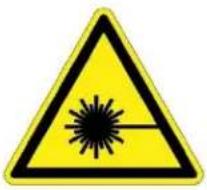
LASER RADIATION
DO NOT STARE INTO BEAM
< 1 MILLIWATT LASER
DIODE CLASS 2 LASER
PRODUCT
Risk levels increase. These lasers emit a visible beam, from 400 to 780 Nanometres (nm), with an upper power limit of 1 milliwatt. An example is a (mw) bar code scanner. Momentary viewing is not hazardous, but extended viewing is laser protective eyewear is recommended for even momentary viewing and necessary for extended viewing

DO NOT TAMPER WITH THE FIBER CABLE; DOING SO WILL VOID THE WARRANTY AND CONTINUED USE OF THE PRODUCT.

natural_image
Blue circular icon with a white silhouette of a person wearing sunglasses (no text or symbols)LASER BEAM USED IN OPTICAL COMMUNICATIONS ARE INVISIBLE AND CAN SERIOUSLY DAMAGE THE EYES. VIEWING IT DIRECTLY DOES NOT CAUSE ANY PAIN TO THE EYE BUT SERIOUS DAMAGE CAN BE DONE TO THE RETINA OF THE EYE

natural_image
Blue circular icon with a white human figure holding an open book (no text or symbols)⚠ WARNING
Read & understand user guide before using this device.
Failure to follow the proper installation instructions could result in damage to the product and preventing expected results.
2. INTRODUCTION
Avenview FO8K-DP-XX-MM 8K Series fiber optic, active optical cable (AOC) lets you extend DisplayPort 1.2a or 1.4 digital signal up to 100 meters (328 feet) at 8K@60Hz (7680X4320) resolution.
- High Speed and long-distance transmission by Optical fiber
- Compatible with DisplayPort VESA standard v1.2a and 1.4
- HBR3 (High Bit Rate) Cable Assembly (up to 8.1 Gbs Data Rate)
- Supports up to 8K@60Hz (7680X4320) resolution
- Main-link video signal / AUX data and Hot Plug Detection signal is transmitted by 1ch multi-mode fiber - DPCP & HDCP compliant (HDCP are not part of the DisplayPort standard)
- MMF optical fiber / copper UL certified Hybrid optical cable (OFNP)
2.1 MODEL DESCRIPTION
Available Lengths (XX)
10 meters
20 meters
30 meters
40 meters
50 meters
70 meters
100 meters
Model Name
FO- Fiber Optic
8K - Resolution
DP - Cable type
FO8K-DP-XX-MM
Length in Meters
(5 = 5 meters, 10 = 10 meters)
EXAMPLE: FO-DP4K-10-MM
Connector type
M-Male
F- Female
2.2
PACKAGE CONTENTS
Before you start the installation of the converter, please check the package contents.
| 1 | DisplayPort Extender Cable X 1 |  |
| 2 | User's Manual X 1 |  |
2.3 BEFORE INSTALLATION
- Use the product in a stable location. If the product falls or drops, it may pull connected equipment causing them to fall.
- Don't place the product in too high temperature (over 50^ ), too low temperature (under 0^ ) or high humidity.
- Do not twist or pull by force ends of the optical cable. It can cause malfunction.
3. OPTICAL FIBER HAZARD
- Persons installing fiber optic products must take all necessary safety precautions, such as wearing protective clothing and goggles and observing warning signs.
- To ensure that the required personnel and equipment is properly installed, secure from unnecessary failure of the components or failure of the whole system, injury to one's self and in addition to legal responsibility; everyone is responsible for his own health
- Keep exposed optical fiber ends away from skin and eyes.
- The waste fragments should be treated with care and not picked up with bare hands, but rather with special gloves.
- Dispose of waste in a suitable container via an approved agency. Make sure that the quantity of optical fiber waste is minimized.
- Closures containing termination points for optical fiber cabling must be labeled with appropriate warning signs or clearly visible text.
- Make sure that the quantity of optical fiber waste is minimized. Closures containing termination points for optical fiber cabling must be labeled with appropriate warning signs or a clearly viewable text.
- There are four laser Classifications based on risk levels. laser manufacturers are required to label their lasers accordingly.
4. INSTALLATION
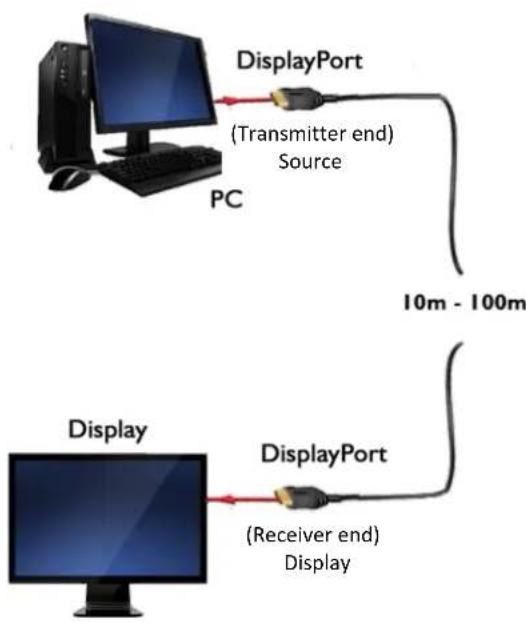
Avenview FO8K-DP-XX-MM is composed of a TX/RX ends, the Transmitter converts the video/audio signal of an input such as a computer over the Optical fiber to the Receiver. The RX then decodes the transmitted data to the connected monitor via the DisplayPort connector.
The Transmitter should be connected to source (Computer/media player) DisplayPort connector and the Receiver should be connected to a monitor/TV with DisplayPort connector.
Avenview FO8K-DP-XX-MM is designed to self-detect the resolution of the monitor and adapt to the resolution accordingly. follow these steps for connecting to a device:
- power on your display.
- Connect Transmitter DP Male connector to the Source device (Laptop/PC).
- Connect the Receiver DP Male connector to the Display/Monitor.
- Once all connections are completed you can then configure your computer's output mode.
NOTE: Ensure when installing this product you carefully read the labels and do not mix the connections in the opposite direction.
FO8K-DP-XX-MM
8K@60 / 10m -100m (328ft)
Up to 8.1Gbs Data Transfer Rate
5. SPECIFICATION
| ITEM | DESCRIPTION |
| UNITS | FO8K-DP-XX-MM |
| UNIT DESCRIPTION | 8K@60Hz 4:4:4 HBR3 DisplayPort 1.4 cable over Fiber Optic DisplayPort fiber Optic Receiver |
| INPUT/OUTPUT SIGNAL | DisplayPort Signal v1.2a, 1.4 |
| VIDEO BANDWIDTH | 5.4Gbps (HBR2) / 8.1 Gbps (HBR3) Per lane |
| DATA RATE | Up to 8.1 Gbps per lane |
| SUPPORTED RESOLUTION & DISTANCE* | Up to 8K(7680X4320) @60Hz - up to 100 meters (328 feet) |
| ELECTRICAL CONNECTOR | Male 20 pin DisplayPort plug |
| DIMENSIONS (L × W × h)* | 2.95" × 1.0" × 0.8" |
| POWER SUPPLY | +3.3V, max 3.6V |
| POWER CONSUMPTION | 0.3W |
Optical
| OPTICAL SOURCE | 1x4 Array 850nm Multi-mode VCSEL |
| O/E CONVERTER | PIN photo Diode |
| CABLE TYPE | Optical Hybrid + Copper |
| FIBER TYPE | 50/125 μm Multi-mode glass-fiber |
Environmental
| OPERATING TEMPERATURE | 32° ~ 122°F (0° to 50°C) |
| STORAGE TEMPERATURE | -4° ~ 158°F (-20° ~ 70°C) |
| RELATIVE HUMIDITY | 20~80% RH (no condensation) |
6.
DISPLAYPORT PIN ASSIGNMENT

6.1 Transmitter
| PIN | SIGNAL ASSIGNMENT | PIN | SIGNAL ASSIGNMENT | PIN | SIGNAL ASSIGNMENT |
| 1 | Main link lane 0+ | 8 | Ground | 15 | Auxiliary Channel+ |
| 2 | Ground | 9 | Main link lane 2- | 16 | Ground |
| 3 | Main link lane 0- | 10 | Main link lane 3+ | 17 | Auxiliary Channel - |
| 4 | Main link lane + | 11 | Ground | 18 | Hot plug Detect |
| 5 | Ground | 12 | Main link lane 3- | 19 | Return |
| 6 | Main link lane 1- | 13 | Configuration 1 | 20 | Connector power (3.3V,500mA) |
| 7 | Main link lane 2+ | 14 | Configuration 2 |
6.2 Receiver
| PIN | SIGNAL ASSIGNMENT | PIN | SIGNAL ASSIGNMENT | PIN | SIGNAL ASSIGNMENT |
| 1 | Main link lane 0+ | 8 | Ground | 15 | Auxiliary Channel+ |
| 2 | Ground | 9 | Main link lane 2- | 16 | Ground |
| 3 | Main link lane 0- | 10 | Main link lane 3+ | 17 | Auxiliary Channel - |
| 4 | Main link lane 1+ | 11 | Ground | 18 | Hot plug Detect |
| 5 | Ground | 12 | Main link lane 3- | 19 | Return |
| 6 | Main link lane 1- | 13 | Configuration 1 | 20 | Connector power (3.3V,500mA) |
| 7 | Main link lane 2+ | 14 | Configuration 2 |
7.
FO8K-DP-XX-MM CABLE General Specification
| The Dimension of FO-HDM-XX-MM Cable | ||
| ITEMS | unit | Specification |
| DVI CABLE MAKE-UP | - | Layer Stranding |
| DRAIN WIRES (SIZE/STRANDED) | mm(AWG) | -0.203/7 (24) |
| AL-MYLAR SCREEN SHIELD | - | Ahelically |
| CABLE OUTER DIAMETER | mm | 4.7±0.1 |
| JACKET COLOR | - | FR-PVC(Orange, Blue, Black) |
| CABLE MARKING | - | If needed |
| Weight | ||
| 10 meters | g | 420 |
| 20 meters | g | 690 |
| 30 meters | g | 1,025 |
| 40 meters | g | 1,280 |
| 50 meters | g | 1,565 |
| 70 meters | g | 2,185 |
| 100 meters | g | 2,895 |
FIBER CABLE CONSTRUCTION
| Item | Description | |
| OPTICAL FIBER | Number | 4 |
| STRENGTH MEMBER | Aramid | |
| OUTER JACKET | Material | OFNP |
| Approx. Thickness | 0.54mm | |
| NOMINAL OUTSIDE DIAMETER | 4.7mm | |
| APPROXIMATE NET WEIGHT | Varies per length | |
| CABLE IDENTIFICATION | OPTICAL DP AOC CABLE | |
8. MECHANICAL SPECIFICATIONS
8.1 Cable and Connector Dimensions
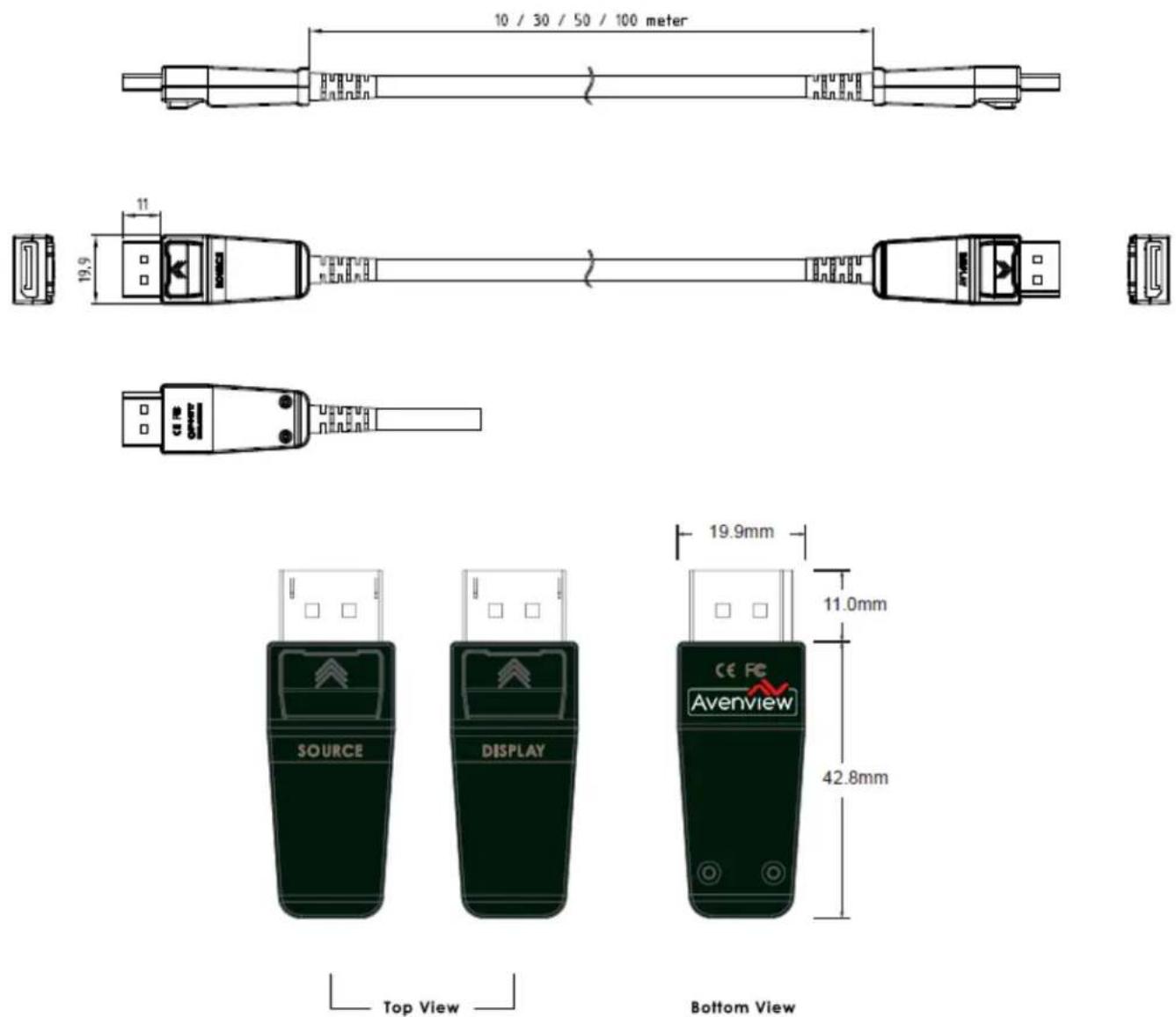
8.2 Optical Cable Info
| DIMENSIONS OF DISPLAYPORT CABLE | ||
| ITEMS | UNIT | SPECIFICATIONS |
| Displayport Cable Make-up | - | layer Stranding |
| Drain Wires (Size/Stranded) | mm(AWG) | -0.203/7 (24) |
| Al-Mylar Screen Shield | - | helically |
| Cable Outer Diameter | Mm | 7.40 ± 0.20 |
| Jacket Color | - | Black |
| FIBER CABLE CHARACTERISTICS | |||
| ITEM | SPECIFICATIONS | UNIT | CONDITION |
| Storage Temperature | -20 ~ 70 | °C | Spooled |
| Operational Test | 0 ~ 50 | °C | - |
| Max. Tensile load | 1000 | N | |
| Min. Radius Bend | 100 | mm | |
| Crush Resistance | N/A | ||
9. TROUBLESHOOTING
| Problem | Possible Solutions |
| NO IMAGE | Check if the Source device is on and producing outputCheck if connection to the computer and the monitor are correctRecycle the PC power off and on againSome graphics cards are not compatible with this unit Ensure it is 60Hz |
| LCD SCREEN DEFECTS APPEAR | This product supports up to 8K@60Hz (7680X4320) resolution.Check the maximum resolution range of the graphics card. |
10. CAUTION
- Do not put heavy object on top of the FO8K-DP-XX-MM. It may cause product malfunction.
- put the product on even and stable location. If the product falls down or dropped, it may get damaged.
- keep away from high temperature (over 50^ C), low temperature (under 0^ C) or high humidity. It may cause a fire and injury by electrical shock.
- Do not twist or pull by force either ends of the optical cable. It can cause malfunction. Minimum bending diameter is 45mm.
NOTE: Using Mini DP or HDMI/DVI converters with this unit may vary in the performance of the specified tested results.
Notes
Avenview Warranty Certificate
AVENVIEW CORP. ("Avenview") warrants Avenview-branded product(s) contained in the original packaging against defects in materials and workmanship when used normally in accordance with Avenview's enclosed manual guidelines for a period of THREE (3) YEARS from the date of original retail purchase - Warranty Period. Avenview's published guidelines include but are not limited to information contained in technical specifications, user manuals and service communications. LABOR: During the Warranty Period of THREE (3) YEARS, Avenview will repair or replace the product(s) at no cost using new or used parts equivalent to novel performance and reliability if the product(s) is determined to have abide by Avenview's published guidelines. Cost of Labor applicable to product(s) after Warranty Period. For labor costs, please contact support@avenview.com.
PARTS: During the Warranty Period of THREE (3) YEARS, Avenview will supply new or rebuilt replacements in exchange for defective parts of the product(s) at no cost if the product(s) is determined to have abide by Avenview's published guidelines. Cost of Parts applicable to product(s) after Warranty Period. For part(s) costs, please contact support@avenview.com.
To obtain Warranty: (a) proof of purchase in the form of a bill of sale or receipted invoice reflecting that the registered product(s) is within warranty period must be presented to obtain warranty service; (b) product(s) must be registered at time of purchase. Failure to do so will result in applicable parts and labor charges. Returning product(s) must be shipped in Avenview's original packaging or in packaging pertaining equal degree of protection to Avenview's. Both Avenview and purchaser are responsible for freight charges and brokerages when shipping the product(s) to the receiver.
NOT COVERED BY THIS WARRANTY
This warranty does not apply to any non-Avenview branded product(s); non-registered Avenview product(s). This warranty does not apply: (a) to cosmetic damage, including but not limited to scratches, dents and broken cords; (b) to damage caused by use with another product; (c) to damage caused by accident, abuse, misuse, liquid contact, fire, earthquake or other external cause; (d) to damage caused by operating the Avenview product(s) outside Avenview's manuals or guidelines; (e) to damage caused by service performed by anyone who is not a representative of Avenview or an Avenview authorized personnel; (f) to defects caused by normal wear and tear or otherwise due to the normal aging of the Avenview product(s), or (g) if any serial number has been removed or defaced from the Avenview product(s).
AVENVIEW IS NOT LIABLE FOR DIRECT, SPECIAL, INCIDENTAL OR CONSEQUENTIAL DAMAGES RESULTING FROM ANY BREACH OF WARRANTY OR CONDITION, OR UNDER ANY OTHER LEGAL THEORY, INCLUDING BUT NOT LIMITED TO LOSS OF USE; LOSS OF REVENUE; LOSS OF ACTUAL OR ANTICIPATED PROFITS (INCLUDING LOSS OF PROFITS ON CONTRACTS); LOSS OF THE USE OF MONEY; LOSS OF ANTICIPATED SAVINGS; LOSS OF BUSINESS; LOSS OF OPPORTUNITY; LOSS OF GOODWILL; LOSS OF REPUTATION; LOSS OF, DAMAGE TO, COMPROMISE OR CORRUPTION OF DATA; OR ANY INDIRECT OR CONSEQUENTIAL LOSS OR DAMAGE REPAIR OR REPLACEMENT AS PROVIDED UNDER THIS WARRANTY IS THE EXCLUSIVE REMEDY OF THE CONSUMER.
Some states do not allow the inclusion or limitation of Incidental or consequential damages, or allow limitations on duration implements of the Warranty Period; therefore, the above limitations or exclusions may not be applicable to you. This warranty gives you specific legal rights, and you may have other rights which vary from state to state.
1100 Military Road, Kenmore, NY 14217 1.866.508.0269


Avenview
AV Connectivity, Distribution And Beyond...
TECHNICAL SUPPORT
CONTACT US

Phone: 1 (866) 508 0269

Email: support@avenview.com

natural_image
Illustration of a globe with headphones and a headset, symbolizing global communication (no text or symbols present)USA Head Office Avenview Corp. 275 Woodward Avenue Kenmore, NY 14217
USA Head Office
Office Avenview Corp.
275 Woodward
Avenue Kenmore,
NY14217
Phone: +1.716.218.4100
Fax: +1.866.387-8764
Email:
info@avenview.com
Canada Sales
Avenview
151 Esna Park Drive, Units 11 &
12 Markham, Ontario, L3R3B1
Phone: 1.905.907.0525
Fax: 1.866.387.8764
Email: info@avenview.com
Avenview
Europe Avenview
Europe
Demkaweg 11
3555 HW
Utrecht
Netherlands
Phone: +31(0)85 2100
613
Unit 8, 6/f., Kwai Cheong
Centre, 50 Kwai Cheong Road,
Kwai Chung,
N.T. Hong kong
Phone: 852.3575.9585
Email: wenxi@avenview.com
Disclaimer
While every precaution has been taken in the preparation of this document, Avenview Inc. assumes no liability with respect to the operation or use of Avenview hardware, software or other products and documentation described herein, for any act or omission of Avenview concerning such products or this documentation, for any interruption of service, loss or interruption of business, loss of anticipatory profits, or for punitive, incidental or consequential damages in connection with the furnishing, performance, or use of the Avenview hardware, software, or other products and documentation provided herein.
Avenview Inc. reserves the right to make changes without further notice to a product or system described herein to improve reliability, function or design. With respect to Avenview products which this document relates, Avenview disclaims all express or implied warranties regarding such products, including but not limited to, the implied warranties of merchantability, fitness for a particular purpose, and non-infringement.


- 8K DisplayPort 1.4 Extender over Fiber Optic Cable
- Product Application & Market Sectors
- TABLE OF CONTENTS
- IMPORTANT SAFEGUARDS
- What the warranty does not cover
- SAFETY INSTRUCTIONS
- On no account should you:
- Warning symbols Description
- ⚠ WARNING
- INTRODUCTION
- MODEL DESCRIPTION
- Available Lengths (XX)
- FO8K-DP-XX-MM
- 2.2
- PACKAGE CONTENTS
- BEFORE INSTALLATION
- OPTICAL FIBER HAZARD
- INSTALLATION
- SPECIFICATION
- Transmitter
- Receiver
- 7.
- FO8K-DP-XX-MM CABLE General Specification
- MECHANICAL SPECIFICATIONS
- Cable and Connector Dimensions
- Optical Cable Info
- TROUBLESHOOTING
- CAUTION
- Avenview Warranty Certificate
- NOT COVERED BY THIS WARRANTY
- Avenview
- TECHNICAL SUPPORT
- USA Head Office
- Canada Sales
- Disclaimer
Brand : Avenview
Model : FO8K-DP-50-MM
Category : Computer Accessories and Peripherals