
KAM2CL2230A - SSD Enclosure Kogan - Free user manual and instructions
Find the device manual for free KAM2CL2230A Kogan in PDF.


| Product Type | M.2 NVMe/AHCI SATA Magnetic SSD Enclosure |
| Brand | Kogan |
| Model | KAM2CL2230A |
| Material | Aluminium |
| Capacity | Up to 2TB |
| Interface | USB-C 3.1 (10Gbps) |
| Supported Protocols | NVMe/AHCI SATA (M Key & B+M Key) |
| Compatible Systems | Windows 7/10/11, macOS 10.2+, Linux, iPhone 15/16 |
| SSD Form Factor | M.2 2230 |
| Magnetic Attachment | Yes (magnetic enclosure) |
| Installation | Tool-free, with rubber retaining plug |
| Thermal Management | Thermal pad included |
| Data Transfer Speed | Up to 10Gbps |
| Operating Temperature | Avoid extreme high/low temperatures |
| Storage Temperature | Avoid extreme high/low temperatures |
| Cleaning | Use a dry cloth |
| Safety | Keep away from humidity, dust, direct sunlight; do not disassemble |
| Included Accessories | Rubber stopper, thermal pad, data cable, user guide |
| Environmental Protection | Recycle according to local regulations |
| Usage | External mobile storage for computers and iPhone 15/16 |
Frequently Asked Questions - KAM2CL2230A Kogan
User questions about KAM2CL2230A Kogan
0 question about this device. Answer the ones you know or ask your own.
Ask a new question about this device
Download the instructions for your SSD Enclosure in PDF format for free! Find your manual KAM2CL2230A - Kogan and take your electronic device back in hand. On this page are published all the documents necessary for the use of your device. KAM2CL2230A by Kogan.
USER MANUAL KAM2CL2230A Kogan
natural_image
Line drawing of a rectangular container with horizontal slats (no text or symbols)MAGNETIC M.2 2230 NVME MOBILE SSD ENCLOSURE
(SUITABLE FOR IPHONE 15 & 16)
KAM2CL2230A
SAFETY & WARNINGS
Safety Notes
- Avoid using this product in environments with extreme high or low temperatures, humidity, dust, or prolonged exposure to direct sunlight.
- Do not place the product in areas containing corrosive substances, and do not use chemical solutions to clean it.
- Keep the product out of reach of children and ensure it is not used by children without supervision.
- Do not disassemble or attempt to repair the product or its accessories without proper authorisation.
- Clean the product gently using a dry cloth.
Usage Requirements
- Using unauthorised or incompatible power supplies or accessories may cause fire, explosions, or other hazards.
- Use only accessories approved by Kogan.com that are compatible with this product.
Environmental Protection
- Do not dispose of this product or its accessories with regular household waste.
- Follow guidelines outlined by your local environmental authority for proper disposal and recycling of this product and its accessories.
COMPONENTS
• M.2 NVME/AHCI SATA Magnetic Enclosure
- Rubber stopper
- Thermal Pad
- Data Cable
- User Guide
INSTALLATION
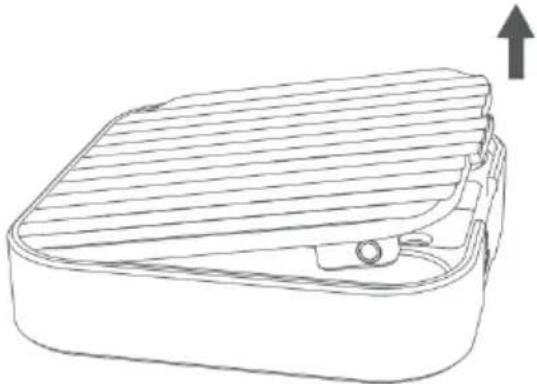
- Remove the cover by lifting it upwards.
natural_image
Line drawing of a rectangular electronic component with internal structure and mounting holes (no text or symbols)- Insert an M.2 NVME or AHCI SATA SSD (2230 specification, not supplied) into the slot in the enclosure. Secure it in place using the rubber retaining plug.

natural_image
Line drawing of a rectangular device with internal compartments and a handle (no text or symbols)- Replace the cover and connect the SSD enclosure to your compatible device or computer via the USB-C interface, which supports 10Gbps high-speed transmission.

natural_image
Line drawing of a rectangular container with horizontal slats (no text or symbols)OPERATION
Disk Ejection Process (Windows)
- To safely disconnect the SSD enclosure from your computer, click on the USB drive icon located at the bottom right of your computer screen, then select 'Eject [Your Disk Name]' (e.g., 'Eject ANYOYO USB Drive').
Note: Disk names may vary depending on the device. Failure to eject the disk properly may result in file loss or damage to the drive.
- If a pop-up window displays an option for 'Basic System Device', do not select it. Doing so may prevent the disk from functioning properly when reinserted, potentially requiring a system restart to resolve the issue.

SPECIFICATIONS
| Product | M.2 NVME/AHCI SATA Magnetic SSD Enclosure |
| Adapter SSD 2230 | |
| Material Aluminium | |
| Capacity Maximum 2TB | |
| Supported protocols NVME/AHCI SATA: M | Key/B & M Key |
| Interface | USB-C 3.1 (10Gbps) |
| Compatible Systems | Windows 7/10/11, Linux, MacOS 10.2 above, Linux & iPhone 15 & 16 |
NOTES
Need more information?
We hope that this user guide has given you the assistance needed for a simple set-up.
For the most up-to-date guide for your product, as well as any additional assistance you may require, head online to help.kogan.com
kogan.com
Brand : Kogan
Model : KAM2CL2230A
Category : SSD Enclosure