
SLKSC21PN - Fan SereneLife - Free user manual and instructions
Find the device manual for free SLKSC21PN SereneLife in PDF.


| Product Type | 3-Wheel Foldable Kids Scooter |
| Model | SLKSC21PN |
| Recommended Age | 3 years and up |
| Maximum Weight Capacity | 110 lbs (50 kg) |
| Seat Weight Capacity | 55 lbs max |
| Dimensions (Unfolded) | 21.65 x 10.23 x 24.40-28.34 inches |
| Handlebar Height Settings | 24.40, 26.37, 28.34 inches |
| Front Wheel Size | 4.72 x 1.18 inches (120 mm diameter) |
| Rear Wheel Size | 3.14 x 1.57 inches (80 mm diameter) |
| Frame Material | Aluminum Metal + Nylon Engineered PP |
| Wheel Material | High-quality Engineered Polyurethane |
| Handlebar Material | Plastic with Soft TPE Grip |
| Key Features | Foldable seat, LED wheel lights, lean-to-steer, adjustable T-bar handlebar, rear foot brake, anti-slip deck, quick folding mechanism |
| Assembly | Easy assembly required by an adult |
| Safety Certification | Lab tested and safety certified |
| Usage | Indoor/outdoor, on smooth surfaces |
| Maintenance | Clean with wet cloth; avoid alcohol/ammonia; store in cool, dry place |
| Brake Type | Rear wheel progressive foot brake |
| Wheel Lights | Built-in LED lights in front wheels |
Frequently Asked Questions - SLKSC21PN SereneLife
User questions about SLKSC21PN SereneLife
0 question about this device. Answer the ones you know or ask your own.
Ask a new question about this device
Download the instructions for your Fan in PDF format for free! Find your manual SLKSC21PN - SereneLife and take your electronic device back in hand. On this page are published all the documents necessary for the use of your device. SLKSC21PN by SereneLife.
USER MANUAL SLKSC21PN SereneLife
3-Wheel Foldable Kids Scooter
USER GUIDE
Features:
• Kid Kick Scooter Fun with Foldable Seat
• Built-in LED Wheel Lights
- Lean-to-Steer Technology
• Lightweight, Compact & Portable
- Adjustable Handlebar
- Rear Foot Brake
- Wide Deck with Anti-Slip Surface
- Easy to Assemble
- Adjustable T-Bar Handlebar Height
- Soft TPE Handle Grip
• Multi-Wheeled Scooter Stability
- Long-Lasting, Super Smooth Gliding PU Wheels
• Lab Tested & Safety Certified
- Indoor/Outdoor Use
- Suitable for Ages 18M+
• Fun for Kids: Small Children
What's in the Box:
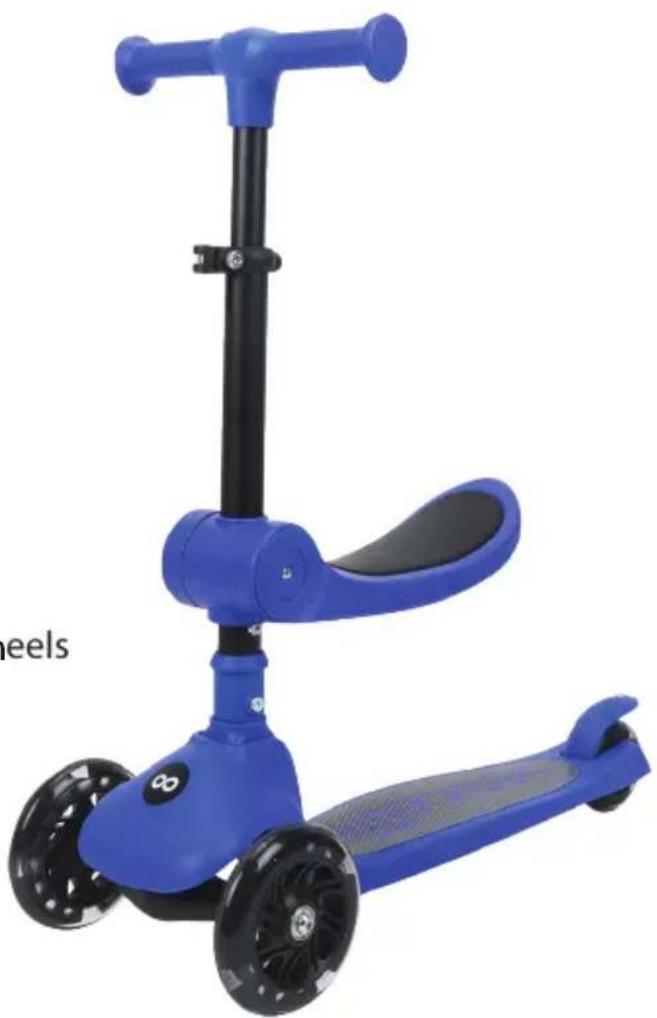
- Foldable Kid Kick Scooter - PE Bag
natural_image
Blue and black blue scooter with wheels and handle, no visible text or symbolsConstruction Materials:
• Aluminum Metal + Nylon Engineered PP Frame
- Handlebar: Plastic
- Tube: Aluminum + Steel
- Folding Part: Nylon
- Wheel Type/Wheel Material: High-quality Engineered Polyurethane
Technical Specs:
- Front Wheels: PU 4.72" x 1.18"-inches with Flash
- Rear Wheels: PU 3.14" x 1.57"-inches with Rear Brake
- Handlebar Height Setting: 24.40", 26.37", 28.34"-inches
- Wheel Size Diameter: 120mm Front, 80mm Rear
• Recommended Age: 3 Years and Up
• Weight Capacity: Up to 110 lbs. - Foldable Seat Weight Capacity: 55 lbs. Max
- Total Unfold Scooter Size (L x W x H): 21.65" x 10.23" x 24.40"-28.34"-inches

natural_image
Purple and black toy scooter with a black handle and three wheels (no text or symbols visible)Product Parts
- Handle Bar
- Fast Release Main Lock
- Sub-lock
- Tube
- Seat
- Folding Mechanism
- Brake
- Wheel
- Deck
Bottom Lock Button Usage

natural_image
Technical line drawing of a mechanical assembly with gears and levers (no text or symbols)Lock the Wheel:
Push up the bottom lock button to lock the wheels.


natural_image
Technical line drawing of a mechanical assembly with no visible text or symbolsUnlock the Wheel:
Push down on the bottom lock button to unlock the wheels.
Folding-Sliding Mode
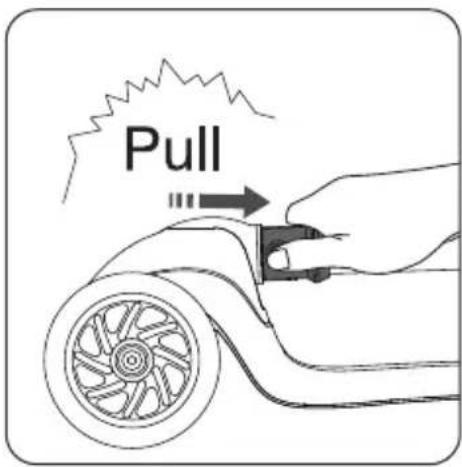
Pull up the folding mechanism towards the rear of the scooter.
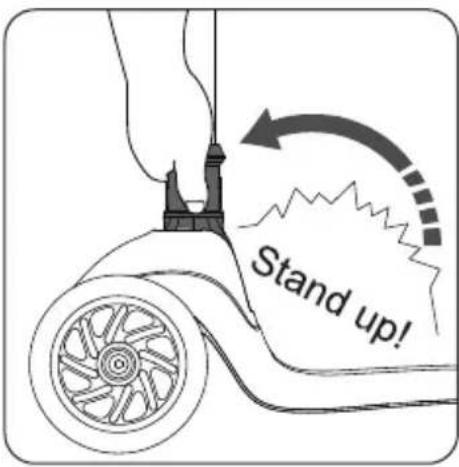
Pull up the tube. Pull up the folding mechanism and the tube towards the front of the scooter.

natural_image
Line drawing of a bicycle scooter with wheels and suspension components (no text or symbols)Finished sliding mode.
Folding-Storage State
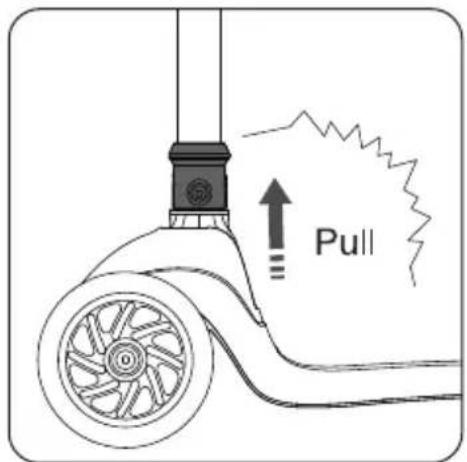
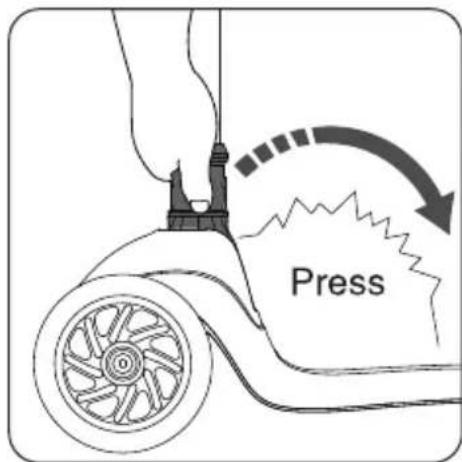
Press down on the tube. Pull up the folding mechanism and press down the tube in the direction of the deck.
Pull the folding mechanism upward.
Finished storage state.

natural_image
Pink and black electric scooter with wheels and handle (no text or symbols visible)Seat Forward Adjustment

Pull the seat upward so that the bottom groove of the seat is free from the positioning screw.


Rotate the seat 180°.

natural_image
Diagram of a scooter with wheels and a mechanical component, showing motion direction (no text or symbols)After rotation, align the notches on both sides of the bottom of the seat vertically with the positioning screws on both sides of the bottom of the tube. Pull down on the seat until the notches are completely fixed with the positioning screws.
Handlebar Height Adjustment

natural_image
Illustration of a hand holding a mechanical tool with a curved arrow indicating rotation (no text or symbols)Open the quick release clockwise.

natural_image
Illustration of a hand holding a vertical tool with a double-headed arrow indicating upward motion (no text or symbols)Press the positioning button while adjusting the handlebar up and down to the right height.

natural_image
Illustration of a hand holding a mechanical tool with a rotating knob (no text or symbols)Close the quick release to lock it tightly.
Warnings
• Maximum load: 50kg.
• Applicable age: Over 3 years.
Seat Folding
natural_image
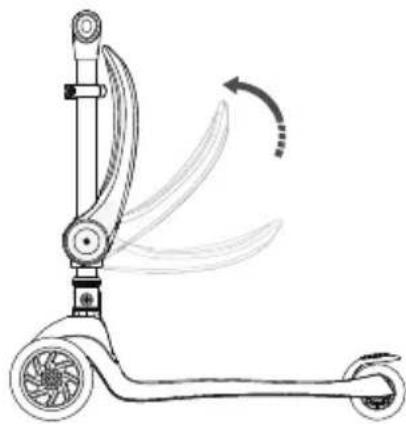
Line drawing of a scooter with motion arrows indicating rotation (no text or symbols)The seat folds directly upwards.
When you hear a "click," the folding is finished.
Scooter Brakes
natural_image
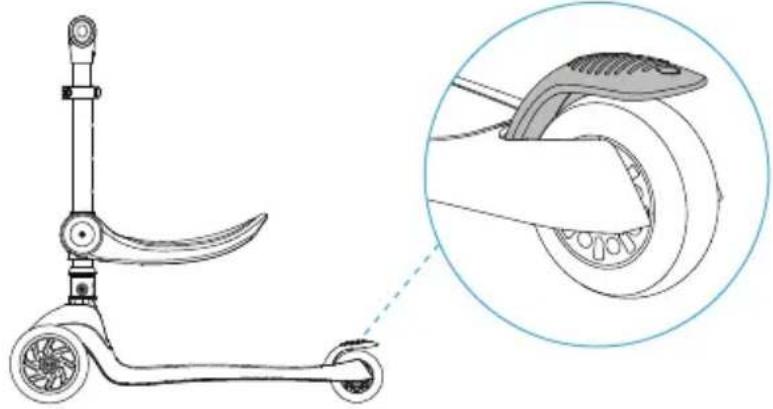
Line drawing of a scooter with handle and wheels, alongside an inset showing the wheel assembly detail (no text or symbols)Rear wheel progressive brake.
WARNINGS
- Ensure there are no obstacles around before playing.
- Do not use in places with obstacles (e.g., ramps, uneven surfaces, ditches).
- Avoid roads, parking lots, and other places with potential safety hazards.
- Keep fingers, hair, and clothes away from wheels and rotating parts.
- Only one child should ride at a time.
- Brake will heat up when braking.
- Do not use if damaged, deformed, or faulty.
- Store in a moisture-proof and damp-proof condition.
- Regularly check the product for faults.
- Keep this package for future reference.
- Power is supplied by electromagnetic induction; power supply parts are not detachable.
- Assembly must be completed by adults due to small parts.
- Use with caution to prevent falls or collisions.
- Wear protective equipment (helmet, gloves, knee pads, elbow pads).
- Ensure the locking mechanism works normally.
Safety Precaution
- Frequently check all fasteners.
- Do not use on slippery ground or in low visibility conditions.
- Normal wear and tear are not covered by the warranty.
- The brake sheet may become hot during use.
Maintenance
- Regularly clean with a wet cloth.
Avoid industrial detergents and products containing alcohol or ammonia. - Keep wheels free of debris.
- Store in a cool, dry place away from heat and fire sources. Avoid direct sunlight.
natural_image
Teal and black light blue scooter with wheels and a handle, no visible text or symbols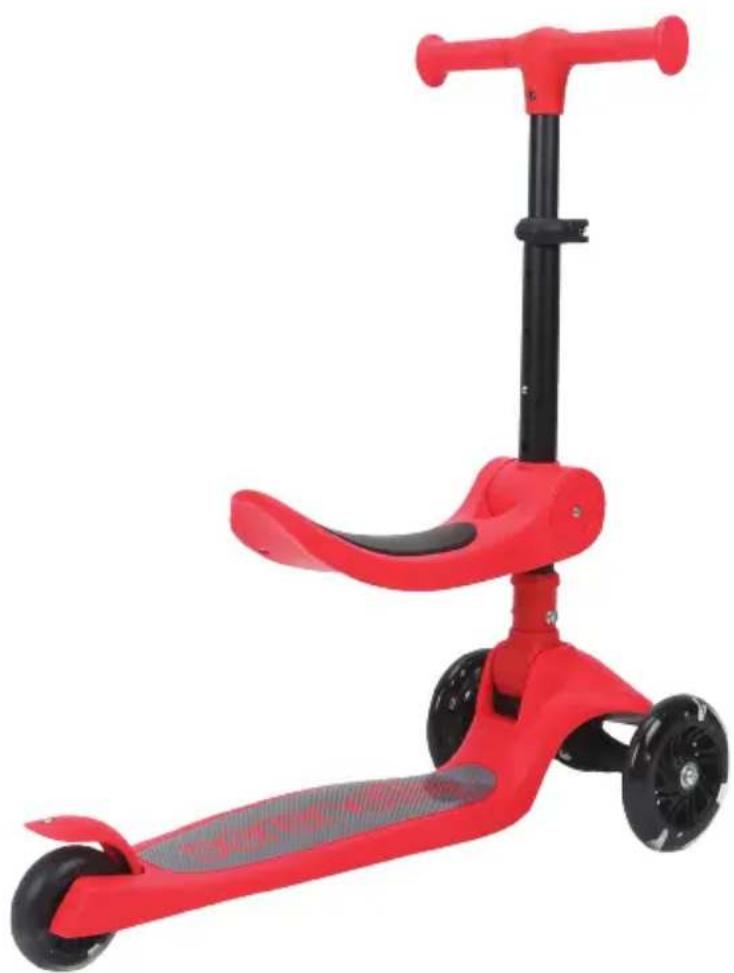
natural_image
Red and black electric scooter with a gray seat and black wheels (no text or symbols visible)Register Product
Thank you for choosing SereneLife. By registering your product, you ensure that you receive the full benefits of our exclusive warranty and personalized customer support.
Complete the form to access expert support and to keep your SereneLife purchase in perfect condition.

Serenelifehome.com/ register

natural_image
Yellow and black toy scooter with a black handle and wheels (no text or symbols visible)
natural_image
Purple toy scooter with black handle and wheels (no text or symbols visible)
natural_image
Blue toy scooter with black handle and wheels, no visible text or symbolsSLKSC27YL SLKSC26PR SLKSC25BL

natural_image
Illustration of a light blue and black electric scooter with three wheels (no text or symbols)
natural_image
Green and black light green toy scooter with three wheels (no text or symbols visible)
natural_image
Red and black toy scooter with three wheels and a handle (no text or symbols visible)
natural_image
Pink toy scooter with black handle and wheels (no text or symbols visible)SLKSC24AQ SLKSC22RD SLKSC21PNSLKSC23MG
serenelife™

Questions or Comments?
We are here to help!
Phone: 1.718.535.1800
Serenelifehome.com/ContactUs


- 3-Wheel Foldable Kids Scooter
- USER GUIDE
- Features:
- What's in the Box:
- Construction Materials:
- Technical Specs:
- Product Parts
- Bottom Lock Button Usage
- Lock the Wheel:
- Unlock the Wheel:
- Folding-Sliding Mode
- Folding-Storage State
- Seat Forward Adjustment
- Handlebar Height Adjustment
- Warnings
- Seat Folding
- Scooter Brakes
- Safety Precaution
- Maintenance
- Register Product
- serenelife™
Brand : SereneLife
Model : SLKSC21PN
Category : Fan