
KASWCONTRLR - Remote control Kogan - Free user manual and instructions
Find the device manual for free KASWCONTRLR Kogan in PDF.


| Brand | Kogan |
| Model | KASWCONTRLR |
| Product Type | Wireless Switch Controller |
| Compatibility | Nintendo Switch / Switch Lite / Switch OLED |
| Connection | Bluetooth, USB-C wired |
| Bluetooth Range | < 10 m |
| Battery Capacity | 600 mAh |
| Charging Time | Approx. 3.5 hours |
| Battery Life | Approx. 10 hours |
| Charging Interface | USB-C |
| Cable Length | 70 cm (2.30 ft) |
| Input Voltage | DC 5V |
| Working Current | < 20 mA |
| Vibration Current | 70-120 mA |
| Sleep Current | 9 µA |
| Turbo Frequency Levels | 5 Hz, 12 Hz (default), 20 Hz |
| Vibration Intensity Levels | Strong (100%), Moderate (70%), Weak (30%) |
| Dimensions | Approx. 100 x 150 x 60 mm (estimated) |
| Weight | Approx. 200 g (estimated) |
| What's in the Box | Controller, USB to USB-C charging cable, User Guide |
Frequently Asked Questions - KASWCONTRLR Kogan
User questions about KASWCONTRLR Kogan
0 question about this device. Answer the ones you know or ask your own.
Ask a new question about this device
Download the instructions for your Remote control in PDF format for free! Find your manual KASWCONTRLR - Kogan and take your electronic device back in hand. On this page are published all the documents necessary for the use of your device. KASWCONTRLR by Kogan.
USER MANUAL KASWCONTRLR Kogan
natural_image
Line drawing of a game controller with labeled buttons (no text or symbols beyond basic icons)KOGAN WIRELESS SWITCH CONTROLLER
COMPATIBLE WITH NINTENDO SWITCH/LITE/OLED
KASWCONTRLR
COMPONENTS LIST
- Controller
• USB to USB-C Charging Cable - User Guide
OVERVIEW
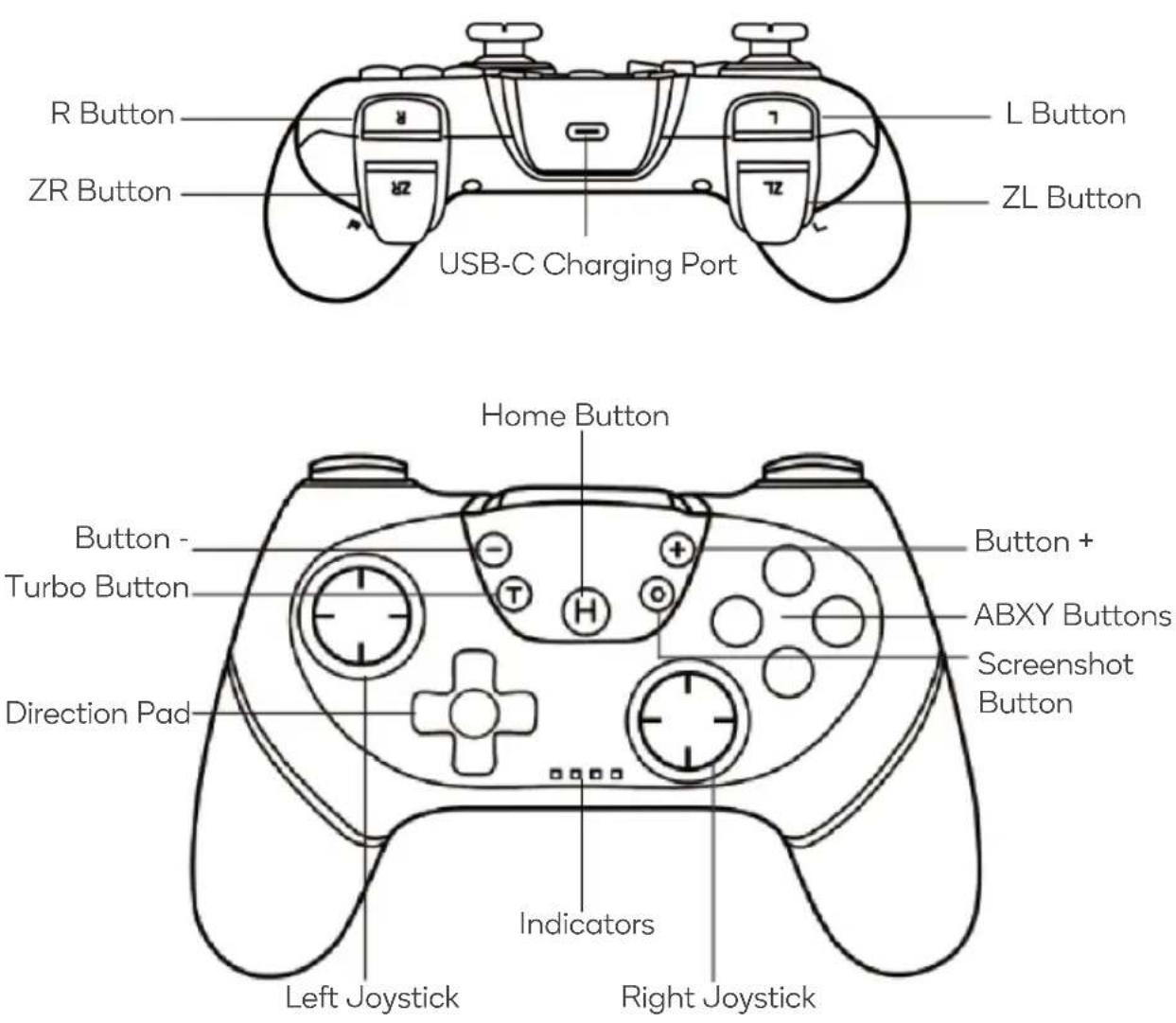
OPERATION
Charging
- When the controller is off and connected to the adapter, the indicators will flash.
- Once fully charged, the indicators will turn off.
- When the controller is online and plugged into a USB port, the corresponding channel indicator will flash slowly and turn solid when fully charged.
Low Battery Indicator
When the controller's battery voltage drops below 3.6V, the corresponding channel indicator will flash slowly, indicating the need to charge the controller. At 3.45V, the controller will shut down due to low power.
Power Off
- When the controller is on, hold the 'Home' button for 5 seconds to power it off.
- When the controller is pairing to the console, it will automatically power off if it cannot connect after 60 seconds.
- When the controller is re-pairing to the console, it will automatically power off if it cannot reconnect after 30 seconds.
- When the controller is connected to the console, it will automatically power off if there is no user input within 5 minutes.
Reconnect
- To wake up and reconnect to the console:
- When the controller is connected to the console, if the console is in sleep mode, the controller's connection indicator will be off.
Press the ‘Home’ button on the controller. The indicators will flash slowly and then rapidly to wake up the console. The console will wake up in about 3-10 seconds (only the ‘Home’ button can wake up the console).
- To reconnect when the console is powered on, press the 'Home' button on the controller.
Reset
- If the controller is experiencing issues such as crashes or connection failures, restart the controller.
- Insert a pin into the reset hole on the back of the controller and press the 'Reset' button to reset the controller.
Bluetooth Connection
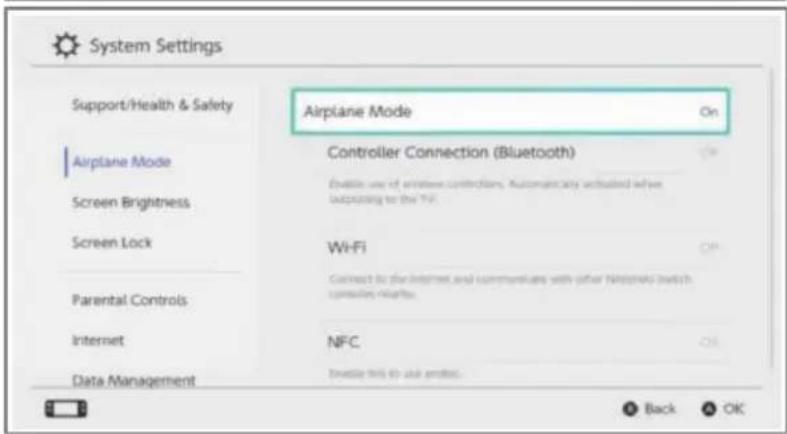
- Turn on the console and click the 'System Settings' menu button on the home page.
- In the next menu, click the 'Airplane Mode' option.
- Click the 'Controller Connection (Bluetooth)' option.
- Turn on the Bluetooth function.



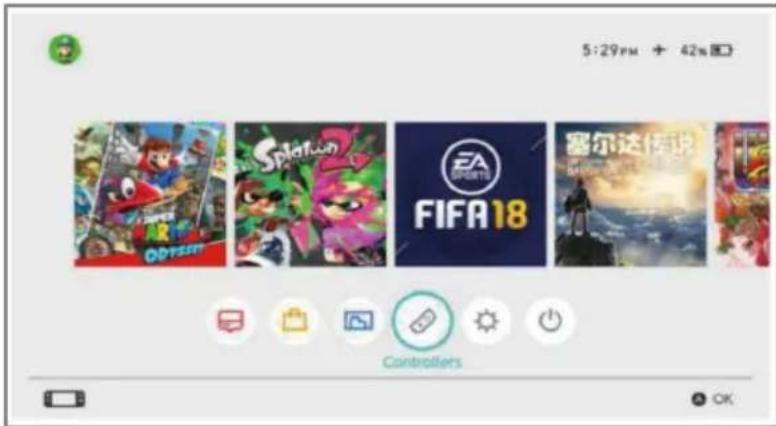
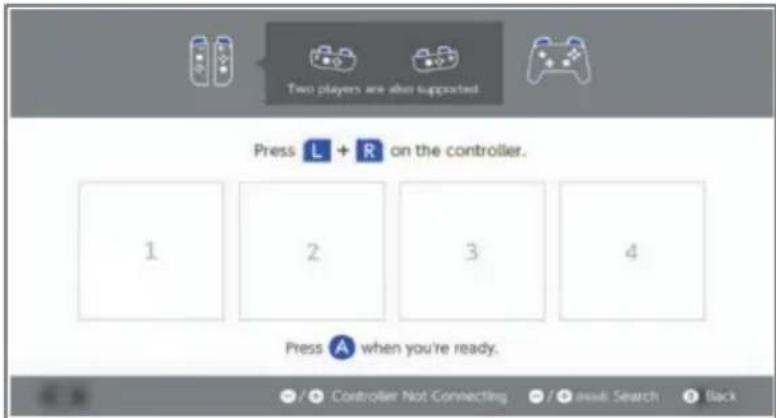
- Enter Bluetooth device searching mode by clicking the 'Controllers' button on the homepage.
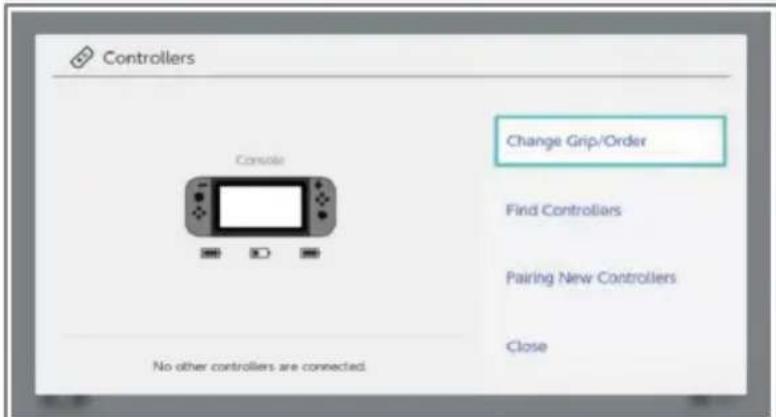
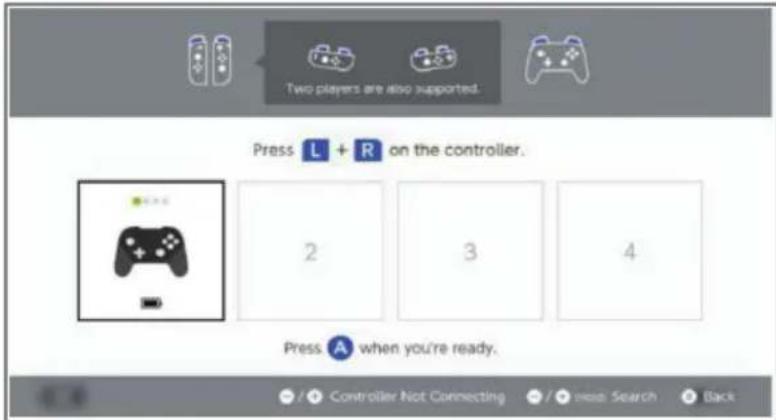
- In the next menu, click the 'Change Grip/Order' option. The console will automatically search for paired controllers.
- Press and hold the 'Home' button on the controller for 3-5 seconds to enter Bluetooth pairing mode. The indicators will flash rapidly.
- Once the controller is successfully connected to the console, it will vibrate and automatically illuminate the corresponding channel indicator.
Nintendo Switch Mode Wired Connection
- Place the console into the base and connect the controller through the USB cable.
- Press any button (A/B/X/Y/ZL/ZR/R/L) on the controller to automatically connect it to the console.
- After the USB cable is removed, the controller will automatically reconnect to the console via Bluetooth.
Windows (PC360) Mode
- When the controller is off, connect it to a PC using a USB cable. The PC will automatically install the driver. The second indicator on the controller will illuminate to indicate a successful connection.
- The display name will be 'Xbox 360 Controller for Windows'.
Turbo Function
The controller has a Turbo function. Hold down the 'Turbo' button and then press the corresponding button to set the Turbo.
- In Nintendo Switch mode, A, B, X, Y, L, R, ZL, ZR can be set.
- In Windows (PC360) mode, A, B, X, Y, L, R, ZL, ZR can be set.
Adjust turbo frequency:
- Press the ‘Turbo’ button and press the right joystick upwards to increase the frequency by 1 level.
- Press the ‘Turbo’ button and press the right joystick downwards to decrease the frequency by 1 level.
- There are 3 levels: 5Hz, 12Hz and 20Hz. The default frequency is 12Hz.
- When Turbo is activated, the indicator 1 will flash accordingly as the Turbo indicator.
Controller Vibration
- The controller has a vibration function with a pressure-sensitive motor.
- The console allows manual control to turn the controller vibration function on or off.
- The motor intensity can be adjusted on the Nintendo Switch platform.
Adjust the motor intensity:
- Press the ‘Turbo’ button and press the left joystick upwards to increase the intensity by 1 level.
- Press the ‘Turbo’ button and press the left joystick downwards to decrease the intensity by 1 level.
- There are 3 intensity levels: Strong (100% strength), Moderate (70% strength), and Weak (30% strength). The default intensity level is Strong (100% strength).
SPECIFICATIONS
Voltage DC 5V
Charging Time
Working Current <20mA
Vibration Current 70-120mA
Sleep Current 9uA
Charging Current Approx. 180mA
Battery Capacity 600mAh
Cable Length 70cm/2.30 ft
Battery Capacity
Bluetooth Transmission Distance <10m
Approx. 3.5 hours
Approx. 10 hours
NOTES
The Ground Truth image displays a single, solid horizontal line. According to Rule 2 (UNDERSCORE & LINE RULES), this is a stylistic or background line, not a placeholder underscore. Therefore, the OCR result must ignore it and output nothing or only meaningful text. The provided OCR content is "____", which consists of four underscores. This is an incorrect interpretation of the line as a fill-in-the-blank placeholder, violating the rule that stylistic lines must be ignored. The OCR has hallucinated underscores where none should exist based on the GT's visual context. Hence, the OCR result is inconsistent with the Ground Truth.
[Non-Text]
[Non-Text]
[EMPTY]
[Non-Text]
[Non-Text]
The Ground Truth image displays a single, continuous horizontal line, which is a stylistic or background element (like a ruled paper line). According to Rule 2, such lines must be ignored by the OCR result. The OCR content provided is "", which consists of no characters. Since the OCR output correctly ignores the stylistic line, it complies with Rule 2. Therefore, the OCR result is consistent with the Ground Truth.
[Non-Text]
[Non-Text]
[EMPTY]
[Non-Text]
[Non-Text]
The Ground Truth image displays a single, continuous horizontal line, which is a stylistic or background element (like a ruled paper line). According to Rule 2, such lines must be ignored by the OCR result. The provided OCR content is "____", which consists of underscores. Underscores are not equivalent to a solid line and are not permitted under the “Stylistic/Background Lines (Ignore)” rule. Outputting underscores for a stylistic line is incorrect because it misinterprets the line as a fill-in-the-blank placeholder. Therefore, the OCR result is inconsistent with the Ground Truth.
[Non-Text]
[Non-Text]
[NO TEXT]
[Non-Text]
[Non-Text]
The Ground Truth image displays a single, continuous horizontal line, which is a stylistic or background element (like a ruled paper line). According to Rule 2, such lines must be ignored by the OCR result. The provided OCR content is "____", which consists of underscores. Underscores are not equivalent to a solid line and are not permitted under the “Stylistic/Background Lines (Ignore)” rule. Outputting underscores for a stylistic line is incorrect because it misinterprets the line as a fill-in-the-blank placeholder. Therefore, the OCR result is inconsistent with the Ground Truth.
[Non-Text]
[Non-Text]
The Ground Truth image displays a single, continuous horizontal line, which is a stylistic or background element (like a ruled paper line). According to Rule 2, such lines must be ignored by the OCR result. The provided OCR content is "____", which consists of underscores. Underscores are not equivalent to a solid line and are not permitted under the “Stylistic/Background Lines (Ignore)” rule. Outputting underscores for a stylistic line is incorrect because it misinterprets the line as a fill-in-the-blank placeholder. Therefore, the OCR result is inconsistent with the Ground Truth.
[Non-Text]
[Non-Text]
The Ground Truth image displays a single, continuous horizontal line, which is a stylistic or background element (like a ruled paper line). According to Rule 2, such lines must be ignored by the OCR result. The provided OCR content is "____", which consists of underscores. Underscores are not equivalent to a solid line and are not permitted under the “Stylistic/Background Lines (Ignore)” rule. Outputting underscores for a stylistic line is incorrect because it misinterprets the line as a fill-in-the-blank placeholder. Therefore, the OCR result is inconsistent with the Ground Truth.
[Non-Text]
[Non-Text]
The Ground Truth image displays a single, continuous horizontal line, which is a stylistic or background element (like a ruled paper line). According to Rule 2, such lines must be ignored by the OCR result. The provided OCR content is "____", which consists of underscores. Underscores are not equivalent to a solid line and are not permitted under the “Stylistic/Background Lines (Ignore)” rule. Outputting underscores for a stylistic line is incorrect because it misinterprets the line as a fill-in-the-blank placeholder. Therefore, the OCR result is inconsistent with the Ground Truth.
[Non-Text]
[Non-Text]
The Ground Truth image displays a single, solid horizontal line. According to Rule 2 (UNDERSCORE & LINE RULES), this is a stylistic or background line, not a placeholder underscore. Therefore, the OCR result must ignore it and output nothing or only meaningful text. The provided OCR content is "____", which consists of four underscores. This is an incorrect interpretation of the line as a placeholder, violating the rule that stylistic lines must be ignored. The OCR has hallucinated placeholder underscores where none exist in the GT. Hence, the OCR result is inconsistent with the Ground Truth.
[Non-Text]
[Non-Text]
The Ground Truth image displays a single, solid horizontal line, which is a stylistic or background element (like a ruled paper line or separator), not a placeholder for text. According to Rule 2, such stylistic/background lines must be ignored by the OCR result. The OCR content provided is "", which consists of no characters. This correctly represents the absence of any textual content in the GT and correctly matches the visual line as a stylistic element. Therefore, the OCR output should not contain any underscores or line representations. Outputting underscores for a stylistic line violates the rule and constitutes an error.
[Non-Text]
[Non-Text]
[Non-Text]
The Ground Truth image displays a single, solid horizontal line. According to Rule 2 (UNDERSCORE & LINE RULES), this is a stylistic or background line, not a placeholder underscore. Therefore, the OCR result must ignore it and output nothing or only meaningful text. The provided OCR content is "____", which consists of four underscores. This is an incorrect interpretation of the line as a placeholder, violating the rule that stylistic lines must be ignored. The OCR has hallucinated underscores where none should exist based on the GT's visual context. Hence, the OCR result is inconsistent with the Ground Truth.
[Non-Text]
[Non-Text]
The Ground Truth image displays a single, continuous horizontal line, which is a stylistic or background element (like a ruled paper line). According to Rule 2, such lines must be ignored by the OCR result. The provided OCR content is "____", which consists of underscores. Underscores are not equivalent to a solid line and are not permitted under the “Stylistic/Background Lines (Ignore)” rule. Outputting underscores for a stylistic line is incorrect because it misinterprets the line as a fill-in-the-blank placeholder. Therefore, the OCR result is inconsistent with the Ground Truth.
[Non-Text]
[Non-Text]
The Ground Truth image displays a single, solid horizontal line, which is a stylistic or background element (like a rule line on paper). According to Rule 2, such lines must be ignored by the OCR result. The OCR content provided is "", which consists of no characters. Since the OCR output correctly ignores the stylistic line, it complies with Rule 2. Therefore, the OCR result is consistent with the Ground Truth.
[Non-Text]
(No text)
[Non-Text]
Need more information?
We hope that this user guide has given you the assistance needed for a simple set-up.
For the most up-to-date guide for your product, as well as any additional assistance you may require, head online to help.kogan.com
kogan.com
- KOGAN WIRELESS SWITCH CONTROLLER
- COMPONENTS LIST
- OVERVIEW
- OPERATION
- Charging
- Low Battery Indicator
- Power Off
- Reconnect
- Reset
- Bluetooth Connection
- Nintendo Switch Mode Wired Connection
- Windows (PC360) Mode
- Turbo Function
- Adjust turbo frequency:
- Controller Vibration
- Adjust the motor intensity:
- SPECIFICATIONS
- NOTES
- Need more information?
Brand : Kogan
Model : KASWCONTRLR
Category : Remote control