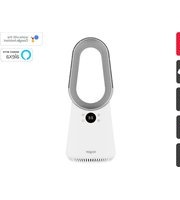
KABLFAN2CCA - Fan Kogan - Free user manual and instructions
Find the device manual for free KABLFAN2CCA Kogan in PDF.


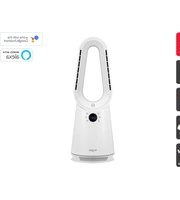
| Type | Bladeless Fan |
| Brand | Kogan |
| Model | KABLFAN2CCA |
| Power Consumption | 24W |
| Input Voltage (Adapter) | 100-240V ~ 50/60Hz |
| Output Voltage (Adapter) | 24V |
| Power Cable Length | 1.5m |
| Fan Speeds | 9 (1-9) plus Hi-speed mode |
| Oscillation Angles | 30°, 60°, 90°, 120° |
| Timer | Up to 8 hours (1-hour increments) |
| Sleep Mode | Yes (low noise) |
| Remote Control | Included (requires 2x AAA batteries) |
| Smart Connectivity | SmarterHome App, Google Home, Amazon Alexa |
| Wi-Fi Compatibility | 2.4GHz only |
| Operating Temperature | 0 to +40°C |
| Humidity Range | 5-75% (non-condensing) |
| Cleaning | Wipe with dry soft cloth; use vacuum for vents |
| Storage | Keep away from direct sunlight, heat, humidity |
| Disposal | Do not dispose with household waste; recycle responsibly |
Frequently Asked Questions - KABLFAN2CCA Kogan
User questions about KABLFAN2CCA Kogan
0 question about this device. Answer the ones you know or ask your own.
Ask a new question about this device
Download the instructions for your Fan in PDF format for free! Find your manual KABLFAN2CCA - Kogan and take your electronic device back in hand. On this page are published all the documents necessary for the use of your device. KABLFAN2CCA by Kogan.
USER MANUAL KABLFAN2CCA Kogan
natural_image
Line drawing of a kōgan air conditioner unit with a circular handle and control buttons (no text or symbols on the device itself)KOGAN SMARTERHOME™ BLADELESS FAN
KABLFAN2CCA
Safety & Warnings 3
Components 5
Overview 6
Installation 7
Operation 8
Connect to SmarterHome™ App 12
Google Home Control 17
Amazon Alexa Control 20
Cleaning & Care 23
Specifications 24
Notes 25
WARNING: To prevent fire, electric shock and personal injury. Be sure to comply with the following requirements. Follow the relevant national and local electrical regulations.
Safety & Warnings
When using electrical appliances, basic safety precautions should always be followed to reduce the risk of fire, electric shock, and injury:
- Read all instructions carefully, even if you are familiar with the appliance. Retain this user guide for future reference.
- This product is intended for general domestic use only. Do not use the product for any other purpose.
- This appliance is not intended for use by persons (including children) with reduced physical, sensory, or mental capabilities or lack of experience and knowledge unless they have been given supervision or instruction concerning use of the appliance by a person responsible for their safety.
- Children should be supervised to ensure that they do not play with the appliance.
- Do not leave the product unattended while it is in use, especially when children are present.
• Always unplug the product from the electrical outlet when it is not in use. - Always operate the product on a flat, level, steady, and stable surface to avoid it overturning.
- Do not hang or wall-mount the product.
- Do not place the product in or near an open window. Rain, snow, and other weather elements may create an electrical hazard.
- Keep the power cord and product away from heated surfaces.
• Always unplug the product from the electrical outlet when cleaning it. - Do not plug or unplug the product into or from the electrical outlet with wet hands.
- Never drop or insert objects into any opening of the product.
- Do not attempt to open any part of the motor housing, as there is a risk of electrical shock.
- Do not allow the power cord to hang over the edge of a table or counter where it may be tripped over or pulled.
- Do not operate the product if the power cord is cut, damaged, or if the wires are exposed.
- Do not immerse or expose the motor housing, power cord, or plug to water or other liquids.
- Do not put any stress on the power cord where it connects to the product, as the power cord could fray and break.
- Only use the adaptor supplied with the product.
- Do not operate the product if it has a damaged power cord or plug, malfunctions, or is dropped or damaged. Do not attempt to examine or repair this product yourself. Qualified service personnel should perform any servicing.
- This product is intended for indoor, non-commercial, non-industrial, household use only. Do not use outdoors.
- To disconnect the product, set the main switch to OFF and then remove the plug from the outlet. Do not pull on the power cord when disconnecting.
- Ensure that the product is switched OFF and unplugged from the supply mains before cleaning and maintenance.
- Do not move the product when it is in use.
- Do not run the power cord under carpeting or cover the power cord with throw rugs, runners, or similar items. Arrange the power cord away from traffic areas where it will not be tripped over.
- Do not use this product with a programmer, timer, or any other device that switches the product on automatically, as a fire risk exists if the product is covered or positioned incorrectly.
- Do not place any objects on or cover the air inlet or outlet. Make sure that the ventilation openings are free of dust, lint, hair, or any other obstacles that could impair airflow.
- The appliance is designed to function quietly and safely under normal circumstances.
Warning:
- Do not place the appliance near any power board or socket outlet.
- If the supply power cord is damaged, it must be replaced by Kogan.com, its service agent, or similarly qualified persons to avoid a hazard.
- This product has not been designed for any uses other than those specified in this booklet.
COMPONENTS

natural_image
Line drawing of a stylized air conditioner fan with a circular handle and control knob (no text or symbols)Fan Power adapter

natural_image
Line drawing of a cable with a plug inserted, no text or symbols present
natural_image
Simple line drawing of a remote control with three buttons (power, function, and minus) on a white background (no text or symbols)Remote control User guide

OVERVIEW
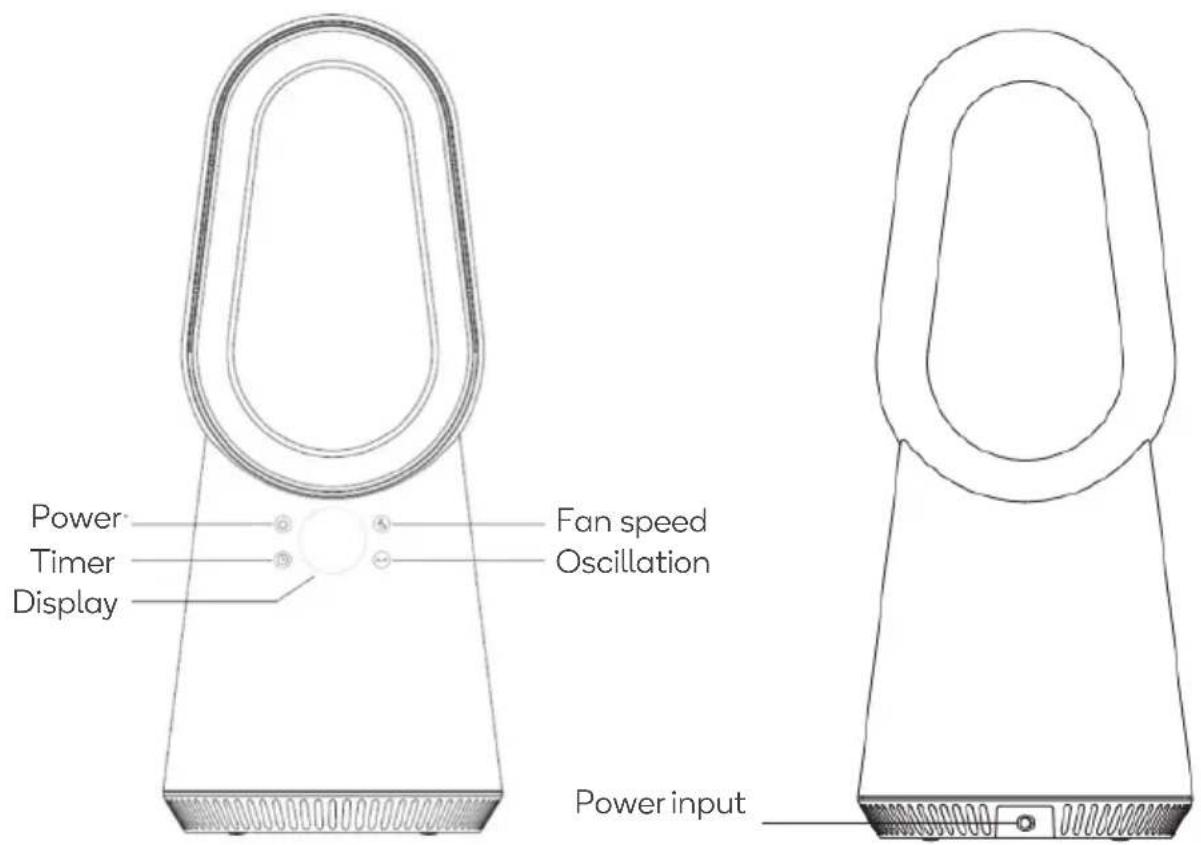
Remote control

INSTALLATION
Remove all packaging material from the device.
Choose an installation location with the following requirements:
- The floor should be firm, flat, and horizontal.
- Do not place the unit in a hot, wet, or very humid environment.
- The outlet must be easily accessible for easy disconnection if necessary.
• Temperature range: 0 to +40 °C
• Air humidity (no condensation): 5–75 % - Ensure there are no obstacles like curtains blocking the air circulation.
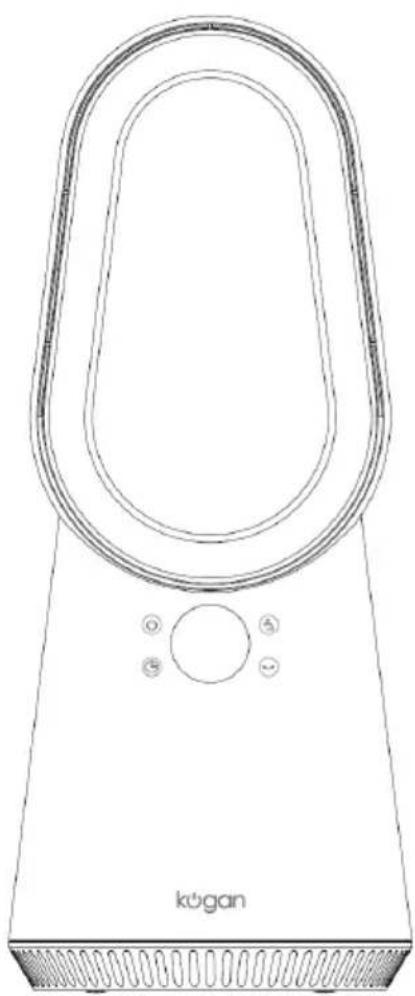
natural_image
Line drawing of a kōgan air conditioner unit with a circular handle and control buttons (no text or symbols on the device itself)
OPERATION
Power Connection:
Insert the plug into an electrical outlet. Ensure the voltage matches the specifications plate. The fan will beep once, indicating standby mode.
Using the Fan:

Power button
- In the standby state, press the power button to start the fan. The default speed is 3.
- Press it again to turn the fan off.

Fan Speed button
To change the fan speed, press the button repeatedly until the desired speed (1-9) is shown on the display.

Oscillation button
Press this button to set the horizontal oscillation angle (options: 30irc , 60irc , 90irc , and 120irc ). A fourth press stops the oscillation.

Timer button
Set the timer to automatically turn off the fan in 1-hour intervals up to 8 hours. Adjust the timer setting by pressing the Timer button repeatedly. Each press increases the timer by 1 hour; at 8 hours, pressing once returns the setting to 0. When the fan is turned off, the timer setting is cancelled.
0 1 - 0 2 - 0 3 - 0 4 - 0 5 - 0 6 - 0 7 - 0 8 - 0 0
Note: A small dot flashes at the bottom right of the display to indicate the timer is enabled.
Using the Remote Control:
Power button

- In the standby state, press the power button to start the fan. The default speed is 3.
- Press it again to turn the fan off.
Hi-speed mode

- The airflow speed is set to the highest level. The display will show HH.
- Press again to exit hi-speed mode.
- You can also exit the current mode by pressing the “+ -” button).
Sleep mode

- The airflow speed and noise are reduced to the lowest level. The display will show LL.
- Press again to exit sleep mode.
- You can also exit the current mode by pressing the “+ -” button).
Oscillation
Press this button to set the horizontal oscillation angle (options: 30irc , 60irc , 90irc , and 120irc ). A fourth press stops the oscillation.

Increase Airflow Decrease Airflow
- Press the “+” button on the remote control to increase the air volume.
- Press the “-” button to decrease the air volume.
• There are 9 speed settings.
Timer
Set the timer to automatically turn off the fan in 1-hour intervals up to 8 hours. Adjust the timer setting by pressing the Timer button repeatedly. Each press increases the timer by 1 hour; at 8 hours, pressing once returns the setting to 0. When the fan is turned off, the timer setting is cancelled.
0 1 - 0 2 - 0 3 - 0 4 - 0 5 - 0 6 - 0 7 - 0 8 - 0 0
Note: A small dot flashes at the bottom right of the display to indicate the timer is enabled.
Operating instructions of remote control
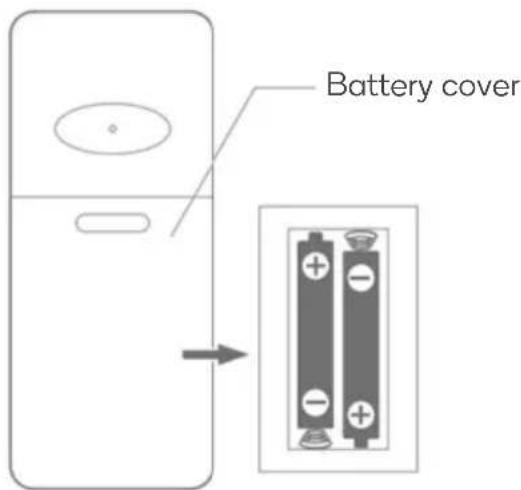
This remote control requires x2 1.5V alkaline AAA batteries to operate.
- Remove the battery cover
- Noting the battery polarities (+/-), insert x2 AAA batteries into the remote control,
- Ensuring the locking tabs click into place. secure the battery cover onto the remote control.
Battery installations
- Open the battery compartment at the back of the remote control.
- Insert x2 new AAA 1.5V alkaline batteries, aligning with the polarity indicator markings (+/-) inside the battery compartment.
- Slide back the battery cover, making sure the locking tabs click into place.
Note:
Make sure the batteries are installed correctly in the remote control by aligning the +/- polarity marking in the battery compartment with the batteries.
Note:
Remove batteries if not in use for a long time, keep out of reach of children, and seek medical attention if swallowed, as batteries are not rechargeable.
Remote Control Interference
- This fan may respond to the remote control of other devices.
- If you use the remote control of this fan, other devices may respond.
This is due to the overlapping frequencies of the remote control. There is no quality problem with the product itself. To avoid misuse, keep the remote control away from other electrical devices during operation. The remote control should be directed towards the display to maximize the remote-control signal.

natural_image
Line drawing of a hand holding a remote control with wireless signal waves (no text or symbols)CONNECT TO SMARTERHOME™ APP
Install App
Download the "Kogan SmarterHome" app from the Play Store (Android) or App Store (iOS).
Play Store (Android)
App Store (iOS)

To register:
- If you already have a SmarterHome account, select 'Log In'. To register a new account, select 'Sign Up'.
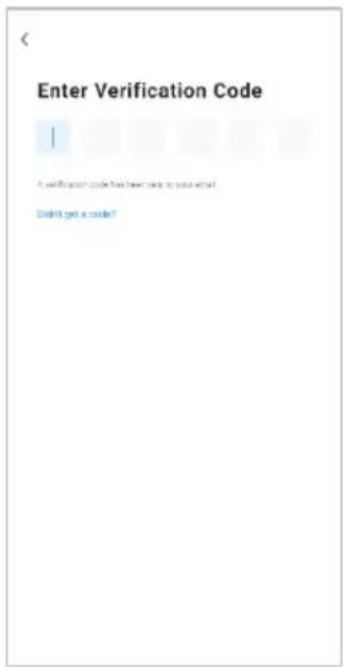
- The system will automatically recognise your country. If needed, you can manually select your country from the drop-down box. Enter your email address and tap 'Get Verification Code' to continue.
- A 6-digit code will be sent to the submitted email address. Enter this code before the one-minute timer expires.
- Continue to the next page and complete your SmarterHome profile.


Set device in pairing mode
Set the device in pairing mode by pressing and holding the display for 5 seconds until you hear three beeps and the display shows 'FF' flashing rapidly.
Add device through network
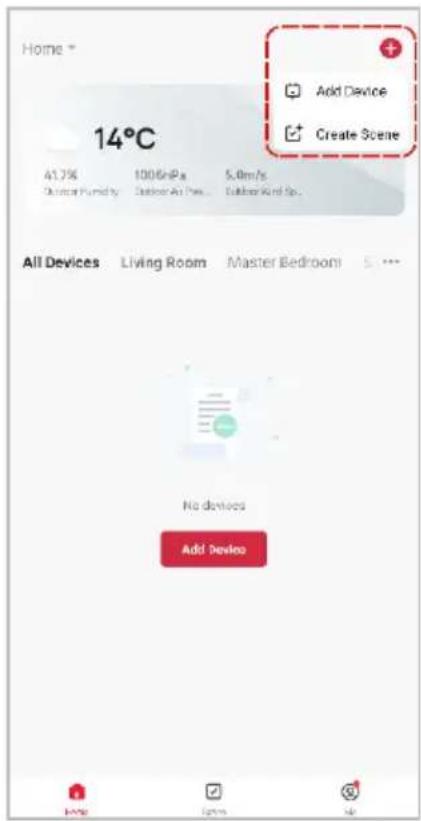
- Once registered, tap 'Add Device' on the app's home page, or the '+' in the upper right corner, to add a new device through the network.
- Select the product type from the list of options in the app (Heating & Cooling > Fans).
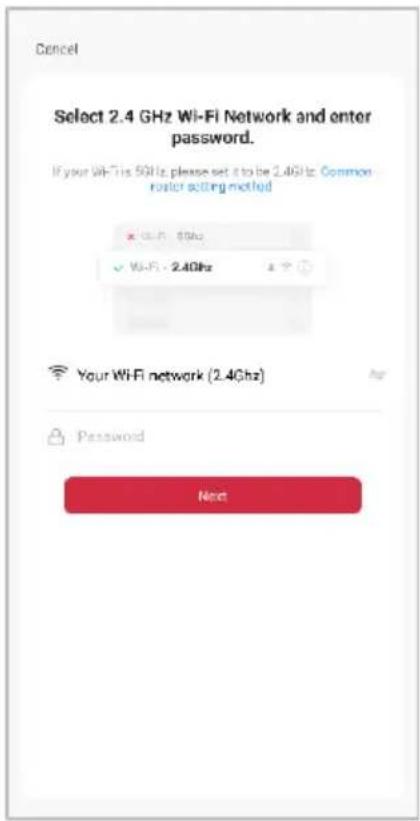
- Enter your Wi-Fi details. It is important that your SmarterHome™ device and the app are connected to the same Wi-Fi network during setup.

Notes:
- The device and the app have to use the same Wi-Fi network.
• The device is only compatible with 2.4Ghz networks. -
Depending on the product, Steps 3 and 4 may be in opposite order.
-
Ensure that the device is in pairing mode, with 'FF' flashing rapidly on the display, and tap 'Confirm light is rapidly flashing' and press "Next".
- The device will commence the pairing process and connect to the app. Ensure your Wi-Fi router, mobile phone, and the SmarterHome™ device are kept close until connection is complete.
- After successfully being added, you will have the option to rename the device and assign it to a location. It will now be listed on the app's home page. Tap the device listing to enter its control page.
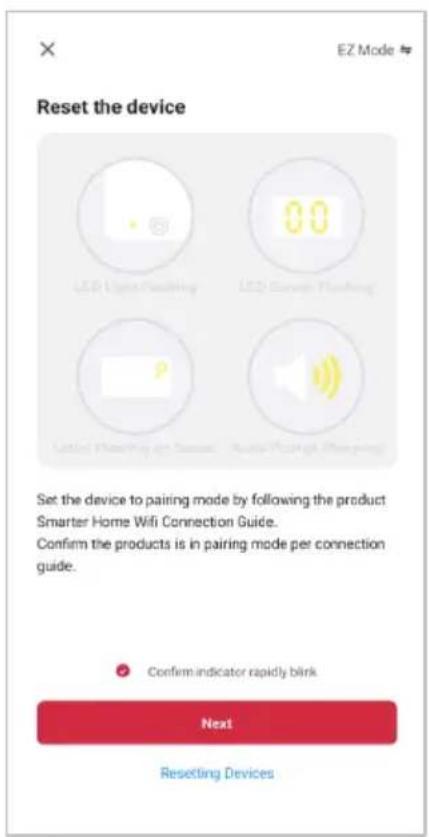


Note:
Once connected, you can select Create Scene from the ‘+’ in the upper right corner (or from the Scene tab) to group connected SmarterHome™ products and automate their functions.
Having trouble connecting?
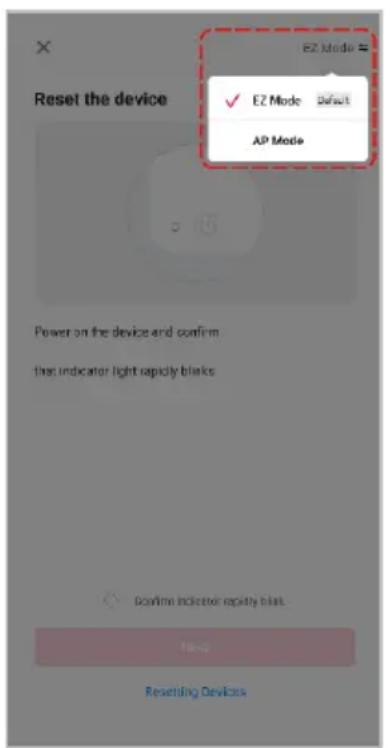
The prior steps detail the process for ‘EZ Mode’ connection. If that does not work for your connection, we suggest trying it again, and if still no success, attempting the following method for AP Mode connection.
Set device in AP pairing mode
Set the device in pairing mode pressing and holding the oscillation button/display for 5 seconds again until the fan emits 3 beeps the display shows 'F' flashing slowly.
Using AP Mode to add device
- Follow the previous steps to select your product type (Heating & Cooling > Fans).
- Adjust your connection method by tapping on the mode type in the top-right corner of the screen. Select 'AP Mode' for the set-up type.
- Ensure that the device is in pairing mode, with the display flashing 'FF' slowly, and tap 'Confirm light is slowly flashing' and press "Next".
- Enter your Wi-Fi details. It is important that your SmarterHome™ device and the app are connected to the same Wi-Fi network during setup.
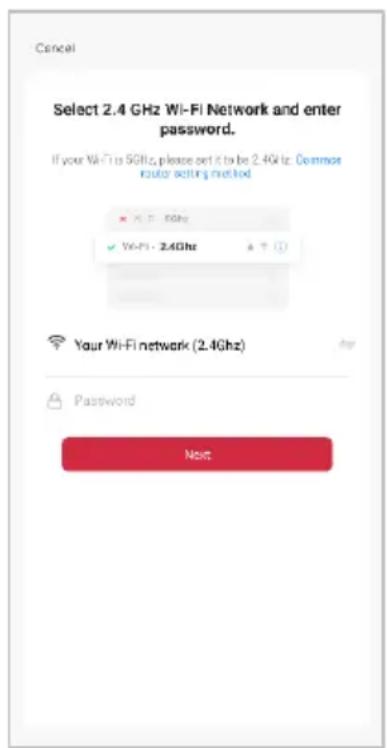
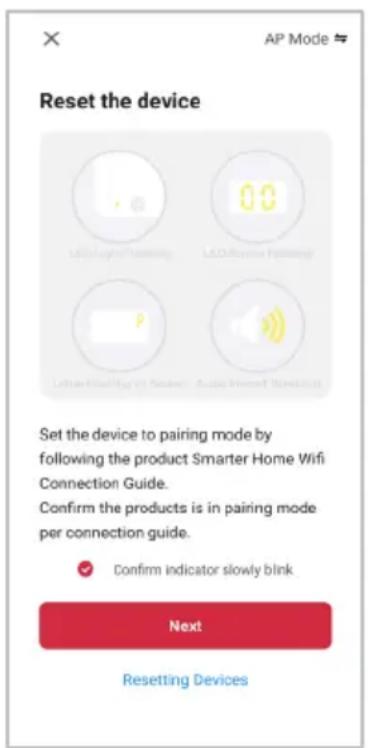
Notes:
- The device and the app have to use the same Wi-Fi network.
-
The device is only compatible with 2.4Ghz networks.
-
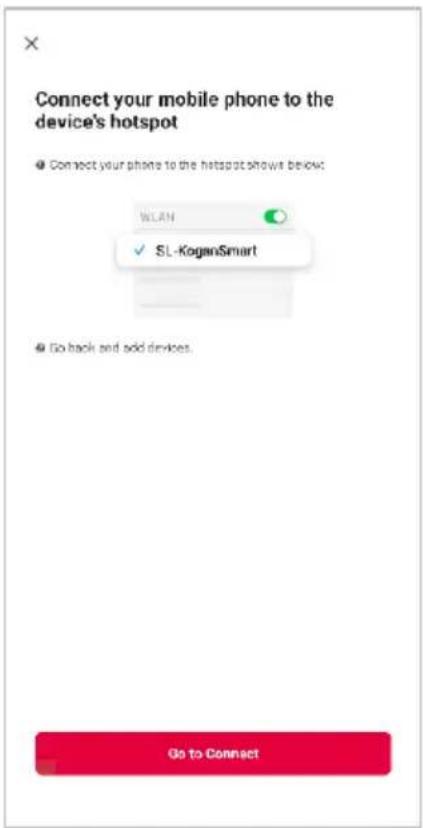
Follow the in-app prompts to continue AP Mode connection, which will pair your mobile phone to the device's Wi-Fi hotspot to ensure a connection. This may be named 'SL-KoganSmart', 'SmartLife-XXXX', or another similar name.
Note:
If the Wi-Fi hotspot does not appear on your phone in the list of available networks, your device may not be set in AP Pairing Mode correctly. Try repeating the steps outlined above to ensure your device is ready for connection.
- The device will commence the pairing process and connect to the app. Ensure your Wi-Fi router, mobile phone, and the SmarterHome™ device are kept close until connection is complete.
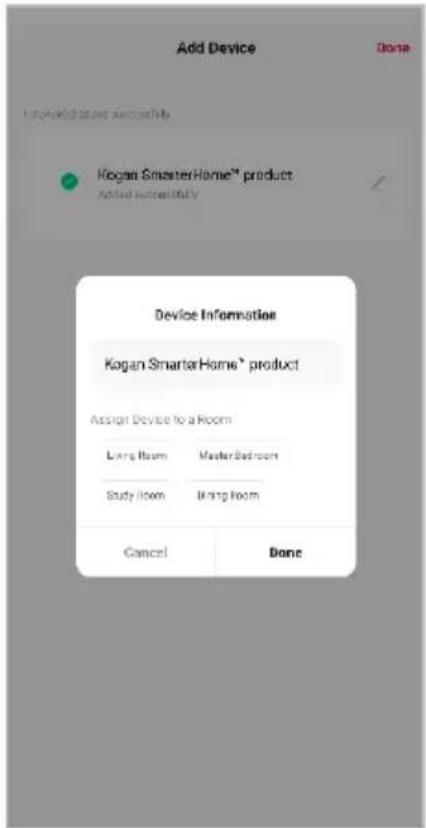
- After successfully being added, you will have the option to rename the device and assign it to a location. It will now be listed on the app's home page. Tap the device listing to enter its control page.

Note:
Once connected, you can select Create Scene from the ‘+’ in the upper right corner (or from the Scene tab) to group connected SmarterHome™ products and automate their functions.
GOOGLE HOME CONTROL
Note:
You will need to have set up a Google Home account prior to linking your Kogan SmarterHome™ device.
Adding 'SmarterHome' to the Google Home app
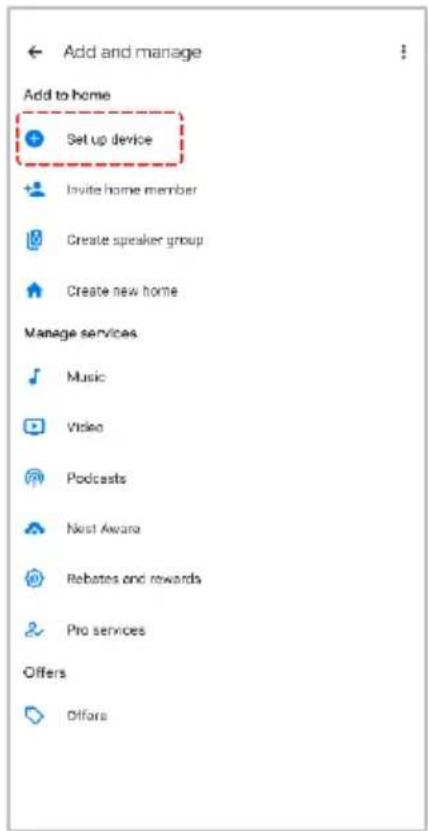
- From the home page of the Google Home app, select the ‘+’ icon (top left corner, see arrow in the below screenshot) to access the ‘Add and manage’ page.
- Select 'Set up device', then select the 'Works with Google' option.


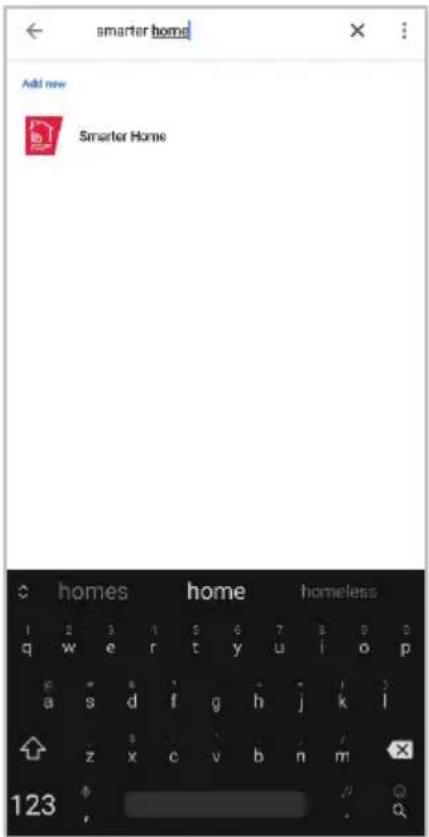
- Select the search bar and type 'Smarter Home' to locate the Kogan SmarterHome™ service.
- From here, you will be prompted to sign into your SmarterHome™ account using either your email or mobile phone number, depending on which method you used to register your account.
- Select 'Kogan SmarterHome™' from the app options.
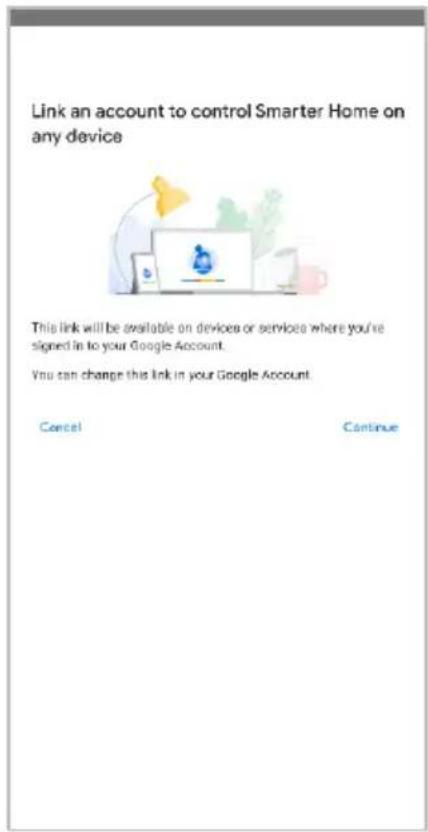
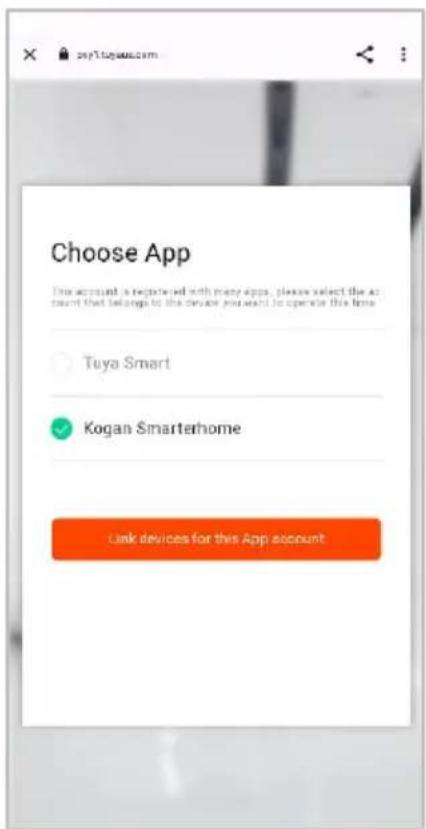
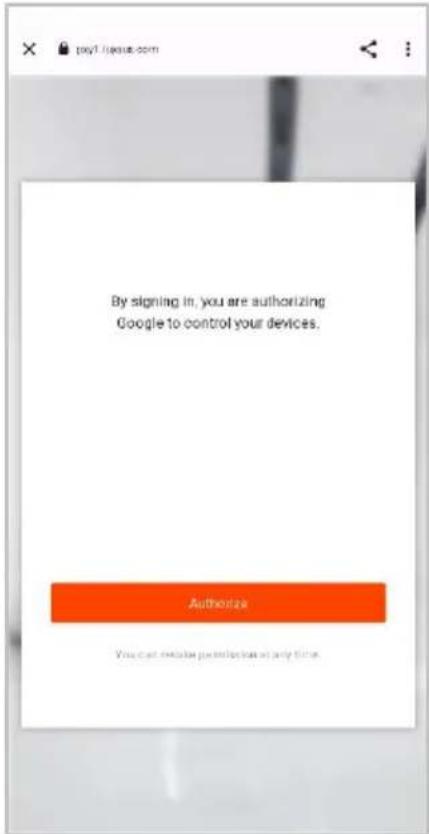
- Tap 'Authorise' to grant Google permission to access the SmarterHome™ app and your devices.
- Once connected, the app will display any compatible devices linked to your SmarterHome™ account. From here you can assign them to rooms and set up any routines. Tap on any of the devices to view a list of available commands.
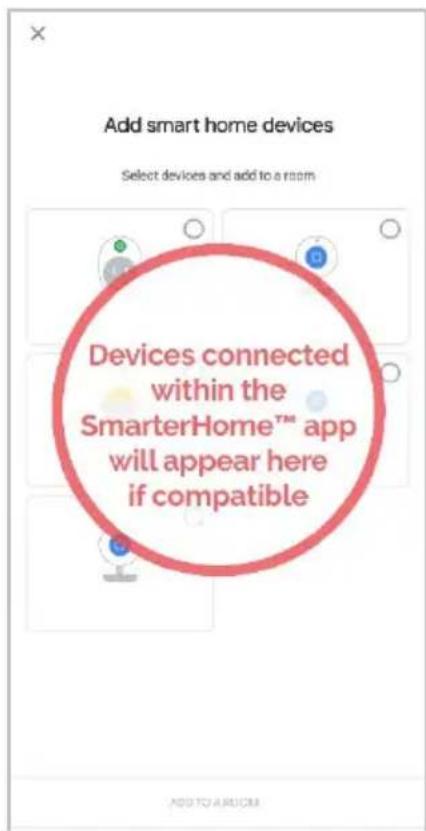
Note:
Please note that Google Home can only control the base/core functions of any compatible SmarterHome™ devices. To make full use of this product's smart functionality, please use the Kogan SmarterHome™ app.
AMAZON ALEXA CONTROL
Note:
You will need to have set up an Alexa account prior to linking your Kogan SmarterHome™ device.
Adding 'SmarterHome' to the Alexa app
- From the home page of the Alexa app, select the ' ’ icon in the bottom-right and select 'Skills & Games' from the sidebar.
- Select the search bar and type 'Smarter Home' to locate the Kogan SmarterHome™ skill.


- Tap 'Enable to Use' to add the Kogan SmarterHome™ skill to Alexa.
- From here, you will be prompted to sign into your SmarterHome™ account using either your email or mobile phone number, depending on which method you used to register your account.
- Select 'Kogan SmarterHome™' from the app options.

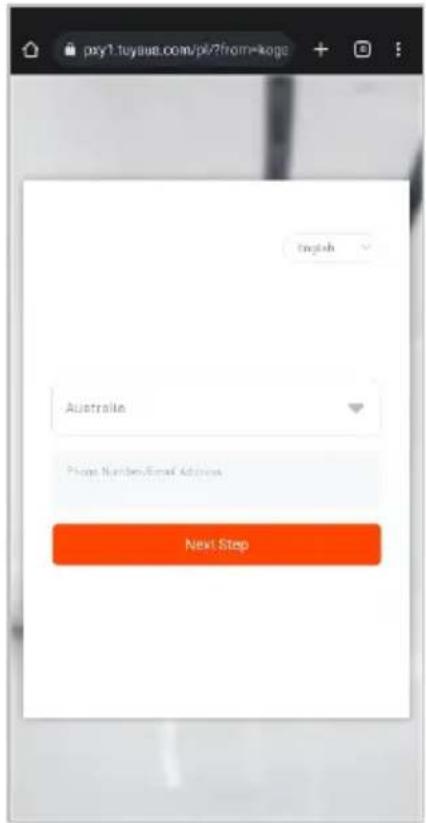

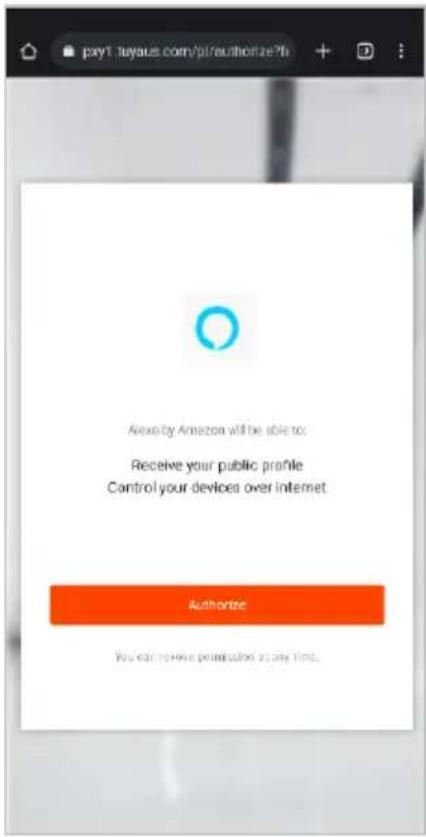
- Tap 'Authorise' to grant Alexa permission to access the SmarterHome™ app and your devices.
- Once connected, the app will perform a search and display the devices linked to your SmarterHome™ account. When your devices have successfully connected to the Alexa app, you will be able to control your Kogan SmarterHome™ devices via Alexa's voice commands.

Note:
Please note that Alexa can only control the base/core functions of any compatible SmarterHome™ devices. To make full use of this product's smart functionality, please use the Kogan SmarterHome™ app.
CLEANING & CARE
When performing maintenance, be sure to unplug the power supply first.
- Do not soak or splash water on the fan, as it may cause water damage.
- Avoid using banana water, gasoline, alcohol, bleach, or metal objects to wipe the fan surface, as these may cause discoloration and deterioration.
Object Surface:
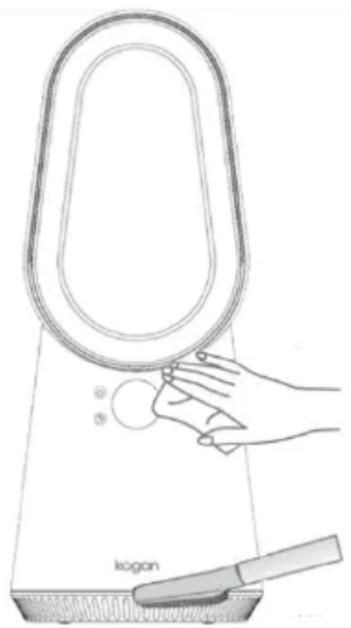
- Gently wipe the fan surface with a dry, soft cloth.
- If the surface is dirty, use a soft cloth dampened with a diluted neutral detergent. Wipe it clean, then dry with a soft cloth.
Air Inlet and Air Outlet:
Use a soft brush or a vacuum cleaner to clean dust from the air inlet and outlet. Excessive dust can affect fan performance, so clean it regularly.
Power Adapter:
Clean the power adapter with a dry, soft cloth.
natural_image
Line drawing of a kogan device with a hand holding a circular tray (no text or symbols)Storage:
- Store the fan in a plastic bag after maintenance.
- Avoid places with vibration and electrical appliances with cooling or heating functions.
- Keep it out of direct sunlight, high temperatures, and humidity.
- Keep it out of the reach of children.
- During maintenance, please do not soak or splash water on the fan, it may cause the machine to get water and damage it.
- Please do not use banana water, gasoline, alcohol, bleach or metal objects to wipe the fan surface, which may cause the fan surface to discolour and deteriorate.
SPECIFICATIONS
Input voltage
24V---
Power consumption 24W
Input voltage 100-240V \~
Rated frequency 50/60Hz
Output power 24W
Protection class

Power cable length
1.5m
Disposal
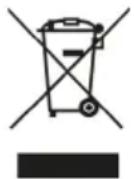
This marking indicates that this appliance should not be disposed with other household wastes. To prevent possible harm to the environment or human health from uncontrolled waste disposal, recycle it responsibly to promote the sustainable reuse of material resources.
NOTES
Need more information?
We hope that this user guide has given you the assistance needed for a simple set-up.
For the most up-to-date guide for your product, as well as any additional assistance you may require, head online to help.kogan.com
kogan.com

- KOGAN SMARTERHOME™ BLADELESS FAN
- Safety & Warnings
- Warning:
- COMPONENTS
- OVERVIEW
- INSTALLATION
- OPERATION
- Power Connection:
- Using the Fan:
- Power button
- Fan Speed button
- Oscillation button
- Timer button
- Using the Remote Control:
- Hi-speed mode
- Sleep mode
- Oscillation
- Increase Airflow Decrease Airflow
- Timer
- Operating instructions of remote control
- Battery installations
- Note:
- Remote Control Interference
- CONNECT TO SMARTERHOME™ APP
- Install App
- To register:
- Set device in pairing mode
- Add device through network
- Notes:
- Having trouble connecting?
- Set device in AP pairing mode
- Using AP Mode to add device
- GOOGLE HOME CONTROL
- Adding 'SmarterHome' to the Google Home app
- AMAZON ALEXA CONTROL
- Adding 'SmarterHome' to the Alexa app
- CLEANING & CARE
- Object Surface:
- Air Inlet and Air Outlet:
- Power Adapter:
- Storage:
- SPECIFICATIONS
- Disposal
- NOTES
- Need more information?
Brand : Kogan
Model : KABLFAN2CCA
Category : Fan