
Chateaux 78605-86 - Indoor Lighting Quorum International - Free user manual and instructions
Find the device manual for free Chateaux 78605-86 Quorum International in PDF.


| Product Type | Ceiling Fan (Indoor Lighting) |
| Brand | Quorum International |
| Model | Chateaux 78605-86 |
| Blade Span | 52 inches |
| Number of Blades | 4 |
| Mounting Type | Downrod mount (standard 3.5" or 6" downrod included) |
| Motor Speed Control | Pull chain (or optional wall control) |
| Reversible | Yes, via reverse switch on control cup |
| Light Kit Compatible | Yes (optional, blue wire for light) |
| Blade Material | Wood |
| Motor Material | Steel with sealed bearings |
| Power Supply | 120V ~ 60Hz |
| Installation Requirements | Outlet box rated for fan support (max 350 lbs) |
| Warranty - Motor | Limited lifetime for original purchaser |
| Warranty - Other Parts | 1 year (blades and finish: 90 days) |
| Maintenance | Periodically tighten screws; clean with damp cloth and mild detergent |
| Lubrication | Never required (sealed bearings) |
| Safety | Disconnect power before installation/service; use approved mounting hardware |
| Replacement Parts | Available from Quorum International (call 817-626-5483) |
Frequently Asked Questions - Chateaux 78605-86 Quorum International
User questions about Chateaux 78605-86 Quorum International
0 question about this device. Answer the ones you know or ask your own.
Ask a new question about this device
Download the instructions for your Indoor Lighting in PDF format for free! Find your manual Chateaux 78605-86 - Quorum International and take your electronic device back in hand. On this page are published all the documents necessary for the use of your device. Chateaux 78605-86 by Quorum International.
USER MANUAL Chateaux 78605-86 Quorum International
THE CHATEAUX CEILING FAN INSTALLATION INSTRUCTIONS
Please read and save these instructions

These instructions are to be used in the installation of the following QUORUM INTERNATIONAL fans...
The Chateaux 52" & 60"

UORUM
INTERNATIONAL
©2015 Quorum International. All Rights Reserved.
QUORUM'S UNIQUE LIMITED LIFETIME WARRANTY
This warranty gives you specific legal rights, and you may also have other rights which vary from state to state.
WHAT IS COVERED-
Except as specified below, the manufacturer of this product warrants it to be free of all defects in workmanship and material.
WHAT IS NOT COVERED BY THIS WARRANTY-
-
All costs of removal or reinstallation of the fan.
-
Damage resulting from failure to follow instructions contained herein.
- Damage occurring during shipment of the product (claims must be presented to the carrier).
- Damage resulting from accident, misuse, abuse, or neglect.
- Damage resulting from the application of any exterior coating, or by the addition of any unapproved accessories.
- Damage resulting from repair or attempted repair by anyone other than the manufacturer.
- Damage resulting from causes other than product defects, including lack of
technical skill, competence, or experience of the user.
-
Light bulbs, glass or acrylic components or accessories.
-
Minor occurrences of wobble are accepted as normal and should not necessarily be considered a defect.
WHO MAY ENFORCE WARRANTY- This warranty may be enforced only by the original purchaser. The end user must possess a dated proof of purchase from an authorized Quorum dealer to establish a warranty claim.
LENGTH OF THE WARRANTY -
- For the fan motor - for the lifetime of the original purchaser.
- For everything else, except blades and finish - one year from the date of purchase.
- For fan blades and finish - 90 days from the date of purchase.
WHAT WE WILL PAY FOR -
We agree to correct defects outlined in the warranty without charge, or at our option replace the fan with an equivalent or
superior product if the defective unit is returned prepaid to us.
TO GET WARRANTY SERVICE - To obtain warranty service, the product must be returned prepaid to Quorum. (This warranty is not enforceable outside the United States.) Details regarding return shipment are explained elsewhere in this manual. Whenever warranty service is required, you must present a copy of the original dated sales receipt as proof of coverage.
There is no other express warranty. Quorum hereby disclaims any and all implied warranties, including but not limited to those of merchantability of fitness for a particular purpose to the extent permitted by law. Quorum shall not be liable for incidental, consequential, or special damages arising out of or in connection with the product use or performance except as may otherwise be accorded by law. The duration of any implied warranty which cannot be disclaimed is limited to the periods specified above in the express warranty.
WARRANTY SERVICE
- Most problems can be handled by our customer service agents over the telephone. Customers seeking warranty repair or replacement for any fan or component are encouraged to call us for assistance. All returns must be issued a Return Goods Authorization number (RGA) prior to returning the defective unit or part. Call (817) 626-5483 - Monday thru Friday 8:00 a.m. - 5:00 p.m. CST to obtain a RGA number.
-
Arriving shipments will be refused if they do not bear a valid RGA number on the outside packaging.
-
A dated proof of purchase must accompany any fan or component clearly indicating the name of the original purchaser.
- To avoid damage in transit, the product should be returned in its original box and packaging. Quorum will not bear responsibility for any shipping damage.
- Any return of a fan or component must be shipped freight and insurance prepaid.
FOR YOUR RECORDS
Purchased From ____
City ____ State ____
Fan Model No. ____
Date Purchased ____
Complete and mail the enclosed warranty card within 10 days to ensure your warranty is registered.
If you have any questions regarding the warranty, or the procedures for obtaining service, please call us at (817) 626-5483 - Monday thru Friday 8:00 a.m. - 5:00 p.m. CST.
- To avoid possible electric shock, turn off the electricity at the main fuse box or circuit panel before you begin the fan installation or before servicing the fan or installing accessories.
- Read all instructions and safety information carefully before installing your fan and save these instructions.
- Make sure all electrical connections comply with local codes or ordinances as well as the National Electrical Code. If you are unfamiliar with electric wiring, please use a qualified and licensed electrician.
-
Make sure you have a location selected for your fan which allows clear space for the blades to rotate, and at least seven (7) feet of clearance between the floor and the fan blade tips.
-
To reduce the risk of fire, electric shock, or other personal injury, mount fan only on an outlet box or supporting system marked acceptable for fan support of 350 lbs (15.9 kg) or less and use mounting screws provided with the outlet box. Most outlet boxes commonly used for the support of lighting fixtures are not acceptable for fan support and may need to be replaced. Consult a qualified electrician if in doubt.
- To reduce the risk of personal injury use only approved hanging brackets and screws supplied with the outlet box for mounting to the outlet box.
- After installation is complete, check that all connections are absolutely secure.
- Do not insert anything into the fan blades while they are rotating.
-
Do not operate the reverse switch until the fan has come to a complete stop.
-
Do not attempt to control the operation of the fan (or an optional light kit) from any wall control that is not approved by Quorum for use with its fans. Do not use solid state wall controls. The use of any unapproved control voids the fan's warranty.
TOOLS REQUIRED FOR INSTALLAITON
Phillips Screwdriver
Wire Cutters
Electrical Tape
Step Ladder
2. UNPACKING YOUR FAN
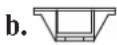
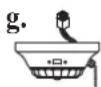
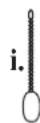
Unpack your fan and check the contents. Do not discard the carton. If warranty replacement or repair is ever necessary the fan should be returned in original packaging. Remove all parts and hardware. Do not lay motor housing on its side - because the decorative casing may shift. Check all visible screws, bolts and nuts for tightness. Examine all parts. The following parts should be included:
- Set of blades (a)
- Hanging bracket (b)
- Canopy (c)
- Downrod assembly (3.5") and Alternate downrod (6") (d)
- Fan motor assembly (c)
- Set of blade arms (f)
- Control cup (g)
-
Parts bags (h) containing:
-
Blade attachment hardware (Screws/washers, washers may be attached to screws)
-
Mounting hardware (wire nuts, wood screws, machine screws, lock washers, spring washers, metal washers.)
-
Pull chain knobs (i)
- Blade balancing kit (j)

NOTE:
Some Quorum fan models will have slightly different parts than what is shown here depending upon the design you have chosen. Basic installation procedures are similar for all models.




3. MOUNTING OPTIONS
- Disconnect the power by removing fuses or turning off circuit breakers.
- If there is an existing outlet box, ensure it is clearly marked "Suitable for Fan Support". If it is not so marked, it must be replaced with an approved one.
- Secure the outlet box (or make sure the existing box is secured) directly to the building structure. Use appropriate fasteners and building materials.
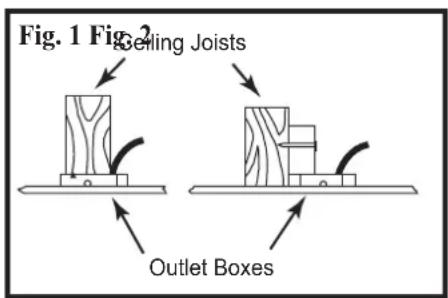
- Figures 1,2 and 3 are examples of different ways to mount the outlet box in different situations. A longer downrod may be required in sloped ceiling situations to maintain proper blade clearance.
- To hang the fan in locations where no ceiling joist is available, a hanger support bar may be required (Figure 4). Quorum distributes approved hanger support bars and outlet boxes.
WARNING: TO REDUCE THE RISK OF ELECTRIC SHOCK, FIRE, OR PERSONAL INJURY, MOUNT THE FAN ONLY TO AN OUTLET MARKED ACCEPTABLE FOR FAN SUPPORT AND USE MOUNTING SCREWS PROVIDED WITH THE OUTLET BOX.
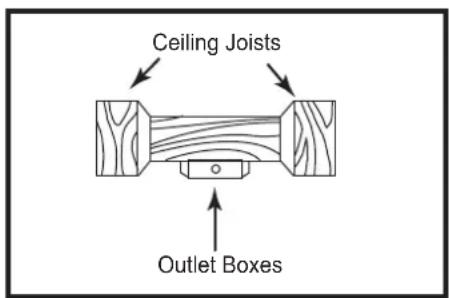
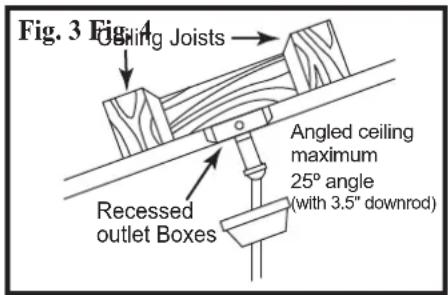
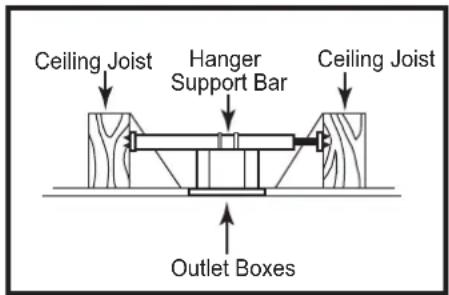
CAUTION: TO REDUCE THE RISK OF PERSONAL INJURY, INSTALL THE PRIMARY MOUNTING MEANS AND USE ONLY THE HARDWARE PROVIDED WITH THE FAN.
4. HANGING YOUR FAN
WARNING -Turn off the power!
DO NOT fasten the blades to the fan until it is assembled and hanging from the ceiling. To do so now will likely bend the blade arms and almost certainly cause wobble.
CAUTION: Remove 5 rubber packing mounts from fan motor assembly and discard before installation.
- If not already affixed to the hanger bracket, place the rectangular rubber isolators between the hanger bracket and outlet box. Secure the hanger bracket to the outlet box using the 2 long steel screws supplied with the outlex box.
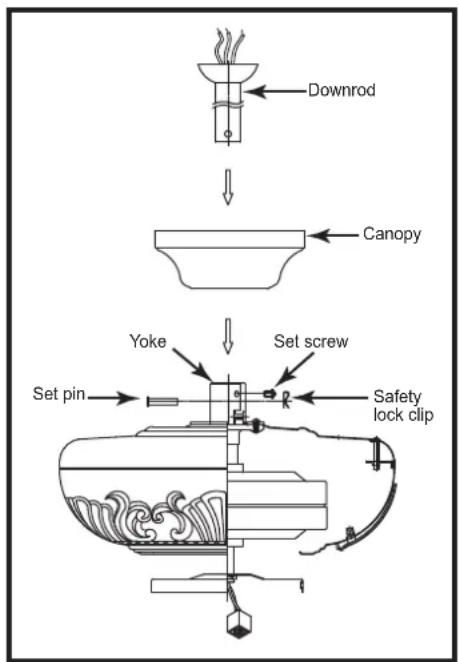
- Remove the set pin and safety lock clip from the yoke on top of the motor assembly. Slide the downrod through the canopy. (Fig. 5). Feed the wires from the fan motor through the downrod assembly.
- (Fig. 6) Attach the downrod assembly (downrod and canopy) to the motor by sliding the downrod into the yoke on top of the motor assembly. Slide the set pin through the hole in the yoke, downrod and secure it with the safety lock clip. Tighten the set screws on yoke. Feed the wires through the downrod ball.
- Lift the fan motor without the blades and place into the hanger bracket, rotating the ball until the groove engages the tab on the hanger bracket. This locks the ball mount and fan motor, preventing fan rotation during operation. (Fig. 7)
Fig. 5
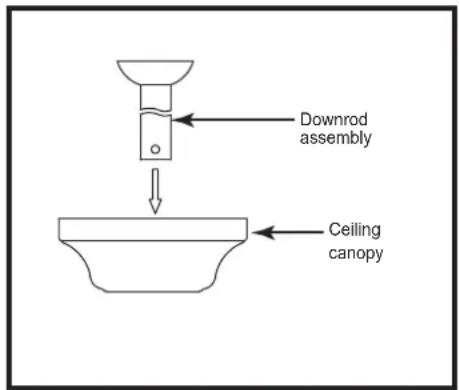
Fig. 7
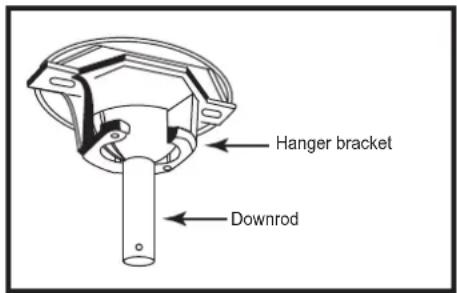
Fig. 6
5. ELECTRICAL CONNECTIONS
REMEMBER -Turn off the power!
Use the wire nuts supplied with your fan when making connections. Secure the connectors with electrical tape and make sure there are no loose connections or wire strands.
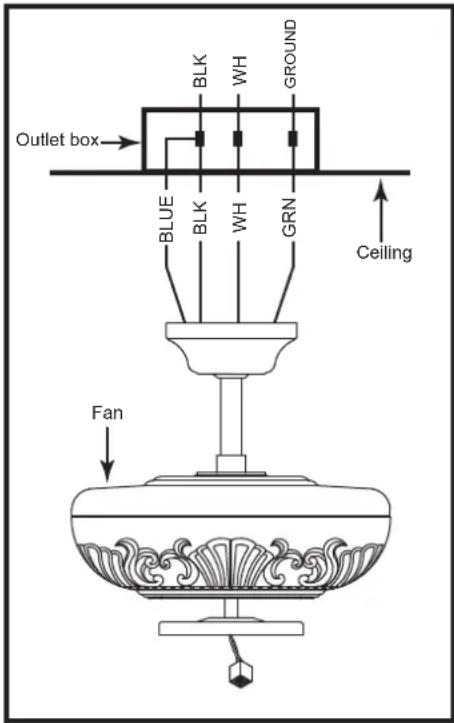
- Spread the wires apart so that the black and blue wires from the fan are on one side of the mounting bracket and the white wire and green ground wire are on the other side.
-
(Fig. 8) Connect the BLACK building supply wire to the BLACK and BLUE fan wires. Connect the WHITE building neutral wire to the WHITE fan neutral wire. Connect the COPPER building ground wire to the GREEN fan ground wire.
-
Optional Wall Controls:
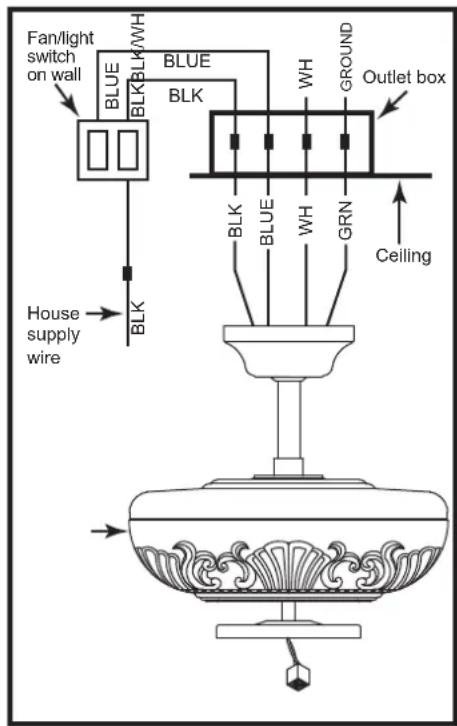
Wiring connections for optional wall control are shown in Fig. 8a and 8b. Figure 8a shows how to wire a fan wall control switch. This controls the fan only. To separately control an optional light kit using the light kit pull chain, you would have to connect the blue wire from the fan to the house supply wire, before it goes to the wall control. This is not an easy connection, and we suggest you call a qualified electrician to do it for you.
- Inside the ceiling junction box be sure to spread the wires apart so that the black and blue connections are on one side of the outlet box and the white/white and green/copper connections are on the other side.
Use ONLY wall controls approved by Quorum. Use of unapproved wall controls will cause unacceptable humming noise, and avoids the fan warranty.
Fig. 8 Fig. 8a Fig. 8b

6. COMPLETING THE INSTALLATION
-
Make sure the wiring is safely inside the outlet box as instructed in Step 5 - Electrical Connections. To install the canopy, remove the 1 of 2 screws from the bottom of the mounting bracket and loosening the other one a half turn from the screw head. Slide the canopy up to mounting bracket and place the key hole on the canopy over the screw on the mounting bracket, turn canopy until it locks in place at the narrow section of the key holes. Secure tightening the two set screws. (Fig. 9)
-
Blade Assembly & Installation (Fig. 10) Using the supplied blade arm screws, attach the blades to the blade arms. In some cases the fiber washer is permanently fixed to the screw head. Ensure all screws are used for each blade. Next attach the blades to the motor assembly using the supplied screws. DO NOT bend the blade arms when installing the blades.
-
Attaching the Control Cup (Fig. 11) While holding the control cup under your fan, snap together the wire connection plugs. Carefully push all wires back into the control cup, then install the control cup onto the control cup plate with 3 screws provided. Be sure to tighten all screws.
A certain amount of wobble may be considered normal, especially if the fan is on a downrod long than 12".
Fig. 9
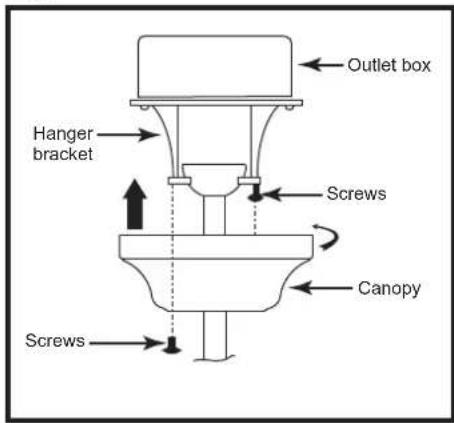
Fig. 10
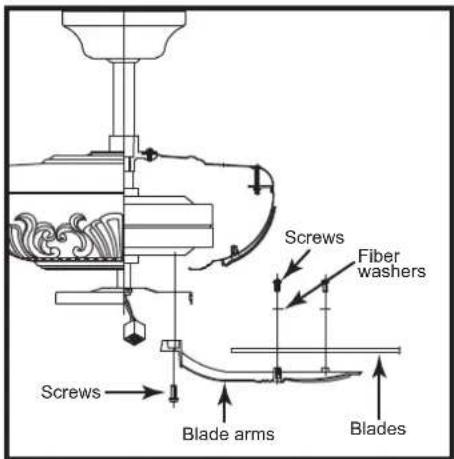
Fig. 11

7. FAN OPERATION AND CARE
- A ceiling fan is an environmentally smart choice to cool as well as to help warm your home or office. Adjust your HVAC thermostat during fan use to save additional energy and money on your air conditioning and heating utility bills. You should see a significant reduction in both your heating and cooling costs by regular use of your fan.
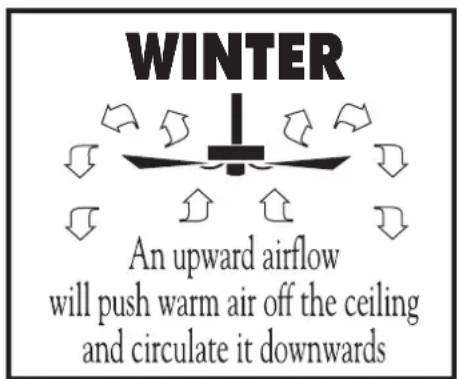
Do not hesitate to use your fan during summer and winter months. In summer, (Fig. 12) using the reverse switch, adjust the fan's direction so cool air is blown down, producing a cooling breeze. In winter, (Fig. 13) reverse the fan so that an upward airflow will push warm air off the ceiling and circulate it downwards into the living area. In winter months, use the fan at a lower speed than summer.
-
Periodically check tightness of all screws securing the blades to the blade arm attachment points. A clicking or a rattling noise is a sure indication of loosening screws. Since screws will invariably work loose over time, at least once a year, tighten all the screws attaching blades to blade arms. Do not bend blade arms when cleaning or servicing the fan.
-
Clean you fan periodically using only a cloth dampened with a mild detergent solution for all hardware - never use solvents. The finish plating is lacquered to prevent tarnishing. Use a lint-free cloth with clean water to clean blades.
-
You will never need to oil or lubricate your fan. Its permanently sealed bearings will provide trouble free, silent operation for many years.
-
If repairs or servicing are ever required, to avoid possible electric shock, turn off the electricity at the main fuse or circuit panel before you begin.
Fig. 12

Fig. 13
8. TROUBLESHOOTING
FAN WILL NOT START
-
Check that the electricity has been turned on at the circuit breaker which had probably been turned off during installation.
-
Turn off the electricity. Check all connections in the wiring of the fan at the ceiling and make sure it follows the wiring instructions outlined in this manual.
NOISE
Note: Always allow a day or two "run-in" time for any new fan at medium or high speed. When attempting to diagnose noise, listen carefully from several sides to try and isolate the location of the noise (blade, upper end, motor, light kit, etc.)
-
Tighten all screws attaching blades to blade arms. Remember to tighten these screws at least once a year because they may loosen slowly over time and cause a clicking noise.
-
Turn off the power. Loosen the canopy and check that the wiring and/or wire nut connectors are not resting against the canopy, possibly vibrating while the fan is on.
-
Use of a standard light rheostat or an unapproved fan wall control to control the fan speed will always cause an annoying "hum". Many fan motors do not work quietly with solid state variable speed controls.
- Check that the rubber gasket on the mounting bracket has been installed if called for in the installation instructions.
- Check that the canopy in not touching the ceiling.
- Check that all screws on the motor housing and the bottom housing are tight.
FAN TURNS, BUT DOES NOT MOVE MUCH AIR
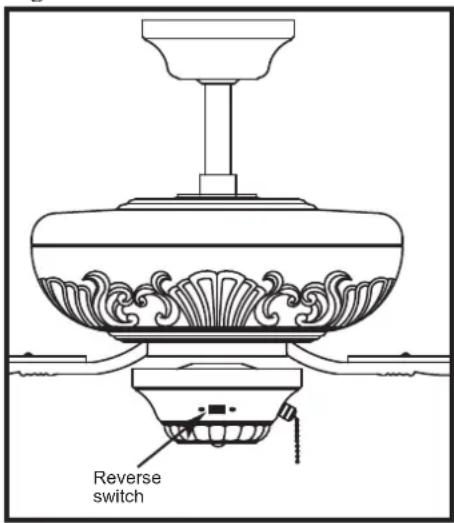
- The fan may be running in reverse. The reverse switch located on the control cup. (see Fig. 14)
- The distance from the ceiling to the blades may be too small. For downrod fans, optimal placement would be 8-9 feet from the floor.
- The room may contain items which obstruct the air flow.
- The fan may be too small for the size of the room.
Fig. 14
EXCESSIVE WOBBLE
Note: A small amount of wobble is considered acceptable and should not be considered a defect.
- Make certain all blades are tightly attached to each blades' respective blade arm.
REPLACEMENT PARTS AVAILABLE
A full range of genuine replacement spare parts are available at reasonable cost directly form Quorum International. Please call us at (817) 626-5483. Monday through Friday from 8:00 A.M. to 5:00 P.M. CST.


- THE CHATEAUX CEILING FAN INSTALLATION INSTRUCTIONS
- QUORUM'S UNIQUE LIMITED LIFETIME WARRANTY
- WHAT IS COVERED
- WHAT IS NOT COVERED BY THIS WARRANTY
- LENGTH OF THE WARRANTY
- WHAT WE WILL PAY FOR
- WARRANTY SERVICE
- FOR YOUR RECORDS
- TOOLS REQUIRED FOR INSTALLAITON
- UNPACKING YOUR FAN
- NOTE
- MOUNTING OPTIONS
- HANGING YOUR FAN
- ELECTRICAL CONNECTIONS
- REMEMBER -TURN OFF THE POWER
- COMPLETING THE INSTALLATION
- FAN OPERATION AND CARE
- TROUBLESHOOTING
- FAN WILL NOT START
- NOISE
- FAN TURNS, BUT DOES NOT MOVE MUCH AIR
- EXCESSIVE WOBBLE
- REPLACEMENT PARTS AVAILABLE
Brand : Quorum International
Model : Chateaux 78605-86
Category : Indoor Lighting