
GEK1235LWLPG - Hot plate WESTINGHOUSE - Free user manual and instructions
Find the device manual for free GEK1235LWLPG WESTINGHOUSE in PDF.


| Product Type | Gas Freestanding Stove |
| Brand | Westinghouse |
| Model | GEK1235LWLPG |
| Fuel Type | Natural Gas or Propane (convertible) |
| Dimensions (Width) | 540 mm |
| Number of Hotplate Burners | 4 |
| Hotplate Burner Outputs | Low (5.1 MJ/h), Medium (9.0 MJ/h), High (12.0 MJ/h) |
| Oven Type | Gas oven with fan forced option |
| Oven Burner Output | 12.0 MJ/h (NG) / 0.95 mm injector |
| Grill Type | Separate gas grill compartment |
| Grill Burner Output | Not specified |
| Ignition | Electronic ignition with igniter switch |
| Electrical Supply | 240 V, 50 Hz |
| Timer Features | 60-minute ringer timer and 2-hour cut-off timer |
| Clock | Programmable 24-hour digital clock (on select models) |
| Oven Capacity | Not specified |
| Safety Features | Flame failure device on gas burners (assumed), child lock not mentioned |
| Inner Door Glass | Removable for easy cleaning |
| Warranty | 2 years domestic (Australia/New Zealand) |
Frequently Asked Questions - GEK1235LWLPG WESTINGHOUSE
User questions about GEK1235LWLPG WESTINGHOUSE
0 question about this device. Answer the ones you know or ask your own.
Ask a new question about this device
Download the instructions for your Hot plate in PDF format for free! Find your manual GEK1235LWLPG - WESTINGHOUSE and take your electronic device back in hand. On this page are published all the documents necessary for the use of your device. GEK1235LWLPG by WESTINGHOUSE.
USER MANUAL GEK1235LWLPG WESTINGHOUSE
ELEVATED COOKING APPLIANCES
CONTENTSCONGRATULATIONS
Dear customer,
Congratulations on the purchase of your new oven.
Follow the instructions below to ensure that you install your oven safely and that it runs efficiently.
To avoid the risks that are always present when you use an electric appliance, it is important that the appliance is installed correctly and that you read the safety instructions carefully to avoid misuse and hazards.
We recommend that you keep this instruction booklet for future reference and pass it on to any future owners.
After unpacking the appliance, please check it is not damaged. If in doubt, do not use the appliance but contact your local customer care centre.
Record model and serial number here:
Model:
Serial No:
Important safety warnings 3
Description of your appliance 5
Before operating your appliance for the first time 7
Parts of your electric cooker....8
The parts of your gas cooker 9
Using your oven 10
Get to know your oven 12
Oven cooking guide 13
Handling baking problems 14
Using your grill 15
Using your hotplates 16
Choosing utensils....17
Using the timer and clock 18
Operating the programmable clock 18
Cleaning the cooker 19
Solving problems 22
Installing the electric cooker 23
Installing the gas cooker 24
Testing the operation of the cooker 26
Warranty 27
IMPORTANT SAFETY INSTRUCTIONS
Please read the user manual carefully and store in a handy place for later reference.
The symbols you will see in this booklet have these meanings:

WARNING
This symbol indicates information concerning your personal safety

CAUTION
This symbol indicates information on how to avoid damaging the appliance

TIPS & INFORMATION
This symbol indicates tips and information about use of the appliance

ENVIRONMENTAL TIPS
This symbol indicates tips and information about economical and ecological use of the appliance

This symbol indicates never to do this

This symbol indicates always do this

TIPS & INFORMATION
IMPORTANT – CHECK FOR ANY DAMAGES OR MARKS
If you find the oven is damaged or marked, you must report it within 7 days if you wish to claim for damage/marks under the manufacturers warranty. This does not affect your statutory rights.

ENVIRONMENTAL TIPS
INFORMATION ON DISPOSAL FOR USERS
- Most of the packing materials are recyclable. Please dispose of those materials through your local recycling depot or by placing them in appropriate collection containers.
• If you wish to discard this product, please contact your local authorities and ask for the correct method of disposal.

WARNING
- This appliance is not intended for use by persons (including children) with reduced physical, sensory or mental capabilities, or lack of experience and knowledge, unless they have been given supervision or instruction concerning use of the appliance by a person responsible for their safety. Children should be supervised to ensure that they do not play with appliance.
• DO NOT allow young children to use the cooker.
• DO NOT use the cooker as a heater. - During use, this appliance becomes hot. Care should be taken to avoid touching hot surfaces, e.g. oven door, heating elements.
• This appliance must not be used as a space heater.
• In order to avoid a fire, the appliance must be kept clean and vents kept unobstructed.
• Do not spray aerosols in the vicinity of the appliance during operation.
• Do not store flammable materials in or under the appliance, e.g. Aerosols. - Accessible parts will become hot when in use. To avoid burns and scalds children should be kept away.
- Do not line the bottom of the oven or grill with foil or cookware. It will damage the enamel.
- This appliance must not be installed on a box or in a closed cupboard.
- Oven gloves should be worn when accessing hot internal parts.
- If the electrical supply cord is damaged, it must be replaced by a suitably qualified individual in order to avoid a hazard.
• Do not modify this appliance.


WARNING
GRILL
√ The grill door must be left fully open whilst grilling in a separate grill wall oven.
The grill drawer must be left approximately two finger widths ajar whilst grilling in a separate grill underbench oven.
√ Always turn the grill off immediately after use as fat left there may catch fire.
Do not cover the insert with foil, as fat left there may catch fire.
√ Always keep the grill dish clean as any fat left may catch fire.
Do not leave the grill on unattended.
To avoid a fire, ensure that grill trays and fittings are always inserted into the appliance in accordance with the instructions.
Do not place thick portions of food under the grill. Foods may curl, catch and ignite.
Do not store flammable materials in the grill.
If the burner is not lit in eight seconds, turn the control knob to off and allow 15 seconds for the gas to clear.
√ Accessible parts may become hot when grill is in use. Children should be kept away.
OVEN
During use the appliance becomes hot. Care should be taken to avoid touching the hot surfaces inside the oven.
Switch the appliance off before removing the oven light glass for globe replacement.
To avoid an accident, ensure that oven shelves and fittings are always inserted into the appliance in accordance with the instructions.
Do not use the door as a shelf.
Do not push down on the open oven door.
Do not use harsh abrasive cleaners or sharp metal scrapers to clean the oven door glass since they can scratch the surface, which may result in shattering of the glass.

WARNING
COOKTOPS
Do not allow pots to boil dry, as damage to both pan and cooktop may result.
Do not operate the cooktop for an extended period of time without a utensil on the hot plate.
Do not allow large cookware to overhang the cooktop onto the adjacent benchtop. This will cause scorching to the benchtop surface.
If the ceramic glass is accidentally cracked, switch off the appliance to avoid the possibility of electric shock.
Do not place heat resistant mats, wire mats or aluminium foil under pots or pans.
Do not cook food directly on the ceramic glass surface.
Do not allow cooking utensils to intrude into the area which is close to the controls.
⊗ Ensure burner caps are in their proper positions.
Do not use round bottom woks, wok stands or similar utensils that could lead to over heating of hotplates and possible damage to the cooking surface.
Do not use the ceramic cooktop as extra bench space or as a cutting board.
INSTALLATION, CLEANING AND SERVICING
√ An authorised person must install and service this appliance. (Certificate of Compliance to be retained)
Do not install gas models in marine craft, caravans or mobile homes because these products are not fitted with a flame safeguard on each burner.
Before using the appliance, ensure that all packing materials are removed from the appliance.
In order to avoid any potential hazard, the enclosed installation instructions must be followed.
☐ Ensure that all specified vents, openings and airspaces are not blocked.
√ Where the appliance is built into a cabinet, the cabinet material must be capable of withstanding 85°C.
Always ensure the appliance is switched off before cleaning or replacing parts.
If this appliance is gas operated it contains aluminium fittings. Do not use caustic based cleaners.
Do not use steam cleaners, as this may cause moisture build up.
√ Always clean the appliance immediately after any food spillage.
To maintain safe operation, it is recommended that the product be inspected every five years by an authorised service person.
This appliance must be earthed.

appliances online
DESCRIPTION OF YOUR APPLIANCE
PEK1370W
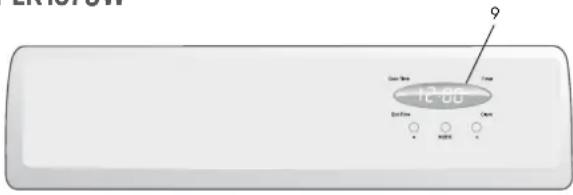

PEK1350W

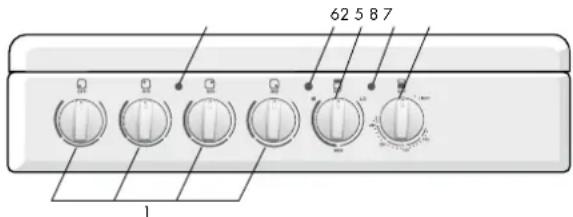
1. Hotplate Control Knob
• Adjusts temperature of hotplate. Can be rotated in either direction.
2. Hotplate Indicator Lamp
• Comes on when a hotplate is turned on.
3. Oven light switch
- Located on oven temperature control knob.
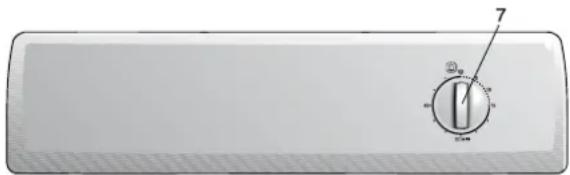
4. 2 Hour Cut-Off Timer
- Sets baking/grilling reminder time. - Sets automatic baking cut-off time. (See page 17 for more information).
5. Grill Temperature Control Knob
- Sets grilling temperature for separate grill. Can be rotated in either direction (See page 14 for more information).
6. Grill Indicator Lamp
- Comes on when grilling.
7. Oven Temperature Control Knob
- Sets temperature for baking. (See page 10 for more information)
8. Oven Indicator Lamp
- Comes on when the oven temperature control knob is operated. Cycles on and off automatically when baking.
9. Programmable Clock
- Sets baking/grilling reminder times. - Sets automatic cooking duration and stop time. NOTE: Clock time must be set before oven can operate. (See page 17 for more information).
DESCRIPTION OF YOUR APPLIANCE
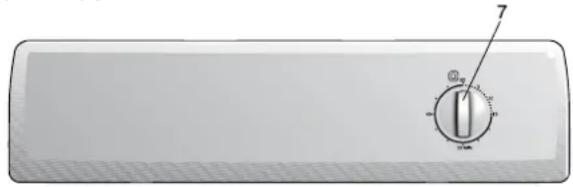
GEK1235W
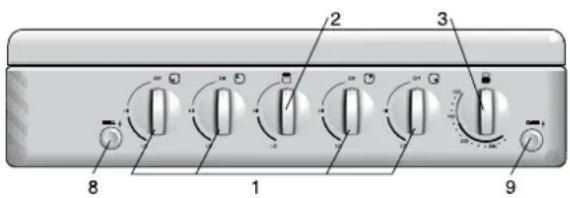
GEK1385W
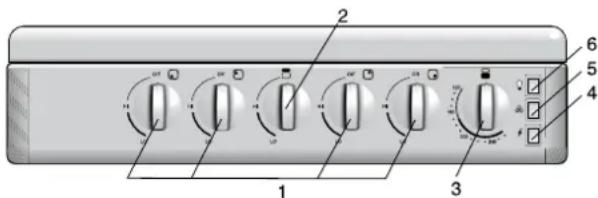
1. Hotplate Burner Control Knob
- Sets the hotplate cooking temperature. (See pg 16 for more information).
2. Grill Burner Control Knob
- Sets the grilling temperature. (See pg 14 for more information).
3. Oven Burner Control Knob
- Sets the baking temperature. (See pg 10 for more information). NOTE: Diagram depicts right hand version.
4. Electronic Igniter Switch
- Ignites the hotplate burners, grill burner and oven burner. NOTE: The appropriate burner control knob has to be set first.
5. Fan Switch
• Turns oven fan on/off.
6. Light Switch
• Turns oven light on/off.
7. 60 Minute Ringer Timer
- Sets reminder time. (See pg 17 for more information).
8. Manual Grill Igniter Button
- Ignites the grill burner. NOTE: The grill burner control knob has to be set to "High" first. (see pg 14 for more information).
9. Manual Oven Igniter Button
- Ignites the oven burner. NOTE: The oven burner control knob has to be held down first (see pg 11 for more information).
BEFORE OPERATING YOUR APPLIANCE FOR THE FIRST TIME

TIPS & INFORMATION
SETTING THE TIME
If you have purchased a model fitted with a 3 button programmable timer, you MUST set the time of day before you can operate your appliance.
ELECTRONIC CLOCK
- After the appliance has been electrically connected "12.00" will be displayed and the "clock" indicator will flash.
- To set the time of day, press - or +. 5 seconds after the last change, the "clock" indicator will disappear, confirming the time has been set.
• NOTE: The clock has a 24-hour display.

PREPARING YOUR APPLIANCE FOR THE FIRST TIME
- Please remove all internal boxes and bags from the oven & remove visible labels from surfaces before operation.
- Please wipe out the oven interior prior to operation with warm soapy water and polish dry with a soft clean cloth. Do not close the oven door until the oven is completely dry.
- New appliances can have an odour during first operation. It is recommended to 'run in' your oven before you cook for the first time. Run the oven at 180°C for 2-4 hours and ensure that the room is well ventilated.
• DO NOT line the oven with foil, it will damage the enamel. - If your appliance is fitted with a 2-hour "Auto Off" timer, make sure it is set to the 'O' marker for manual operation.
- If your appliance is fitted with solid hotplates, turn heat setting to high for 3 minutes to fully harden the coating. When cooled, apply a thin coating of cooking oil to seal the surface.
FITTING OVEN SHELVES
• Ensure shelf orientation is correct (refer picture).
- Slide into oven at an angle until raised back of shelf is past the stop on side runners.
• Lower front of shelf and push in until stop is reached.
NOTE: The top ledge is not a shelf position.

PARTS OF YOUR ELECTRIC COOKER
Check the parts of your cooker against the diagram before you use your cooker for the first time.

- Splashback
- Grill Vent
- Hob
- Control Panel
- Grill Reflector
- Removable Grill Dish Side Support
- Removable Grill Dish & Tray
- Grill Element
-
Grill Door
-
Inner Door Glass
- Oven Vent
- Fan & Element Cover
- Oven Element
- Removable Shelf
- Oven Door
PARTS OF YOUR GAS COOKER
Check the parts of your cooker against the diagram before you use your cooker for the first time.

- Splashback
- Grill Flue Vent
- Removable Hotplate Burner
- Removable Trivet
- Control Panel
- Removable Grill Dish Side Support
- Removable Grill Dish and Tray
- Grill Burner
-
Grill Door
-
Inner Door Glass
- Oven Flue Vent
- Fan Cover (fan forced ovens only)
- Oven Burner Cover
- Removable Shelf
- Oven Door
USING YOUR OVEN
OVEN SAFETY WARNINGS

WARNING
• ALWAYS follow the instructions for putting the shelves and fittings into the oven, to avoid accidents.
• DO NOT line the oven with foil.
- DO NOT use polyunsaturated oil when cooking in the oven. This type of oil can cause heavy deposits inside the oven.
• DO NOT touch the hot surfaces or heating elements inside the oven.
• DO NOT use the oven door as a shelf.
• DO NOT push down on the open oven door.
• DO NOT place cookware or anything else on the bottom of conventional model oven.
• DO NOT place shelves on top of upper most shelf runner as there are no stops for shelf withdrawal.
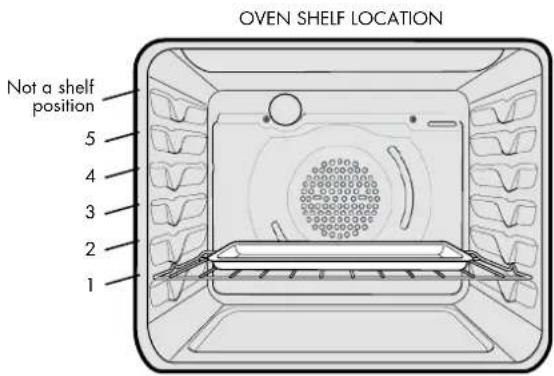
5 Position Rack
Fan Baking (Fan forced oven models)
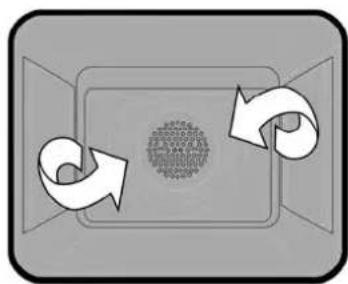
- With fan forced ovens, heat comes from the element surrounding the fan (see diagram below).
- The fan circulates the hot air and so the temperature is more even throughout the oven.
- Fan baking:
- Cooks faster and at lower temperatures than conventional baking
- Is good when you are cooking food on different shelves at the same time.
NOTE: Some variation in browning is normal with a fan forced oven.
NOTE: 3 Button timer models MUST have the clock set after a power outage to operate oven!
flowchart
graph TD
    A["Start"] --> B{Decision}
    B -->|Yes| C["Process"]
    B -->|No| D["End"]
Preheating the oven
We recommend that you preheat your oven before you put the food in to be cooked.
-
Set the required temperature.
-
When the indicator light goes out, put the food in the oven, close the door and set the timer.
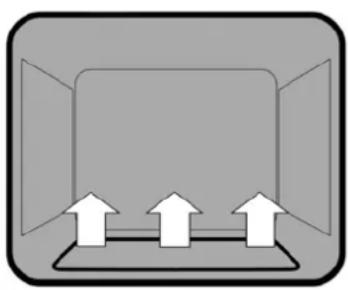
- With conventional oven models heat comes from the burner below the food at rear of oven.
- The burner is controlled by the thermostat which sets the oven temperature.
- There is a variation in temperature between the bottom and the top of the oven. The bottom shelf is the coolest and the top shelf is the hottest.
natural_image
Simple diagram of a device with three upward arrows inside a rectangular frame (no text or symbols)Fan Baking (Fan forced oven models)
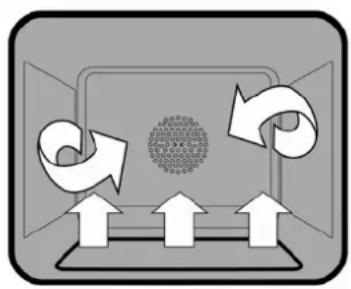
- With fan forced ovens, heat comes from the burner below the food at rear of oven.
- The fan circulates the hot air and so the temperature is more even throughout the oven.
- Fan baking:
- Cooks faster and at lower temperatures than conventional baking
- Is good when you are cooking food on different shelves at the same time.
NOTE: We recommend that you preheat your oven before you turn the fan on.
NOTE: Some variations in browning is normal with a fan forced oven.
flowchart
graph TD
    A["Top Left"] --> B["Top Right"]
    B --> C["Bottom Left"]
    C --> D["Bottom Right"]
    D --> E["Bottom Left"]
    E --> F["Top Right"]
    F --> G["Top Left"]
    G --> H["Top Right"]
    H --> I["Bottom Left"]
    I --> J["Bottom Right"]
    J --> K["Bottom Left"]
    K --> L["Top Right"]
    L --> M["Top Left"]
Lighting the oven
- Press the oven burner control knob and turn it a quarter of the way.
- For manual ignition models
- Keep the oven burner control knob pushed in and at the same time press the oven igniter button on the right hand side of the control panel.
For electronic ignition models
- Keep the oven burner control knob pushed in and at the same time press the electronic igniter switch on the right hand side of the control panel.
- Hold the control knob for about 20 seconds when the burner lights, before releasing it.
NOTE: If the oven does not light within 10 seconds, or the flame goes out after you release the oven burner control knob, follow these steps:
- Turn the oven burner control knob back to the start position and let go.
- Open the oven door to stop gas building up.
- Wait one minute and repeat the steps to light the oven.
Preheating the oven
We recommend that you preheat your oven before you put the food in to be cooked.
The following table tells you how long it takes to preheat a cold oven to different temperatures.
| SET TEMPERATURE ⬆ HEATING TIME | |
| 150 5 minutes | |
| 200 8 minutes | |
| 250 12 minutes |
Cookware
For best cooking results with gas ovens, dark coloured trays and baking dishes are recommended.
GET TO KNOW YOUR OVEN
Get to know your new oven with this 'Simple Test Cake'
Although we strive for a perfect performing oven, it's possible that there will be some variation in colour when baking. Therefore, we suggest this simple, easy and delicious to make Simple Test Cake, it can help you understand your new oven. All ovens do sometimes have hot or cold spots, therefore it is important to judge with your eye as you may require to rotate during baking.
'Simple Test Cake'
125g butter, softened to room temperature
1 cup caster sugar
1 teaspoon pure vanilla essence
4 large eggs
2 cups self-raising flour pinch of salt
4 tablespoons (80mL) full-cream milk
Method:
- Butter base and sides of two, 20cm straight-sided round or square cake pans. Then line the base with grease proof or baking paper.
- Preheat oven to moderate '180°C' (170°C fan forced) and ensure oven shelf is in the centre position of oven.
- Cream softened butter and sugar until light in colour.
- Add vanilla essence.
- Then eggs one at a time, beating well after each addition.
- Sift flour and salt into the mixture and beat until well combined.
- Add milk and beat or stir to combine.
- Spoon mixture equally between prepared cake pans.
- Bake in preheated oven, middle shelf for about 25 to 35 minutes or until when tested with a fine cake skewer it comes out clean or the edges of the cakes have come away slightly from the sides of the cake pans.
- Remove from oven to wire cake rack and rest for 5 minutes before removing from cake pans. Cool completely.
To Serve: sandwich together with your favourite jam or conserve, and dust top with pure icing sugar.
NOTE: If desired substitute butter for either margarine or olive oil spread.
Recipe is based on the Australian standard metric 250mL cup and 20mL tablespoon sets.
OVEN COOKING GUIDE
The following is intended as a guide and experience may show some slight variation to be necessary to meet individual requirements.
| FOOD CONVENTIONAL OVEN FAN FORCED OVEN | ||||||
| Temperature in °C | Oven Shelf Position* | Time in minutes | Temperature in °C | Oven Shelf Position* | Time in minutes | |
| Scones | ||||||
| Plain or Fruit 220 2 (3) 10 - 15 210 Any 10 - 15 | ||||||
| Biscuits | ||||||
| Rolled | 170 (180) | 2 | 10 - 15 | 150 (170) | Any | 10 - 15 |
| Spooned | 190 | 2 | 12 - 15 | 180 | Any | 12 - 15 |
| Shortbread Biscuits | 160 1 or 2 | 30 - 35 150 Any 30 - 35 | ||||
| Meringues | ||||||
| Hard - individual | 110 | 2 | 90 | 100 | Any | 90 |
| Soft - Individual | 180 | 2 | 15 - 20 | 165 | Any | 15 - 20 |
| Pavlova - 6 egg | 110 (120) | 1 | 75 | 100 | Any | 75 |
| Cakes | ||||||
| Patty cakes 190 3 (4) 15 - 20 180 Any 15 - 20 | ||||||
| Sponge - 4 egg | 180 | 2 | 20 - 30 | 170 | Any | 20 - 30 |
| Plain Butter Cake | 180 | 2 | 30 - 40 | 170 | Any | 30 - 40 (25) |
| Rich Fruit Cake | 140 (150) 2 180 | 130 Any 180 | ||||
| Pastry - Shortcrust | ||||||
| Cornish Pasties | 200 (200/180) | 2 | 40 - 45 (10/30) | 180 (180/160) | Any | 40 - 45 (10/30) |
| Custard Tart | 200/180 (220/180) | 1 (3) 10/20 - 30 | (10/35) | 190/170 (200/180) | Any 20 - 30 | (10/25) |
| Pastry Choux | ||||||
| Cream Puffs | 210 | 2 | 25 - 30 | 200 | Any | 25 - 30 |
| Yeast Goods | ||||||
| Bread 210 1 25 - 30 200 Any 25 - 30 | ||||||
* Shelf position is counted from the bottom shelf up ie. Bottom shelf position is 1
Where the gas models vary from electric, details for gas cooking is shown in brackets
| MEAT | PREFERRED TEMPERATURE °C | MINUTES PER KG | |
| Beef | 200°C | Rare | 35 – 40 minutes |
| Medium | 45 – 50 minutes | ||
| Well Done | 55 – 60 minutes | ||
| Lamb | 200°C | Medium | 40 minutes |
| Well Done | 60 minutes | ||
| Veal | 180°C | Well Done | 60 minutes |
| Pork | 200°C | Well Done | 60 minutes |
| POULTRY OR FISH | PREFERRED TEMPERATURE °C | MINUTES PER KG | |
| Chicken | 180°C | 40 – 45 minutes | |
| Duck | 180 – 200°C | 60 – 70 minutes | |
| Turkey | 180°C | 35 – 40 minutes (less than 10kg) | |
| 40 – 45 minutes (more than 10kg) | |||
| Fish | 180°C | 20 minutes | |
HANDLING BAKING PROBLEMS
| PROBLEM POSSIBLE CAUSE WHAT TO DO | ||
| Uneven cooking • Incorrect shelf position• Oven tray too large• Tray not in centre of oven• Air flow in oven uneven | • Select shelf which puts food in centre of oven• Try other trays or dishes• Put trays in centre of oven• Turn food during cooking | |
| Baked products too brown on top | • Oven not pre-heated• Aluminium foil in oven• Baking tins too large for recipe• Baking tins not evenly spaced• Food not evenly sized or placed on trays• Food placed too close to top of oven | • Pre-heat until indicator light goes off• Remove foil• Use correct size tins• Place baking tins so that there is at least 3cms between tins and oven walls• Make food same size and shape and spread evenly on trays• Place food in middle or on a lower shelf |
| Baked products too brown on bottom | • Baking temperature too high• Baking tins too large for recipe• Baking tins are dark metal or glass• Food too low in oven• Oven door opened too frequently during cooking | • Lower temperature• Use correct size tins• Change to shiny, light tins or lower temperature by 10°C• Cook one shelf higher• Do not open door until half way through cooking time |
| Cakes have cracked thick crust | • Baking temperature too high• Food too high in oven• Cake batter over mixed• Pan too deep• Baking tins too dark | • Lower temperature• Cook one shelf lower• Mix just long enough to combine ingredients• Check size of pan and use recommended size• Change to shiny tins |
| Baking products are pale, flat and under cooked | • Baking temperature too low• Food too low in oven• Baking time too short• Incorrect tin size | • Raise temperature• Cook one shelf higher• Increase cooking time• Use correct size tin |
| Cakes fallen in centre • Baking temperature too low• Baking time too short• Measurement of ingredients is wrong• Door opened too early | • Raise temperature• Increase cooking time• Check recipe• Do not open door until three quarters (3/4) of way through cooking time | |
| Crusts too thick • Incorrect ingredients • Check recipe | ||
| Meat and potatoes not browning in fan oven | • Poor circulation • Put food onto a rack to allow air to circulate | |
| Juices running out of meat • Do not pierce meat with fork but turn with tongs | ||
* NOTE: Condensation on oven door is normal
USING YOUR GRILL
GRILL SAFETY WARNING

WARNING
- ALWAYS turn the grill off immediately after you have finished cooking. Fat left in the grill can catch fire.
• ALWAYS leave the grill door open during grilling. - ALWAYS make sure that grill trays are fitted into the grill according to instructions.
• DO NOT line the chrome grill rack with foil.
• DO NOT leave the grill unattended.
• DO NOT touch the hot surfaces inside the grill and keep children away until the grill has cooled.
• DO NOT place thick pieces of food under the grill. Food may catch fire.
• DO NOT store flammable materials near the grill.
Handling grilling problems
| PROBLEM CAUSES WHAT | TO DO | |
| Grilled meats overcooked on outside and raw in centre | • Meat too close to grill | • Grill at lower shelf position |
| Excess grill smoke • | Build up of fats in grill | • Clean grill |
| Juices running out of meat | • Do not pierce meat with fork but turn with tongs | |
| Grilled steaks and chops buckling | • Cut fat with knife towards meat |
* NOTE: Condensation in grill compartment is normal
GRILLING
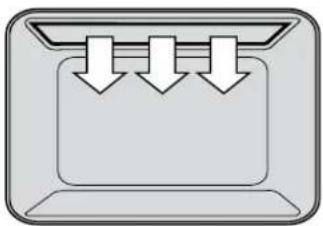
• The grill works by directing heat onto the food. (see diagram below).
- The grill is suitable for tender cuts of meat, steak, chops, sausages, fish, toasted cheese and other foods which cook quickly.
• The grill door MUST be left open during grilling.
- For best results the grill should be preheated for 3 minutes before cooking to seal the natural juices of meat.
natural_image
Simple diagram of three downward arrows inside a rectangular container (no text or symbols)Using the Grill of your Gas Cooker
NOTE: Before you cook on the grill for the first time, turn the grill on for fifteen minutes with 10 mm of water in the bottom of the grill dish. This will remove oils left on the grill during manufacture.
- Turn the grill burner control knob to HI.
- For manual ignition models
- Press the manual igniter button on the left hand side of the control panel.
For electronic ignition models - Press the electronic igniter switch on the right hand side of the panel.
NOTE: If the grill does not light after 8 seconds, follow these steps:
- Turn the grill burner control knob back to the start position and let go.
- Wait 15 seconds for the gas to clear and repeat the steps to light the grill.
USING YOUR HOTPLATES
HOTPLATE SAFETY WARNING

WARNING
• DO NOT leave the hotplate on with no pot or pan on top.
• DO NOT use pots and pans which are unsteady, as these could overbalance.
- DO NOT use asbestos mats or heat diffusers. These will cause a temperature build-up which can damage the cooktop.
• DO NOT allow pots or pans to boil dry. This could damage the hotplate and/or the cooktop.
• DO NOT let cooking utensils get too close to the hotplate control knobs.
• DO NOT use the cooktop as a kitchen bench.
• DO NOT let children on or near the cooktop.
• ALWAYS make sure that gas burners are in the right position.
Using the Hotplates of your Electric Cooker
Check the hotplates on your cooker against the diagrams and instructions below before you use your cooker for the first time.
Solid hotplates
Coated hotplates are strong, solid cast hotplates that give a wide contact with pots and pans for fast efficient cooking.
The hotplates are sealed all round with stainless steel trim rings, food spills can't penetrate to make cleaning easier. The hotplates featuring a red dot in the centre indicate the hotplate temperature. Once the hotplate is heated the red dot turns darker.

natural_image
Circular gray speaker or button component with a central hole, no text or symbols visibleCeramic hotplates
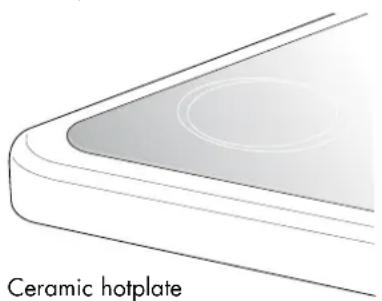
- The cooktop is made from ceramic glass, a tough, durable material that withstands heating and cooling without breaking. It is strong enough to hold the heaviest utensil. However, it must be remembered that as it is GLASS, it may break. Treat it accordingly!
- The smooth glass surface has a pattern to show where the elements under the glass are located (see diagram below).
- When a hotplate is on, the hot surface warning light (see diagram below), will come on. When the hotplate is turned off this light will continue to glow until the temperature of the hotplate drops below 60°C.

Ceramic hotplates

WARNING
• ALWAYS switch the cooker off if the ceramic glass top is cracked or broken.
• DO NOT use aluminium foil on the ceramic hotplates.
NOTE: Stored heat in the hotplate can be used for the last few minutes of cooking. Simply turn off the control.
CHOOSING UTENSILS

Look at this diagram above which shows you which utensils to use on the hotplates and which utensils should not be used.
• ALWAYS use pots and pans with flat bottoms. Uneven or thin bottoms will waste electricity and cook slowly.
• ALWAYS use pots and pans which are slightly larger than the hotplate. Small pans waste electricity.
• ALWAYS put pots and pans which are dry on the hotplates.
• DO NOT use pots and pans which are too large.
Pans which overhang the hotplate more than 50mm can damage enamel cooktops.
USING HOTPLATE BURNERS
Using the Burners of your Gas Cooker
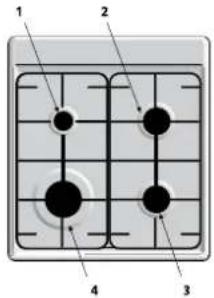
Check the hotplates on your cooker against the diagram below before you use your cooker for the first time.
NOTE: To save gas, place pots and pans centrally over the burners and adjust gas so that flames do not go past edges.
| WHAT IT IS WHAT IT IS USED FOR | |
| 1Low heat burner 5.1MJ/h | Used for simmeringUsed with small pots and pans |
| 2 & 3Medium heat burners9.0MJ/h | Used for normal cookingUsed with middle size pots & pans |
| 4High heat burner12.0MJ/h | Used for fast heatingUsed with large size pots & pans |
Manual Ignition Models
To light these hotplates:
- Choose the hotplate you want to use.
- Turn the hotplate burner control knob to "Hi".
- Light with a hand held lighter e.g. match.
Electronic ignition Models
To light these hotplates:
- Choose the hotplate you want to use.
- Turn the hotplate burner control knob to "Hi".
- Press electronic igniter switch to release sparks to the burner.
USING THE TIMER AND CLOCK OPERATING THE PROGRAMMABLE CLOCK
Using the 60 minute ringer timer
To set the timer:
- Turn the knob clockwise to the required number of minutes. When the time has elapsed the timer will give a short ring.
NOTE: For times below 20 minutes, turn the knob past 20 minutes and then back to the required number of minutes.
Using the 2 hour cut-off timer
Manual operation
The timer needs to be set at the "O" marker so that the oven can be used manually.
Automatic operation
The 2 hour timer features an automatic oven "cut off". This means that a cooking period of up to 120 minutes can be set.
- Set the Oven Temperature Control Knob to the required temperature.
- Turn the cutoff timer clockwise to the required number of minutes. For timer settings of less than 20 minutes, turn the knob past 20 minutes and then back to the required number of minutes. (Purpose – to set audible ringer.)
- When the timer returns to "Auto Off", the timer gives a short ring and the oven will be switched off.
- The oven will not operate again until you turn the timer back to the "O" marker.
NOTE: It is not recommended to use this timer for short duration, e.g. boiling eggs.

OVEN TIMER


WARNING
• The Clock MUST be set to operate oven.

General features
Your 3 button programmable timer has the following features:
- Timer – your 3 button programmable timer allows you to set a countdown time that will beep when the set time has elapsed.
- Cooking duration – You can set a cooking duration. A timer will count down the preset cooking time, beep when the time has elapsed and turn the oven off.
- End cooking time – you can set a cooking finish time. A timer will count down the preset cooking time, beep when the finish time has been reached and turn the oven off.
- Delayed start cooking time – You can combine the cooking duration and cooking end time to switch the oven on and off at a specific time during the day.
NOTE: Your 3 button programmable timer only operates with your oven.
Change the time of day (Daylight saving)
- Press the "mode" button until the "clock" indicator begins flashing.
- Press the - or + buttons to change the time. 5 seconds after the last change, the "clock" indicator ■ will disappear, confirming the time has been set.
Setting the timer
- Press the "mode" button until the "timer" indicator begins flashing.
- Set the countdown time you want by using the - and + buttons. 5 seconds after the last change the "timer" indicator will stop flashing, confirming the timer has been set.
- To stop the beeper, press any button.
Setting the cooking duration
- Check the clock displays the correct time of day.
- Set the oven to the desired temperature. The oven indicator light will glow and the oven will come on.
- Press the "mode" button until the "cook time" indicator begins flashing.
- Set the cooking duration you want by using the - or + buttons. 5 seconds after the last change, the "cook time" indicator will stop flashing, and the time of day will be displayed.
NOTE: Do not forget to add preheating time if necessary.
OPERATING THE PROGRAMMABLE CLOCK (continued)
Setting the cooking end time
- Check the clock displays the correct time of day.
- Select the desired oven function temperature. The oven indicator light will glow and the heating source will come on.
- Press the "mode" button until the "end time" indicator begins flashing.
- Enter the time of day you want to finish cooking by pressing the - or + buttons. 5 seconds after the last change, the "end time" indicator ■ will stop flashing and the current time of day will be displayed.
Setting the delayed start cooking time
- Program the "cook time" and "end time" as described in the relevant sections. Once both the "cook time" and "end time" have been set, the "cook time" and "end time" indicators will stop flashing and the current time of day will be displayed.
To check or cancel settings
- To check your settings, press the mode button until the setting you want is displayed. A red light will flash next to the mode (cook time, end time etc) that is currently on display.
- To cancel "delayed start" press the mode button until a light flashes next to "end time". Press and hold the -button until the clock no longer reverses (you will hear a beep). If you have left the temperature knob at a setting the oven will start once the "end time" light stops flashing.
- To cancel "auto shut off" press the mode button until a light flashes next to "cook time". Press and hold the -button until the clock no longer reverses at ("0:00" and you will hear a beep). This automatically cancels "delayed start". If you have left the temperature knob at a setting, the oven will start once the "cook time" light stops flashing. Because you have cancelled "auto off" the oven will continue to heat until you manually turn it off.
On completion of cooking
The heat source will turn off, the timer will beep and the "end time" and/or "cook time" indicators will flash.
-
Turn the temperature control to the off position.
-
Press any button to stop the timer from beeping.
-
Turn the temperature control to the off position.
- Press any button to stop the timer from beeping.
CLEANING THE COOKER

WARNING
Safety Warnings about cleaning
• ALWAYS make sure that the cooker is turned off before cleaning.
• ALWAYS clean cooker immediately after use.
• DO NOT use steam cleaners. These may cause moisture build-up.
• DO NOT use caustic based cleaners. These will damage aluminium parts.
Cleaning the enamel
- Keep enamel clean by wiping it with a soft cloth dipped in warm soapy water.
- Rub difficult stains with a nylon scourer or creamed cleanser.
• DO NOT use abrasive cleaners, powder cleaners, steel wool or wax polishes.
• If you use an oven cleaner, follow the instructions on the product carefully.
Cleaning the control panel
• Make sure control knobs are in OFF position.
- Remove knobs from control panel by pulling towards you.
• DO NOT use too much water when cleaning control panel.
CLEANING THE GAS COOKTOP
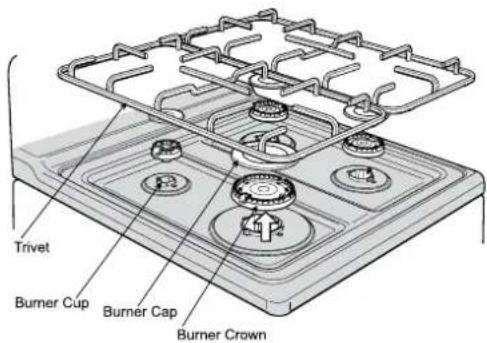
- Remove the trivets (see diagram below) by lifting them from hob.
- Remove the burner caps and crowns (see diagram below).
- Wash hob with warm soapy water.
- If crowns and caps are heavily soiled use a non-abrasive cleaning compound.

WARNING
DO NOT use abrasive or caustic based cleaners.
DO NOT wash in a dishwasher.
DO NOT drop trivet onto hob. This may damage the enamel surface.
Refitting the burner crowns and caps
The burner crown must be fitted correctly into the burner cup or damage will occur during operation.
- To do this ensure that the 2 ribs on either side of the spark plug hole are positioned into the 2 slots on the burner cup. (see diagram below)
- The burner cap is simply positioned over the top of the burner crown.

CLEANING THE ELECTRIC HOTPLATES
Solid hotplates
Coated "easy care" solid hotplates have a robust, corrosion resistant surface which is temperature resistant up to 600°C.
- Clean the hotplates after they have cooled by wiping with a damp cloth or sponge, use a small amount of detergent if necessary.
- Stubborn soiling can be removed by soaking the hotplate for a few minutes with warm water and a little detergent, followed by cleaning using a plastic scourer or soft brush.
- Any spills or marks that still remain can be burnt off by operating the hotplate on high without a pan for 2-3 minutes. When the hotplate has cooled clean it normally as above.
- After cleaning dry the hotplate by warming on a low heat for approximately 30 seconds and then oil the hotplate with a thin coating of cooking oil to prevent rust or corrosion.
- Some discolouration of the stainless trim ring is normal during use. A stainless steel cleaner may be used to clean the trim ring.

natural_image
Simple 3D-rendered gray circular object with a central circular feature, no text or symbols visible.Solid hotplate

WARNING
There is a risk of burns if the hotplates are hot. Ensure the hotplates have cooled before cleaning.
Ceramic hotplates
- Remove all spilt food with the razor blade scraper supplied while the hotplate is still warm – NOT HOT.
- If aluminium foil, plastic items or foods with a high sugar content melt onto glass, use the razor blade scraper to remove immediately before the hotplate has cooled, otherwise pitting of the surface may occur. High sugar content foods include jam, fruit, carrots, tomatoes and peas.
- When the ceramic hotplate has cooled, wipe clean with dishwashing detergent on a damp cloth.
NOTE: DO NOT use abrasive sponges or scourers, oven sprays or stain removers on ceramic hotplates. These may damage, scratch or stain the ceramic cooktop. Any pitting, staining or scratching WILL NOT be covered by warranty.
natural_image
Diagram of a ceramic hotplate with a curved base and circular hole, labeled 'Ceramic hotplate' below (no other text or symbols)CLEANING THE GRILL COMPARTMENT
NOTE: You can use household enamel cleaners but you MUST follow the instructions on the product. DO NOT use a harsh abrasive cleaner, powder cleaners, steel wool or wax polishes.
natural_image
Line drawing of a microwave oven with open lid and side door, showing internal grating and cooling mechanism (no text or symbols)Removing the grill dish
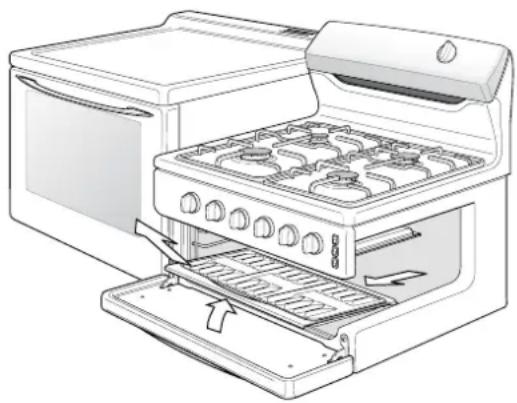
- Pull the grill dish forwards and upward.
- Clean both the grill and grill rack in hot soapy water. Heavy baked-on stains may require soaking.
- When replacing the grill dish make sure that the rear of the dish is fitted onto side supports before sliding backwards.
CLEANING THE COOKER
(continued)
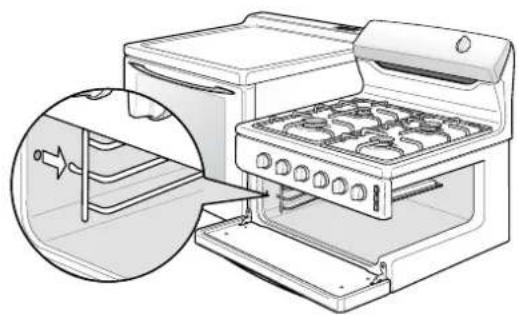
Removing the grill dish supports
The grill dish supports can be removed for easy cleaning of the grill compartment.
- Hold the grill dish supports at the front and pull them inwards (see diagram below).
- Clean the grill compartment with warm soapy water or use a non-abrasive oven cleaner with a nylon scourer for hard to clean areas.
- Replace the grill dish supports by inserting the rear hook into the rear hole.
- Place front peg into front hole and push in firmly (see diagram below).
natural_image
Illustration of a toaster oven with a close-up inset showing the exterior panel (no text or symbols)AIRWASH DOOR
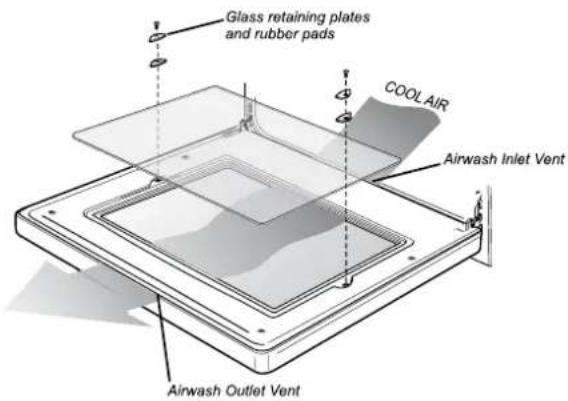
The door on your cooker is designed to allow cool air to pass up through the middle and out through the vent in the top of the door (see diagram below).
This feature results in lower surface temperatures on the outside of the door.
Cleaning the door glass
To help with cleaning the door your cooker has a removable inner door glass.
- First open the oven door to access inner door glass screw
- Undo the screws on either side of the door and remove the 2 glass retaining plates and rubber pads.
- Remove the inner glass and clean in hot soapy water.
- The inside of the outer glass can also be wiped clean.
- When reassembling do not overtighten the retaining plate screw.

WARNING
• DO NOT use harsh abrasive cleaners or sharp metal scrapers to clean the oven door glass since they can scratch the surface which may result in shattering of the glass
• DO NOT use the oven without the inner door glass fitted.
CLEANING THE OVEN COMPARTMENT
Removing the oven shelves
- Slide the oven shelves towards you until they reach the front stop.
- Tilt them up at the front to clear the side supports and lift them clear (see diagram opposite).
- Wash the shelves in warm soapy water or soak the shelves to remove heavy stains.

natural_image
Illustration of a microwave oven with a grater inside, showing internal components and airflow path (no text or symbols)Removing the oven light glass (Fan forced models only)
- Make sure that the cooker is turned off.
- Turn the oven light glass anti-clockwise (see diagram below).
NOTE: The fan cover and oven burner cover are not removable for cleaning. Accidental spills should be cleaned immediately so that the burner does not become blocked.

natural_image
Illustration of a microwave oven with open lid and internal air duct (no text or symbols)
WARNING
Make sure the appliance is turned off before you remove or replace parts, to avoid the possibility of electric shock.

appliances online

Westinghouse
SOLVING PROBLEMS
If you have a problem with your appliance, check the table below before calling service. You may be able to avoid a service call by fixing the problem yourself – and so continue cooking. NOTE: You may be charged for the service call even in the guarantee period if the problem is due to the causes listed below.
If you need information, service or replacement parts please: Quote 1. Model Number, 2. Serial Number You can find these on the data plate which can be seen when the oven door is open.
If you need more information, please contact the Customer Care Centre on:
Australia 1300 363 640
(Centre is open 8am - 5pm Monday to Friday EST) or
New Zealand 09 573 2384
(Centre is open 8am - 5pm Monday to Friday)
If you have a warranty or spare parts enquiry, you should call the number listed on the back page.
| PROBLEM POSSIBLE CAUSE WHAT TO DO | ||
| No spark obtained when electronic igniter is pressed (gas cooker only) | Power not turned onHousehold fuse blownCircuit breaker trippedSpark plug is wet or dirty | Switch on electricityCheck fusesCheck circuit breakerDry or clean spark plug |
| No spark obtained when manual igniter is pressed (gas cooker only) | Spark plug is wet or dirtyDry or clean spark plug | |
| Burner will not light even though igniter is working (gas cooker only) | Gas supply valve is turned offPort blockage in ignition area | Turn on gas supplyMake sure that ports and ignition area are clean and dry |
| Oven or grill not working(electric cooker only)NOTE: if the household fuse continues to blow, call the Service Centre | Clock not setPower not turned onHousehold fuse blownControls incorrectly setCircuit breaker tripped | Refer to clock instructions pg 17Switch on electricityCheck fusesReset controlsCheck circuit breaker |
| Oven not working (electric cooker only)NOTE: if the household fuse continues to blow, call the Service Centre | Clock program setHousehold fuse blown | Cancel program, see pg 18Check fuses |
| Oven light not workingNOTE: if the household fuse continues to blow, call the Service Centre | Power not turned onHousehold fuse blownCircuit breaker trippedLamp blown or loose in socket | Switch on electricityCheck fusesCheck circuit breakerReplace or tighten globe pg 20 |
| Oven not heating enoughFoil or trays on bottom of oven | Heat escaping through incorrectly sealed doorThe set oven temperature is incorrect | Remove foil or traysCheck door is properly closedChange set oven temperature |
| Electronic clock flashing on display(electric cooker only)NOTE: if the household fuse continues to blow, call the Service Centre | Power failure or interruptionHousehold fuse blown or power supply is off | Reset time of dayCheck fuses, power supply |
| Unit smoking when first usedProtective oils being removedTurn grill on high for 10 minutes | Turn oven on high for 10 minutes | |
| Condensation building upToo much water used when cookingReduce amount of water | Leave door open after cooking, if food is to be left in oven to keep warm | |
| Odours on first use of oven | This is normal | |
| 60 minute timer not audible | Timer not wound sufficiently | Turn timer knob past 15 minute mark then to the required number of minutes, see pg 17 |
| Oven shelf tight | Oven shelf not inserted correctly, may be upside down or back to front | Remove shelf and insert as per diagram pg 7 |
| Clock display offNOTE: if the household fuse continues to blow, call the Service Centre | Display switched offHousehold fuse blown or power supply is off | To switch display on refer to pg 18Check fuses, power supply |
Note: Only authorised service centres should carry out servicing. Otherwise warranty may be void.
INSTALLING THE ELECTRIC COOKER
SAFETY WARNINGS ABOUT INSTALLATION

WARNING
• The cooker MUST be installed and serviced by a qualified technician.
- A Certificate of Compliance MUST be supplied to be kept by the customer.
- The packing materials MUST be removed before you install the cooker.
• You MUST follow the installation instructions in this booklet
- The surrounding kitchen cabinets MUST be able to withstand 85°C. Electrolux Products WILL NOT accept responsibility for damage caused by installation into kitchen cabinets which cannot withstand 85°C.
- The vents, openings and air spaces MUST NOT be blocked.
- You MUST NOT pull the cooker by the door handles or the splashback.
• The cooker MUST be checked every five years.
Locating the cooker
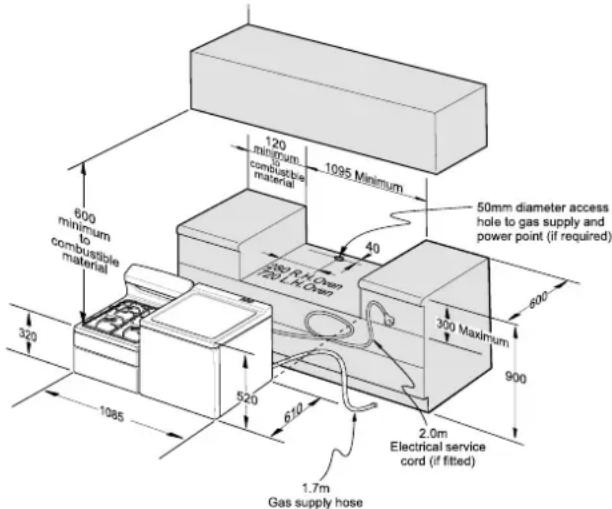
Study the diagrams below to be sure of the dimensions required to locate the cooker safely.
Note: Make sure that the top of the hotplate surface is at least 10 mm higher than the level of the benchtops.


TIPS & INFORMATION
Before you cook in your new oven it is important that the protective oils used in the manufacture of the product be removed.
• Make sure that the room is well ventilated (to allow smoke to escape).
• Run the grill on high for 30 minutes, without grill dish.
• Then run the oven on 180°C for 2 hours.
Wiring requirements
The cooker MUST be installed in compliance with
• Wiring connections in AS/NZS 3000 Wiring Rules
- Local regulations, municipal building codes and other statutory regulations
Data plate • gives information about rating
• is located on the inside panel of the grill door
Circuit diagram • is located on the back panel of the control panel
- An all pole disconnect functional switch MUST be provided near the appliance in an accessible position (AS/NZS 3000 – Clause 4.7.1).
- Wiring MUST be protected against mechanical failure (AS/NZS 3000 – Clause 3.9).
- A means of disconnection with a contact separation of at least 3mm MUST be supplied in the fixed wiring.
Note: To gain access to the terminal block, remove the rear panel by unscrewing the two assembly screws.

natural_image
Technical line drawing of a mechanical assembly with an inset close-up showing internal components (no text or symbols)
WARNING
When connections are made to a multi-phase 240V supply, the bridge piece should be removed from between the active connections.
INSTALLING THE GAS COOKER
SAFETY WARNINGS ABOUT INSTALLATION

WARNING
• The cooker MUST be installed and serviced by a qualified technician.
- A Certificate of Compliance MUST be supplied to be kept by the customer.
- The packing materials MUST be removed before you install the cooker.
• You MUST follow the installation instructions in this booklet
- The surrounding kitchen cabinets MUST be able to withstand 85°C. Electrolux Products WILL NOT accept responsibility for damage caused by installation into kitchen cabinets which cannot withstand 85°C.
- The appliance MUST be installed using the flexible hose supplied.
- The vents, openings and air spaces MUST NOT be blocked.
- You MUST NOT pull the cooker by the door handles or the splashback.
• The cooker MUST be checked every five years.
• The cooker MUST NOT be used as a space heater.
Locating the cooker
Study the diagrams below to be sure of the dimensions required to locate the cooker safely.
Note: Make sure that the top of the hotplate surface is at least 10 mm higher than the level of the benchtops.

TIPS & INFORMATION
Before you cook in your new oven it is important that the protective oils used in the manufacture of the product be removed.
• Make sure that the room is well ventilated (to allow smoke to escape).
- Run the grill on high for 15 minutes with 10mm of water in the bottom of the grill dish.
• Then run the oven on 180irc C for 2 hours.
Checking gas pressures
The cooker MUST be installed in compliance with:
- The Installation Code for Gas Burning Appliances and Equipment – AS 5601/AG 601 – issued by Standards Australia (Particular reference to sections 4.8 & 5.12.1).
- Local gas fitting regulations, municipal building codes and other statutory regulations.
The cookers come in two gas types: Natural gas and Propane. Before installation check that the cooker is suitable for the gas supply. To do this check the gas type on the carton sticker or on the data plate behind the bottom of the oven door.
The following table shows the supply and operating pressures for various gas supplies.
| GAS TYPE NATURAL GAS PROPANE | ||
| Supply Pressure at inlet to appliance regulator (if fitted) | 1.13 (kPa) Minimum | 2.75* (kPa) |
| Operating Pressure at appliance test point | 1.00 (kPa) 2.75 (kPa) | |
* If the regulator is placed upstream of the cooker inlet, as is normal for cookers operating on Propane, then the supply pressure and operating pressure are the same.
The following table shows the injector sizes for each burner.
| INJECTOR ORIFICE NATURAL GAS PROPANE | |
| Low Heat Burner 1.00 mm 0.62 mm | |
| Medium Heat Burner 1.35 mm 0.82 mm | |
| High Heat Burner 1.60 mm 0.95 mm | |
| Grill - main injector 1.50 mm 0.82 mm | |
| Oven - main injector 1.60 mm 0.95 mm | |
| Oven - bypass screw 0.73 mm 0.45 mm | |
Checking pipe size
To work out a suitable pipe size for connection use the information in the table below.
| GAS TYPE NATURAL GAS PROPANE | ||
| Hourly gas consumption for this cooker | 57.2 MJ/h | 56.5 MJ/h |
• Information about the length of the run, number of elbows, tees and bends, the available service pressure and the supply requirements.
NOTE: The Code AS 5601/AG 601 will help you with this matter.
INSTALLING THE GAS COOKER
(continued)
Gas connection
Read these points before connecting to the gas supply:
- The cooker inlet connection point is the inlet to the regulator or LP test point adaptor. This connects to the flexible hose fitted to the appliance. The appliance must be installed using the hose supplied.
- The regulator/inlet connection must be accessible when the appliance is installed.
Operation on NG/SNG
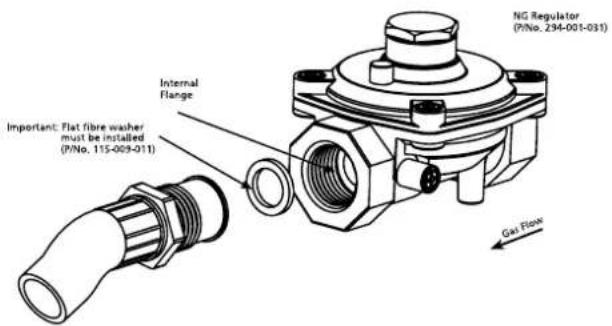
Read these points about operation on NG/SNG and look carefully at the diagram:
- The appliance regulator provided MUST be fitted and positioned so that the pressure nipple is accessible.
- The arrow showing the direction of the flow MUST be pointed correctly.
- Connect the gas supply to the 1/2" BSP internal thread inlet of the regulator.
- The flat fibre washer provided with the regulator MUST be used when making the gas connection.
Operation on SNG
- If the cooker is to be used with SNG, then the grill burner MUST be modified by the replacement of the shutter which fits into the throat of the grill burner.
-
You can buy the kit for this modification from your nearest spare parts stockist. (refer to rear cover for contact details.)
-
Remove the control panel. Remove the existing NG shutter securing screws (as in diagram) and slide upwards to disengage from grill burner.
- Slide the SNG shutter into position and secure with screws.

Operation on Propane
An inlet fitting with pressure test point is provided. Orient the fitting so that gas flows in the direction of the arrow marked on the fitting. Use the sealing washer to connect the fitting to the flexible hose. Connect the gas supply to the 1/2" BSP internal thread inlet of the fitting.
Testing appliance operation
(Apparatus: manometer and connecting tube)
After installation, test the appliance and ensure that it operates correctly, before handing it over to the customer. The following procedure is recommended:
- Check that the manometer zero point is correct; then connect the manometer to the appliance pressure test point. This is located on the Regulator or L.P.G. Inlet Fitting behind the kick panel (or under the Storage Drawer where fitted).
- Turn on the gas supply and electricity (if applicable) and attempt ignition. (For correct procedure, refer to the Ignition Instructions.) Note that additional time needs to be allowed for the initial lighting as air has to be purged from the pipes.
- Check the operating pressure for the particular gas-type, as given in the Table on page 23.
For L.P.G. appliances, the regulator in question may be remote from the appliance.
For Natural Gas appliances
Regulators are supplied pre-adjusted and configured by the component maker for use with Natural Gas. The appliance installer is not required to make an adjustment to obtain the correct outlet pressure setting.
An arrow on the base of the regulator indicates the direction of gas flow when the inlet and outlet of the regulator are orientated correctly. When the regulator has been fitted check for leaks from the connections with soapy water.
Checking the Function of the Regulator
The operation of the regulator can be confirmed by connecting a manometer to the pressure test point located on the side of the regulator body adjacent to the outlet.
With the appliance operating check the outlet pressure:
- When all burners of the appliance are operating at maximum,
-
When the smallest burner of the appliance is operating at minimum.
Under these conditions the outlet pressure should not vary from the nominal outlet pressure by more than ±20% of the nominal outlet pressure (ie ±0.20kPa for Natural Gas). If the regulator appears to not be performing satisfactorily then check the following points. -
If the outlet pressure is consistently too low then the inlet pressure may be too low and adjustment of an upstream regulator may be needed, or an upstream regulator or valve with insufficient flow capacity may be present in the gas supply line. If this is suspected then it may be necessary to repeat the checks whilst measuring both the inlet and outlet pressure to determine if the inlet pressure is in the range 1.13 - 5kPa.
-
Check that the regulator has been fitted to the gas supply line in the correct orientation, the arrow on the base of the body indicates the direction of gas flow.
Once these checks have been completed, if the regulator still fails to perform in a satisfactory manner it should be replaced.
Electrolux Warranty
FOR SALES IN AUSTRALIA AND NEW ZEALAND APPLIANCE: WESTINGHOUSE 540mm Upright Oven
This document sets out the terms and conditions of product warranties for Electrolux branded appliances. It is an important document. Please keep it with your proof of purchase documents in a safe place for future reference should you require service for your Electrolux appliance.
General Terms and Conditions
- In this warranty
(a) 'Electrolux' means Electrolux Home Products Pty Ltd ABN 51 004 762 341 in respect of Appliances purchased in Australia and Electrolux (NZ) Limited in respect of Appliances purchased in New Zealand;
(b) 'Appliance' means any Electrolux product purchased by you accompanied by this document;
(c) 'Warranty Period' means
(i) where you use the Appliance for personal, domestic or household purposes in Australia the period of '24' months and in New Zealand the period of '24' months;
(ii) where you use the Appliance for commercial purposes, in Australia the period of '3' months and in New Zealand the period of '3' months, (if the period stated is 0 months you are not covered by this product warranty) following the date of original purchase of the Appliance;
(d) 'you' means the purchaser of the Appliance not having purchased the appliance for re-sale, and 'your' has a corresponding meaning.
-
This warranty only applies to Appliances purchased and used in Australia or New Zealand and is in addition to (and does not exclude, restrict, or modify in any way) any non-excludable statutory warranties in Australia or New Zealand.
-
Electrolux warrants that, when dispatched from an Electrolux warehouse, the Appliance is free from defects in materials and workmanship for the Warranty Period.
-
During the Warranty Period Electrolux or its Authorised Service Centre will, at no extra charge if your appliance is readily accessible without special equipment, and subject to these terms and conditions, repair or replace any parts which it considers to be defective. Electrolux or its ASC may use reconditioned parts to repair your appliance. You agree that any replaced Appliances or parts become the property of Electrolux. This warranty does not apply to light globes, batteries, filters or similar perishable parts.
-
Parts and Appliances not supplied by Electrolux are not covered by this warranty.
-
Where you are within an Electrolux service area, this warranty covers the cost of transport of the Appliance to and from Authorised Service Centres of Electrolux and travelling costs for representatives of the Authorised Service Centre to and from your home or business. If you are outside an Electrolux service area, you will bear these costs. For information about whether you are within an Electrolux service area, please phone 13 13 49 in Australia, or 0800 10 66 10 in New Zealand.
-
Proof of purchase is required before you can make a claim under this warranty.
-
You may not make a claim under this warranty unless the defect claimed is due to faulty or defective parts or workmanship. Electrolux is not liable in the following situations (which are not exhaustive):
(a) The Appliance is damaged by:
(i) accident
(ii) misuse or abuse, including failure to properly maintain or service
(iii) normal wear and tear
(iv) power surges, electrical storm damage or incorrect power supply
(v) incomplete or improper installation
(vi) incorrect, improper or inappropriate operation
(vii) insect or vermin infestation.
(b) The Appliance is modified without authority from Electrolux in writing.
(c) The Appliance's serial number or warranty seal has been removed or defaced.
(d) The Appliance was serviced or repaired by anyone other than Electrolux or its Authorised Service Centres.
- This warranty, the contract to which it relates and the relationship between you and Electrolux are governed by the law applicable in the Australian State where the Appliance was purchased or the law applicable in New Zealand if the Appliance was purchased in New Zealand. Where the Appliance was purchased in New Zealand for business purposes the Consumer Guarantee Act does not apply..
Limitation of Liability
- To the extent permitted by law:
(a) Electrolux excludes all warranties other than as contained in this document;
(b) Electrolux shall not be liable for any loss or damage whether direct or indirect or consequential arising from your purchase, use or non-use of the Appliance.
- Provisions of the Trade Practices Act and State consumer legislation in Australia, and the Consumer Guarantees Act, the Sale of Goods Act and the Fair Trading Act in New Zealand, imply warranties or conditions, or impose obligations, upon Electrolux which cannot be excluded, restricted or modified. To the extent permitted by law, the liability of Electrolux (if any) arising out of or in relation to the Appliance or any services supplied by Electrolux shall be limited (where it is fair and reasonable to do so).:
(a) in the case of Appliances, at its option, to the replacement or repair of the Appliances or the supply of equivalent products or the payment of the cost of replacing the Appliances or having the Appliances repaired or of acquiring equivalent Appliances. Upon being replaced, parts and Appliances become the property of Electrolux; or
(b) in the case of services, at its option, to the supply of the services again or the payment of the cost of having the services re-supplied; and in the case of Appliances or services supplied in New Zealand, loss or damage whether direct or indirect or consequential that is reasonably foreseeable.
Privacy
You acknowledge that in the event that you make a warranty claim it will be necessary for Electrolux and its Authorised Service Centres to exchange information in relation to you to enable Electrolux to meet its obligations under this warranty.
Important Notice
Before Calling a Service Technician please check carefully the operating instructions, service booklet and the warranty terms and conditions.
| FOR SERVICEor to find the address of your nearest state service centre in AustraliaPLEASE CALL 13 13 49For the cost of a local call (Australia only) | SERVICE AUSTRALIAElectroluxELECTROLUX HOME PRODUCTSwww.electrolux.com.au | FOR SPARE PARTSor to find the address of your nearest state spare parts centre in AustraliaPLEASE CALL 13 13 50For the cost of a local call (Australia only) |
| FOR SERVICEor to find the address of your nearest authorised service centre in New ZealandFREE CALL 0800 10 66 10(New Zealand only) | SERVICE NEW ZEALANDElectroluxELECTROLUX HOME PRODUCTSwww.electrolux.co.nz | FOR SPARE PARTSor to find the address of your nearest state spare parts centre in New ZealandFREE CALL 0800 10 66 20(New Zealand only) |

appliances online

Westinghouse
For more information on all Westinghouse appliances,
or for dimension and installation information, call into your retailer, phone or email our customer care team or visit our website:
AUSTRALIA
phone: 1300 363 640
fax: 1800 350 067
email: customercare@electrolux.com.au
web: www.westinghouse.com.au
NEW ZEALAND
phone: 09 573 2384
fax: 0800 363 600
email: customercare@electrolux.co.nz
web: www.westinghouse.co.nz

Electrolux

TOP SERVICE
Top Service encompasses the after sales service provided by The Electrolux Group to consumers including delivery, home service and spare parts.
Westinghouse. We are part of the Electrolux family.
Share more of our thinking at www.electrolux.com
© 2009 Electrolux Home Products Pty Ltd ABN 51 004 762 341
Print code: WMAN_540mmUpright Issue Date: Nov09
P/No. 342-1-546 ECN 09A060A


- CONTENTSCONGRATULATIONS
- IMPORTANT SAFETY INSTRUCTIONS
- WARNING
- CAUTION
- TIPS & INFORMATION
- ENVIRONMENTAL TIPS
- IMPORTANT – CHECK FOR ANY DAMAGES OR MARKS
- INFORMATION ON DISPOSAL FOR USERS
- GRILL
- OVEN
- COOKTOPS
- INSTALLATION, CLEANING AND SERVICING
- DESCRIPTION OF YOUR APPLIANCE
- Hotplate Control Knob
- Hotplate Indicator Lamp
- Oven light switch
- 2 Hour Cut-Off Timer
- Grill Temperature Control Knob
- Grill Indicator Lamp
- Oven Temperature Control Knob
- Oven Indicator Lamp
- Programmable Clock
- Hotplate Burner Control Knob
- Grill Burner Control Knob
- Oven Burner Control Knob
- Electronic Igniter Switch
- Fan Switch
- Light Switch
- 60 Minute Ringer Timer
- Manual Grill Igniter Button
- Manual Oven Igniter Button
- BEFORE OPERATING YOUR APPLIANCE FOR THE FIRST TIME
- SETTING THE TIME
- ELECTRONIC CLOCK
- PREPARING YOUR APPLIANCE FOR THE FIRST TIME
- FITTING OVEN SHELVES
- PARTS OF YOUR ELECTRIC COOKER
- PARTS OF YOUR GAS COOKER
- USING YOUR OVEN
- OVEN SAFETY WARNINGS
- Fan Baking (Fan forced oven models)
- Preheating the oven
- Lighting the oven
- Cookware
- GET TO KNOW YOUR OVEN
- Get to know your new oven with this 'Simple Test Cake'
- 'Simple Test Cake'
- Method:
- OVEN COOKING GUIDE
- USING YOUR GRILL
- GRILL SAFETY WARNING
- GRILLING
- Using the Grill of your Gas Cooker
- USING YOUR HOTPLATES
- HOTPLATE SAFETY WARNING
- Using the Hotplates of your Electric Cooker
- Solid hotplates
- Ceramic hotplates
- CHOOSING UTENSILS
- USING HOTPLATE BURNERS
- Using the Burners of your Gas Cooker
- Manual Ignition Models
- Electronic ignition Models
- USING THE TIMER AND CLOCK OPERATING THE PROGRAMMABLE CLOCK
- Using the 60 minute ringer timer
- Using the 2 hour cut-off timer
- Manual operation
- Automatic operation
- General features
- Change the time of day (Daylight saving)
- Setting the timer
- Setting the cooking duration
- OPERATING THE PROGRAMMABLE CLOCK (continued)
- Setting the cooking end time
- Setting the delayed start cooking time
- To check or cancel settings
- On completion of cooking
- CLEANING THE COOKER
- Safety Warnings about cleaning
- Cleaning the enamel
- Cleaning the control panel
- CLEANING THE GAS COOKTOP
- Refitting the burner crowns and caps
- CLEANING THE ELECTRIC HOTPLATES
- CLEANING THE GRILL COMPARTMENT
- Removing the grill dish
- (continued)
- Removing the grill dish supports
- AIRWASH DOOR
- Cleaning the door glass
- CLEANING THE OVEN COMPARTMENT
- Removing the oven shelves
- Removing the oven light glass (Fan forced models only)
- SOLVING PROBLEMS
- INSTALLING THE ELECTRIC COOKER
- SAFETY WARNINGS ABOUT INSTALLATION
- Locating the cooker
- Wiring requirements
- INSTALLING THE GAS COOKER
- Checking gas pressures
- Checking pipe size
- Gas connection
- Operation on NG/SNG
- Operation on SNG
- Operation on Propane
- Testing appliance operation
- For Natural Gas appliances
- Checking the Function of the Regulator
- Electrolux Warranty
- General Terms and Conditions
- Limitation of Liability
- Privacy
- Important Notice
- AUSTRALIA
- NEW ZEALAND
- TOP SERVICE
Brand : WESTINGHOUSE
Model : GEK1235LWLPG
Category : Hot plate