
XOU2470WGS - Wine tasting table XO - Free user manual and instructions
Find the device manual for free XOU2470WGS XO in PDF.


| Product Type | Single Zone Wine Cooler / Wine Tasting Table |
| Model | XOU2470WGS |
| Brand | XO |
| Capacity (750ml bottles) | 135 bottles |
| Temperature Range | 41°F to 64°F |
| Factory Preset Temperature | 54°F |
| Control Type | Digital control panel with +/- buttons |
| Display | LED temperature display |
| Interior Light | LED with white, blue, and amber colors |
| Light Modes | L1 (on with door), L2 (continuous, dim after 3 min), L3 (on 10 min then off) |
| ECO Mode | Yes (also serves as Sabbath Mode) |
| Reversible Door | Yes, with included hardware |
| Anti-Tip Bracket | Included, must be installed for safety |
| Leveling Legs | 4 adjustable leveling legs |
| Refrigerant | R600A (flammable) |
| Power Supply | 115V, 60Hz, 15A dedicated circuit |
| Shelf Type | Telescoping shelves with display racks and storage racks |
| Number of Storage Racks | 11 |
| Number of Display Racks | 1 |
| Carbon Air Filter | Optional (model XOUAIRFILTER) |
| Warranty | 2 years parts & labor, 5 years compressor |
| Safety Certifications | Indoor use only; comply with local electrical codes |
Frequently Asked Questions - XOU2470WGS XO
User questions about XOU2470WGS XO
0 question about this device. Answer the ones you know or ask your own.
Ask a new question about this device
Download the instructions for your Wine tasting table in PDF format for free! Find your manual XOU2470WGS - XO and take your electronic device back in hand. On this page are published all the documents necessary for the use of your device. XOU2470WGS by XO.
USER MANUAL XOU2470WGS XO
EVERY THING YOU NEED TO KNOW ABOUT YOUR

I worked really hard on this manual - so please read it...


WARNING
State of California Proposition 65 Warning:
This product contains one or more chemicals known to the State of California to cause cancer, birth defects or other reproductive harm.
XO APPLIANCE
When buying any XO appliance, you can be confident you have chosen a high quality, innovative and stylish product from a company that cares about you!
If you require service or have questions, there are 2 ways to contact our appliance experts;
Online @ https://xoappliance.com/priority-service-for-your-xo-product/
Or by phone 973-403-8900

CONGRATULATIONS
on purchasing your XO. Before you proceed, take just a moment to register your XO at:
www.xoappliance.com/register-your-product/
Or simply scan here to be taken to the registration page...

Ensuring warranty coverage should you need service Providing ownership verification for insurance purposes XO can notify you in the event of product changes or recalls.
WHERE THINGS ARE
Before You Get Started 5 - 8
Installer Checklist
Find Your Model
Safety Instructions
Electrical and Grounding Instructions
Installation Instructions 9 - 15
Sizes and Installation Dimensions
Reversing the Door
Leveling Your XO
Door Handle Installation
Anti-Tip Bracket
Operating Instructions 16 - 23
Control System Overview
Setting the Temperature
Functions
Wine and Beverage Storage
Shelf Instructions
Care and Cleaning 24 - 25
Helpful Hints
Cleaning the Interior / Exterior
Changing the Carbon Air Purification Filter
FAQ's 26 - 28
Before You Call For Service
Warranty
PLEASE READ AND FOLLOW
ALL SAFETY INSTRUCTIONS
It's for your
own good...
Honest.
XO
DEAR INSTALLER THE JOB ISN'T DONE UNTIL
To ensure that the installation process is successfully completed, here are few things to review...
○ Is the unit plugged in?
○ Are the controls on? (Panel will illuminate.)
○ Are the controls operating correctly?
○ Has the unit been properly leveled - both side to side and front to back - with all 4 leveling feet securely making contact with the floor?
○ After installation, does the door open sufficiently to fully extend the shelves?
○ Is the door sealing properly?
○ Is the handle secure?
○ Have you thoroughly inspected the surfaces for any imperfections?
○ Have you reviewed this manual with the customer and explained the unit's operation and care?
○ Has the customer received copies of the literature and keys?
○ Have you properly disposed of all packing materials properly (recycle, please)?
○ Is the customer satisfied?
DANGER
RISK OF CHILD ENTRAPMENT!
An empty refrigerator is a very dangerous attraction to children.
Remove door gaskets, latches, lids, lock and/or doors from unused or discarded appliances, or take other actions to guarantee them harmless.
Always dispose of old appliances in accordance with local laws and regulations.
THESE ARE THE MODELS COVERED IN THIS
BOOK
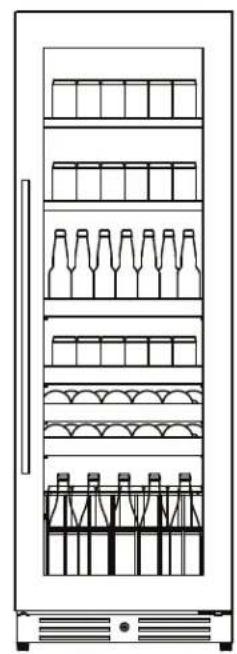
natural_image
Line drawing of a refrigerator with multiple shelves and side compartments (no text or symbols)XOU2470BCGS
XOU2470BCGB
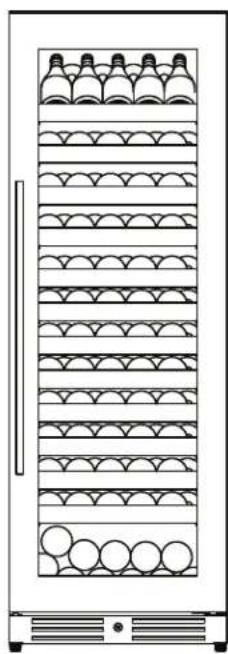
natural_image
Front view of a vertical refrigerator with horizontal shelves and circular base (no text or symbols)natural_image
Front view of a vertical refrigerator with multiple side bays and rows of bottles (no text or symbols visible)XOU2470WDZGS
XOU2470WDZGB
TAKE A MINUTE TO CIRCLE YOUR MODEL ABOVE AND RECORD YOUR SERIAL NUMBER HERE IN CASE YOU NEED IT LATER

YOUR SAFETY MATTERS
Please read through completely before using your XO Unit
To prevent damage to the door gasket, the door must be opened all the way before pulling shelves out.
The appliance must be positioned so that the plug is accessible.
Empty your XO unit before attempting to move the appliance. Moving while loaded may damage or distort the frame.
The compressor will get HOT during operation / touching it may cause injury.
During installation follow all safety tips provided in this manual / appropriate safety equipment such as safety glasses and work gloves should be worn.
Two people should move or lift your XO unit to prevent injury or damage.
Remove all interior and exterior packing materials prior to installation and dispose of properly.
Never cover the bottle racks with foil or other material which will impede internal air circulation.
For maximum efficiency, keep the door tightly shut unless loading or unloading and never overload your XO unit.
Before installing, allow your XO unit to sit upright for 2 hours at the install site. This will allow the cooling system to stabilize after transportation. Failure to follow this step may cause problems.
Never store perishable food products such as meat or cheese in your wine cooler or beverage center.
Location
Your XO unit should be located away from direct sunlight and heat sources (stove, heaters, etc.) which may increase electrical consumption. High or low ambient temperature may cause units to work improperly.
The floor must be strong enough to support your XO unit fully loaded.
Your XO unit must not be installed in areas of where water or excessive moisture are present.
Your XO unit must not be installed near where flammable, corrosive or hazardous materials are present.
Your XO unit's final installation must observe the correct minimum air clearances around and behind the unit to ensure adequate ventilation. In addition, all ventilation openings must be kept clear and free of obstructions, failure to do so will result in damage to the unit.
WARNING
NEVER use external heat sources to accelerate defrosting
NEVER permit unauthorized service or modifications to your XO unit
NEVER tamper with the sealed refrigerant system - this unit uses R600A Refrigerant which is flammable.
It should never be used in the vicinity of any flammable or explosive ignition sources.
ALWAYS FOLLOW THE ELECTRICAL SAFETY INSTRUCTIONS OUTLINED IN THIS MANUAL.
ELECTRICITY - THIS IS SERIOUS
Failure To Follow All Electrical Safety Measures May Result in Serious Injury, Fire Or Death
All electrical work should only be performed by an experienced, licensed electrician.
All XO units MUST be grounded for safe operation and come equipped with a 3 Prong molded cord/plug for that purpose.
NEVER remove or disable the 3rd prong with an adapter.

NEVER use an extension cord to operate your XO unit.
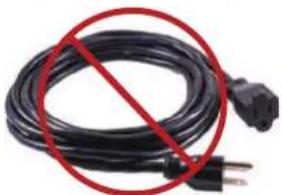
natural_image
Black cable with a red prohibition symbol crossed out by a plug (no text or symbols on the cable itself)Your XO unit is built to operate on 115V 60Hz and should be plugged directly into a dedicated 15 amp 3 prong outlet. If you are uncertain as to the voltage, amperage capacity or if the 3rd prong is properly grounded - consult a licensed electrician.
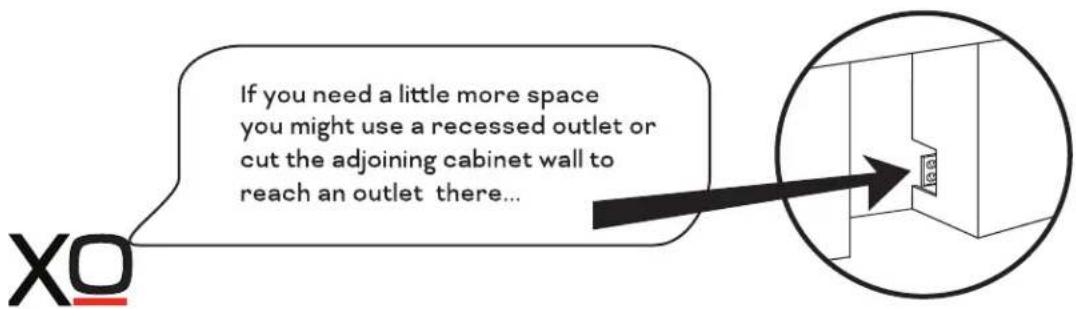
To maximize the depth of the installation recess - your outlet should be mounted flush with the wall.
Your XO unit should not share the circuit with any other electrical devices as this may cause overloading, overheating, blown fuses or tripping circuit breakers. In a worst case this can pose a fire hazard.
NEVER handle your XO unit in wet conditions as this can pose a severe danger of electric shock.
Exercise care when moving your XO unit to avoid damage to the electrical cord. If the electrical cord of your XO unit becomes worn or damaged it must be replaced immediately by a qualified technician.
NEVER unplug your unit by pulling on the cord. Unplug by gripping the plug firmly and pull out straight from the outlet.
INDOOR USE ONLY:
XO Refrigerators, wine cellars and beverage centers described in this manual are rated for indoor use only.
Your XO Unit was designed to operate in a room temperature ambient condition between 60°F and 90°F.
Use in any area which is not temperature controlled within that range, such as a garage or porch may cause your XO unit to fail to function properly. Use in any uncontrolled area or otherwise exposed to the elements is hazardous and voids the warranty.
For outdoor installations - consult XO or your local XO dealer regarding an outdoor rated model.
In regions where high humidity exists condensation may appear on the glass and/or gasket seals. For best operation, keeping the unit fully stocked with product will reduce this.
SERVICE
115V - 60 Hz - 1 phase
AMPS
15 Amp Circuit Breaker
Requires a Dedicated Outlet
All electrical work must be performed by a licensed electrician

Serious injury, fire or death...
Okay -
You've got my attention!
A PERFECT FIT
USE FREE STANDING - OR - BUILT-IN
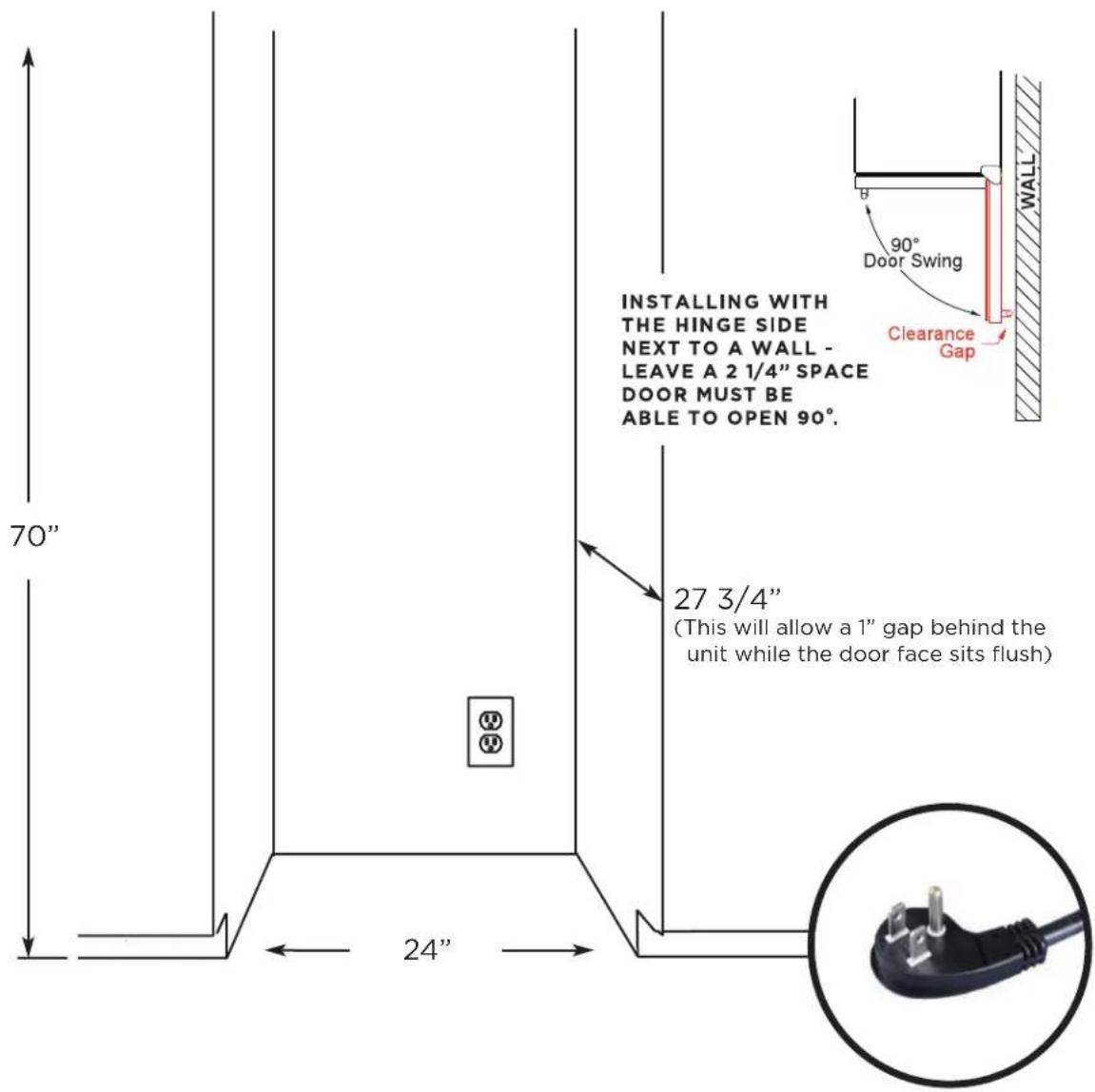
IF THE DOOR CAN'T OPEN FULLY - YOU CAN'T PULL THE SHELVES OUT.
A PERFECT FIT
YOUR XO IS THIS BIG
HEIGHT & WIDTH

DEPTH

natural_image
Simple line drawing of a mechanical component inside a circle (no text or symbols)THE DEPTH IS SHOWN WITHOUT HANDLES HANDLE WILL ADD 1 3/4" TO THE DEPTH
REVERSING THE DOOR
WARNING: Do not attempt to reverse the door alone. This operation requires at least two people to be performed safely. The door is large, heavy and fragile.
READ THESE INSTRUCTIONS COMPLETELY BEFORE BEGINNING - IF YOU ARE UNSURE ABOUT PROCEEDING, STOP AND CALL FOR SERVICE.

BEFORE BEGINNING - REMOVE ALL INTERIOR SHELVES, RACKS AND BINS - THEN LAY THE UNIT FLAT ON ITS BACK. TEAM LIFT - TWO OR MORE PEOPLE ARE REQUIRED!
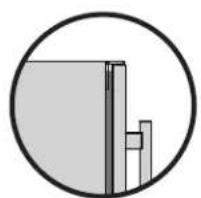
Step 1: Remove the screws attaching the lower hinge to the bottom of the door from below.
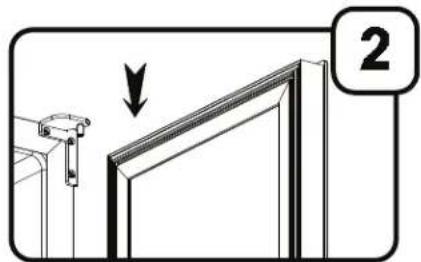
Step 2: Swing the bottom hinge out of the way and carefully slide the door free from the top hinge pin.
CAUTION: DO NOT USE THE DOOR HANDLE TO LIFT OR HOLD THE DOOR. GRIP BY THE EDGES ONLY.

Step 3: Lay the door on a secure, flat, padded, working surface. USE CARE NOT TO DAMAGE THE FINISH OR DOOR GASKET Remove and save the plugs, stickers and hardware from the top of the door.

Step 4: Remove the hardware from the bottom of the door and replace it with the parts removed in Step 3.

natural_image
Diagram of a device with labeled ports and an arrow indicating direction (no text or symbols present)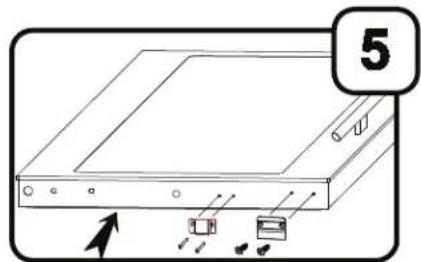
Step 5: Reinstall the hardware from the bottom of the door removed in Step 4 in the holes provided in what had previously been the top of the door.
THE DOOR IS NOW REVERSED 180 DEGREES. PROCEED TO STEP 6.
REVERSING THE DOOR CONT.
WARNING: Do not attempt to reverse the door alone. This operation requires at least two people to be performed safely. The unit is large, heavy and fragile.

Step 6: Remove the upper hinge on the cabinet and replace it with the opposite facing upper hinge, supplied.
Step 7: Remove the front leveling leg support (A) - this will expose the screws (below and behind) holding the toe kick in place. Remove the toe kick (B).
Step 8: Remove the lower hinge support and door bracket as shown. Reinstall the door bracket on the opposite side and install the new opposite facing lower hinge support in its place.
Step 9: First, replace the toe kick (B) removed in Step 7, then replace the front leveling leg support (A) removed in Step 7.
Step 10: Install the lower hinge pin and washer.
TEAM LIFT: Slide the door onto the upper hinge pin, rotate the lower hinge plate into position and secure in place.
NOTE: These two screws are different, the philips head screw installs closest to the cabinet.
AFTER THE DOOR IS SECURE, STAND THE UNIT UPRIGHT AND ALLOW TO STAND AT LEAST 12 HOURS BEFORE PLUGGING IT IN.
GET A GRIP
TIME TO GET A HANDLE ON THIS
Place the handle (B) over the 2 mounting studs (A) on the door frame with the set screws (C) pointing down.

Push the handle tightly against the door and tighten both of the 2 set screws (C) with the hex key (D)
Keep the hex key in a safe place for future use. Two extra set screws are included in the hardware bag.
Stainless Steel / Glass door models come with a matching stainless steel designer handle.
Black glass models come with a black designer handle.

natural_image
Pure electrical circuit lines without any symbolsRotate to raise or lower the LEVELING LEGS located at each of the four corners until all four legs are seated firmly on the floor and the interior floor of the unit is level both front to back and side to side.
Failure to follow this important step may cause problems with proper door operation, excessive condensation, vibration and noise.
ANTI-TIP BRACKET AN ESSENTIAL STEP
When drawers, racks and shelves are extended while loaded, there is a danger of tipping the unit. In these cases an Anti-Tip Bracket must be installed on the rear right or left side.


natural_image
Technical line drawing of a metal bracket with mounting holes and a slot (no text or symbols)The Anti-Tip Bracket kit comes with a bolt and washers to mount to the rear of the refrigerator and three different sets of fasteners to mount it to any of the following: Dry Wall Construction, Wooden Flooring or Concrete Flooring.
DRYWALL CONSTRUCTION: (2 Screws) The bracket is screwed to the wall and at least one of the screws must be into a stud within the wall.
WOODEN FLOORING: (2 Screws) The bracket must be screwed down into the flooring.
CONCRETE FLOORING: (Expansion Bolt) A 3/8" hole is bored into the flooring 1 3/4" to 2" deep. The expansion sleeve is set with a mallet into the hole and the bracket is bolted to the floor.
Make certain that the unit will not tip when finished. FAILURE TO SECURE THE UNIT PROPERLY CAN CREATE A DANGEROUS CONDITION.

natural_image
Pure mechanical diagram showing a cross-section of a structural assembly without any text, numbers, or symbols.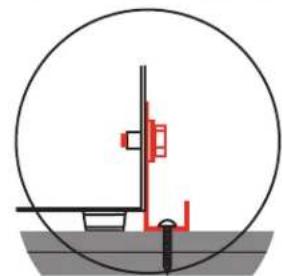
natural_image
Pure mechanical diagram showing a circular component with internal components and a central vertical structure (no text or symbols)
natural_image
Pure mechanical diagram showing a circular component with internal components and a base, without any text, numbers, or symbols.MEET YOUR XO
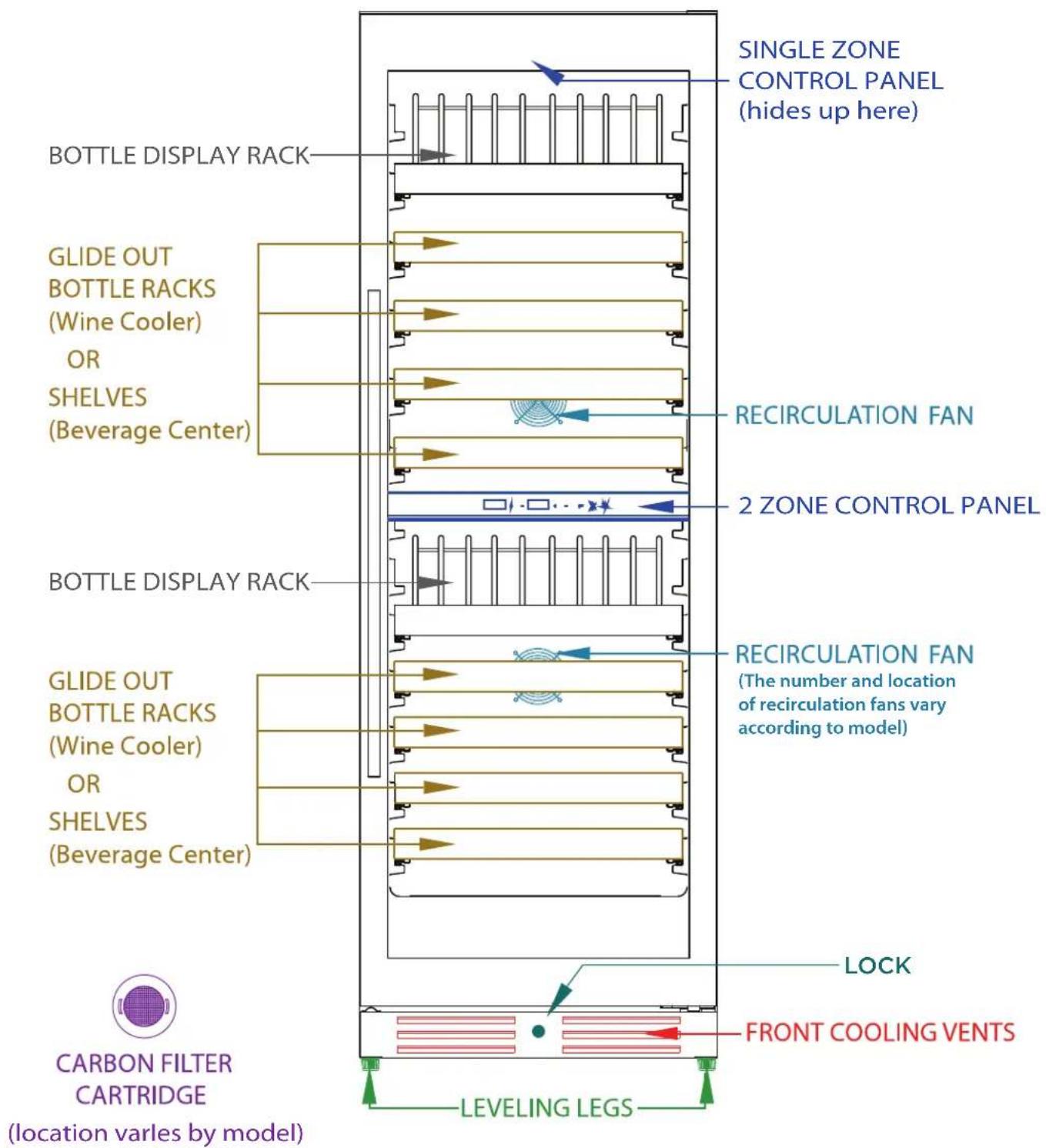
TAKE CONTROL
TEMPERATURE

Single Zone Wine Coolers and Beverage Centers have identical control panels.
| Single Zone Wine Cooler Temp. SettingsFactory Preset: 54°F (Ideal Storage)Adjustable Range: 41°F to 64°F | Beverage Center Temp. SettingsFactory Preset: 43°FAdjustable Range: 34°F to 50°F |
Your Wine Cooler or Beverage Center remembers your temperature setting in case of a power failure and automatically adjusts to the previous setting when power is restored.
When the +/- button is pressed, your wine cellar automatically enters set up mode. The LED Display will begin flashing and display the temperature setting.
Each time you press the + button, the temperature setting will increase 1 Degree. Each time you press the - button, the temperature setting will decrease 1 Degree.
Once you have reached the desired temperature setting, the display will continue to flash for 5 seconds, then revert to showing the compartment temperature.
To view the real time temperature, press and hold the +/- button for 5 seconds. The interior temperature will flash in the LED Display for 5 seconds.
If you wish to change the display from Fahrenheit to Celsius (or vice versa) press and hold both "+" and "-" simultaneously for 5 seconds.
LED LIGHTS

L1: When you turn on your wine cellar, the internal light will switch on when the door is opened, and off when the door is closed.
L2: Press ⚙️, the internal light will remain on continuously and dim after 3 minutes.
L3: Press twice, the internal light will remain on for 10 minutes and then shut off.
TAKE CONTROL
CONTINUED
COLORS!

When you turn your wine cellar or beverage center, the interior light is white, press Ⓞ and the light will change to blue.
Press 📊 again and the light will change to amber.
SWITCHING MODES

When you turn your XO Unit on, it is set to work in standard mode.
Press ⚙ ECO mode is turned on. ECO Mode is an energy saver function.
Press 🌿 again, ECO mode is turned off and it returns to standard mode.
ECO Mode also serves as SABBATH Mode.
The Sabbath Mode was designed for use on the Jewish Sabbath and Holidays.
The Sabbath Mode feature makes it possible for observant Jews to use the beverage center during the duration of the holiday. The Sabbath Mode feature can be set to override typical reactions caused by your interaction with the unit. While in the Sabbath Mode, your appliance will still operate. However, it will not respond to your actions.
While in the Sabbath Mode, you may notice the fan running when the door is opened, however, this is not a result of your actions. The compressor and fan will operate at predetermined times.
Press 📋 for 5 seconds, DEMO mode is turned on.
Press 📋 for 5 seconds again, DEMO mode is turned off and it returns to standard mode.
Your controls are simple and intuitive to operate.
SABBATH MODES


Press " 🔒 " + " ☑ " for 5 seconds. The display show "Sb" for single window model, the display show "Sb On" for two windows model. Sabbath mode is on. Under Sabbath mode, the inner light turn off, and there is not any action when touch the button, and the inner fan keep running.
If the inner temperature is higher than 73^ F, "HI" is shown on the display panel. If the inner temperature is lower than 32^ F, "LO" is shown on the display, the alarm will be sounded in 10 minutes.
Press " 🔒 " + " ☑ " for 5 seconds again, the Sabbath mode is off and the cooler is under normal mode again. The display will show the setting temperature.
SINGLE ZONE CONTROL
BEVERAGE CENTERS OR 1 ZONE WINE COOLERS

flowchart
graph TD
    A["ON/OFF Button\nPress & Hold for 1 Second to turn ON\nPress & Hold for 3 Seconds to turn OFF\nPress to Silence Alarm"] --> B["Light Function Button\nToggle Between 3 Light Functions\nL1, L2, L3"]
    B --> C["TEMPERATURE DISPLAY"]
    C --> D["Indicator Light\nCooling Mode ON"]
    D --> E["+ -"]
    E --> F["Press to raise temperature\nPress to lower temperature"]
    F --> G["Changes interior light color"]
    G --> H["Toggles between different operating modes"]
The temperature setting can be adjusted from 41-64°F.
Your controls are simple and intuitive to operate.
54^ F is usually ideal for wine storage.

DUAL ZONE CONTROL
2 ZONE WINE COOLERS

flowchart
graph TD
    A["ON /OFF Button\nPress & Hold for 1 Second to turn ON\nPress & Hold for 3 Seconds to turn OFF\nPress to Silence Alarm"] --> B["Light Function Button\nToggle Between 3 Light Functions L1, L2, L3"]
    B --> C["TEMPERATURE DISPLAYS\nUPPER | LOWER"]
    C --> D["42°C ±"]
    C --> E["52°C +"]
    D --> F["UPPER"]
    E --> G["LOWER"]
    F --> H["+ Press to raise temperature\n- Press to lower temperature"]
    G --> I["Changes interior light color"]
    H --> J["Toggles between different operating modes"]
Upper compartment: The temperature setting can be adjusted from 41-50°F. Lower compartment: The temperature setting can be adjusted from 50-64°F. Your controls are simple and intuitive to operate.
JUGGLING SPACE
IS EASY WITH XO

- Fully extend the shelf you wish to remove,
- Lift the front of the shelf up to remove from the front clips,
- While holding one of the telescoping glides, push the shelf or rack in and then pull up at the back to release it from the rear clip. Repeat with the other side to complete disconnecting the shelf or rack.
ALL SHELVES MUST BE PUSHED ALL THE WAY IN BEFORE CLOSING THE DOOR DOOR MUST BE FULLY OPENED BEFORE PULLING SHELVES OUT
CAPACITIES
HOW MUCH CAN MY UNIT HOLD
Wine bottles and other types of beverage containers come in a host of different sizes and shapes. The following is provided as a general guideline, wine bottles are assumed to 750ml / Bourdeaux style unless otherwise noted.
WINE DISPLAY RACKS
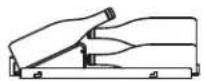
The display racks present in both the single zone and two zone wine storage cabinets are designed to showcase up to 5 bottles.
These racks also have the ability to rack up to 9 bottles behind the bottles on display - see diagram, right.
XOU2470WGS and XOU2470BG have 1 display racks.
XOU2470WDZGS and XOU2470WDZBG have 2 display racks, 1 per zone.

natural_image
Diagram of a mechanical device with multiple bottles arranged in rows (no text or symbols)WINE STORAGE RACKS
These racks have the ability to rack up to 10 bottles side by side - see diagram, right. XOU2470WGS and XOU2470BG have 11 storage racks.
XOU2470WDZGS and XOU2470WDZBG have 8 storage racks, 4 per zone.

In addition, up to 11 bottles may also be stored lying flat on the floor of the unit.
BEVERAGE CENTER SHELVES AND BINS
The clear glass shelving of the beverage centers have the ability to store a variety of different size and shape beverage containers.
In addition to shelving, these units incorporate a slide out bin which has two levels to fit both 12oz cans and tall bottles, standing up - see diagram, right.
This includes XOU2470BCGS and XOU2470BG.


natural_image
Grid of circular and rectangular patterns with vertical stripes, no text or symbols presentStore wine in sealed bottles only
Avoid overloading
Storing little or no product can cause excessive condensation
CAPACITIES
HOW MUCH CAN MY UNIT HOLD
XOU2470BCGS
XOU2470BCBG
XOU2470WDZGS
XOU2470WDZBG
XOU2470WGS
XOU2470WBG
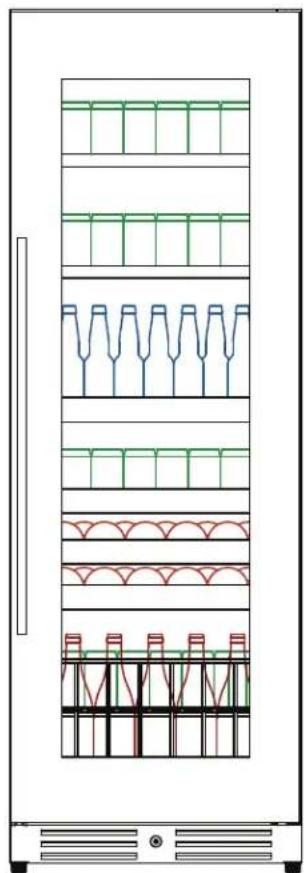
natural_image
Diagram of a multi-level refrigerator with green and red panel layouts, no text or symbols presentBEVERAGE
CENTER
144 (12oz) CANS
+40 BOTTLES
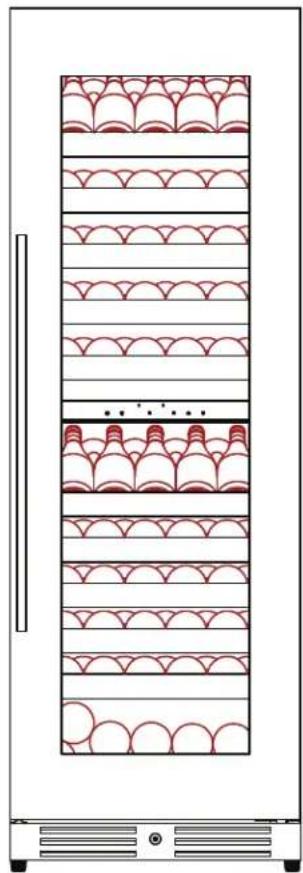
natural_image
Diagram of a vertical storage cabinet with repeating patterned compartments (no text or symbols)2 ZONE
WINE
119 (750ml)
BOTTLES
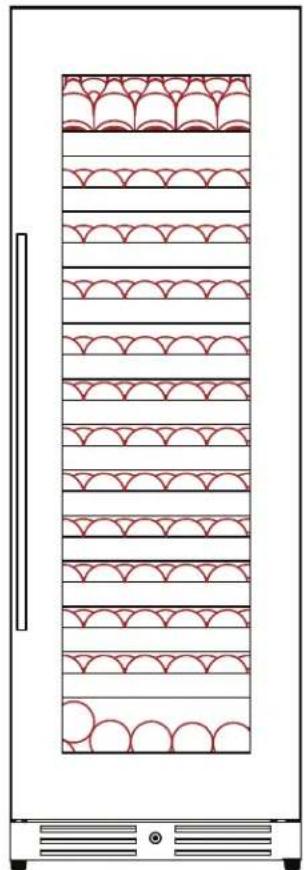
natural_image
Diagram of a vertical storage cabinet with repeating patterned compartments (no text or symbols)1 ZONE
WINE
135 (750ml)
BOTTLES
Assumptions are taken regarding bottle / can size and shape.
Values are max loading estimates.
A LITTLE TLC
GOES A LONG WAY
Cleaning the Inside:
Walls, floor, inside window, and shelves - Some water deposits and dust can be removed with a dry paper towel, others may require a damp cloth.
Cleaning the Outside:
Outer case - It is important to keep the area clean where the door seals against the cabinet. Clean this area with a soapy cloth. Rinse with a damp cloth and let dry.
Control Panel and Door · Wipe with a damp cloth and dry thoroughly. Do not use cleaning sprays, large amounts of soap and water, abrasive, or sharp objects on the panel, they can damage it.
CAUTION: Some paper towels may also scratch the control panel and glass on the door.
Door Surface - Use only mild, non-abrasive detergents applied with a clean sponge or soft cloth. Rinse well with damp cloth.
NOTE: Do not use cleaners containing ammonia or alcohol on your XO unit. Ammonia or alcohol can damage the appearance of the appliance.
NOTE: Never use any commercial/abrasive cleaners or sharp objects on any part of the wine cooler.
POWER FAILURE
Most power failures are corrected within a few hours and should not affect the temperature of your appliance if you minimize the number of times the door is opened.
If the power is off for a longer period of time, you need to take the proper steps to protect your contents.
VACATION
Short vacations: Leave the XO unit operating during vacations of less than three (3) weeks.
Long vacations: If the appliance will not be used for an extended period, remove all items and turn off the appliance.
Clean and dry the interior thoroughly. To prevent odor and mold growth, leave the door open slightly, blocking it open if necessary.
ENERGY SAVING TIP
The unit should be located in the coolest area of the room, away from heat producing appliances, and out of direct sunlight.
MOVING
Remove all items and securely tape down all loose items (shelves) inside your appliance
Turn the adjustable leveling legs all the way into the base to avoid damage
Tape the door shut and transport the XO unit securely in the upright position
Blanket wrap the exterior to help protect against scratches and other damage
A BREATHE OF FRESH AIR
NOTE: Not all models are equipped with XOUAIRFILTER

Rotate the filter 1/4 turn to unlock

natural_image
Two circular diagrams showing a patterned inner circle and a rotating arrow, no text or symbols present.Pull straight out to remove
Align the tabs and insert the new filter
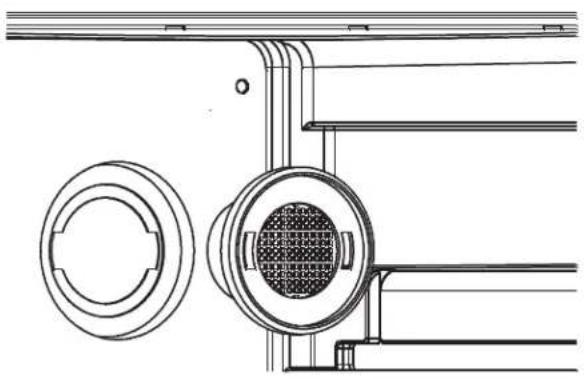
natural_image
Technical line drawing of a mechanical assembly with circular components and a central meshed component (no text or symbols)Rotate filter 1/4 turn to lock in place

natural_image
Two circular diagrams showing a grid-patterned circular component with side handles, one with an arrow indicating rotation (no text or symbols)FAQ'S
Q. There doesn't appear to be any power to the unit.
A. There are 3 easy to check common causes:
(1) Check to see if a fuse has blown or circuit breaker has tripped & replace or reset.
(2) Check to ensure the plug is fully inserted into the outlet.
(3) A power surge may have caused the unit to shut down to protect itself - Unplug the unit, wait 5 seconds and plug it back in.
Q. The cabinet temperature is too high.
A. Check these 5 things:
(1) Check the temperature setting and adjust as needed.
(2) Make certain the door is completely closed and the door gasket is sealing properly.
(3) Avoid opening the door frequently and/or leaving the door open for extended periods.
(4) Did you load a large quantity of warm bottles at once? It is better to add smaller quantities in several loads.
(5) Make certain nothing is blocking the toe kick vents (including dust behind the vents).
Q. The alarm is beeping and "HI" is displayed on the control panel.
A. See the question and answers above - if the door has been tightly closed and you have not recently added a large quantity of warm bottles, it may be a mechanical issue. Unplug the unit and call for service.
Q. The alarm is beeping and "LO" is displayed on the control panel.
A. This may be a sensor malfunction. Unplug the unit and call for service.
MORE "Q & A"
Q. Why does condensation form on the inside or outside of my XO unit?
A. It may be that the door is either opened repeatedly or not closed completely. It may also be due to an excessive ambient humidity, in which case it will clear when the humidity drops.
Q. There is warm air coming from the bottom of my unit.
A. This is normal. Cooling systems must vent the heat they remove from inside the cabinet.
Q. Why does the evaporator fan run all the time?
A. It continually recirculates air to ensure cabinet temperatures are consistent.
Q. How do I adjust temperature?
A. Refer to Page 17.
Q. How do I adjust shelving?
A. Refer to Page 21.
Q. When does the high temperature alarm sound?
A. If internal temperature exceeds 73^ F for more than 60 minutes.
Q. If the door hinge is next to a wall, how much clearance do I need to open the door?
A. The unit should be at least 2" from the wall to allow the door to open at least 90°.
NOTES:
WE'VE GOT YOUR BACK
90 DAY LOVE IT or LEAVE IT. For 90 Days all our products are backed by our unique Love it or Leave it Guarantee.
TWO-YEAR PARTS & LABOR LIMITED WARRANTY. XO warrants to the original purchaser of every new XO refrigerated unit, the cabinet and all parts thereof, to be free from defects in material or workmanship under normal and proper use and maintenance as specified by XO and upon proper installation and start-up in accordance with the instruction packet supplied with each XO unit. XO's obligation under this warranty is limited to a period of two (2) years from the date of original purchase.
FIVE-YEAR COMPRESSOR LIMITED WARRANTY. XO warrants its compressor to be free from defects in both material and workmanship under normal and proper use and maintenance service for a period of five (5) years from the date of original purchase. If the compressor fails during that time period due to a defect in material or workmanship, XO will supply a replacement compressor free of charge. The consumer will be responsible for all related transportation and labor costs. Product must be registered with XO to qualify for this warranty.
TERMS APPLICABLE TO EACH WARRANTY. Any part covered under the above warranties that is determined by XO to have been defective within the time frame is limited to the repair or replacement, including labor charges, of defective parts or assemblies. The labor warranty shall include standard straight time labor charges only and reasonable travel time, as determined by XO.
WARRANTY CLAIMS. All claims for labor or parts must be made directly through XO. All claims should include: model number and serial number of cabinet, proof of purchase, and date of installation. In case of warranted compressor, the compressor model tag must be returned to XO along with the above listed information.
WHAT IS NOT COVERED BY THIS WARRANTY. XO's sole obligation under this warranty is limited to either repair or replacement of parts, subject to the additional limitations below. This warranty neither assumes nor authorizes any person to assume obligations other than those expressly covered by this warranty. Open box, factory seconds, scratch and dent, floor models and commercial applications are excluded from these warranties. Consumer shall be responsible for labor and transportation costs where noted above.
NO CONSEQUENTIAL DAMAGES. XO is not responsible for economic loss, profit loss; or special, indirect or consequential damages, including without limitation, losses or damages arising from food or product spoilage claims whether or not on account or refrigeration failure.
WARRANTY IS NOT TRANSFERABLE. This warranty is not assignable and applies only in favor of the original purchaser/user at the original installation location. Any such assignment or transfer shall void the warranties herein made and shall void all warranties, express or implied, including any warranty or merchantability or fitness for a particular purpose.
IMPROPER USAGE. XO assumes no liability for parts or labor coverage for component failure or other damages resulting from improper usage or installation or failure to clean and/or maintain product as set forth in the warranty packet provided with the unit.
ALTERATION OR NEGLECT. XO is not responsible for the repair or replacement of any parts that XO determines have been subjected after the date of manufacture to alteration, neglect, abuse, misuse, accident, damage during transit or installation, fire, flood, or act of God.
IMPROPER ELECTRICAL CONNECTIONS. XO is not responsible for the repair or replacement of failed or damaged components resulting from electrical power failure, high or low voltage, use of extension cords, or improper grounding of the unit.
YOUR RIGHTS UNDER STATE LAW. This warranty gives you specific legal rights and you may have other rights that vary from state to state. Some states do not allow the exclusion or limitation of consequential damages or a limitation on how long an implied warranty lasts, so the above exclusion or limitation may not apply to you.
OUTSIDE U.S. This warranty does not apply to, and XO is not responsible for, any warranty claims made on products sold or used outside the 48 continental United States.
To obtain service:
Call 973-403-8900 | email service@xoappliance.com | or submit a request on our website www.xoappliance.com

LOVE IT OR LEAVE IT
100% GUARANTEED
2023.04.10


XOU2470BCWCMAN2023

- EVERY THING YOU NEED TO KNOW ABOUT YOUR
- WARNING
- XO APPLIANCE
- CONGRATULATIONS
- WHERE THINGS ARE
- DEAR INSTALLER THE JOB ISN'T DONE UNTIL
- DANGER
- THESE ARE THE MODELS COVERED IN THIS
- BOOK
- YOUR SAFETY MATTERS
- Please read through completely before using your XO Unit
- Location
- ELECTRICITY - THIS IS SERIOUS
- Failure To Follow All Electrical Safety Measures May Result in Serious Injury, Fire Or Death
- INDOOR USE ONLY:
- A PERFECT FIT
- USE FREE STANDING - OR - BUILT-IN
- YOUR XO IS THIS BIG
- REVERSING THE DOOR
- REVERSING THE DOOR CONT.
- GET A GRIP
- TIME TO GET A HANDLE ON THIS
- ANTI-TIP BRACKET AN ESSENTIAL STEP
- MEET YOUR XO
- TAKE CONTROL
- TEMPERATURE
- LED LIGHTS
- COLORS!
- SWITCHING MODES
- SABBATH MODES
- SINGLE ZONE CONTROL
- BEVERAGE CENTERS OR 1 ZONE WINE COOLERS
- DUAL ZONE CONTROL
- ZONE WINE COOLERS
- JUGGLING SPACE
- IS EASY WITH XO
- CAPACITIES
- HOW MUCH CAN MY UNIT HOLD
- WINE DISPLAY RACKS
- WINE STORAGE RACKS
- BEVERAGE CENTER SHELVES AND BINS
- A LITTLE TLC
- GOES A LONG WAY
- Cleaning the Inside:
- Cleaning the Outside:
- POWER FAILURE
- VACATION
- ENERGY SAVING TIP
- MOVING
- A BREATHE OF FRESH AIR
- FAQ'S
- MORE "Q & A"
- WE'VE GOT YOUR BACK
- To obtain service:
Brand : XO
Model : XOU2470WGS
Category : Wine tasting table