
XOMWD24BS - Oven XO - Free user manual and instructions
Find the device manual for free XOMWD24BS XO in PDF.


| Product Type | Built-in Microwave Drawer Oven |
| Brand | XO |
| Model | XOMWD24BS |
| Rated Voltage | 120V~60Hz |
| Rated Input Power (Microwave) | 1500W |
| Rated Output Power (Microwave) | 1000W |
| Oven Capacity | 1.2 cu ft |
| Internal Dimensions (W x H x D) | 16-11/16" x 7-3/16" x 17-1/4" |
| External Dimensions (W x H x D) | 23-7/8" x 15" x 24-9/16" |
| Net Weight | Approx. 74 lbs |
| Power Levels | 10 levels (100% to 10%) |
| Defrost Functions | Weight Defrost (0.1-6.0 lbs) and Time Defrost |
| Auto Menus | Beverage, Popcorn, Melt, Soften |
| Control Panel | Touch buttons: OPEN, CLOSE, START/+30SEC, STOP/CANCEL, etc. |
| Clock Setting | 12-hour format |
| Kitchen Timer | Up to 99 min 99 sec |
| Buzzer On/Off | Yes, configurable via SETUP |
| Panel Lock | Yes, press STOP/CANCEL for 3 seconds |
| Installation Requirements | Anti-tip block, grounded outlet, specific clearances |
| Cleaning | Mild soap and water; do not use abrasive cleaners |
| Warranty | 1 year parts and labor; 90-day Love It or Leave It Guarantee |
| Waveguide Cover | Mica; never remove; clean gently |
Frequently Asked Questions - XOMWD24BS XO
User questions about XOMWD24BS XO
0 question about this device. Answer the ones you know or ask your own.
Ask a new question about this device
Download the instructions for your Oven in PDF format for free! Find your manual XOMWD24BS - XO and take your electronic device back in hand. On this page are published all the documents necessary for the use of your device. XOMWD24BS by XO.
USER MANUAL XOMWD24BS XO
EVERY THING YOU NEED TO KNOW ABOUT YOUR

XOMWD24S
MICROWAVE DRAWER
IMPORTANT INSTALLER - LEAVE THIS MANUAL WITH THE CUSTOMER
SAFETY PRECAUTIONS 3 UTENSILS | FOOD SAFETY 12
RADIO INTERFERENCE 5 CONTROL PANEL 13
ELECTRICAL GROUNDING 6 OPERATING INSTRUCTIONS 14
INSTALLATION INSTRUCTIONS 7 CLEANING + MAITENANCE 19
OVERVIEW 11 WARRANTY 20

CONGRATULATIONS
on purchasing your XO. Before you proceed, take just a moment to register your XO at:
www.xoappliance.com/register-your-product/
Ensuring warranty coverage should you need service Providing ownership verification for insurance purposes Let's XO notify you in the event of product changes or recalls.
PRECAUTIONS TO AVOID POSSIBLE EXPOSURE TO EXCESSIVE MICROWAVE ENERGY
(a) Do not attempt to operate this oven with the door open.
Open-door operation can result in harmful exposure to microwave energy.
Never defeat or tamper with the safety interlocks.
(b) Do not place any object between the oven front face and the door or allow dirt or cleaner residue to accumulate on sealing surfaces.
(c) Do not operate the oven if it is damaged. It is particularly important that the oven door close properly and that there is no damage to the:
(1) DOOR (bent)
(2) HINGES AND LATCHES (broken or loosened)
(3) DOOR SEALS AND SEALING SURFACE S
(d) The oven should not be adjusted or repaired by anyone except properly qualified service personnel.
Specifications
| Model: | XOMWD24S |
| Rated Voltage: | 120V~60Hz |
| Rated Input Power(Microwave): | 1500W |
| Rated Output Power(Microwave): | 1000W |
| Oven Capacity: | 1.2 cu ft |
| Internal Dimensions | 16-11/16” W x 7-3/16” H x 17-1/4” D |
| External Dimensions: | 23-7/8” W x 15” H x 24-9/16” D |
| Net Weight: | Approx. 74 lbs |
State of California Proposition 65 Warning (US only)
WARNING
This product contains chemicals known to the State of California to cause cancer
and birth defects or other reproductive harm.
For more information go to www.P65Warnings.ca.gov
IMPORTANT SAFETY INSTRUCTIONS
When using electrical appliances basic safety precautions should be followed, including: WARNING - To reduce the risk of burns, electric shock, fire, injury to persons or exposure to excessive microwave energy:
- Read all instructions before using the appliance.
- Read and follow the section: "PRECAUTIONS TO AVOID POSSIBLE EXPOSURE TO EXCESSIVE MICROWAVE ENERGY" on the preceding page.
- This appliance must be grounded. Connect only to properly grounded outlet. See "GROUNDING INSTRUCTIONS" on the following page.
- Install or locate this appliance only in accordance with the provided installation instructions.
- Some products such as whole eggs and sealed containers - for example, closed glass jars - are able to explode and should not be heated in this oven.
- Use this appliance only for its intended use as described in the manual. This type of oven is specifically designed for residential use only to heat, cook or dry food and cooking ventilation.
- As with any appliance, close supervision is necessary when used by children.
- Do not operate this appliance if it has a damaged cord or plug, if it is not working properly, or if it has been damaged or dropped.
- This appliance should be serviced only by qualified service personnel. Contact XO to find your nearest authorized service for examination, repair, or adjustment.
- Do not cover or block any openings on the appliance.
- Do not store this appliance outdoors. Do not use this product near water - for example; near a sink, in a wet basement, near a swimming pool, or similar location.
- Do not immerse cord or plug in water.
- Keep cord away from heated surfaces.
- Do not let cord hang over the edge of a table or counter.
- When cleaning the contacting surfaces of door and oven use only mild, nonabrasive soaps, or detergent applied with a sponge or soft cloth.
- To reduce the risk of fire in the oven cavity:
1). Do not overcook food. Carefully attend appliance when paper, plastic, or other combustible materials are placed inside the oven to facilitate cooking.
2). Remove wire twist-ties from paper or plastic bag before placing bag in oven.
3). If material inside of the oven ignites, keep oven door closed, turn the oven off, and disconnect the power cord, or shut off power at the fuse or circuit breaker panel.
4). Do not use the cavity for storage purposes. Do not leave paper products, cooking utensils, or food in the cavity when not in use.
- Liquids such as water, coffee, or tea are able to be overheated beyond the boiling point without appearing to be boiling. Visible bubbling or boiling when the container is removed from the microwave oven is not always present.
THIS COULD RESULT IN VERY HOT LIQUID SUDDENLY BOILING OVER WHEN THE CONTAINER IS DISTURBED OR A UTENSIL IS INSERTED INTO THE LIQUID.
IMPORTANT SAFETY INSTRUCTIONS
17. CONTINUED:
TO REDUCE THE RISK OF PERSONAL INJURY:
1) Do not overheat liquids.
2) Stir the liquid both before and halfway through heating it.
3) Do not use straight-sided containers with narrow necks.
4) After heating, allow the container to stand undisturbed in the microwave for a short time.
5) Use extreme care when inserting a spoon or other utensil into the container.
- Do not operate any heating or cooking appliance beneath the microwave.
- Do not mount the unit over or near any portion of a heating or cooking appliance.
- Do not mount over a sink.
- Do not store anything directly on top of the appliance surface when the unit is in operation.
RADIO INTERFERENCE
- Operation of a microwave may cause interference to your radio, TV, or similar equipment
- When there is interference, it may be reduced or eliminated by taking the following measures:
1) Clean door and sealing surface of the oven
2) Reorient the receiving antenna of radio or television.
3) Relocate the microwave oven with respect to the receiver.
4) Move the microwave oven away from the receiver.
5) Plug the microwave oven into a different outlet so that microwave oven and receiver are different branch circuits.
SAVE AND FOLLOW THESE IMPORTANT GROUNDING INSTRUCTIONS
This appliance must be grounded. In the event of an electrical short circuit. Grounding reduces the risk of electric shock by providing an escape wire for the electric current. This appliance is equipped with a cord having a grounding wire with a third prong grounding plug. The plug must be plugged into an outlet that has been properly installed and grounded by a qualified electrician.

WARNING - Improper grounding can result in a risk of electric shock.
Consult a qualified electrician or serviceman if the grounding instructions are not completely understood, or if doubt exits as to whether the appliance is properly grounded.
This appliance was designed to be permanently installed and an extension cord should never be used in a permanent installation.
In the event that the unit is temporarily used in a non-permanent location, and if it is necessary to use an extension cord, use only a 3-wire extension cord that has a 3-blade grounded plug, and a properly grounded 3-slot receptacle that will accept the plug on the appliance.
The marked rating of the extension cord must be equal to or greater than the electrical rating of the appliance.
If a longer/extension cord is used care must be taken to ensure it will not drape over the counter top or tabletop where it can be pulled by children or create a trip hazard.
DANGER - Electric Shock Hazard
Touching some of the internal components can cause serious personal injury or death.
Do not disassemble this appliance.
WARNING - Electric Shock Hazard
Improper grounding can result in electric shock. Do not plug into an outlet until appliance is properly installed and grounded.
The unit comes pre-wired with a short power supply cord designed for a permanent installation above a range or cooktop.
INSTALLATION

WARNING
CLEARANCES AND DIMENSIONS
For safety considerations, do not install drawer in any combustible cabinetry, which is not in accordance with the stated clearances.
Remove all packing materials from inside the microwave drawer. DO NOT REMOVE THE WAVEGUIDE COVER, located on the top of the microwave drawer. Remove the feature sticker, if there is one. Check the drawer for any damage, such as misaligned or bent drawer, damaged drawer seals and sealing surfaces, broken or loose drawer guides, and dents inside the cavity or on the front side of the drawer. If there is any damage, do not operate the microwave drawer and contact your dealer or XO.
IMPORTANT NOTES TO THE INSTALLER
Read the entire installation portion of the manual before installing the microwave drawer. Remove all packing materials before connecting the electrical supply. Observe all governing codes and ordinances. Be sure to leave these instructions with the consumer.
IMPORTANT NOTES TO THE CONSUMER
Keep this manual for the future reference. With use of any heat generating microwave oven, there are certain safety precautions you should follow. These are listed in the operation portion of the manual. Read all and follow carefully. Be sure your microwave drawer is installed and grounded properly by a qualified installer or service technician.
IMPORTANT SAFETY INSTRUCTIONS
Fire or electrical shock resulting in property damage, personal injury or death may occur if the information in this manual is not followed exactly. To reduce the risk of tipping, the microwave drawer must be secured with a properly installed Anti-Tip block. This microwave drawer must be electrically grounded in accordance with local codes. Make sure any wall coverings and/or cabinets around the microwave drawer can withstand the heat generated by the microwave drawer. Never leave the drawer open when the microwave is unattended. Stepping, leaning, or sitting on the drawer may result in serious injuries and may also cause damage to the microwave.
INSTALLATION
CLEARANCES AND DIMENSIONS
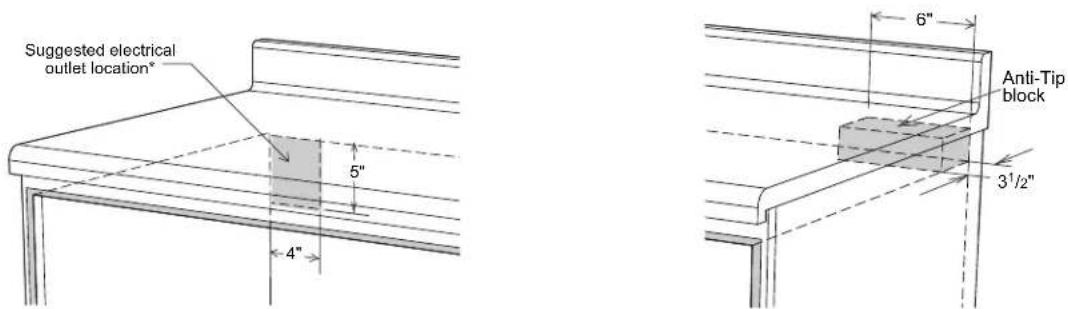
Dimensions shown in the figure below must be used. Given dimensions provide minimum clearance. Locate electrical outlet in the shaded area in the upper left-hand corner of the cutout. Contact surface must be solid and level. The floor of the opening should be constructed of plywood strong enough to support the weight of the oven.
Standard Installation Dimensions and Clearances

INSTALLATION
Appliance Dimensions

ELECTRICAL OUTLET AND ANTI-TIP BLOCK
To reduce the risk of tipping the drawer, the anti-tip block must be properly located 1 4-13/16" above the floor on which the microwave drawer will sit. The 6" anti-tip block must be provided by the installer. The anti-tip block prevents serious injury that might result from spilled hot liquids. If the microwave drawer is ever moved to a different location, the anti-tip block must also be moved and installed. When secured to the wall, make sure that the screws completely penetrate the dry wall and are secured in wood or metal so that the block is totally stable. When fastening, be sure that the screws do not penetrate electrical wiring or plumbing. The electrical requirements are 120 volt, 60 Hz, AC only, 15 amp. It is recommended that a separate circuit serving only this appliance be provided. The drawer is equipped with a 3-prong grounding plug and must be plugged into a wall receptacle that is properly installed and grounded. Should you only have a 2-prong outlet, have a qualified electrician install a correct wall receptacle.
NOTE: If you have any questions about the grounding or electrical instructions, consult a qualified electrician or service person. The microwave drawer can also be installed using an electrical outlet in an adjacent cabinet within the area where the provided electrical cord can reach. ALWAYS check electrical cord can reach.
INSTALLATION
GROUNDING INSTRUCTIONS
This appliance must be grounded. The microwave drawer must be plugged into a wall receptacle that is properly installed and grounded in accordance with the National Electrical Code along with local codes and ordinances. In the event of an electrical short circuit, grounding reduces risk of electrical shock by providing an escape wire for the electrical current.

WARNING: Improper use of the grounding plug can result in the risk of electric shock. Do not use an extension cord. If the power supply cord is too short, have a qualified electrician or serviceman install an outlet near the appliance.

DRAWER INSTALLATION
- Place the drawer adjacent to the wall or cabinet opening. Plug the power supply cord into the electrical outlet.
- Carefully guide the drawer into the prepared opening. Avoid pinching the cord between the oven and wall.
- Slide the drawer all the way until the mounting flange is flush with the face of the cabinet.
- Open the drawer. Using the four holes on the drawer as a template, pre-drill the cabinet using a 1/16" bit.
- Secure the drawer with the four screws supplied.
MODEL AND SERIAL NUMBER LOCATION
To locate the model and serial number, open the microwave drawer fully. The label can be found beyond the back wall of the microwave cavity, facing up from the flat surface.
GET TO KNOW YOUR BUILT-IN MICROWAVE DRAWER OVEN
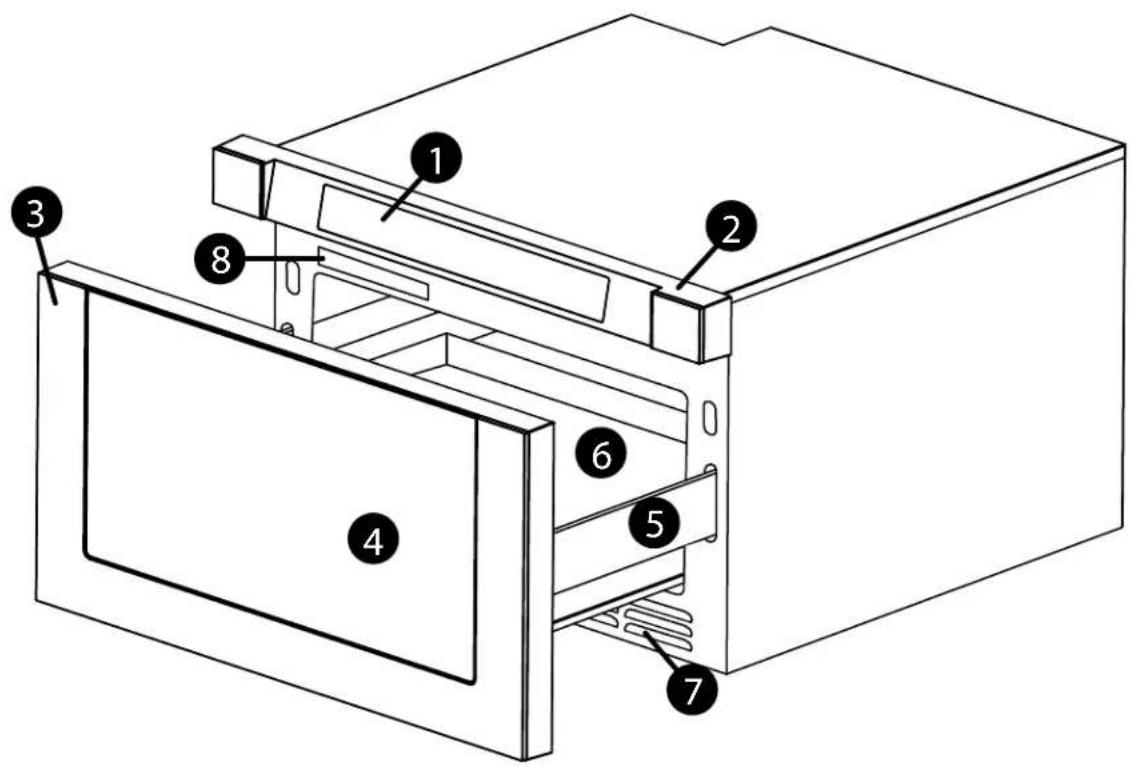
1 CONTROL PANEL
2 CONTROL BOX
3 DOOR DRAWER/FRONT
4 WINDOW
5 DRAWER GUIDE
6 MICROWAVE PLATFORM
7 VENTS
8 NAME PLATE

Defrosting Rack
Use only in defrosting function
Do not use for cooking.
Do not use without food.
UTENSILS
AND RE-HEATING USE: MICROWAVE:
Glass Ceramic (such as Corningware)
Heat Resistant Glass (such as Pyrex®)
Microwave Safe Plastics
Paper Plates
Microwave Safe Stoneware / Pottery
Browning Dishes (per mfrs instructions)
NEVER USE IN YOUR
Metal Pans or Bakeware
Dishes with Metallic Edging
Safe Plastics
Food Storage Bags
Metal Twist Ties
Brown
Paper or Recycled Bags
Utensils made of wood, straw or wicker may be used for short term re-heating with foods low in fat or sugar. Should you wish to check if a dish is safe for microwaving, place the empty dish in the microwave oven and microwave on HIGH for 30 seconds. A dish which becomes very hot should not be used.
Paper Towels, Wax Paper and Microwave-Safe Lids are excellent choices to cover food while cooking. Plastic Wrap may also be used but it should touch the food being heated and must be vented to allow steam to escape. Microwave Oven Cooking Bags are good for large meats but must be slit to allow steam to escape.
FOOD SAFETY - United States Department of Agriculture Recommended Temperatures
145°F (63°C) | Beef, Lamb, or Veal cut into steaks, chops, or roasts
160°F (71°C) | Pork, Ground Meat, Seafood, Eggs Dishes, or Frozen Prepared Foods
165°F (74°C) Leftovers, Ready To Heat, Carry Out, Chicken, Turkey, or Ground Poultry
Cook whole poultry and stuffing separately - Stuffing should be cooked to 165°F.
Temperature should be checked with a meat thermometer in a thick, dense area away from bone or fat. Never leave the thermometer in unless it is microwave approved.
GENERAL SAFETY -
- Always use pot holders when removing utensils from the microwave oven.
- Avoid steam burns by lifting the farthest edge of a dish covering / open cooking bags away from the face and hands.
- Do not leave the microwave operating unattended to prevent over cooking
- Store and handle food carefully to minimize the spread of foodborne bacteria.
- Keep the waveguide cover clean and free of debris which can cause arcing and fires.
- Never store items in the microwaven oven when not in use.
- Exercise care to avoid contacting the door latch while removing items from the oven.
- Maintain at least 1" clearance from all sides and the top while cooking - nothing should contact the sides of the oven in operation.
- Children should never be allowed to use the microwave oven without close supervision.
GET TO KNOW YOUR BUILT-IN MICROWAVE DRAWER OVEN
THE CONTROL PANEL

- OPEN
- SET UP
- AUTO MENU
- WEIGHT DEFROST
- CLOSE
- CLOCK / KITCHEN TIMER
- TIME DEFROST
- NUMBER KEYS
- POWER
- START/+30 SECONDS
- TIME COOK
- STOP/CANCEL
GET TO KNOW YOUR BUILT-IN MICROWAVE DRAWER OVEN
OPERATION
POWER ON
- When the microwave oven is plugged into an outlet, buzzer sounds once. Screen displays "WELCOME" and the oven enter a ready mode. Then the screen displays "00:00".
- In ready mode, the screen will display the current time if the clock has been set. Otherwise, "00:00" will display.
- Press "OPEN" button to open the drawer, and screen displays "OPEN". The screen will display "PLEASE CLOSE" when the drawer is fully opened.
- Press "CLOSE" button to close the drawer, and the screen displays "CLOSE". The screen will display the current time or "00:00" when the drawer is fully closed. If there are mistakes to open or close the drawer, buzzer will sound five times, and the screen will display "CLOSE OR OPEN".
CLOCK SETTING
- Press "CLOCK/KITCHEN TIMER" button once. The first hour figure will flash and other "O" will light.
- Press the number buttons to enter the correct time. The input should be between
01:00-12:59. - Press "CLOCK/KITCHEN TIMER" to finish the setting. ":" will flash.
- Note: In the process of clock setting, if the “STOP/CANCEL” button is pressed or if there is no operation within 1 minute, the oven will go back to former setting automatically.
KITCHEN TIMER
- Press "CLOCK/KITCHEN TIMER" button twice, Screen will display 00:00. "FUNCTION" will light.
- Press the number buttons to enter the time. The maximum cooking time is 99 minutes 99 seconds.
- Press "START/+30SEC." to confirm the setting. . The time begins to count down.
- When the kitchen time arrives, buzzer will ring 5 times. The oven turns into waiting state. Screen will display the current time if the clock has been set. Otherwise, Screen will display "00:00".
- The kitchen timer differs from a 12-hour system. Kitchen Timer is a timer. In the process of Kitchen Timer operation, any cooking program cannot be operated. "STOP/CANCEL" can be pressed to cancel the Kitchen Timer.
GET TO KNOW YOUR BUILT-IN MICROWAVE DRAWER OVEN
OPERATION - continued
POWER LEVEL - 10 Power levels are available
| LEVEL | 10 | 9 | 8 | 7 | 6 | 5 | 4 | 3 | 2 | 1 |
| POWER | 100% | 90% | 80% | 70% | 60% | 50% | 40% | 30% | 20% | 10% |
| DISPLAY | PL100 | PL90 | PL80 | PL70 | PL60 | PL50 | PL40 | PL30 | PL20 | PL10 |
- Press “TIME COOK” button, Screen will display “00:00”. “FUNCTION” will light. Press number buttons to input the cooking time. The maximum cooking time is 99 minutes 99 seconds.
- Press "POWER" button to set the power. The default power level is "PL100".
- Press number buttons to select different power levels.
- Press “START/+30SEC.” to start cooking. Buzzer sounds once. The cooking time begins to count down. When cooking finished, buzzer sounds five times and “FINISH” displays.
NOTE: In the process of setting, if the "STOP/CANCEL" button is pressed or if there is no operation within 1 minute, the oven will go back to the former setting automatically.
FAST COOKING FUNCTION
- In ready mode, instant cooking at 100% power level with 30 seconds cooking time can be started by pressing "START/+30SEC". Each press on the same button will increase cooking time by 30 seconds.
- During microwave and defrost by time, "START/+30SEC." can be pressed to increase cooking time. Each press will increase 30 seconds.
- Note: "START/+30SEC." cannot be pressed to increase cooking time for defrost by weight and Auto menu cooking.
GET TO KNOW YOUR BUILT-IN MICROWAVE DRAWER OVEN
OPERATION - continued
WEIGHT DEFROST FUNCTION:
- Press "DEFROST WEIGHT" button. Screen displays "WEIGHT DEFROST".
• And "FUNCTION" will light. - Press number buttons to input the weight to be defrosted.
• The input weight should be between 0.1-6.0 lbs. - Press "START/+30SEC." to start defrosting. Buzzer sounds once. The defrosting time begins to count down. When cooking finished, buzzer sounds five times and "FINISH" displays.
TIME DEFROST FUNCTION
- Press "DEFROST TIME" button. Screen displays "TIME DEFROST". And "FUNCTION" will light.
- Press number buttons to enter the defrosting time between 00:01-99:99.
- Press "START/+30SEC." to start defrosting. Buzzer sounds once. The defrosting time begins to count down. When cooking finished, buzzer sounds five times and "FINISH" displays.
• NOTE: The defrosting power level is PL30.
AUTO MENU: BEVERAGE
- Press "BEVERAGE" button. Screen displays "1". "AUTO MENU" and " indicators will light. Continue to press "BEVERAGE" button, "1" or "2" will display in order.
- Press "START/+30SEC." to start cooking. Buzzer sounds once. The cooking time begins to count down. When cooking finished, buzzer sounds five times and "FINISH" displays.
AUTO MENU: POPCORN
- Press "POPCORN" button. Screen displays "1.75". "AUTO MENU" and "OZ" indicators will light.
- Continue to press "POPCORN" button, "1.75", "3" or "3.5" will display in order.
- Press "START/+30SEC." to start cooking. Buzzer sounds once. "OZ" will go out. The cooking time begins to count down. When cooking finished, buzzer sounds five times and "FINISH" displays.
GET TO KNOW YOUR BUILT-IN MICROWAVE DRAWER OVEN
OPERATION - continued
AUTO MENU: MELT
- Press "MELT" button. Screen displays "BUTTER". "AUTO MENU" indicator will light.
- Continue to press "MELT" button, "BUTTER", "CHOCOLA", "CHEESE" or "MARSHMA" will display in order.
- Press "START/+30SEC." to confirm the selection.
- Press "MELT" button to select the weight. "OZ" will light except butter menu.
- Press "START/+30SEC." to start cooking. Buzzer sounds once. "OZ" will go out. The cooking time begins to count down. When cooking finished, buzzer sounds five times and "FINISH" displays.
| Menu Display Weight | ||
| Butter/Margarine BUTTER | 1 Stick | |
| 2 Sticks | ||
| 3 Sticks | ||
| Chocolate CHOCOLA | 4 | |
| 8 | ||
| Cheese CHEESE | 8 | |
| 16 | ||
| Marshmallows MARSHMA | 5 | |
| 10 | ||
AUTO MENU: SOFTEN
- Press "SOFTEN" button. Screen displays "BUTTER". "AUTO MENU" indicator will light.
- Continue to press "SOFTEN" button, "BUTTER", "ICE-CRE" or "CHEESE" will display in order.
- Press "START/+30SEC." to confirm the selection.
- Press "SOFTEN" button to select the weight. "OZ" will light except butter menu.
- Press “START/+30SEC.” to start cooking. Buzzer sounds once. “OZ” will go out. The cooking time begins to count down. When cooking finished, buzzer sounds five times and “FINISH” displays.
| Menu Display | Weight | |
| Butter/Margarine BUTTER | 1 Stick | |
| 2 Sticks | ||
| 3 Sticks | ||
| Ice Cream/Frozen Juice | ICE-CRE | 8 |
| 16 | ||
| 32 | ||
| Cheese CHEESE | 3 | |
| 8 | ||
GET TO KNOW YOUR BUILT-IN MICROWAVE DRAWER OVEN
OPERATION - Cont.
BUZZER ON/OFF
- Press "SETUP" button. Screen displays "BUZ OFF".
- Press "START/+30SEC" button. The oven will enter ready mode. The buzzer is turned off. No beep will sound.
- Press "SETUP" button. Screen displays "BUZ ON".
- Press "START/+30SEC" button. The oven will enter ready mode. The buzzer is turned on. The buzzer will sound normally.
PANEL LOCK
- Lock: In waiting state, press "STOP/CANCEL" for 3 seconds, the oven will enter into the panel lock state. Screen will display the current time if the clock has been set. Otherwise, "00:00" will display.
- Lock release: In locked state, press "STOP/CANCEL" for 3 seconds to release the lock.
INQUIRING FUNCTION
- In cooking state, press "CLOCK/KITCHEN TIMER" button to check the clock. The current time will display for 3 seconds.
- In the microwave cooking state, press "POWER" button to inquire the microwave power. The current microwave power will display for 3 seconds.
OTHER SPECIFICATIONS
- The buzzer sounds once by efficient press, inefficient press will be no response.
- In cooking state, "OPEN" cannot be pressed to open the drawer unless "STOP/CANCEL" button is pressed to pause the cooking. Press "CLOSE" button to close the drawer. Then "START/+30SEC." button must be pressed to continue cooking.
- If the cooking program has been set, "START/+30SEC." is not pressed in 1 minute, the current time will be displayed. The setting will be cancelled.
- If the oven door is open, the lamp will light until the oven is powered off.
A LITTLE TLC
CLEANING- microwave oven
EXTERIOR:
Clean the exterior of you XO microwave oven with mild soap and water, then rinse and dry with a soft cloth. Never use household or abrasive cleaners or scouring pads.
DOOR:
Diconnect the power first to prevent accidentally activating different functions.
Wipe the window on both sides with a soft cloth to remove any spills or food spatter.
Metal parts are much easier to maintain if wiped clean frequently with a soft cloth.
Do not use spray or harsh cleaners which may stain, streak or dull the finish.
INTERIOR:
Because microwave interiors do heat up like a conventional oven spills and spatter do not get baked on making them easier to remove. Clean the interior by wiping down interior surfaces with a soft cloth and warm water. Never use household or abrasive cleaners or scouring pads. For heavier spills, use baking soda or a mild soap, taking care to rinse the area thoroughly afterwards with hot water on a soft cloth.
WAVEGUIDE COVER: NOTE - NEVER REMOVE THE WAVEGUIDE COVER
The wave guide cover is made of mica, a naturally occurring mineral. Exercise care when cleaning as mica is fragile. Remove any food spatters as soon as they occur to ensure product safety and peak performance. Carefully wipe away any food splatters on the cover with a damp soft cloth.
Excessive build up of material on the wave guide cover can smoke or catch fire.
ODOR REMOVAL
For removal of persistent odors, mix 1 cup of water with the juice and peel of a lemon and several whole cloves. Boil at 100% power for several minutes and allow to cool. Then remove and wipe interior dry.
WHY CHOOSE XO
INNOVATION • TOP DESIGN • ADVANCED TECHNOLOGY CREATIVE THINKING • EXTRAORDINARY CUSTOMER SERVICE
More than a brand - XO is a customer experience
We decided to develop a new company with a goal of 100% customer satisfaction. From beginning to end, XO will deliver more. We will be here to help specify and design the right ventilation for your home. We are ventilation experts.
All XO quality products are backed by an unmatched, comprehensive warranty program.
Problems happen, they always do. It could be a dent while handling, a defective part or an improper installation.
Don't worry XO will be there to help resolve the issue. Your total satisfaction is our main concern.
Be believe in extraordinary customer service with a personal touch. We are putting into practice our vision of becoming the most innovative, customer oriented appliance company in the world.
Your New XOMWD24S is backed by
One Year Parts and Labor Warranty on our Performance Collection

For 90 days, our products are backed by our unique Love It or Leave It Guarantee
and our unmatched, 90 Day Love It or Leave It Guarantee on all XO Ventilation
STILL HAVE QUESTIONS - OR -
NEED WORLD CLASS SERVICE
JUST CALL 973-403-8900
AND PUT DECADES OF EXPERIENCE TO WORK FOR YOU...
Thanks and Welcome to XO...

Take just a minute to record you model number and serial number here, just in case
M#
S#

- EVERY THING YOU NEED TO KNOW ABOUT YOUR
- CONGRATULATIONS
- PRECAUTIONS TO AVOID POSSIBLE EXPOSURE TO EXCESSIVE MICROWAVE ENERGY
- IMPORTANT SAFETY INSTRUCTIONS
- THIS COULD RESULT IN VERY HOT LIQUID SUDDENLY BOILING OVER WHEN THE CONTAINER IS DISTURBED OR A UTENSIL IS INSERTED INTO THE LIQUID
- CONTINUED
- RADIO INTERFERENCE
- SAVE AND FOLLOW THESE IMPORTANT GROUNDING INSTRUCTIONS
- DANGER - ELECTRIC SHOCK HAZARD
- WARNING - ELECTRIC SHOCK HAZARD
- INSTALLATION
- CLEARANCES AND DIMENSIONS
- IMPORTANT NOTES TO THE INSTALLER
- IMPORTANT NOTES TO THE CONSUMER
- ELECTRICAL OUTLET AND ANTI-TIP BLOCK
- GROUNDING INSTRUCTIONS
- DRAWER INSTALLATION
- MODEL AND SERIAL NUMBER LOCATION
- GET TO KNOW YOUR BUILT-IN MICROWAVE DRAWER OVEN
- UTENSILS
- AND RE-HEATING USE: MICROWAVE
- NEVER USE IN YOUR
- FOOD SAFETY - UNITED STATES DEPARTMENT OF AGRICULTURE RECOMMENDED TEMPERATURES
- GENERAL SAFETY
- OPERATION
- POWER ON
- CLOCK SETTING
- KITCHEN TIMER
- FAST COOKING FUNCTION
- OPERATION - CONTINUED
- TIME DEFROST FUNCTION
- AUTO MENU: BEVERAGE
- AUTO MENU: POPCORN
- AUTO MENU: MELT
- AUTO MENU: SOFTEN
- BUZZER ON/OFF
- PANEL LOCK
- INQUIRING FUNCTION
- OTHER SPECIFICATIONS
- A LITTLE TLC
- CLEANING- MICROWAVE OVEN
- EXTERIOR
- DOOR
- INTERIOR
- WAVEGUIDE COVER: NOTE - NEVER REMOVE THE WAVEGUIDE COVER
- ODOR REMOVAL
- WHY CHOOSE XO
Brand : XO
Model : XOMWD24BS
Category : Oven