
Councilman - Video conference system Anchor Audio - Free user manual and instructions
Find the device manual for free Councilman Anchor Audio in PDF.


| Product Type | Portable Video Conference System |
| Manufacturer | Anchor Audio |
| Model | Councilman (AN-100CM+, CHM-100, DEL-100) |
| Speaker Dimensions (HWD) | 9\" x 8.5\" x 5.5\" (23 x 21.6 x 14 cm) |
| Base Dimensions (HWD) | 6\" x 7\" x 3\" (15.2 x 17.8 x 7.7 cm) |
| Speaker Weight | 4.5 lbs / 2 kg |
| Base Weight | 1 lb / 0.45 kg |
| Power Requirements | AC 100-240V ~ 50/60 Hz, 0.7A |
| Rated Power Output | 30 Watts AC |
| Max SPL | 103 dB @ 1 meter |
| Frequency Response | 65 Hz – 18 kHz ± 3 dB |
| Wireless Microphone Frequency | 1.9 GHz DECT |
| Wireless Microphone Range | 150'+ line of sight |
| Microphone Input | XLR (3-pin) |
| Line Input | 3.5 mm |
| Line Output | Lo-Z, buffered, XLR and 1/4\" balanced |
| Speaker Type | 4.5\" woofer & 10 mm dome tweeter |
| Maximum Microphones Daisy Chained | 11 |
| Phantom Power | 24 VDC (from amplifier) and 18 V (on bases) |
| Enclosure Material | ABS plastic |
| Warranty (Amplifier) | 6 years |
| Warranty (Microphones & Bases) | 2 years |
| Cleaning Instructions | Unplug, use damp cloth; no liquid cleaners |
| Optional Hard Case | HC-ARMOR24-CM rolling hard case |
Frequently Asked Questions - Councilman Anchor Audio
User questions about Councilman Anchor Audio
0 question about this device. Answer the ones you know or ask your own.
Ask a new question about this device
Download the instructions for your Video conference system in PDF format for free! Find your manual Councilman - Anchor Audio and take your electronic device back in hand. On this page are published all the documents necessary for the use of your device. Councilman by Anchor Audio.
USER MANUAL Councilman Anchor Audio
MESSAGE FROM ANCHOR AUDIO
Congratulations on purchasing an Anchor Audio portable conference system! You have joined the thousands of satisfied customers including the various professional athletic teams, prestigious universities, school districts nationwide, first responders, and the branches of the U.S. Military.
From developing our products on giant sticky notes to testing them in the parking lot and driving our neighbors crazy, our hearts - and ears - are 110% committed to delivering reliable battery powered portable sound systems and portable PA systems for you. But we don't stop there. Anchor Audio is proudly manufactured in America and has plenty more solutions for you to choose from: speaker monitors, conference systems, assistive listening, lecterns, and intercoms. We are your best friend in portable sound and are here for you when you need us...or even when you don't. We're just a phone call away. With over 40 years of experience, our Engineering and Production to Sales and Tech Support teams will provide you with the most reliable portable audio products and customer service.
Welcome to the Anchor Audio family! Feel free to contact us at any time. We'd love to hear from you.

Alex Jacobs
President
CONTENTS
GETTING STARTED....1
CONNECTING AN EXTERNAL AUDIO DEVICE....2
IMPORTANT SAFETY INSTRUCTIONS 8 - 9
WARRANTY 10
RETURN AUTHORIZATION PROCEDURES....10
GETTING STARTED
Please check your new unit carefully for any damage which may have occurred during shipment. Each Anchor Audio product is carefully inspected at the factory and packed in specially designed boxes for safe transport.
Notify the freight carrier immediately of any damage to the shipping box or product. Repack the unit in the original box and wait for inspection by the carrier's claim agent. Notify your Anchor Audio authorized dealer of the pending freight claim.
NOTE: All damage claims must be made with freight carrier!
RETURNING SYSTEMS FOR SERVICE OR REPAIR
For service or repair, please call us at 1-800-262-4671 x782 or visit www.anchoraudio.com/technical-support-form.html
Our Technical Support team will help to troubleshoot. If unsuccessful and under warranty, they will issue you a Return Merchandise Authorization (RMA) number. Once you ship your product back to Anchor Audio with the RMA number clearly noted on the box, we will diagnose your unit and repair your unit then ship it back to you. All products must be shipped prepaid. C.O.D. shipments and shipments without an RA number will be refused and returned at your expense.
COUNCILMAN
BASIC SYSTEM OPERATION: AN-100CM+ AMPLIFIER
- Position the speaker to face your audience
- Set volume control of speaker to minimum
- Plug in AC power cord to the Power Inlet then in to a wall power outlet
- Plug in a standard 3-pin XLR cable to the 24 VDC Phantom Power then into a CHM-100 and DEL-100 bases. Continue daisy chaining the conference microphones until desired setup is complete. Anchor Audio recommends no more than 11 microphones be daisy chained for optimal performance. Or plug an external audio source into the 3.5 mm Line Input.
- Turn the power switch on the rear panel ON (red LED will light)
- Adjust volume to desired level.
To operate the CHM-100 and DEL-100, see the instructions on page 3.
To pair or unpair your AnchorLink wireless microphone or belt pack, see the instructions on page 4.
![graph TD A["PAIRING"] --> B["MIC RECEIVER 1 & 2"] B --> C["NO LINK"] C --> D["MIC 1"] C --> E["MIC 2"] D --> F["VOL"] E --> F F --> G["LINE IN"] G --> H["VOLUME"] H --> I["BALANCED LINE OUT"] I --> J["POWER ON"] J --> K["3.5 MM LINE INPUT"] K --> L["ANCHORLINK DUAL WIRELESS MIC RECEIVER"] L --> M["V…](/content/2026/06/1226575/images/424ba246a536fb8b07b7690d29c6503de2f7328aafb6d08bced248382da34f09.jpg)
CONNECTING AN EXTERNAL SPEAKER
The AN-100CM+ can be connected to an in house or external sound system.
- Ensure the AN-100CM+ is turned OFF.
- Plug an XLR or 1/4" cable in to the Balanced Line Out of the AN-100CM+ then plug the other end of the cable into the in house system or external sound system (such as an Anchor Audio Liberty).
- Turn the power switch on the rear panel ON (red LED will light)
COUNCILMAN
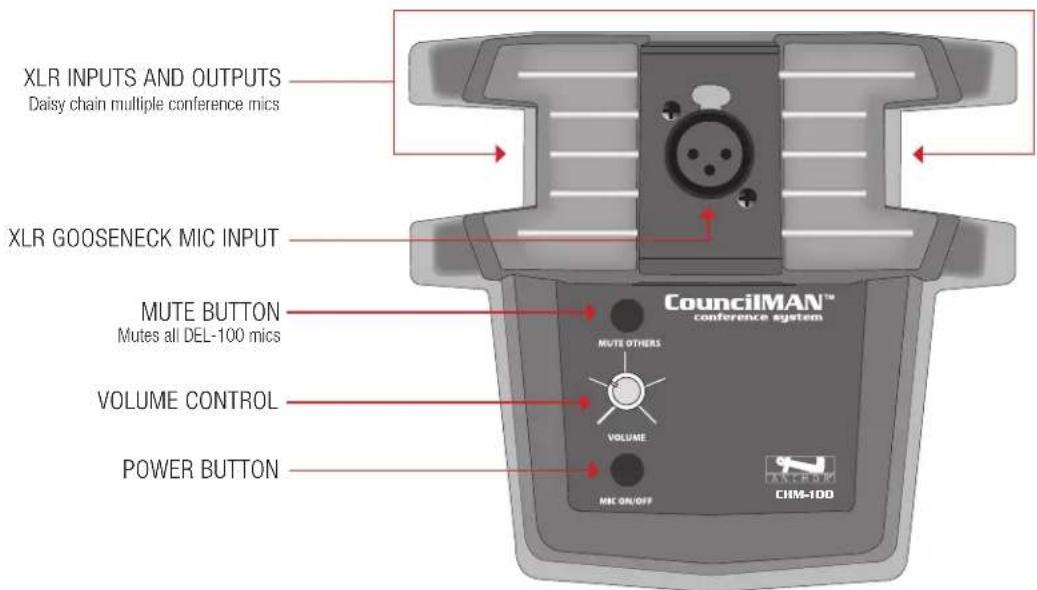
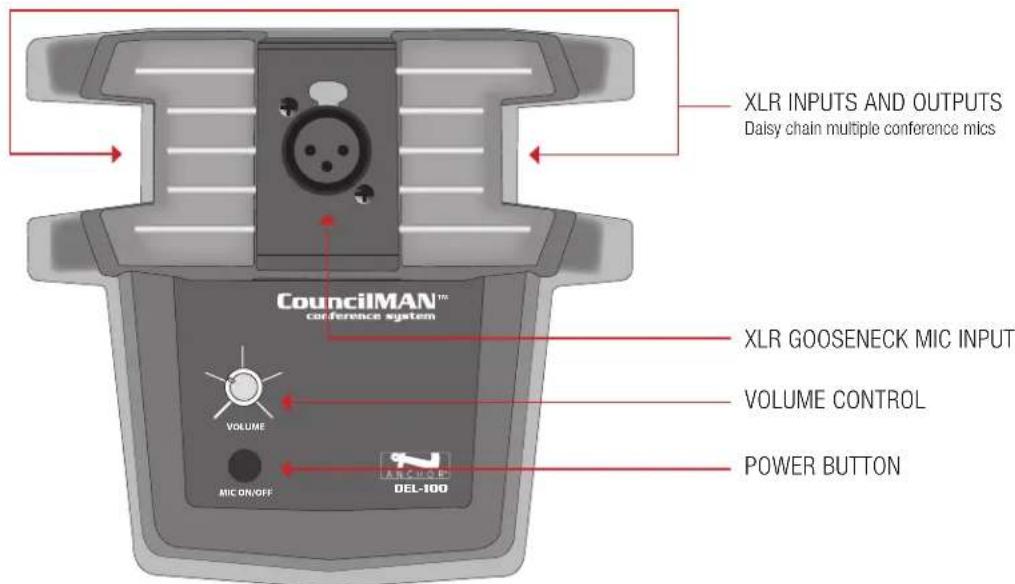
BASIC SYSTEM OPERATION: CHM-100 and DEL-100
- Connect a gooseneck microphone (GM-18 or LM-618) into each base.
- Using standard 3-pin XLR cables, daisy chain all the microphone bases and the AN-100CM+ powered speaker.
- Connect the AN-100CM+ to a power source and turn the power switch to ON. NOTE: When connected to a power source and turned ON, the AN-100CM+ will power the chairman and delegate microphones.
- On the microphone bases, push the MIC ON/OFF buttons once to talk and press again to turn off. When a microphone is live, its talk button will be illuminated. NOTE: The CHM-100 has the ability to mute all of the DEL-100 microphones by pressing the MUTE button on the chairman microphone base.
- For optimal voice amplification, adjust the microphone, so it is near the mouth.
- Set volume controls on each base to desired level
To set-up and operate the AN-100CM+, see the instructions on page 2.
CHM-100
DEL-100
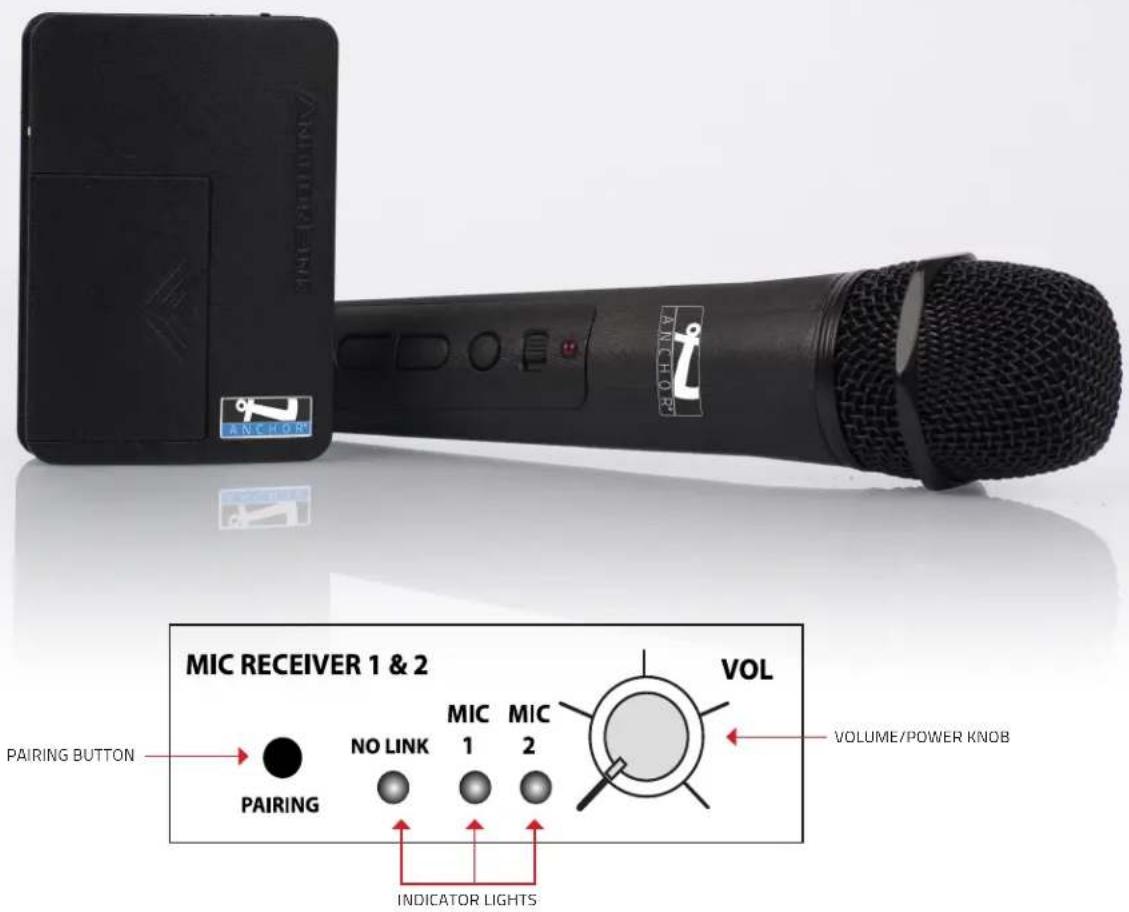
PAIRING THE ANCHORLINK WIRELESS MICROPHONES
- Turn on Mic Receiver (Volume knob clockwise) then hold Pairing button until green light for Mic 1 flashes, release button.
- Turn on Mic then press and hold Mute button until Mic red light turns off, release button.
- Press and hold Mute button again until Mic green light flashes.
- The Mic is paired when the green light is solid on both the Mic and Mic Receiver.
- Repeat these steps for Mic 2 on the same Mic Receiver (Mic 1 will stay paired through this process).
NOTE: You may pair only one microphone at a time. Each Mic Receiver included supports two wireless microphones. Two Dual Mic Receivers = Four wireless microphones supported. You will only need to pair your microphone once.
UNPAIR WIRELESS MICROPHONES
- Start with the speaker On and the Mic Receiver in the Off position (Volume knob turned counter-clockwise until "click").
- Press and hold the Pairing button on the Mic Receiver.
- While holding the Pairing button, turn on the Mic Receiver (Volume knob clockwise).
-
Continue to hold the Pairing button. Lights will appear in the order listed below. Process takes approximately 25 seconds:
-
Mic 2 – Green blinking
- No Link – Red blinking
- Pause
- Mic 1 – Green blinking
-
No Link – Red
-
Once the No Link red light is solid, both Mics have been unpaired.
NOTE: This process unpairs both Mics from a Mic Receiver. The Mics are not needed to unpair from the Mic Receiver.
ANCHORLINK: FREQUENTLY ASKED QUESTIONS
Q: What is the wireless frequency and range of the AnchorLink? A: The AnchorLink operates on the 1.9 GHz wireless frequency range. To ensure a clear signal with zero interference, the receiver will automatically change frequencies to a clear channel without disruption. The AnchorLink microphones and belt packs have a wireless range of 300' or more in ideal conditions for the Bigfoot, Beacon, Liberty, Go Getter, MegaVox, and Acclaim. The MiniVox/AN-Mini, AN-1000X+, AN-130+, and CouncilMAN have a wireless range of 150' line of sight.
Q: How do I connect my AnchorLink mic to my sound system?
A: To pair your AnchorLink wireless microphone or belt pack, simply turn on your Anchor Audio sound system. Then turn on the sound system's microphone receiver and hold the pairing button until the green light flashes. Next, turn on the wireless microphone (WH-LINK) or belt pack (WB-LINK) and hold the mute button until its red light turns off. Release the mute button then hold the mute button again until the microphone or belt pack's green light flashes. The microphone is paired when the green light is solid.
Q: Do I need to pair my microphone with my Anchor system for each use?
A: You only need to pair your mic to the receiver the first time you receive your unit then that mic will always be paired to that unit. Basically, all you have to do moving forward is turn on your PA system along with the mic, and the two will automatically sync together.
Q: Can I use multiple mics?
A: In an effort to simplify our systems and meet the needs of our customers, the new AnchorLink wireless microphone receivers can pair up to two microphones per receiver. Every unit that includes a wireless receiver noted by a U2 has the ability to pair up to two mics with the PA system, and every unit that is noted by a U4 has the ability to pair up to four mics.
Q: Can I control the volume on the AnchorLink mic and/or belt pack?
A: Yes! The new WH-LINK and WB-LINK feature both volume and mute buttons, so you can mute and even adjust the volume of the microphone or belt pack to fit your setting.
Q: What batteries does my microphone use? And how long does it last?
A: The WH-LINK and WB-LINK use two standard AA alkaline batteries. The batteries last 8 – 10 hours of continuous use. We suggest keeping some extra batteries with you for easy on-site battery replacement. Always better to be prepared!
Q: Does my AnchorLink mic and/or belt pack have a warranty?
A: Anchor Audio guarantees its AnchorLink microphones and belt packs for up to two years.
Q: Can I use other brand's wireless mics with the AnchorLink?
A: In order to achieve zero interference, we designed the AnchorLink to perform outside of other wireless microphones, so the AnchorLink wireless platform is specifically designed to work with Anchor Audio products only.
Q: Are the AnchorLink microphones compatible with older Anchor Audio systems?
A: No. The new AnchorLink operates on a different wireless frequency range than older Anchor units. If you are unsure what wireless frequency your sound system uses, contact our Technical Support team at 800.262.4671 ext. 782 for assistance.
TECHNICAL SPECIFICATIONS
| AN-100CM+ Technical Specifications | |
| Rated Power Output | 30 watts AC |
| Max SPL @ Rated Power | 103 dB @ 1 meter |
| Frequency Response | 65 Hz – 18 kHz ± 3 dB |
| Microphone Wireless Frequency | 1.9 GHz DECT |
| Microphone Wireless Range | 150'+ line of sight |
| Mic Input | XLR |
| Line In | 3.5 mm |
| Line Out | Lo-Z, buffered, XLR and 1/4" balanced |
| Line Output Level | -20 dBV (100 mVms) |
| Speaker Type | 4.5" woofer & 10 mm dome tweeter |
| AC Power Requirements | 110 - 125 VAC |
| Fuse Rating | T 1.0A / 250 V (internally mounted) |
| Export Model Fuse Rating | T 0.5A / 250 V (internally mounted) |
| Enclosure Material | ABS plastic |
| Dimensions (HWD) | 9" x 8.5" x 5.5" (23 x 21.6 x 14 cm) |
| Weight | 4.5 lbs / 2 Kg |
| Warranty | 6 years |
| CHM-100/DEL-100 Technical Specifications | |
| Power Requirements | +22 VDC @ 60 mA from pin 2 of daisy chain |
| Output Impedance | >10k |
| Phantom Power | 18 V |
| Daisy Chain In/Out | Male and Female 3-pin XLR |
| CHM-100 Controls | Power, Volume, and Mute |
| DEL-100 Controls | Power and Volume |
| Dimensions (HWD) | 6" x 7" x 3" (15.2 x 17.8 x 7.7 cm) |
| Weight | 1 lb / .45 Kg |
| Warranty | 2 years |
| GM-18 Technical Specifications | |
| Mic Element Type | Electret Condenser (requires phantom power) |
| Polar Pattern | Unidirectional, Cardioid |
| Frequency Response | 50 - 18,000 Hz |
| Sensitivity | -65 ± 3 dB (0 dB = 1 volt/microbar) |
| Output Impedance | 200 ohms ± 30% at 1,000 Hz (Balanced) |
| Operating Voltage | 12 to 48 Volts DC Phantom |
| Maximum SPL | 110 dB |
| Signal-to-Noise Ratio | 55 dB @ 1 kHz |
| Connector | 3-pin Male XLR |
| Windscreen | Black Urethane Foam |
| Dimensions (HW) | 18" long (457.2 mm), 0.5" (13 mm) |
| Weight | 4.4 oz (0.12 kg) |
| Warranty | 2 years |
HAVING TROUBLE WITH YOUR SOUND SYSTEM?
HAVING TROUBLE WITH YOUR SOUND SYSTEM?
| CONDITION | POSSIBLE SOLUTIONS |
| No Sound (Power LED: OFF) | Turn POWER knob clockwise to turn ONEnsure the AC cord is plugged in to the unit and a power source |
| No Sound (Power LED: ON) | Check your source audio and turn up volume of source audioMake sure all cables are completely plugged inTurn up volume control |
| Wireless Mic will not Connect to System | Check battery level of microphoneUnpair all microphones from the system then re-pair the microphones |
| Connected Wireless Mic but No Sound (Solid Green LED) | Check the Mute button on the microphone or belt packRaise volume on the microphone and systemCheck battery level of microphone |
| Poor Wireless Range / Poor Wireless Audio Quality | Check battery level of microphoneRe-position system away from any possible interference sourcesMinimize obstructions between the system and wireless microphoneIf wireless range continues to be poor, call Anchor Audio Tech Support |
| Distorted Sound | Lower system volumeLower source audio volumeWireless belt pack - ensure Mic and/or Line Level setting is correct |
| Excessive Feedback (Squelching) | Lower the volume on the microphone (handheld or belt pack)Do not stand within at least 10 feet in front of the speaker with the mic(s) |
| Excessive Hum or Noise | Use shielded cablesUse a balanced microphone |
FREQUENTLY ASKED QUESTIONS
FREQUENTLY ASKED QUESTIONS
| QUESTION ANSWER | |
| Can any gooseneck microphone work with this system? | Yes. The Chairman and Delegate base has a 3-pin XLR input for any gooseneck microphone. |
| How long of an XLR cable can I use? | We suggest not exceeding 100+ ft. |
| Can I use the system without the AN-100CM+/AN-100CMU2+? | No. The system does require the use of the AN-100CM+/AN-100CMU2+ to power the microphone base and microphone. However, you can add an additional speaker for larger audiences using the XLR or 1/4" output. |
| Is the Line Out post-fader or pre-fader? | In this particular model, the Line Out is pre-fader. This allows you to use a recording devices or house system without worrying about the volume of the AN-100CM+/AN-100CMU2+ speaker monitor. |
| Is there a storage case for the CouncilMAN? | Yes! Anchor Audio offers a rolling hard case to protect and transport your system. It is called the HC-ARMOR24-CM. |
IMPORTANT SAFETY INSTRUCTIONS

General Warning or Caution
The Exclamation Symbol in the figure to the left appears in Warning and Caution tables throughout this document. This symbol designates an area where personal injury or damage to the equipment is possible.
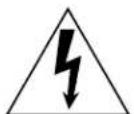
Electric Shock
The Electrical Shock Symbol in the figure to the left appears throughout this manual. This symbol indicates a hazard arising from dangerous voltage. Any mishandling could result in irreparable damage to the equipment and personal injury or death.

Protective Conductor Terminal
The Electrical Shock Symbol in the figure to the left appears throughout this manual. This symbol indicates a hazard arising from dangerous voltage. Any mishandling could result in irreparable damage to the equipment and personal injury or death.

European Union CE Mark European Union CE Mark
The presence of the CE Mark on Anchor Audio equipment means that it has been designed, tested, and certified as complying with all applicable European Union (CE) regulations and recommendations.

On Symbol
The On Symbol in the figure to the left represents a power switch position on the Anchor Audio product. This symbol represents a Power On condition.

Off Symbol
The Off Symbol in the figure to the left represents a power switch position on the Anchor Audio product. This symbol represents a Power Off condition.
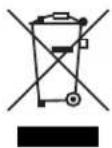
Waste Electrical and Electronic Equipment (WEEE)
This symbol on the product or on its packaging indicates that this product must not be disposed of with regular waste. Instead, it is the user's responsibility to dispose of waste equipment according to the local laws. The separate collection and recycling of the waste equipment at the time of disposal will help to conserve natural resources and ensure that it is recycled in a manner that projects human health and the environment. For information about where the user can drop off the waste equipment for recycling, please contact your local authority for recycling advice.
Inspection for Damage
Anchor Audio products are carefully packaged at the factory to minimize the possibility of damage during shipping. Inspect the box for external signs of damage or mishandling. Inspect the contents for damage. If there is visible damage to the instrument upon receipt, inform the shipping company and Anchor Audio immediately.

Inspection for Damage
Do not attempt to operate this equipment if there is evidence of shipping damage or you suspect the unit is damaged. Damaged equipment may present additional hazards to you. Contact Anchor Audio Technical Support for advice before attempting to plug in and operate damaged equipment.
Anchor Audio Technical Support: 800.262.4671 x782
Electrical Requirements
Before attempting to power up the unit for the first time, the following precautions must be followed:

WARNING
To avoid electric shock, connect the instrument to properly earth-grounded, 3-prong receptacles only. Failure to observe this precaution can result in severe injury.
Have a qualified electrician verify the wall socket that will be used is properly polarized and properly grounded.
Warning: To reduce the risk of fire or electric shock, do not expose this apparatus to rain or moisture, apparatus shall not be exposed to dripping or splashing and no objects filled with liquids, such as vases or cups, shall be placed on the apparatus.
The apparatus should be connected to a main socket outlet with a protective earthing connection. For Nordic markings refer to copy of marking label. The plug in the power cord is the AC mains disconnected device and must remain readily operable.
There should be a minimum distance around the apparatus for sufficient ventilation. The ventilation should not be impeded by covering the ventilation openings with items, such as newspapers, table-cloths, curtains, etc.; no naked flame sources, such as lighted candles, should be placed on the apparatus.
Equipment may be located above or below this apparatus, but some equipment (like large amplifiers) may cause an unacceptable amount of hum or may generate too much heat and degrade the performance of this apparatus.
IMPORTANT SAFETY INSTRUCTIONS (CONT.)
1) Read Instructions – All the safety and operation instructions should be read before the product is operated.
2) Retain Instructions – The safety and operating instructions should be retained for future reference.
3) Heed Warnings – All warnings on the product and in the operating instructions should be adhered to.
4) Follow Instructions – All operating and use instructions should be followed.
5) Cleaning – Unplug this product from the wall outlet before cleaning. Do not use liquid cleaners or aerosol cleaners. Use a damp cloth for cleaning.
Exception: A product that is meant for uninterrupted service and that for some specific reason, such as the possibility of the loss of an authorization code for the CATV converter, is not intended to be unplugged by the user for cleaning or any other purpose, may exclude the reference to unplugging the product in the cleaning description otherwise).
6) Attachments – Do not use attachments not recommended by the product manufacturer as they may cause hazards.
7) Water and Moisture – Do not use this product near water – for example, near a bath tub, wash bowl, kitchen sink, or laundry tub; in a wet basement; or near a swimming pool; and the like.
8) Accessories – Do not place this product on an unstable cart, stand, tripod, bracket, or table. The product may fall, causing serious injury to a child or adult and serious damage to the product. Use only with a cart, stand, tripod, bracket, or table recommended by the manufacturer or sold with the product. Any mounting of the product should follow the manufacturer's instructions and should use a mounting accessory recommended by the manufacturer.
9) A product and cart combination should be moved with care. Quick stop, excessive force, and uneven surfaces may cause the product and stand combination to overturn.
10) Ventilation – Slots and openings in the cabinet are provided for ventilation to ensure reliable operation of the product and to protect it from overheating. These openings must not be blocked or covered. The openings should never be blocked by placing the product on a bed, sofa, rug, or other similar surface. This product should not be placed in a build-in installation such as a bookcase or rack unless proper ventilation is provided, or the manufacturer's instructions have been adhered to.
11) Power Sources – This product should be operated only from the type of power source indicated on the marking label. If you are not sure of the type of power supply to your home, consult your product dealer or local power company. For products intended to operate from battery power or other sources refer to the operating instructions.
12) Grounding or Polarization – This product may be equipped with a polarized alternating-current line plug (a plug having one blade wider than the other). This plug will fit into the power outlet only one way. This is a safety feature. If you are unable to insert the plug fully into the outlet, try reversing the plug. If the plug should still fail to fit, contact your electrician to replace your obsolete outlet. Do not defeat the safety purpose of the polarized plug.
13) Power-Cord Protection – Power-supply cords should be routed so that they are not likely to be walked on or pinched by items placed upon or against them, paying particular attention to cords at plugs, convenience receptacles, and the point where they exit from the product.
14) Protective Attachment Plug – The product is equipped with an attachment plug having overload protection. This is a safety feature. If replacement of the plug is required, be sure the service technician has used a replacement plug specified by the manufacturer that has the same overload protection as the original plug.
15) Outdoor Antenna Grounding – If an outside antenna or cable system is connected to the product, be sure the antenna or cable system is grounded so as to provide some protection against voltage surges and built-up static charges. Article 810 of the National Electrical Code, ANSI/NFPA 70, provides information with regard to proper grounding of the mast and supporting structure grounding of the lead in wire to an antenna discharge unit, size of grounding conductors, location of antenna-discharge unit, connection of grounding electrodes, and requirements for the grounding electrode. See Figure A.
16) Lightning – For added protection, unplug this product during a lightning storm, or when it is left unattended and unused for long periods of time, unplug it from the wall outlet and disconnect the antenna or cable system. This will prevent damage to the product due to lightning and power-line surges.
17) Power Lines – An outside antenna system should not be located in the vicinity of overhead power lines or other electric light or power circuits, or where it can fall into such power lines or circuits. When installing an outside antenna system, extreme care should be taken to keep from touching such power lines or circuits as contact with them might be fatal.
18) Overloading – Do not overload wall outlets, extension cords, or integral convenience receptacles as this can result in a risk of fire or electric shock.
19) Object and Liquid Entry – Never push objects of any kind into this product through openings as they may touch dangerous voltage points or short-out parts that could result in a fire or electric shock. Never spill liquid of any kind on the product.
20) Servicing – Do not attempt to service this product yourself as opening or removing covers may expose you to dangerous voltage, other hazards, and potentially void the warranty. Refer all servicing to qualified service personnel.
21) Damage Requiring Service – Unplug this product from the wall outlet and refer servicing to qualified service personnel under the following conditions:
a. When the power-supply cord or plug is damaged.
b. If liquid has been spilled or objects have fallen into the product.
c. If the product has been exposed to rain or water.
d. If the product does not operate normally by following the operating instructions. Adjust only those controls that are covered by the operating instructions as an improper adjustment of other controls may result in damage and will often require extensive work by a qualified technician to restore the product to its normal operation.
e. If the product has been dropped or damaged in any way.
f. When the product exhibits a distinct change in performance – this indicates a need for service.
22) Replacement Parts – When replacement parts are required, be sure the service technician has used replacement parts specified by the manufacturer or have the same characteristics as the original part. Unauthorized substitutions may result in fire, electric shock, or other hazards.
23) Safety Check – Upon completion of any service or repairs to this product, ask the service technician to perform safety checks to determine that the product is in proper operating condition.
24) Wall or Ceiling Mounting – The product should be mounted to a wall or ceiling only as recommended by the manufacturer.
25) Heat – The product should be situated away from heat sources such as radiators, heat registers, stoves, or other products (including amplifiers) that produce heat.
26) Warning: Battery pack or batteries installed shall not be exposed to excessive heat such as sunshine, fire, or the like.
ANCHOR AUDIO WARRANTY
Anchor Audio products are warranted to be free from defects in materials and workmanship for the period of SIX (6) YEARS from the date of original purchase unless listed below.
Warranted for a period of TWO (2) YEARS:
- All wired and wireless microphones, belt pack transmitters, base station transmitters, base station receivers, and hands-free microphones
- All woodworking
• CouncilMAN microphones and bases - PortaCom and ProLink 500 systems in their entirety
• Assistive Listening systems in their entirety
• Accessories, cables, cases, and covers
Warranties are subject to the following conditions:
- Product must have been purchased from an authorized Anchor Audio Dealer and have an Anchor Audio serial number
- Anchor Audio must perform or authorize all warranty services or warranty is void
- Warranty is void when equipment is subjected to negligent use, connected to improper power sources, misuse, and/or operation beyond specifications and limits
- Warranty shall not apply to exterior finish, AC power cords, bulbs, or any other failings due to normal wear
- Warranty is void when equipment is subjected to adverse temperature, humidity, moisture, or any condition not considered normal environmental conditions
- Products out of warranty cannot be repaired by Anchor Audio
ANCHOR AUDIO RETURN AUTHORIZATION PROCEDURES
- In all cases, dealers and end users must first obtain approval from Anchor Audio for any product they are attempting to return to Anchor Audio. Upon approval, a Return Merchandise Authorization (RMA) number will be issued by the Anchor Audio Customer Service Department and must accompany all products returned. Clearly note the RMA number on the outside of the box.
- Products returned without approval and an RMA number may be returned to the sender.
- The RMA expires 30 days from date of issue. Any product received after 30 days of the RMA issue date will be returned to sender.
- Products returned must include a RMA number. Product received without an RMA number visibly seen on the box will incur a \$25 processing fee.
- Customer will incur the cost of shipping product to Anchor Audio for any reason. Under warranty repair and/or replacement, Anchor Audio will incur the freight cost to return product to the dealer or customer within the continental U.S.A.
CONTACT US!
5931 Darwin Court | Carlsbad, CA 92008 USA | anchoraudio.com
Technical Support Team
800.262.4671 x 782
techsupport@anchoraudio.com

Sales Team
800.262.4671 x 772
sales@anchoraudio.com
- MESSAGE FROM ANCHOR AUDIO
- CONTENTS
- GETTING STARTED
- RETURNING SYSTEMS FOR SERVICE OR REPAIR
- COUNCILMAN
- BASIC SYSTEM OPERATION: AN-100CM+ AMPLIFIER
- CONNECTING AN EXTERNAL SPEAKER
- BASIC SYSTEM OPERATION: CHM-100 AND DEL-100
- PAIRING THE ANCHORLINK WIRELESS MICROPHONES
- UNPAIR WIRELESS MICROPHONES
- ANCHORLINK: FREQUENTLY ASKED QUESTIONS
- TECHNICAL SPECIFICATIONS
- HAVING TROUBLE WITH YOUR SOUND SYSTEM
- FREQUENTLY ASKED QUESTIONS
- IMPORTANT SAFETY INSTRUCTIONS
- GENERAL WARNING OR CAUTION
- ELECTRIC SHOCK
- PROTECTIVE CONDUCTOR TERMINAL
- EUROPEAN UNION CE MARK EUROPEAN UNION CE MARK
- ON SYMBOL
- OFF SYMBOL
- WASTE ELECTRICAL AND ELECTRONIC EQUIPMENT (WEEE)
- INSPECTION FOR DAMAGE
- ELECTRICAL REQUIREMENTS
- WARNING
- IMPORTANT SAFETY INSTRUCTIONS (CONT.)
- ANCHOR AUDIO WARRANTY
- WARRANTED FOR A PERIOD OF TWO (2) YEARS
- WARRANTIES ARE SUBJECT TO THE FOLLOWING CONDITIONS
- ANCHOR AUDIO RETURN AUTHORIZATION PROCEDURES
- CONTACT US
Brand : Anchor Audio
Model : Councilman
Category : Video conference system