
KASTRLTPRJA - Projector Kogan - Free user manual and instructions
Find the device manual for free KASTRLTPRJA Kogan in PDF.


| Product Type | Star Light Projector |
| Brand | Kogan |
| Model | KASTRLTPRJA |
| Dimensions (L x W x H) | 16.2 x 6.8 x 16.2 cm |
| Net Weight | 0.5 kg |
| Power Input | 100~240V AC |
| Power Cord Length | 1.8 m |
| Laser Classification | Class 1 |
| Laser Color | Green (515-520 nm) |
| Nebula Color | Multi-colour (450 nm) |
| Shell Material | Flame Retardant V0 Class ABS |
| Application | Indoor (Home/Cafe/Bar/Motor homes) |
| Control Methods | Full Control: Kogan SmarterHome™ app; Voice Control: Amazon Alexa and Google Home |
| Wireless Type | Wi-Fi 2.4G 1T1R |
| Work Temperature | -10~40°C |
| Certification | FDA, FCC, CE, ROHS |
| Timing Function | Flexible timing via app |
| Safety Warnings | Do not look directly at laser light. Keep away from water and fire. Use under adult supervision. |
| Cleaning | Wipe with a soft dry cloth. Do not use water or solvents. |
| Spare Parts & Repairability | Do not disassemble. Contact Kogan.com for service. |
Frequently Asked Questions - KASTRLTPRJA Kogan
User questions about KASTRLTPRJA Kogan
0 question about this device. Answer the ones you know or ask your own.
Ask a new question about this device
Download the instructions for your Projector in PDF format for free! Find your manual KASTRLTPRJA - Kogan and take your electronic device back in hand. On this page are published all the documents necessary for the use of your device. KASTRLTPRJA by Kogan.
USER MANUAL KASTRLTPRJA Kogan
natural_image
Line drawing of a cylindrical mechanical device with concentric circles and a handle (no text or symbols)KOGAN SMARTERHOME™ GALAXY & STAR LIGHT PROJECTOR
KASTRLTPRJA
SAFETY & WARNINGS
- Read all of the following instructions before use. Keep this user guide for future reference.
- Place the device away from fire source.
- Keep the device away from water source to avoid damage.
• Children must use it under an adult supervision. - Disconnect from power supply when not in use.
- Do not look directly at the laser light to avoid hurting your eyes.
- Do not point the light into the sky within 10 nautical miles (18.5km) of airport.
- Do not disassemble and assemble the device by yourself. Contact Kogan.com
- For indoor use only. This device works better in a dark environment.
COMPONENTS LIST
- Smart Star Projector
- USB Cable
- Adapter
- User Guide

1 Laser light
2 Projector light
3 Switch button
SETUP
- Remove the protective sticker from the laser light.
- Connect the projector to a power supply. The projector will turn on.
- Press the switch button to cycle through different modes. The switch button will work as follows:
| Button | Projector Power | Projector Light | Laser Light |
| Press once On Blue | On | ||
| Press twice On Red | On | ||
| Press three times On Green On | |||
| Press four times | On | Multi-colour | On |
| Press five times | On | Off | On |
| Press six times | Off | Off | Off |
CONNECT TO SMARTERHOME™ APP
Install App
Download the "Kogan SmarterHome" app from the Play Store (Android) or App Store (iOS).
Register
If you do not have a Kogan SmarterHome™ account, register or sign in with a verification code sent by SMS.
To register:
- Tap to enter registration page.
- The system automatically recognises your country/area. You can also select your country code manually. Enter your email address and tap 'Next.'
- Alternatively, you can select 'Register by mobile number' and enter the verification code sent to you by SMS.
- Create a profile on the next page to define your location and room.


Set device in pairing mode
When the device is first turned on, it may automatically enter pairing mode which is indicated by blue light blinking rapidly.
If not automatically in pairing mode when powered on, you can manually set the device in pairing mode by pressing and holding the switch button for 6 seconds until the blue light begins blinking rapidly.
Add device through network
- Once registered, tap "+" in the upper right corner of the app's home page to add a new device through the network.
- Select the product type from the list of options in the app (Lighting > Star Light).
- Ensure that the device is in pairing mode, with the projector light blinking blue, and tap "Confirm indicator rapidly blink".


- Upon successfully confirming pairing mode, enter your Wi-Fi details. It is important that your SmarterHome™ device and the app are connected to the same Wi-Fi network during setup.
- The device will commence the pairing process and connect to the app. Ensure your Wi-Fi router, mobile phone, and the SmarterHome™ device are kept close until connection is complete.
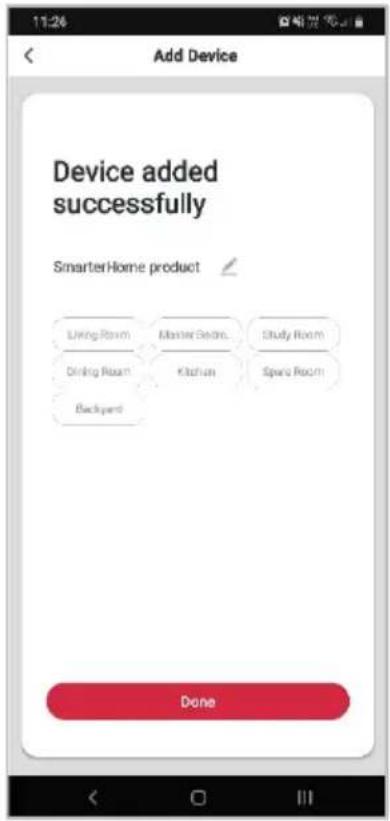
- After successfully being added, you will have the option to rename the device and assign it to a location. It will now be listed on the app's home page. Tap the device listing to enter its control page.


Notes:
• The device and the app have to use the same Wi-Fi network.
• The device is only compatible with 2.4Ghz networks.
GOOGLE HOME CONTROL
Note:
You will need to have set up a Google Home account prior to linking your Kogan SmarterHome™ device.
Adding "SmarterHome" to the Google Home app
- From the home page of the Google Home app, select the "+" icon to access the 'Add and manage' page.
- Select 'Set up device', then under the Works with Google banner, select 'Have something already set up?'
- Select the search bar and type 'Smarter Home' to locate the Kogan SmarterHome™ service.


- Tap 'Authorise' to grant Google permission to access the SmarterHome™ app and your devices.
- From here, you will be prompted to sign into your SmarterHome™ account using either your email or mobile phone number, depending on which method you used to register your account.


- Once connected, the app will display any compatible devices linked to your SmarterHome™ account. From here you can assign them to rooms and set up any routines.
- Tap on any of the devices to view a list of available commands.


Note:
Please note that Google Home can only control the base/core functions of any compatible SmarterHome™ devices. To make full use of this product's smart functionality, please use the Kogan SmarterHome™ app.
AMAZON ALEXA CONTROL
Note:
You will need to have set up an Alexa account prior to linking your Kogan SmarterHome™ device.
Adding "SmarterHome" to the Alexa app
- From the home page of the Alexa app, select the “≡” icon in the top-right and select Skills & Games from the sidebar.
- Select the search bar and type 'Smarter Home' to locate the Kogan SmarterHome™ skill.


- Tap 'Enable to Use' to add the Kogan SmarterHome™ skill to Alexa.
- From here, you will be prompted to sign into your SmarterHome™ account using either your email or mobile phone number, depending on which method you used to register your account.
- Tap 'Authorise' to grant Alexa permission to access the SmarterHome™ app and your devices.
![10:29 SMARTER HOME Smarter Home Kogan.com Reted: Guidance Suggested ENABLE TO USE Account Linking required If you have any problem when you use this skill, you can contact us with email: app-feedback@kogan.com.au Amazon Alexa and the Kogan smart home products work together to help you control home appliance nice and easy.... See More Start By Saying English [AU] "Alexa, set bedroom light to cool white." "Alexa, dim the bedroom light to 50%." "Alexa, turn on my livingroom heater." About Note Save Home This will move here for your PLAY Citation](/content/2026/06/1226213/images/104b54f9cb8b623520555023c056eb2e632888c11c2d911e115ff133b0ba9b66.jpg)

-
Once connected, the app will perform a search and display the devices linked to your SmarterHome™ account.
-
When your devices have successfully connected to the Alexa app, you will be able to control your Kogan SmarterHome™ devices via Alexa's voice commands.


Note:
Please note that Alexa can only control the base/core functions of any compatible SmarterHome™ devices. To make full use of this product's smart functionality, please use the Kogan SmarterHome™ app.
TROUBLESHOOTING
| Problem | Possible Solution |
| Why I cannot access the device via app? | ·Ensure the device is within the range of both your router and connected smartphone.·Ensure the projector and your smartphone are both connected to the 2.4Ghz network. 5Ghz networks are not compatible for SmarterHomeTM connection.·Wi-Fi is not connected, reset device by long pressing the switch for 6 seconds. Reconnect it with the app. Check the Connect to SmarterhomeTM App section of this user guide. |
| Can I share the device with family members? | Enable the Device Sharing in the app settings. |
| Can the Kogan SmarterHomeTM app be installed on any smartphone? | The app can work with both iOS and Android smartphones. |
| Can I control this device with a 2G/3G/4G connection? | The device must be registered first on a 2.4GhzWi-Fi network. After you have successfully connected it, then the device can be controlled by your smartphone with 2G/3G/4G networks. |
| Will the device cause fire or any other hazard when kept on all night? | The device is safe to be on all night. If required, adjust the light brightness on the app. |
| Can the laser light damage eyes? | Yes, do not look directly into the laser light. |
| What are the dimensions of the projected image? | It depends on the placement of the device. |
SPECIFICATIONS
| Power Input | 100~240V AC |
| Power Output | <1mW per beamlet |
| Classification of Lasers | Class 1 |
| Work Temperature | -10~40°C |
| Wireless Type | Wi-Fi 2.4G 1T1R |
| Laser Colour | Green, 515-520nm |
| Nebula Colour | Colourful, 450nm |
| Shell Material | Flame Retardant V0 Class ABS |
| Application | Indoor (Home/Cafe/Bar/motor homes) |
| Certificate | FDA, FCC, CE, ROHS |
| Control By | Full Control: Kogan SmarterHomeTM appVoice Control: Amazon Alexa and Google Home |
| Iiming | Flexible Iiming |
| Dimensions (L X W X H) | 16.2 x 6.8 x 16.2cm |
| Net Weight | 0.5kg |
| Power Cord Length | 1.8m |
Need more information?
We hope that this user guide has given you the assistance needed for a simple set-up.
For the most up-to-date guide for your product, as well as any additional assistance you may require, head online to help.kogan.com
kogan.com

- KOGAN SMARTERHOME™ GALAXY & STAR LIGHT PROJECTOR
- SAFETY & WARNINGS
- COMPONENTS LIST
- SETUP
- CONNECT TO SMARTERHOME™ APP
- Install App
- Register
- To register:
- Set device in pairing mode
- Add device through network
- Notes:
- GOOGLE HOME CONTROL
- Note:
- Adding "SmarterHome" to the Google Home app
- AMAZON ALEXA CONTROL
- Adding "SmarterHome" to the Alexa app
- TROUBLESHOOTING
- SPECIFICATIONS
- Need more information?
Brand : Kogan
Model : KASTRLTPRJA
Category : Projector