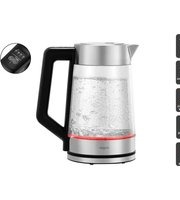
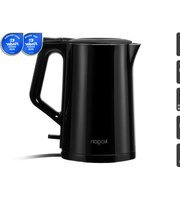
KA17KETGLSHA - Kettle Kogan - Free user manual and instructions
Find the device manual for free KA17KETGLSHA Kogan in PDF.


| Product Type | Electric Kettle |
| Brand | Kogan |
| Model | KA17KETGLSHA |
| Capacity | 1.7 L |
| Construction | Double-walled |
| Temperature Settings | 50°C, 70°C, 80°C, 90°C, 100°C |
| Keep Warm Duration | 30 minutes |
| Keep Warm Function | Yes, with automatic on/off to maintain temperature |
| Boil-Dry Protection | Yes, auto shut-off if operated without water |
| Base Type | Power base with 360° rotation |
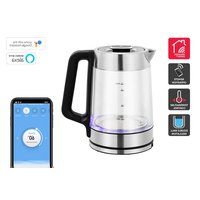
| Indicator Light | Color-coded by temperature: 50°C blue, 70°C green, 80°C yellow, 90°C orange, 100°C red |
| Control Method | Touch buttons: Power/100°C, Temperature +/- |
| Lid | Push-button release |
| Spout | Filling through spout or open lid |
| Water Level Marks | MIN and MAX indicators |
| Cleaning | Descaling with white vinegar or commercial descaler |
| Safety Features | Automatic shut-off, boil-dry protection, residual current device recommended |
| Intended Use | Household, staff kitchens, farmhouses, hotels, motels |
Frequently Asked Questions - KA17KETGLSHA Kogan
User questions about KA17KETGLSHA Kogan
0 question about this device. Answer the ones you know or ask your own.
Ask a new question about this device
Download the instructions for your Kettle in PDF format for free! Find your manual KA17KETGLSHA - Kogan and take your electronic device back in hand. On this page are published all the documents necessary for the use of your device. KA17KETGLSHA by Kogan.
USER MANUAL KA17KETGLSHA Kogan
1.7L DOUBLE WALLED SMART KETTLE
KA17KETGLSHA
SAFETY & WARNINGS
Ensure to read all the instructions in this user guide prior to first use. Retain this user guide for future reference. Misuse of the kettle may cause potential injuries.
- This kettle is not intended to be used by persons (including children under 8 years) with reduced physical, sensory or mental capabilities or lack of experience or knowledge unless they have been given supervision or instruction regarding the use of the kettle by a person responsible for their safety.
- Close supervision is required when this kettle is used by or near children. Ensure they do not play with the appliance.
- Keep the kettle and its power cord out of reach of children aged less than 8 years.
-
This kettle is intended to be used in households and similar applications such as:
-
Staff kitchen areas in shops, offices, and other working environments.
- Farmhouses.
- By clients in hotels, motels, and other residential-type environments.
- Do not use this kettle outdoors.
- Do not use this kettle for any purpose other than its intended use.
- The kettle will get hot during use. Do not touch it directly. When handling, use the handle.
- To protect against fire, electric shock, or injury to persons, do not immerse any parts of the appliance into water or any other liquids.
- The kettle is only to be used with the stand provided.
- This kettle should be used with a residual current device (safety switch) to lessen the risk of scalding or other injuries from hot water that may be ejected if the heating element ruptures.
- Do not operate the kettle on an inclined plane.
- Do not operate the kettle if the kettle is not securely placed onto the base.
- Do not move the kettle whilst it is operating.
- Do not spill anything on the power cord or base.
- Avoid spillage on the connector.
- If the power cord is damaged, stop use immediately and contact help.Kogan.com for assistance.
- If the kettle is damaged or has malfunctioned, unplug the kettle and stop use immediately. Contact help.Kogan.com for assistance.
- Do not attempt to repair the kettle yourself.
- Do not operate the kettle unless the element is fully immersed.
- Unplug the kettle from the power outlet when not in use and when cleaning.
- Do not let the power cord hang over the edge of the table or counter.
- Do not allow the power cord to touch hot surfaces.
- Do not place the kettle on or near a hot stove or in a heated oven.
- Never forcibly pull on the power cord to disconnect. Turn off the power and pull the power cord out close to the wall outlet.
- Do not use the kettle to heat anything other than water.
- Do not fill above the 'MAX' indicator otherwise water may overflow when heating.
- Do not operate the kettle if the amount of water is below the minimum level.
- Do not use alkaline cleaning agents on this kettle.
- Cleaning and user maintenance shall not be made by children unless they are older than 8 years and supervised.
- Electrical appliances are not to be disposed of with domestic household waste. Consumers should take electrical appliances to waste disposal points for the correct disposal.

This marking indicates that this appliance should not be disposed with other household wastes. To prevent possible harm to the environment or human health from uncontrolled waste disposal, recycle it responsibly to promote the sustainable reuse of material resources.
OVERVIEW

Control Panel

Buttons
 | Power: This is a multifunctional button and it can be regarded as 100°C button, Power button or Keep-warm button (hold and press it for 3 seconds) |
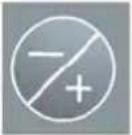 | Temperature selector: 50°C/70°C/80°C/90°C |
Before First Use
If you are using the kettle for the first time, it is recommended that you should clean your kettle before use by boiling a full kettle of water twice and then discarding the water.
Note:
The max capacity of kettle is 1.7L.
Using Your Water Kettle
To fill the kettle, remove it from the power base and open the lid by pressing the Lid Release button, fill with the desired amount of water and then close the lid. Alternatively, the kettle may be filled through the spout. The water level should not exceed MAX marks or sit below MIN level. Too little water will result in the kettle switching off before the water has boiled.
Note:
Do not fill the water over the maximum level, as water may spill out of the spout when boiling. Ensure that the lid is family in place before plugging the power outlet.
- Place the kettle on the power base and connect the plug into a power outlet.
Note:
The power base can be rotated by 360 degree to facilitate the plug connecting with power outlet.
OPERATION
1. Boil water
Place the kettle onto the power base, press “100°C” button, the kettle starts to work and heat the water up to 100°C directly, at that time, the indicators in the control panel do not light up and the indicator in the kettle illuminates red.
When the water temperature reaches 100^ C, the indicator in the kettle will turn off and two beeps can be heard.
2. Heat water to selected temperature
Place the kettle onto the power base, press the "+/-" button to select your desired water temperature (50°C, 70°C, 80°C, 90°C), after selecting it, its corresponding indicator turns on.
Press “100°C” button, the kettle starts to work and heat the water to the selected temperature, at that time, all the indicators turn off and two beeps can be heard.
3. Keep warm at the selected temperature
Place the kettle onto the power base, press "+/-" button to select your desired keep-warm temperature (50°C, 70°C, 80°C, 90°C), after selecting it, its corresponding indicator turns on.
Press the “100°C” button for 3 seconds and the kettle will enter into keep-warm mode after heat the water to the selected temperature, at that time, the indicator of the selected keep-warm temperature keeps blinking.
When the water temperature reaches the selected temperature, one beep can be heard and the kettle will enter into the keep-warm condition.
After keeping warm for 30 minutes, the kettle will shut off automatically and all the indicators will turn off.
Note:
Ensure that switch is free of obstructions and the lid is firmly closed. The kettle will not turn off if the switch is constrained or if the lid is opening.
4. Lift the kettle from the power base and then pour the water.
Note:
Operate carefully when pouring the water from your kettle as boiling water may result in scald, besides, don't open the lid while the water in the kettle is hot.
The kettle will not re-boil until the switch is pressed again. The kettle may be stored on the power base when not in use.
Note:
Ensure power supply is turned off when kettle is not in use.
Keep warm mode
- In this mode, after heating, the kettle will keep water at the desired temperature and the keep warm indicator will be illuminated. The kettle will then automatically switch on/off to maintain the water's temperature.
- With power-on, place the kettle onto the power base, all four indicators in the control panel turn on and one beep can be heard.
- At the same time, the indicator in the kettle lights up in red, green, blue in sequence and then turns off and the indicators in the control panel turn off simultaneously, together with one beep heard.
- Different colours for indicating different temperatures: The indicator in the kettle will illuminate in different colours under different water temperature at any condition.
○ 50°C (blue)
- 70°C (green)
○ 80°C (yellow)
- 90°C (orange)
○ 100°C (red).
Boil-Dry Protection
Should you accidentally let the kettle operate without water, the boil-dry protection will automatically switch off the power. If this occurs, allow the kettle to cool before filling with cold water to re-boil.
CLEANING & CARE
The kettle should be cleaned regularly to remove any mineral deposits and to prolong its service life.
Ensure the kettle is unplugged and allowed to cool before cleaning.
Kettle
- Fill the kettle with 500ml of white vinegar and then fill it to the top with water. Allow to stand for at least 1 hour.
- Empty the kettle. Wipe off any remaining deposits with a damp cloth.
- Fill the kettle with fresh water. Bring to the boil, then discard the water. Repeat this process once more. The kettle will then be ready to use.
Note:
If necessary, repeat the cleaning process multiple times.
Exterior
Wipe the exterior with a soft cloth and mild detergent, then wipe dry with a dry cloth.
Notes:
- Do not use chemicals, steel wool, or other abrasive cleaners to clean the exterior as these will scratch the surface and cause the colour to fade.
- Do not use alkaline cleaning agents when cleaning.
Removal Of Scale
Your kettle should be periodically descaled by virtue of the mineral deposits in tap water may form scale on the bottom of kettle so as to cause the efficiency of operation less. You can use the commercially available descales and follow the instructions on the package of descales. Alternatively, you may follow the instructions as below to use the white vinegar.
- Fill the kettle with 3 cups of white vinegar, then adding water to the amount so as to cover the bottom of kettle completely. Leave the solution in the kettle overnight.
- Then discard the mixture in the kettle, filling the kettle with clean water, boiling and then throw it away. Repeat several times until the Odor of vinegar has been flushed away. Any stains remaining inside the spout can be removed by rubbing with a damp cloth.
NOTES
The Ground Truth image displays a single, solid horizontal line. According to Rule 2 (UNDERSCORE & LINE RULES), this is a stylistic or background line, not a placeholder underscore. Therefore, the OCR result must ignore it and output nothing or only meaningful text. The provided OCR content is "____", which consists of four underscores. This is an incorrect interpretation of the line as a fill-in-the-blank placeholder, violating the rule that stylistic lines must be ignored. The OCR has hallucinated underscores where none should exist based on the GT's visual context. Hence, the OCR result is inconsistent with the Ground Truth.
[Non-Text]
[Non-Text]
[EMPTY]
[Non-Text]
[Non-Text]
The Ground Truth image displays a single, continuous horizontal line, which is a stylistic or background element (like a ruled paper line). According to Rule 2, such lines must be ignored by the OCR result. The provided OCR content is "____", which consists of underscores. Underscores are not equivalent to a solid line and are not permitted under the “Stylistic/Background Lines (Ignore)” rule. Outputting underscores for a stylistic line is incorrect because it misinterprets the line as a fill-in-the-blank placeholder. Since the OCR output incorrectly rendered a stylistic line as underscores (which should be ignored), this violates the rule. Therefore, the OCR result is inconsistent with the Ground Truth.
[Non-Text]
[Non-Text]
[EMPTY]
[Non-Text]
[Non-Text]
The Ground Truth image displays a single, continuous horizontal line, which is a stylistic or background element (like a ruled paper line). According to Rule 2, such lines must be ignored by the OCR result. The provided OCR content is "____", which consists of underscores. Underscores are not equivalent to a solid line and are not permitted under the “Stylistic/Background Lines (Ignore)” rule. Outputting underscores for a stylistic line is incorrect because it misinterprets the line as a fill-in-the-blank placeholder. Therefore, the OCR result is inconsistent with the Ground Truth.
[Non-Text]
[Non-Text]
The Ground Truth image displays a single, continuous horizontal line, which is a stylistic or background element (like a ruled paper line). According to Rule 2, such lines must be ignored by the OCR result. The provided OCR content is "____", which consists of underscores. Underscores are not equivalent to a solid line and are not permitted under the “Stylistic/Background Lines (Ignore)” rule. Outputting underscores for a stylistic line is incorrect because it misinterprets the line as a fill-in-the-blank placeholder. Therefore, the OCR result is inconsistent with the Ground Truth.
[Non-Text]
[Non-Text]
____
[Non-Text]
[Non-Text]
The Ground Truth image displays a single, continuous horizontal line, which is a stylistic or background element (like a ruled paper line). According to Rule 2, such lines must be ignored by the OCR result. The provided OCR content is "____", which consists of underscores. Underscores are not equivalent to a solid line and are not permitted under the “Stylistic/Background Lines (Ignore)” rule. Outputting underscores for a stylistic line is incorrect because it misinterprets the line as a fill-in-the-blank placeholder. Since the OCR output incorrectly rendered a stylistic line as underscores (which should be ignored), this violates the rule. Therefore, the OCR result is inconsistent with the Ground Truth.
[Non-Text]
[Non-Text]
The Ground Truth image displays a single, continuous horizontal line, which is a stylistic or background element (like a ruled paper line). According to Rule 2, such lines must be ignored by the OCR result. The provided OCR content is "____", which consists of underscores. Underscores are not equivalent to a solid line and are not permitted under the “Stylistic/Background Lines (Ignore)” rule. Outputting underscores for a stylistic line is incorrect because it misinterprets the line as a fill-in-the-blank placeholder. Therefore, the OCR result is inconsistent with the Ground Truth.
[Non-Text]
[Non-Text]
The Ground Truth image displays a single, continuous horizontal line, which is a stylistic or background element (like a ruled paper line). According to Rule 2, such lines must be ignored by the OCR result. The provided OCR content is "____", which consists of underscores. Underscores are not equivalent to a solid line and are not permitted under the “Stylistic/Background Lines (Ignore)” rule. Outputting underscores for a stylistic line is incorrect because it misinterprets the line as a fill-in-the-blank placeholder. Therefore, the OCR result is inconsistent with the Ground Truth.
[Non-Text]
[Non-Text]
The Ground Truth image displays a single, solid horizontal line. According to Rule 2 (UNDERSCORE & LINE RULES), this is a stylistic or background line, not a placeholder underscore. Therefore, the OCR result must ignore it and output nothing or only meaningful text. The provided OCR content is "____", which consists of four underscores. This is an incorrect interpretation of the line as a placeholder, violating the rule that stylistic lines must be ignored. The OCR has hallucinated placeholder underscores where none should exist in the GT. Therefore, the OCR result is inconsistent with the Ground Truth.
The Ground Truth image displays a single, solid horizontal line. According to Rule 2 (UNDERSCORE & LINE RULES), this is a stylistic or background line, not a placeholder underscore. Therefore, the OCR result must ignore it. The provided OCR content is "____", which consists of four underscores. This is an incorrect interpretation of the line as a placeholder and violates the rule that stylistic lines must be ignored. The OCR has hallucinated text (underscores) where none should exist based on the GT's visual context. Hence, the OCR result is inconsistent with the Ground Truth.
[Non-Text]
The Ground Truth image displays a single, solid horizontal line. According to Rule 2 (UNDERSCORE & LINE RULES), if the GT contains lines used for stylistic emphasis or as background elements (like ruled paper), the OCR result must ignore them. The line in the GT is clearly a stylistic or background line, not a placeholder for text. Therefore, the OCR should not have output any underscores. Outputting `____` constitutes an error under Rule 2, as it hallucinates placeholder symbols where none are semantically intended. Hence, the OCR result is inconsistent with the Ground Truth.
[Non-Text]
[Non-Text]
[Non-Text]
The Ground Truth image displays a single, solid horizontal line. According to Rule 2 (UNDERSCORE & LINE RULES), this is a stylistic or background line, not a placeholder underscore. Therefore, the OCR result must ignore it and output nothing or only meaningful text. The provided OCR content is "____", which consists of four underscores. This is an incorrect interpretation of the line as a fill-in-the-blank placeholder, violating the rule that stylistic lines must be ignored. The OCR has hallucinated underscores where none should exist based on the GT's visual context. Hence, the OCR result is inconsistent with the Ground Truth.
[Non-Text]
[Non-Text]
The Ground Truth image displays a single, continuous horizontal line, which is a stylistic or background element (like a ruled paper line). According to Rule 2, such lines must be ignored by the OCR result. The provided OCR content is "____", which consists of underscores. Underscores are not equivalent to a solid line and are not permitted under the “Stylistic/Background Lines (Ignore)” rule. Outputting underscores for a stylistic line is incorrect because it misinterprets the line as a fill-in-the-blank placeholder. Therefore, the OCR result is inconsistent with the Ground Truth.
[Non-Text]
[Non-Text]
The Ground Truth image displays a single, continuous horizontal line, which is a stylistic or background element (like a ruled paper line). According to Rule 2, such lines must be ignored by the OCR result. The OCR content provided is "", which consists of no characters. Since the OCR output correctly ignores the background/stylistic line and produces no actual text, it complies with the “Stylistic/Background Lines (Ignore)” rule. Therefore, the OCR result is consistent with the Ground Truth.
[Non-Text]
[Non-Text]
Need more information?
We hope that this user guide has given you the assistance needed for a simple set-up.
For the most up-to-date guide for your product, as well as any additional assistance you may require, head online to help.kogan.com
kogan.com

- 1.7L DOUBLE WALLED SMART KETTLE
- SAFETY & WARNINGS
- OVERVIEW
- Buttons
- Before First Use
- Note:
- Using Your Water Kettle
- OPERATION
- Boil water
- Heat water to selected temperature
- Keep warm at the selected temperature
- Lift the kettle from the power base and then pour the water.
- Keep warm mode
- Boil-Dry Protection
- CLEANING & CARE
- Kettle
- Exterior
- Notes:
- Removal Of Scale
- NOTES
- Need more information?
Brand : Kogan
Model : KA17KETGLSHA
Category : Kettle