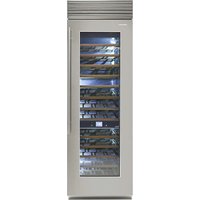
XS7490FW3A - Wine cellar Fhiaba - Free user manual and instructions
Find the device manual for free XS7490FW3A Fhiaba in PDF.


| Product Type | Wine Cellar |
| Brand | Fhiaba |
| Model | XS7490FW3A |
| Power Supply | 220-240 V, 16A Schuko plug |
| Compartments | Cantina (wine aging), Wine Cellar (serving), TriMode (freezer/fridge/cooler) |
| Temperature Range Cantina | +4°C to +18°C (+39.2°F to +64.4°F) |
| Temperature Range Wine Cellar | +4°C to +18°C (+39.2°F to +64.4°F) |
| Temperature Range TriMode (Freezer) | -15°C to -22°C (+5°F to -7.6°F) |
| Temperature Range TriMode (Fridge) | +2°C to +8°C (+35.6°F to +46.4°F) |
| Temperature Range TriMode (Cooler) | -2°C to +2°C (+28.4°F to +35.6°F) |
| Default Temperatures | Cantina +12°C, Wine Cellar +10°C, TriMode -18°C (freezer) |
| Installation Type | Freestanding or built-in |
| Materials | Stainless steel interior/exterior, aluminium trim |
| Design | Exclusive design by Giugiaro |
| Lighting | LED strips and direct LED lights; automatic shutoff after 6 hours |
| Control | Electronic control with interactive Menu and display |
| Special Functions | TriMode, Vacation, Bottle Cooler, Sabbath Mode, Humidity adjustment (HI/MED/LO) |
| Safety Features | Automatic door closing, anti-tipping brackets, child safety (keypad lock), door/drawer open alarm |
| Cleaning | Microfiber cloth and sponge for steel; condenser filter cleaning with vacuum |
| Warranty | Refer to warranty certificate; rating plate behind bottom drawer |
Frequently Asked Questions - XS7490FW3A Fhiaba
User questions about XS7490FW3A Fhiaba
0 question about this device. Answer the ones you know or ask your own.
Ask a new question about this device
Download the instructions for your Wine cellar in PDF format for free! Find your manual XS7490FW3A - Fhiaba and take your electronic device back in hand. On this page are published all the documents necessary for the use of your device. XS7490FW3A by Fhiaba.
USER MANUAL XS7490FW3A Fhiaba
USER MANUAL
Wines/Cellars
Fhiaba


Page 2 1 Important instructions for safety and the environment
1.1 For your safety
1.2 Respect for the environment
3 2 Installation
2.1 Installation
2.2 Connection to the electrical mains
4 3 Before starting
3.1 Getting to know the appliance
3.2 Main features
3.3 Main components
3.4 Electronic Control
3.5 Main control panel
8 4 Turning the appliance on and off
4.1 Turning on and off
4.2 How to adjust the temperature to suit various needs
4.3 Information and malfunction signals on the display
10 5 Settings and Special Functions
5.1 Customization and Language Settings
5.2 Special functions activated through the Menu
5.3 Basic settings of the Menu
15 6 Internal Layout
6.1 Internal Layout (positioning, adjustment, removal)
16 7 Lighting
7.1 Lighting
17 8 Use of the TriMode compartment
8.1 Use of the TriMode compartment
8.2 TriMode compartment
18 9 Conservation of wines
9.1 General directions
9.2 Wine conservation temperature
9.3 Time of conservation
9.4 Consumption temperature
9.5 Position of bottles
21 10 Food Conservation
10.1 Recommendations for conserving fresh food
10.2 Recommendations for conserving frozen food
22 11 Recommended times for food conservation
23 12 Care and Cleaning
12.1 Care and Cleaning
12.2 Condenser cleaning
12.3 Internal cleaning
24 13 Troubleshooting guide
13.1 Troubleshooting guide
13.2 Malfunction indications appearing on the display
26 14 Prior to calling Service
14.1 Prior to calling Service
27 15 Fhiaba Access Menu Map
15.1 Functions
15.2 Settings
1 Important instructions for safety and the environment
1.1 For your safety
If this appliance is replacing an existing appliance which must be removed or disposed of, make sure that it does not become a dangerous trap for children by cutting its power supply cable and rendering it impossible to close the door. Use the same caution at the end of the lifespan of the new appliance.
This appliance is designed to refrigerate beverages and foods and is destined for domestic use.
■ The appliance must be installed by following the instructions in the Installation Guide, particular care should be taken not to obstruct the vent openings of the appliance and of the built-in units.
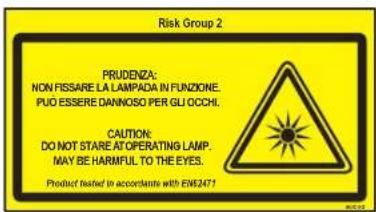
The appliance features a concentrated lighting system with LED lamps. Do not stare into these lamps when they are on to avoid possible eyesight damage.
This warning is also contained on the label attached to the inside of the refrigerator door.
- When the freezer is functioning do not touch the inner surfaces in stainless steel with wet or damp hands, since skin may stick to the very cold surfaces.
- Do not use any type of electrical equipment inside of the food conservation compartments.
- When positioning the shelves, do not place fingers in the shelf slide guides.
- Do not position containers of flammable liquids near the appliance.
■ Completely switch off the appliance and unplug the power supply cable during cleaning operations. If the plug is not easily reached, it is a good idea to disconnect the omnipolar switch that controls the socket that the appliance is connected to.
■ The packaging parts can be dangerous for children: do not allow children to play with the plastic bags, plastic film or Styrofoam.
■ Any repairs must be performed by a qualified Fhiaba Service technician.
This appliance is not intended for use by persons (including children) with reduced physical, sensory or lack of experience and knowledge unless they have been given supervision or instruction concerning use of the appliance by a person responsible for their safety. Children should be supervised to ensure that they do not play with the appliance.
- Do not damage the appliance refrigerant circuit pipes.
- Do not store explosive substances such as aerosol cans with a flammable propellant in this appliance.

Notes
Suggestions for proper use of the appliance

Important
Instruction to prevent damage to the appliance

Warning
Instructions for preventing personal injury
Respect for the environment 1.2

■ Make sure you dispose properly of all packing materials.
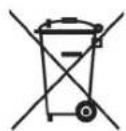
■ The appliance must not be disposed of with urban waste. Contact local waste disposal authorities for information on the disposal of recyclable waste.
- For disposal, cut the power supply cord and make it impossible to close the door.
■ During disposal, avoid damage to the refrigeration circuit.
■ Neither the refrigeration circuit nor the insulation contain substances that are hazardous to the ozone layer
Installation 2.1
Make sure that installation is performed correctly, adhering to all of the instructions in the specific installation guide provided with the appliance.
Connection to the electrical mains 2.2

The appliance is equipped with a Schuko type 16A plug.
It must be connected to the electrical mains by means of a corresponding Schuko socket.
Do not use extension cords and/or multiple adapters for connection.

Do not use extension cords and/or multiple adapters for connection.

If energy is supplied through an alternative energy power source (solar, geothermal, etc.) or if home automation systems are installed, it is necessary to install the Alternative Energy Kit to integrate the unit into the power grid.
3 Before starting
3.1 Getting to know the appliance
Congratulations for having purchased your new Fhiaba: from now on you can use our innovative conservation system, which will allow you to keep all of your food in the best way possible.
This manual will answer most of your questions about the product's features. Should you require further information, please check our website
www.fhiaba.com
or write us an e-mail at
care@fhiaba.com.
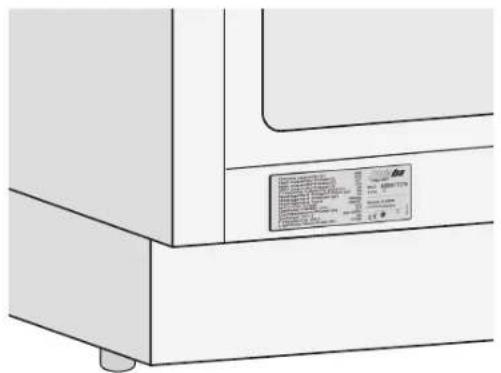
Before calling, write down the model type and serial number which are available on the warranty certificate and on the rating plate located on the bottom left-hand corner of the appliance, behind the bottom drawer and any messages which may have appeared on the display.
+39 0434 420 160
3.2 Main features
■ Exclusive design by Giugiaro
■ The Fhiaba triple refrigeration system and the separation of internal compartments ensure perfect conditions for conservation of various types of wines
■ The electronic control guarantees constant temperature and humidity levels set by the user
The double compressor allows separate management of the set temperature and humidity for the Cantina, Wine Cellar and TriMode compartments
■ The TriMode compartment may operate in three different modes: as a freezer, as a refrigerator or as a cooler compartment
■ Free-standing or built-in installation
■ An interactive menu (Menu) permits personalized management of appliance functions and the display of messages on operation
■ Optimization of consumption during vacation periods
■ Surfaces in stainless steel both inside and outside, with fine aluminium trim
■ Patented hinge system that permits automatic door closing
■ TriMode drawers with Soft self-closing system
- Localized lighting system with LEDS
■ Anti-tipping system with brackets for wall mounting.

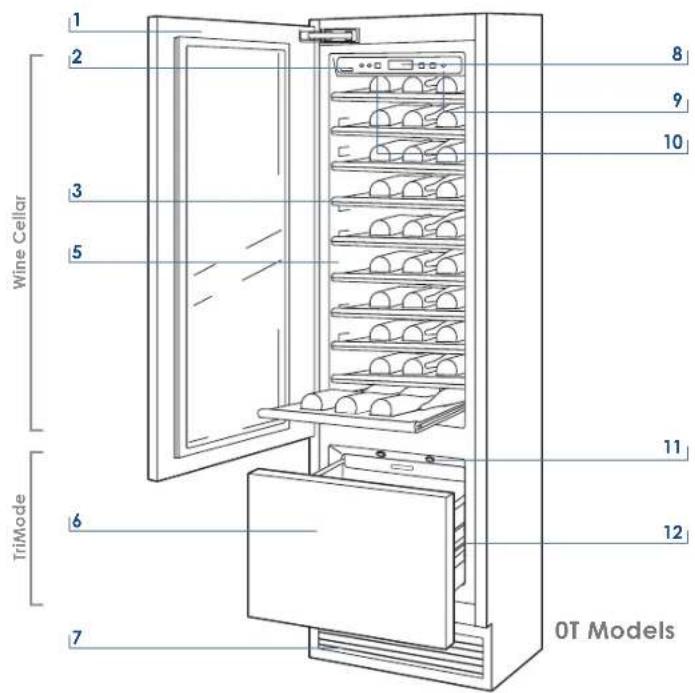
One drawer Wine Cellar
1 Structure in stainless steel with aluminium trim
2 Wine Cellar and TriMode control panels with Menu
3 Sliding bottle shelves, mounted on wheels for easy extraction
4 Cantina area control panel
5 Wine Cellar
6 Frezer compartment that can be transformed into a refrigerator or Crisper-Fresco compartment (TriMode function)
7 Double refrigeration system
8 Temperature display
9 Acoustic signals
10 Vacation function (in Menu)
11 Innovative lighting
12 Automatic door and drawer closure
3 Before starting
3.3 Main components

Two drawer Wine Cellar
1 Structure in stainless steel with aluminium trim
2 Wine Cellar and TriMode control panels with Menu
3 Sliding bottle shelves, mounted on wheels for easy extraction
4 TriMode drawers, may be used as freezer, refrigerator or cooler
5 Double refrigeration system
6 Temperature display
7 Acoustic signals
8 Vacation function (in Menu)
9 Innovative lighting
10 Automatic door and drawer closure
The innovative electronic control system designed by Fhiaba maintains constant temperature on the three compartments and visualizes it on the control panel display. It also allows user interaction making it possible to personalize settings of the various functions and to receive sound and/or visual messages should any malfunction occur in the appliance.
Main control panel
3.5
Friaba
1 2 3 4 5 6 7 9
1

2

3

4

5

6
7

8

9

Allows complete shutdown and start-up of the appliance (press for three seconds).
Allows switching on and off only the Wine Cellar compartment (press for three seconds).
Menu Allows access to the appliance functions menu.
Up/down Wine Cellar Using the Up and Down buttons, it is possible to change the set temperature of the refrigerator and scroll through the interactive menu.
Display Displays the temperature of the Wine Cellar and TriMode compartments, the date and time, Menu functions and visual messages.
Up/Down (TriMode) By selecting Up/Down the preset temperature can be changed according to the selected function mode (freezer, refrigerator, Crisper-Fresco).
Enter Confirms activation or deactivation of the selections made in the Menu.
Alarm Allows activating or deactivating the automatic ice production.
Light Allows illumination of the Wine Cellar and Cantina compartments also when the door is closed. Once activated, the light of the top compartment will automatically shut off after 6 hours.


10111213
10

11

12

13

Display Shows the temperature of the Cantina compartment.
Up/Down Cantina Using the Up and Down keys, it is possible to change the set temperature for the Cantina compartment.
Cantina Allows switching on and off only the Cantina compartment on or off (press for three seconds).
Humidity Allows adjustment of humidity in the Wine Cellar and Cantina compartments to three levels: High (HI), Medium (A) and Low (LO).
4 Turning the appliance on and off
4.1 Turning on and off
First start-up
When the appliance is connected to the electrical power supply but has not yet been turned on, the display shows the message
Stand by
This is a safety message to warn that power is supplied to the appliance, while all of the keys on the panel are off. To switch on all the appliance compartments, press the Unit button ⏻ for three seconds.
Turning off the Wine Cellar compartment
Once you have turned on all of the compartments of the appliance, you can turn off only the wine cellar compartment by pressing the relevant key for three seconds.
The TriMode compartment is always on and cannot be turned off except by completely turning off the appliance.
Turning the Wine Cellar compartment on again
Press again for three seconds the relevant key.
Complete shutdown
To shut down the unit completely for cleaning or maintenance, press the Unit key Ⓤ for three seconds. Also take the plug out of the socket and turn off the omnipolar switch that powers it.
Lengthy shutdown periods
After you have completely shut down the appliance and unplugged it, empty it of all its contents, clean it and dry it. Leave the doors and the drawers ajar to prevent the formation of unpleasant odours.

To prevent accidental modification of settings, the keypad locks automatically after a certain period of time and the display shows the message "keypad locked". To re-activate it, simultaneously press the keys Menu and Up/Down (Down) for three seconds.
At the first start-up, if the message Standby does not appear, it means that the appliance has already started the cooling process. If this is the case, deactivate any possible acoustic signals by pressing the Alarm key close the door and wait until the set temperature is reached.
During the first start-up, you will not be able to use the Menu to modify factory settings until the default temperature has been reached. It is however possible to set the time and date immediately; these parameters are required to activate some of the special functions.
If only the Cantina or Wine Cellar compartment is turned off, the corresponding fan will continue to run independently to prevent the formation of unpleasant odours and mould.
How to adjust the temperature for suit various needs
4.2
To adjust the temperature in the various compartments, use the up/down key for that compartment (see chapter 3.5). If the "keypad locked" message appear, simultaneously press the keys Menu and Up/Down (Down) for 3 seconds.
Wines compartment
Each model has been carefully tested before leaving the factory and is adjusted so as to ensure high performance and low consumption. The ideal temperature for wine conservation does however depend on the types of wine you want to conserve, the method of conservation (Wine Cellar for conservation and consumption, or Cantina for the conservation and aging of prized bottles). It also varies according to personal taste. Please refer to the guide on wine conservation included further ahead in this manual.
As needed, you can reset the temperatures as follows:
- Cantina Compartment: from +4°C to +18°C (from 39.2°F to 64.4°F). The default temperature is +12°C (53.6°F).
■ Wine Cellar compartment: from +4°C to +18°C (from 39.2°F to 64.4°F). The default temperature is +10°C (50°F).

TriMode compartment
If the "keypad locked" message appear, simultaneously press the keys Menu ▲ and Up/Down (Down) ◆ for 3 seconds.

The displayed temperature may vary slightly with respect to the set temperature if the doors are continuously opened or insertion of room temperature food or large quantities of food.
It takes 6 to 12 hours to reach the selected temperature.
The TriMode compartment is default set to freezer mode but it can also be set to run as a refrigerator or cooler compartment. Instructions for conversion are provided in the paragraph on special functions and settings.
As needed, you can reset the temperatures as follows:
■ Freezer compartment: from -15° C to -22° C (from 5° F to -7.6° F). The default temperature, which is recommended, is -18° ( 0° F)
■ Refrigerator compartment: from +2°C to +8°C (from 35.6°F to 46.4°F). The default temperature, which is recommended, is +5°C (41°F).
- Cooler compartment: from -2°C to +2°C (from 28.4°F to 35.6°F ), The default temperature, which is recommended, is 0°C ( 32°F ).
Information and malfunction signals on the display
4.4
An integrated control system provides information through luminous signals or text messages shown on the display. The information signal is always displayed with a fixed text message, while a malfunction signal is shown with blinking text. The acoustic signal that accompanies some malfunction signals can be deactivated by pressing the Alarm key 📍 on the main control panel. The list of malfunction signals is located in the back of this manual.
5 Settings and Special Functions
5.1 Customization and Language Settings

To prevent accidental modification of settings, the keypad locks automatically after a certain period of time and the display shows the message "keypad locked".
To re-activate It, simultaneously press the keys Menu ▲ and Up/Down (Down) √ for at least three seconds.

It is possible to customized the functions of your Fhiaba to adapt it to diverse usage needs, resetting the main parameters (Settings) or activating special functions (Functions).
Functions are visualized on the main display by pressing the Menu button ⚠.
The Up/Down buttons permit scrolling the available functions, which can be selected by pressing the Enter button. The display visualizes the current functioning status.
Using the Up/Down buttons ↗ it is also possible to scroll through the selected function, activating or deactivating by pressing the Enter button √
Once the function is confirmed, the display will automatically visualize the main menu to select other functions.
At any time it is possible to return to the previous selection through the Menu button ▲
The language of the messages appearing on the display can be changed by operating as follows:
Enter the Menu by pressing the Menu button ▲select Settings via the Up/Down buttons ▲and confirm via Enter √
Then select the Language function and the desired language.
5.2 Special functions activated through the Menu

![graph TD A["Vacation TriMode"] --> B["How to activate"] B --> C["Functions → ✓ → ^Vacation TriMode → ✓ → ^Vacation ON/OFF → ✓ → ^Vacation TriMode On → ✓"] C --> D["How to deactivate upon re-entry"] D --> E["Functions → ✓ → ^Vacation TriMode → ✓ → ^Vacation ON/OFF → ✓ → ^Vacation TriMode Off → ✓"] E…](/content/2026/06/1225760/images/5d28db316be1650eee127c895c555c88f957026c82bfc33bad225cde1152d009.jpg)
5 Settings and Special Functions
5.3 Basic settings of the Menu


ATTENTION: If the default settings are restored, it is necessary to reactivate the choice of operation of the TriMode compartment in case it was previously set as Fridge or Fresco.
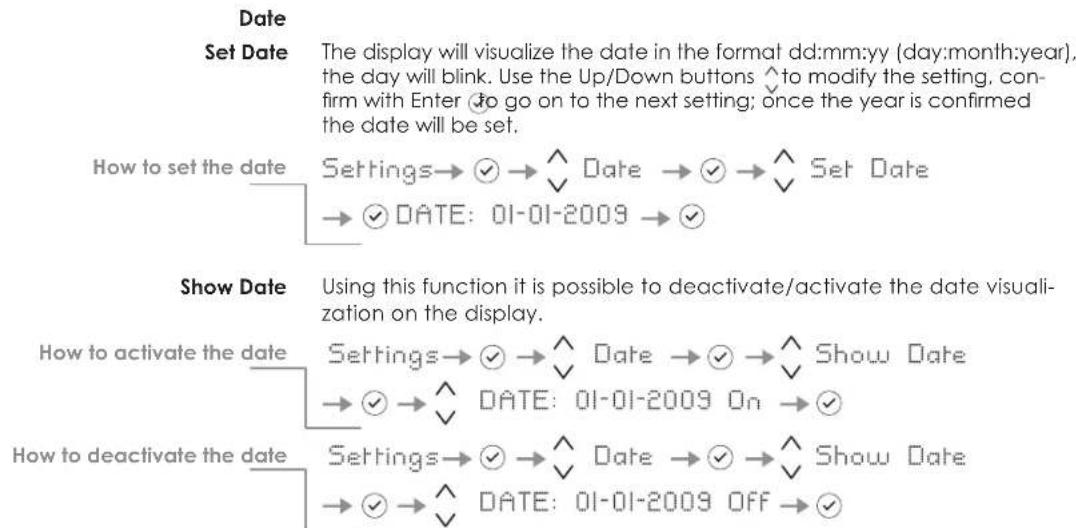
Time
Set Time
The display visualizes the hours and minutes in the format hh:mm and with hh: blinking. Use the Up/Down buttons ^ to modify the setting and then confirm by pressing Enter √ to go on to the next setting. Once the minutes are confirmed, the time will be set.
![graph TD A["How to set the time"] --> B["Settings"] B --> C{✓} C --> D["Time"] D --> E{✓} E --> F["Set Time"] F --> G{✓}TIME: 01:01 --> H{✓}](/content/2026/06/1225760/images/46109a0d92219a6044830a1b71cb7e2adbc7b0523298438dab39c1354d02d399.jpg)
This function selects the display at 12 or 24 h. Set 12/24
![graph TD A["How to set the display to 12 h"] --> B["Settings → ✓ → ^"] B --> C["Time → ✓ → ^ Set View → ✓ → ^"] C --> D["Set:24 → ✓ → ^"] E["How to set the display to 24 h"] --> F["Settings → ✓ → ^"] F --> G["Time → ✓ → ^ Set View → ✓ → ^"] G --> H["Set:24 → ✓ → ^"]](/content/2026/06/1225760/images/c8d5603eb22291679895c73ba659cee14c99a217357c38ab3ba983dc906f98bc.jpg)
Show Time
Through this function it is possible to activate/deactivate the constant visualization of the time.
![graph TD A["How to activate the permanent time"] --> B["Settings → ✓ → ^ Time → ✓ → ^ Show Time"] B --> C["→ ✓ → ^ TIME: 01:01 On → ✓"] D["How to deactivate"] --> E["Settings → ✓ → ^ Time → ✓ → ^ Show Time"] E --> F["→ ✓ → ^ TIME: 01:01 Off → ✓"]](/content/2026/06/1225760/images/7c68d2f829b67199faa59954e265cb89f28208b79499fb2ae1f5fff459c8ec68.jpg)
5 Settings and Special Functions
The function allows selection of the language for the display messages. Language
![graph LR A["Italian"] --> B["Settings → ✓"] B --> C["Language → ✓"] C --> D["italiano → ✓"] E["English"] --> F["Settings → ✓"] F --> G["Language → ✓"] G --> H["english → ✓"] I["French"] --> J["Settings → ✓"] J --> K["Language → ✓"] K --> L["français → ✓"] M["German"] --> N["Settings → ✓"] N --> O["L…](/content/2026/06/1225760/images/5fa4e19a20b4895e65e2491edb16b52d9824b8bd1de64a9811874a7e787a9a81.jpg)
Set °C/°F This function permits visualizing the temperature in Centigrade or Fahrenheit degrees. Normally, the appliance is set for visualization in centigrade degrees.
![graph LR A["How to set the temperature in Centigrade"] --> B["Settings → ✓ → ^ ∨ Set 'C/'F → ✓ → ^ ∨ Set 'C → ✓"] C["How to set the temperature in Fahrenheit"] --> D["Settings → ✓ → ^ ∨ Set 'C/'F → ✓ → ^ ∨ Set 'F → ✓"]](/content/2026/06/1225760/images/0eb261d0cf0d5fc8611002cff29cc569bb47f19effa5d46f70deaef77b4b9a13.jpg)
Internal Layout (positioning, adjustment, removal)
6.1
Wine shelf
The shelves can be easily removed for cleaning. Remove the bottles, completely extract the shelf, tilt it upward until the wheels are free of their seat and extract it.

TriMode drawer
Fixed to the slide guides with two locking nuts


■ to remove the drawer, unscrew the locking nuts and remove the drawer.
■ to remove the inner TriMode drawer unscrew the locking nuts.
7 Lighting
7.1 Lighting
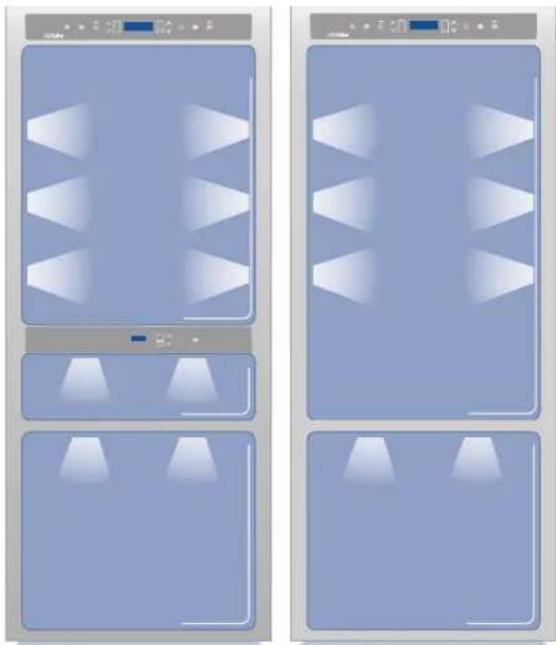
To provide optimum interior lighting, LED strips illuminate the refrigerator compartment from the top and sets of LED lights directly illuminate different areas of the refrigerator compartment, of the Crisper-Fresco drawers and the freezer drawer.
In case of malfunction and/or failure of the lighting system, you should contact an authorized Fhiaba Service Agent.

Once activated, the light of the top compartment will automatically shut off after 6 hours.
Use of the TriMode compartment
8.1
The TriMode compartment, used in conjunction with the Wine Cellar and Cantina compartment, allows great flexibility in the use of the appliance.
Some possible uses:
Freezer mode
■ Liquors, such as vodka, gin, tequila, schnapps, limoncello and the glasses to serve them
■ Rapid cooling of beverages, by activating the bottle cooler function
■ Storage of large amounts of ice.
Refrigerator mode
■ As expansion of the Wine Cellar or of the Cantina
■ For refrigeration of beer and soft drinks
■ For storage of cold dishes and snacks.
Cooler mode
■ For conservation of ham, salmon
■ gourmet preparations.
It comes without saying that, the compartment can be used in a traditional manner. Suggestions and instructions are provided to offer you best conservation of your food over time in complete safety.
TriMode compartment
8.2
To fully use the capacity of the TriMode compartment:
■ remove the drawer
■ remove the top drawer
■ install the supports delivered with the units (on request)
9.1 General directions
As is known, wine can be stored for long periods of time if this is done under the following conditions:
■ Suitable temperature without appreciable variations over time
■ Controlled level of humidity
■ Protection from light
■ Absence of noise and vibrations
■ Absence of odours
■ Bottle kept horizontal.
All of these conditions are fully met in the Fhiaba Wine Cellar.
9.2 Conservation temperature
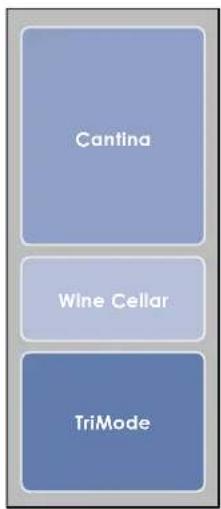
Models with Cantina and Wine Cellar

Models with Wine Cellar
The space offered by the Wine Cellar and Cantina compartments, which can be expanded as necessary by using the TriMode compartment as a wine cellar, allows conservation of your best wines at three different temperatures.
The three compartments are initially set to the following temperatures:
■ Cantina compartment
+12°C (53.6°F) - adjustable from +4°C to +18°C (from 39.2°F to 64.4°F)
■ Wine Cellar compartment
+10°C (50°F) - adjustable from +4°C to +18°C (from 39,2°F to 64,4°F)
TriMode drawer
-18° (0° F) - adjustable from -15° C to -22° C (from 5° F to -7.6° F) (freezer mode)
To transform the TriMode compartment into a wine cellar space, you must access the Menu, set it as a refrigerator compartment, and adjust it to a temperature between +4°C and +8°C (from 39.2°F to 46.4°F).
All the temperatures can be modified according to the characteristics of the wines and personal preferences. However, you should attempt to keep the temperature as constant as possible over time.
Rapid and large-scale temperature variations can in fact cause dilation of the liquid and early aging of the wine.
You should also avoid very low temperatures (below 4° C - 39.2° F) which may lead to the formation of deposits and damage the aesthetic qualities of the wine.
All the compartments offer optimal conditions and take into account all these needs. It should however be noted that the Cantina compartment, in particular, is thermostatically controlled in a very precise manner and ensures the utmost care and attention over time of your most prized bottles.
Time of conservation
9.3
Improvement of wine over time and its duration usually depends on the character of the variety and its type. The following chart shows the best period of conservation and aging for various types in ideal conservation conditions offered by your appliance. However, you should always follow the instructions of the winemaker, especially for fine wines.
TYPE OF WINE CONSERVATION TEMPERATURE TIME OF CONSERVATION
| New wines (Vin Nouveau) from 12° to 14°C 6 months | ||
| Sweet sparkling wines from 8° to 10°C 1 year | ||
| Rosé from 10° to 14°C 1 year | ||
| Semi-sparkling wines from 10° to 12°C 1 - 2 years | ||
| Normal white wines from 10° to 14°C 1 - 2 years | ||
| Light red wines | from 12° to 14°C | 2 years |
| Dry sparkling wines | from 8° to 10°C | 2 years |
| Classic sparkling wines | from 8° to 10°C | 3 - 4 years |
| Barrique and Vigorous white wines | from 8° to 12°C | 3 - 5 years |
| Normal red wines | from 14° to 16°C 3 - 5 years | |
| Barrique and Vigorous red wines | from 14° to 18°C | 7 - 10 years |
| Straw wines or Liquorous wines | from 16° to 18°C | 10 - 15 years |
Consumption temperature
9.4
As a general rule, white wines should be served at a temperature between 10 and 12°C (50 and 53,6°F ) and red wines between 12 and 14°C (53,6 and 57,2°F ). Some wines may however be best enjoyed at higher or lower temperatures.
You should also keep in mind that, during the summer, wine is generally enjoyed at lower temperatures than during the winter.
You should also consider the following:
White wines
White wines are normally not served at high temperatures, since they are generally more acidic that red wines and not very tannic. Therefore they are more enjoyable at low temperatures. It is preferable to serve these wines between 10° C and 14° C ( 50° F and 57,2° F). Young, fresh and aromatic wines can also be served at 10° C ( 50° F), while less aromatic ones are served at 12° C ( 53,6° F). Temperatures between 12° C and 14° C ( 53,6° F and 57,2° F) are for soft, mature white wines that have been aged for some years in the bottle. Higher temperatures would favour the exaltation of the sweet character of the wine, at the expense of the acidity and flavour, which are considered pleasant and desirable characteristics of this type of wine.
Rosé
Rosé wine is served at the same temperature as white wines. It should be noted that these wines may include a certain amount of tannin and may therefore be preferable at higher temperatures. Therefore, they are served between 10°C and 12°C (50°F and 53.6°F), if young and fresh, and between 12°C and 14°C (53.6°F and 57.2°F) if robust and mature.
Due to the special processing they undergo, new vintage wines contain a low tannin content and are therefore more enjoyable if served between 12°C and 14°C (53.6 and 57.2°F).
Red wines
Since they contain more tannin and are less acidic, red wines are normally served at higher temperatures.
Younger wines with less tannin are normally served between 14°C and 16°C (57.2 and 60.8°F), while more full-bodied ones that are more tannic may be served at up to 18°C (64.4°F). Some wines that have aged for years in the bottle, still full-bodies and tannic, may be served at 18°C (64.4°F) or even 20°C (68°F).
Young red wines with little tannin and slightly structured may be enjoyable at lower temperatures, between 12°C and 14°C (53.6 and 57.2°F).
Sparkling wines
It is difficult to provide instructions to cover the wide variety of sparkling wines in available.
As a general rule, sweeter and more aromatic sparkling wines should be served at lower temperatures, down to 8° C (46,4°F), whereas more tannic sparkling wines may be served at higher temperatures, up to 14° C (57,2°F).
Dry sparkling wines are usually served between 8°C and 10°C (46.4 and 50°F).
"Classic" sparkling wines are normally served at these temperatures, which may be as high as 12°C (53.6°F) for sparkling wines that have been aged for some time.
It is however advisable, especially for finer wines, to follow the suggestions and recommendations of the winemaker on the bottle.
These types of wines can be served at temperatures between 16°C and 18°C (60,8 and 64,4°F), depending on personal tastes, to attenuate the sweet taste of straw wines, it can also be served at 10°C (50°F).
9.5 Position of bottles
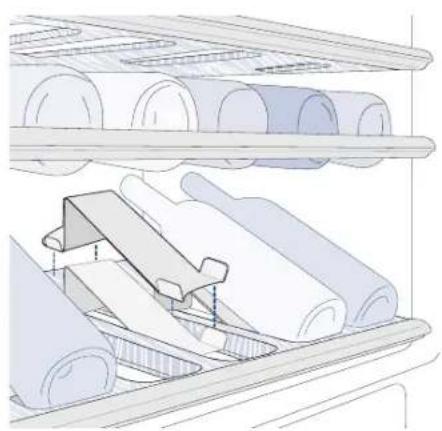
The sliding shelves are made of fine wood and contoured so as to hold bottles of the most classical traditional shape or of the most modern design.
Whether your collection holds fine bouteilles or petit bouteilles, they will be right at home in the Fhiaba Wine Cellar. A special accessory, available on request, will let you place them in an inclined position, in order to display the labels of your most prized items.
Also Magnum bouteilles can be stored, provided you remove the shelf just above the one that will hold them.
If the TriMode compartment is also used as a wine cellar, the bottles may be kept in a horizontal position, as long as they do not move or touch one another. A special accessory for this purpose may be provided on request.
Recommendations for conserving fresh food 10.1
Vegetables

Fruit
Wash vegetables in cold water and dry well. Place vegetables in vacuum packed containers, plastic containers or vegetable bags.
Wash and dry fresh fruit. Pack very aromatic fruit in plastic bags. Fruit should be placed in the Cooler compartment on low humidity.

Packaged meat

Fresh meat, fish and poultry

Eggs
Place in the refrigerator in its original packaging. After opening, wrap the remaining food in plastic bags or aluminium foil.

Milk, cream and fresh cheeses

Cheeses
Remove the original packaging, then place in plastic bags or containers and immediately place back in the refrigerator.
Place the eggs in their package or container into the refrigerator without washing them. Check the expiration date and use the eggs within two weeks of purchasing.
These should be kept in their original closed packaging. Place these on refrigerator shelves and consume them within five days of purchase.
Place these in the refrigerator in their original packaging. Once opened, close them hermetically in plastic bags or aluminium foil.
Leftovers
Let these cool off and cover hermetically with aluminium foil or place in sealed containers to prevent drying and release of odours.
Recommendations for conserving frozen food 10.2

Frozen foods Place foods in plastic bags for the freezer.
These bags must be hermetically sealed against air and humidity. Do not refreeze defrosted meat.

After a prolonged power outage, when the power comes back on, a sound signal will let you know that the temperature is above what is best suited for conservation. These temperatures are shown for one minute on the display. This makes its possible for the user to decide how best to use the conserved foods. After one minute, the displays will start working normally again, while the Alarm key will continue to flash. Touch the Alarm key to again view the highest recorded temperatures.
11 Recommended times for food conservation
Fresh foods Conservation area Time
Raw meats
Large cuts Cooler Compartment 4 days
Steaks, poultry and wild game Cooler Compartment 3 days
Ground meat Cooler Compartment 1-2 days
Carpaccio Cooler Compartment Immediately
Cooked meat
Boiled meat and roasted meat Refrigerator Compartment 2 days
Meat sauce Refrigerator Compartment 6 days
Raw and cooked fish Cooler Compartment 2 days
Soups and broths Refrigerator Compartment 2 days
Pasta Refrigerator Compartment 2 days
Opened cold cuts Refrigerator Compartment 3 days
Fresh cheeses
Refrigerator Compartment 2-3 days
Well protected aged cheeses
Refrigerator Compartment Several months
Eggs (fresh and unwashed)
Refrigerator Compartment 15 days
Opened containers
Refrigerator Compartment 2-3 days
Raw vegetables (in perforated bags)
Refrigerator Compartment 3-6 days
| Frozen foods | Conservation area | Time | |
| Beef, veal, lamb and goat | Freezer Compartment | (steaks) | 6-12 months |
| Beef, veal, lamb and goat | Freezer Compartment | (Meat with bone) | 4-6 months |
| Ground beef | Freezer Compartment 1-2 months | ||
| Pork | Freezer Compartment | (Without bone) | 4-6 months |
| Pork | Freezer Compartment | (With bone) | 2-3 months |
| Ground pork | Freezer Compartment 1-2 months | ||
| Meat leftovers | Freezer Compartment | 2-3 months | |
| Whole chicken and turkey | Freezer Compartment | 8-12 months | |
| Goose, duck and pheasant | Freezer Compartment | 4-8 months | |
| Fish | Freezer Compartment | 1-2 months | |
| Crustaceans | Freezer Compartment | 2-3 months | |
| Cooked foods | Freezer Compartment | 1-2 months | |
| Vegetables | Freezer Compartment | 8-12 months | |
| Fruit | Freezer Compartment | 6-12 months | |
| Desserts and cakes | Freezer Compartment | 2-3 months | |
Care and Cleaning 12.1

Scrupulously follow the detailed directions that can be found in the provided kit and never use abrasive or metallic products which could scratch and damage the satin finishing on the appliance permanently. Before performing any sort of cleaning, disconnect the appliance from the electrical power supply. Make sure you do not damage the refrigerant circuit in any way.
To clean the parts in steel use a microfiber cloth and the sponge provided in the kit with the appliance.
Always use the cloth and sponge in the direction of the steel's satin finish.
Every now and then, to make to steel shiny, wipe with a slightly damp microfiber cloth.
Do not use the sponge on aluminium parts, such as the handles and the profiles of the glass shelves.
You should use special care to keep free of obstructions the ventilation openings in the appliance or in the cabinet that houses it.
Condenser cleaning 11.2
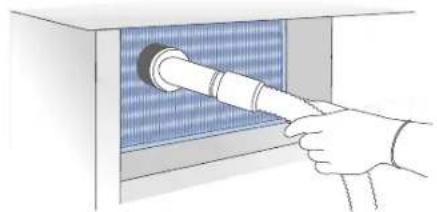

The edges of the condenser are sharp, therefore use adequate protection for the hands and arms when cleaning the condenser.
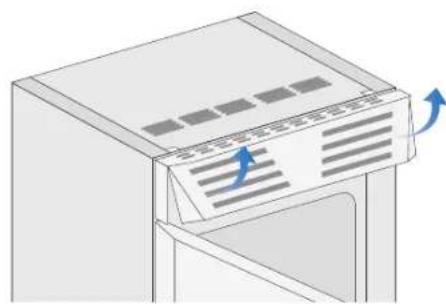
A ventilation grille is located either at the top of the appliance or at the bottom according to the model type.
A foam filter is placed behind the grille to protect from dust the ventilation system.
To clean it use a vacuum cleaner with a soft brush attachment at maximum power, sweeping it along the vent slits. In case of a significant dust build up, the ventilation grille can be removed to allow a more accurate cleaning of the filter.
Take care also to check the condition of the finned condenser and clean it from dust if needed.
Operate as follows:
- Switch off the appliance by pressing the Unit button on the main control panel for approx 3 seconds.
- On models with ventilation at the base remove the grille at the bottom and take it off. On models with ventilation at the top the grille (magnetically attached) lift as shown in the picture.
- Thoroughly clean the grille and the foam filter, by means of a vacuum cleaner and the soft brush attachment.
- Wait approx 30 minutes, until the finned condenser cools down to room temperature, then clean it thoroughly from any dust build up as shown in the picture, taking care not to damage it.
- Start up the appliance again, by pressing the Unit button on the main control panel for approx 3 seconds.
Internal cleaning 12.3

Do not use water on the electrical parts, lights and control panel.
Clean the internal and removable parts by washing them with a solution of lukewarm water, a small amount of dishwashing detergent.
Rinse and dry right away.

Do not bring cold glass parts into contact with boiling water.
Do not use mechanical devices or other methods to speed up defrosting.
Do not wash any parts of the refrigerator in a dishwashing machine since this could damage or irreparably deform the parts.
13 Troubleshooting guide
13.1 Troubleshooting guide
| If you notice malfunctions in your appliance, use this guide before calling Service. This guide may help you resolve the problem yourself or could provide important information to ensure rapid and effective service. | |
| Malfunction message | A malfunction is usually indicated on the display.Problems that cannot be resolved by the user are signalled through a malfunction code. |
| The appliance does not work | Is the appliance connected to the electrical power supply?Does electrical power arrive at the electrical socket?Is the Unit key ⚙ activated?Is the condenser clean? |
| The internal temperatures are higher than normal | Does the display show a malfunction code?Is the temperature adjusted correctly?Is the condenser clean?Were the doors or drawers open for a long period of time?Were large quantities of food recently inserted? |
| The appliance remains in function for a long time period | Bear in mind that during a very hot weather and with very high temperatures in the room it is normal that the compressor remains in operation for prolonged periods of time.Were the doors or drawers open for a long period of time?Were large quantities of food recently inserted?Is the condenser clean?Check that the doors are closed and that the food or containers do not obstruct the perfect closure of the door. |
| If you hear strange noises | It is normal to hear noise from the fans or compressors during the defrost phase.Noise could be louder depending on the position of the appliance and the surrounding environment. |
| Condensation forms both inside and out | If the climate is very humid, the formation of condensation is normal.Opening the door or drawers for prolonged periods of time can contribute to the formation of condensation.In any case, make sure that the doors are always perfectly closed. |
| The Refrigerator or Freezer has frost or ice | Did you leave the doors open for a long period of time?Do the doors close perfectly?If the doors do not close perfectly, contact your installer. |
| Unpleasant odours inside the refrigerator | Clean the appliance completely as indicated in this manual.Hermetically cover all the food. Do not conserve food for prolonged periods of time. |
| The doors are difficult to open | The appliance was designed to permit hermetic closure.When the door is closed, a vacuum situation can occur: in this case it is necessary to wait a few seconds until the pressure balances before opening the door. |
Malfunction indications appearing on the display 13.2
Display message Malfunction description
Power Failure Prolonged interruption of electrical power
The appliance starts up again automatically and indicates the highest recorded temperatures
Door open Door open
this message appears few minutes from the door opening
Drawer open Drawer open
this message appears few minutes from the drawer opening
Cellar too warm Cellar (Wine Cellar) compartment too warm
See the troubleshooting guide
Cellar too cold Cellar (Wine Cellar) compartment too cold
Wait 12 hours. If the problem persists, contact Customer Care
Cantina too warm Cantina compartment too warm
See the troubleshooting guide
Cantina too cold Cantina compartment too warm
Wait 12 hours. If the problem persists, contact Customer Care
Fridge too warm TriMode compartment (refrigerator mode) too warm
See the troubleshooting guide
Fridge too cold TriMode compartment (refrigerator mode) too cold
Wait 12 hours. If the problem persists, contact Customer Care
Cooler too warm TriMode compartment (cooler mode) too warm
See the troubleshooting guide
Cooler too cold TriMode compartment (cooler mode) too cold
Wait 12 hours. If the problem persists, contact Customer Care
Freezer too warm TriMode compartment (freezer mode) too warm
See the troubleshooting guide
Freezer too cold TriMode compartment (freezer mode) too cold
Wait 12 hours. If the problem persists, contact Customer Care
Error Code... Functional problems
call Customer Care who may help you to solve the problem or put you in contact with the
nearest Service Agent
14 Prior to calling Service
14.1 Prior to calling Service
If our recommendations were not sufficient to solve the problem, please get in touch with our Customer Care Center for further support via our website at
www.fhiaba.com
or by sending an email to
care@fhiaba.com
You can also contact us on the phone at
+39 0434 420 160
If necessary, we will place you in contact with the Fhiaba Service Center nearest to you.
Before calling, write down the model type and serial number and any messages which may have appeared on the display.
This information is available on the warranty certificate and on the rating plate which is located on the cabinet's frame, on the bottom left side, behind the bottom drawer.
![graph TD A["FUNCTIONS"] --> B["Dual Zone"] A --> C["Shopping TriMode"] A --> D["Vacation TriMode"] A --> E["Bottle Cooler"] A --> F["Set Sabbath Mode"] B --> G["Dual Zone Off"] B --> H["Dual Zone On"] C --> I["Shopping ON/OFF"] C --> J["Shopping Time"] I --> K["Shopping TriMode Off"] I --> L["Shoppi…](/content/2026/06/1225760/images/5b9cd8251a3ca07686f5ffa4c1ffaee18184e509df4a2d6f0f6d747eeebce877.jpg)
15 Menu Map
15.2 Settings
![graph TD A["TriMode Options"] --> B["Freezer"] A --> C["Fresco"] A --> D["Fridge"] E["Default Setting"] --> F["Enter to Confirm"] G["Date"] --> H["Set Date"] G --> I["Show Date"] G --> J["DATE: 01-01-2009"] G --> K["DATE: 01-01-2009 On"] G --> L["DATE: 01-01-2009 Off"] M["Time"] --> N["Set Time"] M…](/content/2026/06/1225760/images/576f2d99eaf9f75791329c8b8fd8d04fa014f3dec9c752c528d5413bedec4b90.jpg)

1-1|-20|4


Fhiaba srl Via Fiumicino, 20 · 33082 · Azzano Decimo · PN · Italy · Tel +39 0434 420160 · Fax +39 0434 420161 E-mail: info@fhiaba.com · www.fhiaba.com · Info Line 800-Fhiaba (800-344222)
Fhiaba srl is constantly researching new way to improve the features and the design of their products, therefore models are often upgraded and reviewed.

B09000207 EN
Fhiaba
www.fhiaba.com
Info Line
800 - Fhiaba · (800-344222)
- PAGE 2 1 IMPORTANT INSTRUCTIONS FOR SAFETY AND THE ENVIRONMENT
- 3 2 INSTALLATION
- 4 3 BEFORE STARTING
- 8 4 TURNING THE APPLIANCE ON AND OFF
- 10 5 SETTINGS AND SPECIAL FUNCTIONS
- 15 6 INTERNAL LAYOUT
- 16 7 LIGHTING
- 17 8 USE OF THE TRIMODE COMPARTMENT
- 18 9 CONSERVATION OF WINES
- 21 10 FOOD CONSERVATION
- 22 11 RECOMMENDED TIMES FOR FOOD CONSERVATION
- 23 12 CARE AND CLEANING
- 24 13 TROUBLESHOOTING GUIDE
- 26 14 PRIOR TO CALLING SERVICE
- 27 15 FHIABA ACCESS MENU MAP
- 1 IMPORTANT INSTRUCTIONS FOR SAFETY AND THE ENVIRONMENT
- 1.1 FOR YOUR SAFETY
- NOTES
- IMPORTANT
- WARNING
- RESPECT FOR THE ENVIRONMENT 1.2
- INSTALLATION 2.1
- CONNECTION TO THE ELECTRICAL MAINS 2.2
- 3 BEFORE STARTING
- 3.1 GETTING TO KNOW THE APPLIANCE
- WWW.FHIABA.COM
- CARE@FHIABA.COM
- 3.2 MAIN FEATURES
- ONE DRAWER WINE CELLAR
- 3.3 MAIN COMPONENTS
- TWO DRAWER WINE CELLAR
- FRIABA
- 10111213
- 4 TURNING THE APPLIANCE ON AND OFF
- 4.1 TURNING ON AND OFF
- FIRST START-UP
- STAND BY
- TURNING OFF THE WINE CELLAR COMPARTMENT
- TURNING THE WINE CELLAR COMPARTMENT ON AGAIN
- COMPLETE SHUTDOWN
- LENGTHY SHUTDOWN PERIODS
- HOW TO ADJUST THE TEMPERATURE FOR SUIT VARIOUS NEEDS
- WINES COMPARTMENT
- TRIMODE COMPARTMENT
- INFORMATION AND MALFUNCTION SIGNALS ON THE DISPLAY
- 5 SETTINGS AND SPECIAL FUNCTIONS
- 5.1 CUSTOMIZATION AND LANGUAGE SETTINGS
- 5.2 SPECIAL FUNCTIONS ACTIVATED THROUGH THE MENU
- 5.3 BASIC SETTINGS OF THE MENU
- TIME
- SET TIME
- THIS FUNCTION SELECTS THE DISPLAY AT 12 OR 24 H. SET 12/24
- SHOW TIME
- INTERNAL LAYOUT (POSITIONING, ADJUSTMENT, REMOVAL)
- WINE SHELF
- TRIMODE DRAWER
- 7 LIGHTING
- 7.1 LIGHTING
- USE OF THE TRIMODE COMPARTMENT
- 8.1
- FREEZER MODE
- REFRIGERATOR MODE
- COOLER MODE
- 8.2
- 9.1 GENERAL DIRECTIONS
- 9.2 CONSERVATION TEMPERATURE
- CANTINA COMPARTMENT
- WINE CELLAR COMPARTMENT
- TIME OF CONSERVATION
- 9.3
- CONSUMPTION TEMPERATURE
- 9.4
- WHITE WINES
- ROSÉ
- RED WINES
- SPARKLING WINES
- 9.5 POSITION OF BOTTLES
- RECOMMENDATIONS FOR CONSERVING FRESH FOOD 10.1
- VEGETABLES
- PACKAGED MEAT
- FRESH MEAT, FISH AND POULTRY
- MILK, CREAM AND FRESH CHEESES
- LEFTOVERS
- RECOMMENDATIONS FOR CONSERVING FROZEN FOOD 10.2
- 11 RECOMMENDED TIMES FOR FOOD CONSERVATION
- FRESH FOODS CONSERVATION AREA TIME
- CARE AND CLEANING 12.1
- CONDENSER CLEANING 11.2
- OPERATE AS FOLLOWS
- INTERNAL CLEANING 12.3
- 13 TROUBLESHOOTING GUIDE
- 13.1 TROUBLESHOOTING GUIDE
- MALFUNCTION INDICATIONS APPEARING ON THE DISPLAY 13.2
- DISPLAY MESSAGE MALFUNCTION DESCRIPTION
- 14 PRIOR TO CALLING SERVICE
- 14.1 PRIOR TO CALLING SERVICE
- 15 MENU MAP
- 15.2 SETTINGS
Brand : Fhiaba
Model : XS7490FW3A
Category : Wine cellar