
SkyFiller Wings SFW-150LS - Photo accessory Fotodiox - Free user manual and instructions
Find the device manual for free SkyFiller Wings SFW-150LS Fotodiox in PDF.


| Type | LED Foldable Light |
| Model | SkyFiller Wings SFW-150LS |
| Dimensions (Unfolded) | 40.1 x 11.8 x 1.2 in (102 x 30 x 3 cm) |
| Dimensions (Folded) | 20.4 x 11.8 x 1.9 in (52 x 30 x 4.8 cm) |
| Weight (Light Body) | 6 lbs (2.75 kg) |
| Weight (Power Control Box) | 3.36 lbs (1.525 kg) |
| Power Consumption | 150 W |
| Power Input | AC 100-240V, DC 13-17V |
| Color Temperature Range | 2800K - 6500K |
| Brightness (at 1m) | 3220 Lux @ 2800K, 3850 Lux @ 6500K |
| CRI (Color Rendering Index) | 96-98 |
| TLCI (Television Lighting Consistency Index) | ≥96 |
| Beam Angle | 120° |
| LED Lifetime | 50,000 hours |
| Dimmer Range | 10% - 100% (flicker-free) |
| Cooling | Passive (metal heat sink) |
| Mount | Ball head bracket with stand mount |
| Display | LCD screen showing color temperature and brightness |
| Accessories Included | Softbox, power control box, ball head bracket, DC power cable, AC power cable, carrying case |
| Optional Accessories | Remote control, grid |
| Safety | Do not disassemble; avoid wet hands, flammable gases, enclosed spaces; use only provided power control box |
| Maintenance | Clean with soft dry cloth; avoid dust buildup |
| Repair and Spare Parts | Contact techsupport@fotodiox.com for replacement power control box or other parts |
Frequently Asked Questions - SkyFiller Wings SFW-150LS Fotodiox
User questions about SkyFiller Wings SFW-150LS Fotodiox
0 question about this device. Answer the ones you know or ask your own.
Ask a new question about this device
Download the instructions for your Photo accessory in PDF format for free! Find your manual SkyFiller Wings SFW-150LS - Fotodiox and take your electronic device back in hand. On this page are published all the documents necessary for the use of your device. SkyFiller Wings SFW-150LS by Fotodiox.
USER MANUAL SkyFiller Wings SFW-150LS Fotodiox
1100 Lakeside Dr Gumee, IL60031, United States
Toll Free:(866)812-1107
Local & International: (847)201-4623
Fax: (847) 261 0295
Http://www.fotocioxpro.com
FotioX®
FOTODIOX

natural_image
Two simple rectangular panels with vertical lines and a horizontal line, no text or symbols presentSkyFiller Wings
SFW-150ss/LS | SFW-150ss/LS RGB
USER MANUAL
LED FOLDABLE LIGHT


LED FOLDABLE LIGHT
SkyFiller Wings SFW-150ss/SFW-150ls
Thank you for choosing the SkyFiller Wings lighting series from Fotodiox Pro. The SkyFiller Wings SFW / 150SS / SFW-150t s is lightweight, curable and easy to transport due to the use of PC hollow core materials. The SkyFiller Wings/SFW / 150SS / SFW-150Ls features an adjustable color temperature range of 2830K to 6300K, a unique foldable design convenient for transportation and a metal heat sync to improve heat dissipation to ensure a long product life.
Characteristics
- It is composed of multiple ultra bright chip LEDs with a lifespan of up to 50,000 hours. These LEDs have a standardized color temperature with a CRI and TLCI of 96 or above.
- The light is lightweight, easy to transport and durable due to the use of PC hollow materials and a metal heat sink.
- The power control box can be connected to battery power* for easy use on location. *Batteries sold separately.
- The LCD screen displays real-time data for color temperature and brightness.
- The solid metal ball head bracket allows the light to be securely mounted and easily adjusted.
- Provides stable, consistent output while remaining heat free.
- Flicker-free and uniformly dimmable from 10% to 100% due to the PWM integrated design.
- Color temperature is adjustable from 2800K to 6500K.
- Suitable for indoor and outdoor photography and videography. Great for studio or location shoots including TV, film, portrait photography, etc.
Warnings:
- Do not disassemble or modify the light.
- Do not operate with wet hands; doing so may cause electric shock.
- Do not operate near flammable gases or volatile liquids as this may increase the risk of explosion or fire.
- Do not operate in enclosed spaces where heat buildup can be extreme, such as in a car on a sunny day. The increased heat may cause premature failure of the lighting unit.
- Do not touch the plug or AC adapter with wet hands, doing so may cause electric shock.
- Do not damage, disassemble, tweak or twist the power cord, as it may cause a fire or electric shock.
- Do not place the light under heavy objects.
- Keep the light clean with a soft, dry cloth,
- ONLY use the provided power control box. Using other power control boxes may result in damage to your light. Please contact techsupport@fotodiox.com should you need a replacement.
- Avoid impact to the LCD screen: Impact to the LDC may cause damage.
- Avoid dust and debris build-up on the light surface as this will change the illuminance and color temperature.
- When hanging the product, always use a safety cable.
- Do not block or cover the air inlet/outlet.
Packing list:

natural_image
Product display set including flat-screen, camera, earphones, and a portable device (no visible text or symbols)SPW 150ss
① Light-IPC ② Softbox-IPC Power control box-IPC
① Ball head bracket IPC ⑤ DC power cable (control box to light unit) IPC
⑥ AC power cable-IPC Wa7anty card-IPC Certificates of inspection-IPC
⑨ Instruction manual-IPC ⑩ Carrying case-IPC

natural_image
Product display set including rectangular and electronic devices, a compact case, and accessories (no visible text or symbols)SPW 150s
① Light-IPC ② Softbox-IPC Power control box-IPC
④ Ball head bracket IPC ⑤ DC power cable (control box to light unit) IPC
⑥ AC power cable-IPC WaTanty card-IPC Certificate of inspection-IPC
⑨ Instruction manual IPC ⑩ Carrying case IPC
LED FOLDABLE LIGHT


LED FOLDABLE LIGHT
Optional accessory

natural_image
Front view of a portable electronic device labeled 'FosBioX' with control buttons and display (no readable text beyond branding)Remote control

SFW-150ss Grid
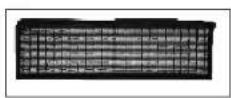
SPW-50s Gnd
Parts diagram:

natural_image
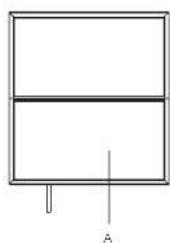
Simple line drawing of a rectangular frame with a horizontal line and a vertical line labeled 'A' at the bottom (no text or symbols beyond the label)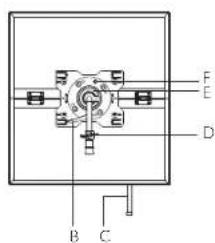
SPW-150ss / SPW-150ls
Ⓐ Front diffuser panel
® Ball head locking screw
© DC input cable
① Stand mount locking screw
Metal mounting plate ball head bracket (detachable)
⑤ Mounting plate lock pin

natural_image
Simple line drawing of a rectangular block with two vertical pins and a base, no text or symbols present.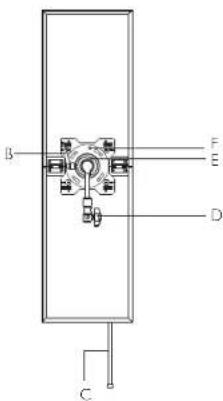
LED FOLDABLE LIGHT


LED FOLDABLE LIGHT
Q150(L) Power control box:

natural_image
Technical diagram of a heat exchanger or cooling unit with cooling fins and a central component (no text or symbols)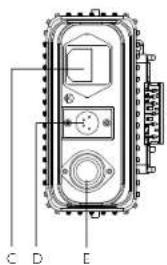
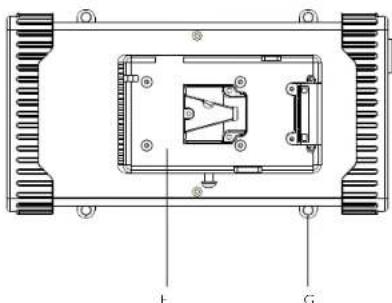
SPW-15Css/s
Ⓐ LCD screen
⑧ Operation buttons
© AC power input socket
DC output socket (to light unit)
① 4-pin XLR socket (DC input)
⑤ V-lock plate
© Strap/safety cable mounting point
LCD display:

Intensity 10%-100%
Color temperature 2800K-6500K
Specifications:
| SIZE\MODEL | SFW-150ss | SFW-150s |
| I-FD | I.FD3784pcs of ultra bright chip | I.FD3784pcs of ultra bright chip |
| Brightness | 2800K:3500Lux/1m, 1020Lux/2m | 2800K:3220Lux/1m, 1000Lux/2m |
| 6500K:3850Lux/1m, 1170Lux/2m=5 | ||
| Beam angle | 120° | |
| Color temperature | 2800±150K - 6500±200K | |
| CRI | Ra: 96-98 | |
| TLCI | ≥96 | |
| Power | 150W 150W | |
| Working voltage | AC 100-240V,DC 13-17V | |
| Dimension for unfolded light body | 20.4x22x1.2in (52x56x3cm) 40 | x1 1.8x1.2n (102x30x3cm) |
| Dimension for folded light body | 20.4x 1.8x1.9in (52x30x4.8cm)20 | |
| Dimension for power control box | 5.6x10.6x3.27in(14.2x27x8.3cm) | |
| Weight for light body | 6.5 lbs (2.96kg) 6 lbs (2.75kg) | |
| Weight for power control box | 3.36 lbs(1.525kg) | |
| Accessories | Softbox, Power control box, Ball head bracket, DC power cable, AC power cable, Carrying car | |
| Optional accessories | Remote control, Grid | |
OK:40+CL
4×1.4×1.9
LED FOLDABLE LIGHT


LED FOLDABLE LIGHT
Instructions for operation buttons on power control box:
-
Sound button: Press once to turn sound on, press again to turn sound off.
-
Brightness shortcut button: Each time the button is pressed, it is cyclically switched between 25%, 50%, 75% and 100% of intensity.
-
Brightness increase button. Each time you press the button, the brightness is increased by 1%. To increase intensity rapidly, press and hold the button.
-
Brightness decrease button: Each time you press the button, the brightness is decreased by 1%. To decrease intensity rapidly, press and hold the button.
-
Color temperature decrease button. Each time the button is pressed, the color temperature is decreased by 100K, down to 2800K. To rapidly decrease the color temperature, press and hold the button.
-
Color temperature increase button: Each time the button is pressed, the color temperature is increased by 100K, up to 6500K. To rapidly increase the color temperature, press and hold the button.
-
Color temperature shortcut button: Each time the button is pressed, the color temperature is cyclically switched between 2800K, 3200K, 5600K and 6500K.
-
Power ON/OFF button. Press the button once to turn the light on; press again to turn it off.
-
Special effects: Press and hold the Sound button for more than 3 seconds to enter the special effect mode. At this time, one of the F1-F5 modes will be displayed below the LCD display. Press the Brightness 'Increase' or "Decrease" buttons to shift between the five modes. Press and hold the Sound button for more than 3 seconds to exit the special effect mode.
Note: F1 - Lightning mode, F2 - Fireworks mode, F3 - Storm mode, F4 - Gradient mode, F5 - Flash mode

Instructions for operation buttons on remote control

- To pair the remote control and light: press and hold the Pairing Button for more than 5 seconds, until buzzer sounds.
- Turn on the light or lights you wish to pair with the remote control, and pair. Don't turn on those lights you don't wish to pair.
- The remote control and light unit packed in each box are factory paired. The remote control can be paired to another light or multiple units by following the pairing instructions.
- The remote control working distance is 20m
LED FOLDABLE LIGHT


LED FOLDABLE LIGHT
Operating instructions:
- Set up instructions:
(I) Align the four holes (A, B, C, D) on the back of metal mounting plate to the corresponding four posts (A, B, C, D) on the fixing plate on the back of light. Push in and turn the metal mounting plate/ball head bracket counterdoctwise until you hear a "click." The metal mounting plate/ball head bracket is now secured to the light body. To remove the metal mounting plate/ball head bracket, just pull out mounting plate lock pin and rotate the metal mounting plate/ball head bracket doctwise.

natural_image
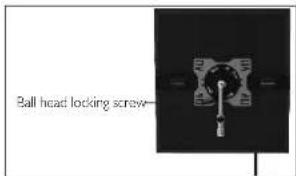
Two mechanical components: a black rectangular block labeled A, B, C with a cable and a circular dial with labeled points A, B, C (no text or symbols on the main components)(2) Loosen the stand mount locking screw by turning counterclockwise. Place the mount on the light stand and secure the screw by turning clockwise. Please ensure the light stand stud is fully inserted into the mounting plate and the screw is securely fastened.

(3) Tum the ball head locking screw counterclockwise to loosen the ball head. Adjust to the desired position and turn the ball head locking screw clockwise to secure in position.
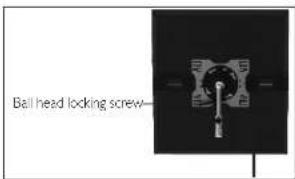
- Connecting the power supply
(1) Use the DC power cable to connect the light unit to the power control box. (2) Use the power cord to connect the power control box to external AC power (AC 00 240V).
Warnings:
Do not use battery while the light is running on AC power, doing so may cause damage to the battery or light. Do not store the light with the battery attached, doing so may reduce battery life.

LED FOLDABLE LIGHT


LED FOLDABLE LIGHT
SkyFiller Wings
SFW-150ss RGB/SFW-150ls RGB
The 5BA/full@col@F2D light, RGB-viding soft, clean light. It is lightweight, durable and
easy to transport due to the use of PC hollow core material. The RGBWT LED design provides access to the full
360° HSI color selection, white light is adjustable from 2800K to 10000K with adjustable green / magenta points.
Characteristics:
I. Standardized color temperature with a CRI 93-98 and TLCI 95-97.
2. 0-360° HSI color selection (RGB+WT color gamut).
3. Multiple pre-programmed scenes and effects.
4. Flicker-free and uniformly dimmable from 10% to 100%.
5. Color temperature is adjustable from 2800K to 10000K.
6. This easy to carry, foldable light is made of PC hollow material with a metal heat sink. for enhanced durability
7. The solid metal ball head bracket allows the light to be securely mounted and easily adjusted.
8. USB for future firmware updates and feature additions
9. Easy to use softbox featuring a snap-on design.
10. Provides stable, consistent output while remaining heat free.
11. DMX512 compatible
12. Mobile APP is available to adjust various parameters of the light.
13. Suitable for indoor and outdoor photography and videography. Great for studio or location shoots including TV, film, portrait photography, etc.
Warnings:
- Do not disassemble or modify the light.
- Do not operate with wet hands; doing so may cause electric shock.
- Do not operate near flammable gasses or volatile liquids as this may increase the risk of explosion or fire.
- Do not operate in enclosed spaces where heat buildup can be extreme, such as in a car on a sunny day.
The increased heat may cause premature failure of the lighting unit. - Do not touch the plug or AC adapter with wet hands, doing so may cause electric shock.
- Do not damage, disassemble, tweak or twist the power cord, as it may cause a fire or electric shock.
- Do not place the light under heavy objects.
- Keep the light clean with a soft, dry cloth.
- ONLY use the provided power control box. Using other power control boxes may result in damage to your light. Please contact techsupport@fotodiox.com should you need a replacement.
- Avoid impact to the LCD screen; impact to the LDC may cause damage.
- Avoid dust and debris build-up on the light surface as this will change the illuminance and color temperature.
- When hanging the product, always using a safety cable.
- Do not block or cover the air inlet/outlet.
Packing list:

natural_image
Product display panel showing front, side, and close-up views of a camera module (no visible text or labels)SFW-150ssRGB
①2Light unit-IPC Softbox-IPC Power control box-IPC
④ Ball head bracket-IPC ⑤ AC power supply-IPC
⑥ DC power cable (control box to light unit)-IPC ⑦ DMX cable-IPC
⑧ AC power cable-IPC ⑨ Warranty card-IPC ⑩ Certificate of inspection-IPC
⑪ Instruction manual-IPC ⑫ Carrying case-IPC

natural_image
Product display and accessories including a rectangular panel, battery pack, and camera module (no visible text or symbols)5FW-150sRGB
①2 Light unit IPC ◯ Softbox-IPC Power control box-IPC
④ Ball head bracket-IPC ⑤ AC power supply-IPC
⑥ DC power cable (control box to light unit)-IPC ⑦ DMX cable-IPC
⑧ AC power cable-IPC ⑨ Warranty card-IPC ⑩ Certificate of inspection-IPC
⑪ Instruction manual-IPC ⑫ Carrying case-IPC
LED FOLDABLE LIGHT


LED FOLDABLE LIGHT
Optional accessory

SPW-150sRGB Grid
Paris diagram:
natural_image
Simple line drawing of a two-segment display with a vertical line and labeled point A (no text or symbols beyond label)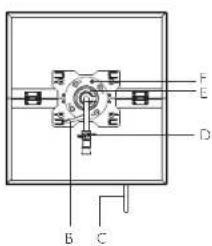
5FW-150ssRGB / 5FW-150sRGB
① Front diffuser panel
③ Ball head locking screw
DC input cable
① Stand mount locking screw
⑤ Metal mounting plate
ball head bracket (detachable)
⑤ Mounting plate lock pin

natural_image
Simple line drawing of a rectangular block with two vertical pins, no text or symbols present
LED FOLDABLE LIGHT


LED FOLDABLE LIGHT
Power control box of SPW-150ssrsRGB :

A DMX input B 4-pin XLR socket (DC input)
© DMX output © DC output socket (to light unit) © Power on/off switch
⑤ Tact switches (for CCT, HSI, RGBWT, MENU, Filters, FX, Scenes, BACK)
© Knob I-Intensity Ⓗ Knob 2-Saturation ⏻ Knob 3 - (with touch button functionality)Selector
① LCD screen ② Indicator lights (2 indicators)
Specifications:
| NO. | Name | SPW-150ssRGB |
| 1 | Optical system | Diffusion panel |
| 2 | Light emission surface | 19.3x20.9in(49x53cm) |
| 3 | Beam angle | 120° |
| 4 | Color | Full RGB + WT spectrum with hue saturation control |
| 5 | Intensity / Brightness | Continuously adjustable 0.100% |
| 6 | White light | Adjustable 2800K-0000K |
| 7 | CRI | 93-98 |
| 8 | TLCI | 95-97 |
| 9 | Color temperature error | ±200K |
| 10 | Remote control | DMX 5/2. Remove control, Mobile APP |
| 11 | Power input | AC100-240V, 50/601 z, DC13-17V |
| 12 | Power output | 150W |
| 13 | Working temperature | 20-45°C |
| 14 | Protection | IP20 |
| 15 | LED lifecime | 50,000 hours |
| 16 | Dimension for unfolded light body | 20.4x22x1.2in (52x56x3cm) |
| 17 | Dimension for folded light body | 20.4x11.4x1.9in (52x29x4.8cm) |
| 18 | Dimension for power control box | 15x5.6x3.2in (38x14.2x8.3cm) |
| 19 | Weight for light body | 6.8 lbs (3.12kg) |
| 20 | Weight for power control box | 4 (1.825kg)/os |
| 21 | Accessories | Softbox, Power control box. Ball head bracket, DC power cable (control box to light unit), Power cable, DMX cable. Carry bag |
| 22 | Optional accessories | Remote control.Gnd |
SPW-150ssRGB Illuminance
| Distance\Color Illuminance | 2800K | 3200K | 5600K | 10000K |
| 0.5m | 10000Lux | 9280Lux | 1000Lux | 10400Lux |
| 1m | 2960Lux | 1070Lux | 3600Lux | 3130Lux |
| 2m | 800Lux | 890Lux | 1000Lux | 1030Lux |
| 5m | 170Lux | 175Lux | 210Lux | 200Lux |
| Distance\luminance\Color | Red | Green Blue | White | Tungsten | |
| 0.5m | 2180Lux | 6000Lux | 900Lux | 9380Lux | 10800Lux |
| 1m | 680Lux | 1920Lux | 290Lux | 3090Lux | 3520Lux |
| 2m | 200Lux | 560Lux | 80Lux | 890Lux | 1060Lux |
| 40Lux 1 | 0Lux 19Lux5m | 175Lux 20Lux |
LED FOLDABLE LIGHT


LED FOLDABLE LIGHT
Specifications:
| NO. | Name | SFW-150sRCB |
| 1 | Optical system | Diffusion panel |
| 2 | Light emission surface | 37.6 10.2in(95.5x26cm)x |
| 3 | Beam angle | 120° |
| 4 | Color | Full RGB + WT spectrum with hue saturation control |
| 5 | Intensity/ Brightness | Continuously adjustable 0-100% |
| 6 | White light | Adjustable 2800K-10000K |
| 7 | CRI | 93-98 |
| 8 | TLCI | 95-97 |
| 9 | Color temperature error | ±200K |
| 10 | Remote control | DMX 512, Remote control, Mobile APP |
| 11 | Power input | AC100-240V, 50/60Hz, DC13-17V |
| 12 | Power output | 150W |
| 13 | Working temperature | 20-45°C |
| 14 | Protection | IP20 |
| 15 | LED lifetime | 50,000 hours |
| 16 | Dimension for unfolded light body | 40.1x11.8x1.2in (102x30x3cm) |
| 17 | Dimension for folded light body | 20.4x11.8x1.9in (52x30x4.8cm) |
| 18 | Dimension for power control box | 4.9x3.5x3.2 (38x14.2x8.3cm)in |
| 19 | Weight for light body | 6.8 lbs (3.12kg) |
| 20 | Weight for power control box | 4 lbs (1.825kg) |
| 21 | Accessories | Softbox, Power control box. Ball head bracket, DC power cable (control box to light unit), Power cable, DMX cable, Carrying case |
| 22 | Optional accessories | Remote control,Grid |
SPW-150usRGB illuminance:
| Distance\Color | 2800K | 3200K | 5600K | 10000K |
| 0.5m | 8130Lux | 8810Lux | 9720Lux | 9200Lux |
| 1m | 2850Lux | 2970Lux | 3430Lux | 3280Lux |
| 2m | 830Lux | 890Lux | 1040Lux | 990Lux |
| 5m | 70Lux | 175Lux | 210Lux | 190Lux |
| Distance\ColorJuminance | Red | Green Blue | White | Tungsten | |
| 0.5m | 1890Lux | 5270Lux | 790Lux | 7960Lux | 9400Lux |
| 1m | 610Lux | 1780Lux | 260Lux | 2860Lux | 3750Lux |
| 2m | 190Lux | 550Lux | 84Lux | 880Lux | 1020Lux |
| 40Lux 110Lux 180Lux5m | 175Lux 205Lux | ||||
Operating instructions:
- Set-up instructions
(1) Align the four holes (A, B, C, D) on the back of metal mounting plate to the corresponding four posts (A, B, C, D) on the fixing plate on the back of light. Push in and turn the metal mounting plate/ball head bracket counterclockwise until you hear a "click." The metal mounting plate/ball head bracket is now secured to the light body. To remove the metal mounting plate/ball head bracket, just pull out mounting plate lock pin and rotate the metal mounting plate/ball head bracket clockwise.

natural_image
Two mechanical components: a black rectangular block labeled A, B, C with a switch and circular dial (no text or symbols visible)(2) Loosen the stand mount locking screw by turning counterclockwise. Place the mount on the light stand and secure the screw by turning clockwise. Please ensure the light stand stud is fully inserted into the mounting plate and the screw is securely fastened.
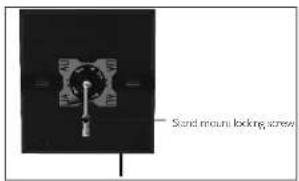
(3) Turn the ball head locking screw counterclockwise to loosen the ball head. Adjust to the desired position and turn the ball head locking screw clockwise to secure in position.
LED FOLDABLE LIGHT


LED FOLDABLE LIGHT
- How to Install the AC power adapter
(1) The V lock holder is already mounted on the adapter when it is shipped from the factory.
(2) Install the power adapter with V-lock plate on the back of the light. It is successfully installed when you hear the lock mechanism click.
(3) To remove the adapter, press down on the V-lock release button and push the adapter out of the V-lock plate.
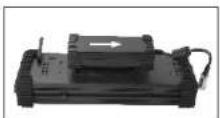
Attaching the adapter

Removing the adapter
- Connecting the power supply
(1) Use the DC power cable to connect the light unit to the power control box.
(2) Use the power cord to connect the power control box to external AC power (AC 100-240V).
Warnings:
Do not use battery while the light is running on AC power, doing so may cause damage to the battery or light.
Do not store the light with the battery attached, doing so may reduce battery life.
Functions of the control knobs:
- Selector Knob:

Selector Knob
Rotate the selector knob to select the desired mode in the menu press once to select. In certain modes, parameters such as CCT, CMB, SPD, and Freq may be adjusted using this knob. In ISI, CCT, RGBWT mode, press the knob for several seconds to save the current settings.
2.Saturation Know:

SAT 0-100%
In the HSI mode, SAT can be adjusted 0-100%. In other modes, parameters such as SAT. CMB. Col. may be adjusted using this knob.
- Intensity knob:

Brightness 0 100%
Adjusts brightness 0.00% in any mode.
LED FOLDABLE LIGHT


LED FOLDABLE LIGHT
I. LCD display screen and menu instructions:
(Boot display Welcome message.)

flowchart
graph TD
    A["FOTODIOX WELCOME TO USE"] --> B["↓"]
    B --> C["MENU\n1.CCT\n2.HSI\n3.RGBWT\n4.Filters\n5.FX\n6.Scenes\n7.Lang\n8.COMX Settings\n9.RMT Settings"]
Main menu
Operating Instructions
1. Use the Selector knob to highlight the desired sub-menu option, press the knob once to select.
2. In the main menu, you may also press the operation shortcut buttons to enter a menu option directly. There are nine modes: CCT, HSI, RGBWT, Filters, FX, Scenes, Language, DMX channel setting and Remote control channel setting.
3. From any of the menus, press the BACK button to return to the previous menu. You may also enter the main menu using the MENU button.
indicator function description:

- Battery indicator
When the battery indicator light is on, the V-block battery is being used to power the light.
When the battery indicator light flashes: the V-lock battery is running low.
When the battery indicator light is all: the AC power adapter is being used to power the light.
Note: when the battery is used to power the right, the max output power is reduced to 80%.
- Data indicator
When the data indicator is on, the DMX512 remote control fund on is being used.
When the data indicator flashes: the USA port is being used for data upgrade.
The data indicator flashes once each time the light receives an effective remote control signal.
- USB part operation:

When the device requires a software upgrade, you can connect a USB flash drive through the USB port. (Upgrade software can be downloaded from www.fotodioxpro.com)
Operation:
(1) Download the updates to an USB flash drive from www.fotodioxpro.com
(2) Remove the custproof plug from the USB port and insert the USB flash drive with the upgrade program.
(3) Power on: the DATA indicator light will flash. The upgrade is complete when the "Welcome" message appears in the LCD display.
(4) It takes about 15 seconds to finish upgrading. After the upgrade is complete, remove the USB flash drive and replace the dustproof plug.
LED FOLDABLE LIGHT


LED FOLDABLE LIGHT
[Menu function instructions:]
1.CCT (color temperature)
M1, M2, M3, M4, M5 switch data back and forth with the "Select" knob
CCT (color temp.): 2830K-10000K ----adjust using the 'selector' knob
GN:-1/1----aust using the "saturation" knob
INT: 0-100%----adjust using the "intensity" knob
2151
R+G+B,R+G,R+B,G-B switch back and forth with the "Selector" knob
HUF: 0-360 °----adjust using the "Selector" knob
SAT (saturation): 0.100% adjust using the "Saturation" knob
INT (intensity): 0-100% adjust using the "intensity" knob
3 RGBW
*Mode ONF [M1 M2 M3 M4 M5]
RGBWT selection adjust using the "Selector" knob
Red: 0-100%----adjust using the "Intensity" knob
Green: 0-100%----adjust using the "Intensity" knob
Blue: 0-100%----adjust using the "Intensity" knob
White: 0.100% adjust using the "Intensity" knob
Tungsten: 0-100%----adjust using the "Intensity" knob
4.1X
Use the selector knob to highlight the desired effect. Push the knob once to enter. Use the selector.
saturation and intensity krobs to adjust the parameters
*○π
1 Party effect
----SPD (speed): 0-100% SAT: 0-100% INT: 0-100%
◆Candle
----SPD: 0-100% COL warm/warm/white/white INT: 0-100%
◆Clouds
----SPD: 0-100% INT: 0-100%
4 Club lights
----SPD: 0-100% COL: 03-24 INT: 0-100%
4 Color chase
----SPD: 0-100% SAT: 0-100% INT: 0-100%
3 Cop car
----CMB(combination): R+B-W/B+W/R+B/B INT: 0-100%
4 Fire
----SPD: 0-100% INT: 0-100%
*Fireworks
----FRO(frequency): 0-100% CMB: COLOR/WHITEACI W INT: 0-100%
*Lightning
----SPD: 0-100% INT: 0-100%
5.Filters
Filter comparison table
| ROTODICX No. | Rosco | Description | ROTODICX No. | Rosco | Description |
| 0328 | R3202 9203TB | 4307 | 07 CYAN | ||
| 1228 | R3203 22194 CTB | 4315 | 15 CYAN | ||
| 1218 | R3204 24192 CTB | 4330 | 30 CYAN | ||
| 2218 | R3206 08293 CTB | 4360 | 60 CYAN | ||
| 2118 | R3208 09264 CTB | 4390 | 90 CYAN | ||
| 2108 | R3216 22098 CTB | 4415 | 15 GREEN | ||
| 0586 | R3220 | 2X CTB | 6506 | 4430 | 30 GREEN |
| 9101 | R3407 | CTO | 9701 | 4460 | 60 GREEN |
| 9103 | R3411 | 3/4 CTO | 9901 | 4490 | 90 GREEN |
| 6106 | R3408 | 1/2 CTO | 4208 | 4515 | 15 YELLOW |
| 3108 | R3409 | 1/4 CTO | 9304 | 4530 | 30 YELLOW |
| 3109 | R3410 | 1/8 CTO | 9301 | 4560 | 60 YELLOW |
| 9100 | 3420 9300X CTO | 4590 | 90 YELLOW | ||
| 9201 | 3441 | CTS | 3009 | 4615 | 15 RED |
| 9206 | 3442 | 1/2 CTS | 9008 | 4630 | 30 RED |
| 3208 | 3443 | 1/4 CTS | 9002 | 4660 | 60 RED |
| 4108 | 3444 | 1/8 CTS | 9000 | 4690 | 90 RED |
| 6408 | 3304 3007GREEN | 4715 | 15 MAGENTA | ||
| 2208 | 3315 7018/2 GREEN | 4730 | 30 MAGENTA | ||
| 2109 | 3316 | 1/4 GREEN | 9013 | 4760 | 60 MAGENTA |
| 2106 | 3317 | 1/8 GREEN | 9012 | 4790 | 90 MAGENTA |
| 4009 | 3308 300MAGENTA | 4815 | 15 PINK | ||
| 3008 | 3309 8008/4 MAGENTA | 4830 | 30 PINK | ||
| 4008 | 3313 | 1/2 MAGENTA | 9003 | 4860 | 60 PINK |
| 3118 | 3314 | 1/4 MAGENTA | 9001 | 4890 | 90 PINK |
| 2107 | 3318 | 1/8 MAGENTA | |||
| 9102 | 3310 | ||||
LED FOLDABLE LIGHT
![Fotodiox SkyFiller Wings SFW-150LS - [Menu function instructions:] - 1](/content/2026/06/1225618/images/d9751162a5e94b694422d43c9606d22537e655b641418940c197d9b540c0a7ce.jpg)
![Fotodiox SkyFiller Wings SFW-150LS - [Menu function instructions:] - 2](/content/2026/06/1225618/images/0492275f07a529735a22aa268e485587df652c453eff48d62498ac64e60ce264.jpg)
LED FOLDABLE LIGHT
6. Scenes
Use the selector knob to highlight the desired mode. Push the knob once to enter. Use the selector, saturation and intensity knobs to adjust the parameters.
----(CCT mode) CCT:2800-10000 K INT: 0-100%
GN: +1 / +1
*Mode TWO G+B,R+G+B,R+G,R+B
----(HSI mode) HUE: 0-360°, SAT: 0-100% INT: 0-100%
*Mode THREE
(RGBWT mode) Red: 0-100% Green: 0-100% Blue: 0-100% White: 100% T: 0-100%
/.[Lang] (language)
Use the selector knob to highlight the desired language. Push the knob once to select.
English
*Chinese
8.DMX settings
Adjust the DMX address using the selector knob, push the knob to select the address.
DMX Address: 001-512
9.RMT settings (remote control settings)
Remote control operating instructions:
(1) On the light, go to menu and enter RMT settings. Set the desired wireless receiving address from 0-5 L.
(2) On the remote control, go to menu and enter RMT settings. Set the desired wireless receiving address from 0-511.
(3) Make sure the wireless receiving address on the light matches the light receiving address on the remote control.
The remote control can control multiple lights at the same time.
(4) The wireless remote control has a working distance of approximately 6.5 feet (20 meters).
Note: After setting the wireless receiving address in the RMT settings on the light, you cannot change the address
through the remote control. You can only manually adjust it through the RMT settings on the light.
0. Factory reset
To restore the light or remote control to factory settings:
Press and hold the MENU button on the light or on the remote control for more than 4 seconds in the main menu.
on the light, the entire device will reset, and the data will be restored to the factory setting state.
11.DMX connection
When operating DMX, connect the DMX cable to the console (the specific wiring is shown in the diagram below), then set the DMX address to match the console address.

- DMX control: First, the menu needs to be switched to the DMX control interface. Note: Seven channels are required for proper DMX control overall parameters.

For example:
In DMX address setting 1, 1-1 is brightness control, 1-2 is color temperature control, 1-3 is red and green deviation control, 1-4 is saturation control, 1-5 is monochrome red control, 1-6 is monochrome green control, and 1-7 is monochrome blue control.
DMX address comparison table:
| LCD display adness | DMX console channels |
| 1 | 1 (brightness) 2 (color temperature) 3 (red/green deviation) 4 (sat) 5 (red) 6 (green) 7 (blue) |
| 2 | 2 (brightness) 3 (color temperature) 4 (red/green deviation) 5 (sat) 6 (red) 7 (green) 8 (blue) |
| ...... | |
| 1/5 | 1 (green moss) 2 (color temperature) 3 (red/green deviation) 4 (sat) 5 (red) 7 (green) 8 (blue) |
| 1/7 | 2 (greenness) 2 (color temperature) 3 (red/green deviation) 4 (sat) 5 (red) 6 (green) 7 (blue) |
| ...... | |
| 50/51/12 | 32 (lightness) 32 (color temperature) 32 (red/green deviation) 32 (circulation) 32 (red) 32 (green) 32 (blue) |
All Fotodiox products are backed by a 24 month limited warranty.

Brand : Fotodiox
Model : SkyFiller Wings SFW-150LS
Category : Photo accessory