
Exos - Loudspeaker Martin Logan - Free user manual and instructions
Find the device manual for free Exos Martin Logan in PDF.


| Product Type | Active Crossover |
| Brand | Martin Logan |
| Model | Exos |
| Dimensions | 19" W x 15" D x 2.3" H (48.3 x 38.1 x 5.9 cm) |
| Weight | 14 lbs (6.4 kg) |
| Input Impedance | 1.0 M ohms |
| Output Impedance | 33 Ohms |
| Maximum Output Voltage | 20 V peak-to-peak |
| Total Harmonic Distortion | < 0.01% at 1 kHz and 20 kHz |
| Crossover Frequency Control | Adjustable |
| Phase Alignment | Adjustable (0-270 degrees) |
| Bass Level Control | Yes, rotary knob |
| Input Types | Balanced (XLR) and Single-ended (RCA) |
| Output Types | High Frequency Left/Right (XLR and RCA) |
| Mute Function | Yes, with LED indicator |
| Battery Backup | Yes, for settings retention |
| Power Supply | AC cord (standard) |
| Rear Panel Connectors | Inputs: Left, Right, LFE/0.1; Outputs: HF L/R |
| Warranty | 90 days automatic, 5 years with registration |
| Construction | Precision electronic instrument |
| Country of Origin | USA |
Frequently Asked Questions - Exos Martin Logan
User questions about Exos Martin Logan
0 question about this device. Answer the ones you know or ask your own.
Ask a new question about this device
Download the instructions for your Loudspeaker in PDF format for free! Find your manual Exos - Martin Logan and take your electronic device back in hand. On this page are published all the documents necessary for the use of your device. Exos by Martin Logan.
USER MANUAL Exos Martin Logan
Ex O S ^TM user's manual
Thank you for choosing MartinLogan. We are deeply committed to building only products of uncompromised quality and technology and are dedicated to achieving perfection in everything we do. By choosing MartinLogan you have demonstrated your own dedication to the finer things in life. You will not be disappointed with your choice.
The MartinLogan Exos crossover is a precision electronic instrument that represents the culmination of an intensive, dedicated group research program dedicated to establishing a world class reference monitor. The Exos crossover is an application-specific crossover filter network containing both high and low pass active tone shaping that delivers linear and extended frequency response.
We know you are eager to listen to your new crossover, so we have provided the Exos Crossover User's Manual. Please read and follow these instructions as you initially connect your crossover into your system. These instructions are important and will prevent you from experiencing any delay, frustration or system damage which might occur in a trial and error procedure.
Phase Alignment
The phase alignment allows the phase to be adjusted for a smoother blending in the crossover area. Ideally it is good to get both the main speaker and the subwoofer in phase at the crossover area. An easy way to set this is to try the different setting until you get the worst sound. Then change the phase setting by 180 degrees. For example if 270 degrees sounds the worst use the 90 degree position.
Crossover Frequency
This control allows you to pick the crossover frequency desired. The crossover frequency is the frequency at which the signal is split between the subwoofer and the main speaker. Too high of a crossover can result in boomy bass while too low will leave a suck-out between the main speaker's low frequency limit and the subwoofer..
Input
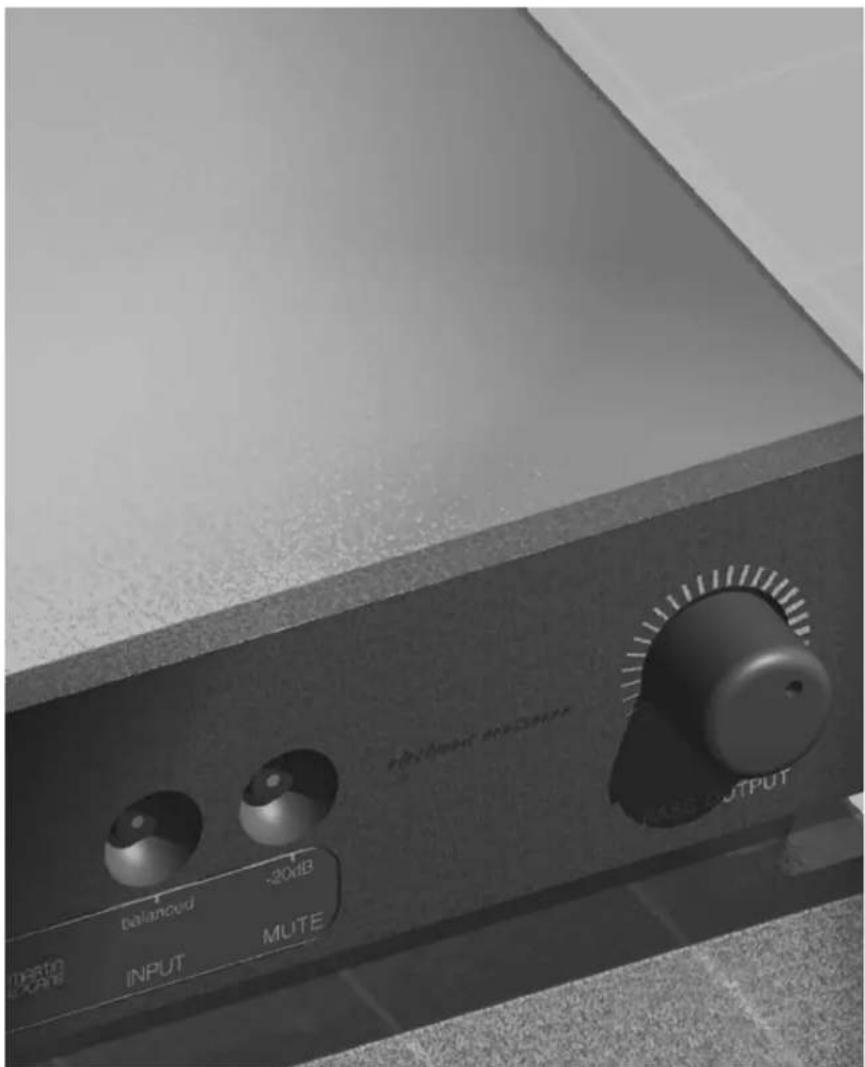
When lit, indicates that balanced inputs are in use by the Exos crossover. This button should be pressed to light the indicator LED if you are using balanced XLR connectors. Otherwise, press the button to toggle the LED off if RCA connectors are used.

Warning!
All outputs are always on. Do not have both the RCA and balanced XLR connectors hooked-up simultaneously and attempt to use this button as an A/B switch. You will have degraded performance and possibly damage your equipment. Only one type of connector should be used throughout your system.
Mute
When lit, indicates that the outputs of the EXOS are disconnected so that no signal reaches the power amplifiers.
Bass output
This knob controls the overall level of bass relative to the rest of the music. Use it to adjust the amount of bass according to your taste or for matching the output level of your bass amplifier to that of your treble amplifier. Rotate to the left for less bass, to the right for more. Use this to fine tune the bass after properly setting the phase and crossover controls.
Other Features
Push-Buttons
The EXOS uses precision push-buttons with LED indicators. A lit LED indicates that the button's function or option is on.
Battery Backup
An internal battery provides power to store your crossover settings in case of AC power interruption.

Output Connections
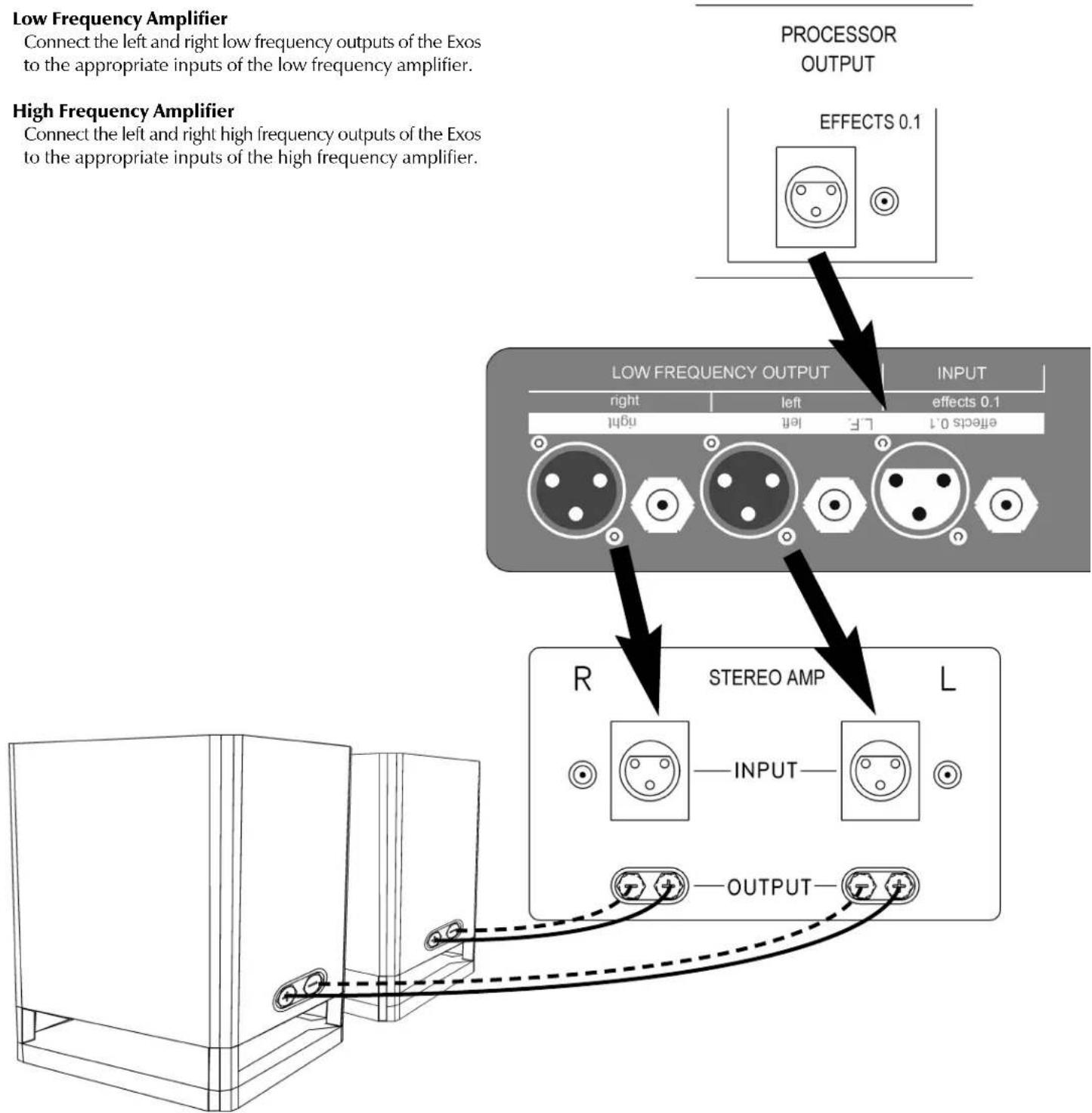
Low Frequency Amplifier
Connect the left and right low frequency outputs of the Exos to the appropriate inputs of the low frequency amplifier.
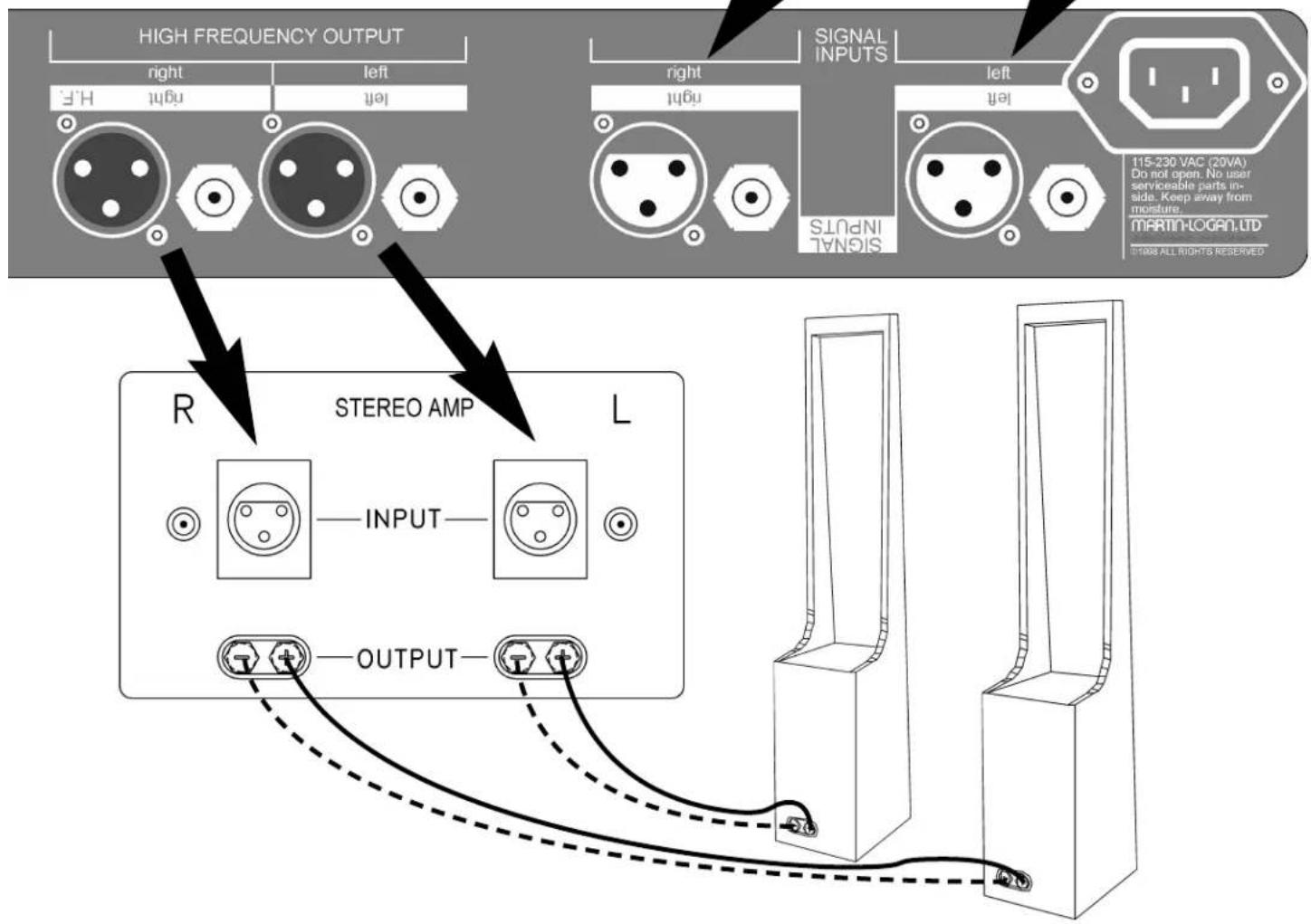
High Frequency Amplifier
Connect the left and right high frequency outputs of the Exos to the appropriate inputs of the high frequency amplifier.
flowchart
graph TD
    A["Low Frequency Amplifier"] --> B["Connect the left and right low frequency outputs of the Exos to the appropriate inputs of the low frequency amplifier."]
    C["High Frequency Amplifier"] --> D["Connect the left and right high frequency outputs of the Exos to the appropriate inputs of the high frequency amplifier."]
    E["PROCESSOR OUTPUT"] --> F["PROCESSOR OUTPUT"]
    G["LOW FREQUENCY OUTPUT"] --> H["PROCESSOR OUTPUT"]
    I["INPUT"] --> J["PROCESSOR OUTPUT"]
    K["R"] --> L["STEREO AMP"]
    M["L"] --> N["STEREO AMP"]
    O["OUTPUT"] --> P["STEREO AMP"]
    Q["effects 0.1"] --> R["PROCESSOR OUTPUT"]
    S["effects 0.1"] --> T["PROCESSOR OUTPUT"]
Input Connections
Preamplifier/Processor Connection
Connect the outputs of you preamplifier to the respective inputs of the Exos crossover. You may use either single-ended cables with RCA connectors or balanced cables via XLR connectors. Do not mix connector types or use both at once. Use only one at a time.
Power Connection
After all signal connections have been made and you have verified that the power amps are off, install the AC cord into the Exos first and then plug the other end into an outlet. The power cord should not be installed, removed or left detached while the other end is plugged into an AC outlet.
THD
At 1K: Less than 0.01%
At 20k: less than 0.01%
Input Impedance
1.0 M ohms
Output Impedance
33 Ohms
Maximum Output Voltage
20 volts peak to peak
Rear Panel Description
Inputs
Left, Right and LFE/0.1
Outputs:
High Frequency Left & Right stereo
Balanced via 3 pin XLR connector
Single ended via RCA connector
XLR Pin Configuration
Pin 1: Shield (ground)
Pin 2: Non-inverting or 0 degrees
Pin 3: Inverting or 180 degrees
Weight
14 lbs. (6.4kg)
Size
19 inches W × 15 inches D × 2.3 inches H
(48.3cm W × 38.1cm D × 5.9cm H)
Warranty and RegistrationSpecifications
Your Exos crossover is provided with an automatic Limited 90 Day Warranty coverage.
You have the option, at no additional charge, to receive a Limited 5 Year Warranty coverage. To obtain the Limited 5 Year Warranty coverage you need to complete and return the Certificate of Registration, included with your crossover, and provide a copy of your dealer receipt, to MartinLogan within 30 days of purchase.
MartinLogan may not honor warranty service claims unless we have a completed Warranty Registration card on file!
If you did not receive a Certificate of Registration with your new Exos crossover you cannot be assured of having received a new unit. If this is the case, please contact your authorized MartinLogan dealer.
Service
Should you be using your MartinLogan product in a country other than the one in which it was originally purchased, we ask that you note the following:
-
The appointed MartinLogan distributor for any given country is responsible for warranty servicing only on units distributed by or through it in that country in accordance with its applicable warranty.
-
Should a MartinLogan product require servicing in a country other than the one in which it was originally purchased, the end user may seek to have repairs performed by the nearest MartinLogan distributor, subject to that distributor's local servicing policies, but all cost of repairs (parts, labor, transportation) must be born by the owner of the MartinLogan product.
-
If, after owning your crossover for six months, you relocate to a country other than the one in which you purchased your speakers, your warranty may be transferable. Contact MartinLogan for details.
c l s e l e c t r o s t a t i c

MARTIN LOGAN
2101 Delaware Street, Lawrence, Kansas 66046, USA tel 785.749.0133 fax 785.749.5320 www.martinlogan.com
- Ex O S TM user's manual
- Phase Alignment
- Crossover Frequency
- Input
- Warning!
- Mute
- Bass output
- Other Features
- Push-Buttons
- Battery Backup
- Output Connections
- Low Frequency Amplifier
- High Frequency Amplifier
- Input Connections
- Preamplifier/Processor Connection
- Power Connection
- THD
- Input Impedance
- Output Impedance
- Maximum Output Voltage
- Rear Panel Description
- XLR Pin Configuration
- Weight
- Size
- Warranty and RegistrationSpecifications
- Service
Brand : Martin Logan
Model : Exos
Category : Loudspeaker