
ENB6631PEBB - Dishwasher Element - Free user manual and instructions
Find the device manual for free ENB6631PEBB Element in PDF.


| Product Type | Built-In Dishwasher |
| Brand | Element |
| Model | ENB6631PEBB |
| Capacity | 8 Place Settings |
| Dimensions (W x D x H) | 17.72 x 22.84 x 32.48 inches |
| Power Supply | 120V, 60Hz |
| Wash Motor Power | 100W |
| Heater Power | 700W |
| Water Pressure Range | 5.8 - 145 psi (0.04 - 1 MPa) |
| Recommended Inlet Water Temperature | 120°F - 149°F |
| Filter System | Multiple Filter System (3 mesh filters) |
| Smart Wash System | Yes (auto adjusts cycle based on soil level) |
| Number of Wash Cycles | 6 (Normal, Heavy, Energy, Glass, Quick, Rinse) |
| Options | Sanitize, Heated Dry, Hi Temp |
| Child Lock | Yes (press Delay Start + Options for 3s) |
| Delay Start | 1-24 hours |
| Control Type | Electronic push buttons with LED display |
| Baskets | Upper basket with cup shelf, lower basket with fold-down tines, cutlery basket (3 modules) |
| Rinse Aid Dispenser | Yes, adjustable |
| Detergent Dispenser | Yes, with release catch |
| Spray Arms | Upper (middle) and lower spray arms |
| Heating Element | Yes, for drying and sanitize |
| Warranty | 1 year (extends to 2 years with product registration within 90 days) |
| Installation Type | Built-in, under counter |
| User Manual | Included, English, 43 pages |
Frequently Asked Questions - ENB6631PEBB Element
User questions about ENB6631PEBB Element
0 question about this device. Answer the ones you know or ask your own.
Ask a new question about this device
Download the instructions for your Dishwasher in PDF format for free! Find your manual ENB6631PEBB - Element and take your electronic device back in hand. On this page are published all the documents necessary for the use of your device. ENB6631PEBB by Element.
USER MANUAL ENB6631PEBB Element
18 inch Built-In Dishwasher

natural_image
Technical line drawing of a mechanical device with rollers and housing (no text or symbols)ENB6631PEBS
ENB6631PEBW
ENB6631PEBB
Table of Contents
Important Safety Instructions ....1
Features of Your New Dishwasher .....2-4
Operating Instructions 5-7...
Preparing and Loading Dishes 8-12...
User Maintenance 13-14
Troubleshooting 15-17..
IMPORTANT SAFETY INSTRUCTION
WARNING
For your safety, please follow the information in this manual to minimize the risk of fire, explosion, electric shock, and to help prevent property damage or personal injury.
Proper installation
Please install your dishwasher properly, follow the installation guide.
Water supply inlet temperature should be between 120°F and 149°F.
■ Dispose of the discarded appliance and packing material properly.
The dishwasher must be properly grounded, or it can result in a risk of electric shock. PERMANENTLY CONNECTED is allowed.
If there is any damage to the dishwasher, p lease contact to your dealer and do not attempt to repair or replace any part by yourself.
Basic precaution before use
- Read all instructions before using the dishwasher.
■ The manual does not cover every possible condition and situation that may occur.
■ Use the dishwasher only for intended function as described in this manual. - When loading items to be washed:
- Load sharp items and knives so that they are not likely to damage the door seal and tub.
- Load sharp items and knives with the handles up to reduce the risk of injury.
Do not wash plastic items unless they are marked dishwasher safe, if not marked, check with manufacture for recommendation, items that are not dishwasher safe may melt and create a potential fire hazard.
If the dishwasher drains into a garbage disposal, make sure disposal is completely empty before running dishwasher.
■ Do not tamper with controls. - Do not operate your dishwasher unless all enclosure panels are in the proper place.
-
Do not touch the heating element during or immediately after use, especially if the sanitize option has been selected.
■ To reduce the risk of injury, do not allow children to play in or on a dishwasher. -
Do not let children abuse, sit, or stand on door or racks of the dishwasher.
■ Under certain conditions, hydrogen gas may be produced in a hot water system that has not been used for two weeks or more. HYDROGN GAS IS EXPLOSIVE. If the hot water system has not been used for such a period, before using dishwasher, turn on all hot water faucets and let water flow from each for several minutes. This will release any accumulated hydrogen gas. Hydrogen gas is flammable. Do not smoke or use an open flame during this time. - Do not store or use combustible materials, gasoline or other flammable vapors and liquids in the vicinity of this or any other appliance.
■ Use only detergents or rinse agents recommended for use in a dishwasher and keep them out of the reach of children. - Keep young children and infants away from dishwasher when it is operating.
Do not use the dishwasher if it has a damaged power line or plug, and do not plug the dishwasher into a damaged outlet. Failure to observe these instructions may result in electrical shock.
■ Remove the door to the washing compartment when removing an old dishwasher from service or discarding it.
FEATURES OF YOUR NEW DISHWASHER
Specification
| Capacity | 8 place settings |
| Dimension | 17 6 . x 22.6 x 32.4 inches (W x D x H) |
| Power Supply | 120volts, 60Hz |
| Rated Power Usage | Wash motor 100W Heater 700W |
| Water Feed Pressure | 5.8 ~ 145 psi (0.04 ~ 1MPa) |
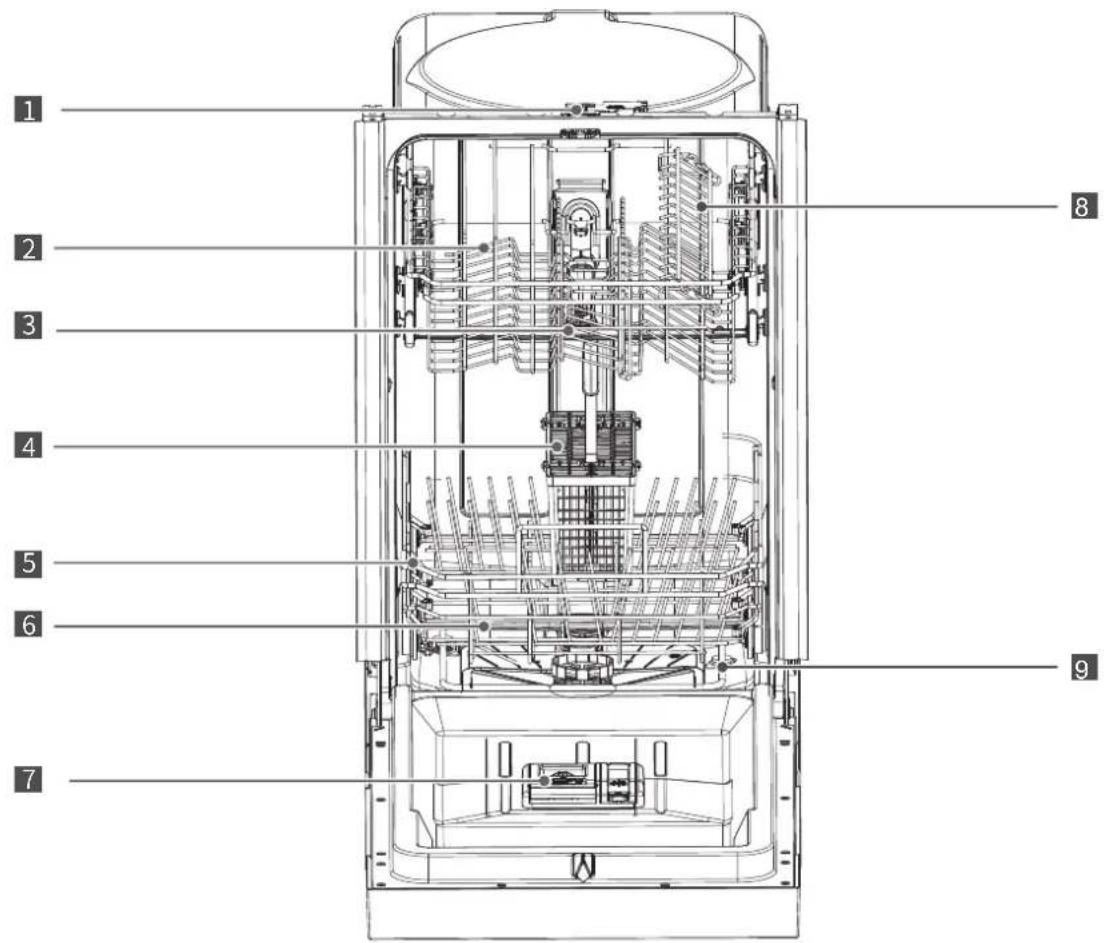
1 Lock
2 Upper Basket
3 Upper Spray Arm
4 Cutlery Basket
5 Lower Basket
6 Lower Spray Arm
7 Rinse Aid Dispenser
8 Cup Shelf
9 Heating Element
FEATURES OF YOUR NEW DISHWASHER
Features
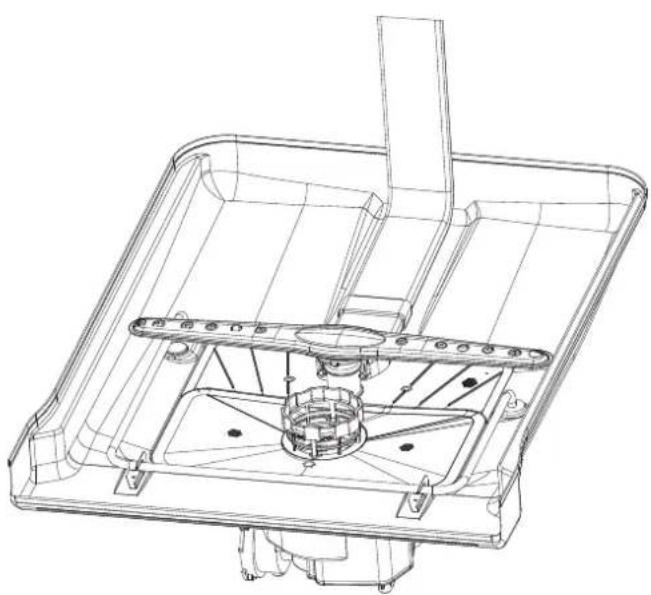
Filter System
Your dishwasher has a multiple filter system. In the system there are three mesh filters. It can separate soiled water and clean water in different chambers.
The multiple filter system helps your dishwasher to get better performance with less water and less energy.
Smart Wash System
Your dishwasher has a Smart Wash System. When a partial load of lightly soiled dishes is placed in the unit, a wash cycle similar to a short wash will automatically be performed. When a full load of heavily soiled dishes is placed in the unit, a heavy wash cycle will automatically be performed. It can determine the type of cycle required to clean the dishes and will clean more efficiently every time.
natural_image
Technical line drawing of a mechanical assembly with no visible text or symbols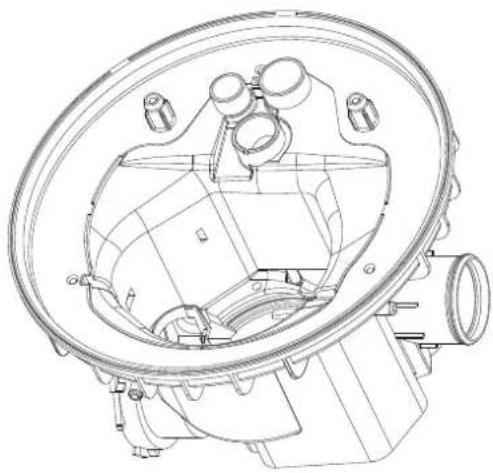
natural_image
Technical line drawing of a mechanical component with no visible text or symbols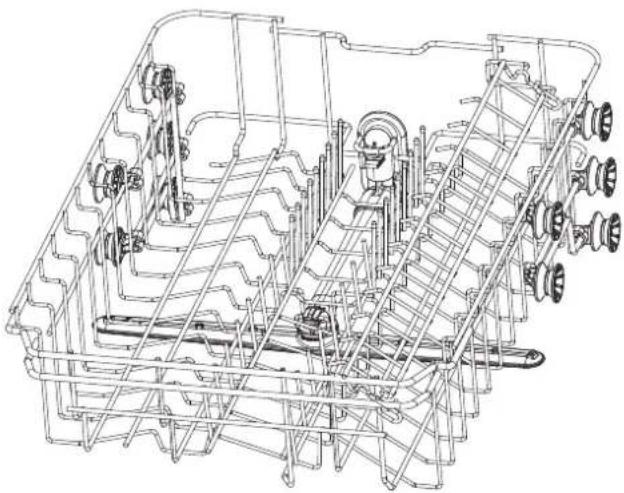
natural_image
Technical line drawing of a mechanical assembly with gears and shafts (no text or symbols)FEATURES OF YOUR NEW DISHWASHER
How Your Dishwasher Cleans
Your dishwasher cleans by spraying a mixture of hot water and detergent through the spray arms against soiled surfaces.
The dishwasher fills with water covering the filter area. Water is then pumped through the multiple filter and spray arms. Separated soil particles go down the drain as the water is pumped out and replaced with clean water.
The number of water fills will vary with the cycle being used.
Getting Started
- Load the dishwasher (See Dish Preparation and Loading sections).
- Add detergent (See Filling the detergent dispenser).
- Add rinse aid (See Filling the rinse aid dispenser).
- Close door.
- Select desired CYCLE (See Cycle Chart).
- Select desired OPTIONS (See Control Panel). The indicator light above the pad will glow when selected.
- Run the hot water faucet nearest the dishwasher until the water is hot, then turn it off.
- To start, press Start/Cancel (See Control Panel).
Note:
Your dishwasher has the controls mounted in the front of the door. The door should be closed first if you want to operate the machine.
Wash Cycle Selections
Cycle times are approximate and will vary with the options selected. Hot water is necessary to activate the detergent and melt fatty food soils. An automatic sensor will check the incoming water temperature. If it is not at the appropriate temperature the timer will delay the cycle to allow automatic water heating during the main wash. When the HI-TEMP wash is selected an even higher temperature will be assured to handle heavier soil loads.
OPERATING INSTRUCTIONS
flowchart
graph TD
    A["Power Input"] --> B["1"]
    B --> C["Cycles"]
    C --> D["2"]
    C --> E["7"]
    D --> F["Normal"]
    D --> G["Heavy"]
    D --> H["Energy"]
    E --> I["Glass"]
    E --> J["Quick"]
    E --> K["Rinse"]
    L["3:30"] --> M["Delay Start"]
    M --> N["Options"]
    N --> O["Start/Cancel"]
    P["8:30"] --> Q["Delay Start"]
    Q --> R["Options"]
    S["Sanitize"] --> T["High Temp."]
    U["Heated Dry"] --> V["High Temp."]
    W["Sanitize"] --> X["High Temp."]
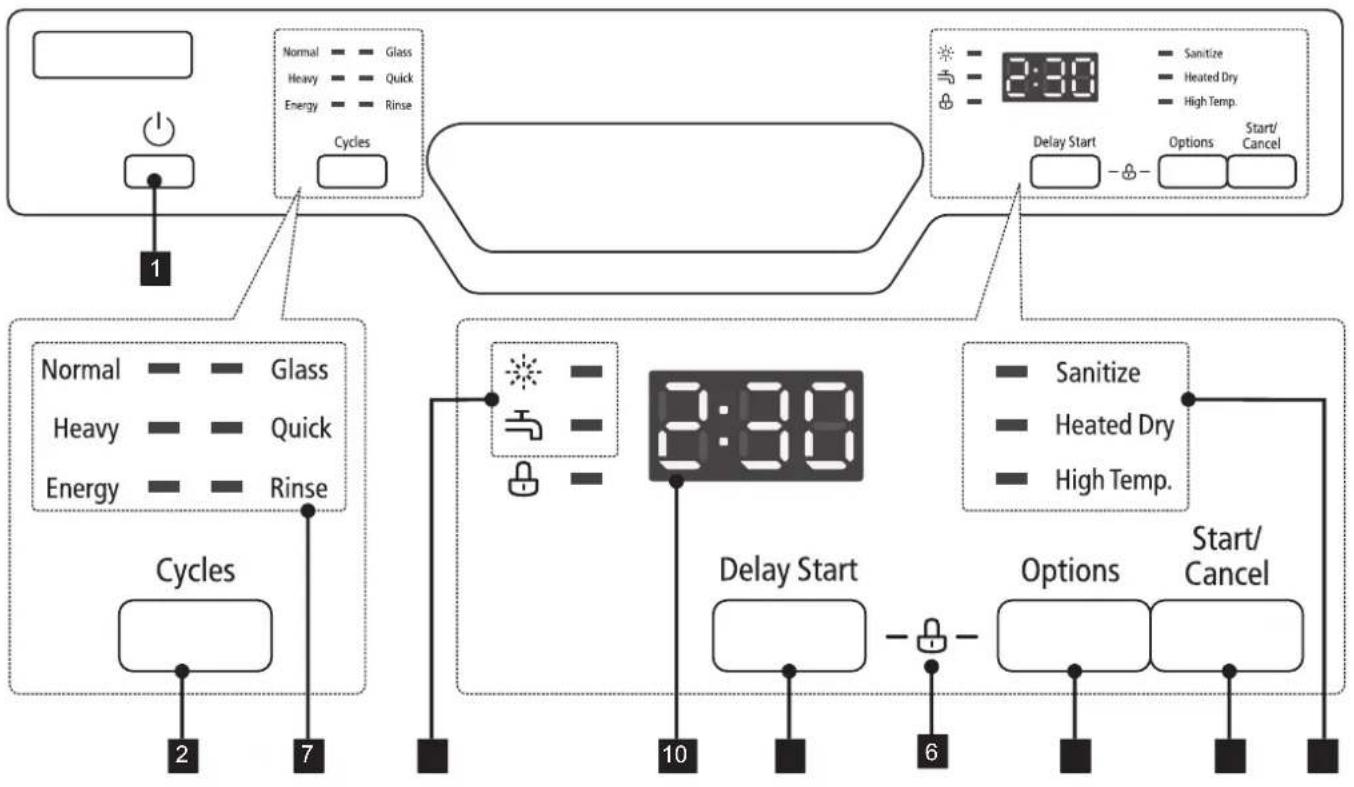
1. Power button
Switch on / off the power by pushing
2.Cycles button
To select the program by pushing.
3.Delay Start button
To set the delay start time, showing in the display window as H01-H24.
4. Options button
To select the fuction after setting the program.
5.Start/Cancel button
Start the washing program or cancel the washing program when the machine is working.
6. Child lock
When the appliance is running, push both "Delay Start" and "Options" button 3s to lock all buttons, as the same method to cancel locked state.
7.Wash Cycle Selections
Normal
This is standard program, this cycle is for regularly soiled dinner dishes or silverware.
Heavy
This cycle is for hard-to-clean, heavily soiled dishes, pots, pans, and dishes.
Energy
It is suitable to clean normally soiled tableware and it is the most efficient program in terms of it's combined energy and water consumption for that type of tableware.
Glass
For lightly soiled loads, such as glasses, crystal and fine china.
Quick
A shorter wash for lightly soiled loads that do not need drying.
Rinse
Use for rinsing dishes glasses and silverware that will not be wash right away.
OPERATING INSTRUCTIONS
8. Warning indications
Rinse detergent deficient
When the indication lights on, please refill the detergent from the hole located on the dispenser.
Faucet warning
When the indication lights on, you should open the water tap, no water flow into the sump.
9. Options
Sanitize
When the \$ahitize function is selected, the temperature of water will be maintained at 156.2°F (69°C) max. The max temperature may not be reached if the incoming water temperature is not correct. Certified residential dishwashers are not intended for licensed food establishments.
WARNINGitize option is available with "Nomal" "Heavy" and "Energy" cycles.
Heated Dry
When the "Heated Dry" function is selected, the heater will work during the drying process.
Hi Temp
When the HI Temp function is selected, the temperature of the water will be maintained at 140^ F ( 60^ C) max.
10.Display window
This displays the remaining hours and minutes of the running cycle, delay hours and error codes etc.
If the Delay Start option is selected, the number of delay start hours shows in the status window.
2:25-0:00
After the machine starts operation, the remaining time of the selected cycle will be shown in the window.
In certain situations, which are critical to the machines function and safe operation, the control will shut down and indicate an errorcode (See Error Codes on page 18).
If Error codes are displayed, contact the dealer or a serviceman. They will be able to provide assistance in troubleshooting the problem and or locate authorized service technician if needed.
NOTE
The remaining time could suddenly increase or drop several minutes. This means the Smart Sensor has checked the soil level and determined if additional water fills are needed or if water fills can be deleted.
Cycle Chart
| Program | Description of Cycle | Water (L/G) | Cycle time (min) |
| Heavy | Pre Wash | 19. 7L/5. 2G | 155 |
| Main Wash(140°F) | |||
| Rinse(149°F) | |||
| Rinse(with Sani 156.2°F) | |||
| Drying | |||
| NORMAL | Pre Wash | 9.5~18.5L/2.5~4.9G | 105~135 |
| Main Wash(122-131°F) | |||
| Rinse(136.4-140°F) | |||
| Rinse(with Sani156.2°F) | |||
| Drying | |||
| Energy | Pre Wash | 15. 5L/4.1G | 105 |
| Main Wash(113-122°F) | |||
| Rinse(122-131°F) | |||
| Rinse(with Sani 156.2°F) | |||
| Drying | |||
| Glass | Pre Wash | 15.5L/4.1G | 95 |
| Main Wash(118.4-122°F) | |||
| Rinse (122-131°F) | |||
| Drying | |||
| Quick | Pre Wash | 12.5L/3.3G | 60 |
| Main Wash(122°F) | |||
| Rinse(131°F) | |||
| Rinse | Pre Wash | 6.7L/1.8G | 20 |
| Main Wash |
PREPARING AND LOADING DISHES
Dish Preparation
Scrape away large pieces of food, bones, pits, toothpicks, etc. The continuously filtered wash system will remove the remaining food particles. Burned-on food should be loosened before loading. Empty liquids from glasses and cups. Food such as mustard, mayonnaise, vinegar, lemon juice and tomato based products may cause discoloration of stainless steel and plastics if allowed to sit for a long period of time. Unless the dishwasher is to be operated at once it is best to rinse off these food soils. If the dishwasher drains into a food disposal, be sure the disposal is completely empty before starting dishwasher.
Loading the Upper Basket
The upper basket is designed for cups, glasses, small plates, bowls and plastic items marked dishwasher safe etc.
For best results, place the bowls, cups, glasses, sauce pans with soiled surface facing down or toward the center. Tilt slightly for better drainage.
Loading the Bottom Basket
The bottom basket designed to load plates, soup bowls, plates, saucers and cookware. The adjustable space will allow you to load items with a maximum height of 11 inches.
The fold-down tines in the bottom basket make it easy to load those extra large and hard-to-fit items. The tines may be left up for normal use or folded down for more flexible loading. Fold down for more space to load large pots or pans.

natural_image
Illustration of hands pouring liquid from a container into a cylindrical tank (no text or symbols)
Make sure the loaded dishes do not interfere with the rotation of the middle spray arm, which is located at the bottom of the upper basket. (Check this by rotating the middle spray arm by hand.)

Large items should be placed along the edge so they do not interfere with the middle spray arm rotation, and make sure they not prevent the detergent dispenser from opening. Large items should be turned so that the inside faces downward, and make sure these items do not interfere with the lower spray arm rotation.
PREPARING AND LOADING DISHES
Loading the Lower Basket
The lower basket has been especially designed for dinner dishes, soup bowls, plates, pots, lids, and casserole dishes.
Load large items such as pans and pots into the dishwasher so their open sides face downwards. We recommend loading cups, stemware, and small plates into the upper basket.
See the recommended loading patterns below.

natural_image
Top-down schematic of a mechanical or electrical component layout with circular components and structural beams (no text or symbols)8 place setting
Loading the Upper Basket
The upper basket has been designed for small plates, mugs, glasses, and plastic items marked "dishwasher safe". Load your plates into the dishwasher in two half rows, so that the front of each plate faces the back of the plate in front of it, and the open sides of the plates at the center of the dishwasher face each other. See the illustrations below.
Make sure the loaded dishes do not interfere with the rotation of the nozzle which is located at the bottom of the upper basket. (Check this by rotating the nozzle by hand.)
When loading dishes, pull the upper basket out sufficiently so you can load it without striking the counter

natural_image
Technical line drawing of a mechanical or electrical enclosure with internal components and structural ribs (no text or symbols)8 place setting
PREPARING AND LOADING DISHES
Loading the Silverware Basket
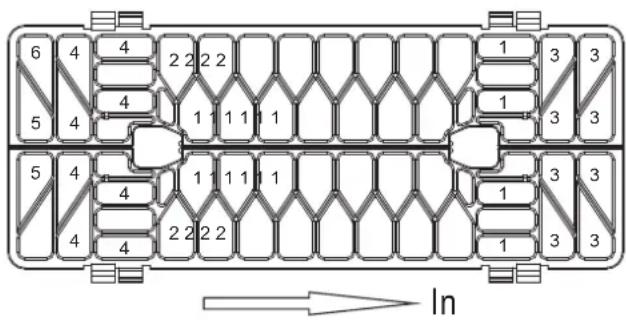
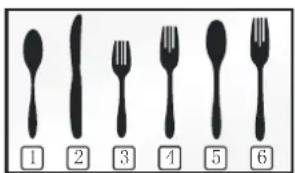
The silverware basket can be divided into three separate modules that can be used in both upper and lower racks
1.Spoons
2.Knives
3.Salad forks
4.Forks
5. Large spoons
6. Large forks
WARNING
- Do not let item extend though bottom.
- Be sure nothing protrudes though bottom of the basket or rack to block the lower spray arm
Adding A Dish
To add or remove items after wash cycle starts:
- Open door slightly and wait a few seconds until wash action stops before completely opening.
2.Add the item. - Close the door firmly to latch within 4 secs, then cycle will automatically resume.

CAUTION
TO AVOID BURN INJURY: Slightly open door and wait until spray arms and wash action stop. Hot water may splash out of dishwasher. Failure to do so may result in injury.
Filling the Rinse Aid Dispenser
Rinse aid greatly improves drying and reduces water spots and filming. Without rinse aid your dishes and dishwasher interior will have excessive moisture.
The Heated Dry option will not perform as well without rinse aid. The rinse aid dispenser, located next to the detergent cup, automatically releases a measured amount of rinse aid during the last rinse.
If the rinse aid is low, the Rinse Aid light is illuminated at the beginning and end of the cycle indicating that it is time to refill.
PREPARING AND LOADING DISHES
Filling the Rinse Aid Dispenser

Your dishwasher is designed to use a liquid rinse aid.
The use of rinse greatly improves drying performance after the final rinse. Do not use a solid or bar-type rinse aid. Under normal conditions, the rinse aid will last approximately one month. It is best to keep it full, but do not over fill.
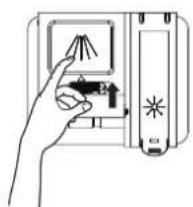
Filling the detergent dispenser
- Open the detergent dispenser cap by pushing the detergent dispenser release catch.

The fl ap is always open at the end of a dishwashing cycle.

natural_image
Hand inserting a card into a device with a star symbol (no text or labels)
- Add the recommended amount of detergent to the main wash detergent compartment.

natural_image
Illustration of a hand cleaning a cloth from a washing machine (no text or symbols)- Close the flap and then press it down.
natural_image
Hand inserting a device into a device panel (no text or symbols visible)PREPARING AND LOADING DISHES
Filling the rinse aid reservoir
Your dishwasher has been designed to use liquid rinse aid only.
Using a powdered rinse aid will clog the reservoir opening and cause the dishwasher to malfunction.
Rinse aid improves the drying performance of the dishwasher.

Do not add regular detergent to the rinse aid reservoir.
- Remove the rinse aid reservoir cap by rotating it counterclockwise.
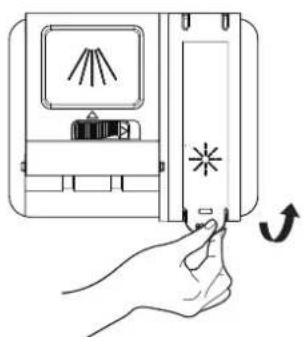
natural_image
Hand holding a device with a starburst symbol and a curved arrow indicating rotation (no text or symbols present)- Fill the rinse aid reservoir with rinse aid.

Use the viewing port when fil ling the rinse aid reservoir.

Do not fill the reservoir above the full level indicator. Excess rinse aid can over flow during the wash cycle.

- Close the rinse aid reservoir cap by rotating it clockwise.
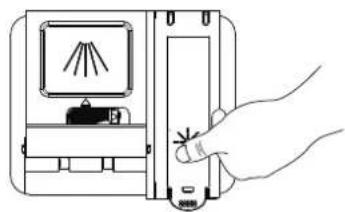
natural_image
Line drawing of a hand pressing a button on a device (no text or symbols)USER MAINTENANCE
Keeping your dishwasher clean improves its performance, reduces unnecessary repairs, and lengthens its life.
CLEANING THE EXTERIOR
It's best to clean spills on the outside of your dishwasher as they occur. Use a soft, damp cloth on the control panel to gently wipe away spills and dust. Do not use benzene, wax, thinner, chlorine bleach, or alcohol. These materials may discolor the inner walls and cause stains. Do not clean the dishwasher by sprinkling water over it and avoid letting water come into contact with any of the electrical parts.

If your dishwasher has a stainless steel door panel, you can clean it with a stainless steel cleaner for Home Appliances or a similar product using a clean, soft cloth.
CLEANING THE INTERIOR
Clean the interior of your dishwasher periodically to remove any dirt or food particles. Wipe the inside of the dishwasher and the inner part of the door with a wet dishcloth. We recommend fi lling the detergent dispenser with dish detergent, and then running the dishwasher empty periodically using either the Normal or Express 60 cycle with the sanitize option. This will keep your dishwasher clean.
If white spots and odor are still present in your dishwasher, run the Normal cycle with the dishwasher empty and without detergent until it fl ushes. Then, interrupt the cycle and put an 8 ounce cup of white vinegar into the lower basket. Close the dishwasher and let the cycle fi nish.

Do not remove the tub front seal (the long rubber seal enclosing the opening of the dishwasher).

Do not touch the HEATING ELEMENT during or immediately after use.
- Turn off the dishwasher.
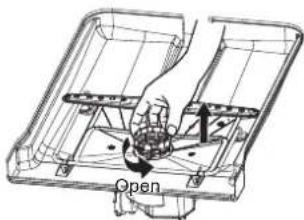
- Rotate the fi Iter insert counterclockwise to unfasten and then detach the fi Iter insert.
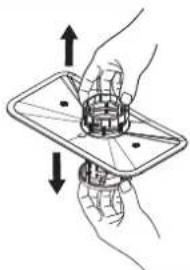
natural_image
Illustration of two hands holding a device with arrows indicating upward and downward motion (no text or symbols)- Remove the fi ne fi lter (fl at, rectangular).
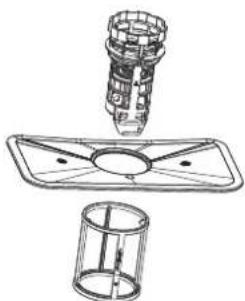
natural_image
Technical line drawing of a mechanical assembly with a cylindrical component and a cylindrical housing (no text or symbols)USER MAINTENANCE
- Remove any dirt or other remains from the fil ters, and then rinse them under running water.
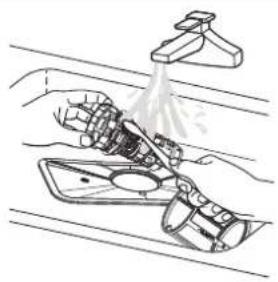
natural_image
Diagram of a mechanical assembly with a lever and valve (no text or labels)- Reassemble the fil Iters in the reverse order of the disassembly, replace the fil Iter insert, and rotate clockwise to the close arrow.

If the fil ter insert is not closed properly, its performance will be decreased.
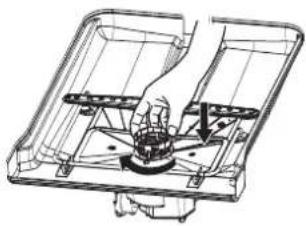
natural_image
Technical line drawing of a mechanical assembly with a hand operating a valve (no text or symbols present)CLEANING THE NOZZLES
If your dishwasher does not seem to be cleaning adequately or the nozzles seem clogged, you can clean each of the nozzles. When removing the nozzles, take care as they may break.
Lower nozzle
- Check whether the nozzle holes are clogged by food particles.
- If cleaning is needed, remove the nozzle by pulling it upwards.
- Clean the nozzle, and then push it back into place.
- Check whether the nozzle is engaged correctly by rotating it by hand.
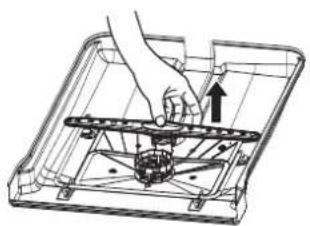
natural_image
Technical line drawing of a mechanical assembly with a hand operating a component (no text or symbols)Troubleshooting
| Problem | Possible cause | Solution |
| Dishwasher won't start | Dishwasher won't start | Shut the door completely make sure it is latched |
| Power supply or power line is not connected | Check and connect the power supply | |
| Delay Start option has been selected | Refer to Delay Start section in this manual to reset | |
| Child Lock activated (selected models) | Deactivate the child lock, refer to child lock section in this manual | |
| Dishwasher beeps at the end of the cycle | It indicates the wash cycle finished, the dishwasher will beep | |
| Rinse Aid light on | Rinse detergent deficient | Add rinse aid |
| Dishwasher operates too long | The dishwasher is connected to cold water | Check the dishwasher, make sure it is properly connected to the hot water supply |
| The cycle time will vary due to the soil | When heavy soil is detected, the auto, normal, pots&pan cycle will automatically increase the cycle time | |
| The sanitize option is selected | When sanitize option is selected, the cycle time will be increase to meet the sanitized temperature request | |
| Dishes are not clean enough | Water pressure is temporarily low | Use you dishwasher when the water pressure is normal |
| The inlet water temperature is low | Make sure the dishwasher is connected to the hot water supplyTry not use your dishwasher when hot water is being used elsewhere in the house | |
| Dishes are loaded too close togetherImproper use of detergent | Load the dishes again as the manualAdd detergent depending on the water hardness and the cycle you chose. Use fresh detergent | |
| The selected cycle is not suitable for food soil condition | Choose anther cycle for longer washing time | |
| Spay arms are blocked by some items | Make sure the spay arm can rotated freely | |
| Dishes not drying enough | Detergent dispenser is empty | Fill rinse aid dispenser or increase the amount of rinse aid. |
| Improper loading of dishes | Load the dishes again as the manual instructs. | |
| The cycle you chose did not included the drying | Choose the proper cycle with drying | |
| Spots and filming on dishes | Water hardness is too high | For extremely hard water install a water softener |
| Improper loading of dishes | Load the dishes again as the manual indicates | |
| Old rinse aid is used | Use fresh rinse aid | |
| Rinse dispenser empty | Add rinse aid to the dispenser | |
| Etching | Using too much detergent Use less detergent if you have soft water | |
| The inlet water temperature exceeds 158°F | Lower the inlet water temperature | |
Troubleshooting
| Problem Possible cause | Solution | |
| Detergent left in dispenser cup | Detergent may be too old | Use fresh detergent |
| Spray arm is blocked | Load the dishes, making sure the spray arms are not blocked | |
| Detergent dispenser will not shut | Improper operation of the detergent cover | Add the detergent and rinse aid as indicated by the manual |
| Water remains in the dishwasher | Previous cycle has not finished or has been interrupted | Select the proper cycle explained in the manual |
| Dishwasher does not drain properly | Drain is clogged | Check the air gap if you have one. Make su re the disposal is empty if the dishwasher is connected to the disposal. |
| Drain hose is kinked | Make sure the drain hose is properly connected to the sink | |
| Suds in the tub | Improper detergent is used | Make sure to use only the automatic dishwasher detergent |
| Dishwasher leaks | Excessive suds caused by using the improper detergent | Make sure to use only the proper dishwasher detergent |
| Dishwasher is not level Level the dishwasher | ||
| Black or gray marks on dishes | Aluminum utensils have rubbed against dishes | Rearrange the dishesMake sure the inlet water is no less than 120H |
| Stained tub interior | Coffee and tea soil | Using an approved spot cleaner to remove the soil |
| Reddish stain | Some tomato-based foods will cause this, use of the rinse only cycle right after loading this will decrease the staining | |
| Noises | Detergent cup opening\ Drain pump sound | This is normal |
| A hard object has entered the wash module.When the object is ground up, the sound should stop | If the noise persists after a complete cycle, call for service. | |
| Dishwasher won't fill | Water valve is turn off | Check if the water valve is turn on |
| Door latch may not be properly seated | Make sure the door is closed |
Error Codes
When some malfunctions come on, the appliance will display error codes to warn you:
| Codes | Meanings | Possible Causes |
| E1 | Longer inlet time. | Faucets is not opened, or water intake is restricted, or water pressure is too low. |
| E4 | Overflow. | Some element of dishwasher leaks . |
| E3 | Not reaching required temperature. | Malfunction of heating element. |

WARNING
If overflow occurs, turn off the main water supply before calling a service.
If there is water in the base pan because of an overfill or small leak, the water should be removed before restarting the dishwasher.
Element Appliance Limited Warranty
(the "Products" or "Product" when referencing a singular product herein)
This Product (including any accessories included in the original packaging) as supplied and distributed in new condition, is warranted by Element Appliance Company, LLC ("Element") to the original customer who purchases the Product from an authorized Element retailer (the "Original Customer" or "you") against defects in material and workmanship under proper use, maintenance, and care according to the owner's manual, warnings, and instructions accompanying the Product ("Warranty") as follows:
* PLEASE NOTE – Proof of purchase evidencing the date of purchase by the Original Purchaser from an authorized Element retailer (“Valid Proof of Purchase”) is required for all Warranty service. The express Warranty set forth herein is subject to all terms and conditions set forth below.
1. WARRANTY SERVICE:
A. ONE-YEAR WARRANTY: Except as provided in subpart 1.B below, for a period of one (1) year from the date of purchase by the Original Customer (the "Warranty Period"), if the parts or components covered by this Warranty are determined by Element or Element's authorized service provider to be defective in material or workmanship, Element will, at its sole and absolute discretion and option: (i) repair the defective part or component at no charge to the Original Customer, (ii) replace the defective Product with a new Product of similar or better quality, at no charge to the Original Customer, or (iii) refund the documented purchase price paid by the Original Customer (excluding tax) to the Original Customer upon return of the defective Product as directed by Element. After the Warranty Period expires, the Original Customer must pay for all parts, components, shipping and handling, labor, and replacement costs associated with the Product or any part or component thereof, regardless of any defects in the Product or any part or component thereof.
B. LIMITED EXTENDED WARRANTY THROUGH PRODUCT REGISTRATION: If and only if the Original Customer registers the Product at www.elementetelectronics.com within ninety (90) days of the date of purchase by the Original Customer, then the Warranty Period discussed in subpart 1.A. above shall be extended an additional one (1) year to a new Warranty Period equaling two (2) years from the date of purchase by the Original Customer. If the Product is not registered as provided for in this subpart 1.B, then the standard one-year Warranty Period set forth in subpart 1.A shall apply.
C. TIMING AND PROCEDURE: Before Warranty service can commence, the Original Customer must contact either (i) the retailer from whom the Original Customer purchased the Product, or (ii) Element directly, in either case for problem determination and service procedures. Valid Proof of Purchase evidencing that the Product is within the Warranty Period MUST be presented by Original Customer in order to obtain the requested Warranty service. Please have your model and serial number available, along with your date of purchase of the Product. To remain eligible for Warranty service, Original Customer may not return the Product or any part or component thereof to the retailer or Element without Element's prior written consent.
2. EXCLUSIONS AND LIMITATIONS TO WARRANTY SERVICE
The Warranty covers manufacturing defects in materials and workmanship of the Product encountered in the normal, non-commercial use of the Product, and does not cover (a) damages or malfunctions resulting from improper or unreasonable use or maintenance, abuse, negligence, failure to follow instructions contained in any written materials that accompany the Product, deterioration by reason of excess moisture, corrosive atmosphere, lightning, power surges, connections to improper voltage supply, unauthorized alteration, or other external causes such as extremes in temperature or humidity, modifications, scratches or discoloration; (b) any damage caused by using non-authorized parts or service facilities for repair of Products (however, for avoidance of doubt, using non-authorized parts or service facilities will not, in and of itself, void the Warranty); (c) transportation, shipping, delivery, pickup, insurance, installation, or set-up costs; (d) ordinary wear and tear, cosmetic damage, or damage due to acts of nature, including but not limited to, water, floods, wind, storm, tornado, earthquake, or fire, or due to damage caused by extraordinary impact events, such as dropping, crushing, demolition or other extraordinary damage; (e) commercial use of the Product, or use of the Product for anything other than single-family household or residential use; or (f) modification of the Product or any part of the Product.
This Warranty is made to the Original Customer only and does not cover Products sold AS IS or WITH ALL FAULTS. The Warranty is invalid if the factory-applied serial number has been altered or removed from the Product. This Warranty is valid only in the United States, and only applies to Product if it was purchased and serviced in the United States. The addition of equipment or features to the Product that are not manufactured or recommended by Element could affect the intended function of the Product, and therefore may void the Warranty. Furthermore, the exposure of the Product to chemicals, heat, cold, humidity, or other elements can affect the Product components, and therefore, the Warranty does not cover discoloration, fading, cosmetic changes, rust, or any damages or failure related to any such items. The Warranty is contingent upon the proper use, maintenance, and care of the Product. The Warranty may be void if the Product has been used in a manner contradictory to, or in violation of, the terms of the user's manual, warnings, or instructions accompanying the Product.
THIS WARRANTY IS MADE IN LIEU OF AND SUPERSEDES ALL OTHER WARRANTIES OR CONDITIONS OF MERCHANTABILITY OR FITNESS FOR A PARTICULAR PURPOSE OR GENERAL USE, WHETHER EXPRESS, IMPLIED, COLLATERAL, STATUTORY, OR PROVIDED BY COMMON LAW, THE UNIFORM COMMERCIAL CODE, OR OTHERWISE. ELEMENT FURTHER DISCLAIMS ALL WARRANTIES AFTER THE END OF THE WARRANTY TERM DEFINED ABOVE. NO OTHER EXPRESS WARRANTY OR GUARANTY GIVEN BY ANY OTHER PERSON, FIRM, OR ENTITY WITH RESPECT TO THE PRODUCT SHALL BE BINDING ON ELEMENT. REPAIR, REPLACEMENT, OR REFUND OF THE ORIGINAL PURCHASE PRICE, AT ELEMENT'S SOLE DISCRETION, ARE THE EXCLUSIVE REMEDIES OF THE CUSTOMER.
ELEMENT SHALL NOT BE LIABLE FOR ANY INCIDENTAL OR CONSEQUENTIAL DAMAGES CAUSED BY THE USE, MISUSE, OR INABILITY TO USE THE PRODUCT. THESE INCLUDE, BUT ARE NOT LIMITED TO, ANY DAMAGES IN THE FORM OF LOST PROFITS, LOSS OF USE, LEGAL FEES, ECONOMIC LOSS, PERSONAL INJURIES, OR ANY OTHER DAMAGES CAUSED BY CIRCUMSTANCES BEYOND THE CONTROL OF ELEMENT. NOTWITHSTANDING THE FOREGOING, ELEMENT'S AGGREGATE LIABILITY TO ANY CUSTOMER SHALL NOT EXCEED THE ORIGINAL PURCHASE PRICE OF THE PRODUCT. THIS WARRANTY SHALL NOT EXTEND TO ANYONE OTHER THAN THE ORIGINAL CUSTOMER WHO PURCHASED THE PRODUCT, AND IS NOT
TRANSFERRABLE. NO PERSON IS AUTHORIZED TO ALTER, EXTEND, OR WAIVE THIS WARRANTY OR ANY OF ITS TERMS OR CONDITIONS.
Some states do not allow the exclusion or limitation of incidental or consequential damages, or allow limitations on warranties, so the above limitations or exclusions may not apply to you. This Warranty gives you specific rights, and you may have other rights, which vary from state to state. The exclusions and limitations to the Warranty apply to the maximum extent permitted by law and unless restricted or prohibited by law. Where any term of this Warranty is prohibited by applicable law, it shall be null and void, but the remainder of this Warranty shall remain in effect.
PLEASE DIRECT ALL CORRESPONDENCE TO:
Element Appliance Company, LLC customerservice@elementelectronics.com (888) 842-3577 https://elementelectronics.com
Element, the Element Logo, and Bring it home are trademarks of Element Brand Holding, LLC. All other trademarks are the property of their respective owner, who has not sponsored, endorsed, or approved this product. ©2024 Element Appliance Company, LLC. All rights reserved.
Distributed by Element Appliance Company, LLCAugusta, GA 30909
For service, support and warranty information: Call 888.842.3577, email us at customerservice@elementelectronics.com or visit www.elementetelectronics.com
SAFETY INSTRUCTIONS
Throughout this manual, you'll see Warning and Caution notes. These warnings, cautions, and the important safety instructions that follow do not cover all possible conditions and situations that may occur. It's your responsibility to use common sense, caution, and care when installing, maintaining, and operating the dishwasher.
Important Safety Instructions
What the icons and signs in this installation guide mean:
| WARNING | Hazards or unsafe practices that may result in severe personal injury or death. |
| CAUTION | Hazards or unsafe practices that may result in personal injury or property damage. |
| CAUTION | To reduce the risk of fire, explosion, electric shock, or personal injury when using the dishwasher, follow these basic safety precautions: |
| Follow directions explicitly. | |
| Make sure the machine is grounded to prevent electric shock. | |
| Call the service center for help. | |
These warning signs are here to prevent injury to you and others.
Please follow them explicitly.
After reading this section, keep it in a safe place for future reference.

Read all instructions before using the appliance.
Install and store the dishwasher inside, away from exposure to weather.

Do not install the dishwasher near electrical components. Keep the dishwasher away from open flames.
Do not install the dishwasher on a carpet as this is a fire hazard.
Do not install the dishwasher in a location where the water may freeze (where the temperature falls below 32^ F ( 0^ C). Frozen water in the hoses or pipes may damage the dishwasher.
As with all equipment using electricity, water and moving parts, potential hazards exist. To safely operate this appliance, become familiar with its operation and exercise care when using it.
The dishwasher must be properly grounded. Never connect it to an ungrounded outlet.
Prior to removal of original dishwasher and the installation of your new unit, make sure to switch off your circuit breaker. Do not connect the dishwasher until you have completed the installation. Connecting the power cable is the last step when installing the dishwasher.

All wiring and grounding must be done in accordance with the electrical code applicable to the region.
2_ safety instructions
SAFETY INSTRUCTIONS
Throughout this manual, you'll see Warning and Caution notes. These warnings, cautions, and the important safety instructions that follow do not cover all possible conditions and situations that may occur. It's your responsibility to use common sense, caution, and care when installing, maintaining, and operating the dishwasher.
Important Safety Instructions
What the icons and signs in this installation guide mean:
| WARNING | Hazards or unsafe practices that may result in severe personal injury or death. |
| CAUTION | Hazards or unsafe practices that may result in personal injury or property damage. |
| CAUTION | To reduce the risk of fire, explosion, electric shock, or personal injury when using the dishwasher, follow these basic safety precautions: |
| Follow directions explicitly. | |
| Make sure the machine is grounded to prevent electric shock. | |
| Call the service center for help. | |
These warning signs are here to prevent injury to you and others.
Please follow them explicitly.
After reading this section, keep it in a safe place for future reference.

Read all instructions before using the appliance.
Install and store the dishwasher inside, away from exposure to weather.

Do not install the dishwasher near electrical components. Keep the dishwasher away from open flames.
Do not install the dishwasher on a carpet as this is a fire hazard.
Do not install the dishwasher in a location where the water may freeze (where the temperature falls below 32^ F ( 0^ C). Frozen water in the hoses or pipes may damage the dishwasher.
As with all equipment using electricity, water and moving parts, potential hazards exist. To safely operate this appliance, become familiar with its operation and exercise care when using it.
The dishwasher must be properly grounded. Never connect it to an ungrounded outlet.
Prior to removal of original dishwasher and the installation of your new unit, make sure to switch off your circuit breaker. Do not connect the dishwasher until you have completed the installation. Connecting the power cable is the last step when installing the dishwasher.

All wiring and grounding must be done in accordance with the electrical code applicable to the region.
2_ safety instructions
GROUNDING INSTRUCTIONS
For a permanently connected appliance:
This appliance must be connected to grounded metal, a permanent wiring system, or an equipment-grounding conductor must be run with the circuit conductors and connected to the equipment-grounding terminal or lead on the appliance.
The dishwasher is very heavy. Do not attempt to move or carry a dishwasher alone. Two or more people are needed to move a dishwasher and avoid potential injuries.

If the power cable is damaged, it must be replaced by the manufacturer, a service agent or similarly qualified person in order to avoid a hazard.

Do not touch the power cable with wet hands.

Do not connect another appliance to the same power outlet as the dishwasher.
Make sure to use a new water supply line. Old lines are susceptible to breakage because they become hardened and may cause property damage due to a water leakage.
The dishwasher must be connected to a hot water supply with a temperature between 120 °F(49°) and 131°F (55°C). This temperature range provides the best washing result and shortest cycle time. Temperature should not exceed 131 °F (55°) to prevent damage to dishes.
Ensure that the water supplied to the dishwasher does not freeze. Frozen water can damage the hoses, valves, pump, or other components.
For a full list of safety information, please refer to the User Manual.
Before Installing The Dishwasher

WARNING

Tip-Over Hazard
- Do not use the dishwasher until it is correctly installed.
- Do not push down on the door when it is open.
- Do not place excessive weight on the open door.

Electric Shock Hazard
Failure to follow these instructions can result in death, fire, or electric shock:
• Electrically ground the dishwasher
- Connect the ground wire to the green ground connector in the junction box.
- Do not use an extension cord.
To reduce the risk of electric shock, fire, or injury to persons, the installer must ensure that dishwasher is completely enclosed at the time of installation.
CONTENTS
05
5 PREPARING THE DISHWASHER ENCLOSURE
5 Product dimensions
5 Enclosure dimensions
06
6 INSTALLING THE DISHWASHER
6 STEP 1 Check the parts and tools
8 STEP 2 Select the best location for the dishwasher
9 STEP 3 Check water supply requirements and cautions
10 STEP 4 Check the electrical requirements and cautions
11 STEP 5 Unpacking and inspecting the dishwasher
13 STEP 6 Preparing the dishwasher
14 STEP 7 Placing the dishwasher and connecting the hot water supply line
15 STEP 8 Leveling the dishwasher
16 STEP 9 Securing the dishwasher
17 STEP 10 Connecting the drain hose
20 STEP 11 Wiring connections
21 STEP 12 Completing the installation
22
22 SPECIFICATIONS
PREPARING THE DISHWASHER ENCLOSURE
Product Dimensions
Rear view

natural_image
Technical line drawing of a mechanical part with a 575mm dimension label (no other text or symbols)Front view

Back view

The water supply line, power cable and drain hose should go through this space behind the dishwasher. Then, the power cable run in channels underthe dishwasher to connections in the front.
Enclosure Dimensions

This dishwasher is designed to be enclosed on the top and on both sides by a standard residential kitchen cabinet unit.
The installation enclosure must be clean and free of any obstructions.
The enclosure must be at least 17.7 inches wide 23 inches deep and 32.5 inches high.
For the front door of the dishwasher to be flush with the leading edge of the counter top, the counter top must be at least 23 inches deep.

INSTALLING THE DISHWASHER
Be sure that you or your installer follow these instructions closely so that the new dishwasher works properly and that you're not at risk of injury when washing dishes.
Step 1 Check The Parts And Tools
Before starting on the installation, prepare all the necessary tools and parts required to install the dishwasher. This will save installation time and simplify the installation process.
Parts Required
Provided with the dishwasher. Check when you unbox the dishwasher in Step 5.
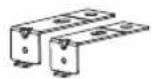
Installation brackets X2
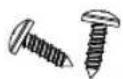
ST3.5*9 X2 (For the installation bracket)
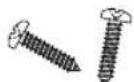
ST3.9*13 X2 (for the kick plate)
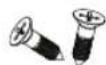
ST4*14 X2 (For installation brackets)

Kick plate
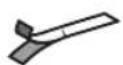
Condensation strip

Adjustment cap X2
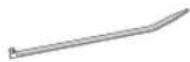
Cable Tie (for the drain hose)
Not provided

Twist on wire connector

Strain relief
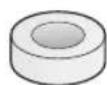
Electrical tape & Standard duct tape

Power cable

Hot water supply line

90° Elbow
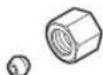
Tube fittings

Teflon tape or sealing compound
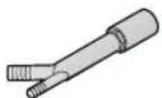
Air gap
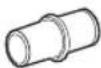
Rubber connector
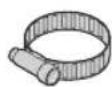
Hose clamp

For the hot water supply line, we strongly recommend using copper tubing with a compression fitting or a flexible stainless steel braided hot water supply line.

Do not use plastic tubing. Plastic tubing can deteriorate over time and cause a leak inside the tube fitting.
6\_ installing the dishwasher
Tools required
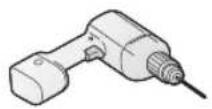
Electric drill
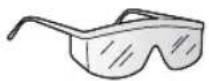
Safety glasses

Gloves
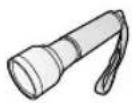
Flashlight
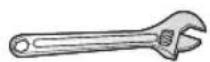
Adjustable wrench

Wire stripper

Pliers

Nipper
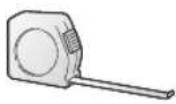
Tape measure

Pencil

Phillips screwdriver

Flat screwdriver
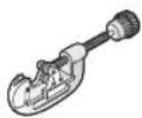
Tubing cutter
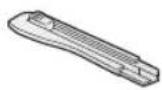
Cutting knife
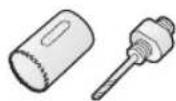
Hole saw

Level

Torx t20

Hex L-wrench
INSTALLING THE DISHWASHER

New installation
If the dishwasher is a new installation, most of the installation work must be done before the dishwasher is moved into place.

Replacement
If the dishwasher is replacing an old dishwasher, you must check the existing dishwasher connections for compatibility with the new dishwasher. Replace the existing connections as necessary.
Step 2 Select The Best Location For The Dishwasher
The following criteria are important to ensure the best location for the dishwasher:
• The location must have a solid floor that is able to support the weight of the dishwasher.
- The location must be near a sink with easy access to the water supply, drain, and electrical outlet.

For the drain to operate properly, the dishwasher should be installed within 9.8 ft (3 m) of the sink.
The location must let you load your dishes into the dishwasher easily.
- The location must have sufficient space for the dishwasher door to open easily and provide enough space between the dishwasher and the cabinet sides (at least 0.1 in (2 mm)).

If the dishwasher is installed in a corner, ensure that the side of the dishwasher is more than 2 in (50 mm) from
• the wall or cabinet to its right or left.
The wall at the back must be free of obstructions.
If this is a new installation, follow these steps:
- Using a hole saw, cut a hole into the side of the cabinet that hold the sink as shown in Figure 1-1 below.
- If the base inside the sink cabinet is raised above the kitchen floor and is higher than the connections on the dishwasher, make a hole in the base inside the cabinet and in the cabinet side as shown in Figure 1-2.

Depending on where your electrical outlet is, you may need to cut a hole in the opposite cabinet side.

natural_image
Isometric line drawing of a kitchen sink with drawers and drawers, showing interior layout (no text or symbols)The hole for the water supply line, drain hose and power cables.

natural_image
Isometric line drawing of a kitchen sink with faucet and piping (no text or symbols)8_ installing the dishwasher
STEP 3 CHECK WATER SUPPLY REQUIREMENTS AND CAUTIONS
• The hot water supply line pressure must be between 0.04-1MPa.
- Adjust the water heater to deliver water between 120 ° F (49° G)131 ° F (55° C).
- The dishwasher must be connected to a hot water supply between 120 ° F (49° G)131 ° F (55° C). This temperature range provides the best washing result and shortest cycle time. Temperature should not exceed 131 ° F (55° C) prevent damage to dishes.
- Ensure that the water supply valve is turned off before connecting the hot water supply line to the dishwasher.
- Seal the hot water supply line connections using teflon tape or sealing compound to stop any water leakage.
- When you install the dishwasher, ensure there is nothing on the drain hose and be careful not to tear it during the installation process.
Step 4 Check The Electrical Requirements And Cautions
The electrical requirements for the dishwasher are as follows: - In the United States, install in accordance with the National Electric Code/State and Municipal codes and/or local codes. - In Canada, install in accordance with the Canadian Electric Code C22.1-latest edition/Provincial and Municipal codes and/or local codes. • For cable direct connections. - Use flexible, armored or non-metallic sheathed, copper wire with a grounding wire that meets the wiring requirements for your local codes and ordinances. - Use the strain relief method provided with the wiring junction box or install a U.L.-listed/CSA-certified clamp connector to the wiring junction box. If using conduit, use a U.L.-listed/CSA-certified conduit connector.Step 5 Unpacking And Inspecting The Dishwasher
Unbox the dishwasher in an open area free of obstruction both around the carton and overhead. We recommend that you retain the carton and all of the packing materials until the dishwasher is fully installed and operational to ensure you have removed all the product's components from the carton prior to disposal.Unboxing
1. Unbuckle or cut the four straps securing the carton top. 2. Lift the top of the telescoping carton clear of the carton tray and the contents, and then turn it over and place it on the floor. 3. Put the straps and all of the packing materials from around the dishwasher inside the carton top, inspecting them for any signs of damage. 4. Locate and set aside the dishwasher's kick plate. The Kick plate is attached to packing material of the dishwasher.  5. Lift the dishwasher from the carton tray, and then place it on the floor. Put the tray into the carton top. 6. Remove the bag that protects the dishwasher during shipping.  ALWAYS LIFT THE DISHWASHER TO MOVE IT. Sliding it over rough surfaces can damage the dishwasher's feet and sliding the feet over finished surfaces can, in some cases, damage that finish on the underlyingsurface. 7. There is also packing inside the dishwasher that you may want to leave in place until the dishwasher is installed. 8. DO NOT, under any circumstances, remove the sound-absorbent padding that surrounds the exterior of the tub of the dishwasher.Inspecting
Mechanical
1. Check the plastic base assembly to ensure that it is intact 2. Check the dishwasher's feet to ensure they are in place and can be adjusted so you can level and secure the dishwasher. 3. Check all the visible components on the bottom of the dishwasher to ensure they are intact and secure. 4. Check the door latch, the operation of the hinges, and confirm the door is properly secured to the dishwasher.Plumbing
1. Check the hot water connection on the front left-side of the base of the dishwasher. The mounting plate should be secured to the front of the base, the threads inside the connection should be smooth and shiny, and the area should be clean and free of any debris. 2. Check the plastic Brake and Sensor cases to ensure these assemblies are not cracked and that all connections are secure. 3. Check the drain hose for any holes or deformities that could allow a water leak during draining.Electrical
1. Confirm the junction box cover is secured to the junction box on the front right-side of the base of the dishwasher. 2. Confirm the electrical box was not damaged during shipping and that it is secured to the base of the dishwasher.Appearance
1. Confirm there are no dents or scratches on the front of the dishwasher 2. Check the edges of the doors for any roughness or cracking 3. Check the control panel to ensure it is clear and unscratched, and that all the control markers are in their proper places.Parts
1. Confirm you have all the parts listed in Step 1 an page 6.Step 6 Preparing The Dishwasher
1. Ensure that the circuit breaker and water supply valve are turned off before proceeding with the following steps. Before you move or lay down the dishwasher for installation, make sure to adjust the height of the legs so the legs are as short as possible. This prevents the legs from breaking. Level the dishwasher by adjusting the height of the legs after you have the dishwasher in place. 2. Make sure there are no kinks and that the hose is not bent at any extreme angles that could constrict the flow of water. 3. Remove the junction box cover located at the bottom front right of the dishwasher using a screwdriver, and then install the strain relief (Figure 4 - C). Make sure to keep the junction box cover you removed. It is used in Step 11, Wiring Connections. 4. If the countertop is made of wood or a material that is not damaged by drilling, attach the two installation brackets that were supplied with the dishwasher using the supplied screws (Figure 4 - A). They will be used in Step 9. Securing the Dishwasher.Step 7 Placing The Dishwasher And Connecting The Hot Water Supply Line
1. Adjust the three leveling legs at the bottom of the dishwasher after measuring the height of the cabinet opening from under the countertop to the floor. (See Step 8, Leveling the Dishwasher.) 2. Locate the hot water supply line and the power cable. 3. Place the dishwasher so that the power cable is in the right channel of the base of the dishwasher. Use standard duct tape or cable ties to secure the electrical cable to their adjacent channels in the base. This can prevent the electrical cable from being squeezed when you push the dishwasher into place. 4. Pull the drain hose through the hole in the sink cabinet side wall. Keep it free of kinks. 5. Make sure the hot water supply line is not twisted, and then connect the hot water supply line to the elbow joint. 6. Slide the dishwasher carefully into the installation space. If possible, gently pull any excess lengths of water supply line, drain hose, or power cable back as you move the dishwasher. Get a second or third person to help you do this if necessary.  CAUTION Do not place the dishwasher on the water supply line, drain hose, or power cable. Also, make sure they are not folded or twisted.  14\_ installing the dishwasherStep 8 Leveling The Dishwasher
1. Open the door and place the level against the top of the tub on the inside and check if the the dishwasher is level. If it is not level, rotate the leveling legs at the bottom front of the dishwasher until the dishwasher is level. See the first note below for instructions on adjusting the height of the front legs. 2. Use the level to check if the dishwasher is level front to back, as shown in the figure to the right. If the dishwasher is not level front to back, adjust the height of the rear leg until the dishwasher is level. See the second note below for instructions on adjusting the the rear leg. 3. Open the door of the dishwasher and check if both the tub and door clearances are correct. If not, rotate the leveling legs on the bottom front of the dishwasher. You can also check this by placing a level against an inside front vertical surface of the tub. natural_image
Line drawing of a hand holding a tool with circular features, no text or symbols presentnatural_image
Simple line drawing of a door handle and vertical panel (no text or symbols)natural_image
Diagram showing a 3D box being cut with an arrow pointing to a mechanical component (no text or symbols present)natural_image
Hand holding a wrench to press a car (no text or symbols visible)natural_image
Line drawing of a person kneeling beside a refrigerator with a lid (no text or symbols)Step 9 Securing The Dishwasher
You must fix the dishwasher to the countertop or cabinet side walls for additional stability and safety. 1. If the countertop is made of wood or the material will not be damaged by drilling, follow the instructions in 2-1 below. If the countertop is made of granite, marble, or any other material that can be damaged by drilling, follow the Instructions in 2-2 below. 2-1. Put a large towel into the bottom of the dishwasher to prevent wood shavings or a dropped screw from falling into the dishwasher. Carefully drill screw holes Into the counter top bottom by passing the drill bit through a screw hole in each bracket, and then drilling into the counter top bottom beneath. Make sure the hole you drill is smaller than the diameter of the screw. Firstly, put the installation bracket into the slot of the side plane and tighten to the dishwasher with screw ST3.5\*9. Secondly, insert the provided screws into the brackets, and then tighten to secure the dishwasher to the countertop. 2-2. Put a large towel into the bottom of the dishwasher to prevent wood shavings or a dropped screw from falling into the dishwasher. Remove the adjustment cap with the tip of a screwdriver. The caps are just inside the tub near the middle of the tub an both sides (Figure 9 on the next page). Drill a hole into the sides of the kitchen cabinet on both sides by carefully passing a drill bit through the screw holes exposed by the removal of the spacer caps, and then drilling into the cabinet side beneath. Make sure the hole you drill is smaller than the diameter of the screw. Also make sure the drill bit does not strike the sides of the spacer cap holes. Firstly, put the installation bracket into the slot of the side plane and tighten to the dishwasher with screw ST3.5\*9. Secondly, insert the provided screws into the holes, and then tighten to secure the dishwasher to the cabinet. Make sure the tub is not distorted by pressure from the screws. If the tub is distorted, loosen the screws a little. Replace the tub spacer caps.  - The screws or tub spacer cap may fall into the dishwasher while you are working with the door open. Cover the interior of the dishwasher with a towel to prevent any screws from falling into the dishwasher. If any foreign items such as a screw get into the dishwasher, it may cause noise, an abnormal operation, damage, or a malfunction. - Use a magnetic screwdriver to help prevent screws from falling into the dishwasher. - If a foreign item such as a screw gets into the dishwasher and you are unable to remove it. the dishwasher needs to be disassembled. Contact a qualified service technician for this.natural_image
Technical line drawings of three mechanical assembly components (no text or symbols)Step 10 Connecting The Drain Hose
1. Check the parts on the sink to which the drain hose will be connected. 2. There are several ways to insert the drain hose into the drain hose connector of the sink, as shown in the following figures. You must connect the drain hose in accordance with the water pipe installation regulations in your region.| Without disposal | With an air gap/without disposal | Without an air gap |
 | 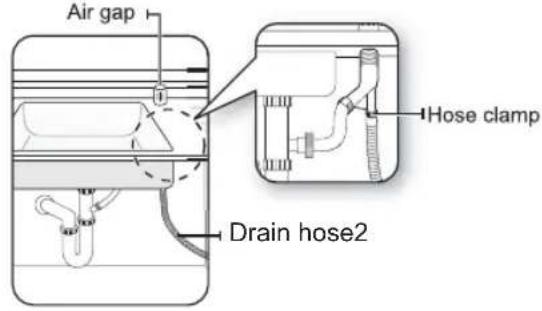 | 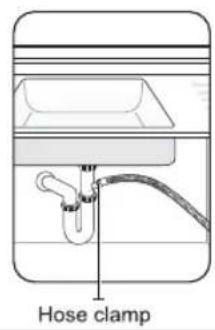 |
INSTALLING THE DISHWASHER
Case 2. With disposal| With disposal Disposal with an air gap | Without an air gap | |
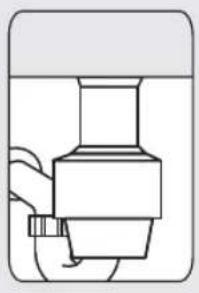 | 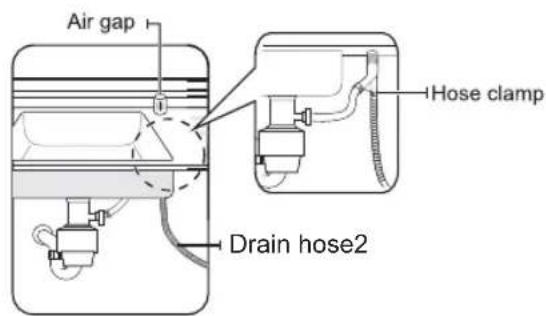 |  |
natural_image
Technical line drawing of a pipe sink with coiled tubing and a valve (no text or symbols)Step 11 Wiring Connections
1. Before connecting the power cable to the dishwasher, make sure the circuit breaker is off. 2. In the junction box located at the front bottom right of the dishwasher, find the three power wires from the dishwasher including the grounding line. 3. Pass the power cable through the strain relief, and then into the junction box (Figure 14). 4. Connect the black wire of the dishwasher to the black wire of the power cable by inserting both into a wire nut and then rotating the wire connector as shown in Figure 15. Connect the white wire to the white wire and the green to the green in the same manner. 5. Recheck each wire to ensure it is connected correctly and securely. Each colored wire should be connected to the corresponding wire of the same color. White should be connected to white, black to black, and green to green. 6. Replace the junction box cover on the dishwasher.WARNING
Electrical Shock Hazard To avoid electrical shock, do not work on an energized circuit. Doing so could result in serious injury or death. Only qualified electricians should perform electrical work. Do not attempt any work on the dishwasher electric supply circuit until you are certain the circuit is de-energized.WARNING
Fire Hazard To avoid a fire hazard, make sure electrical work is properly installed. Only qualified electricians should perform electrical work.  Recheck each wire to ensure it is connected correctly and securely. Each colored wire should be connected to the corresponding wire of the same color.Step 12 Completing The Installation
1. Open the door and remove all foam, paper packaging, and unnecessary parts. 2. Turn on the circuit breaker you turned off before you began the installation. 3. Open the water supply valve to supply water to the dishwasher. 4. Turn on the dishwasher, and then select and run a cycle.  Check if the power turns on correctly and if there is any water leakage while the dishwasher is operating. If no errors occur while it is operating, turn off the dishwasher, and then go to Step 5 below. If an error has occurred, turn off the dishwasher, close the water supply valve, and then refer to the user manual or contact a local service center.  Make sure to check for water leakage on both ends of the water supply line and drain hose connector. 5. Confirm that the kick plate gasket is on the bottom of the kick plate. To install the kick plate with screw ST3.9\*13, refer to the figure below. SPECIFICATIONS
| Power supply | 120 V 60 Hz |
| Water pressure | 0.04 - 1 MPa |
| Dimensions (Width x Depth xHeight) | 17.72 inch x 22.84 inch x 32.48 inch |
| Nominal inlet water temperature | 120 ° F (49°C) |
22\_ specifications
- inch Built-In Dishwasher
- Table of Contents
- IMPORTANT SAFETY INSTRUCTION
- WARNING
- Proper installation
- Basic precaution before use
- FEATURES OF YOUR NEW DISHWASHER
- Features
- Filter System
- Smart Wash System
- How Your Dishwasher Cleans
- Getting Started
- Note:
- Wash Cycle Selections
- OPERATING INSTRUCTIONS
- Power button
- 2.Cycles button
- 3.Delay Start button
- Options button
- 5.Start/Cancel button
- Child lock
- 7.Wash Cycle Selections
- Warning indications
- Options
- 10.Display window
- NOTE
- PREPARING AND LOADING DISHES
- Dish Preparation
- Loading the Upper Basket
- Loading the Bottom Basket
- Loading the Lower Basket
- Loading the Silverware Basket
- Adding A Dish
- CAUTION
- Filling the Rinse Aid Dispenser
- Filling the detergent dispenser
- Filling the rinse aid reservoir
- USER MAINTENANCE
- CLEANING THE EXTERIOR
- CLEANING THE INTERIOR
- CLEANING THE NOZZLES
- Lower nozzle
- Error Codes
- Element Appliance Limited Warranty
- WARRANTY SERVICE:
- EXCLUSIONS AND LIMITATIONS TO WARRANTY SERVICE
- TRANSFERRABLE. NO PERSON IS AUTHORIZED TO ALTER, EXTEND, OR WAIVE THIS WARRANTY OR ANY OF ITS TERMS OR CONDITIONS.
- PLEASE DIRECT ALL CORRESPONDENCE TO:
- SAFETY INSTRUCTIONS
- Important Safety Instructions
- For a permanently connected appliance:
- Before Installing The Dishwasher
- Tip-Over Hazard
- Electric Shock Hazard
- CONTENTS
- 05
- PREPARING THE DISHWASHER ENCLOSURE
- 06
- INSTALLING THE DISHWASHER
- 22
- SPECIFICATIONS
- PREPARING THE DISHWASHER ENCLOSURE
- Product Dimensions
- Enclosure Dimensions
- INSTALLING THE DISHWASHER
- Step 1 Check The Parts And Tools
- Parts Required
- Not provided
- 6\_ installing the dishwasher
- Tools required
- Step 2 Select The Best Location For The Dishwasher
- STEP 3 CHECK WATER SUPPLY REQUIREMENTS AND CAUTIONS
- Step 4 Check The Electrical Requirements And Cautions
- Step 5 Unpacking And Inspecting The Dishwasher
- Unboxing
- Inspecting
- Mechanical
- Plumbing
- Electrical
- Appearance
- Parts
- Step 6 Preparing The Dishwasher
- Step 7 Placing The Dishwasher And Connecting The Hot Water Supply Line
- Step 8 Leveling The Dishwasher
- Step 9 Securing The Dishwasher
- Step 10 Connecting The Drain Hose
- Step 11 Wiring Connections
- Step 12 Completing The Installation
- SPECIFICATIONS
- 22\_ specifications
Brand : Element
Model : ENB6631PEBB
Category : Dishwasher