
TP-GVTA-01 - Tripod Proaim - Free user manual and instructions
Find the device manual for free TP-GVTA-01 Proaim in PDF.


| Product Type | Camera Tripod Stand |
| Brand | Proaim |
| Model | TP-GVTA-01 |
| Material | Aluminum (dual stage) |
| Leg Sections | 3-section dual tandem legs |
| Leg Adjustment | Independent, twist knobs |
| Height Range | 17 to 61 inches (43 to 155 cm) |
| Bowl Size | 75mm |
| Spreader | Mid-level spreader with knob |
| Feet | Rubber shoes with twin spikes (indoor/outdoor) |
| Weight Capacity | Approximately 20 kg (44 lbs) |
| Color | Black |
| Package Contents | Tripod stand, 3x rubber feet, carrying bag |
| Fluid Head Mount | 75mm bowl (fluid head not included) |
| Warranty | 1 year from date of purchase |
| Care Instructions | Clean with damp cloth, avoid harsh chemicals |
| Safety Note | Ensure all knobs are tightened before use |
Frequently Asked Questions - TP-GVTA-01 Proaim
User questions about TP-GVTA-01 Proaim
0 question about this device. Answer the ones you know or ask your own.
Ask a new question about this device
Download the instructions for your Tripod in PDF format for free! Find your manual TP-GVTA-01 - Proaim and take your electronic device back in hand. On this page are published all the documents necessary for the use of your device. TP-GVTA-01 by Proaim.
USER MANUAL TP-GVTA-01 Proaim
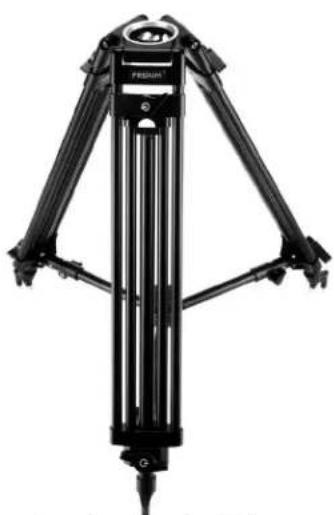
PROAIM Gravita 75mm Camera Tripod Stand (TP-GVTA-01)
Assembly Manual

natural_image
Black tripod-mounted camera with adjustable legs and feet, no visible text or symbolsWhat's In The Box
Please inspect the contents of your shipped package to ensure you have received everything that is listed below.
natural_image
Black mechanical tripod device with adjustable legs and mounting feet (no visible text or symbols)Proaim Gravita 75mm Dual Stage Tripod

3 x Feet

natural_image
Black cylindrical bag with red trim and 'PRAZUM' branding, labeled 'Bag' below (no other text or symbols)All rights reserved.
No part of this document may be reproduced, stored in a retrieval system, or transmitted by any form or by any means, electronic, mechanical, photo-copying, recording, or otherwise, except as may be expressly permitted by the applicable copyright statutes or in writing by the Publisher.
Gravita Tripod Stand Setup
- Properly spread and open all the legs of the tripod stand and attach rubber tripod shoes to the feet of the stand.
- Then, pull the rubber tripod shoe grip & secure it. Follow the same process to attach the remaining rubber tripod shoes.
NOTE: It has rubber feet equipped with twin spikes, suited for indoor and outdoor use, as well as any terrain.
- Loosen all the three knobs of the dual stage tripod and you can adjust height according to your requirement by sliding.
• After adjusting the height, re-tighten the knobs and properly secure it.
- To adjust the height of the tripod, loosen all the three adjustment knobs. You can adjust the tripod to the desired height and then re-tighten the knobs securely.
NOTE: The tripod legs are independently adjustable in length and extend from 17" to 61".
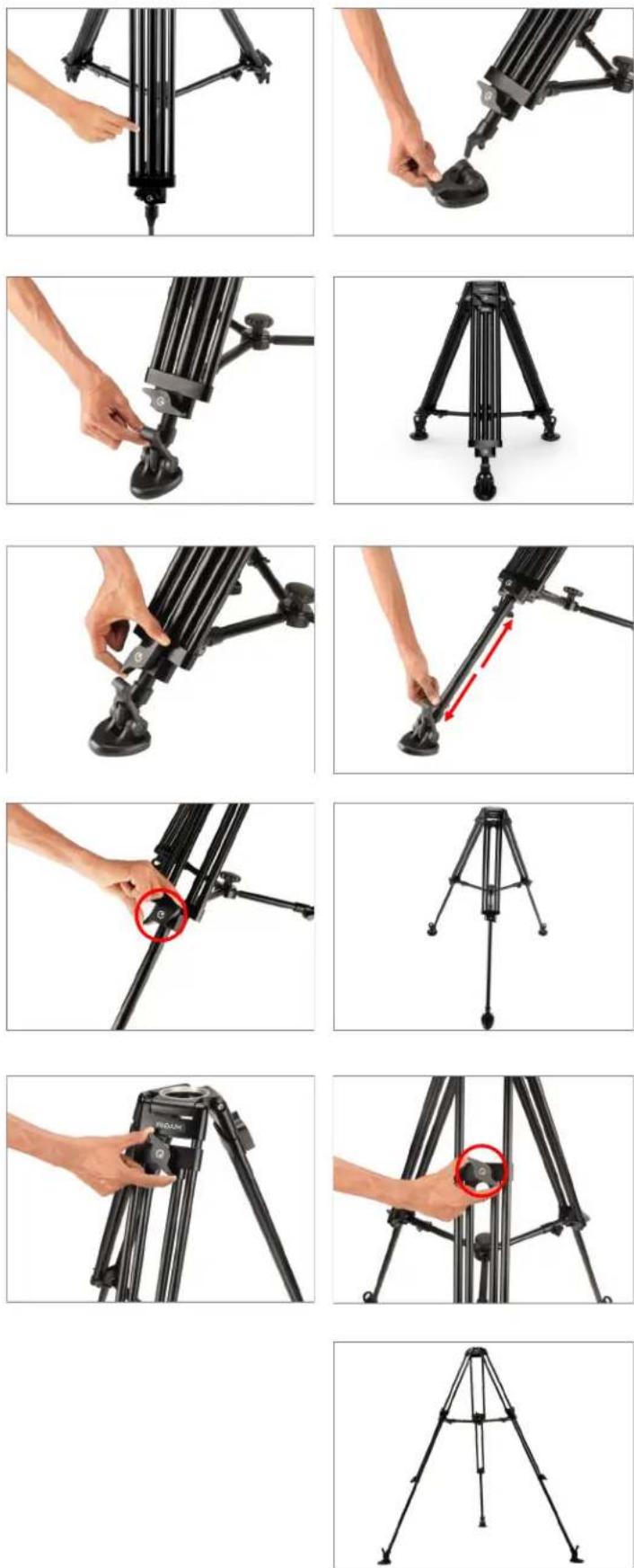
- The spreader can be adjusted according to the requirement by loosening the knob of the mid level spreader. Then secure the spreader tightly with the help of the knob.
NOTE: It uses a mid-level spreader for significant control over the tripod footprint.
- You can also collapse the spreader by loosening the center knob on the mid-level spreader.
NOTE: This two-stage aluminum tripod has 3-section dual tandem legs that offer excellent torsional rigidity along with easy height adjustment.
- Remove the knob of the 75mm Bowl Fluid Head (Not Included) and mount it on the Tripod Stand.
- Then, properly tighten and secure the knob of the Fluid Head (Not Included) from the bottom.

natural_image
Close-up of a hand adjusting a black tripod-mounted cable with a red circle highlighting the cable end (no text or symbols visible)
natural_image
Close-up of a hand holding a black bicycle frame with a red circle highlighting a component (no text or symbols visible)
natural_image
Close-up of a tripod-mounted camera frame with tripod legs and stand (no text or symbols visible)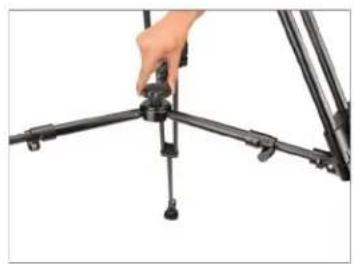
natural_image
Close-up of a hand adjusting a tripod-mounted camera frame (no text or symbols visible)
natural_image
Close-up of a hand adjusting a camera lens on a tripod structure (no text or symbols visible)
natural_image
Diagram of a tripod with directional arrows indicating measurement or orientation (no text or labels)
natural_image
Close-up of hands assembling a black mechanical component (no visible text or symbols)
natural_image
Hand operating a camera on a tripod, no visible text or symbols
natural_image
Hand holding a black tripod-mounted camera with 'PROGRAM' branding visible (no text or symbols on the device itself)
natural_image
Close-up of a hand adjusting a black tripod-mounted device (no visible text or symbols)Fluid Head Setup
- Loosen the fluid head (Not Included) knob and then remove the plate.
- Attach the camera plate to the bottom of the camera (Not Included), then secure it with the help of a screwdriver, as shown in the image.
- Pull the knob of the fluid head, then slide and mount the camera (Not Included), same as shown in image.
- Gravita Tripod Stand Setup is ready to use.

natural_image
Close-up of hands adjusting a black tripod-mounted camera frame with a red circle highlighting the clip (no text or symbols visible)
natural_image
Close-up of a black tripod-mounted camera with a hand adjusting the top component (no visible text or symbols)
natural_image
Close-up of a black HED video camera with lens and control panel, held by hands (no visible text or symbols)
natural_image
Close-up of hands using a red tool to adjust or install a camera module with a red circle highlighting the component (no visible text or symbols)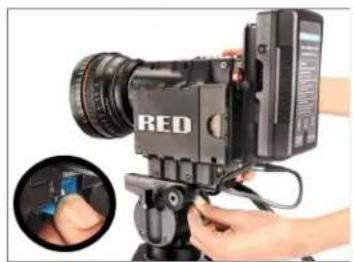
natural_image
Close-up of a red video camera with a lens and control panel, showing hands adjusting the camera (no visible text or symbols)
natural_image
Close-up of a professional video camera with a red circle highlighting the lens (no visible text or symbols)
natural_image
Photograph of a tripod-mounted camera with tripod base and tripod legs (no text or symbols visible)YOUR PROAIM GRAVITA 75MM CAMERA TRIPOD STAND ALL DRESSED UP AND READY TO GO!
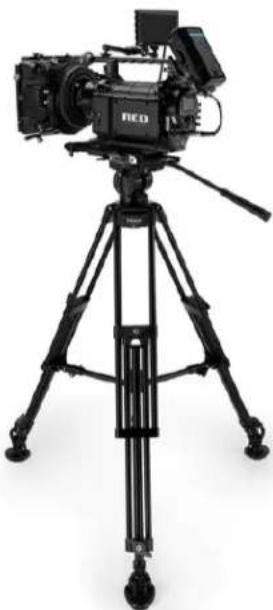
natural_image
Black studio video camera on tripod with tripod-mounted camera (no visible text or symbols)(SHOWN WITH OPTIONAL ACCESSORIES)
Warranty: We offer one year warranty for our products from date of purchase. Within this period of time, we will repair it without charge for labor or parts. Warranty doesn't cover transportation costs nor does it cover a product subjected to misuse or accidental damage. Warranty repairs are subjected to inspection and evaluation by us.
Liability: We are not liable for damage caused by products that we do not supply or from mishandling in transit, accident, misuse, neglect, lack of care of the product, or service by anyone other than our company.
Contact Us: In case of any kind of dissatisfaction, please Contact us immediately and we promise our utmost support and care until you use our product.

Brand : Proaim
Model : TP-GVTA-01
Category : Tripod