
ZTSV65 - Loudspeaker PHOENIX GOLD - Free user manual and instructions
Find the device manual for free ZTSV65 PHOENIX GOLD in PDF.


| Product Type | Component Speaker System (2-way) |
| Woofer Size | 6.5 inches (165 mm) |
| Tweeter Size | 1 inch (25 mm) silk dome |
| Power Handling (RMS) | 100 Watts per channel (estimated) |
| Peak Power Handling | 200 Watts per channel (estimated) |
| Impedance | 4 Ohms |
| Sensitivity | 90 dB (estimated) |
| Frequency Response | 60 Hz - 20 kHz (estimated) |
| Crossover Type | External passive crossover (included) |
| Compatible Vehicles | Volvo FH (2020 and later) with Basic Sound System |
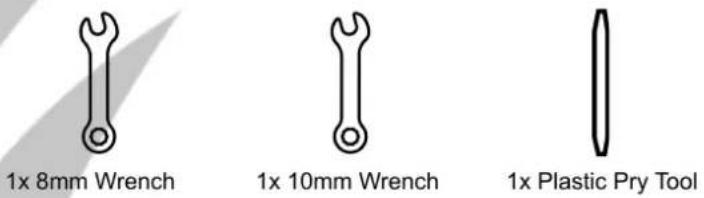
| Installation Tools Required | 10mm wrench, drill, T25 screwdriver, plastic pry tool, 8mm wrench |
| Included Components | 2 woofers, 2 tweeters, 2 crossovers, wiring harness, mounting hardware |
| Maintenance | Clean with a dry, soft cloth. Avoid moisture and solvents. |
| Safety Precautions | Disconnect vehicle battery before installation. Ensure secure mounting to prevent damage. |
| Spare Parts & Repairability | Contact Phoenix Gold authorized dealer for replacement parts. Repair by qualified technician. |
| Brand | Phoenix Gold |
| Model | ZTSV65 |
| Series | ZTS Series |
| General Information | The Gold Standard in Sound. Designed for premium audio upgrade in compatible trucks. |
Frequently Asked Questions - ZTSV65 PHOENIX GOLD
User questions about ZTSV65 PHOENIX GOLD
0 question about this device. Answer the ones you know or ask your own.
Ask a new question about this device
Download the instructions for your Loudspeaker in PDF format for free! Find your manual ZTSV65 - PHOENIX GOLD and take your electronic device back in hand. On this page are published all the documents necessary for the use of your device. ZTSV65 by PHOENIX GOLD.
USER MANUAL ZTSV65 PHOENIX GOLD
ZTSV65

natural_image
Two black speaker amplifiers with red wiring and connectors, mounted on white background (no text or symbols)Installation Tools Required
Vehicle used for installation:\*
Volvo FH (2020 →)
Basic Sound System
*Some differences may occur between different truck and year models.
10mm Wrench or Socket

natural_image
Simple line drawing of a wrench (no text or symbols)Drill
8mm Wrench or Socket

natural_image
Simple line drawing of a wrench (no text or symbols)T25 Screwdriver
Plastic Pry Tool
natural_image
Abstract geometric shape with a black vertical line and gray curved bands (no text or symbols)
natural_image
Line drawing of a handheld electric drill (no text or symbols)
natural_image
Black-and-white line drawing of a screwdriver with a star emblem on its body (no text or symbols)ZTSV65 Installation 1
Tools required:
1. Front door panel removal

natural_image
Interior view of a white semi-truck showing the front door, backrest door, and side panel (no text or symbols visible)3. Disconnect the connector
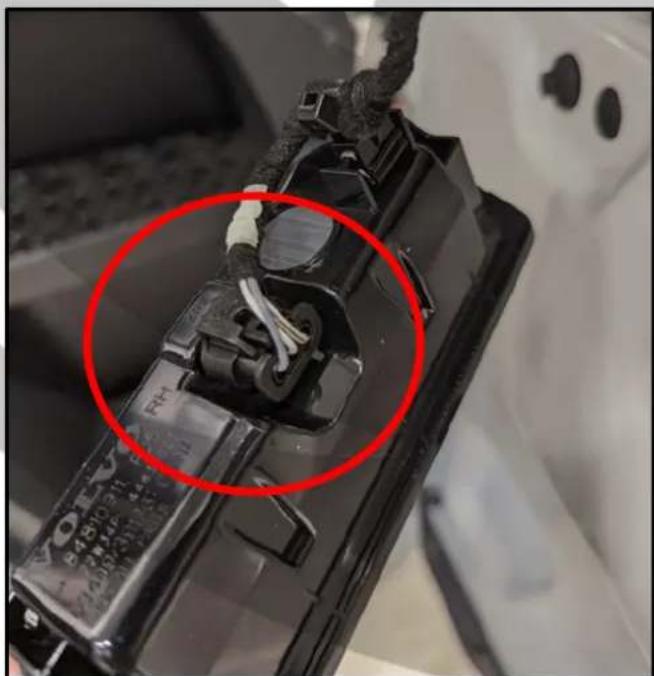
natural_image
Close-up of a battery pack with a red circle highlighting the internal structure (no visible text or symbols)2. Remove bottom light panel
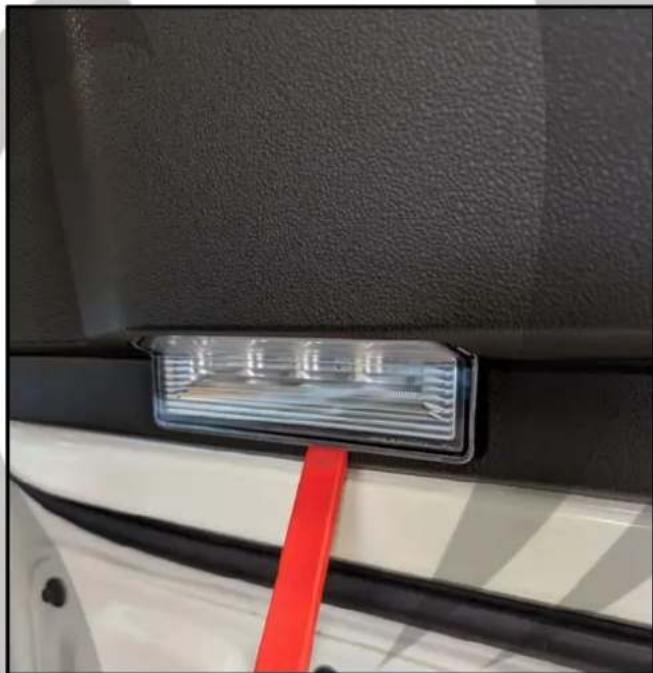
natural_image
Close-up of a car's rearview compartment showing a red ribbon and illuminated LED component (no text or symbols visible)4. Unscrew the bolt

natural_image
Close-up of a car's side panel showing a red circle highlighting a bolt hole (no text or symbols visible)ZTSV65 Installation 2
Tools required:

- Remove the cover panel

natural_image
Close-up of a hand using a red tool to clean or store interior space near a vehicle door (no text or symbols visible)- Pull up the cover panel

natural_image
Close-up of a car's front bumper with a red circle highlighting a specific area (no text or symbols visible)- Unscrew the bolt
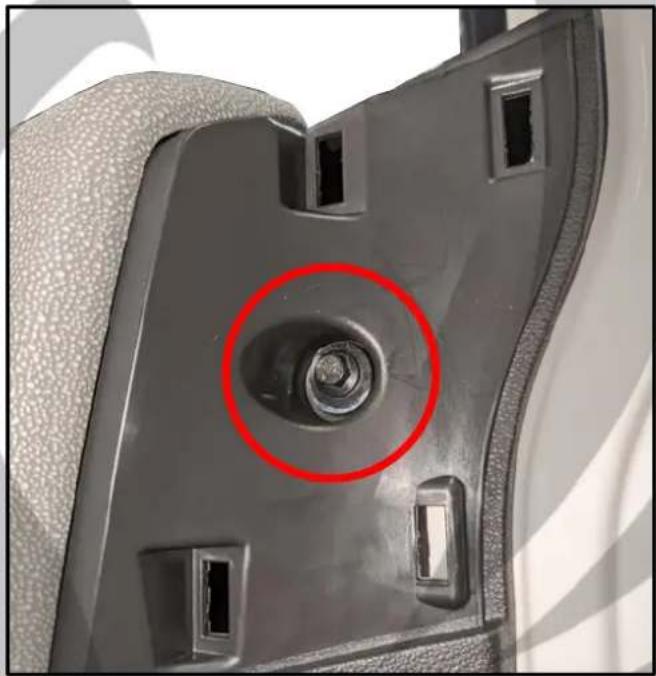
natural_image
Close-up of a car seatbelt component with a red circle highlighting a bolt hole (no text or symbols visible)- Unscrew the bolt
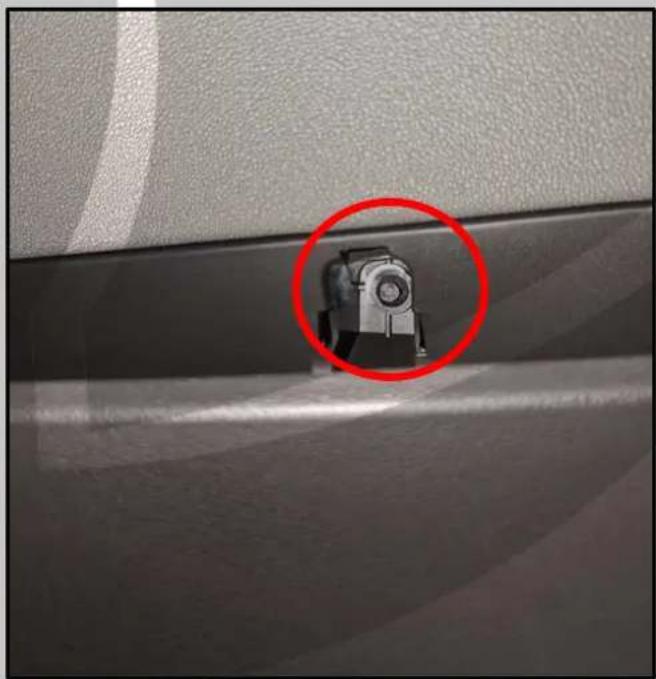
natural_image
Close-up of a car's side panel corner with a red circle highlighting a small mechanical component (no text or symbols visible)ZTSV65 Installation 3
Tools required:

9. Remove the door handle panel

natural_image
Close-up of a car interior showing a red-handled tool interacting with the side panel (no text or symbols visible)11. Pull up the window switch panel

natural_image
Close-up of a car dashboard control panel with two red arrows pointing upward (no text or symbols visible)10. Unscrew the bolt
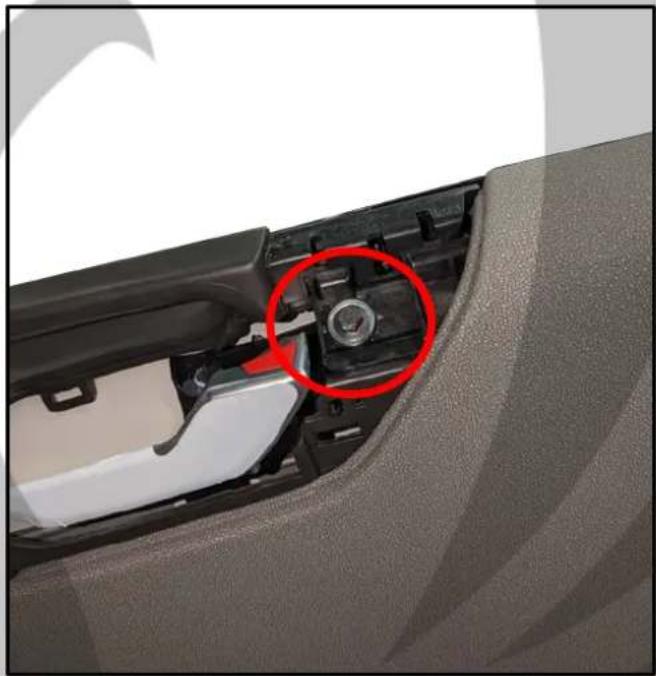
natural_image
Close-up of a car interior showing the side panel and seatbelt, with a red circle highlighting a component (no text or symbols visible)12. Disconnect the connector
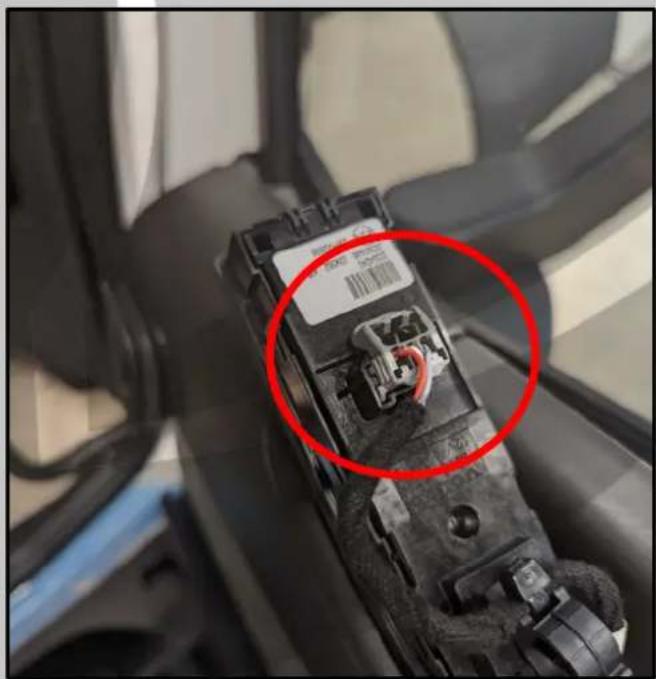
natural_image
Close-up of a mechanical component with a red circle highlighting a specific part, no visible text or symbols.ZTSV65 Installation 4
Tools required:
13. Remove the two bolts

natural_image
Close-up of a car's front bumper with two red-circled fasteners on the jaw (no text or symbols visible)15. Pull off the door panel

natural_image
Close-up of a car door frame with red arrows pointing to the side panel, showing structural details (no text or symbols visible)14. Unscrew the bolt

natural_image
Close-up of a car seatbelt buckle with a red circle highlighting the opening area (no text or symbols visible)16. Disconnect the connector
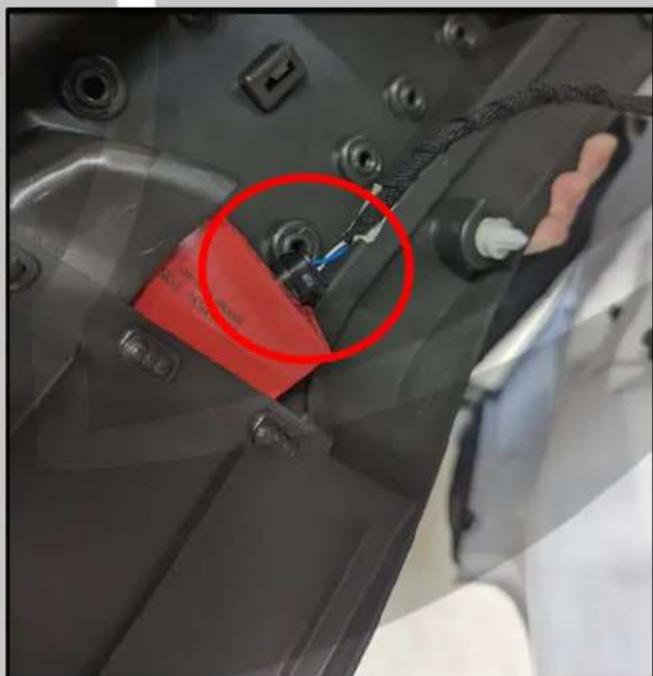
natural_image
Close-up of a mechanical component with a red circle highlighting a specific part, no visible text or symbols.ZTSV65 Installation 5
Tools required:

- Door panel removed

natural_image
Interior view of a white car door frame with exposed internal components and wiring (no text or symbols visible)- OEM speaker removed
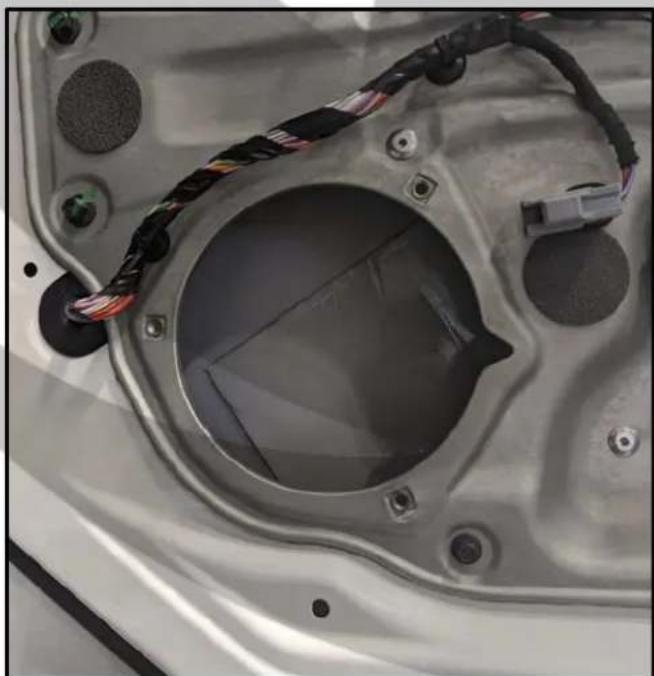
natural_image
Close-up of a car front panel with visible wiring and screw holes (no text or symbols)- Unscrew OEM speaker

natural_image
Close-up of a speaker component with red circles highlighting specific parts (no text or symbols visible)- Mark drill holes for the next step

natural_image
Close-up of a car interior showing a speaker inside a vehicle frame with hands adjusting the component (no visible text or symbols)ZTSV65 Installation 6
Tools required:

1x Drill
- Drill up the markings

natural_image
Close-up of a person using a power tool to adjust or install a car body panel (no visible text or symbols)- Bring out filter and 6.5" driver

natural_image
Exterior view of a Phoenix Gold speaker with attached red and black cables, placed on a metal panel (no visible text or symbols)- Drilled holes

natural_image
Close-up of a mechanical component with red circular markers highlighting specific areas (no text or symbols visible)- Connect cable harness to speaker

natural_image
Close-up of a black Phoenix Gold speaker with red wiring and a small electronic component on top (no visible text or symbols)ZTSV65 Installation 7
Tools required:

1x Screwdriver
25. Screw speaker in place
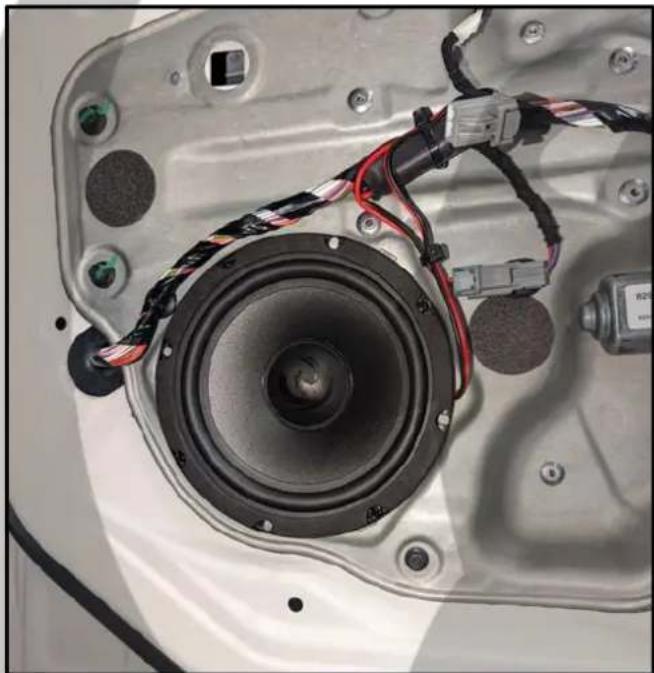
natural_image
Close-up of a car interior showing a speaker component with wiring and connectors (no visible text or symbols)27. Reassemble door in reverse order
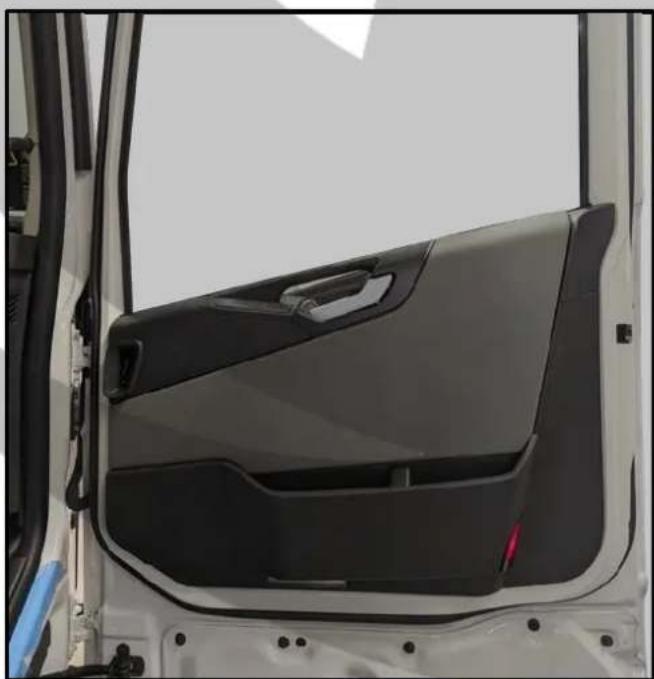
natural_image
Interior view of a white vehicle showing the front door, dashboard, and side panels (no text or symbols visible)26. Connect speaker connector

natural_image
Close-up of a car's front panel with exposed audio and wiring, no visible text or symbols28. Go to the dashboard

natural_image
Close-up of a car interior showing a mesh grille and textured surface (no text or symbols visible)ZTSV65 Installation 8
Tools required:

1x T25 Screwdriver

1x Plastic Pry Tool
29. Remove the speaker grill
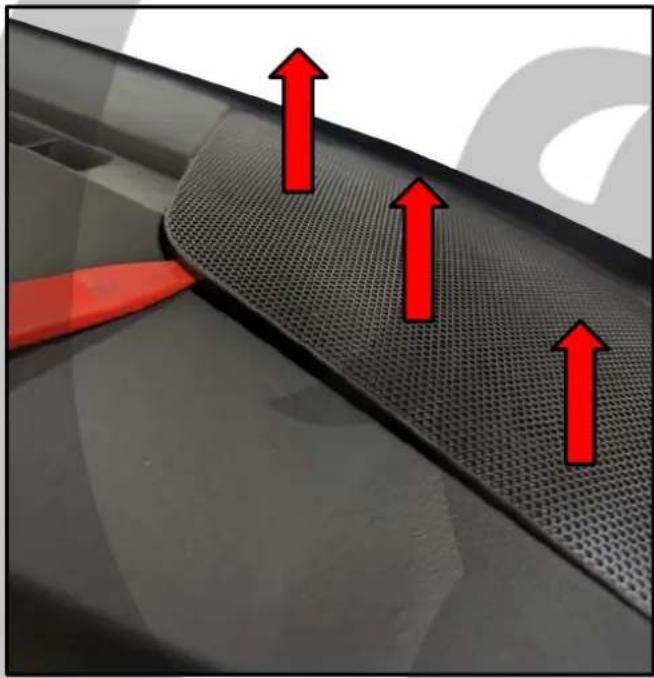
natural_image
Close-up of a car grille with red arrows pointing upward, no visible text or symbols31. Pull up the dashboard panel

natural_image
Close-up of a car's side panel with red arrows pointing upward, showing structural details (no text or symbols visible)30. Speaker grill removed

natural_image
Close-up of a car's front panel showing the speaker chamber and dashboard (no text or symbols visible)32. Dashboard panel removed

natural_image
Interior view of a car showing the rear engine compartment with visible battery and control panel (no text or symbols)ZTSV65 Installation 9
Tools required:

1x T25 Screwdriver

1x Plastic Pry Tool
33. Unscrew the two screws
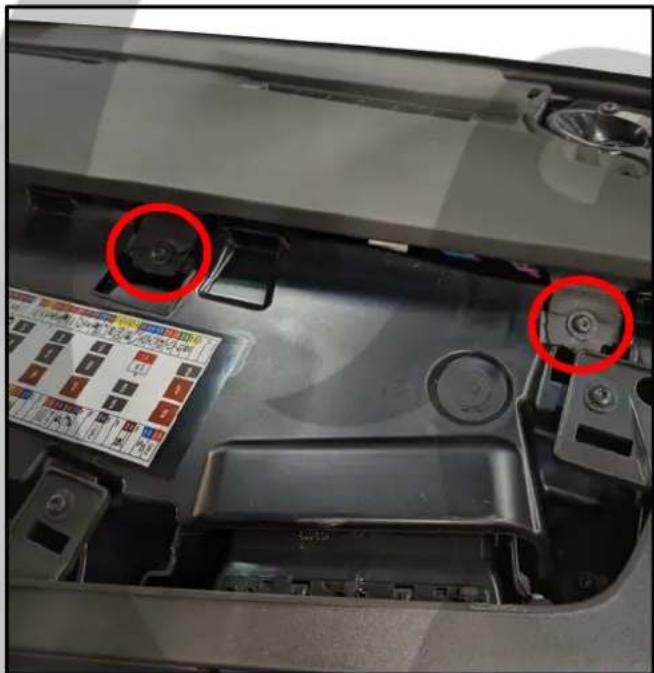
natural_image
Close-up of a car engine bay with red circles highlighting the front panel and side buttons (no text or symbols visible)35. Pull up the dashboard
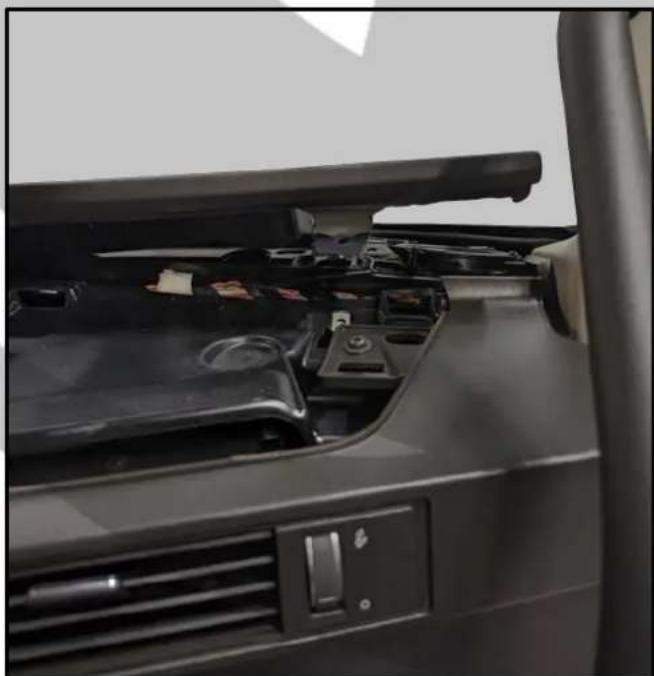
natural_image
Interior view of a car showing the dashboard and rearrest door panel with battery compartments (no visible text or symbols)34. Unscrew the screw

natural_image
Close-up of a car's internal battery pack with visible wiring and a red circle highlighting a component (no text or symbols)36. Unscrew the screw

natural_image
Close-up of a car's front panel showing internal components and a red circle highlighting a component (no text or symbols visible)ZTSV65 Installation 10
Tools required:

1x T25 Screwdriver
37. Unscrew the two screws

natural_image
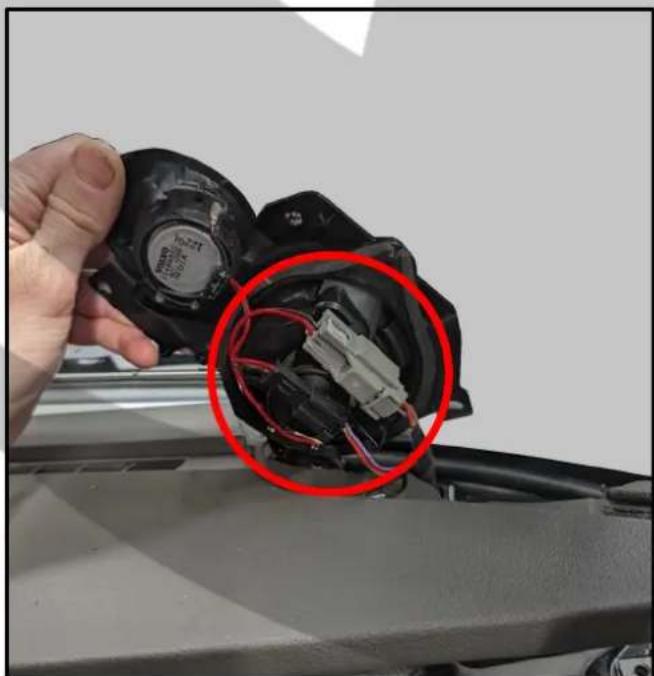
Close-up of a car's front panel showing internal components with red circles highlighting specific parts (no text or symbols visible)39. Disconnect the speaker connectors
natural_image
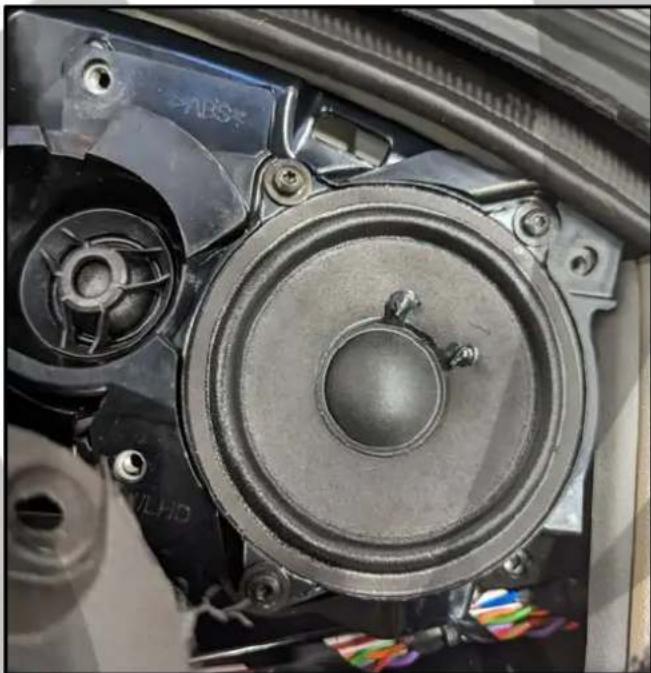
Close-up of a hand holding a damaged black plastic component with red wire, showing internal wiring and a magnified inset (no text or symbols visible)38. Lift up the speaker bracket
natural_image
Close-up of a car's front-mounted speaker assembly with visible components and wiring (no text or symbols)40. Remove OEM tweeter

natural_image
Disassembled automotive engine components including a black plastic fan, red wiring, and a voltmeter (no visible text or symbols)ZTSV65 Installation 11
Tools required:
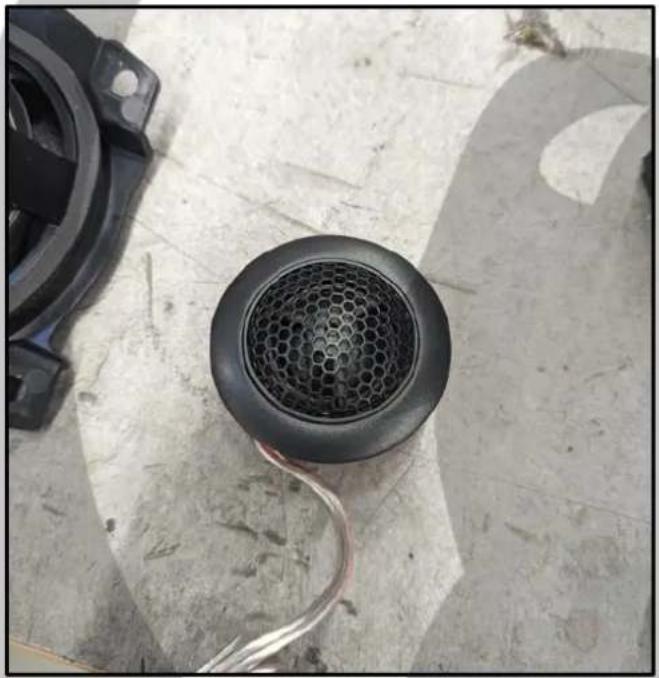
- Bring out the tweeter
natural_image
Close-up of a black speaker grille and cable on a concrete floor, with a black plastic component nearby (no text or symbols visible)- Mounting adapter removed

natural_image
Close-up of a damaged floor with wires and a circular component, no visible text or symbols- Unscrew the mounting adapter

natural_image
Close-up of a black plastic electronic component with a red wire, placed on a white surface (no visible text or symbols)- Mount the tweeter

natural_image
Close-up of a black industrial sensor device with visible branding and wiring, placed on concrete ground (no readable text or symbols)ZTSV65 Installation 12
Tools required:

1x T25 Screwdriver

1x Plastic Pry Tool

1x Glue
45. Put some glue on the tweeter sides

natural_image
Close-up of a mechanical component with red annotation arrows and a circled circle, no readable text or symbols present.47. Connect tweeter filter

natural_image
Close-up of an automotive electrical connector with red wiring and a pressure gauge (no visible text or symbols)46. Unscrew the midrange speaker

natural_image
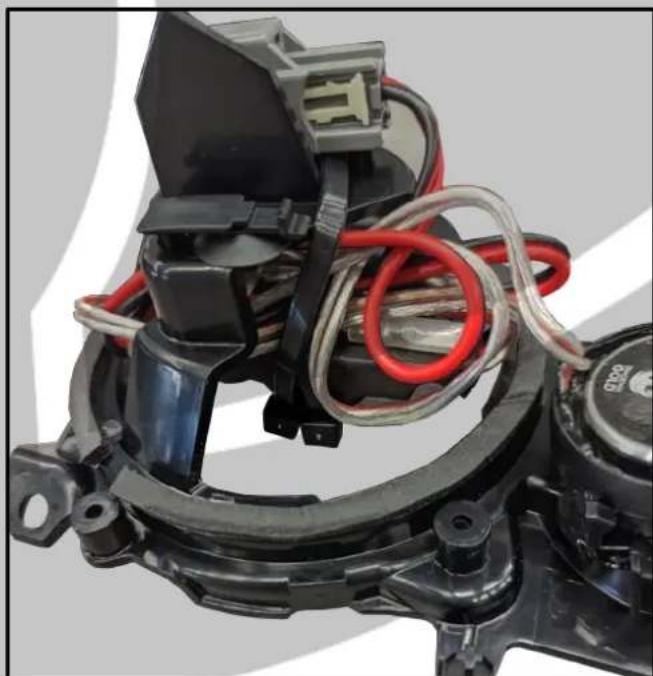
Close-up of a speaker component with concentric rings and mounting holes, marked by red circles (no text or symbols visible)48. Cable tie filter in place
natural_image
Close-up of a mechanical assembly with red and gray wires wrapped around components (no visible text or symbols)ZTSV65 Installation 13
Tools required:

1x T25 Screwdriver

1x Plastic Pry Tool
49. Screw speaker bracket in place
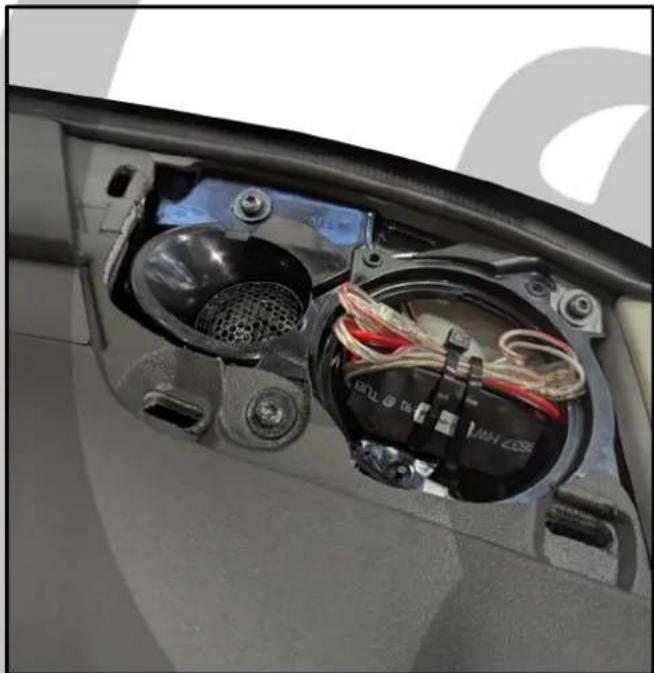
natural_image
Interior view of a car's front and side compartments showing electrical wiring and ventilation (no text or symbols visible)51. Left side tweeter grill removal

natural_image
Interior view of a car dashboard with control knob and steering wheel (no visible text or symbols)50. Reassemble panels in reverse order

natural_image
Close-up of a car's side panel showing mesh grille and textured surface (no text or symbols visible)52. Pull up the tweeter grill

natural_image
Close-up of a hand using a red tool to trim a black textured surface, no text or symbols visibleZTSV65 Installation 14
Tools required:

- Unscrew the two screws

natural_image
Close-up of a car's front panel showing the speaker and rotor assembly (no text or symbols visible)- Disconnect the speaker connectors

natural_image
Close-up of a car's engine compartment with visible wiring and components, circled in red (no text or symbols)- Unscrew the screw
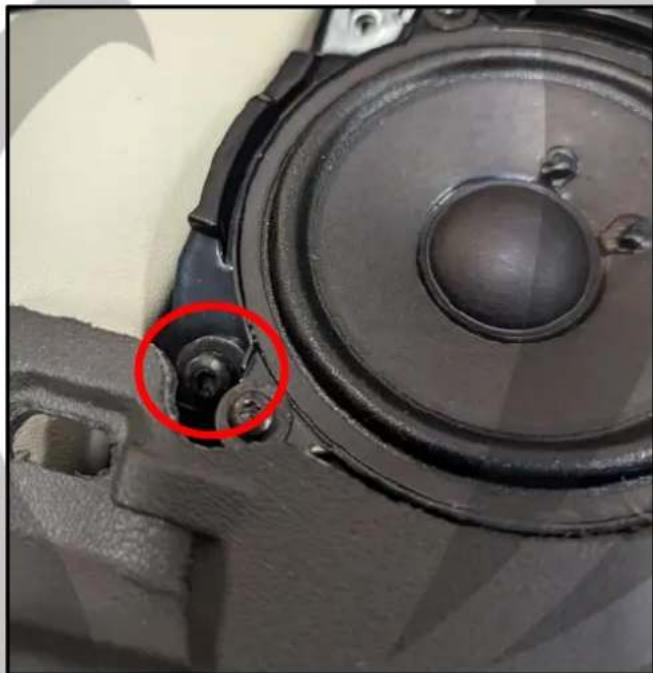
natural_image
Close-up of a speaker component with a red circle highlighting a mechanical part detail (no text or symbols visible)- Repeat steps 40 to 48
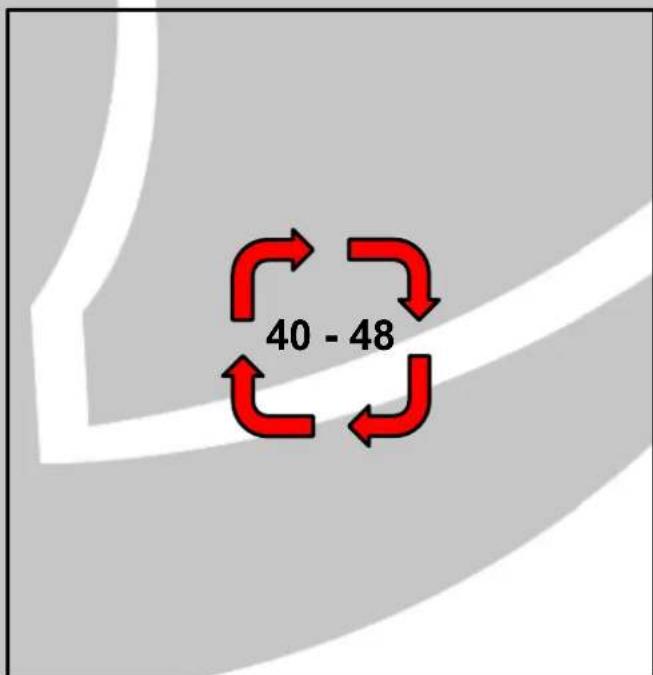
ZTSV65 Installation 15
Tools required:

1x T25 Screwdriver
57. Screw speaker bracket in place

natural_image
Interior view of a car showing internal components including exposed wiring, air filters, and a mesh chamber (no text or symbols visible)58. Reassemble panels in reverse order

natural_image
Interior view of a car dashboard with steering wheel and mode dial (no visible text or symbols)59. Installation is complete

natural_image
Stylized orange bird logo within a circular frame, no text or symbols presentOn Behalf of the Phoenix Gold team, Thank you for choosing us!
Your installation is complete and we hope that your new upgraded system will bring you joy and happiness for many years to come when listening to your favorite music. As always, our goal is bringing you The Gold Standard in Sound.


- ZTSV65
- Installation Tools Required
- Vehicle used for installation:\*
- ZTSV65 Installation 1
- Tools required:
- Front door panel removal
- Disconnect the connector
- Remove bottom light panel
- Unscrew the bolt
- ZTSV65 Installation 2
- ZTSV65 Installation 3
- Remove the door handle panel
- Pull up the window switch panel
- Unscrew the bolt
- Disconnect the connector
- ZTSV65 Installation 4
- Remove the two bolts
- Pull off the door panel
- Unscrew the bolt
- Disconnect the connector
- ZTSV65 Installation 5
- ZTSV65 Installation 6
- ZTSV65 Installation 7
- Screw speaker in place
- Reassemble door in reverse order
- Connect speaker connector
- Go to the dashboard
- ZTSV65 Installation 8
- Remove the speaker grill
- Pull up the dashboard panel
- Speaker grill removed
- Dashboard panel removed
- ZTSV65 Installation 9
- Unscrew the two screws
- Pull up the dashboard
- Unscrew the screw
- Unscrew the screw
- ZTSV65 Installation 10
- Unscrew the two screws
- Disconnect the speaker connectors
- Lift up the speaker bracket
- Remove OEM tweeter
- ZTSV65 Installation 11
- ZTSV65 Installation 12
- Put some glue on the tweeter sides
- Connect tweeter filter
- Unscrew the midrange speaker
- Cable tie filter in place
- ZTSV65 Installation 13
- Screw speaker bracket in place
- Left side tweeter grill removal
- Reassemble panels in reverse order
- Pull up the tweeter grill
- ZTSV65 Installation 14
- ZTSV65 Installation 15
- Screw speaker bracket in place
- Reassemble panels in reverse order
- Installation is complete
- On Behalf of the Phoenix Gold team, Thank you for choosing us!
Brand : PHOENIX GOLD
Model : ZTSV65
Category : Loudspeaker