
SPS1038C - Chair PHILIPS - Free user manual and instructions
Find the device manual for free SPS1038C PHILIPS in PDF.


| Product Type | Desktop Charging Station / Surge Protector |
| Brand | Philips |
| Model | SPS1038C |
| AC Outlets | 3 |
| USB Charging Ports | 2 |
| USB Output | Configurable via switch for Apple devices (A) or other USB devices (B) |
| Input Voltage | 120 V AC (typical for US) or 230 V AC (EU models) |
| Power Cord | Attached, 3-prong grounded plug |
| Surge Protection | Yes (Class B digital device, FCC compliant) |
| Slide-out Tray | Yes, for holding charged devices |
| Warranty | 1 year limited |
| Safety Certifications | FCC Part 15 Class B |
| Indoor Use Only | Yes, not for outdoor or wet areas |
| Care Instructions | Wipe with dry cloth; do not expose to liquids |
| Spare Parts / Repairability | Not user-serviceable; do not disassemble |
| Compatible Devices | Smartphones, tablets, and other USB-chargeable devices |
| Package Contents | Desktop charging station, user manual |
Frequently Asked Questions - SPS1038C PHILIPS
User questions about SPS1038C PHILIPS
0 question about this device. Answer the ones you know or ask your own.
Ask a new question about this device
Download the instructions for your Chair in PDF format for free! Find your manual SPS1038C - PHILIPS and take your electronic device back in hand. On this page are published all the documents necessary for the use of your device. SPS1038C by PHILIPS.
USER MANUAL SPS1038C PHILIPS
natural_image
Close-up of a black plastic electrical connector with a cable, no visible text or symbolsUser manual
PHILIPS
1 Important safety instructions
This manual contains important information about the Philips desktop charging station. Read it carefully before you start the installation and setup.

Warning
- Do not operate your desktop charging station near the rain or wet areas.
- Do not operate your desktop charging station if liquid of any kind is spilled onto or inside the unit.
• Do not disassemble or repair. - Do not expose your desktop charging station to direct sunlight or place it near wall heaters, space heaters, or enclosed space prone to temperature increase.
- The Philips desktop charging station requires a properly grounded outlet for safety and to protect the connected equipment. If you are not sure whether your home's electrical wiring has proper grounding, consult a qualified electrician.

Caution
- Risk of electrical shock! Not for use outdoors or in other wet or damp areas, with aquariums, in hazardous environments requiring failsafe performance (such as nuclear facilities or aircraft), or for medical or life support equipment.
Notice for USA
This equipment has been tested and found to comply with the limits for a Class B digital device, pursuant to part 15 of the FCC Rules. These limits are designed to provide reasonable protection against harmful interference in a residential installation. This equipment generates, uses and can radiate radio frequency energy and, if not installed and used in accordance with the instruction manual, may cause harmful interference to radio communications.
However, there is no guarantee that interference will not occur in a particular installation. If this equipment does cause harmful interference to radio or television reception, which can be determined by turning the equipment off and on, the user is encouraged to try to correct the interference by one or more of the following measures:
- Relocate the receiving antenna.
- Increase the separation between equipment and receiver.
- Connect the equipment into an outlet on a circuit different from that to which the receiver is connected.
- Consult the dealer or an experienced radio/TV technician for help.
Recycling

Your product is designed and manufactured with high quality materials and components, which can be recycled and reused.
Never dispose of your product with other household waste. Please inform yourself about the local rules on the separate collection of electrical and electronic products. The correct disposal of your old product helps prevent potentially negative consequences on the environment and human health.
The packaging of this product is intended to be recycled. Contact your local authorities for information about how to recycle the packaging.
2 Your desktop charging station
Congratulations on your purchase and welcome to Philips!
To fully benefit from the support that Philips offers, register your product at www.philips.com/welcome.
Overview
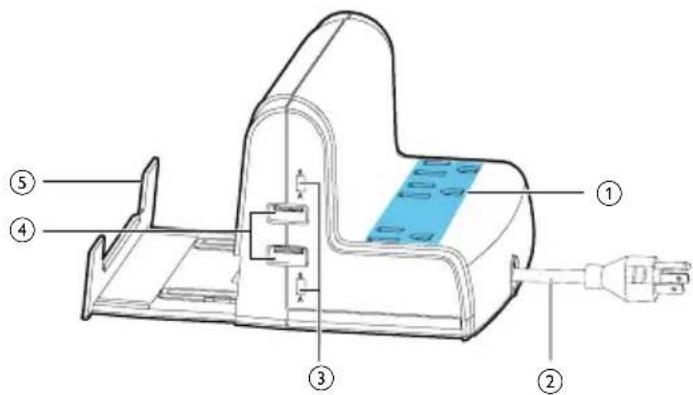
① AC outlet
② Power cord
③ USB charging configuration switch
④ USB charging port
⑤ Slide-out tray
3 Get started

Warning
•To avoid any potential hazard, use the power source supplied by your local authorities.
1 Put the desktop charging station on a flat surface.
2 Plug the desktop charging station into a properly grounded outlet.
4 Power/Charge your devices
You can power or charge your devices with this desktop charging station.
Power/Charge from AC outlet
There are three AC outlets in this desktop charging station.
1 Plug a proper charging adaptor (not included) into the AC outlet.
2 Connect your device to output of the charging adaptor.
→ The connected device is powered or charged.
Charge from USB port
There are two USB charging ports in this surge protector. Each USB charging port is controlled by a related USB charging configuration switch. You can set the switch to A for charging iPod, iPhone or iPad and set the switch to B for charging other USB devices.
1 Set the USB charging configuration switch to A or B.
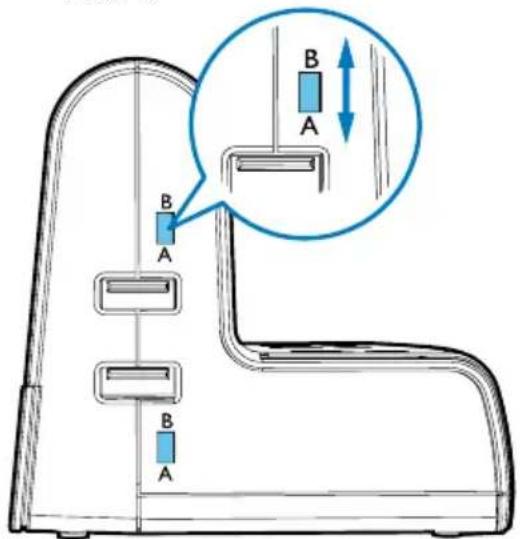
2 Connect your device to the desktop charging station with a proper USB cable (not included). → The connected device is charged.

Tip
- If your device is not charged, try to reset the USB charging configuration switch, unplug the desktop charging station, and repeat the steps above.
- If you choose a wrong switch setting, the connected device or the desktop charging station will not be damaged.
• In case a device can only be charged with its original adaptor, you can charge from an AC outlet of this desktop charging station.
Use the slide-out tray
The slide-out tray can hold the charged device securely.
1 Slide out the tray.
2 Put the charged device on the tray.

natural_image
Illustration of a smartphone mounted on a stand with an upward arrow indicating motion (no text or symbols present)5 Limited warranty
Limited One-Year Warranty
Philips warrants that this product shall be free from defects in material, workmanship and assembly, under normal use, in accordance with the specifications and warnings, for a period of one year from the date of purchase.
This warranty does not cover damages (a) as a result of an accident; (b) resulting from the use of parts not manufactured or sold by Philips; (c) or resulting from modification of the surge protector. After any repair or modification of the surge protector by a facility not authorized by Philips, any problems that arise will not be remedied under this warranty.
These warranties extend only to the original purchaser of the product, and are not transferable. To exercise your rights under this warranty, you must provide proof of purchase in the form of an original sales receipt that shows the product name and the date of purchase.
For customer support or to obtain warranty service, please visit our website www.philips.com/support. There are no other express or implied warranties. Philips' liability is limited to repair or, at its sole option, replacement of the product. Incidental, special and consequential damages are disclaimed where permitted by law. This warranty gives you specific legal rights. You may also have other rights that vary from state to state.

Brand : PHILIPS
Model : SPS1038C
Category : Chair