
PWR-960-48 - Computers and Peripherals Planet - Free user manual and instructions
Find the device manual for free PWR-960-48 Planet in PDF.


| Type | Industrial DIN-rail Power Supply |
| Model | PWR-960-48 (Mean Well SDR-960-48) |
| Power Output | 960W, 48V DC, 20A |
| Input Voltage | 200-240V AC, 50/60Hz, 6A |
| Dimensions (W x D x H) | 110 x 125 x 150 mm |
| Weight | 2.4 kg |
| Operating Temperature | -30°C to 70°C |
| Storage Temperature | -40°C to 85°C |
| Humidity (Operating) | 20% to 95% (non-condensing) |
| Installation | DIN rail TS-35/7.5 or TS-35/15 |
| Output Voltage Adjustment | 48V to 55V (via +V ADJ trimmer) |
| DC OK LED Indicator | Solid green when output is normal |
| DC OK Relay Contact | 1 set, 30V DC / 1A resistive load |
| Safety Approvals | UI508, TUV EN62368-1 (meets EN60204-1) |
| Protection | Short circuit, overload, overvoltage, overtemperature |
| Cooling | Convection (fanless) |
| Maintenance | Clean with a dry cloth; no internal user-serviceable parts |
| Warranty | Standard manufacturer warranty (check reseller) |
Frequently Asked Questions - PWR-960-48 Planet
User questions about PWR-960-48 Planet
0 question about this device. Answer the ones you know or ask your own.
Ask a new question about this device
Download the instructions for your Computers and Peripherals in PDF format for free! Find your manual PWR-960-48 - Planet and take your electronic device back in hand. On this page are published all the documents necessary for the use of your device. PWR-960-48 by Planet.
USER MANUAL PWR-960-48 Planet
DC Single Output Industrial
DIN-rail Power Supply
PWR-40-24/PWR-60-24/PWR-75-24/PWR-75-48 PWR-120-48/PWR-240-48/PWR-480-48/PWR-960-48 User's Manual
Table of Contents
- Package Contents....3
- Requirements....5
- AC Power Cord Installation....6
- DC Power Terminal Block Installation 10
- Product Specifications.... 14
1. Package Contents
Thanks for purchasing DC Single Output Industrial DIN-rail Power Supply units from PLANET technology; the DC Single Output Industrial DIN-rail Power Supply units can transform AC power into DC power output for PLANET Industrial devices.
The following are the descriptions of the DC Single Output Industrial DIN-rail Power Supply units:
| Model Name Description | Operating Temperature | |
| PWR-40-24(MEAN WELL MDR-40-24) | 40W 24V DC Single OutputIndustrial DIN-rail Power Supply | -20 ~ 70 degrees C |
| PWR-60-24(MEAN WELL MDR-60-24) | 60W 24V DC Single OutputIndustrial DIN-rail Power Supply | -20 ~ 70 degrees C |
| PWR-75-24v2(MEAN WELL NDR-75-24) | 75W 24V DC Single OutputIndustrial DIN-rail Power Supply | -20 ~ 70 degrees C |
| PWR-75-48(MEAN WELL NDR-75-48) | 75W 48V DC Single OutputIndustrial DIN-rail Power Supply | -20 ~ 70 degrees C |
| PWR-120-48v2(MEAN WELL NDR-120-48) | 120W 48V DC Single OutputIndustrial DIN-rail Power Supply | -20 ~ 70 degrees C |
| PWR-240-48v2(MEAN WELL NDR-240-48) | 240W 48V DC Single OutputIndustrial DIN Rail Power Supply | -20 ~ 70 degrees C |
| PWR-480-48v2(MEAN WELL NDR-480-48) | 480W 48V DC Single OutputIndustrial DIN-rail Power Supply | -20 ~ 70 degrees C |
| PWR-960-48(MEAN WELL SDR-960-48) | 960W 48V DC Single OutputIndustrial DIN-rail Power Supply | -30 ~ 70 degrees C |

Note
Strongly recommend to use the 24V DC Single Output Industrial DIN-rail Power Supply units for Industrial non-PoE devices and the 48V DC Single Output Industrial DIN-rail Power Supply units for Industrial PoE devices.
The box should contain the following items:
● The DC Single Output Industrial DIN-rail Power Supply Unit x 1
- This User's Manual x 1
If any item is found missing or damaged, please contact your local reseller for replacement.
2. Requirements
The DC Single Output Industrial DIN-rail Power Supply units are designed for providing DC power to PLANET Industrial devices. For AC power input and DC power output from DC Single Output Industrial DIN-rail Power Supply units, the following are necessary for further installation.
- AC Power Cord Cable x 1
● Terminal Block Connector within Two DC Power Inputs Wires
● Cutting Tools: Long Nose Plier and Cutter

-
Before working on the device, please make sure power cord has to unplug from power outlet.
-
PLANET DIN-rail power supply series is for indoor use only.
-
PLANET DIN-rail power supply series must be earthed.
3. AC Power Cord Installation
The DC Single Output Industrial DIN-rail Power Supply unit's power requirement is 100-240V AC, 50/60Hz with power input lines. Suggest you use a standard AC power cord.
Step 1: Use a cutter to cut open the AC power cord.
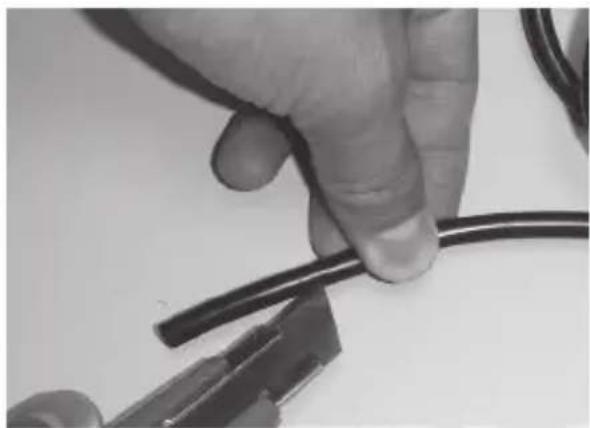
Step 2: Open the AC power cord and there are 3 wires inside.

Step 3: Use a long nose plier to remove the jackets of the 3 wires.
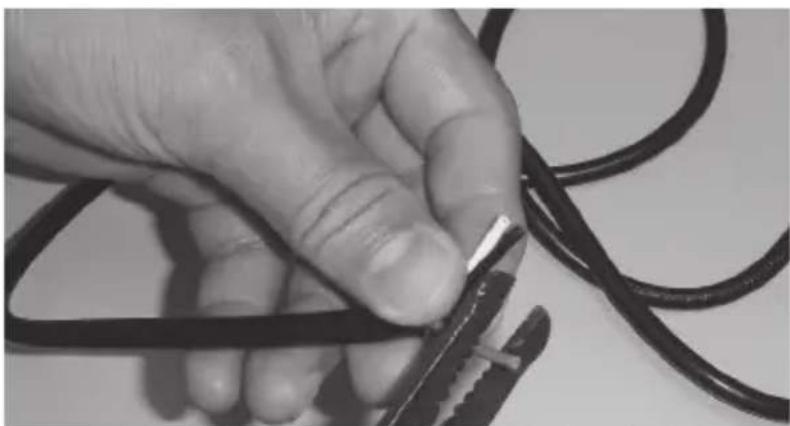
Step 4: Make sure the wires are neatly straightened.

Step 5: The 3 wires should consist of a live wire, neutral wire and earth wire.


Note
For the standard AC power cord, live wire is black, neutral wire is white and earth wire is green. Please verify these 3 wires from your AC power cord before starting the following procedure.
| Live wire Black color | |
| Neutral wire White color | |
| Earth wire Green color |
Step 6: Please connect the live wire, neutral wire and earth wire to the corresponding location.
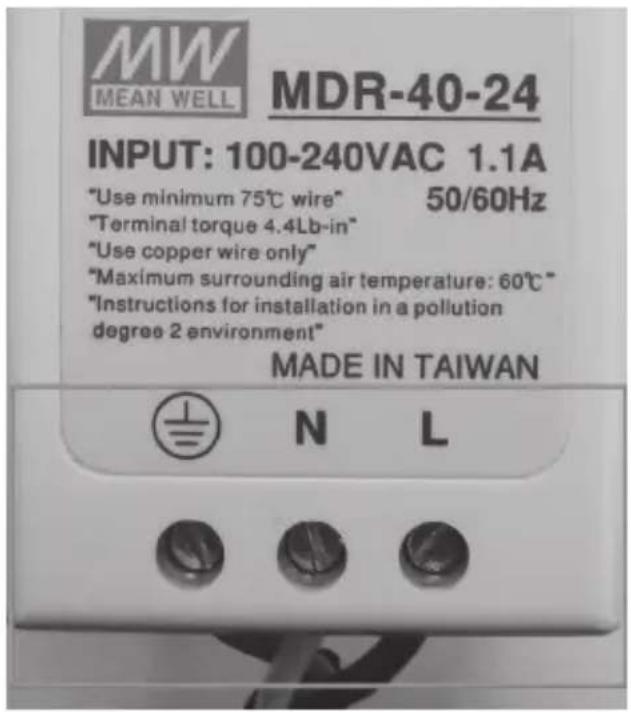
Figure 1: Connecting the 3 wires to the corresponding location
Wiring the AC Power Input:

: Earth wire

: Neutral wire

: Live wire

Note
- Please do not connect the power plug of the power cable to a standard wall outlet during this installation.
- The example is based on PWR-40-24 for PWR-60-24, PWR-75-24v2, PWR-75-48, PWR-120-48v2, PWR-240-48v2, PWR-480-48v2 and PWR-960-48. The indication is the same, but on a different location.
Step 7: Please connect the power plug of the power cable to a standard wall outlet to power on the DC Single Output Industrial DIN-rail Power Supply units.
When the DC Single Output Industrial DIN-rail Power Supply units receive power, the "DC OK" LED should remain solid Green.
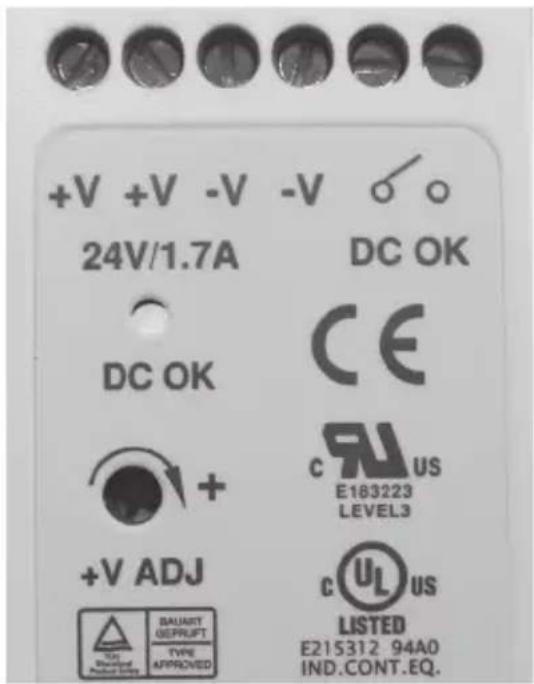
Figure 2: "DC OK" LED of DC Single Output Industrial DIN-rail Power Supply units.

Note
- The example is based on PWR-40-24 for PWR-60-24, PWR-75-24v2, PWR-75-48, PWR-120-48v2, PWR-240-48v2, PWR-480-48v2 and PWR-960-48. The DC OK indication is the same, but on a different location.
- As +V ADJ is for O/P voltage adjustment, the range is shown as PWR-40-24/PWR-60-24: 24V to 30V. PWR-75-24v2: 24V to 28V. PWR-75-48/PWR-120-48v2/PWR-240-48v2/PWR-480-48v2/PWR-960-48:48V to 55V. Adjustable with screw-driver and voltage measure with multimeter.
- Please ensure the output voltage is correct for remote device. Otherwise, it will damage your remote device.
4. DC Power Terminal Block Installation
The DC Single Output Industrial DIN-rail Power Supply units consist of two sets of DC power output contact and one set of DC OK Relay contact (PWR-40-24, PWR-60-24 and PWR-960-48 only).
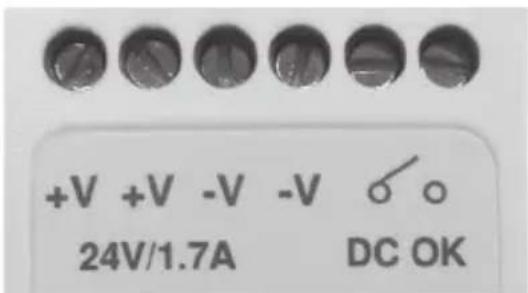
Figure 3: DC Single Output Industrial DIN-rail Power Supply Upper Panel.

- The example is based on PWR-40-24 for PWR-60-24 and PWR-960-48 whose the DC OK contact location and indication are the same.
- In this chapter, the example is based on PWR-40-24 for PWR-75-24v2, PWR-75-48, PWR-120-48v2, PWR-240-48v2 and PWR-480-48v2, where there is no DC OK Relay Contact.
Wiring the Power Inputs
The two sets of the DC power output contact of the DC Single Output Industrial DIN-rail Power Supply units are used for connecting to terminal block with two DC redundant power inputs.

Please do not connect the power plug of the power cable to a standard wall outlet during this installation.
Please follow the steps below to insert the power wire.
Step 1: Please find one terminal block connector within two DC power inputs. The power contact distributor is shown below:

1 2 3 4 5 6 Power 1 Alarm Power 2 + - + -

Note
The wire gauge for the terminal block should be in the range between 12 and 24 AWG.
Step 2: Insert 4 DC power wires into Contacts 1 and 2 for Power 1, or Contacts 5 and 6 for Power 2.
Step 3: Connect the 4 DC power wires from the terminal block to the DC power output contact of the DC Single Output Industrial DIN-rail Power Supply units.
Step 4: Tighten the wire-clamp screws for preventing the wires from loosening.
V+ V+ V- V- Relay Contact
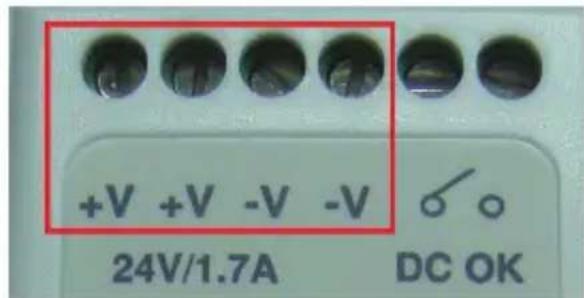
Step 5: Install the terminal block on PLANET Industrial Ethernet device.
Step 6: Connect the power plug of the power cable to a standard wall outlet to enable the DC Single Output Industrial DIN-rail Power Supply units to provide power to PLANET Industrial Ethernet device.
DC OK Relay Contact (PWR-40-24/PWR-60-24/PWR-960-48 Only)
The PWR-40-24/PWR-60-24/PWR-960-48 DC Single Output Industrial DIN-rail Power Supply unit provides DC OK Relay Contact function, as the detailed description is shown below:
| Contact Close | When the output voltage reaches the adjusted output voltage. |
| Contact Open | When the output voltage drops below 90% of output voltage. |
| Contact Ratings (max.) | PWR-40-24/PWR-60-24/PWR-960-4830V DC, 1A resistive load. |
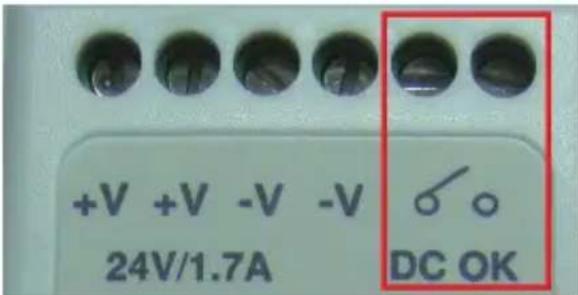
Contact
DC OK Relay

Note
The wire gauge for the terminal block should be in the range between 12 and 24 AWG.
DIN-rail Mounting
The DC Single Output Industrial DIN-rail Power Supply units come with DIN rail when out of factory. To hang the DC Single Output Industrial DIN-rail Power Supply units, follow the steps below:

Note
-
The example is based on PWR-40-24 for PWR-60-24, PWR-75-24v2, PWR-75-48, PWR-120-48v2, PWR-240-48v2, PWR-480-48v2 and PWR-960-48. The installation is the same.
-
Admissible DIN rail: TS35/7.5 or TS35/15.
Step 1: Lightly slide the bottom of the DIN rail into the track.

Step 2: Check whether the DIN rail is tightly on the track.

Step 3: Please refer to the following procedure to remove the DC Single Output Industrial DIN-rail Power Supply unit from the track.

Step 4: Lightly pull out the bottom of the DIN rail to remove it from the track.
5. Product Specifications
| Model | PWR-40-24(MEAN WELLMDR-40-24) | PWR-60-24(MEAN WELLMDR-60-24) | PWR-75-24v2(MEAN WELLNDR-75-24) |
| Hardware Specifications | |||
| Dimensions(W x D x H) | 40 x 100 x 90mm | 40 x 100 x 90mm | 32 x 102 x 125mm |
| Weight (kg) | 0.3kg 0.3kg 0.5kg | ||
| Input Voltage | 100-240V AC,50/60Hz, 1.1A | 100-240V AC,50/60Hz, 1.8A | 100-240V AC,50/60Hz, 1.45A |
| Power Output | 40 watts, 24V, 1.7A | 60 watts, 24V, 2.5A | 75 watts, 24V, 3.2A |
| Temperature | Operating:-20~70 degrees CStorage:-40~85 degrees C | Operating:-20~70 degrees CStorage:-40~85 degrees C | Operating:-20~70 degrees CStorage:-40~85 degrees C |
| Humidity | Operating: 20~90%Storage: 10~95% (non-condensing) | Operating:20~95%Storage: 10~95%(non-condensing) | |
| Installation DIN rail TS-35/7.5 or 15 | |||
| Safety & Function* | PWR-40-24 (MEAN WELL MDR-40-24):UL508, UL60950-1, TUV EN60950-1 approved, NEC class 2/LPS compliant.PWR-60-24 (MEAN WELL MDR-60-24)/PWR-75-24 (MEAN WELL NDR-75-24):UL508, TUV EN60950-1 approved | ||
| Model | PWR-75-48(MEAN WELL NDR-75-48) | PWR-120-48v2(MEAN WELL NDR-120-48) | PWR-240-48v2(MEAN WELL NDR-240-48) |
| Hardware Specifications | |||
| Dimensions(W x D x H) | 32 x 102 x 125mm | 40 x 113 x 125mm | 63 x 113 x 125mm |
| Weight (kg) | 0.5kg 0.6kg 1kg | ||
| Input Voltage | 100-240V AC,50/60Hz, 1.45A | 100-240V AC,50/60Hz, 2.25A | 100-240V AC,50/60Hz, 2.5A |
| Power Output | 75 watts, 48V, 1.6A | 120 watts, 48V, 2.5A | 240 watts, 48V, 5A |
| Temperature | Operating:-20~70 degrees CStorage:-40~85 degrees C | Operating:-20~70 degrees CStorage:-40~85 degrees C | Operating:-20~70 degrees CStorage:-40~85 degrees C |
| Humidity | Operating: 20~95%Storage: -40~85 degrees C, 10~95% (non-condensing) | ||
| Installation DIN rail TS-35/7.5 or 15 | |||
| Safety & Function* | UI508, TUV EN60950-1 approved (meeting EN60204-1) | ||
| Model | PWR-480-48(MEAN WELL NDR-480-48) | PWR-960-48(MEAN WELL SDR-960-48) |
| Hardware Specifications | ||
| Dimensions(W x D x H) | 85 x 128 x 125mm 110 x 125 x 150mm | |
| Weight (kg) 1.5kg 2.4kg | ||
| Input Voltage | 100-240V AC, 50/60Hz, 4.8A 200-240V AC, 50/60Hz, 6A | |
| Power Output | 480 watts, 48V, 10A 960 watts, 48V, 20A | |
| Temperature | Operating: -20~70 degrees CStorage: -40~85 degrees C | Operating: -30~70 degrees CStorage: -40~85 degrees C |
| Humidity | Operating: 20~95%Storage: 10~95% (non-condensing) | |
| Installation DIN rail TS-35/7.5 or 15 | ||
| Safety & Function* | PWR-480-48 (MEAN WELL NDR-480-48):UI508, TUV EN60950-1 approved (meeting EN60204-1)PWR-960-48 (MEAN WELL SDR-960-48):UI508, TUV EN62368-1 approved (meeting EN60204-1) | |
* Note: The power supply is considered a component which will be installed into a device. The device must be re-confirmed that it meets EMC directive.
- DC SINGLE OUTPUT INDUSTRIAL
- DIN-RAIL POWER SUPPLY
- PWR-40-24/PWR-60-24/PWR-75-24/PWR-75-48 PWR-120-48/PWR-240-48/PWR-480-48/PWR-960-48 USER'S MANUAL
- TABLE OF CONTENTS
- PACKAGE CONTENTS
- REQUIREMENTS
- AC POWER CORD INSTALLATION
- WIRING THE AC POWER INPUT
- DC POWER TERMINAL BLOCK INSTALLATION
- WIRING THE POWER INPUTS
- DC OK RELAY CONTACT (PWR-40-24/PWR-60-24/PWR-960-48 ONLY)
- DIN-RAIL MOUNTING
- PRODUCT SPECIFICATIONS
Brand : Planet
Model : PWR-960-48
Category : Computers and Peripherals