
NMS-360V - NAS Planet - Free user manual and instructions
Find the device manual for free NMS-360V Planet in PDF.


| Product Type | Renewable Energy Management Controller with LCD Touch Screen |
| Model Variants | NMS-360V-10 (10.1" display), NMS-360V-12 (12.1" display) |
| Display Size | 10.1" TFT-LCD (NMS-360V-10) / 12.1" TFT-LCD (NMS-360V-12) |
| Touch Type | Resistive Touch (NMS-360V-10) / Projected Capacitive Touch (NMS-360V-12) |
| Display Resolution | 1280x800 (NMS-360V-10) / 1024x768 (NMS-360V-12) |
| Display Luminance | 350 cd/m² (NMS-360V-10) / 500 cd/m² (NMS-360V-12) |
| Dimensions (W x D x H) | 285 x 49 x 189 mm (NMS-360V-10) / 319 x 51.7 x 245 mm (NMS-360V-12) |
| Weight | 2 kg (NMS-360V-10) / 2.9 kg (NMS-360V-12) |
| Storage | 2.5" 32GB SATA3 HDD |
| Ethernet Ports | 2 x 10/100/1000BASE-T Gigabit RJ45 |
| Power Input | DC 9-36V, 60W adapter (NMS-360V-10) / DC 12V 5A terminal block, AC 100-240V (NMS-360V-12) |
| Managed Devices | Up to 512 BSP-360 units |
| IP Rating | IP66 (front bezel) |
| Operating Temperature | 0 to 50°C |
| Mounting Options | Panel mount or VESA 100x100 |
| Key Management Features | Dashboard, Device List, Setup Wizard, Node Discovery, App-like Device Viewing, Event Table, Alarm System, Device Provisioning, Site Map, Remote PoE Control, User Control, Scalability |
| Network Management Protocols | SNMP v1/v2c/v3, DHCP server, RADIUS server, SSL, Web GUI |
| Regulatory Compliance | CE, FCC |
| Maintenance | Clean with dry cloth, avoid moisture and extreme temperatures. |
Frequently Asked Questions - NMS-360V Planet
User questions about NMS-360V Planet
0 question about this device. Answer the ones you know or ask your own.
Ask a new question about this device
Download the instructions for your NAS in PDF format for free! Find your manual NMS-360V - Planet and take your electronic device back in hand. On this page are published all the documents necessary for the use of your device. NMS-360V by Planet.
USER MANUAL NMS-360V Planet
Renewable Energy Management Controller
with LCD Touch Screen
NMS-360V
Quick Installation Guide
Table of Contents
- Package Contents .... 3
- Hardware Description.... 4
2.1 Physical Specifications.... 5
2.2 Product Features 7
2.3 Specifications 8
- Deployed Devices Monitored via NMS-360V Controller 10
- Wired Network Configuration 12
- Entering into the Web Management....13
- Setup Wizard ....14
Further Information ....16
1. Package Contents
Thank you for purchasing PLANET Universal Network Management Controller. PLANET NMS-360V comes in two sizes as described below:
NMS-360V-12 Renewable Energy Management Controller with 12" LCD Touch Screen
NMS-360V-10 Renewable Energy Management Controller with 10" LCD Touch Screen
Package Contents:
● The NMS-360V Controller x 1
- Quick Installation Guide x 1
- Adapter with Power Cord x 1
- Installation Kit x 1
If any item is found missing or damaged, contact your local reseller for replacement.
2. Hardware Description
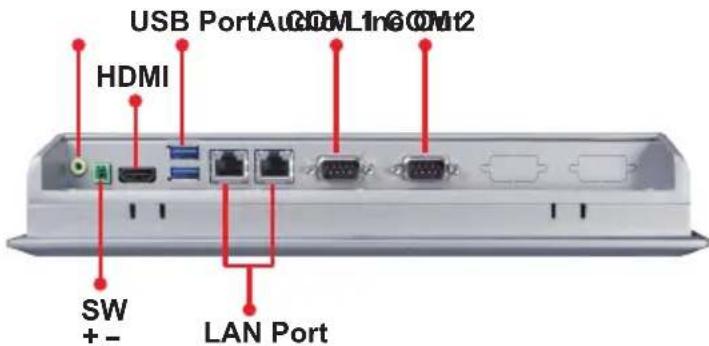
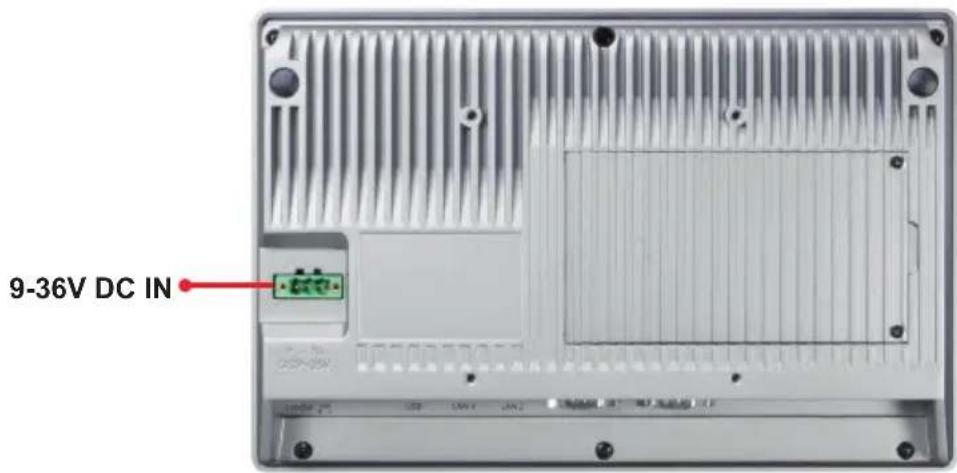
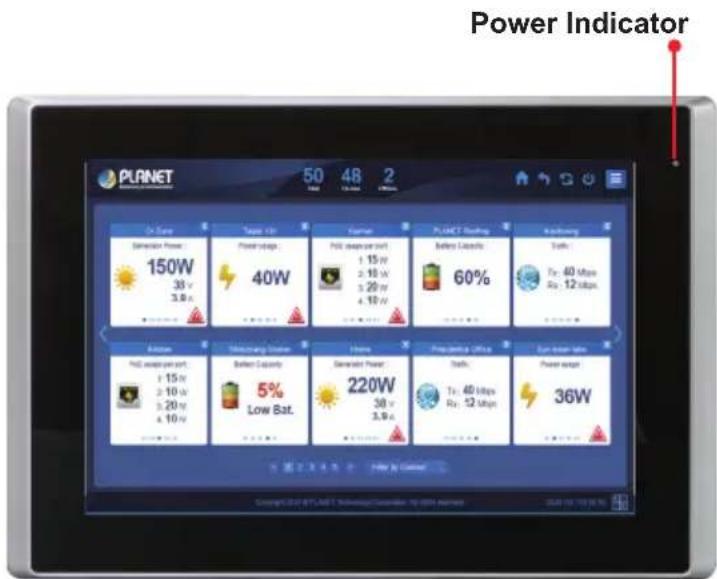
2.1 Physical Specifications
| Model NMS-360V-10 NMS-360V-12 | ||
| Dimensions (W x D x H) 285 | x 49 x 189 mm 319 x 51.7 x 245 mm | |
| Weight 2 kg 2.9 kg | ||
NMS-360V-10 (10" Panel)

UNIT: mm
Tolerance: ±0.5
NMS-360V-12 (12" Panel)

UNIT: mm
Tolerance: ±0.5
VESA Mounting
The NMS-360V series is designed to be VESA-mounted as shown in the picture. Just carefully place the LCD stand on the back of the controller and tighten the given screws to secure the mounting.

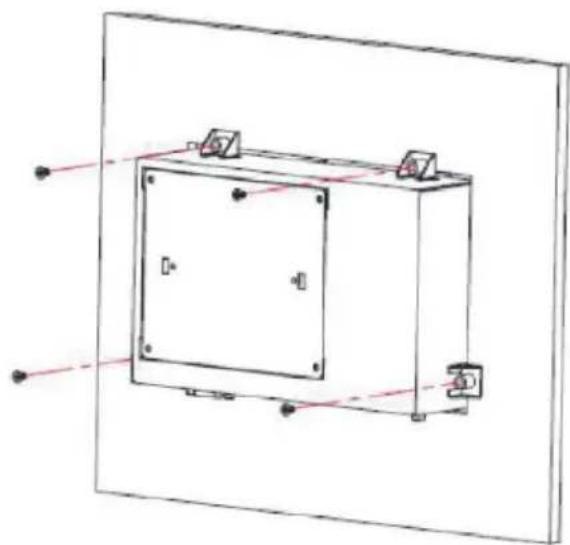
Panel Mounting
There are eight holes located along the four sides of the NMS-360V. Insert the clamp from the four sides and tighten them with the nuts provided.
2.2 Product Features
▶ Network Devices Management
| Dashboard | Providing the at-a-glance view of system, power, traffic, and device event statuses. |
| Device List Providing | devices status overview and managed function. |
| Setup Wizard Easy to | use step-by-step guidance. |
| Node Discovery | Management is carried out once a BSP-360-powered device is detected. |
| App-like Device Viewing | App-like devices that are compliant with SNMP, MQTT, and Smart Discovery. |
| Event Table The status | us of system can be reported via event alarm. |
| Alarm System E-mail | alerts for the administrator via the SMTP server. |
| Device Provisioning | Enabling BSP-360 to be configured and upgraded at the same time. |
| Site Map | Real-time site map of BSP-360 and IP cams on the user-defined map to optimize energy deployment. |
| Remote PoE control | Real-time remote PoE on/off to reboot connected devices. |
| User Control | Allowing on-demand account creation and user-defined access policy. |
| Scalability | Free system upgrade and BSP-360 firmware bulk upgrade capability. |
| Maximum Scalability | 1 site map, 512 nodes, 2048 managed IP cameras. |
▶ Network Management Characteristics
● Built-in DHCP Server
● Built-in RADIUS Server
- SSL secure access
● Web-based GUI management interface
- SNMP v1, v2c, and v3 management
● Supports PLANET DDNS/Easy DDNS
2.3 Specifications
| Product | NMS-360V-10 NMS-360V-12 | |
| Renewable Energy Management Controller with LCD Touch Screen | ||
| Platform | ||
| Form Factor Panel Mount, VESA 100 x 100 | ||
| Physical Specifications | ||
| I/O Interface | 2 10/100/1000BASE-T Gigabit Ethernet RJ45 ports | |
| 2 USB 3.0 ports (They cannot be used at the same time.) | ||
| 1 Audio Line Out (reserved) | ||
| 1 HDMI interface | ||
| 2 DB-9 COM1,COM2 (reserved) | ||
| 1 3-pin DC power input terminal | ||
| 1 2-pin connector for power on/off button (reserved) | ||
| Storage 2.5" 32G SATA3 HDD | ||
| Touch LCD Size 10.1" TFT-LCD | 12.1" TFT-LCD | |
| Touch Type Resistive Touch Window Projected Capacitive Touch | ||
| Display Resolution 1280 x 800 | 1024 x 768 | |
| Display Luminance (cd/m2) 350 | 500 | |
| Display Viewing Angle (H°/V°) | 160(H) / 160(V) | 160(H) / 140(V) |
| Display Contrast | 800:1 | 700:1 |
| Display Backlight Lifetime (hrs) | 40,000 hrs | 30,000 hrs |
| Light Transmission (%) | Resistive Touch Window: over 80% Projected Capacitive Touch: over 90% | |
| Enclosure | Aluminum Die-casting Chassis | |
| Power Requirements | DC IN 9~36V 60W adapter 12V 5A with terminal block AC 100~240V, 2.0A, 60~50Hz. | |
| Environment & Certification | ||
| IP Rating | IP66-rated front bezel | |
| Temperature | Operating: 0 ~ 50 degrees C Storage: -30 ~ 70 degrees C | |
| Humidity | 10 ~ 90% relative humidity (non-condensing) | |
| MTBF (Hours) | 100,000 | |
| Network Management | ||
| Number of Managed Devices | 512 BSP-360 units | |
| Auto Discovery Supports PLANET BSP-360 | ||
| Dashboard | Providing the at-a-glance view of system, power, traffic, system statistics and device event statuses | |
| Device List | Providing devices status overview and managed function | |
| Setup Wizard Easy-to-use step-by-step guidance | ||
| Node Discovery | Management is carried out once a BSP-360-powered device is detected | |
| App-like Device Viewing | App-like devices that are compliant with SNMP, MQTT, and Smart Discovery | |
| Event Table | The status of system can be reported via event alarm | |
| Alarm System | E-mail alerts for the administrator via the SMTP server | |
| Device Provisioning | Enabling BSP-360 to be configured and upgraded at the same time | |
| Site Map | Real-time site map of BSP-360 and IP cams on the user-defined map to optimize energy deployment | |
| Remote PoE control | Real-time remote PoE on/off to reboot connected devices | |
| User Control | Allowing on-demand account creation and user-defined access policy | |
| Scalability | Free system upgrade and BSP-360 firmware bulk upgrade capability | |
| Backup/Restoration Provides system and profile backup/restoration | ||
| Network Services | ||
| Network | DDNS Supports PLANET DDNS/Easy DDNS | |
| DHCP Built-in DHCP Server for auto IP assignment to APs | ||
| Management | Console; Telnet; SSL;Web browser (Chrome is recommended); SNMP v1, v2c, v3 | |
| Discovery Supports SNMP, ONVIF and PLANET Smart Discovery | ||
| Maintenance | Backup System backup and restore to local or USB HDD | |
| Reboot | Provides system reboot manually or automatically per power schedule | |
| Diagnostic Provides IPv4/IPv6 ping and trace route | ||
| Standards Conformance | ||
| Regulatory Compliance CE, FCC | ||
| Standards Compliance | IEEE 802.3 10BASE-TIEEE 802.3u 100BASE-TXIEEE 802.3ab Gigabit 1000BASE-T | |
| [Remarks] Only support BSP-360 V2 version. | ||
3. Deployed Devices Monitored via NMS-360V Controller
Prior installation
The NMS-360V is used to centrally manage a large number of BSP-360s(V2). Therefore, you need to upgrade the BSP-360(V2) firmware before using NMS-360V.
Please download and use the latest BSP-360(V2) firmware from the website that setting can be completed smoothly.
The NMS-360V incorporated in a workstation or PC can monitor the BSP-360s compliant with the MQTT Protocol, SNMP Protocol, ONVIF Protocol and PLANET Smart Discovery utility.
Follow the steps below to set up the NMS-360V and BSP-360(V2) accordingly.
Step 1. Connect the devices, NMS-360V Controller and your computer, to the same network.
![graph LR A["Managed AP 192.168.1.x"] -->|PoE| B["BSP-360 192.168.1.x"] C["IP Camera 192.168.1.x"] -->|PoE| B B --> D["NMS-360V Default IP: 192.168.1.100"] D --> E["PC / Workstation with Web Browser 192.168.1.x"]](/content/2026/06/1225136/images/4c0646e1db0bc61e5fb2312e8e0ce0790b2ad939a4af22562f88b604b1be0183.jpg)
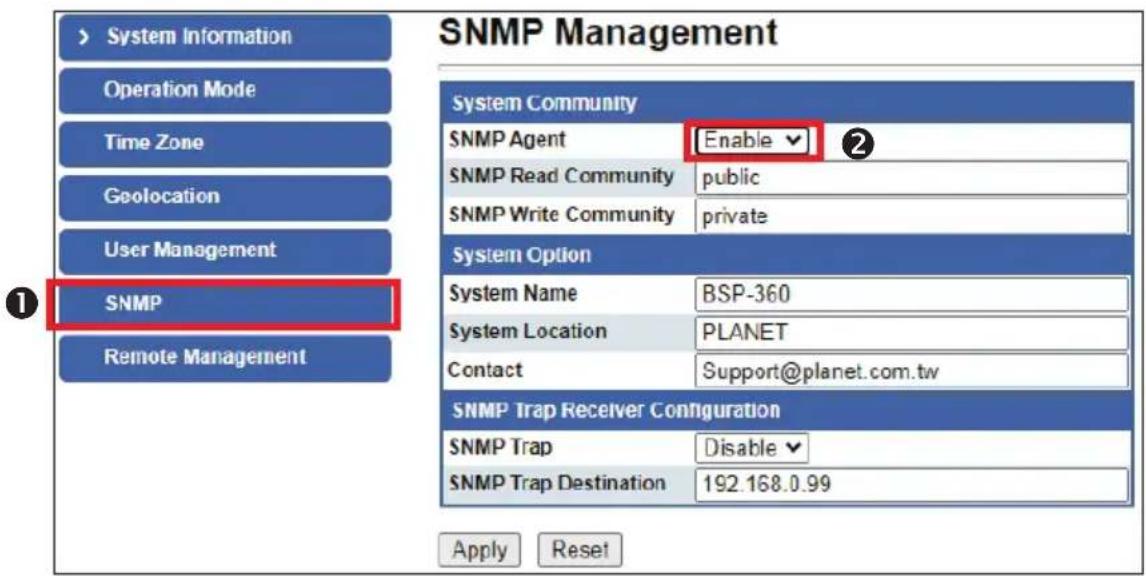
Step 2. BSP-360: Log in to the Switch's Web User Interface and enable the SNMP and NMS controller functions.

4. Wired Network Configuration
A computer with wired Ethernet connection is required for the first-time configuration of the NMS-360V Controller.

NMS-360V
IP Address: 192.168.1.100
RJ45/UTP Cable
PC / Workstation with Web Browser 192.168.1.x
- Go to "Control Panel-> Network and Sharing Center-> Change Adapter Settings".
- Double-click "Local Area Connection".
- Select "Internet Protocol version 4 (TCP/IPv4)" and click "Properties".
- Select "Use the following IP address" and then click the "OK" button twice to save the configuration. For example, the default IP address of the I 360V Controller is 192.168.1.100, then the manager PC should be set to 192.168.1.x (where x is a number between 1 and 254, except 100), and the default subnet mask is 255.255.255.0.


5. Entering into the Web Management
Default IP Address: 192.168.1.100
Default Management Port: 8888
Default Username: admin
Default Password: admin
Launch the Web browser (Google Chrome with seamless mode is recommended.) and enter the default IP address "https://192.168.1.100:8888". Then, enter the default username and password shown above to log on to the system.
* The secure login with SSL (HTTPS) prefix is required.

After logging on, connect the NMS-360V Controller to the managed network to centrally control PLANET managed devices.
6. Setup Wizard
- Account Modification: Set a new account and password for security.

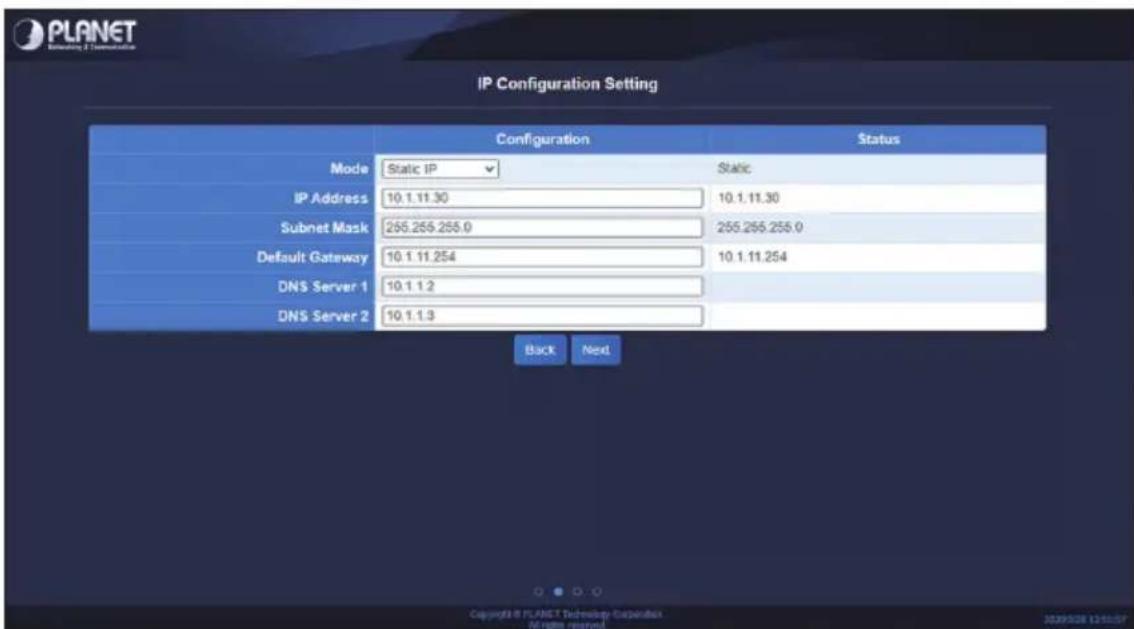
- IP Configuration Setting: Set the NMS-360V's IP into the same local network segment.
- Devices Discovery: Search the managed devices and add to list. (Finish Wizard)
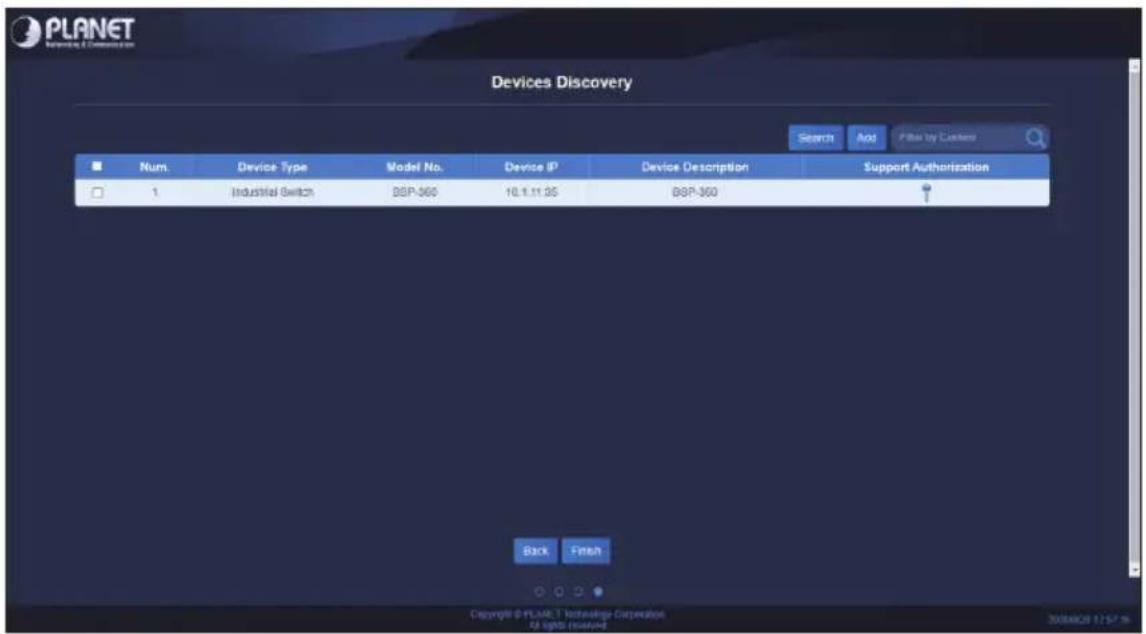
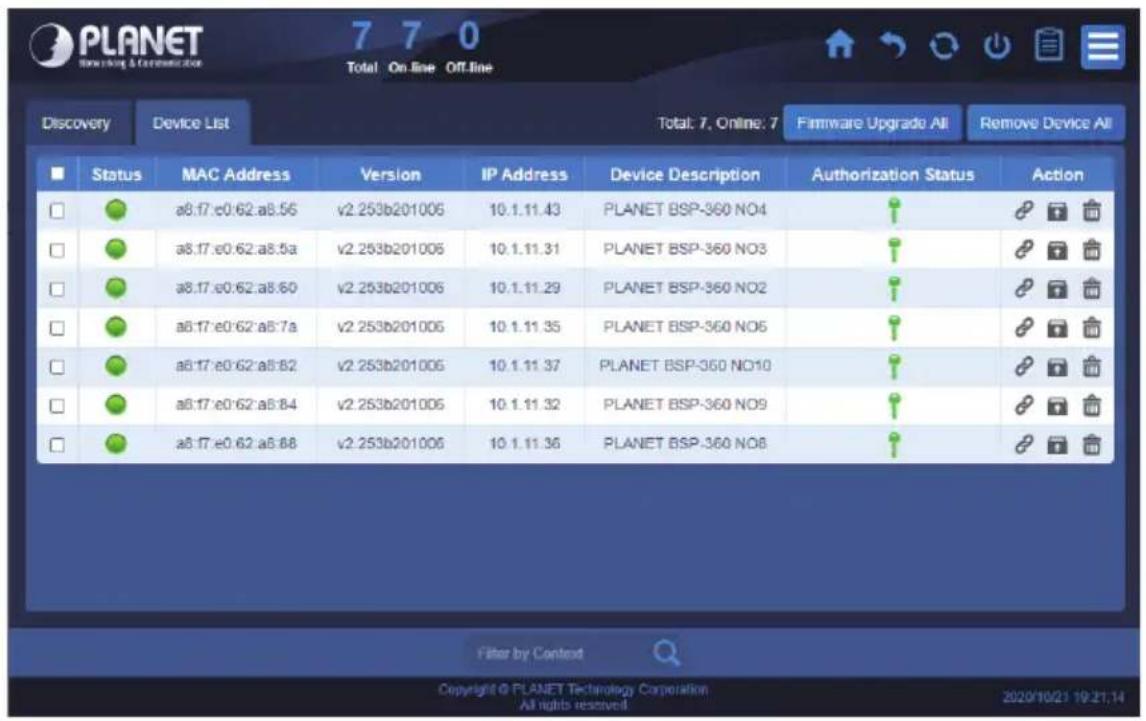
- If added devices are successful, you can see them in Device List / Management page.
Further Information
The above steps introduce the simple installations and configurations of the 360V Controller. For further configurations of PLANET NMS, please refer to the user manual, which can be downloaded from the website.
PLANET online FAQs:
http://www.planet.com.tw/en/support/faq
Support team mail address:
If you have further questions, please contact the local dealer or distributor where you purchased this product.
- RENEWABLE ENERGY MANAGEMENT CONTROLLER
- WITH LCD TOUCH SCREEN
- TABLE OF CONTENTS
- PACKAGE CONTENTS
- HARDWARE DESCRIPTION
- 2.1 PHYSICAL SPECIFICATIONS
- VESA MOUNTING
- PANEL MOUNTING
- 2.2 PRODUCT FEATURES
- NETWORK DEVICES MANAGEMENT
- NETWORK MANAGEMENT CHARACTERISTICS
- DEPLOYED DEVICES MONITORED VIA NMS-360V CONTROLLER
- PRIOR INSTALLATION
- WIRED NETWORK CONFIGURATION
- ENTERING INTO THE WEB MANAGEMENT
- SETUP WIZARD
- FURTHER INFORMATION
Brand : Planet
Model : NMS-360V
Category : NAS