
CAM-AHD425 - Security Camera Planet - Free user manual and instructions
Find the device manual for free CAM-AHD425 Planet in PDF.


| Product Type | AHD 1080p IR Security Camera |
| Model | CAM-AHD425 |
| Image Sensor | SONY 1/2.8" 2MP CMOS |
| Effective Resolution | 1920 (H) x 1080 (V) @ 30fps |
| Lens | 3.6mm / F1.2 (Fixed board lens) |
| Minimum Illumination | 0.01 lux (F1.2), 0 lux with IR |
| IR LED Count | 24 pcs Φ5 LEDs |
| IR Projection Distance | 25 meters |
| Video Output | BNC (AHD/TVI/CVI/CVBS selectable) |
| Signal Modes | AHD, TVI, CVI, CVBS (switchable via OSD button) |
| Day & Night | Auto / Color / B/W / External |
| Wide Dynamic Range | D-WDR ON/OFF |
| White Balance | ATW / MWB |
| Gamma | 0.45 |
| Exposure Mode | Global / Center / BLC / FLC |
| Shutter Speed | 1/25s ~ 1/45,000s |
| Digital Noise Reduction | 2D DNR |
| Defog | Auto / ON / OFF |
| AGC | Auto / Manual |
| S/N Ratio | > 52 dB |
| Transmission Distance | Up to 300-500m (75-3 coaxial cable) |
| Power Supply | 12V DC, 1A (Max. ±5%) |
| Power Connector | DC jack (12V DC input) |
| Operating Temperature | -30°C to 50°C |
| Operating Humidity | ≤ 85% RH |
| Water Resistance Rating | IP65 |
| Dimensions (W x D x H) | 98 x 110 x 77 mm |
| Mounting | Wall or ceiling mount (screws included) |
| Package Contents | Camera, Quick Installation Guide, Screw packet |
| OSD Function | Configurable via OSD control button (exposure, DNR, special functions, adjust) |
| Cleaning | Gently clean lens with a soft, dry cloth |
| Safety Precautions | Use only 12V DC power adapter; ensure stable power output |
| Technical Support | Email: support_ica@planet.com.tw |
Frequently Asked Questions - CAM-AHD425 Planet
User questions about CAM-AHD425 Planet
0 question about this device. Answer the ones you know or ask your own.
Ask a new question about this device
Download the instructions for your Security Camera in PDF format for free! Find your manual CAM-AHD425 - Planet and take your electronic device back in hand. On this page are published all the documents necessary for the use of your device. CAM-AHD425 by Planet.
USER MANUAL CAM-AHD425 Planet
Quick Installation Guide
AHD Camera
CAM-AHD325/CAM-AHD425
AHD 1080p IR Camera

natural_image
Two white security cameras with circular lens designs against a blue background (no visible text or symbols)1. Packet Contents
VERIFY THE CONTENTS INSIDE THE PACKAGE BOX
The package should contain the items plus CAM-AHD325/CAM-AHD425. If any item is missing or damaged, please contact the seller immediately.


natural_image
Pure L-shaped metal angle line without any text or symbolsQuick installation guide x 1
Hex wrench x 1 (CAM-AHD325 only)


natural_image
Close-up of a plastic bag with a green plastic clip and a blue string attached (no text or symbols visible)CAM-AHD325 CAM-AHD425
Screw packet for each model x 1
2. Physical Introduction
CAM-AHD325 CAM-AHD425


OSD Control Button

| Connector Description | |
| Power Input Connect to a 12V DC power adapter. | |
| Video Output BNC connector for analog video output. | |
| OSD Control Button | Description |
| H AHD Mode | |
| T TVI Mode | |
| C CVI Mode | |
| A CVBS Mode | |
| Press & Direction Control | OSD Configuration |
3. Hardware Installation
- Place the camera in a suitable location and attach with screws.
- Adjust the camera to the correct direction.
- Connect a 12V DC power adapter to the power input connector.
- Connect to the DVR and select your channel. Next, select required mode via the OSD control button and hold the button for about 5 seconds to take effect. After that, the image of camera will be shown on the channel.
- Press the OSD control button to enter the main menu of OSD function for configuration
| Note | Before connecting the power adapter to the camera, please make sure the power output voltage is 12V DC (max. ±5%). If you are not sure of this part, we suggest you use a 12V DC switching power adapter. It can provide stable power output. |
3.1 OSD Function

3.2 Setting Steps
1. Exposure

2. Digital Noise Reduction

3. Special Functions
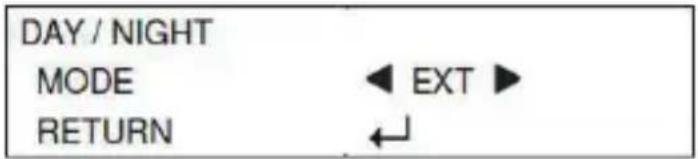
4. Adjust

4. Specifications
| Product | ||
| Model CAM-AHD325 CAM-AHD425 | ||
| Camera | ||
| Sensor SONY 1/2.8" 2MP CMOS | ||
| Effective Picture Elements | 1920(H) x 1080(V) @ 30fps | |
| Lens Furnished Board | Lens 3.6mm/F1.2 | |
| Minimum Illumination | 0.01 lux @ F1.2, 0 lux with built-in IR LED | |
| LED | ||
| IR LED 36pcs Φ5 LED | 24pcs Φ5 LED | |
| IR Project Distance 30 meters 25 meters | ||
| Video & Audio | ||
| Hybrid Signal Output | AHD/TVI/CVI/CVBS mode | |
| S/N Ratio More than 52 dB | ||
| Day & Night Auto/Color/B/W/EXT | ||
| D-WDR ON/OFF | ||
| White Balance ATW/MWB | ||
| Gamma Characteristics | 0.45 | |
| Exposure Mode | Globe/Center/BLC/FLC | |
| Shutter Speed | 1/25s~1/45,000s | |
| Digital Noise Reduction | 2D DNR | |
| Defog Auto/ON/OFF | ||
| AGC | Auto/Manual | |
| Transmission Distance | Coaxial transmission common 75-3 cable up to 300-500 meters | |
| Environment | ||
| Operating Temperature | -30 to 50 degrees C | |
| Humidity | ≤85%RH | |
| Power Supply | 12V DC, 1A | |
| Water Resistance | IP66 | IP65 |
| Dimensions (W x D x H) | 83 x 192 x 77 mm | 98 x 110 x 77 mm |
Further Information
If you have any other question, please contact the dealer where you purchased this product or you can contact PLANET directly at the following email address:
support_ica@planet.com.tw
www.PLANET.com.tw

Brand : Planet
Model : CAM-AHD425
Category : Security Camera