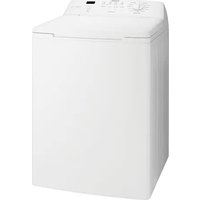
SWT8542A - Washing machine Simpson - Free user manual and instructions
Find the device manual for free SWT8542A Simpson in PDF.


| Product Type | Top-loading washing machine |
| Max. Dry Cloth Capacity | 8.5 kg |
| Control Panel | Electronic touchpad controls with LED display |
| Wash Programs | Regular, Cold Wash, Fast Wash, Delicates, Heavy Duty, Colours, Woollens, Handwash, Bedding, Drain+Spin, Rinse+Spin |
| Water Level Options | Auto, Full, Medium, Low |
| Water Temperature Options | Very Hot, Hot, Warm, Cold |
| Soak Time Options | No Soak, 15 min, 30 min, 45 min |
| Rinse Options | Fast, Eco, Deep, Extra |
| Rinse Type (Eco vs Deep) | Eco Rinse uses spray pulses (up to 6); Deep Rinse fills and agitates (uses ~40% more water) |
| Lid Lock Feature | Lid locks during spin for safety; LED indicator shows when locked |
| Out of Balance Detection | Stops spin cycle if load is unbalanced; display shows E17; redistribute load and close lid |
| Auto Water Level | Automatically senses and sets optimal water level for load size |
| Ultra Wash System | Uses less water, spraying action for faster detergent dissolution and gentle wash |
| Detergent Dispenser | Removable drawer with flap for powder or liquid detergent; fabric softener compartment (90ml max) |
| Bleach Dispenser | Separate compartment for oxygen or chlorine bleach |
| Lint Filter | Removable filter located inside wash bowl; clean after each wash |
| End of Wash Beep | Can be enabled or disabled via touchpad sequence |
| Safety Features | Lid lock, out of balance interruption, child supervision notice, hot water limit (70°C max) |
| Installation Requirements | Hot and cold water connections; drain hose; leveling feet; power point |
| Warranty | 24 months full warranty + 96 months parts only on inverter motor (if applicable) |
Frequently Asked Questions - SWT8542A Simpson
User questions about SWT8542A Simpson
0 question about this device. Answer the ones you know or ask your own.
Ask a new question about this device
Download the instructions for your Washing machine in PDF format for free! Find your manual SWT8542A - Simpson and take your electronic device back in hand. On this page are published all the documents necessary for the use of your device. SWT8542A by Simpson.
USER MANUAL SWT8542A Simpson
natural_image
Abstract geometric shape resembling a stylized letter 'G' in light gray tones, no text or symbols present.SECTION A: Knowing your washing machine
Conditions of use 3
Parts of the washing machine 3
Saving water and energy 3
The difference between the Deep Rinse and Eco Rinse options 4
Control panel 4
About your washing machine 5
SECTION B: Washing instructions
Sort your washing into separate wash loads 6
Check your clothes to avoid damage 6
Pre-treatment sprays and stain removers 6
Load the washing machine 6
Add the detergent 7
Adding fabric softener 7
Adding bleach 8
Choose the wash program 8
Your program guide 9
Choose the water level 9
Choose the wash water temperature 10
Choose the soak time 10
To start the wash cycle/program, Machine in pause mode, Wash cycle in progress,
End of program, Lid lock feature, Enabling/Disabling end of wash beep 11
SECTION C: Features of your washing machine
Information and guidance feature 12
13Rinse option
SECTION D: Caring for your washing machine
What to do after you have finished your washing 14
Cleaning the dispenser....14
Cleaning the lint filter 14
Cleaning your washing machine 14
Cleaning stains in the wash bowl 15
Avoiding build up of undissolved detergent 15
For your safety 15
SECTION E: Handy washing hints
Yellowing or greying clothes, Stained clothes 16
A guide to stain removal 17
SECTION F:
Do not call for service until you have checked these points 18
Other diagnostic help and a guide for when you should call for service 19
Warranty and Service Centres 23
SECTION A: Knowing your washing machine
CONDITIONS OF USE
This appliance is intended to be used in household and similar applications such as:
- Farm Houses.
- By clients in serviced apartments, holiday apartments and other residential type environments.
It must not be used for purposes other than those for which it was designed.
PARTS OF THE WASHING MACHINE
This booklet talks about different parts of your washing machine. The main ones you need to know are shown on the diagrams below.
FRONT BACK INSIDE
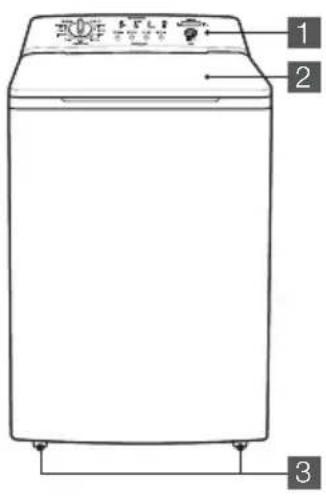


1 Control Panel, See Page 4-5
2 Machine Lid
3 Front Feet
4 POWER Switch ( ^** Some Models)
5 Water Inlet Hose
- RED fittings (Hot Water)
- BLUE fittings (Cold Water)
6 Mains Cable
7 Outlet Hose/Drain Hose (See installation instructions to fit & position drain hose)
8 Back Feet
9 Bleach Dispenser, See Page 8
10 Detergent Dispenser Drawer (**Some Models), See Page 7
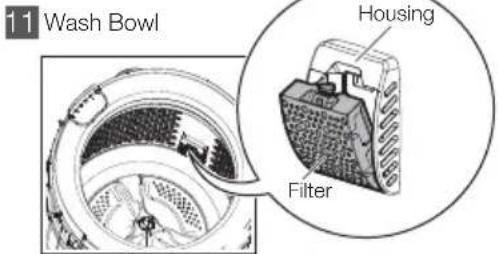
12 Low Profile Agitator
SAVING WATER AND ENERGY
This washing machine features water and energy saving options.
To save energy, the wash time can be shortened for a load of less dirty clothes by selecting the appropriate wash program e.g. Fast Wash.
The washing machine is energy efficient and most water efficient when used with a full load of clothes and with Eco Rinse selected. You should use Eco Rinse (where available) instead of Deep Rinse to reduce the amount of water used for rinsing clothes.
Your machine is most water efficient when Eco Rinse is used as the rinse option.
Each time you switch on your washing machine the machine will select most suitable rinse option for the selected program. You can change rinse option if you wish. See page 13 for more detail. The difference between Deep rinse and Eco rinse is explained on the next page.
THE DIFFERENCE BETWEEN THE DEEP RINSE AND ECO RINSE OPTIONS.
(See page 13 for rinse option instructions)
Eco Rinse Option
When Eco rinse is used, rinse water is sprayed into the wash bowl in pulses. After each pulse the wash bowl will spin to remove detergent laden water from the clothes.
Normally the machine will go through a series of six pulse sprays and short spin cycles in this manner, followed by the final long spin that removes the water from the clothes to complete the wash.
In some wash programs, the series of pulses, sprays and short spins may be less than six, e.g. Fast Wash has only 3 eco sprays for both Eco rinse and Fast rinse.
By selecting Eco rinse instead of Deep rinse, considerably less water will be used to remove detergent and dirty water from your clothes. However, the wash cycle will take longer to complete with Eco rinse. As a guide, Deep rinse uses approx. 40% more water than Eco rinse.
Eco rinse is not available with the Woollens or Bedding wash programs. When you choose these two programs, Deep rinse is automatically selected for you.
Deep Rinse Option
When Deep rinse is used, rinse water enters the washing machine filling up to the wash water level selected. The machine will then agitate and finally empty the water through the drain hose.
For the same wash cycle settings, Deep rinse uses up to 40% more water than Eco rinse but it will take less time to complete a full wash.

natural_image
Cartoon illustration of a smiling thumbs-up character (no text or symbols)CONTROL PANEL
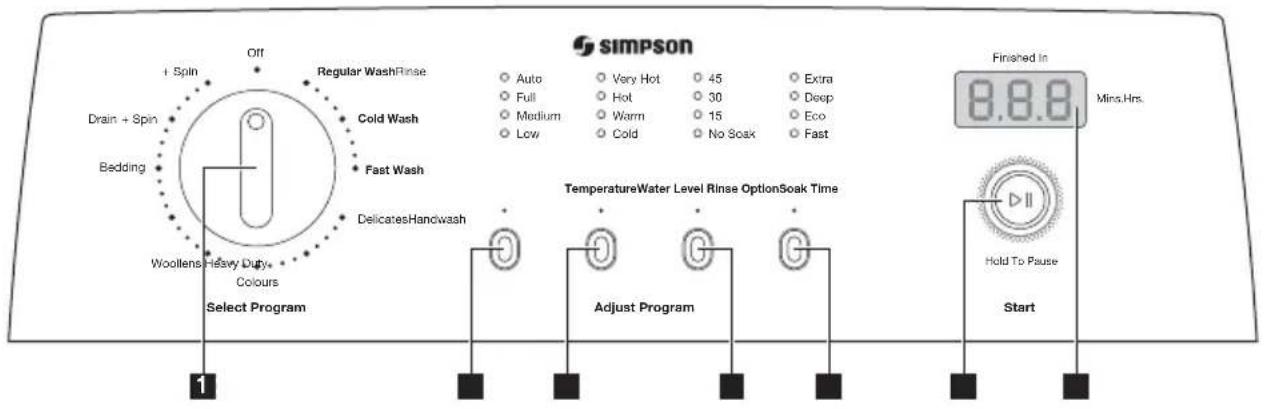
1 Program selector Knob (See page 8)
2 Water Level Touchpad (See page 9)
3 Temperature Touchpad (See page 10)
4 Soak Time Touchpad (See page 10)
5 Rinse Option Touchpad (See page 13)
6 Start/Hold To Pause Touchpad (See page 11)
7 Display (See page 11)
ABOUT YOUR WASHING MACHINE
• Out of Balance Interruption
The washing machine can stop during the spin stage of a wash because of an out of balance condition. The display will show "E17 and you will hear a short beep every second.
Out of balance during spin is caused by an uneven distribution of clothes in the wash bowl.
To rectify the out of balance condition, open the lid and redistribute the clothes evenly in the wash bowl. Closing the lid will start the machine and continue the spin stage of the wash.
If you have frequent out of balance interruptions, it may be due to your washing machine not standing firm and level on the floor. This can be corrected by adjusting the washing machine legs as described in the Installation Instructions supplied with your machine.
- Touchpad Response and Lights
Always press touchpads gently.
Watch the lights on the control panel to see the effect pressing a touchpad or turning a program selector knob has, and listen for "BEEPS".
When you press a touchpad you will get a short "BEEP" to acknowledge the entry. If the option is not available at the time, the machine will not allow you to select it. After the machine has started, the entire wash option touchpad will be disabled and machine will show "Err" on the display with three short beeps to indicate the touchpad is disabled. The Start/Hold To Pause touchpad is still active but you need to press and hold the touchpad for minimum 1.2 seconds to pause machine. This is to confirm that you really want to pause the machine. When in pause mode, all options will be able to be changed again.
NOTE: All functions of the washing machine will stop when the lid is open, except for pump out before spin.
- Ultra Wash System
This product features the new Ultra Wash System that uses less amount of water, thus more energy efficient, during the washing process. It achieves this with just the right amount of water needed, and by moving and rolling the laundry for an optimum wash result.
The water spraying effect helps to dissolve the detergent faster and it provides an additional gentle wash action, for a thorough wash.
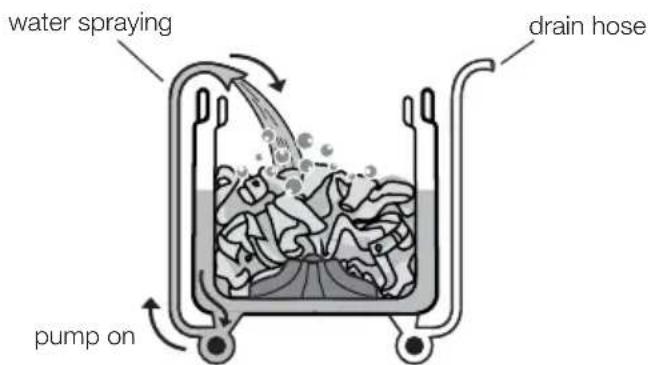
Wash operation
The low profile agitator & bowl rotates while it is filled with water to partially immerse the clothes.
The low profile agitator then rotates to move the clothes so that the detergent can be dissolved and activated at the selected water temperature.
Agitation and dilution
After the wash operation is completed, the bowl is filled with more water.
The low profile agitator then moves in an energy efficient mode, generating additional mechanical actions.
• Auto Water Level Feature
Your washing machine has selectable "Auto" sensing water level option as well as allowing you to choose a manual water level if you wish.
We recommend you to use the Auto water level option to ensure there is just the right amount of water for the wash load in the machine. In other words, it will usually give you the best wash while also being the most efficient in terms of water usage.
SECTION B: Washing instructions
Follow the instructions in this section for the best washing results.
SORT YOUR WASHING INTO SEPARATE WASH LOADS
natural_image
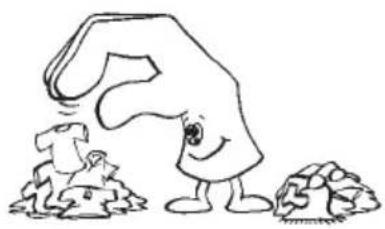
Cartoon illustration of a large, anthropomorphic object with a smiling face emerging from smaller rocks (no text or symbols)Each load of washing should contain clothing which needs the same washing conditions. For example, you should not wash delicate clothes with very dirty work clothes.
Some fabrics are lint collectors and can pick up lint, dirt and colour from other fabrics, which are lint producers. Some example are listed below:
LINT COLLECTORS
Corduroy
Synthetics
Permanent press fabrics
LINT PRODUCERS
Towels
Nappies
Chenille/Candlewick
Make sure that you wash lint collectors separately from lint producers.
CHECK YOUR CLOTHES TO AVOID DAMAGE
natural_image
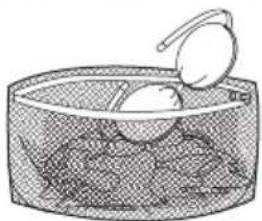
Illustration of a bowl containing eggs and a spoon, no text or symbols presentEmpty all pockets. Close all hooks and zippers to avoid snagging clothes.
Wash bras, pantyhose and other delicates in a mesh laundry bag which you can purchase from your supermarket.
PRE-TREATMENT SPRAYS AND STAIN REMOVERS
IMPORTANT: Pre-treatment sprays and stain removers can damage plastic components in your washing machine.
If you use pre-treatment sprays or stain removers, apply them to the clothing well away from your washing machine.
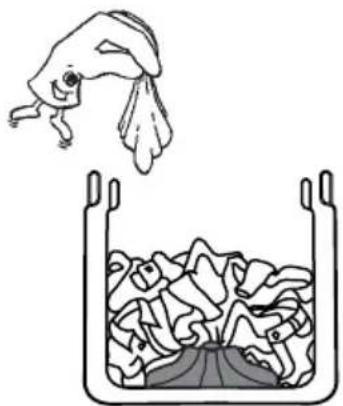
LOAD THE WASHING MACHINE
natural_image
Simple line drawing of a fish jumping above a container filled with fish (no text or symbols)When loading the clothes into your washing machine, there are three things to remember:
- Clothes must be loaded evenly in the wash bowl. For best results load small items first, followed by large items.
- The washing machine must not be overloaded. Clothes must be able to move during the washing cycle.
- The load should contain only three or four large items, for example sheets. The rest of the load should be small items. A mixed load of large and small items will wash cleaner than a load of all large items.
ADD THE DETERGENT
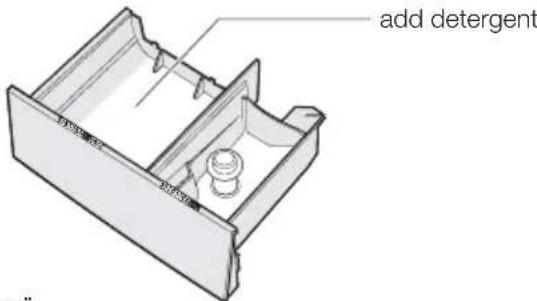
When using the washing machine for the first time, check that the dispenser is set for the type of detergent you will use. To do this, proceed as follows:
-
Pull the dispenser drawer forward until it stops.
-
Lift the front of the drawer up and forward to remove it from the runners.
-
Check the position of the flap at the rear of the detergent compartment in the dispenser drawer. (Factory setting is flap up for powder.)
-
Clip the flap down if you intend to use liquid detergent.
-
Refit the dispenser back into its runners.
Remember: If you change the type of detergent you use, the position of the flap will need changing. See picture.
- You are now ready to add detergent. Measure the amount required and pour it into the detergent compartment of the dispenser drawer.
When using liquid detergent, some may leak out of the dispenser into the wash load earlier than expected through small openings in the back of the dispenser. The openings are to help flushing out of detergent.


-
If you want to use fabric softener, see "Add fabric softener".
-
Close the drawer by pushing it backwards into the top panel of the washing machine when you have finished adding detergent.
ADD FABRIC SOFTENER
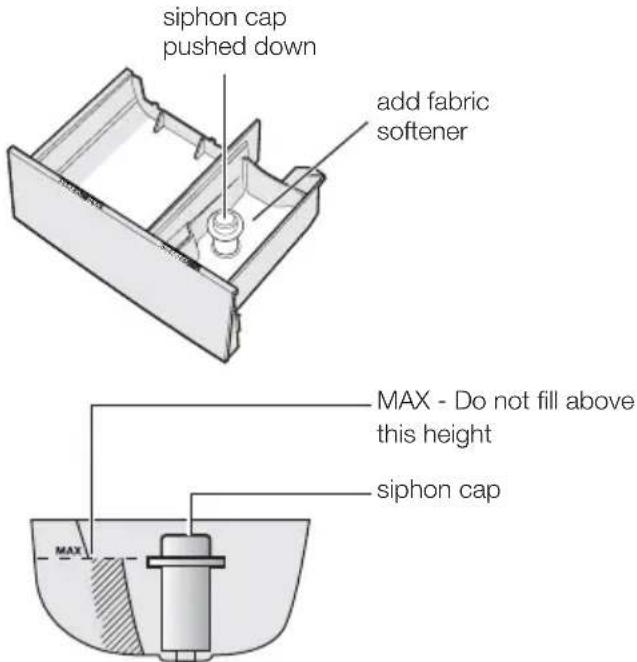
Before adding softener to the dispenser, make sure the siphon cap is pushed firmly down onto the spigot in the drawer. The softener will not siphon out if the cap is incorrectly fitted, is missing or blocked with residue. You are now ready to add fabric softener.
Measure the correct amount as recommended on the softener package into a cup and then pour it into the softener compartment of the dispenser drawer.
Caution: Do not overfill the fabric softener dispenser.
Overfilling and then siphoning out too early can cause softener and detergent to mix resulting in staining problems. The softener dispenser holds 90ml when filled up to the MAX marker. Any level lower than MAX will function correctly.
Caution: Only use the detergent compartment for detergent and the fabric softener compartment for fabric softener.
ADDING BLEACH
natural_image
Hand pouring liquid into a white container with a small object inside (no text or symbols visible)Bleaching of clothes can help to remove stains, heavy soiling and to kill bacteria.
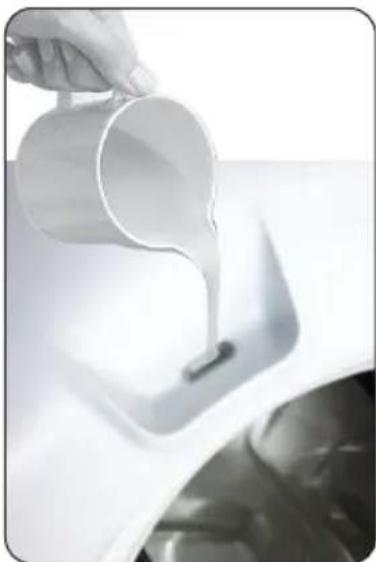
Oxygen type - This is generally a powder type bleach. Mix the required quantity with water and pour down the hole in the top panel during the fill when there is some water in the wash bowl. Refer to the instructions on the bleach container.
Chlorine type - This type of bleach should NOT be mixed with detergent. Mix the bleach with water as per the instructions on the container.
- Turn Program Selector to a Regular Wash position.
- Press the Start/Hold To Pause touchpad to commence water fill.
- Pour the bleach solution down the hole in the top panel during fill when there is some water in the wash bowl.
- Allow the machine to agitate for a few minutes, then let it stand for the required time by pressing and holding the Start/Hold To Pause touchpad for 1.2 seconds to pause machine.
- Turn Program Selector to Drain & Spin position and press the Start/Hold To Pause touchpad to empty the wash bowl.
- You can now wash the clothes load using detergent and your selected wash program.
NOTE: Bleach should NOT be used on silk, wool, rayon or drip dry clothes.
CHOOSE THE WASH PROGRAM
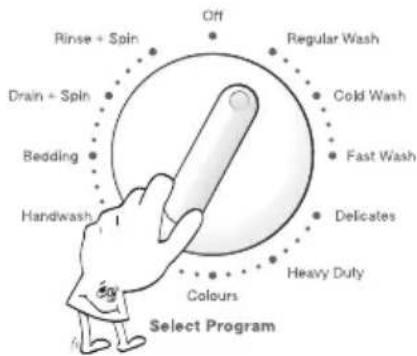
- Turn on the taps and turn power on at the power point.
- Close the lid.
- Press the POWER switch "ON" at the back of control panel above the rating label.
- Turn the Program Selector knob to choose the wash program you want.
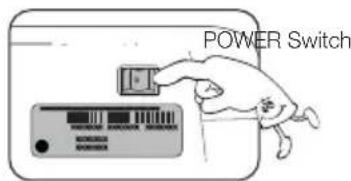
Your washing machine is now in STAND-BY-MODE and ready to wash your clothes. If the settings shown on the control panel are what you want to use and the Program Selector is set to the correct wash program for your clothes load, press the Start/Hold To Pause touchpad to start your wash.
The table "YOUR PROGRAM GUIDE" shown on page 9 will help you in selecting the right program.
The Program Selector knob is not a timer. Once you select a wash program, the Program Selector knob will stay at that position for the whole wash cycle.
You can turn the Program Selector Knob to a new program position at any time. If you do move the Program Selector Knob the effect will be different depending on the status of the machine at the time you do this, as follows:
- When the machine is in pause mode, moving the Knob to a new position will result in the machine resetting to the start of the new program. (For pause mode, see "Machine in pause mode" page 11)
- When the machine is running, moving the Knob to a new position will result in the machine continuing the wash and it will show "Err" on the display with 3 consecutive short beeps to remind you that this option is not allowed. (For machine running, see "Wash cycle in progress" page 11)
NOTE:
When you choose the Woollens and Bedding program, the Deep Rinse option is automatically selected for you. You will not be able to select and use Eco Rinse and Fast Rinse with these two programs.
When you select the Drain+Spin program, there will be a delay of at least 2 minute before the washing machine starts to spin. This delay is a pump out (Drain) period to ensure the bowl is empty of water, which is necessary before spin commences. Even though you may have only put wet clothes into an empty bowl, the delay before spin will still occur to be safe and to protect your washing machine.
YOUR PROGRAM GUIDE
| Program | Select this Program | Recommended | |||
| Water Level | Temp. | Soak | Rinse*** Option | ||
| Off | To reset a program and to switch off the machine. | - | - | - | - |
| Regular **** Wash | For normally soiled cotton load at rated load capacity. | Auto | Warm | Eco RinseNo Soak | |
| Cold Wash | For synthetic or mixed fabrics, underwear, coloured garments, non-shirnk shirts, blouses. | Full | Cold | No Soak | Deep Rinse |
| Fast Wash | For a very small load of mixed fabrics. | Medium | Warm | No Soak | Deep Rinse |
| Delicates | For lingerie, lace, trimmed and embroidered items. | Auto | Cold | No Soak | Deep Rinse |
| Heavy Duty * | For a heavily soiled cotton wash load. | Auto | Warm | No Soak | Deep Rinse |
| Colours | For colours item of mixed fabrics. | Full | Cold | No Soak | Deep Rinse |
| Woollens | For woollen fabrics labelled “Machine Washable”. | Full | Cold | No Soak | Deep Rinse |
| Handwash | For articles of clothing whose label indicates that they must be hand-washed. | Full | Warm | 15 Min. | Deep Rinse |
| Bedding | For bedding fabrics labelled “Machine Washable”. | Auto | Hot | No Soak | Deep Rinse |
| Drain + Spin ** | For very wet clothes to remove the water. | Auto | - | - | - |
| Rinse + Spin | For items that you want to rinse and spin eg. clothes items you have hand washed in a wash tub. | Auto | Cold | - | Deep Rinse |
* Heavy Duty has a built-in Soak period of 6 minutes.
** Drain & Spin has a built-in pump out period of approx. 2 minutes prior to spin. (See "Choose the wash program" page 8).
*** Add Rinse to Deep Rinse uses up to 40% more water than Eco to rinse clothes, but Deep takes less time than Eco. Your wash cycle will be longer using Eco rinse. (See pages 4 and 13).
**** "Regular Wash, Warm Temp, Auto Water Level, No Soak, Eco Rinse" is recommended for a full load (maximum mass of dry cloth: model SWT8542A = 8.5 kg, model SWT1042A = 10 kg) of normally soiled cottons.
CHOOSE THE WATER LEVEL

- Choose the water level by pressing Water Level touchpad.
You can select:
• Auto, Full, Medium and Low
(Auto level: the exact water level required to wash your clothes effectively is determined and set for you automatically, ensuring no water is wasted.)
- Use only the amount of water you need for the wash load.
- If you want to add more water after wash cycle has started, press and hold the Start/Hold To Pause touchpad for 1.2 seconds to pause machine and press the Water Level touchpad to the new higher level that you want, press the Start/Hold To Pause touchpad again to continue your wash cycle. The machine will add water up to the new level selected and continue the wash program.
If the water level you have is high and you wish to reduce this level for the following Deep Rinse cycle or for your next wash program, press and hold the Start/Hold To Pause touchpad for 1.2 seconds to pause machine then press the Water Level touchpad to the new lower level. The washing machine will use this new lower level for next fill of water.
NOTE: Flood diagnostic is explained on page 19. You should refer to this if you have water pouring onto the floorThe display will show "E30" and you will hear rapid short beep continuously to remind you about this problem.
CHOOSE THE WASH WATER TEMPERATURE
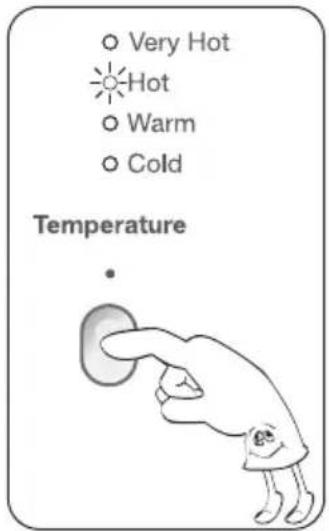
For each wash program your washing machine automatically selects a suitable fill water temperature.
If you want to use a different wash water temperature, press the Temperature touchpad repeatedly. The water temp lights will tell you the temperature for each press of the touchpad.
You have four temperatures to choose from Very Hot, Hot, Warm and Cold.
The temperature of warm water will depend on the temperature and pressure of your hot and cold water supplies. The recommended temperature for warm is 35^ C. You can adjust the flow rate of the water supplies to adjust the Warm temperature.
All rinse water temperatures are cold.
If you have selected the Woollens program, you will not be able to select Hot and Very Hot wash water temperature.
NOTE: If you have a cold water connection ONLY and the hot inlet valve is capped off (refer installation instructions) you must select Cold washes only. Otherwise the machine will stop the operation and Eco rinse light will be flashing.
Water Temperatures
| Temp. | Descriptions | How to machine mix water | |
| from hot valve from cold valve | |||
| Very Hot | for normally soiled white cottons and linen (e.g. teacloths, towels, tablecloths, sheets...). | 90 % 10 % | |
| Hot | for normally soiled, colourfast garments (e.g. shirts, night dresses, pyjamas...) in linen, cotton or synthetic fibres and for lightly soiled white cotton (e.g. underwear). | 60 % 40 % | |
| Warm | for delicate items (e.g. net curtains), mixed laundry including synthetic fibres and woollens bearing the label pure new wool, machine washable, non-shrink. | 40 % 60 % | |
| Cold | 0 % 100 % | ||
IMPORTANT: Components in the washing machine are designed to be used with water no hotter than 70^ C. If your water supply is too hot, you should have a temperature limiting valve fitted by a qualified plumber.
CHOOSE THE SOAK TIME

This option allows you to soak heavily soiled clothes at the beginning of the wash.
To do this, select the wash program you want to use, then press the "Soak Time" touchpad.
You have four soak times to choose from No Soak, 15 min, 30 min and 45 min.
TO START THE WASH CYCLE / PROGRAM

Press the Start/Hold To Pause touchpad.
Start/Hold To Pause is used to Start, Stop and Continue the wash.
If you have started your wash and you wish to stop it for some reason, press the Start/Hold To Pause touchpad and hold it for 1.2 seconds to enter pause mode
MACHINE IN PAUSE MODE

You can tell when your washing machine is in pause mode.
The time remaining is shown then "SP".
WASH CYCLE IN PROGRESS
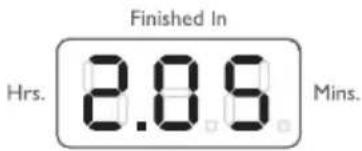
After selecting a program, the duration is displayed in hours and minutes (for example 2.05).
The duration is calculated automatically on the basis of the maximum recommended load for each type of fabric.
After the program has started, the time remaining is updated every minute.
END OF PROGRAM
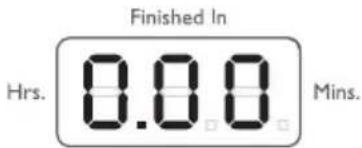
When the program is completed the 3 zeros will flash.
LID LOCK FEATURE
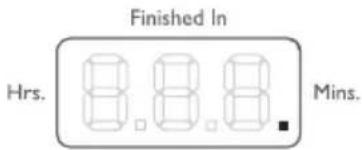
Lid lock is a safety feature in your washing machine to ensure the lid is not opened during a stage in the wash cycle when it would be hazardous for you to do so.
The lid will be locked when your washing machine is spinning, shown by the last digit of LED display being ON. Do not try to force the lid open when it is locked.
ENABLING/DISABLING END OF WASH BEEP
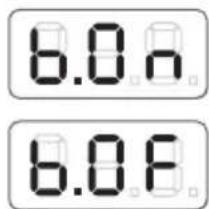
"Beep ON"
"Beep OFF"
To enable/disable end of wash beep, while the machine is in Pause mode touch and hold Start/Pause touchpad for approximately 3 seconds. You'll hear an acknowledgment beep and display will show "b.0n" (Beep ON). Within 5 seconds touch Rinse touchpad to toggle between "b.0n" (Beep ON) and "b.0F" (Beep OFF). Then wait 5 seconds for the machine to automatically go back to Pause mode or switch the machine OFF in order to save this setting in the memory.
SECTION C: Features of your washing machine
natural_image
Simple line drawing of a cartoon rabbit holding its head (no text or symbols)Additional features on your washing machine are described in this section.
INFORMATION AND GUIDANCE FEATURE
The washing machine will give you information by using the control panel display and "beeping" function.
| What your washing machine is doing | What this is telling you and what to do to continueLights and “beeps” |
| Display will show “E17” and “FLASHING” and you get 4 fast “beeps” every 1 minute. | Indicates the machine has gone out of balance during the spin cycle. Open lid, redistribute load and close lid. |
| Display will show “Ld” and “FLASHING” and you get 4 fast “beeps” every 1 minute. | Lid is in the open position. Close lid. |
| Time remaining is shown then “SP”. | The machine is in PAUSE mode. Press Start/Hold To Pause to continue. |
| Display will show “0.00” and “FLASHING” and you get 4 slow “beeps” every 4 minutes. | The wash program has finished. Start a new wash or turn off your machine. |
| Display will show “Err” and “FLASHING” and you get 3 fast “beeps”. | Wash option touchpad is touched while the washing cycle is in progress. You can only change wash option when machine is paused or before you start the program. |
| Other codes and you get 4 fast “beeps” every 1 minute. | The machine is informing you of a fault with the washing machine which you need to address. Refer to page 18 and 19 for further information, and what you should do before calling for service. |
RINSE OPTION
Pressing the "Rinse Option" touchpad allows you to change the rinse type. For most washes the machine automatically selects "Deep Rinse" for you.

There are four rinses to choose from... Fast rinse, Eco rinse, Deep rinse and Extra rinse.
- Extra: Extra rinse, the machine fills twice, giving you two deep rinses.
- Deep: Deep rinse the machine fills once, giving you one deep rinse.
- Eco: Eco rinse is a spray rinse giving you maximum water saving.
- Fast: Fast rinse uses less time then Eco rinse by performing only 3 Eco sprays but the amount of water in each spray is increased.
How does Eco Rinse work?
When Eco Rinse is used, rinse water is sprayed into the washbowl in pulses. After each pulse the washbowl will spin to remove detergent laden water from the clothes.

The machine will go through a series of maximum four pulse spray and short spin cycles in this manner, depending on program selection, followed by a final long spin that removes the water from the clothes to complete the full wash program.
Compare this with deep rinse where much more water is used.
For deep rinse, water enters the machine filling up to the wash water level selected. The washer agitates and finally empties the rinse water through the drain hose.
Extra rinse, this is special option for those people who suffer from allergies, this extra rinse will provide two deep rinses to ensure all detergent residue has been removed.
- Eco Rinse and Fast Rinse cannot be selected with Woollens and Bedding program.
• We strongly recommend you use Eco rinse for your washes whenever you can. There is considerable saving of water when Eco is used instead of Deep or Extra to rinse clothes. - Eco rinse is not designed to be used with fabric softener. Select Deep or Extra rinse if you are going to use fabric softener. Deep rinse ensures the fabric softener is correctly dispensed and thoroughly removed from your clothes during rinsing.
SECTION D: Caring for your washing machine
Your washing machine will give you long and trouble-free service, if you follow the instructions in this sections. These instructions show you how to care for your washing machine.
WHAT TO DO AFTER YOU HAVE FINISHED YOUR WASHING
- Rotate Selector knob to "Off" position.
- Turn off power switch.
- Switch off the electricity at the power point.
- Turn off the water taps.
- Leave lid open for a while to allow moisture inside washing machine to evaporate.
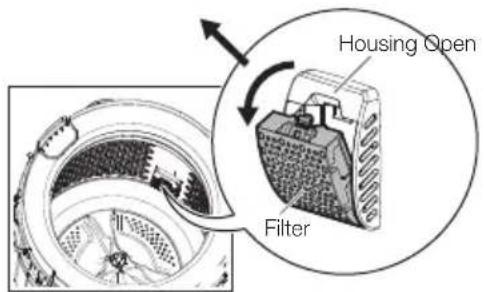
HOW TO CLEAN THE LINT FILTER
The lint filter needs to be cleaned regularly, preferably after each wash. Inspect the lint filter after each wash to see if there is any lint collected. To do this proceed as follows:
- Remove the lint filter out from its housing.
- Open the lint filter.
- Clean the filter under the water tap with an old toothbrush.
- Reassemble the filter to the housing.

natural_image
Technical line drawing of a mechanical component with a circular patterned interior and an arrow indicating rotation (no text or symbols)
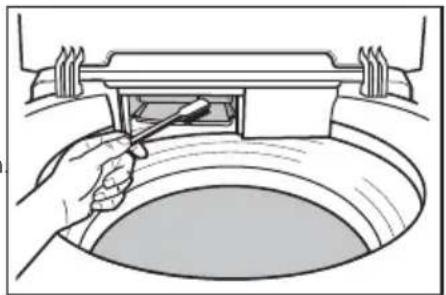
CLEANING THE DISPENSER
The dispenser needs to be cleaned regularly, preferably after each wash. Inspect the dispenser after each wash to see if there is any residue of detergent.
To do this proceed as follows:
- Pull the dispenser drawer forward until it stops.
- Lift the front of the drawer up and forward to remove it from the runners.
- Clean the dispenser drawer with hot water and a brush, eg. an old toothbrush
- Dry the drawer.
- Before replacing the dispenser back in its recess, clean the inside of the drawer with an old toothbrush.
- Put the dispenser back into its runners and close the drawer.
natural_image
Illustration of a hand using a tool to clean or inspect a circular object, no text or symbols presentCLEANING YOUR WASHING MACHINE
To clean the inside and outside of your washing machine you should:
Wipe the surface with a mild dishwashing detergent and warm water.1. Wipe dry with a soft cloth.2.
IMPORTANT: Never use solvents, aerosol cleaners, spray pack cleaners, glass cleaners, metal polishes, caustic materials, scourers or general household cleaners on or near top panel and lid, control panel or other parts of your washing machine.

CLEANING STAINS IN THE WASH BOWL
Stains in the wash bowl can be caused by:
* metal objects such as bobby pins, dressmaking pins and nails.
* salt
IMPORTANT: Check all pockets before loading clothes into your washing machine. Don't leave wet clothing (especially swimwear) in the bowl for too long before you wash it.
How to clean the stainless steel wash bowl
Wipe with a cleaning product which is marked suitable for stainless steel.
IMPORTANT: Never use bleach cleaners or steel wool.
AVOIDING BUILD UP OF UNDISSOLVED DETERGENTS
If you only wash with cold water, undissolved detergent and body oils will build up in the washing machine. This build-up can cause spotting on your clothes.
To avoid this build-up:
* do not use too much fabric softener with cold water
* select a hot water wash at least once a month
* always dissolve the detergent in one litre of warm water.
What to do if there is spotting on your clothes
- Put 250 grams of Epsom Salts into the wash bowl.
- Fill the washing machine with HOT water and agitate for one minute.
- Leave the water in the washing machine for 3 hours.
- Agitate for 5 minutes.
- Pump the water out.
- Rinse the washing machine twice with cold water.
FOR YOUR SAFETY:
This appliance is not intended for use by persons (including children) with reduced physical, sensory or mental capabilities, or lack of experience and knowledge, unless they have been given supervision or instruction concerning use of the appliance by a person responsible for their safety.
* Young children should be supervised to ensure that they do not play with the appliance.
* If this appliance is supplied from an extension cord or portable electrical outlet device, the extension cord or portable electrical outlet device must be positioned so that it is not subject to splashing or entry of moisture.
natural_image
Cartoon illustration of a large hand making an 'SERVICE' gesture next to a small electronic device (no text or symbols on the diagram itself)IMPORTANT: If the electrical cord of this appliance is damaged, it must be replaced by the Manufacturer, Authorised Service Agent or similarly qualified person in order to avoid a hazard.
※ If you have a mains pressure hot water service and it has not been used for two or three weeks:
Before using the washing machine it is recommended that a hot water tap close to the washing machine be turned on and the water allowed to flow for a couple of minutes. This will allow any gas pressure that has built up over the period of non use to be discharged.
For further details refer to your hot water service installation instruction and owners guide.
Section E: Handy Washing Hints
This section gives you some help in dealing with washing problems. Chemicals referred to on this page and page 20 are available from your local supermarket, hardware store or the chemist.
YELLOWING OR GREYING CLOTHES
| Problem | What to doPossible causes | |
| GREYNESS | Incorrect wash times and using insufficient detergent which can cause redepositing of detergent on clothes.Using too much detergent can cause poor rinsing and poor spin performance.Mixing whites with very dirty clothes, eg work clothes.Using soap flakes instead of laundry detergent. | Add three quarters of a cup of water softener, egCalgonto the water with one cup of ammoniaor oxygen bleach.Wash the load through a normal wash program using hot water.If the water is very dirty or very suds y, repeat 1 and 2 above. |
| YELLOWING | A build-up of oils in clothes that comes into close contact with the skin, eg underwear, T-shirts, etc.Ageing of clothes.Iron deposits in the wash water.Use of chlorine bleaches on fabrics with resin finishes.Incorrect drying.Incorrect water temperatures ie too hot or too cold. | Add three quarters of a cup of water softener, egCalgonto the water with half to one cup of oxygen bleach.Wash the load through a normal wash program using hot water.If the water is very dirty or very suds y, repeat 1 and 2 above.Synthetics which have been washed in very hot water will not respond to any treatment. |
STAINED CLOTHES

natural_image
Cartoon illustration of a hand holding a large piece of meat (no text or symbols)Hints for removing stains
* Treat all stains as soon as possible. The longer you leave a stain the harder it will be to remove.
* Try soakers and stain removers first.
IMPORTANT: Pre-treatment sprays and stain removers can damage plastic components on your washing machine.
If you use pre-treatment sprays or stain removers, apply them to the clothes items in a well ventilated area away from your washing machine.
* Avoid the use of hot water on stains as hot water will set stains.
* Use light strokes and don't rub the stain remover into the fabric.
* If you use a chlorine bleach, follow the instructions on the bottle and dilute it before putting it on clothing.
* Test coloured fabrics on an inside seam for colour fastness before using any stain removers or bleaches.
* Test synthetic fabrics on an inside seam before using any chemicals or bleaches.
IMPORTANT: Do not use dry cleaning fluids near your washing machine. These fluids will damage your washing machine and may cause an explosion.
A GUIDE TO STAIN REMOVAL
Treat stains as soon as possible. The longer they are the harder they are to remove. The following information may assist you in stain removal.

natural_image
Cartoon illustration of a smiling character holding a large object with a curved handle (no text or symbols)| White cotton and Linens | Washable Coloured Fabrics | |
| BALL POINT PEN INK | Sponge with methylated spirit. Bleach if necessary. | Same as for whites but omit bleach. |
| BLOOD, MEAT JUICE, EGG (dry stain) | Cover area with meat tenderiser (MSG). Apply warm water to make a paste. Wait 15-30 minutes. Sponge with cool water or with diluted bleach. | Same as for whites but select water temperature suitable to fabric. Use oxygen bleach. |
| BLOOD, MEAT JUICE, EGG (fresh stain) | Rinse in cold water. If stain remains sprinkle with meat tenderiser (MSG). Let stand 15 to 20 minutes. If stain still remains, then sponge with diluted bleach. Launder in hot water. | Same as for whites but select water temperature suitable to fabric. Use oxygen bleach. |
| CANDLE WAX | Scrape off excess, place stain between clean white blotter or several layers of facial tissue. Sponge with dry cleaning fluid. If spot remains, bleach. | Same as for whites — use oxygen type bleach. |
| CHEWING GUM | Rub with ice to harden. Scrape off excess with blunt knife. Sponge with dry cleaning fluid. | Same as for whites. |
| CHOCOLATE | Soak in warm water with pre-soak product, and wash in lukewarm water. Use solvent to remove any grease spots. | Soak in warm water with pre-soak or detergent solution. Bleach remaining stain. |
| COFFEE / TEA (milk or cream) | Rinse or soak in cold water. Work detergent into stain. Thoroughly rinse and dry. If a stain remains, sponge with dry cleaning fluid. If stain remains, bleach. | Same method — use oxygen type bleach. |
| COFFEE / TEA (black) FRUIT JUICE, WINE | Pour boiling water through stain. Bleach if necessary. | Soak or rinse in cold water or sponge with warm water and detergent. Use oxygen type bleach. |
| FAT, GREASE, OIL | Sponge with safe home dry cleaning fluid (White Spirits). | Same as for whites. |
| FRUIT | Sponge with warm water and wash. Bleach remaining stain with oxygen bleach. | Pour boiling water through stain. Bleach remaining stain. |
| GRASS, GREEN VEGETABLES | Sponge with methylated spirit. Wash in warm suds. | Same as for Whites. Check colourfastness before applying methylated spirit. For acetate, sponge with dry cleaning fluid. |
| ICE CREAM, CREAM and MILK | Rinse or soak in cold water and launder. If ice cream contains fruit or chocolate treat stains as such. | Same as for whites. |
| IODINE | Wash in hot suds | Wash in warm suds. |
| IRON RUST | Apply oxalic acid and place in sun. | Apply lemon juice and place in sun. |
| LIPSTICK | Rub with lard and wash in hot suds. Bleach if necessary. | Rub with lard and wash in warm suds. |
| MILDEW | Wash in hot suds. Moisten with lemon juice and let dry in sun. If stain persists, bleach. Old stains are hard to remove. | Same as for whites but select water temperature suitable to fabric. |
| MUSTARD | Wash in hot suds and bleach. | Same as for whites but use water temperature to suit fabric. |
| NAIL POLISH | Sponge with acetone, dry cleaning fluid or nail polish remover. Bleach to remove dye. | Sponge with dry cleaning remover. |
| PAINT (oil based) | Scrape off fresh paint. Soften dry paint with lard or oil, then sponge with turpentine (turps). | Same as for whites. |
| RED WINE | Rub salt into the stain. Pour boiling water through stain. Bleach if necessary. | Same as for whites. |
| SCORCH | Moisten and place in sunlight. Bleach if necessary. | Usually a permanent stain. Brush wools lightly with sandpaper. |
SECTION F: Don't call for service until you've checked these points
IMPORTANT: If you call for service and there is nothing wrong with your washing machine, you will have to pay for the service call. You will have to pay even when your washing machine is under warranty.
Before you call for service, check the points in the table below.
| Problem | Possible CausesDisplay Code | What to do | |
| Machine not working. | Power not switched on. | Switch on power point. | |
| No electricity supply through the power point. | Check power point with another appliance. | ||
| Machine not switched on. | Press power switch on at the back of a washing machine. | ||
| E11 | Water taps not turned on. | Turn on taps. | |
| E17 | Out of balance switch off. | Open lid, redistribute load and close lid. | |
| Ld | Lid not fully closed. | Close lid. | |
| Machine has washed load but will not spin. Water in washbowl. | E17 | Out of balance. | Open lid, redistribute load, close lid. |
| Ld | Lid not fully closed. | Close lid. | |
| E20 | Drain hose blocked. | Check drain hose for blockage. | |
| EFO | Too much suds causing motor temperature overload. | Wait a short while, the wash will continue. | |
| In future, reduce detergent dose or use low sudsing (front load) detergent. | |||
| Will not fill with water. | E11 | Water taps not turned on Inlet hoses blocked. | Turn taps on. Clean tap filters/washers. |
| Water flowing into washbowl indefinitely. | E13 | Drain hose too low. | Raise drain hose or fit a syphon break. |
| Refer to installation instructions for correct positioning of hose. | |||
| Machine goes out of balance or vibrates excessively when spinning. | E17 | Machine not level. | Make the machine level. |
| Levelling feet not adjusted. | Adjust feet to touch the floor. | ||
| Clothes not evenly distributed. | Redistribute clothes evenly. | ||
| Too much water for load size. | |||
| Water on floor. | Loose inlet hose connections. | Check connections at taps and rear of machine. | |
| Incorrect water level for size of load. | Use low water level. | ||
| Condensation from hot water. | |||
| Clothes still dirty after wash program. | Not enough or no detergent. | Check detergent use and rewash clothes. | |
| Too many clothes in load. | Remove some clothes and rewash. | ||
| Incorrect wash program or temperature selected. | Reselect program or temperature and rewash. | ||
| Incorrect water level selected. | Use a higher water level. | ||
| Scraping noise on spin. | Bra wire or other thin items caught between inner and outer washbowls. | If the item is visible, remove it with pliers. | |
| Use a wash bag in future. | |||
| Humming, clicking and other noises. | Bowl rotation at start of wash. | Normal noise. | |
| Brake activation when stopping after spin. | Normal noise. | ||
| Detergent residue. | Overloaded laundry. | Put appropriate load in washer. | |
| Cold water temperature less than 20°C. | Correct supply water temperature. | ||
| Detergent overdosage. | Check detergent use and rewash clothes. | ||
| Bad smell or mold on clothes. | Lint filter not cleaned. | Clean lint filter. |
OTHER DIAGNOSTIC HELP AND A GUIDE FOR WHEN YOU SHOULD CALL FOR SERVICE
If you are having a problem with your washing machine, make sure you have followed ALL of the instructions on page 18 in the "What to do" column before calling for service.
| Description | Display Code | Customer action (Summary) |
| Not filling with water. | E11 | Make sure both wall taps are on and hose filters are not blocked.Raise drain hose if water is flowing out of drain hose.Press Start/Hold To Pause to re-start wash.If problem remains, call Service. |
| Flood. | E30 | If the water is pouring onto the floor, turn OFF both wall taps.Wait a few minutes to see if the fault is corrected.If not, call Service. |
| Draining problem. | E20 | Wait a few minutes to see if the fault is corrected.If not, press the Start/Hold To Pause touchpad and hold it for 1.2 second to enter pause mode then check the drain hose for blockage.Press Start/Hold To Pause to continue the wash.If problem remains, call Service. |
| Loss of water, while washing. | E13 | If water level in wash bowl is low and water is flooding the floor, turn Program Selector Knob to Drain & Spin position, then press Start/Hold To Pause.Should this make things worse, press the power button off (some models) and call Service.Otherwise, press Start/Hold To Pause to continue the wash. |
| Water level problem. | E30 | Wait, this fault may clear itself.If not, turn Program Selector Knob to Drain & Spin position, then press Start/Hold To Pause to drain the wash bowl.If this problem is repeated, call Service. |
| Motor fault. | ESO | Wait, this fault may clear itself.If not, turn Program Selector Knob to Drain & Spin position to drain the wash bowl.You may have to press Start/Hold To Pause to commence draining.If this problem is repeated, call Service. |
* This product has auto load sensing feature to select optimum amount of water to suit the cloth load which might seem lower than conventional machine. This is normal condition.
NOTE
NOTE
NOTE
This document sets out the terms and conditions of the product warranties for Electrolux Appliances. It is an important document. Please keep it with your proof of purchase documents in a safe place for future reference should you require service for your Appliance.
1. In this warranty
(a) 'acceptable quality' as referred to in clause 10 of this warranty has the same meaning referred to in the ACL;
(b) 'ACL' means Schedule 2 to the Competition and Consumer Act 2010;
(c) 'Appliance' means any Electrolux product purchased by you and accompanied by this document;
(d) 'ASC' means Electrolux' authorised serviced centres;
(e) 'Electrolux' means Electrolux Home Products Pty Ltd of 163 O'Riordan Street, Mascot NSW 2020, ABN 51 004 762 341 in respect of Appliances purchased in Australia and Electrolux (NZ) Limited of 3-5 Niall Burgess Road, Mount Wellington, in respect of Appliances purchased in New Zealand;
(f) 'major failure' as referred to in clause 10 of this warranty has the same meaning referred to in the ACL and includes a situation when an Appliance cannot be repaired or it is un-economic for Electrolux, at its discretion, to repair an Appliance during the Warranty Period;
(g) "Warranty Period" means the Appliance is warranted against manufacturing defects in Australia and New Zealand for 24 months with an additional 96 months parts only warranty for the Appliance's inverter motor, if applicable (for appliances purchased after 1st January 2015), following the date of original purchase of the Appliance;
(h) 'you' means the purchaser of the Appliance not having purchased the Appliance for re-sale, and 'your' has a corresponding meaning.
-
This warranty only applies to Appliances, purchased and used in Australia or New Zealand and is in addition to (and does not exclude, restrict, or modify in any way) any non-excludable statutory warranties in Australia or New Zealand and are used in normal domestic applications.
-
During the Warranty Period Electrolux or its ASC will, at no extra charge if your Appliance is readily accessible for service, without special equipment and subject to these terms and conditions, repair or replace any parts which it considers to be defective. Electrolux or its ASC may use remanufactured parts to repair your Appliance. You agree that any replaced Appliances or parts become the property of Electrolux. This warranty does not apply to light globes, batteries, filters or similar perishable parts.
-
Parts and Appliances not supplied by Electrolux are not covered by this warranty.
-
To the extent permitted by law, you will bear the cost of transportation, travel and delivery of the Appliance to and from Electrolux or its ASC. If you reside outside of the service area, you will bear the cost of:
(a) travel of an authorised representative;
(b) transportation and delivery of the Appliance to and from Electrolux or its ASC,
In all instances, unless the Appliance is transported by Electrolux or an Electrolux authorised representative, the Appliance is transported at the owner's cost and risk while in transit to and from Electrolux or its ASC.
-
Proof of purchase is required before you can make a claim under this warranty.
-
You may not make a claim under this warranty unless the defect claimed is due to faulty or defective parts or workmanship. Electrolux is not liable in the following situations (which are not exhaustive):
(a) the Appliance is damaged by:
(i) accident
(ii) misuse or abuse, including failure to properly maintain or service
(iii) normal wear and tear
(iv) power surges, electrical storm damage or incorrect power supply
(v) incomplete or improper installation
(vi) incorrect, improper or inappropriate operation
(vii) insect or vermin infestation
(vii) failure to comply with any additional instructions supplied with the Appliance;
(b) the Appliance is modified without authority from Electrolux in writing;
(c) the Appliance's serial number or warranty seal has been removed or defaced.
(d) the Appliance was serviced or repaired by anyone other than Electrolux, an authorised repairer or ASC.
-
This warranty, the contract to which it relates and the relationship between you and Electrolux are governed by the law applicable where the Appliance was purchased. Where the Appliance was purchased in New Zealand for commercial purposes the Consumer Guarantee Act does not apply.
-
To the extent permitted by law and subject to your non-excludable statutory rights and warranties, Electrolux excludes all warranties and liabilities (other than as contained in this document) including liability for any loss or damage whether direct or indirect arising from your purchase, use or non use of the Appliance.
-
For Appliances and services provided by Electrolux in Australia, the Appliances come with a guarantee by Electrolux that cannot be excluded under the ACL. You are entitled to a replacement or refund for a major failure and for compensation for any other reasonably foreseeable loss or damage. You are also entitled to have the Appliance repaired or replaced if the Appliance fails to be of acceptable quality and the failure does not amount to a major failure. The benefits to you given by this warranty are in addition to your other rights and remedies under a law in relation to the Appliances or services to which the warranty relates.
-
At all times during the Warranty Period, Electrolux shall, at its discretion, determine whether repair, replacement or refund will apply if an Appliance has a valid warranty claim applicable to it.
-
For Appliances and services provided by Electrolux in New Zealand, the Appliances come with a guarantee by Electrolux pursuant to the provisions of the Consumer Guarantees Act, the Sale of Goods Act and the Fair Trading Act.
-
To enquire about claiming under this warranty, please follow these steps: (a) carefully check the operating instructions, user manual and the terms of this warranty;
(b) have the model and serial number of the Appliance available;
(c) have the proof of purchase (eg an invoice) available;
(d) telephone the numbers shown below.
- You accept that if you make a warranty claim, Electrolux and its ASC may exchange information in relation to you to enable Electrolux to meet its obligations under this warranty.
Important Notice
Before calling for service, please ensure that the steps listed in clause 13 above have been followed.
| FOR SERVICEor to find the address of your nearest state service centre in AustraliaPLEASE CALL 13 13 49For the cost of a local call (Australia only) | SERVICE AUSTRALIAElectroluxELECTROLUX HOME PRODUCTSwww.electrolux.com.au | FOR SPARE PARTSor to find the address of your nearest state spare parts centre in AustraliaPLEASE CALL 13 13 50For the cost of a local call (Australia only) |
| FOR SERVICEor to find the address of your nearest authorised service centre in New ZealandFREE CALL 0800 10 66 10(New Zealand only) | SERVICE NEW ZEALANDElectroluxELECTROLUX (NZ) Ltdwww.electrolux.co.nz | FOR SPARE PARTSor to find the address of your nearest state spare parts centre in New ZealandFREE CALL 0800 10 66 20(New Zealand only) |
www.simpson.com.au

natural_image
Abstract geometric shape resembling a stylized letter 'G' in light gray tones, no text or symbols present.
- SECTION A: Knowing your washing machine
- SECTION B: Washing instructions
- SECTION C: Features of your washing machine
- SECTION D: Caring for your washing machine
- SECTION E: Handy washing hints
- SECTION F:
- CONDITIONS OF USE
- PARTS OF THE WASHING MACHINE
- SAVING WATER AND ENERGY
- THE DIFFERENCE BETWEEN THE DEEP RINSE AND ECO RINSE OPTIONS.
- Eco Rinse Option
- Deep Rinse Option
- CONTROL PANEL
- ABOUT YOUR WASHING MACHINE
- • Out of Balance Interruption
- - Touchpad Response and Lights
- Always press touchpads gently.
- - Ultra Wash System
- Wash operation
- Agitation and dilution
- • Auto Water Level Feature
- SORT YOUR WASHING INTO SEPARATE WASH LOADS
- LINT COLLECTORS
- LINT PRODUCERS
- CHECK YOUR CLOTHES TO AVOID DAMAGE
- PRE-TREATMENT SPRAYS AND STAIN REMOVERS
- LOAD THE WASHING MACHINE
- ADD THE DETERGENT
- ADD FABRIC SOFTENER
- Caution: Do not overfill the fabric softener dispenser.
- ADDING BLEACH
- CHOOSE THE WASH PROGRAM
- The Program Selector knob is not a timer. Once you select a wash program, the Program Selector knob will stay at that position for the whole wash cycle.
- NOTE:
- YOUR PROGRAM GUIDE
- CHOOSE THE WATER LEVEL
- You can select:
- CHOOSE THE WASH WATER TEMPERATURE
- CHOOSE THE SOAK TIME
- TO START THE WASH CYCLE / PROGRAM
- MACHINE IN PAUSE MODE
- WASH CYCLE IN PROGRESS
- END OF PROGRAM
- LID LOCK FEATURE
- ENABLING/DISABLING END OF WASH BEEP
- INFORMATION AND GUIDANCE FEATURE
- RINSE OPTION
- How does Eco Rinse work?
- WHAT TO DO AFTER YOU HAVE FINISHED YOUR WASHING
- HOW TO CLEAN THE LINT FILTER
- CLEANING THE DISPENSER
- CLEANING YOUR WASHING MACHINE
- CLEANING STAINS IN THE WASH BOWL
- How to clean the stainless steel wash bowl
- AVOIDING BUILD UP OF UNDISSOLVED DETERGENTS
- To avoid this build-up:
- What to do if there is spotting on your clothes
- FOR YOUR SAFETY:
- STAINED CLOTHES
- Hints for removing stains
- IMPORTANT: Pre-treatment sprays and stain removers can damage plastic components on your washing machine.
- A GUIDE TO STAIN REMOVAL
- SECTION F: Don't call for service until you've checked these points
- OTHER DIAGNOSTIC HELP AND A GUIDE FOR WHEN YOU SHOULD CALL FOR SERVICE
- NOTE
- This document sets out the terms and conditions of the product warranties for Electrolux Appliances. It is an important document. Please keep it with your proof of purchase documents in a safe place for future reference should you require service for your Appliance.
- In this warranty
- Important Notice
Brand : Simpson
Model : SWT8542A
Category : Washing machine