
Rerun - Musical instrument Electro Harmonix - Free user manual and instructions
Find the device manual for free Rerun Electro Harmonix in PDF.


| Product Type | Tape Delay Guitar Pedal |
| Brand | Electro-Harmonix |
| Model | Rerun |
| Power Supply | 9VDC, 100mA, center-negative |
| Included Power Supply | Electro-Harmonix 9.6DC-200 |
| Delay Time Range | 8ms to 3 seconds |
| Controls | BLEND, DELAY, SAT, FDBK, FLUTTER button, footswitch |
| Flutter Depth Levels | Low (green), Medium (orange), High (red) |
| Bypass Modes | Analog bypass (true bypass) or Tails (digital bypass with decay) |
| Tap Tempo | Yes, can be disabled via power-up hold |
| Maximum Feedback | Runaway self-oscillation achievable with FDBK knob max or footswitch hold in Tails mode |
| Input Impedance | 2.2 MΩ |
| Output Impedance | 680 Ω |
| Max Input Level | +1.5 dBu |
| Max Output Level | +2.1 dBu |
| Current Draw | 100mA at 9VDC |
| Construction | Compact chassis |
| Warranty | Void if wrong adapter or polarity used |
Frequently Asked Questions - Rerun Electro Harmonix
User questions about Rerun Electro Harmonix
0 question about this device. Answer the ones you know or ask your own.
Ask a new question about this device
Download the instructions for your Musical instrument in PDF format for free! Find your manual Rerun - Electro Harmonix and take your electronic device back in hand. On this page are published all the documents necessary for the use of your device. Rerun by Electro Harmonix.
USER MANUAL Rerun Electro Harmonix
Welcome to the Electro-Harmonix Rerun Tape Delay: an extremely compact tape delay modeler with up to 3 seconds of delay time. The Rerun lets you dial in repeats with saturation and flutter for lush, organic delay tones. The pedal features tap-tempo, to keep the echoes in time with your music, tails mode, to keep the repeats going after switching to bypass, and foot accessible maximum feedback for run-away self-oscillation.
Operating Instructions
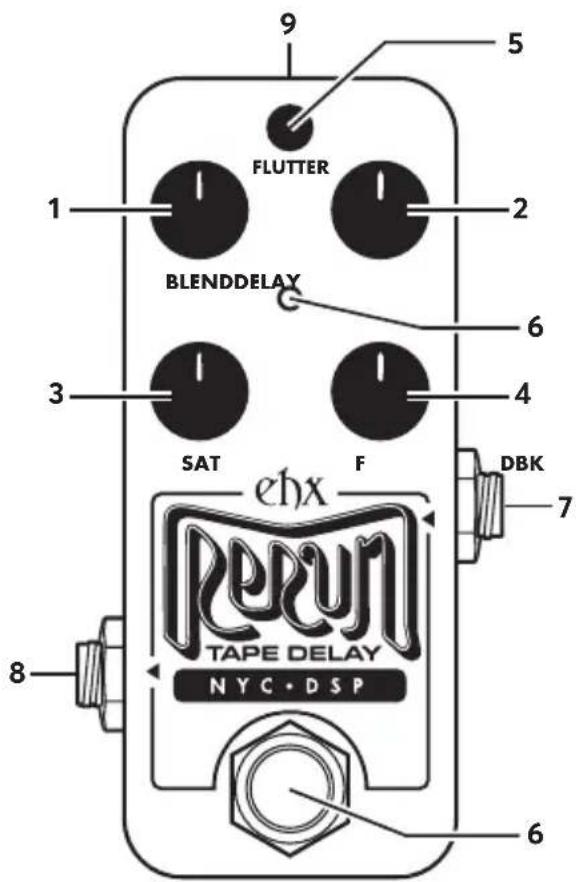
Insert the output plug from the supplied 9VDC AC adapter into the power jack at the top of the Rerun. The unit must be powered to pass signal, even in bypass. The Rerun features buffered analog bypass or digital bypass depending on settings. Connect an instrument cable from your instrument to the Input jack. Connect an instrument cable between the Output jack and a suitable amplifier. Click the footswitch to engage the pedal and light the LED.
Power Supply Requirements: Voltage: 9VDC Current: 100mA Polarity: Center-Negative
This device comes equipped with an Electro-Harmonix 9.6DC-200 power supply. Use of the wrong adapter or a plug with the wrong polarity may damage the device and void the warranty. Do not exceed 10.5VDC on the power plug. Power supplies rated for less than 100mA may cause the device to act unreliably.
Controls & Jacks
- BLEND Adjusts the output mix from 100% dry to 100% wet.
- DELAY Controls the delay time, ranging from 8ms to 3s.
- SAT Controls the saturation, or distortion, on the echo repeats.
- FDBK Controls the number of echo repeats the Rerun generates. At minimum you get one repeat, at maximum you get runaway self-oscillation.
- FLUTTER Button Flutter emulates the pitch modulation that occurs on old, worn-down tape machines. Press this button to set flutter depth:
Green - LOW FLUTTER
Orange - MEDIUM FLUTTER
Red - HIGH FLUTTER
-
Footswitch and Status LED The footswitch engages or bypasses the effect. The LED indicates the selected Flutter depth. In bypass mode, the LED is off. The LED blinks at the latest tap reading when the delay time is set by tap tempo.
-
Input Jack Impedance: 2.2MΩ, Max In: +1.5 dBu
- Output Jack Impedance: 680Ω, Max Out: +2.1 dBu
- Power Jack Current draw: 100mA at 9.0VDC
Tap Tempo
The footswitch can be used to set the delay time. Press and release the footswitch at least twice, in time with your music, to set the tempo. The LED blinks at the tempo to confirm the delay time is set by tap-tempo. To turn off tap-tempo, simply turn the DELAY knob to reset the delay time. You can completely disable tap-tempo by following these steps:
- Power down the Rerun.
- Press and hold the footswitch while reapplying power.
- Continue to hold the footswitch for about two seconds; the LED will slowly blink through all three colors twice.
- Release the footswitch; tap-tempo is now disabled.
- Repeat this process to re-enable tap-tempo.
Tap-tempo disable is recalled through power cycles so you can set it and forget it.
Tails and Analog Bypass Selection
The Rerun allows you to choose between two bypass modes:
Analog: the bypass signal is fully analog; the delay effect instantly mutes upon entering bypass.
Tails: the repeats of the delay effect continue to decay naturally upon entering bypass; no new audio enters the delay block; bypass is digital.
Tails bypass is selected by default from the factory. To activate Analog bypass, do the following:
- Press and hold the TYPE push button.
- After two seconds, the LED enters Party Mode, where it rapidly cycles through the three LED colors.
-
Release the button; Analog bypass is now active.
-
Repeat this same procedure to change back to Tails bypass.
The bypass mode setting is remembered through power-cycles so you can set it and forget it.
Maximum Feedback Self-Oscillation
Turn the FDBK knob up to maximum to achieve runaway self-oscillation. When Tails bypass mode is enabled, you can also activate maximum feedback by pressing and holding the footswitch:
- Press-and-hold the footswitch.
- After 500ms, the LED begins flashing through all three colors. Maximum Feedback is now active.
- Release the footswitch to stop self-oscillation and return the feedback setting to the current position of the FDBK knob.


Brand : Electro Harmonix
Model : Rerun
Category : Musical instrument