
Vertigo Glass & Iron - Faucets STEINBERG - Free user manual and instructions
Find the device manual for free Vertigo Glass & Iron STEINBERG in PDF.


| Product Type | Virtual Instrument (HALion Library) |
| Format | HALion (VST, AU, AAX) |
| Developer | Cinematique Instruments for Steinberg |
| Release Date | March 2022 |
| Sound Sources | 17 sound sources: Rubbed (3), Bowed (4), Struck (5), Special (5) |
| User Interface | Mixer section with per-source volume, pitch, pan, solo; master controls |
| Master Effects | Attack, Decay, Short Envelope, Tone EQ, Low Cut, Chorus, Tape Echo, Reverb (6 types) |
| Reverb Types | Room, Wood, Chamber, Hall, Church, Infinite |
| Mod Wheel Control | Assignable to volume and dynamic layer (MW switch) |
| Preset Management | Previous/Next arrows, click name to open menu, Reset and Dice functions |
| Interval Lock | Locks tuning of all sources when changing presets |
| Installation | Follow Steinberg website or 'How to install' video; no physical media |
| System Requirements | HALion or HALion Sonic player (compatible DAW) |
| License | Steinberg eLicenser or Soft-eLicenser |
| Maintenance | No physical maintenance; software updates via Steinberg Download Assistant |
| Safety | None specific; standard computer usage safety applies |
| Repair/Spare Parts | Not repairable by user; contact support@cinematique-instruments.com |
| Country of Origin | Germany |
Frequently Asked Questions - Vertigo Glass & Iron STEINBERG
User questions about Vertigo Glass & Iron STEINBERG
0 question about this device. Answer the ones you know or ask your own.
Ask a new question about this device
Download the instructions for your Faucets in PDF format for free! Find your manual Vertigo Glass & Iron - STEINBERG and take your electronic device back in hand. On this page are published all the documents necessary for the use of your device. Vertigo Glass & Iron by STEINBERG.
USER MANUAL Vertigo Glass & Iron STEINBERG
Thank you for buying Vertigo Glass & Iron
How to install?
In order to properly install your HALion library please follow the instructions given on the Steinberg website or watch the „How to install“ HALion instruments video.
For any kind of questions concerning the installation or registration of HALion instruments please contact Steinberg – in terms of the instrument please contact us at : support@cinematique-instruments.com
Vertigo Glass & Iron
Vertigo Glass & Iron is another addition to our Vertigo range.
As a further member of our Vertigo series it inherits similar sonic characteristics, namely the warm and gritty tones of the Vertigo instruments. We put a lot of effort into creating a diverse range of articulations allowing the user to blend from subtle tones to more experimental soundscapes. The effects section of our Vertigo engine enables you to tweak sounds to create anything from cozy warm pads to rougher sounds.
All in all, the Vertigo Glass & Iron is a versatile and easy to use tool for sculpting textures fitting for film but feeling equally at home with producers looking for organic, breathy and unique timbres.
Overview and Concept
Essentially Vertigo Glass & Iron is a melange of 17 meticulously selected glass & metal sounds. The overall sound is characterized by a warm and raw ensemble, with a special organic flavor. We recorded different sounds with a varying sound sources and articulations. All sounds can be mixed, tuned and panned individually.
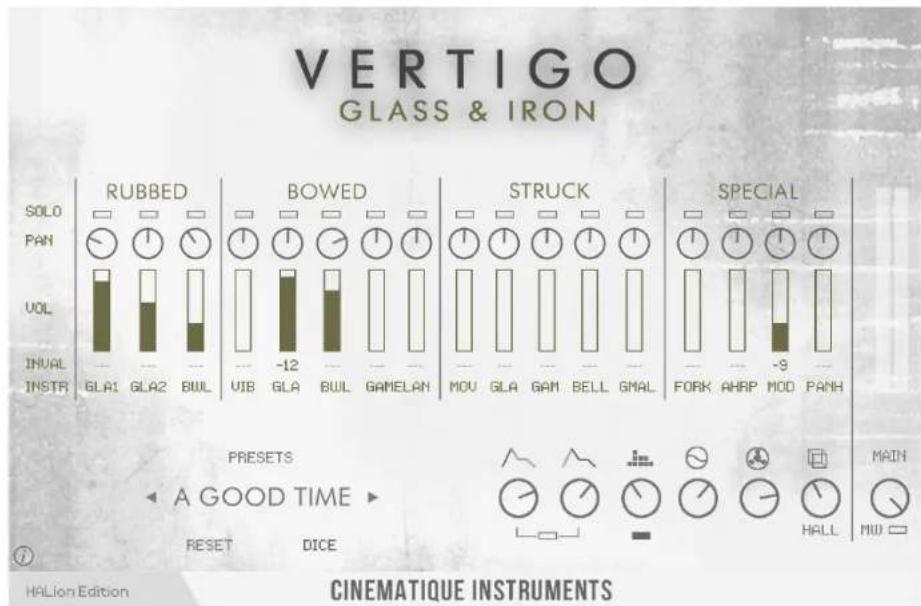
Vertigo Glass & Iron provides 17 different sound sources:
| Rubbed | GLA1: Rubbing wine glassesGLA2: Rubbing thicker drinking glassesBWL: Rubbing metal Singing Bowls |
| Bowed | VIB: Bowing a vibraphoneGLA: Bowing drinking glassesBWL: Bowing metal Singing BowlsGAMELAN: Bowing a Saron (left) & a Gender (right) |
| Struck | MOV: Randomly hitting a drinking glassGLA: Hitting drinking glassesGAM: Hitting a Gender with rubber malletBELL: Hitting a GlockenspielGMAL: Hitting drinking glasses with a mallet |
| Special | FORK: Timestreched metal forkAHRP: Bowing a AutoharpMOD: Glass send thru a strange modulePANH: Glass send thru a resynthesizer |
Vertigo Glass & Iron in detail
All of these sounds are equipped with a separate volume slider, a pitch slider covering a range from -12 to 12 semitones, a pan-pot and a solo button.
Solo Play the corresponding
instrument in solo mode
Panning Pan the corresponding
instrument from left
to right
Volume Controls the volume
of the corresponding
instrument

Tuning Controls the specific interval (pitch) of the
corresponding instrument in relation to the played key(s)
Interval Lock On the left side of the instrument slots you can click onto INVALID in order to
lock the Interval Section, so preset changes won't have an effect on the tuning
The controls of the master section:
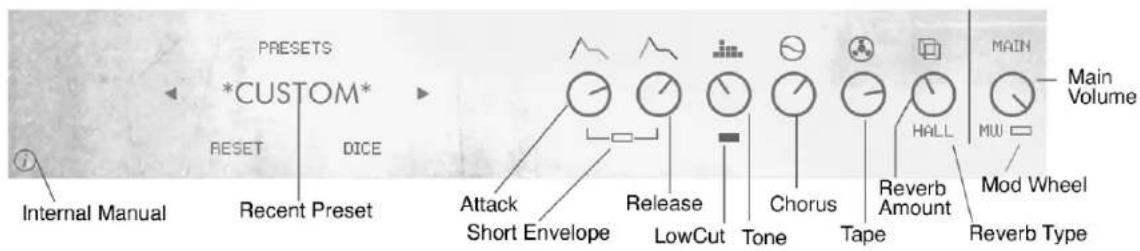
Reset Sets the entire instrument back to the default values
Dice Sets all(!) parameters randomly
Presets Clicking on the name will open the preset menu
Previous/ Next By clicking on these arrows you will get to the previous/ next preset
Attack Controls the attack of all instruments
Decay Controls the decay/ release of all instruments
Short Envelope Deactivates the sustain for more percussive sounds
Tone This EQ is a kind of low/high bell EQ. Turning counterclockwise will boost the low and reduce the high frequencies. Turning the knob clockwise will achieve the opposite.
Low Cut Activates a Low Cut Filter around 120 Hz
Chorus Play the entire sound through a chorus effect (100% is pure wet)
Tape Play the entire sound through an old tape echo (100% is pure wet)
Reverb Controls the amount of reverb. By clicking on the name below the slider you can select the type of reverb out of 6 different variations. There are six different types: Room, Wood, Chamber, Hall, Church and Infinite
Main Controls the overall volume level of a tape saturation (Gain and Output)
MW By activating this function, Vertigo Glass & Iron will be volume controlled by the mod wheel.
The mod wheel controls the main volume as well as slightly changes the tone (from low to high). Furthermore the engine activates the dynamic layer of all corresponding instruments. The maximum boundary of the mod wheel is set by the value when the MW is turned off.
VERTIGO
GLASS & IRON
Vertigo Glass & Iron is a wonderful tool to easily achieve inspiring as well as unique Glass & Iron ensemble sounds. It gives you a rich and deep sonic experience.
Thanks to René, Jumpel, Hannah, Nati and Jonas at Cinematique Instruments and Florian, Matthias, Michael and Frank at Steinberg.
Copyright © March, 2022 by Cinematique Instruments, Cologne, Germany
Brand : STEINBERG
Model : Vertigo Glass & Iron
Category : Faucets