10-342EVS - Saw RIKON - Free user manual and instructions
Find the device manual for free 10-342EVS RIKON in PDF.


| Product Type | 18" Wood/Metal Bandsaw |
| Model | 10-342EVS |
| Brand | RIKON |
| Motor | 2.5 HP, TEFC, 230V, 12.5 A, 60 Hz |
| Blade Length | 153" (3,886 mm) |
| Blade Width Range | 1/4" - 1-3/8" (6.35 - 35 mm) |
| Blade Speeds (Low Range) | 82 - 1,800 ft/min (25 - 549 m/min) |
| Blade Speeds (High Range) | 140 - 3,280 ft/min (43 - 1,000 m/min) |
| Table Size (W x D) | 21-1/2" x 15-3/4" (546 x 400 mm) |
| Table Tilt | Left -10°, Right 45° |
| Maximum Cutting Width (Throat) | 17-1/2" (445 mm) |
| Maximum Cutting Depth (Height) | 13" (330 mm) |
| Table Height | 35-1/2" (902 mm) |
| Dust Port Diameter | 4" (100 mm), two ports |
| Overall Dimensions (W x D x H) | 38-1/2" x 29-1/8" x 72-7/8" (976 x 740 x 1850 mm) |
| Net Weight | 403.5 lbs (183 kg) |
| Power Requirement | 230V, 12.5A, 60 Hz, 2.5 HP |
| Blade Tracking | Adjustable upper and lower wheel tracking |
| Blade Tension | Quick release lever, hand wheel adjustment with indicator |
| Fence System | Adjustable rip fence with drift correction, vertical/horizontal and left/right mounting |
| Blade Guides | Spring-loaded ball bearing guides, upper and lower, adjustable |
| Safety Features | Blade guard, emergency stop button, push stick, lockable switch |
| Warranty | 5-Year Limited Warranty (residential use) |
| Included Accessories | Rip fence, miter gauge, push stick, tool holder, hex wrenches |
Frequently Asked Questions - 10-342EVS RIKON
User questions about 10-342EVS RIKON
0 question about this device. Answer the ones you know or ask your own.
Ask a new question about this device
Download the instructions for your Saw in PDF format for free! Find your manual 10-342EVS - RIKON and take your electronic device back in hand. On this page are published all the documents necessary for the use of your device. 10-342EVS by RIKON.
USER MANUAL 10-342EVS RIKON
18" Wood/Metal Bandsaw
natural_image
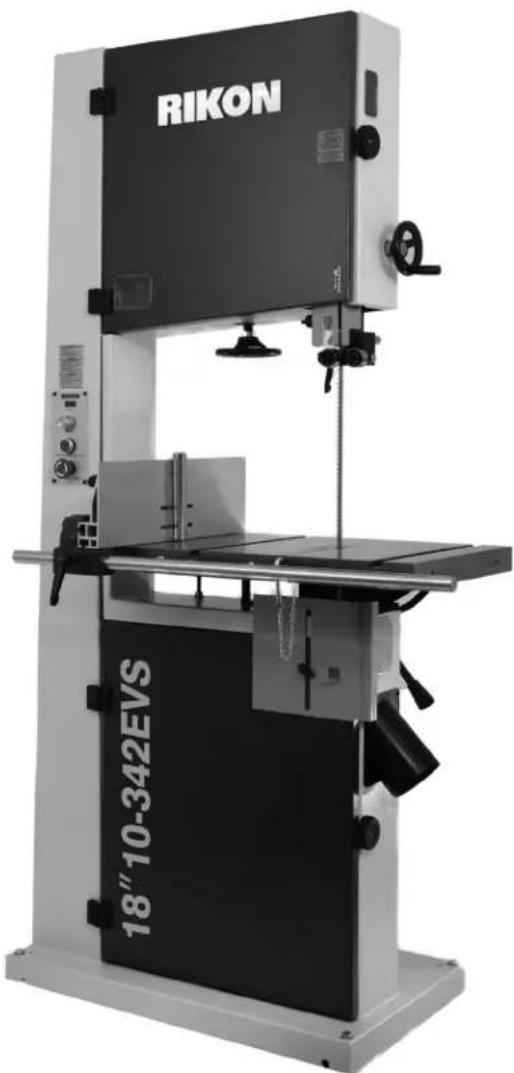
Rikon industrial machine with visible branding and model number 18" 10-342EVS (no additional text or symbols)Operator's Manual
Record the serial number and date of purchase in your manual for future reference. The serial number can be found on the specification label on the rear of your machine.
Serial Number:
Date of purchase:
TABLE OF CONTENTS
Specifications....2
Safety Instructions 3 - 6
Getting To Know Your Machine 7
Contents of Package 8 - 9
Installation 9
Assembly 10 - 12
Adjustments....12 - 20
Operation 21 - 23
Wiring Diagram 23
Maintenance 23 - 24
Notes 24
Troubleshooting 25 - 27
Parts Diagrams & Parts Lists 28 - 37
Accessories 38
Warranty 39
SPECIFICATIONS
Motor 2.5 HP, TEFC
Motor Speed (no load).... 1,400 RPM
Volts 230 V
Amps, Hertz 12.5 A, 60 Hz
Blade Length 153" (3,886 mm)
Blade Width 1/4" - 1-3/8" (6.35 - 35 mm)
Blade Speeds (Low Range)....82 - 1,800 ft/min (25 -549 m/min)
Blade Speeds (High Range)....140 - 3,280 ft/min (43 -1,000 m/min)
Table Size (W x D) 21-1/2" x 15-3/4" (546 x 400 mm)
Table Side Extension Size (W x D)..... 4-3/8" x 15-3/4" (110 x 400 mm)
Table Tilt Left -10°, Right 45°
Maximum Cutting Width (throat) 17-1/2" (445 mm)
Maximum Cutting Depth (height) 13" (330 mm)
Table Height 35-1/2" (902 mm)
Fence Height 6" (152 mm)
Fence Length 18-3/4" (475 mm)
Miter Gauge T-Slots (2) 3/4" x 3/8" (19.05 x 9.5 mm)
Dust Ports (2) 4" Diameter (100 mm)
Base Size ...... 29-11/32" x 18-1/8" x 2-7/16" (745 x 460 x 62.5 mm)
Overall Height 72-7/8" (1850 mm)
Overall Size (WxDxH) ..... 38-1/2"x29-1/8"x72-7/8" (976x740x1850 mm)
Net Weight 403.5 lbs (183 kg)
NOTE: The specifications, photographs, drawings and information in this manual represent the current model when the manual was prepared. Changes and improvements may be made at any time, with no obligation on the part of Rikon Power Tools, Inc. to modify previously delivered units. Reasonable care has been taken to ensure that the information in this manual is correct, to provide you with the guidelines for the proper safety, assembly and operation of this machine.
SAFETY INSTRUCTIONS
IMPORTANT! Safety is the single most important consideration in the operation of this equipment. The following instructions must be followed at all times. Failure to follow all instructions listed below may result in electric shock, fire, and/or serious personal injury.
There are certain applications for which this tool was designed. We strongly recommend that this tool not be modified and/or used for any other application other than that for which it was designed. If you have any questions about its application, do not use the tool until you have contacted us and we have advised you.
SAFETY SYMBOLS

SAFETY ALERT SYMBOL: Indicates DANGER, WARNING, or CAUTION. This symbol may be used in conjunction with other symbols or pictographs.

DANGER
Indicates an imminently hazardous situation, which, if not avoided, could result in death or serious injury.

WARNING
Indicates a potentially hazardous situation, which, if not avoided, could result in death or serious injury.

CAUTION
Indicates a potentially hazardous situation, which, if not avoided, could result in minor or moderate injury.
NOTICE: Shown without Safety Alert Symbol indicates a situation that may result in property damage.
GENERAL SAFETY
KNOW YOUR POWER TOOL. Read the owner's manual carefully. Learn the tool's applications, work capabilities, and its specific potential hazards.
BEFORE USING YOUR MACHINE
To avoid serious injury and damage to the tool, read and follow all of the Safety and Operating Instructions before operating the machine.
-
⚠️ WARNING Some dust created by using power tools contains chemicals known to the State of California to cause cancer, birth defects, or other reproductive harm. Some examples of these chemicals are:
-
Lead from lead-based paints.
• Crystalline silica from bricks, cement, and other - masonry products.
- Arsenic and chromium from chemically treated lumber.
Your risk from these exposures varies, depending on how often you do this type of work. To reduce your exposure to these chemicals: work in a well ventilated area and work with approved safety equipment, such as those dust masks that are specially designed to filter out microscopic particles.
- READ the entire Owner's Manual. LEARN how to use the tool for its intended applications.
-
GROUND ALL TOOLS. If the tool is supplied with a 3 prong plug, it must be plugged into a 3-contact electrical receptacle. The 3rd prong is used to ground the tool and provide protection against accidental electric shock. DO NOT remove the 3rd prong. See Grounding Instructions on the following pages.
-
AVOID A DANGEROUS WORKING ENVIRONMENT. DO NOT use electrical tools in a damp environment or expose them to rain.
- DO NOT use electrical tools in the presence of flammable liquids or gasses.
- ALWAYS keep the work area clean, well lit, and organized. DO NOT work in an environment with floor surfaces that are slippery from debris, grease, and wax.
- KEEP VISITORS AND CHILDREN AWAY. DO NOT permit people to be in the immediate work area, especially when the electrical tool is operating.
- DO NOT FORCE THE TOOL to perform an operation for which it was not designed. It will do a safer and higher quality job by only performing operations for which the tool was intended.
- WEAR PROPER CLOTHING. DO NOT wear loose clothing, gloves, neckties, or jewelry. These items can get caught in the machine during operations and pull the operator into the moving parts. The user must wear a protective cover on their hair, if the hair is long, to prevent it from contacting any moving parts.
- CHILDPROOF THE WORKSHOP AREA by removing switch keys, unplugging tools from the electrical receptacles, and using padlocks.
- ALWAYS UNPLUG THE TOOL FROM THE ELECTRICAL RECEPTACLE when making adjustments, changing parts or performing any maintenance.
SAFETY INSTRUCTIONS
-
KEEP PROTECTIVE GUARDS IN PLACE AND IN WORKING ORDER.
-
AVOID ACCIDENTAL STARTING. Make sure that the power switch is in the "OFF" position before plugging in the power cord to the electrical receptacle.
-
REMOVE ALL MAINTENANCE TOOLS from the immediate area prior to turning "ON" the machine.
-
USE ONLY RECOMMENDED ACCESSORIES. Use of incorrect or improper accessories could cause serious injury to the operator and cause damage to the tool. If in doubt, check the instruction manual that comes with that particular accessory.
-
NEVER LEAVE A RUNNING TOOL UNATTENDED. Turn the power switch to the "OFF" position. DO NOT leave the tool until it has come to a complete stop.
-
DO NOT STAND ON A TOOL. Serious injury could result if the tool tips over, or you accidentally contact the tool.
-
DO NOT store anything above or near the tool where anyone might try to stand on the tool to reach it.
-
MAINTAIN YOUR BALANCE. DO NOT extend yourself over the tool. Wear oil resistant rubber soled shoes. Keep floor clear of debris, grease, and wax.
-
MAINTAIN TOOLS WITH CARE. Always keep tools clean and in good working order. Keep all blades and tool bits sharp, dress grinding wheels and change other abrasive accessories when worn.
-
EACH AND EVERY TIME, CHECK FOR DAMAGED PARTS PRIOR TO USING THE TOOL. Carefully check all guards to see that they operate properly, are not damaged, and perform their intended functions. Check for alignment, binding or breaking of moving parts. A guard or other part that is damaged should be immediately repaired or replaced.
-
DO NOT OPERATE TOOL WHILE TIRED, OR UNDER THE INFLUENCE OF DRUGS, MEDICATION OR ALCOHOL.
-
SECURE ALL WORK. Use clamps or jigs to secure the workpiece. This is safer than attempting to hold the workpiece with your hands.
-
STAY ALERT, WATCH WHAT YOU ARE DOING, AND USE COMMON SENSE WHEN OPERATING A POWER TOOL.
A moment of inattention while operating power tools may result in serious personal injury.
-
ALWAYS WEAR A DUST MASK TO PREVENT INHALING DANGEROUS DUST OR AIRBORNE PARTICLES, including wood dust, crystalline silica dust and asbestos dust. Direct particles away from face and body. Always operate tool in well ventilated area and provide for proper dust removal. Use dust collection system wherever possible. Exposure to the dust may cause serious and permanent respiratory or other injury, including silicosis (a serious lung disease), cancer, and death. Avoid breathing the dust, and avoid prolonged contact with dust. Allowing dust to get into your mouth or eyes, or lay on your skin may promote absorption of harmful material. Always use properly fitting NIOSH/OSHA approved respiratory protection appropriate for the dust exposure, and wash exposed areas with soap and water.
-
USE A PROPER EXTENSION CORD IN GOOD CONDITION. When using an extension cord, be sure to use one heavy enough to carry the current your product will draw. The table on the following page shows the correct size to use depending on cord length and nameplate amperage rating. If in doubt, use the next heavier gauge. The smaller the gauge number, the larger diameter of the extension cord. If in doubt of the proper size of an extension cord, use a shorter and thicker cord. An undersized cord will cause a drop in line voltage resulting in a loss of power and overheating.
USE ONLY A 3-WIRE EXTENSION CORD THAT HAS A 3-PRONG GROUNDING PLUG AND A 3-POLE RECEPTACLE THAT ACCEPTS THE TOOL'S PLUG.
- ADDITIONAL INFORMATION regarding the safe and proper operation of this product is available from:
• Power Tool Institute 1300 Summer Avenue Cleveland, OH 44115-2851 www.powertoolinstitute.org
• National Safety Council 1121 Spring Lake Drive Itasca, IL 60143-3201 www.nsc.org
• American National Standards Institute 25 West 43rd Street, 4th Floor New York, NY 10036 www.ansi.org
• ANSI 01.1 Safety Requirements for Woodworking Machines and the U.S. Department of Labor regulations www.osha.gov
- SAVE THESE INSTRUCTIONS. Refer to them frequently and use them to instruct others.
SAFETY INSTRUCTIONS
ELECTRICAL SAFETY
WARNING: THIS TOOL REQUIRES THE INSTALLATION OF A 220V PLUG (NOT INCLUDED), AND MUST BE GROUNDED WHILE IN USE TO PROTECT THE OPERATOR FROM ELECTRIC SHOCK.
IN THE EVENT OF A MALFUNCTION OR BREAKDOWN, grounding provides the path of least resistance for electric current and reduces the risk of electric shock. This tool is equipped with an electric cord that has an equipment grounding conductor and requires a grounding plug (not included). The plug MUST be plugged into a matching electrical receptacle that is properly installed and grounded in accordance with ALL local codes and ordinances.
DO NOT MODIFY ANY PLUG. If it will not fit the electrical receptacle, have the proper electrical receptacle installed by a qualified electrician.
IMPROPER ELECTRICAL CONNECTION of the equipment grounding conductor can result in risk of electric shock. The conductor with the green insulation (with or without yellow stripes) is the equipment grounding conductor. DO NOT connect the equipment grounding conductor to a live terminal if repair or replacement of the electric cord or plug is necessary.
CHECK with a qualified electrician or service personnel if you do not completely understand the grounding instructions, or if you are not sure the tool is properly grounded when installing or replacing a plug.
REPLACE A DAMAGED OR WORN CORD IMMEDIATELY.
This tool is intended for use on a circuit that has a 220 volt electrical receptacle. FIGURE 1 shows the type of the 220V, 4-wire electrical plug and electrical receptacle that has a grounding conductor that is required.
Samples of 220 volt plugs required for this machine.


Consult a qualified electrician if the distance of the machine to the electrical panel is greater than 30 feet.
Figure 1
EXTENSION CORDS
A WARNING: USE OF AN EXTENSION CORD WITH THIS MACHINE IS NOT RECOMMENDED. FOR BEST POWER AND SAFETY, PLUG THE MACHINE DIRECTLY INTO A DEDICATED GROUNDED ELECTRICAL OUTLET THAT IS WITHIN THE SUPPLIED CORD LENGTH OF THE MACHINE.
IF AN EXTENSION CORD NEEDS TO BE USED, IT SHOULD ONLY BE FOR LIMITED OPERATION OF THE MACHINE. THE EXTENSION CORD SHOULD BE AS SHORT AS POSSIBLE IN LENGTH, AND HAVE A MINIMUM GAUGE SIZE OF 14AWG.
USE ONLY A 4-WIRE EXTENSION CORD THAT HAS THE PROPER TYPE OF A 4-PRONG GROUNDING PLUG THAT MATCHES THE MACHINE'S 4-PRONG PLUG AND ALSO THE 4-POLE RECEPTACLE THAT ACCEPTS THE TOOL'S PLUG. *
WARNING: Check extension cords before each use. If damaged replace immediately. Never use a tool with a damaged cord, since touching the damaged area could cause electrical shock, resulting in serious injury.
Use a proper extension cord. Only use cords listed by Underwriters Laboratories (UL). Other extension cords can cause a drop in line voltage, resulting in a loss of power and overheating of tool. When operating a power tool outdoors, use an outdoor extension cord marked "W-A" or "W". These cords are rated for outdoor use and reduce the risk of electric shock.
A WARNING Keep the extension cord clear of the working area. Position the cord so that it will not get caught on lumber, tools or other obstructions while you are working with a power tool.
* Canadian electrical codes require extension cords to be certified SJT type or better.
** The use of an adapter in Canada is not acceptable.

THIS SYMBOL DESIGNATES THAT THIS TOOL IS LISTED BY THE INTERTEK TESTING SERVICES, TO UNITED STATES AND CANADIAN STANDARDS.
Intertek
SAFETY INSTRUCTIONS
SPECIFIC SAFETY INSTRUCTIONS FOR BAND SAWS
This machine is intended for the cutting of natural, solid woods, composite materials, plastics and non-ferrus metals. The permissible workpiece dimensions must be observed (see Technical Specification). Any other use not as specified, including modification of the machine or use of parts not tested and approved by the equipment manufacturer, can cause unforeseen damage and invalidate the warranty.
ATTENTION: Use of this band saw still presents risks that cannot be eliminated by the manufacturer. Therefore, the user must be aware that wood working machines are dangerous if not used with care and all safety precautions are adhered to.
- Do not operate this machine until you have read all of the following instructions.
- If you are not familiar with the operation of the machine, obtain assistance from a qualified person.
- Always wear approved, safety protective eye wear and hearing protection when operating this machine.
- Always wear a dust mask and use adequate dust collection and proper ventilation.
- Adjust the upper guides about 1/8" to 1/4" above the material being cut.
- Check for proper blade size and type for the thickness and type of material being cut.
- Make sure that the blade tension and blade tracking are properly adjusted.
- Always keep hands and fingers away from the blade.
- Make "relief" cuts before cutting curves to eliminate blade binding.
- Always hold material firmly, resting flat on the table and feed it into the blade at a moderate speed.
- Never attempt to saw stock that does not have a flat surface, unless a suitable support is used.
- When cutting small work pieces, always use a push stick, holding jig or other device to keep your hands safely away from the blade. Use 'Zero Clearance Inserts' to prevent small pieces from becoming jammed in the table insert or lower blade guides.
- Always allow the bandsaw blade to stop before removing scrap pieces from the table.
- Do not remove jammed pieces from the saw until the machine and blade has stopped. Unplug the bandsaw from the power source, and then remove the jammed work piece.
- Always turn off the machine if the material is to be backed out of an uncompleted cut.
- Use extra supports (roller stands, saw horses, tables etc.) for any work pieces large enough to tip when not held down to the table top surface.
- Always turn off and unplug the machine when changing blades or servicing the machine.
- Release blade tension when the saw will not be used for a long period of time.
- Remove material or debris from the work area. Keep work area neat and clean.
SAVE THESE INSTRUCTIONS.
Refer to them often.
CALIFORNIA PROPOSITION 65 WARNING:

WARNING: Drilling, sawing, sanding or machining wood products can expose you to wood dust, a chance known to the State of California to cause cancer. Avoid inhaling wood dust or use a dust masker safeguards for personal protection. For more information go to www.P65Warnings.ca.gov/wood.
This owner's manual is not a teaching aid. Use of this owner's manual is intended to show assembly, adjustments, and general use.
GETTING TO KNOW YOUR MACHINE

A. Tension Indicator Window
B. Blade Tension Hand Wheel
C. Control Panel
D. Rip Fence, Rail & Re-saw Bar
E. Base
F. Blade Tracking Window
G. Door Lock Knob
H. Guide Post Rise/Fall Handle
I. Blade Guard
J. Upper Blade Guides
K. Work Table
L. Lower Blade Guides & Blade Guard

M. 4" Dust Port
N. Table Tilt Wheel & Locking Handle
O. Guide Post Lock Knob
P. Blade Tracking Knob
Q. Push Stick & Hanger Bolt
R. Blade Tension Quick Release Lever
S. Tool Holder
T. Hanger Bolts for Tow Bar (optional)
U. Electrical Outlet 110V
V. Motor Adjusting Rod & Nut
W. Motor & Wiring Box
X. Lower Wheel Adjustment Bolts
CONTENTS OF PACKAGE
Model 10-342EVS 18" Wood/Metal Bandsaw is shipped complete in one box.
Unpacking, Checking Contents & Clean-up
- Carefully remove all contents from the shipping carton. Compare the contents with the list of contents to make sure that all of the items are accounted for, before discarding any packing material. Place parts on a protected surface for easy identification and assembly. If any parts are missing or broken, please call RIKON Customer Service (877- 884-5167) as soon as possible for replacements. DO NOT turn your machine ON if any of these items are missing. You may cause injury to yourself or damage to the machine.
- Report any shipping damage to your local distributor. Take photographs for any possible insurance claims.
- With the help of another person, carefully lift the Bandsaw from the packaging and place it on a level floor.
- Clean all rust protected surfaces with ordinary house hold type grease or spot remover. Do not use; gasoline, paint thinner, mineral spirits, etc. These may damage painted surfaces.
- Apply a coat of paste wax to the table to prevent rust. Wipe all parts thoroughly with a clean dry cloth. Be careful, as the pre-installed bandsaw blade has sharp teeth and may cause injury if touched.
- Set packing material and shipping carton aside. Do not discard until the machine has been set up and is running properly.
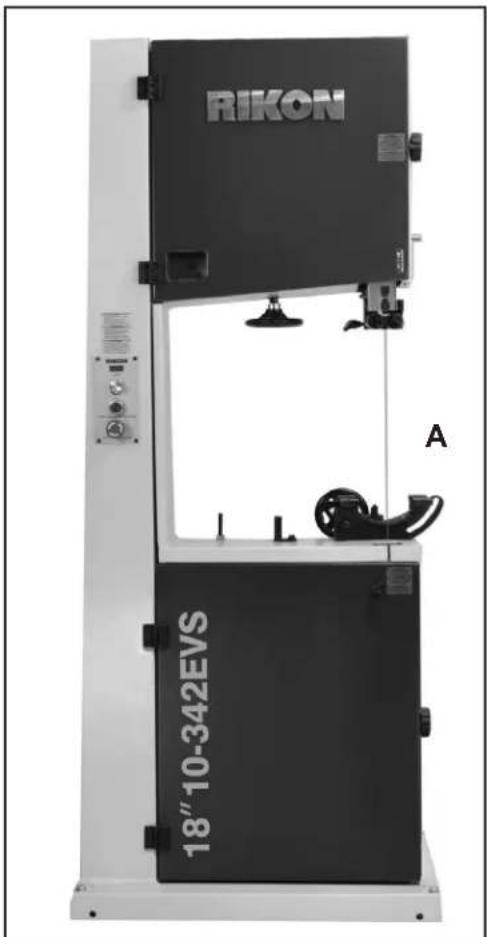
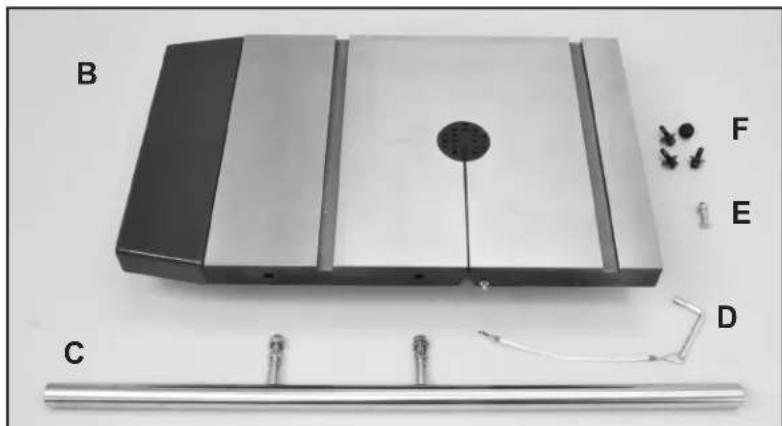
TABLE OF LOOSE PARTS
A. Bandsaw Frame Assembly
B. Table with Extension and Blade Insert
C. Rip Fence Front Rail and Hardware
D. Leveling Pin and Lanyard
E. Table Leveling Bolt and Nut
F. Table Mounting Bolts and Washers
G. Manual and Warranty Card - not shown
natural_image
Exterior view of a mechanical device with labeled parts (B, C, D, E, F) and a central circular component (no readable text or symbols beyond labels)Link to RIKON website, 10-342EVS Product Page

CONTENTS OF PACKAGE
TABLE OF LOOSE PARTS continued
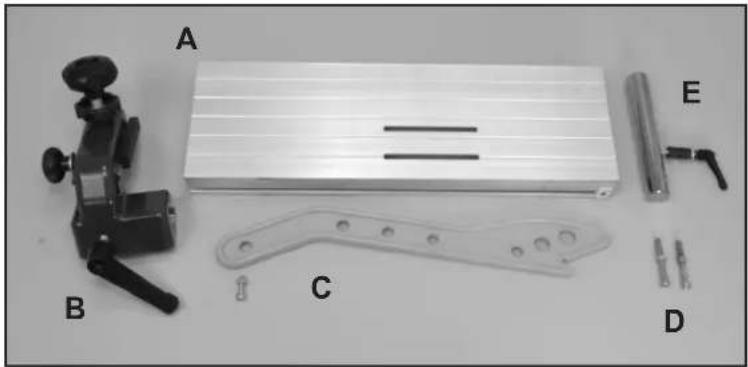
Rip Fence Assembly & Parts:
A. Rip Fence
B. Rip Fence Carrier Assembly
C. Push Stick and Mounting Bolt and Nut
D. Hanger Bolts for Tow Bar (accessory item)
E. Re-saw Bar Assembly
natural_image
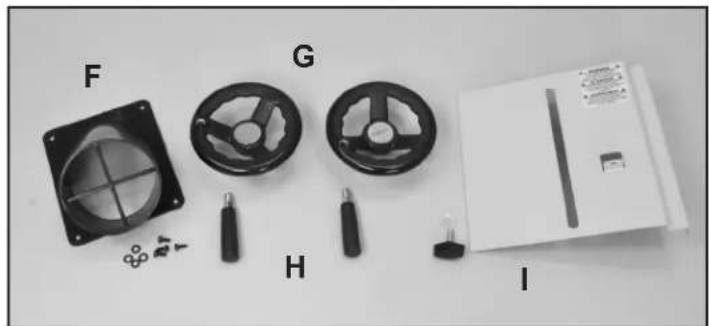
Black-and-white photo of mechanical components including a clamp, a flat plate, a bracket, and labeled parts A, B, C, D, E (no text or symbols on main objects)Parts for Assembly on Frame:
F. Dust Port & Mounting Screws
G. Handwheels (2)
H. Handles for Handwheels (2)
I. Lower Blade Guard and Knob
natural_image
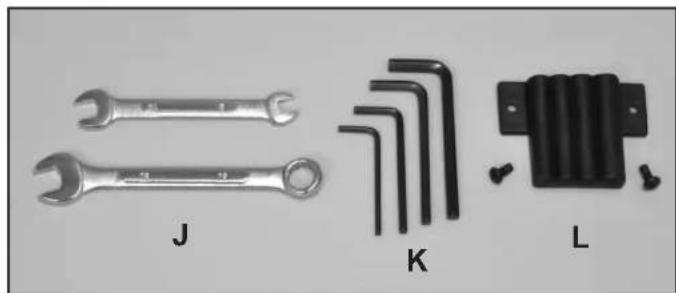
Assorted mechanical components including a fan, three circular gauges, and a rectangular device (no visible text or symbols)Tools and Tool Holder:
J. Wrenches: 10, 13 mm
K. Hex Wrenches; 3, 4, 5, 6 mm
L. Tool Holder and Mounting Screws
natural_image
Set of three wrenches and a transformer component with labeled parts (J, K, L), no text or symbols present.Additional Tools required - not supplied
2 Phillips Screwdriver
16mm or an Adjustable Wrench
INSTALLATION
MOVING & INSTALLING THE BANDSAW
CAUTION The bandsaw is heavy - over 300 lbs! It is best to assemble the machine near the area where it will eventually reside. When moving or positioning an assembled bandsaw, DO NOT use the table or upper blade guard assemblies as this may damage the machine. Move the bandsaw by grasping the support column and lower frame which are all welded together for rigidity. The bandsaw can also be moved by laying it down on the back/left side of the column so that the table assembly is not compromised.
-
Carefully remove the machine from the shipping carton. See above instructions on handling the saw.
-
Position the machine on a solid, level foundation that is located in an area that has ample space in front, right side and in back of the bandsaw for cutting large or long material.
For best power and safety, the bandsaw should be plugged directly into a dedicated grounded electrical outlet that is within the supplied cord length of the machine. The use of an extension cord is not recommended. - Align the machine so that during use, the material being cut will not face aisles, doorways, or other work areas that bystanders may be in. Do not locate or use the machine in damp or wet conditions.
- Once in place in your shop, level the machine with spacers, and secure it to the floor with lag screws (not supplied) using the 4 holes in the saw's base.
ASSEMBLY
WARNING THE MACHINE MUST NOT BE PLUGGED IN AND THE POWER SWITCH MUST BE IN THE OFF POSITION UNTIL ASSEMBLY IS COMPLETE.
NOTE: Parts referenced throughout the manual refer to the different sheets and key numbers of the Parts Diagrams and Parts Lists on pages 28 to 37. Example: (#1A) refers to Part #1 on Sheet A.
TABLE ASSEMBLY
- Mount the table (Fig. 1) in place on the trunnion with the assistance of another person. The table is heavy! Do this from the rear of the machine, so that it is easier to fit the pre-installed blade through the slot in the table.
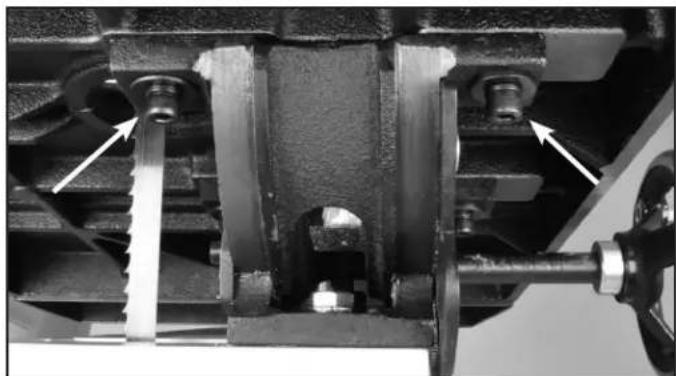
- Attach the table to the trunnion with the four Hex Socket Cap Screws, Spring Washers and Washers (Parts #13B, 12B, 11B). Install two bolts to the right of the blade, hand tightened only. Fig. 2. Then tip the table to 45 degrees and install the two bolts to the left of the blade. Fig. 3. DO NOT fully tighten the bolts at this time. Return the table to the horizontal position.
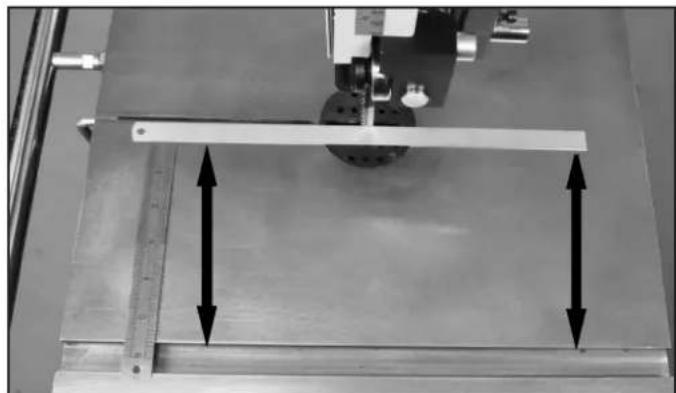
NOTE: Before finally secured in position, the table can be slightly moved, left and right. Check to make sure that the table's miter gauge slot is parallel to the side of the saw blade. This will provide a true cut when ripping stock. Set a thin metal ruler against the side of the saw blade. Make sure that it is not touching the saw's teeth, which can angle the ruler. Measure the distance from one end of the ruler to the miter gauge slot. FIG. 4. Then measure the same distance from the other end of the ruler to the miter gauge slot. Compare these two measurements and angle the table as necessary until the distances are the same.
-
Once the table is aligned parallel to blade, tighten all four of the installed bolts to secure the table in place.
-
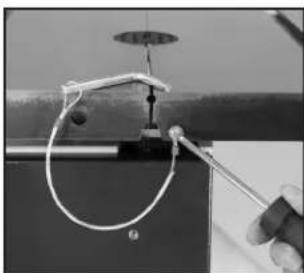
Attach the Table Leveling Pin's Lanyard (Part #5B) to the front of the table with the supplied Phillips Screw and Washer. This metal pin keeps the two sides of the table level at the slot area.
natural_image
Close-up of a mechanical clamp or wire being held by a tool, with no visible text or symbols.
natural_image
Exterior view of a modern office building (no signage)FIGURE 1
natural_image
Mechanical assembly diagram showing a piston and crankshaft mechanism with no visible text or symbolsFIGURE 2

natural_image
Close-up mechanical assembly showing internal components and a white arrow pointing to a specific part (no text or symbols visible)FIGURE 3
natural_image
Mechanical testing setup with a metal ruler and two vertical arrows indicating measurement or alignment (no text or symbols present)FIGURE 4
ASSEMBLY
RIP FENCE ASSEMBLY
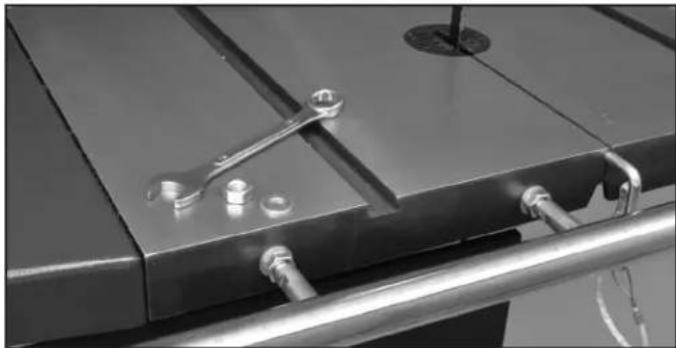
- Mount the fence Guide Rail (#12E) onto the front table edge with the two fence bar Nuts and Washers (#14E, 5E) Fig. 5. Position the bar so that it is parallel with the table surface, and equal distance out from the front edge of the table when measured at both left and right front edges of the table.
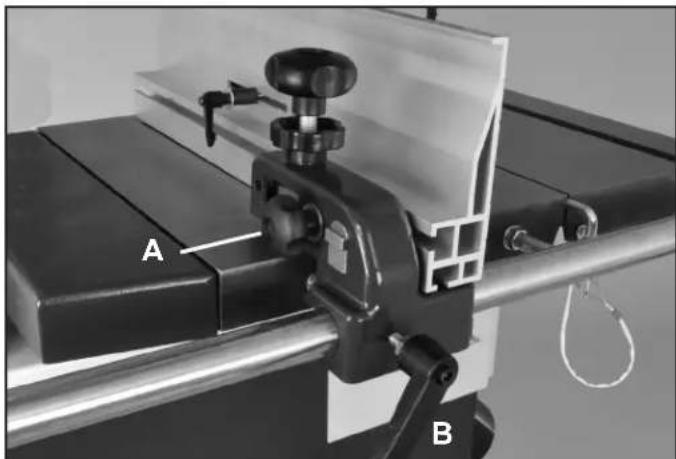
- Slide the Fence Carrier Assembly (#9E) onto the fence's guide rail. Fig. 6.
- Slide the Rip Fence (#18E) onto the fence carrier, and lock it in place by tightening the fence lock Knob (#7E) which is located on the carrier, opposite side to the fence. Fig. 6, A.
- With the front Locking Handle (#10E, Fig. 6,B) secure the fence on the rail so that it does not move during the rest of the assembly process. Final adjustments to the fence are covered on pages 18 to 20. Information on the re-saw bar is on page 21.
INSTALL THE HAND WHEELS
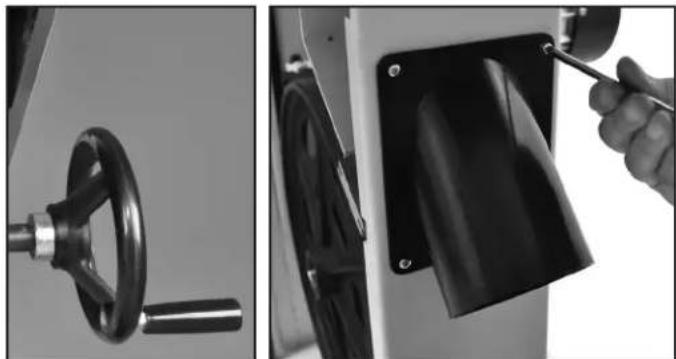
- Attach the small Handle (#25B) to the large Handwheel (#24B) that tilts the table. Then install this handwheel onto the Gear Shaft (#23B) extending out from the trunnion at the back of the machine. Fig. 7A.
- Attach the second small Handle to the Handwheel (#38C) that has been pre-installed at the upper right side of the saw frame. This wheel raises and lowers the blade guard.
INSTALL THE 4" DUST PORT
Mount the 4" Dust Port (#53A) under the table on the right side of the saw frame with four pan head screws and flat washers (#51A, 52A) using a Phillips screw driver. Fig. 7B.
Attach the Blade Guard (#19A) to the front of the lower door with the Handle and Washer (#17A, 18A). Slide the guard up to protect the lower guides during use, and slide the guard down when adjusting the lower guides is needed. Fig. 8A.
INSTALL THE 90° TABLE STOP
- Tilt the table to gain access to its underside.
- Thread the Hex Screw (#9B) and Nut (#8B) to the bottom of the table in the pre-bored and tapped hole. Fig. 8B. Setting the table to 90° to the blade will be done later on pages 12 and 13.
natural_image
Close-up of a metal frame with a wrench and bolted joints, mounted on a metal railing (no text or symbols visible)FIGURE 5
natural_image
Mechanical setup with labeled components A and B, showing a clamp and lever mechanism (no readable text or symbols beyond labels)FIGURE 6
natural_image
Two-panel black-and-white photo showing a hand holding a tool next to a mechanical component with a circular handle and cable (no visible text or symbols)A
FIGURE 7
B

natural_image
Two-panel black-and-white photo showing mechanical components: a close-up of a tool and a textured surface with bolts (no visible text or symbols)A
FIGURE 8
B
ASSEMBLY
Assemble the Tool Holder (#68A) to the column rear with two Phillips Screws. Fig. 9, A. Handy storage for the Hex Wrenches (3, 4, 5, 6mm).
INSTALL THE PUSH STICK HOLDER
Assemble the Push Stick Hanger Bolt (#4A) to the column's left side with a 5mm hex wrench. Handy storage for the push stick when not in use. FIG. 9, B.
INSTALL THE TOW BAR HOLDER
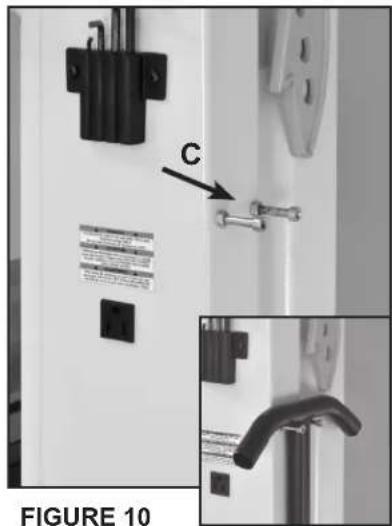
Two bolts (#4A) are included to store the tow bar included with the optional Mobility Kit #13-345. Screw the bolts into the column's left side. Fig. 10, C.
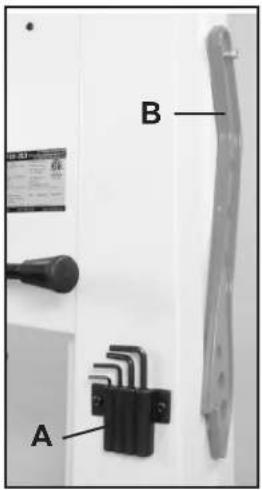
FIGURE 9
ADJUSTMENTS
WARNING
THE MACHINE MUST NOT BE
PLUGGED IN AND THE POWER SWITCH MUST BE IN THE OFF POSITION UNTIL ALL ADJUSTMENTS ARE COMPLETE.
TILTING THE TABLE
- At the rear of the saw, loosen the Quick Locking Handle (#74A) on the table trunnion by pulling it upward. Fig.11, A.
- Turn the table tilting Handwheel (#24B) to adjust the table to the desired angle. Fig. 11, B. Use the angle indicator scale (#32B) on the trunnion bracket (#27B) to find the desired angle, Fig. 11, C.
- Retighten the lock handle to secure the table.
SETTING THE TABLE SQUARE TO THE SAW BLADE'S SIDE
The table may be set at 90^ to the saw blade sides by adjusting the table stop Bolt (#9B) under the table. The table stop bolt rests on the top of the pivoting Stop Block (#62A).
- First loosen the bolt's Locking Nut (#8B) Fig. 12, A.
- Set a square on the table and against the saw blade's flat side. Tilt the table until the table is set exactly 90^ to the blade, than lock the table in position.
- Adjust the bolt (Fig. 12, B), up or down, until it is in contact with the pivoting Table Angle Stop Block

FIGURE 11


natural_image
Close-up of a metallic bolt and a cylindrical component labeled B and C (no text or symbols on the components)FIGURE 12
CONTINUED ON PAGE 13
(#62A) Fig. 12, C. Retighten the locking nut making sure that the table angle setting is maintained.
ADJUSTMENTS
SETTING THE TABLE SQUARE TO THE SAW BLADE'S SIDE continued
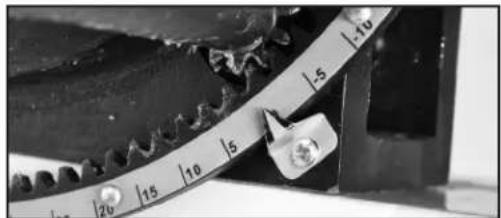
- The angle indicator on the trunnion, under the table at the rear of the machine, can be adjusted by loosening the Phillips head screw and moving the pointer into position to accurately indicate the 90^
natural_image
Close-up of a mechanical gear with a curved caliper and metric ruler (no visible text or symbols)FIGURE 13
SETTING THE TABLE SQUARE TO THE SAW BLADE'S BACK
While pre-set before shipping, if needed, the table may also be re-set at 90° to the back of the saw blade by adjusting the trunnion's micro adjustment screws.
- On the lower Trunnion Support (#18B), slightly loosen the two Hex Bolts (#14B) that hold the support to the bandsaw frame. Fig. 14, A.
- Set a square on the table and against the saw blade's back, flat edge.
- Using the 3mm hex wrench, turn the rear trunnion micro adjusting hex screws (#17B) to adjust the table position. Fig. 14, B.
- Clockwise will raise the trunnion & table.
- Counterclockwise will lower the trunnion & table.
- Check the table and blade angle for 90^ and when achieved, re-tighten the bolts to secure the table in position.
Unplug the bandsaw. A blade is installed at the factory. It is recommended to check the blade tracking prior to use. Make sure the upper and lower blade guides are adjusted away from the blade and the tension scale is set to correspond to the width of the blade you are using.
- Open both doors. At the rear of the machine, loosen the Lock Lever (#27D, FIG. 15, A) by turning it counterclockwise.
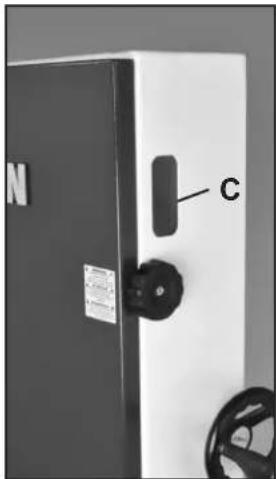
- Turn the Blade Tracking Handle (#28D, Fig. 15 B) clockwise or counterclockwise, while at the same time carefully turning the Upper Wheel (#1F) by hand. Reference Fig. 16, on page 14. Check the tracking of the blade on the wheel through the side window (C). Make at least three rotations of the wheel or until the blade tracks centered on the wheel.
WARNING
THE MACHINE MUST NOT BE
PLUGGED IN AND THE POWER SWITCH MUST BE IN THE OFF POSITION UNTIL ALL ADJUSTMENTS ARE COMPLETE.
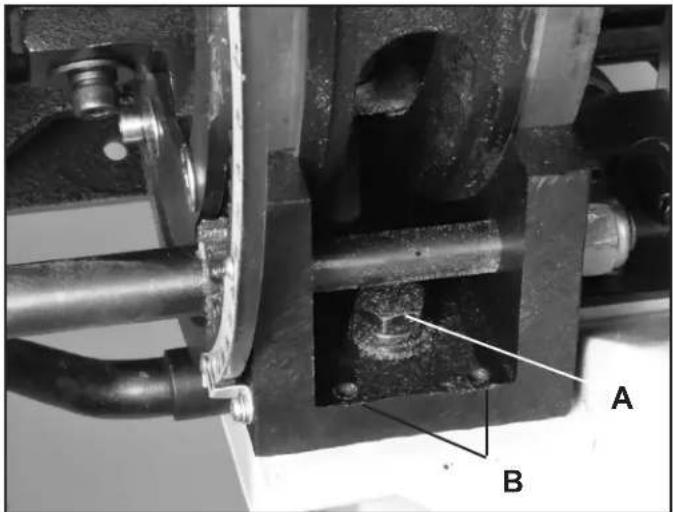
FIGURE 14
Photo of the micro adjusting screws shown with table angled for clarity.
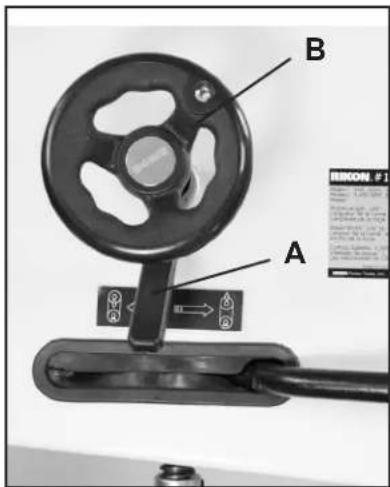
FIGURE 15
natural_image
Close-up of a white industrial cabinet with black components and a labeled component 'C' (no readable text or symbols beyond labels)CONTINUED ON PAGE 14
ADJUSTMENTS
TRACKING THE SAW BLADE continued
- Once the blade runs centered, tighten the lock lever and close the doors. For tracking of the blade on the Lower Wheel (#9F), see page 26 for instructions.
NOTE: the lower wheel has been pre-set at the factory and any changes made to this wheel should be after thorough reading and understanding of the instructions. Failure to do so could damage the machine.

natural_image
Close-up of a hand operating a film reel inside a mechanical device (no visible text or symbols)FIGURE 16
ADJUSTING THE BLADE TENSION
CAUTION
Always tension the blade with the Quick Release Lever (#19D) in the "ON" position. Failure to do so could result in lack of blade tension or tension failure. Figure 17.
NOTE: Release / turn 'OFF' the Tension Lever ONLY to change the blade, or to prolong the life of the blade when the saw is not in use for extended periods.
- To adjust the blade tension, turn the Blade Tension Handwheel (#17D, Fig. 18, A).
To tighten the tension of the blade, turn the hand wheel clockwise. Tension the blade until the Tension Indicator Arrow (#6A, Fig. 18, B) corresponds to the width of blade you are using. View the indicator Arrow through the top door's front window.
NOTE: The blade tension scale may read differently due to different blade specifications from manufacturers - steel thickness, material, or variations in the welded blade length. It may be necessary to adjust the tension arrow up/down one size on blade tension scale to match your blade. Note the blade setting for the next time the same blade is used.
General Rule for blade tension: With the saw unplugged and the blade guard up, the saw blade should deflect about 1/4" when pressed with a finger to the side of the blade.

FIGURE 17
WARNING
THE MACHINE MUST NOT BE PLUGGED IN AND THE POWER SWITCH MUST BE IN THE OFF POSITION UNTIL ALL ADJUSTMENTS ARE COMPLETE.

FIGURE 18
ADJUSTING THE BLADE TENSION STOP
If you can not set full tension on a new blade, the blade is most likely welded a bit longer than the standard 153" length, and so just beyond the pre-set tensioning range of the saw. To fix this, behind the top bandsaw wheel is Set Screw (#1D). Loosen the Nut (#2D) and turn the screw upward about 1/4", then retighten the securing nut. This will increase the blade tensioning range of the saw for your new blade.

natural_image
Close-up of a mechanical component with a bolt and arrow indicating direction (no visible text or symbols)ADJUSTMENTS
ADJUSTING THE BLADE TENSION INDICATOR
The Blade Tension Indicator Arrow should be checked and adjusted the first time the saw is set up and run, and whenever a new blade is installed.
The blade tension indicator should be adjusted for blades made from thicker steel, if over cut or undercut in length, or made by different manufacturers.
-
With desired tension on the blade, loosen the top adjusting Screw (#8A) with a Phillips screwdriver. Fig. 19.
-
Adjust the blade indicator up/down as needed and then re-tighten the screw.

CHANGING THE BANDSAW BLADE
WARNING
Unplug the machine from the electrical supply to ensure that the Bandsaw will not accidentally turn on if the ON/OFF switch is bumped.
- Release the blade tension by moving the quick release lever from the right to the left (OFF). Fig. 20.
- Open the top and bottom wheel doors, and remove the table support pin from the table front edge, and Dust Board (#33A, Fig. 21, G) by the lower dust port.
- Open the Hinged Door (#11C) on the blade guard by loosening the Locking Handle (#14C). Fig. 21, A.
- Remove the saw blade from the top wheel then feed it through the upper blade guides (B), slot in the table (C), lower blade guides (D), out of the slot in the column of the machine (E), off of the bottom wheel, and then around the front rail (F).
CAUTION
Be careful not to cut yourself on the sharp saw teeth. Wear gloves for protection.
-
When installing the new blade, reverse the steps 1-4 above. Ensure that the blade teeth are pointing downwards and towards you at the position where the blade passes through the table.
-
Center the blade on both wheels.
-
Re-tension the new blade by moving the quick release lever back to the ON position, Fig. 20, and check the blade tracking. The blade should run in the center of the wheels. Refer to 'Tracking the Saw Blade' on pages 13 and 14 for more details.
-
Reset the blade guides as described in the section "Adjusting the Blade Guides" on pages 16 and 17.
-
Reset the blade tension as described in the section 'Adjusting the Blade Tension' on page 14.
-
Close the hinged door on the blade guard and tighten the locking handle to keep the door closed.
-
Close and lock both the wheel doors before reconnecting the power supply.

FIGURE 20
WARNING
THE MACHINE MUST NOT BE PLUGGED IN AND THE POWER SWITCH MUST BE IN THE OFF POSITION UNTIL ALL ADJUSTMENTS ARE COMPLETE.
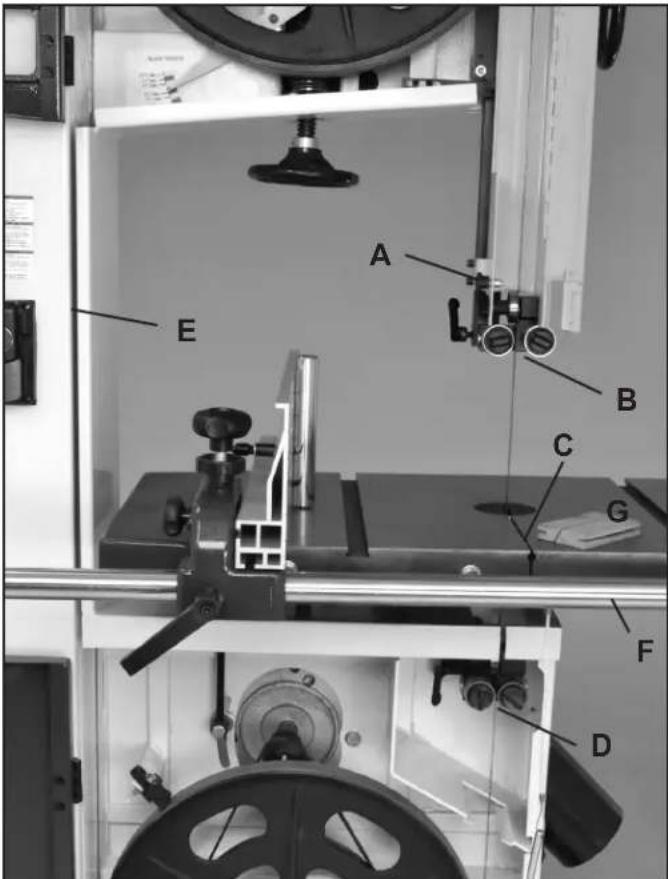
FIGURE 21
ADJUSTMENTS
ADJUSTING THE BLADE GUIDES
The 10-342 Bandsaw features quick-adjusting, spring loaded, ball bearing blade guides for fast and easy setting to the blades. With the bandsaw blade properly centered on the drive wheels, the guide bearings can then be set. To adjust the blade guides:
Upper Guides:
- Position the right and left roller guides relatively close to the blade. First, loosen their front Lock Handles (#21C, Fig 22, A). The Guide Shafts (#25C) that hold the guide bearings are spring loaded! To move the guides towards the blade, simply push the ends of the guide shafts (B), or use the front lock handles to pull the guides towards the blade. Lock the guides in place with the front handles. Fig. 22.
- The guides should be approximately 1/16" behind the gullets of the saw blade. If they need to be moved, loosen the back Clamp Handle (#31C, Fig. 23, C) and move the Upper Guide Block (#20C, D) that holds the guides so that the guides are properly positioned behind the blade gullets. Re-tighten the handle when done. Fig. 23.
- Set both bearing guides to within 1/32" of the saw blade - about the same thickness of a business card. Do not set the bearing guides too close, or touch the sides of the blade, as this will adversely affect the life of the saw blade and bearings.
- Adjust the rear bearing guide (Fig. 23, E) to be just clear of the back of the saw blade. Release the guide's Locking Handle (#17C, F) and move the rear guide towards the blade by pushing the end of the Rear Guide Shaft (#27C, Fig. 24, G) located at the rear of the block. Tighten the handle when done.
Lower Guides:
Adjusting the lower ball bearing guides, that are below the table, is similar to the steps taken for the upper guides.
- Position the right and left roller guides close to the blade. Loosen the front Lock Handles (#38A, Fig. 25, A). Move the guides towards the blade by pushing the ends of the Guide Shafts (#42A, B), or use the front lock handles to pull the guides towards the blade.
Lock the guides
in place. Fig. 25.

FIGURE 22 NOTE: Blade Guard removed for photo purposes

FIGURE 23 NOTE: Blade Guard removed for photo purposes
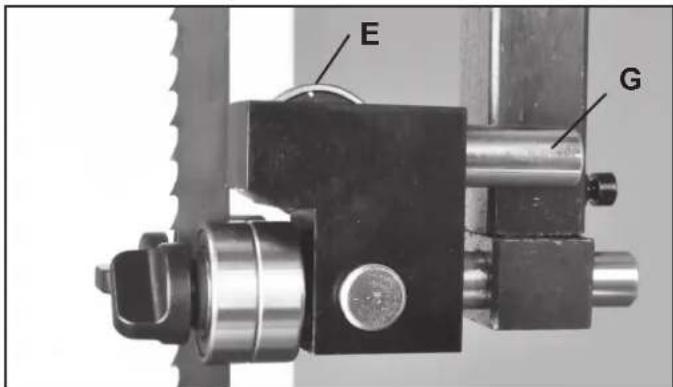
FIGURE 24 NOTE: Blade Guard removed for photo purposes
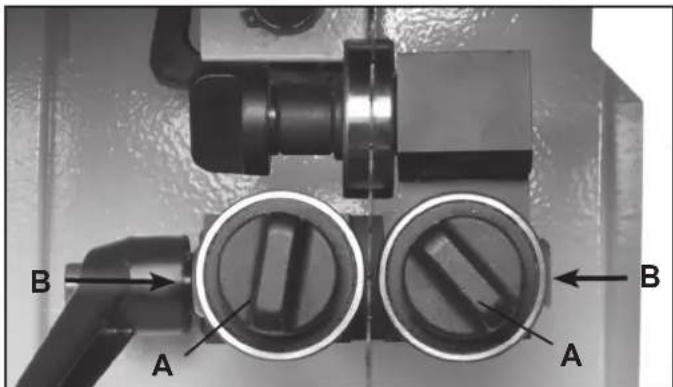
FIGURE 25
CONTINUED ON PAGE 18
ADJUSTMENTS
ADJUSTING THE BLADE GUIDES - continued
Lower Guides - continued:
- The guides should be approximately 1/16" behind the gullets of the saw blade. If they need to be moved, loosen the Lock Handle (#47A, Fig. 26, A), located to the left of the Lower Guide Block (#44A, B), and move this block that holds the guides so that the guides are properly positioned behind the blade gullets. Re-tighten the lever handle when done.
- Set both bearing guides to within 1/32" of the saw blade's sides - about the same thickness of a business card. Do not set the bearing guides too close, or touch the sides of the blade, as this will adversely affect the life of the blade and bearings.
- Adjust the rear bearing guide to be just clear of the back of the saw blade. Release the guide's Locking Handle (Fig. 27, C) and move the rear guide towards the blade by pushing the end of the Rear Guide Shaft (#49A). This shaft extends through the bottom frame for easy access. Tighten the handle when done.
NOTE: Before cutting, set the upper guide bearings approximately 1/4" above the top surface of the work piece. This will give the best blade control. Fig. 28.
- Loosen the Guidepost Lock Knob (#1C, Fig. 29A) and turn the Guidepost Handle (#38C, Fig. 30, B) to raise or lower the guide post/upper blade guide assembly to the desired height. A measurement scale has been supplied on the right side of the guide post for quick reference on the height of the guide bearings above the table surface.
- When the guide bearings are in proper position, re-tighten the guidepost lock knob.
NOTE: The guide post is pre-set at the factory to aligned vertical with the bandsaw blade. If the guide post setting ever needs slight adjustment:
- Open the top door and lower the blade guard all the way down to the table to access the Guide Bracket (#4C). Fig. 31.
- Loosen the four Hex Bolts (#2C) located at the rear of the top frame. (Fig. 29, C). This will allow the
CONTINUED ON PAGE 18

natural_image
Close-up of mechanical components with labeled parts A and B, no readable text or symbols beyond labelsFIGURE 26
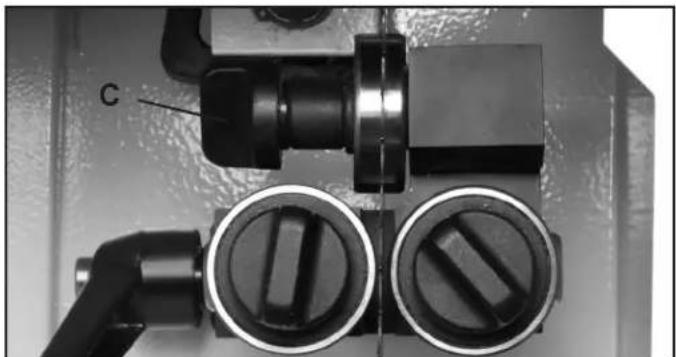
natural_image
Close-up of mechanical components including a valve, pipe fitting, and circular ports with no visible text or symbolsFIGURE 27 NOTE: Blade Guard removed for photo purposes
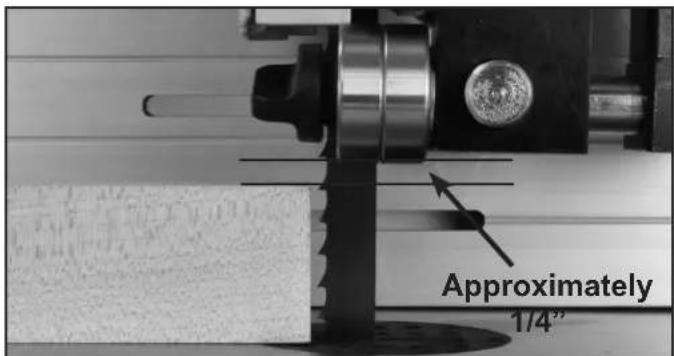
FIGURE 28
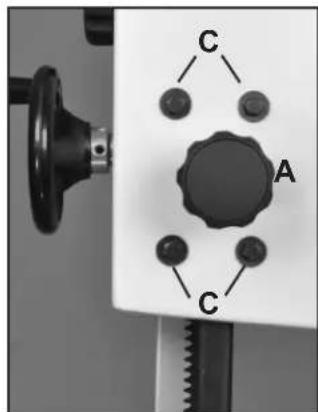
FIGURE 29

natural_image
Close-up of a mechanical device with labeled parts and measurement arrows (no readable text or symbols)FIGURE 30
ADJUSTMENTS
ADJUSTING THE BLADE GUARD - continued
guide post to be shifted/angled a bit left or right to correct any positioning issues.
-
There are also four Set Screws (#5C) set in the rear of the guide bracket near the corners. If the guard post needs to be angled slightly towards the front or back of the table, or even twisted on an angle, make the adjustment with these screws. Fig. 31.
-
Advancing the top two set screws will angle the post towards the rear of the table.
- Advancing the bottom two set screws will angle the post towards the front of the table.
-
Setting the two left or right screws will angle the post to the right or left.
-
When the post is adjusted vertical, tighten the four hex bolts that were loosened in step 4.
The 10-342 Bandsaw features an innovative fence system that will easily adjust to eliminate 'drift', and bring the fence back to being parallel to the blade. Plus, it allows quick changing of the fence from a vertical to horizontal position, or for use to the left or right of the blade. To adjust the fence for drift:
- Loosen the side Handle (#7E, Fig. 32, A) which holds the rip fence again the Fence Carrier (#9E, B).
- Loosen the Locking Knob (#2E, Fig. 32, C).
- Turn the top Adjusting Handle (#1E, D) to position the fence left or right as needed to align it parallel to the blade and miter saw slots in the table. The handle turns a Cam (#4E, E) that presses against the fence and pivots it as needed.
- Once the fence is set, tighten the Handle and Knob that were loosened in steps 1 and 2.
ADJUSTING THE FENCE 90° TO THE TABLE
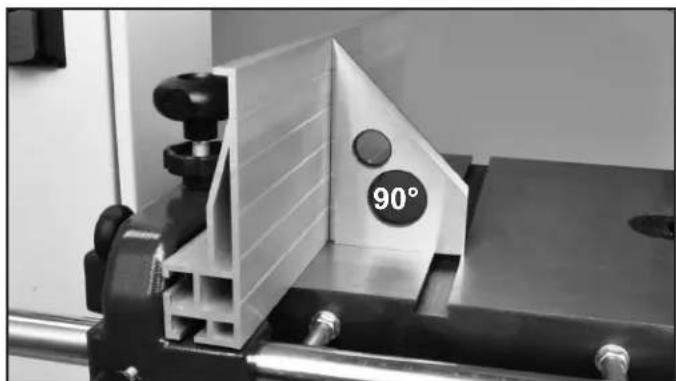
Check that the fence is 90 degrees to the table using a suitable square. If adjustments are required, raise or lower either side of the fence's Guide Rail until the fence body is 90 degree to the table. Once set at 90 degrees, fully tighten the fence bar nuts. FIG. 33. See page 11 for the guide rail installation process.

natural_image
Close-up of a mechanical switch mechanism with gears and bolts (no visible text or symbols)FIGURE 31 NOTE: Gear Guard removed for photo purposes
WARNING THE MACHINE MUST NOT BE PLUGGED IN AND THE POWER SWITCH MUST BE IN THE OFF POSITION UNTIL ALL ADJUSTMENTS ARE COMPLETE.

FIGURE 32
natural_image
Close-up of a mechanical clamp or vise with a 90-degree angle marking on its side (no text or symbols beyond the angle label)FIGURE 33
ADJUSTMENTS
ADJUSTING THE FENCE TO THE TABLE
Check that the fence is lying flat, or parallel to the table surface. The gap between the table and the bottom of the fence should be equal along the whole length of the fence. If a slight adjustment is necessary, the front rail will need to adjusted - moving it up or down to raise or lower the fence distance over the table. Fig. 34.
Refer to page 11 for instructions on the mounting and re-positioning of the front fence rail.
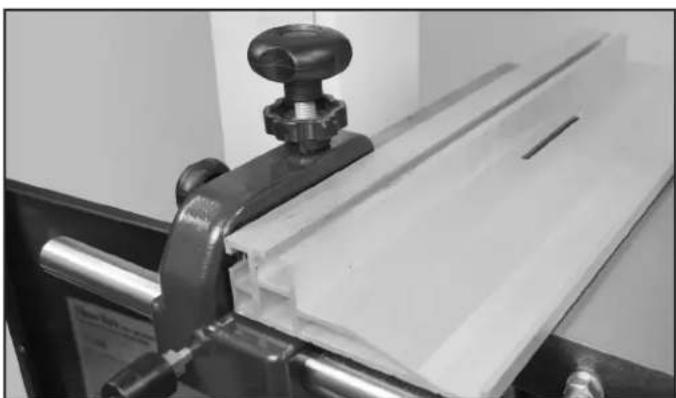
The fence can be changed from a vertical position to a horizontal position, or from its mounting on the left side of the blade to the right with simple adjustments of the carrier's handles and hardware.
To change the fence from vertical to horizontal:
- Loosen the side Handle (#7E, Fig. 35, A) which holds the rip fence again the Fence Carrier (#9E, B).
- Slide the fence forward to remove it from the carrier's Sliding Block (#11E, Fig. 35, C).
- Turn the fence down to its horizontal position and slide it back onto the carrier. The bottom of the fence is slotted to mount on the sliding block, and position itself on the small, raised key (Fig. 35, D) on the side of the carrier. Fig. 36.
- Once in place, retighten the side handle to secure the fence in position on the carrier.
- Check the fence for drift, and make corrections if needed per instructions on page 18.
To change the fence from the left side of the carrier to the right side for using the rip fence to the right of the blade:
- Loosen the side Handle (#7E, Fig. 35, A) which holds the rip fence again the Fence Carrier (#9E, B).
- Slide the fence forward to remove it from the carrier's Sliding Block (#11E, C). Move the carrier on the front rail to the right side of the table and blade.
- Fully unscrew the side handle from the sliding block and reassemble the parts on the opposite, left
CONTINUED ON PAGE 20

natural_image
Mechanical assembly showing a white panel mounted on a black base with a tool and pipe (no visible text or symbols)FIGURE 34
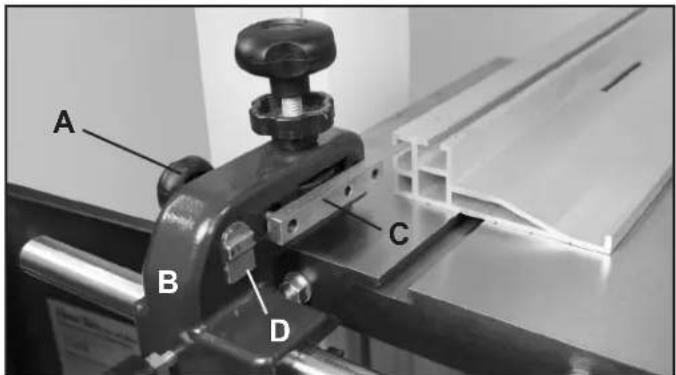
FIGURE 35
natural_image
Close-up of a mechanical clamping device with a metallic clamp and white sheet material (no visible text or symbols)FIGURE 36

FIGURE 37
ADJUSTMENTS
side of the carrier. Then rotate the fence 180° end-to-end and slide it back onto the carrier. Fig. 37 & 38.
- Once in place, retighten the side handle to secure the fence in position on the carrier. Fig. 38.
- Check the fence for drift, and make corrections if needed per instructions on page 18.
WARNING
THE MACHINE MUST NOT BE
PLUGGED IN AND THE POWER SWITCH MUST BE IN THE OFF POSITION UNTIL ALL ADJUSTMENTS ARE COMPLETE.
ADJUSTING THE DRIVE BELT TENSION
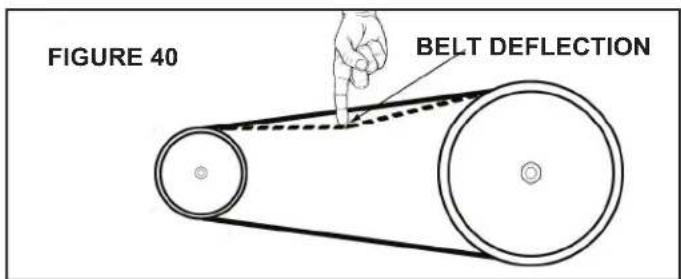
Check the Drive Belt (#10F, FIG. 39, A) tension with thumb pressure. The drive belt should not give more than 3/8" TO 1/2" in the center. DO NOT over tension the belt as this can put excessive, damaging pressure on the belt, pulleys and motor. Fig. 40. To adjust the tension:
- Loosen the two Hex Bolts (#25A, 27A, Fig. 39, B) that secure the motor to the frame.
- Loosen the Hex Nut on the top of the Motor Pulling Rod (#26A, Fig. 39, C). The motor should now be loose to move downward for adjusting the belt.
- For less tension on the drive belt, push the motor downward.
- For more tension on the drive belt, lift the motor upwards. NOTE: There is a second hex nut on the motor pulling rod that is located under the frame. This second hex nut (Fig. 39, D) must be loosened to allow the motor to be lifted upwards.
- When the belt tension is correct, tighten all the motor mounting nuts from steps 1, 2 and 4 above.
SEE PAGE 23 FOR INSTRUCTIONS ON CHANGING THE DRIVE BELT.
LEVELING THE TABLE INSERT
The table insert has an innovative, built-in micro adjustment feature to use if the insert sits too high or too low in the table seat. If the insert is resting above the table, turn the hex screws counter-clockwise to lower the insert. If the insert is sitting below the table surface, turn the hex screws clockwise to raise the insert level with the table surface. Fig. 41.
CAUTION: Having the insert below the table surface could cause the workpiece to get stuck on the lip of the table seat behind the blade, stopping your cut.

natural_image
Mechanical testing setup with metal frame and clamping mechanism (no visible text or symbols)FIGURE 38

FIGURE 39

natural_image
Circular metallic object with perforated surface and central vertical slot, labeled FIGURE 41 (no text or symbols on the object itself)OPERATION
MAIN ON / OFF SWITCH
The 10-342EVS Wood/Metal Bandsaw has a main on/off switch located behind the saw on the side of the metal Inverter Box. FIG. 42. This switch MUST be operated before and after the saw is used.
It allows electrical access to the control box for using the saw. It also totally shuts down the saw when not in use for an extended time.
The switch protects the saw's electricals, particularly the LCD display from burning out, and prevents unwanted access by children or bystanders. The switch will also hold a lock to further secure the lathe from being activated.

FIG. 42
CONTROL PANEL: ON/OFF SWITCH
In conjunction with the two speed pulley system, the 10-342EVS Wood/Metal Bandsaw also features a variable speed switch.
To use within a specific belt speed range, simply turn the bandsaw on (FIG. 43, A) and rotate the variable speed dial (B) clockwise to increase the speed, and counter clockwise to decrease the speed.
The blade speed will be indicated on the digital readout display (C).
To stop the bandsaw press the large red button (D).
NOTE: Rotate the large red stop button clockwise to reset the saw for next operation.
NOTE: The variable speed dial will only increase speed to the highest speed shown depending on belt position. FIG. 43.
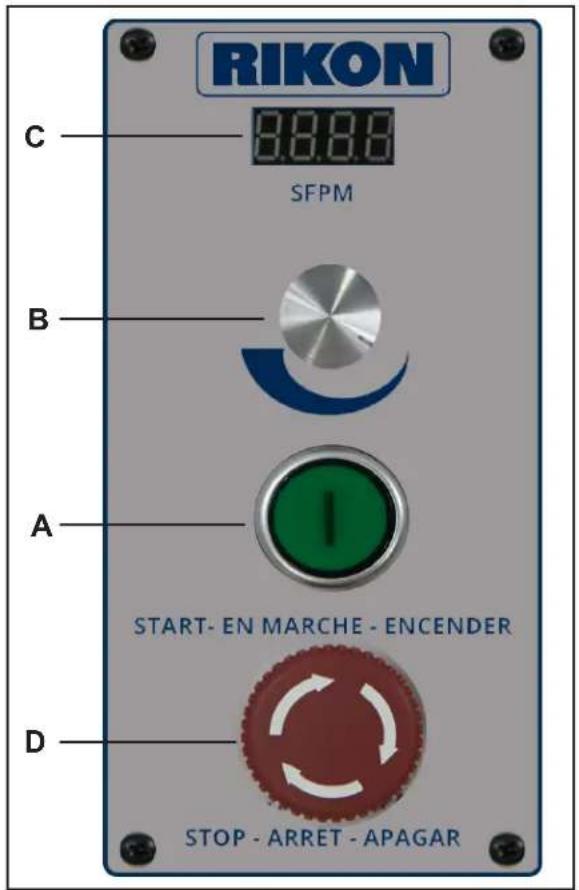
FIG. 43
OPERATION
METAL CUTTING

The 10-342EVS Wood/Metal bandsaw is designed for DRY CUTTING ONLY.
Do not use lubricants or coolants with this bandsaw.
Proper blade selection for the material to be cut is key to good performance. Do not force the material into the blade as excessive heat will lead to premature blade failure. Poor cutting results will also occur. Always keep three teeth in the material being cut.
Stack or bundle cutting is not recommended with this bandsaw. When cutting round stock, use jigs or wedges to prevent the material from rolling into the cut.
Blade speed differs for each type or grade of metal to be cut. Below is a chart of common materials and the suggested blade speeds. The speeds shown have been reduced by 30% for dry cutting operations. It may be necessary to reduce an additional 15% due to material hardness. Changing blade type/style will also help performance.
NOTE: Blade speed and performance depend on proper blade selection. Consult your blade manufacturer for the proper blade style and speed required for the material to be cut.
| METAL TYPE | BLADE SPEED -Ft/Min |
| Brass Alloys | 140-154 |
| Bronze Alloys | 80-230 |
| Cast Iron | 80-157 |
| Copper Alloys | 112-206 |
| Cr-Mo Alloy | 136-164 |
| Low/Med Carbon Steel | 161-189 |
| Stainless Steel | 80-95 |
CUTTING PLASTIC/COMPOSITE MATERIAL
The 10-342EVS Wood/Metal bandsaw is also designed for cutting plastics and composite materials.
As always, selecting the proper blade for the material to be cut is key to getting good performance. Do not force the material into the blade as excessive heat will lead to premature blade failure and poor cutting results will also occur.
Stack or bundle cutting is recommended if the material is properly secured during the cut. When cutting round stock, use jigs or wedges to prevent the material from rolling into the cut.
Blade speed differs for each type of material to be cut. Improper blade selection and speed may result in melting or curling the material. Changing blade type/style will also help performance.
NOTE: Blade speed and performance depend on proper blade selection. Consult your blade manufacturer for the proper blade and speed required for the material to be cut.
OPERATION
ELECTRICAL OUTLET
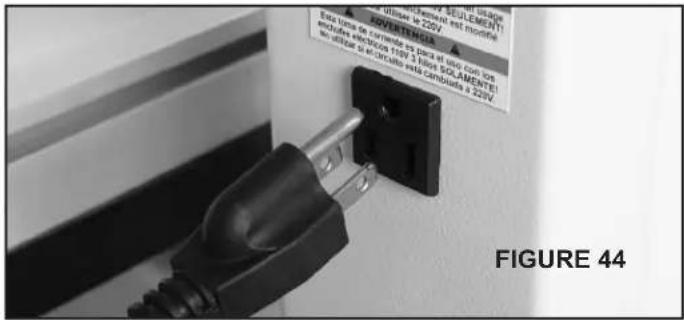
On the rear of the bandsaw column below the tool holder, a 110V electrical outlet has been added to the machine for your working convenience. This outlet can be used with work lights (with magnetic bases or clips) to illuminate the work table and blade, for radios, charging phones or tablets, etc. FIG. 44.
CAUTION: Make sure that the cords of these devices do not interfere with any parts of the bandsaw.

WARNING This machine must be grounded. Replacement of the power supply cable should only be done by a qualified electrician. See page 5 for additional electrical information.
MAINTENANCE
CAUTION
BEFORE CLEANING OR CARRYING OUT MAINTENANCE WORK, DISCONNECT THE MACHINE FROM THE POWER SOURCE (WALL SOCKET). NEVER USE WATER OR OTHER LIQUIDS TO CLEAN THE MACHINE. USE A BENCH BRUSH. DO NOT USE COMPRESSED AIR NEAR BEARINGS. REGULAR MAINTENANCE OF THE MACHINE WILL PREVENT UNNECESSARY PROBLEMS.
- Keep the table clean to ensure accurate cutting.
- Keep the outside of the machine clean to ensure accurate operation of all moving parts and prevent excessive wear.
- Keep the ventilation slots of the motor clean to prevent it from overheating.
- Keep the inside of the machine (near the saw blade, etc.) clean to prevent accumulation of dust. Use dust collection, if possible.
- To prolong the life of the blade, when the bandsaw is not in use for extended periods, release the blade tension. Before reusing the bandsaw, ensure that the blade is re-tensioned and tracking is checked.
- Keep the guide bearings free of dust, and clean the guide bearing assemblies frequently.
MAINTENANCE
WARNING: THE MACHINE MUST NOT BE PLUGGED IN AND THE POWER SWITCH MUST BE IN THE OFF POSITION UNTIL ALL ADJUSTMENTS ARE COMPLETE.
CHANGING THE MOTOR DRIVE BELT
Refer to "Frame Assembly" parts diagram on page 28, and "Motor & Drive Wheel Assembly" page 37.
- Before changing the belt, make sure that the bandsaw is unplugged from the power source.
- Release the saw blade tension from the drive belt by turning the quick release blade tension lever.
- Release the drive belt tension by using the belt tension. See page 20 for Instructions.
- Remove the lower wheel (Wheel Assembly, Part #9F) by removing the hex head bolt and washer (#7F, 6F) in the middle of the wheel's hub. Carefully slide the lower wheel off of the lower wheel shaft, and at the same time remove the saw blade from this wheel.
CAUTION Be careful not to cut yourself on the sharp saw teeth. Wear gloves for protection.
- Remove the old drive belt from the wheel's pulley, and install the new belt. Make sure the ribs in the drive belt are seated correctly in the pulley before reassembling and tensioning the drive belt.
- Reverse the procedure to re-assemble the saw parts. Tension the drive belt until there is 3/8" to 1/2" of deflection. See page 20 for instructions on 'Belt Tensioning'.
CHANGING BANDSAW TIRES
Use a putty knife to get underneath the tire and pull it up and away from the wheel. Work the putty knife all the way around the wheel to loosen the tire. Then, use the putty knife as leverage to flip the tire over and off of the wheel. Clean the inside of the groove, removing any dirt, debris or cement with lacquer thinner.
Soak the replacement tire in warm water to make it more flexible. Dry the tire, and while it is still warm, lay it on top of the wheel. Start by setting the tire into the wheel groove at the top of the wheel. Using a putty knife, work the new tire around the wheel, making sure not to slice the tire. If rubber cement is to be used as a binder, make sure to distribute it evenly. Having high spots between the wheel and the tire will cause a vibration and effect blade tracking.
NOTES
Use this section to record maintenance, service and any calls to Technical Support.
TROUBLESHOOTING
FOR YOUR OWN SAFETY, ALWAYS TURN OFF AND UNPLUG THE MACHINE BEFORE ANY TROUBLESHOOTING.
| TROUBLE | PROBABLE CAUSE | REMEDY |
| The machine does not work when switched on. | 1. No power supply.2. Defective switch. | Check the cable for breakage.Contact your local dealer for repair. |
| The blade does not move with the motor running. | 1. The quick release lever or blade tension handwheel has not been tightened.2. The blade has come off one of the wheels.3. The saw blade has broken.4. The drive belt has snapped. | Switch off the motor, tighten the quick release lever or blade tension handwheel.Open the hinged door and check.Replace the blade.Replace the belt. |
| The blade does not cut in a straight line. | 1. Fence for cutting not used.2. Too fast feed rate.3. The blade teeth are dull or damaged.4. Blade guides not suitably adjusted. | Use a fence.Put light pressure on the workpiece & make sure the blade does not bend.Use a new blade.Adjust the blade guides (see the section on page 16 and 17). |
| The blade does not cut, or cuts very slowly. | 1. The teeth are dull, caused by cutting hard material or long use.2. The blade was mounted in the wrong direction. | Replace the blade, use a 6 T.P.I. blade for wood and soft materials. Use a 14 T.P.I. blade for harder materials. A 14 T.P.I. blade always cuts slower due to the finer teeth and the slower cutting performance.Fit the blade correctly. |
| Sawdust builds up inside the machine. | 1. This is normal. | Clean the machine regularly. Open the hinged door and remove the sawdust with a vacuum cleaner. |
| Sawdust inside the motor housing. | 1. Excessive dust build-up on the machine exterior components. | Clean the ventilating slots of the motor with a vacuum cleaner. From time to time remove the sawdust to prevent it from being sucked into the housing. |
| The machine does not cut at 45° or 90° angles. | 1. The table is not at right angles to the blade.2. The blade is dull or too much pressure was put on the workpiece. | Adjust the table.Replace the blade or put less pressure on the workpiece. |
| The blade cannot be properly positioned on the bandwheels. | 1. The blade tracking knob hasn't been properly adjusted.2. Inferior blade.3. The wheels are not in alignment. | Adjust the tracking knob (see page 13).Replace the blade.Adjust the lower wheel (see pages 26 & 27)Contact Technical Support @ 877-884-5167 or techsupport@rikontools.com. |
For parts or technical questions contact: techsupport@rikontools.com or 877-884-5167.
TROUBLESHOOTING
LOWER WHEEL ADJUSTMENTS
The following instructions will correct common blade issues related to the lower wheel's alignment in relation to the upper wheel. These adjustments will correct the blade position on the lower wheel and blade oscillation (wobble). These are critical adjustments which affect the performance and accuracy of the bandsaw.
CAUTION
PLEASE READ AND UNDERSTAND THESE STEPS THOROUGHLY BEFORE
MAKING ANY ADJUSTMENTS. FAILURE TO DO SO COULD DAMAGE THE MACHINE.
Please contact a tech support representative if you have questions before attempting these adjustments. RIKON Tech Support 877-884-5167 techsupport@rikontools.com
Release the blade tension completely before making any lower wheel adjustments. Pressure must be released on the lower wheel to allow proper adjustments and to avoid damaging the machine.
If the blade is not running true, or it is not running on center of the lower wheel but is correct on the upper wheel, then an adjustment to the wheel hub on the rear of the bandsaw is required.
The numbers shown on the rear hub photo represent the positions on a clock face.
NOTE: To help identify the extent of rotation on a bolt, mark a black dot on the edge of the bolt as a visual indicator.
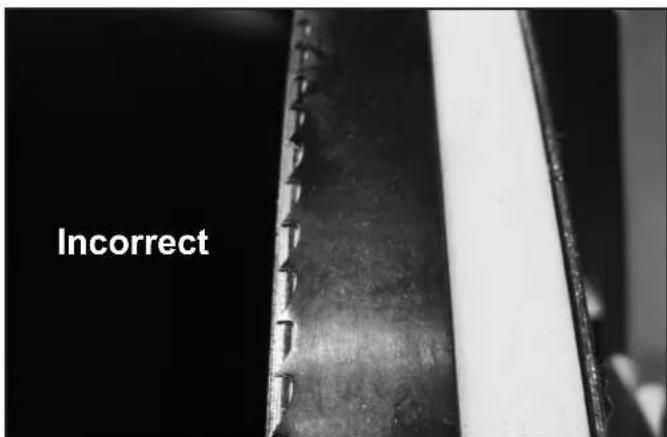
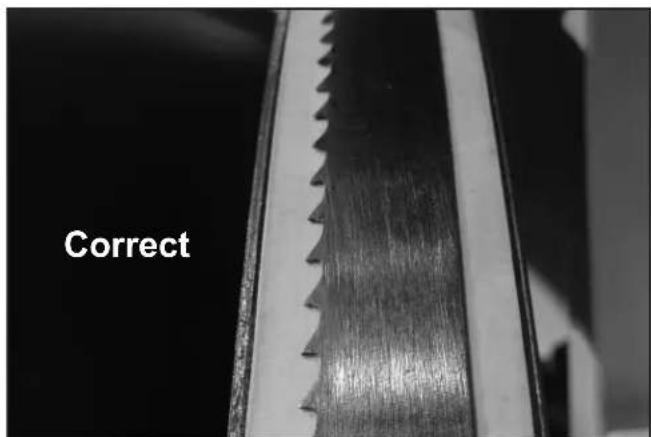
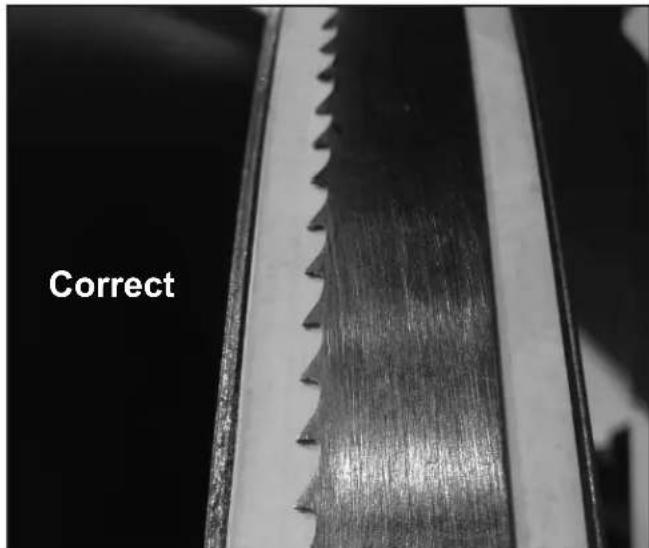
If a blade is tracking forward on the lower wheel toward the door, follow these correction steps:

1.) De-tension the saw blade.
2.) Loosen 9 o'clock shaft bolt to take pressure off the shaft.
3.) Loosen 12 o'clock shaft bolt one half rotation.
4.) Tighten the 6 o'clock shaft bolt until the shaft touches the 12 o'clock adjusting bolt.
5.) Lock all three shaft bolts.
6.) Re-tension the saw blade and set the upper wheel to plumb by adjusting the tracking knob. Spin the upper wheel by hand and track the blade.
7.) Repeat if further adjustment is necessary.
TROUBLESHOOTING
If a blade is tracking on the rear of the lower wheel away from the door, follow these steps:
1.) De-tension the saw blade.
2.) Loosen 9 o'clock shaft bolt to take pressure off the shaft.
3.) Loosen 6 o'clock shaft bolt one half rotation.
4.) Tighten the 12 o'clock shaft bolt until the shaft touches the 6 o'clock adjusting bolt.
5.) Lock all three shaft bolts.
6.) Re-tension the saw blade and set the upper wheel to plumb by adjusting the tracking knob. Spin the upper wheel by hand and track the blade.
7.) Repeat if further adjustment is necessary.

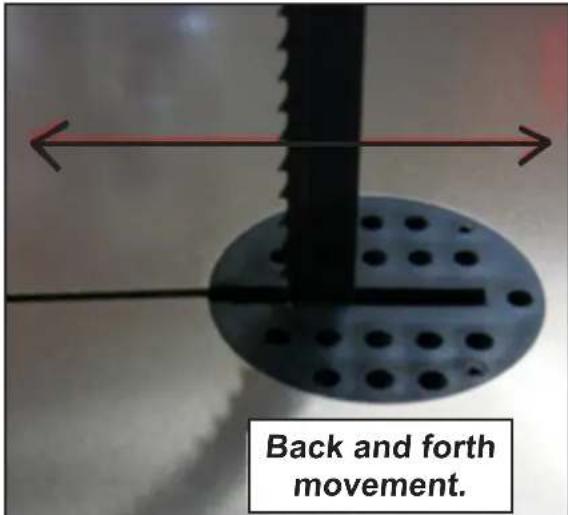
If a blade is moving back and forth (wobbling) follow these steps:
First, check the bandsaw blade to insure that it has been welded correctly, so that the blade's back is in proper alignment - flat (if it is laid down on a table surface).
If the blade is welded true, then adjustment to the wheel hub on the rear of the bandsaw is required.
1.) De-tension the saw blade.
2.) Loosen 6 o'clock shaft bolt to take pressure off of the shaft.
3.) Loosen 9 o'clock shaft bolt one half rotation.
4.) Tighten the 3 o'clock shaft bolt until the shaft touches the 9 o'clock adjusting bolt.
5.) Lock all three shaft bolts.
6.) Re-tension the saw blade and set the upper wheel to plumb by adjusting the tracking knob. Spin the upper wheel by hand and track the blade.
7.) Start the bandsaw and check blade movement.
8.) If movement has diminished then continue with the adjustment.
9.) If movement is worse, reverse the adjustments in steps 3 and 4.
PARTS DIAGRAM
FRAME ASSEMBLY
SHEET A
NOTE: Please reference the Manufacturer's Part Number when calling for Replacement Parts. For Parts under Warranty, the Serial Number of your machine is required.
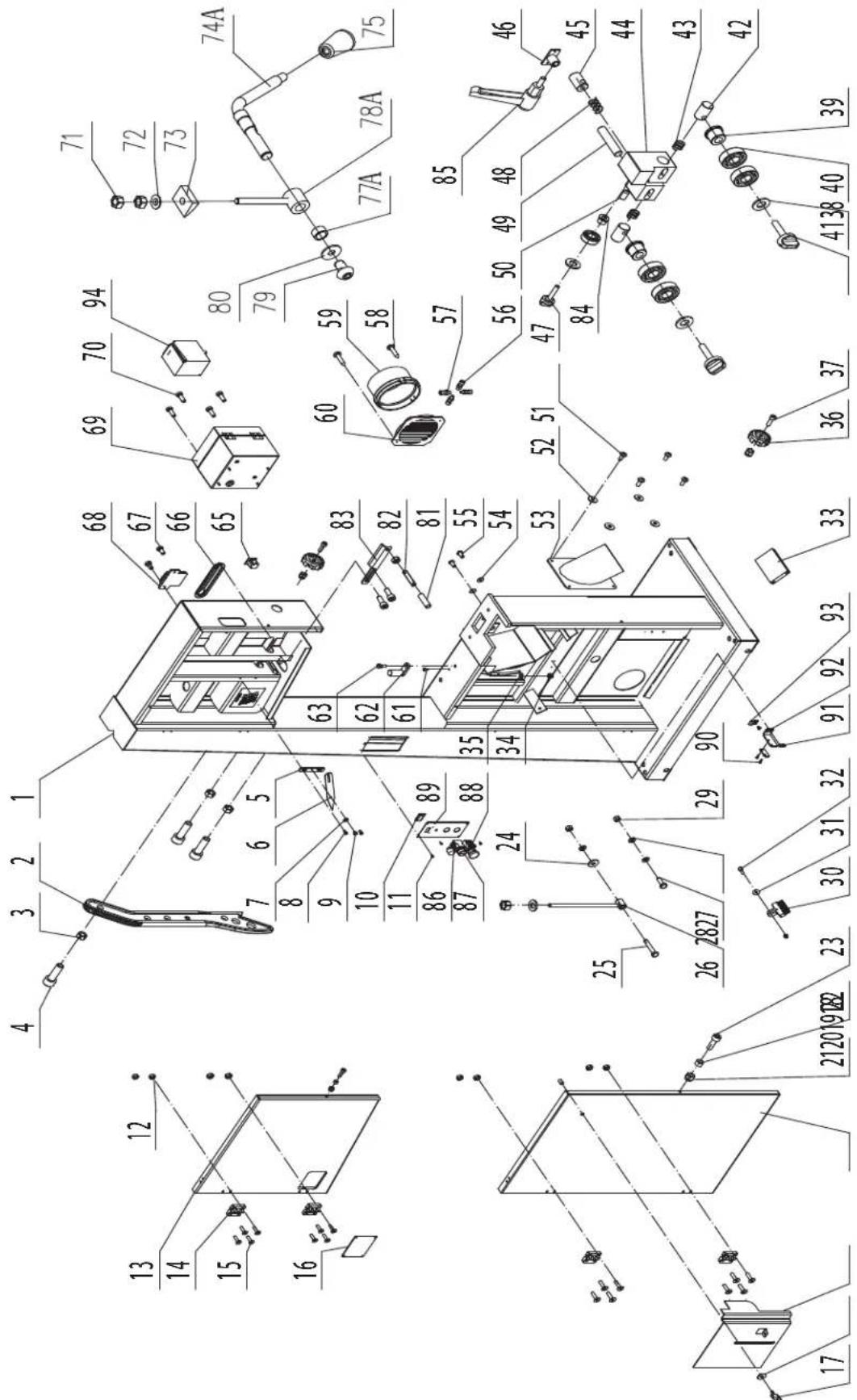
PARTS LIST
KEY NO. DESCRIPTION QTY PART NO.
| 1A | Frame | 1 | 1-JMBS1801011000A-117U |
| 2A | Push stick | 1 | 1-JL81100003-146S |
| 3A | Hex nut M6 | 3 | 1-M6GB6170B |
| 4A | Hex bolt | 3 | 1-M6X30GB70D1B |
| 5A | Batter board | 1 | 1-JL27010005 |
| 6A | Tension indicator arrow | 1 | 1-JL26010004-002A |
| 7A | Flat washer | 1 | 1-WSH5GB97D1Z |
| 8A | Pan head screw M5x10 | 2 | 1-M5X10GB818Z |
| 9A | Special screw | 1 | 1-JL26010010 |
| 10A | Digital display board | 1 | 1-JMWL1203090008A |
| 11A | Pan head screw M4x10 | 4 | 1-M4X10GB823B |
| 12A | Hex nut with flange | 8 | 1-M6GB6177B |
| 13A | Upper door cover | 1 | 1-JMBS1801012000A-076U |
| 14A | Plastic hinge | 4 | 1-EBBS1801010004 |
| 15A | Hex cap screw M6x20 | 16 | 1-M6X20GB70D3B |
| 16A | Window | 1 | 1-JXBS1804010004A |
| 17A | Wing nut | 1 | 1-JXBS2401054001-001S |
| 18A | Big washer | 1 | 1-WSH6GB96B |
| 19A | Protective cover | 1 | 1-JXBS1804012004-114X |
| 20A | Lower door cover | 1 | 1-JMBS1801013000A-076U |
| 21A | Hex locking nut M6 | 5 | 1-M6GB889Z |
| 22A | Cover | 2 | 1-JL26010007 |
| 23A | Hex cap screw M6x20 | 2 | 1-M6X20GB70D1Z |
| 24A | Big washer | 1 | 1-WSH10GB96Z |
| 25A | Hex bolt M10x60 | 1 | 1-M10X60GB5783Z |
| 26A | Pull rod | 1 | 1-JMBS1801014001 |
| 27A | Hex bolt M10x30 | 1 | 1-M10X30GB5783Z |
| 28A | Flat washer | 3 | 1-WSH10GB97D1Z |
| 29A | Hex nut M10 | 3 | 1-M10GB6170Z |
| 30A | Brush | 1 | 1-JL21060003 |
| 31A | Big washer | 3 | 1-WSH6GB96Z |
| 32A | Hex bolt M6x25 | 1 | 1-M6X25GB5783Z |
| 33A | Board | 1 | 1-JXBS1804010002 |
| 34A | Hex locking nut M8 | 1 | 1-M8GB889Z |
| 35A | Flat washer | 1 | 1-WSH8GB97D1Z |
| 36A | Star knob | 2 | 1-JL26010006-001S |
| 37A | Hex cap screw M6x25 | 2 | 1-M6X25GB70D1Z |
| 38A | Lock handle | 2 | 1-JMBS1801052002-001S |
| 39A | Bearing sleeve | 2 | 1-JMBS1801052003 |
| 40A | Bearing | 5 | 1-BRG6202-2RSGB276 |
| 41A | Washer | 3 | 1-WSH8GB96B |
| 42A | Guide shaft | 2 | 1-JMBS1403014003 |
| 43A | Spring | 2 | 1-JMBS1403014005 |
| 44A | Lower guide block | 1 | 1-JMBS1801052001 |
| 45A | Adjust bar | 1 | 1-JMBS1801016001 |
| 46A | Guide frame | 1 | 1-JMBS1801010001 |
| 47A | Locking handle | 1 | 1-JMBS1403014006-001S |
| 48A | Spring | 1 | 1-JMBS1401014008 |
FRAME ASSEMBLY - SHEET A
| KEY NO. | DESCRIPTION | QTY | PART NO. |
| 49A | Guide supporting rod | 1 | 1-JL26041004 |
| 50A | Cap screw M8x10 | 1 | 1-M8X10GB80B |
| 51A | Pan head screw M4x10 | 4 | 1-M4X10GB818B |
| 52A | Big washer | 4 | 1-WSH4GB96B |
| 53A | Dust port | 1 | 1-JXBS2401010013 |
| 54A | Big washer | 2 | 1-WSH6GB96B |
| 55A | Screw M6x12 | 2 | 1-M6X12GB70D2B |
| 56A | Hex bolt M12x40 | 4 | 1-M12X40GB5783B |
| 57A | Hex nut M12 | 4 | 1-M12GB6170B |
| 58A | Tapping screw | 2 | 1-ST3D5X9D5GB845B |
| 59A | Dust port | 1 | 1-JL20010007-001S |
| 60A | Dust port grating | 1 | 1-JL20010019-001S |
| 61A | Hex cap screw M5x12 | 3 | 1-M5X12GB70D1B |
| 62A | Heel stop block | 1 | 1-FDBS2001014001 |
| 63A | Stud shaft | 1 | 1-JL26010015 |
| 65A | Electric socket | 1 | 1-DB-F-M |
| 66A | Dust board | 1 | 1-JL26030019 |
| 67A | Pan head screw M5x10 | 4 | 1-M5X10GB818B |
| 68A | Tool holder | 1 | 1-JL26090001 |
| 69A | Threading board | 1 | 1-JL26010011-117U |
| 70A | Strain relief M20 | 2 | 1-JL91046100B |
| 71A | Hex nut M10 | 2 | 1-M10GB6170B |
| 72A | Washer | 1 | 1-WSH10GB849B |
| 73A | Heel block | 1 | 1-JMBS1403030004 |
| 74AA | Camshaft handle | 1 | 1-JMBS1801015001A |
| 75A | Knob ball | 1 | 1-1904011 |
| 77AA | Cam | 1 | 1-JMBS1401012002 |
| 78AA | Tension | 1 | 1-JMBS1403016003A |
| 79A | Hex cap screw M8x12 | 1 | 1-M8X12GB70D2B |
| 80A | Big washer | 1 | 1-WSH8GB96B |
| 81A | Plastic tubing | 1 | 1-JXBS2401010018 |
| 82A | Set screw M6x30 | 1 | 1-M6X30GB77B |
| 83A | Upper blade guard | 1 | 1-JMBS1801010006 |
| 84A | Bearing Sleeve | 1 | 1-JMBS1403014002 |
| 85A | Ratchet handle | 1 | 1-KTSB-1-B-M8X63X20 |
| 86A | Potentiometer knob | 1 | 1-RCWL1601091003 |
| 87A | Start button | 1 | 1-LA39-B2-10-g |
| 88A | Stop button | 1 | 1-LA39-B2-R02Z-R |
| 89A | Switch cover | 1 | 1-JMBS180101009A-117U |
| 90A | Cr pan hd screw M3X10 | 2 | 1-M3X10GB818Z |
| 91A | Cr apn hd screw M4X6 | 3 | 1-M4X6GB818B |
| 92A | Speed measuring plate | 1 | 1-JMBS1801010010 |
| 93A | Cable clamp | 1 | 1-1502014-02 |
| 94A | Transducer | 1 | 1-ATV12HU15M2 |
PARTS DIAGRAM
TABLE ASSEMBLY SHEET B
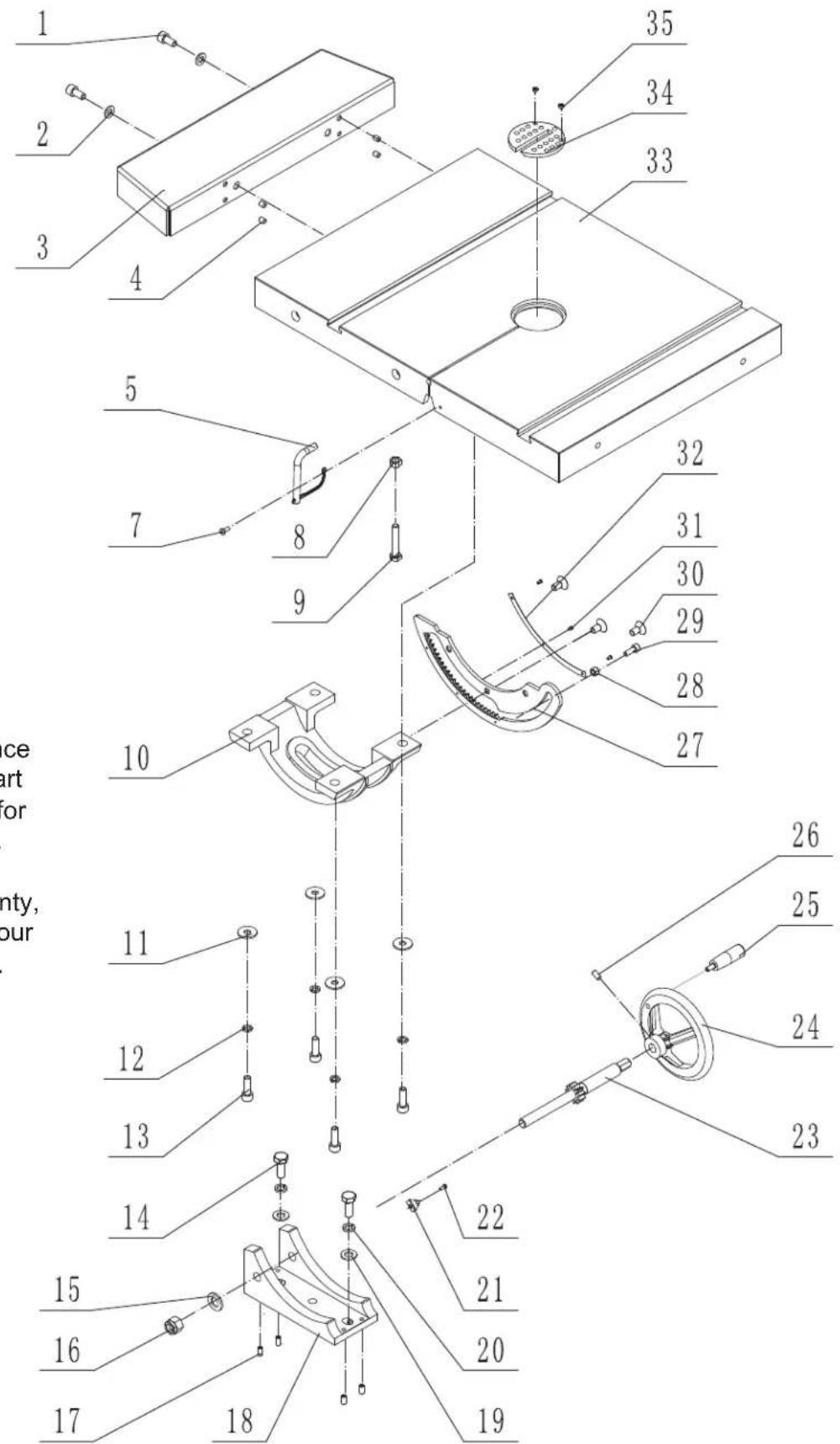
NOTE: Please reference the Manufacturer's Part Number when calling for Replacement Parts.
For Parts under Warranty, the serial number of your machine is required.
PARTS LIST
TABLE ASSEMBLY - SHEET B
| KEY NO. | DESCRIPTION | QTY | MFG. PART NO. |
| 1B | Hex socket cap screw M8x16 | 2 | 1-M8X16GB70D1Z |
| 2B | Flat washer M8 | 2 | 1-WSH8GB97D1Z |
| 3B | Extension table | 1 | 1-JMBS1801030002-076U |
| 4B | Set screw M6x8 | 4 | 1-M6X8GB77B |
| 5B | Table support pin assembly | 1 | 1-JMBS1404030002 |
| 7B | Cross recess pan head screw M4x10 | 1 | 1-M4X10GB818Z |
| 8B | Nut M8 | 1 | 1-M8GB6170B |
| 9B | Hex bolt M8x50 | 1 | 1-M8X50GB5781B |
| 10B | Lower table trunnion | 1 | 1-JMBS1403030002 |
| 11B | Big washer | 4 | 1-WSH8GB96B |
| 12B | Spring washer | 4 | 1-WSH8GB93B |
| 13B | Hex socket cap screw M8x25 | 4 | 1-M8X25GB70D1B |
| 14B | Hex bolt M10x25 | 2 | 1-M10X25GB5783B |
| 15B | Flat washer M12 | 1 | 1-WSH12GB97D1B |
| 16B | Hex locking nut | 1 | 1-M12GB889B |
| 17B | Set screw M6x12 | 4 | 1-M6X12GB77B |
| 18B | Support bracket | 1 | 1-JMBS1403030005 |
| 19B | Flat washer | 2 | 1-WSH10GB97D1B |
| 20B | Spring washer | 2 | 1-WSH10GB93B |
| 21B | Table angle pointer | 1 | 1-JXBS2401031008A |
| 22B | Cross recess pan head screw M3x8 | 1 | 1-M3X8GB818Z |
| 23B | Gear shaft | 1 | 1-JMBS1403030007A |
| 24B | Handle | 1 | 1-SGSL-D125-d12 |
| 25B | Small handle | 1 | 1-JL26020014-001S |
| 26B | Set Screw M6x12 | 1 | 1-M6X12GB80B |
| 27B | Rack | 1 | 1-JMBS1403030003 |
| 28B | Eccentric bushing | 1 | 1-JMBS1403030008 |
| 29B | Screw M6x16 | 1 | 1-M6X16GB70D1B |
| 30B | Hex countersunk head screw M8x16 | 3 | 1-M8X16GB70D3Z |
| 31B | Rivet | 3 | 1-RVT2D5X5GB827C |
| 32B | Angle scale label | 1 | 1-JMBS1403030006 |
| 33B | Table | 1 | 1-JMBS1801030001A-001L |
| 34B | Table insert | 1 | 1-JL26050008A-001S |
| 35B | Set screw M6x4 | 2 | 1-M6X4GB77B |
PARTS DIAGRAM
GUIDE POST ASSEMBLY
SHEET C
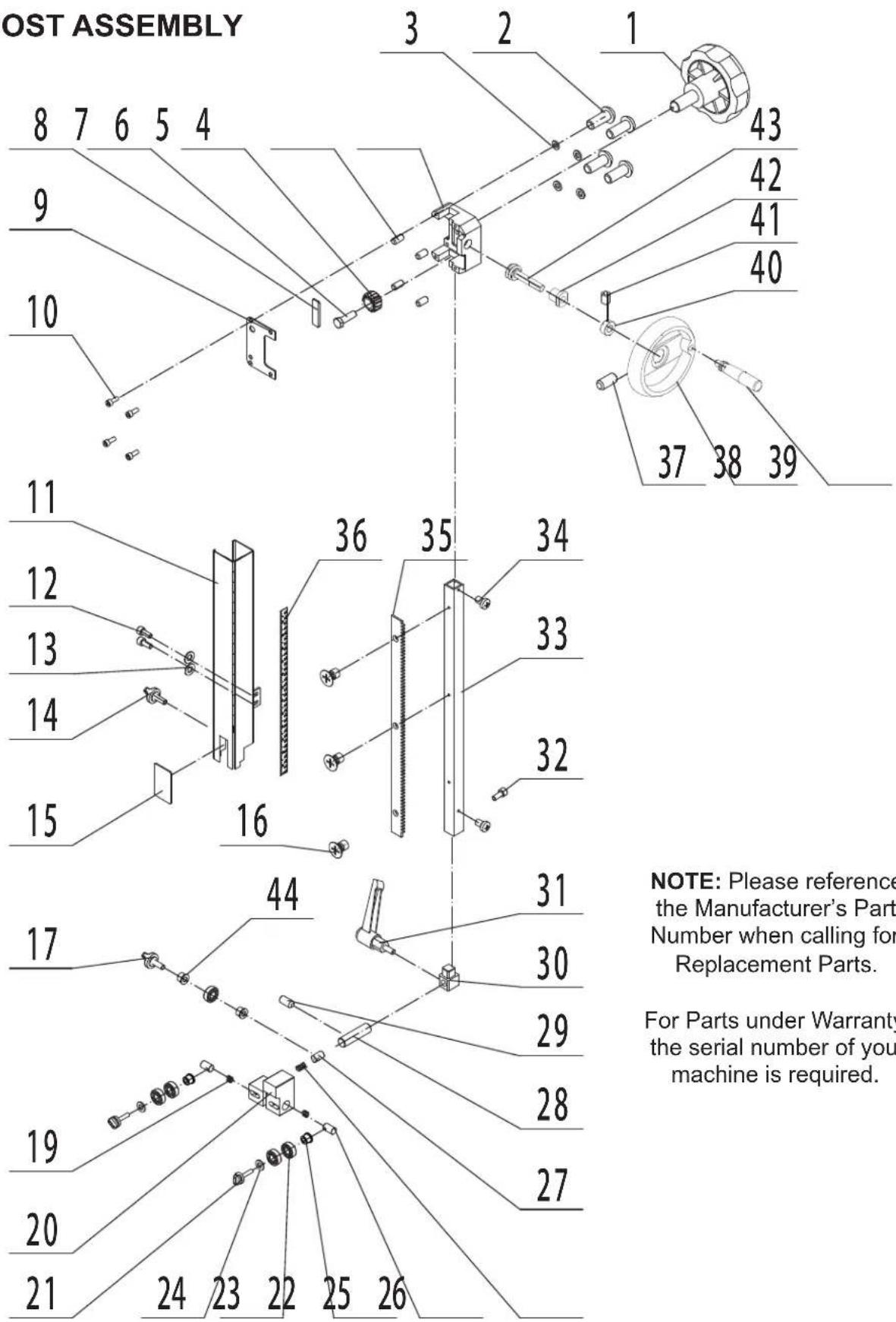
NOTE: Please reference the Manufacturer's Part Number when calling for Replacement Parts.
For Parts under Warranty, the serial number of your machine is required.
PARTS LIST
GUIDE POST ASSEMBLY - SHEET C
| KEY NO. | DESCRIPTION | QTY | MFG. PART NO. |
| 1C | Lock handle | 1 | 1-JL26040015-001S |
| 2C | Hex bolt M8x20 | 4 | 1-M8X20GB70D2B |
| 3C | Big washer | 4 | 1-WSH8GB96B |
| 4C | Guide bracket | 1 | 1-JL26040008 |
| 5C | Set screw M6x12 | 4 | 1-M6X12GB77B |
| 6C | Gear | 1 | 1-1501006 |
| 7C | Fixed bolt | 1 | 1-JL26040006 |
| 8C | Fixed plate | 1 | 1-JL26040007 |
| 9C | Guide bracket cover | 1 | 1-BS5001050001 |
| 10C | Hex bolt | 4 | 1-M8X16GB70D1B |
| 11C | Hinged door | 1 | 1-JMBS1801051000B-114X |
| 12C | Hex socket cap screw M5x12 | 2 | 1-M5X12GB70D1B |
| 13C | Washer | 2 | 1-WSH5GB97D1B |
| 14C | Lock handle | 1 | 1-JMBS1403050004-001S |
| 15C | Clear window | 1 | 1-JMBS1404050001 |
| 16C | Screw M4x10 | 3 | 1-M4X10GB819B |
| 17C | Lock handle | 1 | 1-JMBS1801052002-001S |
| 19C | Spring | 2 | 1-JMBS1403014005 |
| 20C | Upper guide | 1 | 1-JMBS1801052001 |
| 21C | Lock handle | 2 | 1-JMBS1801052002-001S |
| 22C | Bearing sleeve | 2 | 1-JMBS1801052003 |
| 23C | Bearing | 5 | 1-BRG6202-2RSGB276 |
| 24C | Flat washer | 2 | 1-WSH8GB96B |
| 25C | Guide shaft | 2 | 1-JMBS1403014003 |
| 26C | Spring | 1 | 1-JMBS1403014008 |
| 27C | Adjust bar | 1 | 1-JMBS1801052004 |
| 28C | Guide supporting rod | 1 | 1-JL26041004 |
| 29C | Locking screw M6x12 | 1 | 1-M8X10GB77B |
| 30C | Upper guide support block | 1 | 1-BS5001052001 |
| 31C | Ratchet handle | 1 | 1-KTSB-1-B-M8X63X25 |
| 32C | Hex socket cap screw M6x30 | 1 | 1-M6X30GB70D1B |
| 33C | Slider bar | 1 | 1-BS5001050003 |
| 34C | Pan head screw M5x10 | 2 | 1-M5X10GB818B |
| 35C | Rack | 1 | 1-BS6001050001 |
| 36C | Scale | 1 | 1-JMBS1403050002 |
| 37C | Locking screw M6x12 | 1 | 1-M6X12GB77B |
| 38C | Crank handwheel | 1 | 1-SGSL-D100-d12 |
| 39C | Small handle | 1 | 1-JL26020014B-001S |
| 40C | Set screw collar | 1 | 1-CLP12GB884B |
| 41C | Set screw M5x8 | 1 | 1-M5X8GB78B |
| 42C | Bushing | 1 | 1-JL26040003 |
| 43C | Worm cylinder | 1 | 1-JL26040004 |
| 44C | Bearing sleeve | 2 | 1-JMBS1403014002 |
PARTS DIAGRAM
BLADE TENSION & TRACKING
SHEET D

NOTE: Please reference the Manufacturer's Part Number when calling for Replacement Parts.
For Parts under Warranty, the serial number of your machine is required.
PARTS LIST
BLADE TENSION & TRACKING SHEET D
| KEY NO. | DESCRIPTION | QTY | MFG. PART NO. |
| 1D | Hex socket cap screw M6x30 | 1 | 1-M6X30GB70D1Z |
| 2D | Hex nut M6 | 1 | 1-M6GB6170Z |
| 3D | Hex socket cap screw M8x10 | 2 | 1-M8X10GB70Z |
| 4D | Washer | 2 | 1-WSH8GB5287Z |
| 5D | Supporting roller | 1 | 1-JL26030001A |
| 6D | Blade tension bracket assembly | 1 | 1-JL26031000B |
| 7D | Sliding Rail | 1 | 1-JL26030013 |
| 8D | Roll pin | 1 | 1-PIN5X35GB879D1B |
| 9D | Upper wheel shaft hinge | 1 | 1-JL26030009A |
| 10D | Upper wheel shaft | 1 | 1-JMBS1801040001 |
| 11D | Spring | 1 | 1-JL26030011 |
| 12D | Spring bushing | 1 | 1-JL26030002 |
| 13D | Hex nut | 1 | 1-M3GB6170B |
| 14D | Screw M3x16 | 1 | 1-M3X16GB70D2B |
| 15D | Knob ball | 1 | 1-1904011 |
| 16D | Set screw M6x12 | 1 | 1-M6X12GB80B |
| 17D | Large tension handwheel | 1 | 1-SGSL-D125-D12 |
| 18D | Bearing | 1 | 1-BRG51105GB301 |
| 19D | Tension lever with riser block | 1 | 1-JL26030018 |
| 20D | Bearing | 1 | 1-BRG51201GB301 |
| 21D | Layer board | 1 | 1-JMBS1403040007 |
| 22D | Washer | 2 | 1-WSH6GB93Z |
| 23D | Hexagon bolt M6x12 | 2 | 1-M6X12GB5783Z |
| 24D | Set screw M5x12 | 1 | 1-M5X12GB73B |
| 25D | Stud shaft | 1 | 1-JL26030020 |
| 26D | Set screw M5x10 | 1 | 1-M5X10GB77B |
| 27D | Locking handle | 1 | 1-JL26030016-001S |
| 28D | Top wheel tilt handwheel | 1 | 1-SGSL-D100-d10 |
| 29D | Set screw M6x10 | 1 | 1-M6X10GB80B |
| 30D | Retainer ring | 1 | 1-JL26030021 |
| 31D | Support sleeve | 1 | 1-JL26030017A |
NOTE: Please reference the Manufacturer's Part Number when calling for Replacement Parts. For Parts under Warranty, the serial number of your machine is required.
PARTS DIAGRAM & PARTS LIST
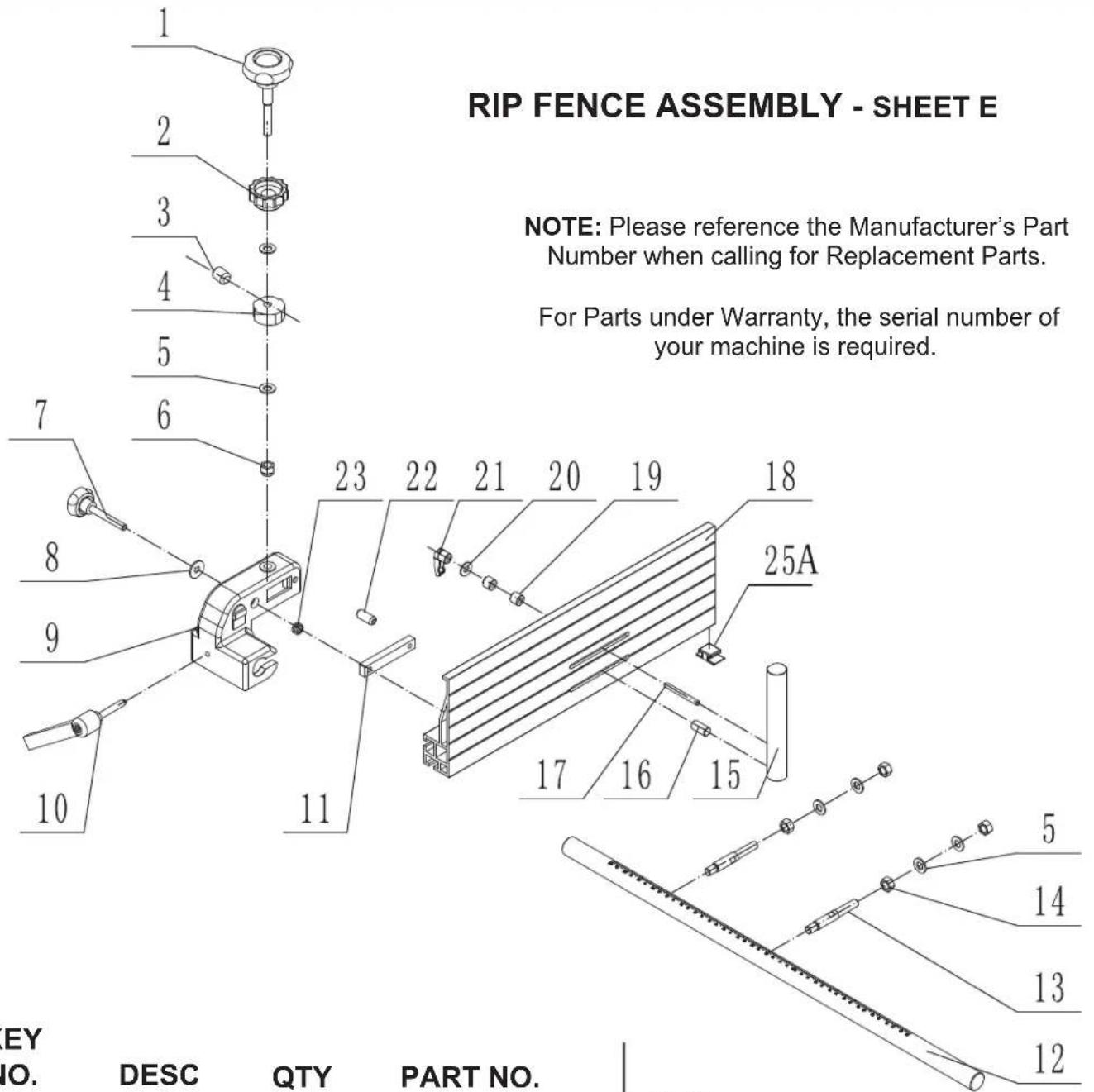
KEY
NO.
DESC
| 1E | Adjust handle | 1 | 1-JMBS1403060009-001S |
| 2E | Drift locking handle | 1 | 1-JMBS1403060010-001S |
| 3E | Cap screw M8x10 | 1 | 1-M8X10GB80B |
| 4E | Cam | 1 | 1-JMBS1403060004 |
| 5E | Flat washer | 6 | 1-WSH10GB97D1Z |
| 6E | Hex locking nut M10 | 1 | 1-M10GB889D1Z |
| 7E | Fence locking handle | 1 | 1-JMBS1403060003-001S |
| 8E | Big washer | 1 | 1-WSH8GB96Z |
| 9E | Fence carrier | 1 | 1-JMBS1403060001-076U |
| 10E | Carrier locking handle | 1 | 1-JMBS1403060011 |
| 11E | Sliding block | 1 | 1-JMBS1403060005 |
| 12E | Guide rail | 1 | 1-JMBS1801060004 |
| 13E | Connecting rod | 2 | 1-JXBS2001060003 |
| 14E | Hex nut | 4 | 1-M10GB6170Z |
QTY
PART NO.
KEY
NO.
DESC
QTY
PART NO.
| 15E | Re-saw bar | 1 | 1-JMBS1403061001 |
| 16E | Screw | 1 | 1-JL26061003 |
| 17E | Bolt | 1 | 1-JMBS1403061002 |
| 18E | Fence | 1 | 1-JMBS1403060002 |
| 19E | Spacer | 2 | 1-JL93010018 |
| 20E | Washer | 1 | 1-WSH6GB97D1B |
| 21E | Lock knob | 1 | 1-KTSB-1-A-M6X50 |
| 22E | Roll pin | 1 | 1-PIN6X26GB879D1B |
| 23E | Spring | 1 | 1-JMBS1403060007 |
| 25AE | Nylon plate | 1 | 1-JMBS1401060001A |
PARTS DIAGRAM & PARTS LIST
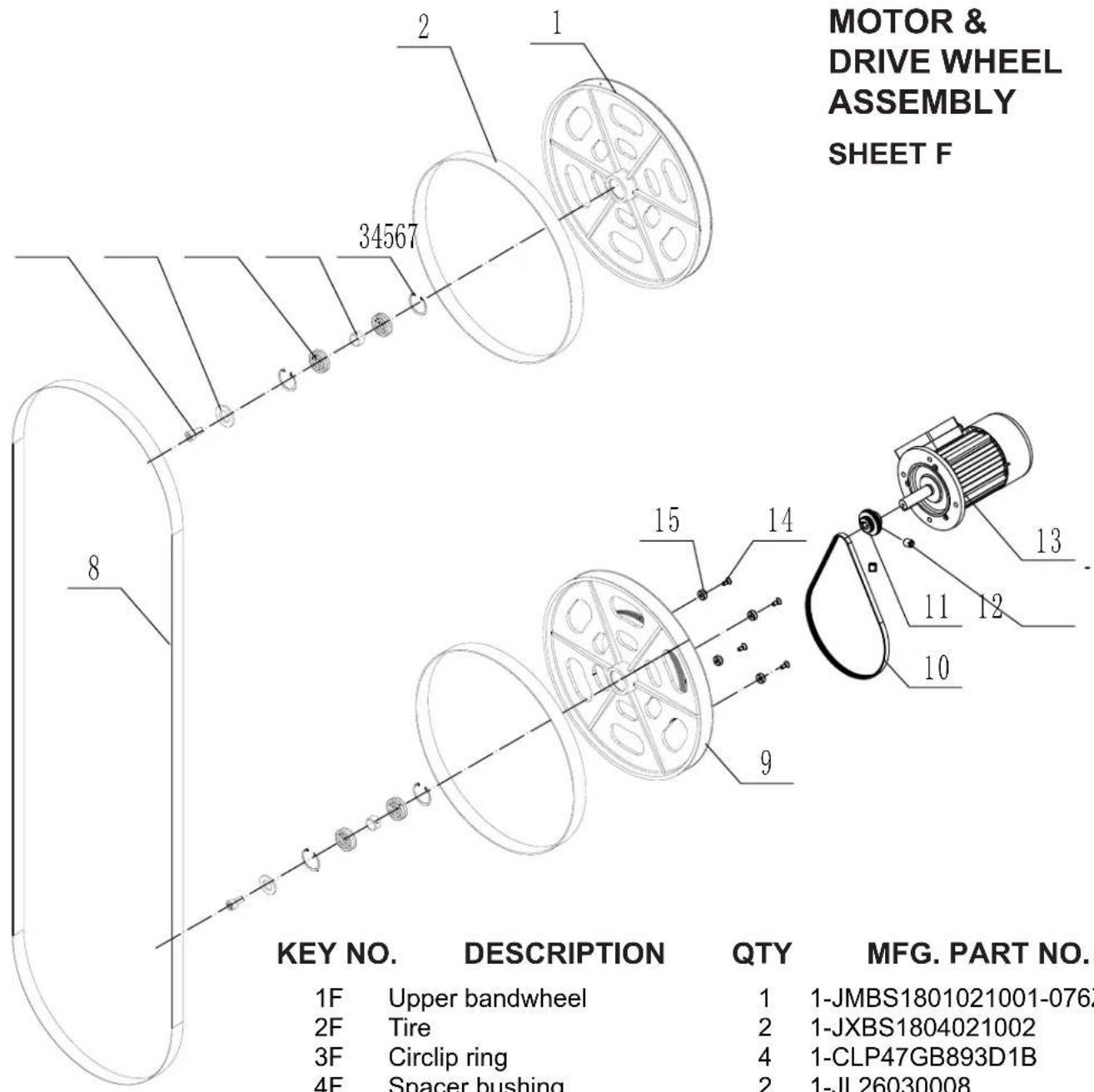
NOTE: Please reference the Manufacturer's Part Number when calling for Replacement Parts.
For Parts under Warranty, the serial number of your machine is required.
| KEY NO. | DESCRIPTION | QTY | MFG. PART NO. |
| 1F | Upper bandwheel | 1 | 1-JMBS1801021001-076Z |
| 2F | Tire | 2 | 1-JXBS1804021002 |
| 3F | Circlip ring | 4 | 1-CLP47GB893D1B |
| 4F | Spacer bushing | 2 | 1-JL26030008 |
| 5F | Bearing | 4 | 1-BRG6204-2RSGB276 |
| 6F | Washer | 2 | 1-JXPS1202070005 |
| 7F | Hex screw M8x16 | 2 | 1-M8X16GB70D1Z |
| 8F | Bandsaw blade | 1 | 1-JMBS1801020002 |
| 9F | Lower bandwheel | 1 | 1-JMBS1801022001-076Z |
| 10F | Multi-vee belt | 1 | 1-5PJ1023GB16588 |
| 11F | Motor pulley | 1 | 1-JMBS1801020004D |
| 12F | Socket head cap screw M8X8 | 2 | 1-M8X8GB80B |
| 13F | Motor | 1 | 2- YSH100194 |
| 14F | Countersunk screw M4X10 | 4 | 1-M4X10GB819D1B |
| 15F | Magnetic steel | 4 | 1-JMWL1203010006 |
ACCESSORIES

natural_image
Circular diagram with a vertical white line and dot pattern, no text or symbols presentC10-391 TABLE INSERTS - PK 4
Replacement plastic inserts with rear threaded holes for hex screw levellers.
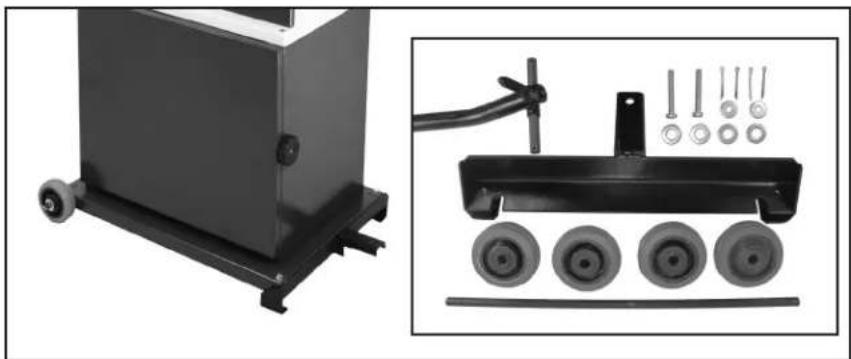
natural_image
Industrial machine with wheels and a mechanical device, shown in two views: left shows a black box with wheels, right shows a black cart with four wheels and a handle (no text or symbols visible)13-345 MOBILITY KIT Conversion Kit installs onto the bandsaw base to make it easy to move around the shop. Includes rear wheel assembly, front support, tow bar, hardware and instructions.
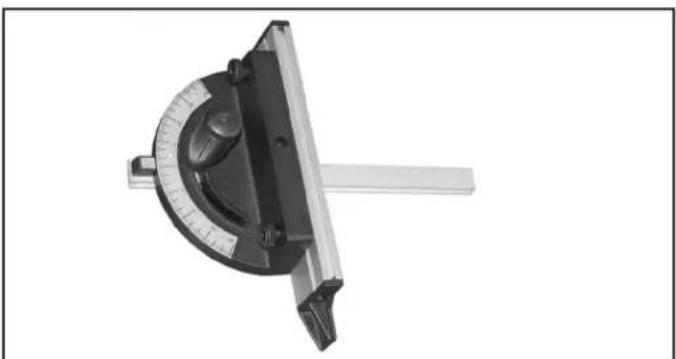
natural_image
Monochrome image of a protractor tool with a circular dial and metal handle (no text or symbols visible)13-912 'T' SLOT MITER GAUGE
Fits 3/4" x 3/8" miter slots. Handy scale for up to 60° left and right angle settings, includes adjustable 9" aluminum fence extension and push handle.
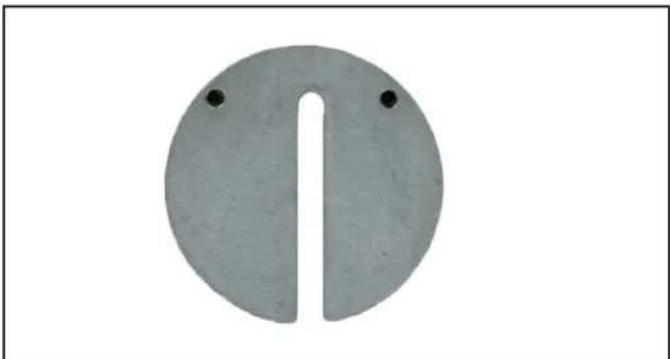
natural_image
Circular object with a vertical slot and two small dots on top, resembling a stylized musical instrument or device (no text or symbols)C10-395 ALUMINUM TABLE INSERT
Replacement cast aluminum insert with central slot for positioning the bandsaw blade. Provides solid support and includes rear table levelling screws.

natural_image
Four metallic circular plates with bolt holes, arranged diagonally (no text or symbols visible)C10-392 ZERO CLEARANCE INSERTS - PK 4
Pack of four plastic inserts with table levelling screws. Inserts have no slot and require user to cut their own on installation. This minimizes the slot width so debris or thin cut wood strips will not catch or fall into the thin slot. Ideal for use when cutting small pieces on the bandsaw for inlay, shims, puzzles, etc.

natural_image
Close-up of a black saw blade with serrated edges, isolated on white background (no text or symbols)BAND SAW BLADES
For a complete line of 142" band saw blades, contact your local RIKON Distributor, or visit the RIKON website at www.rikontools.com.
LINK TO RIKON WEBSITE

RIKON
POWER TOOLS®
5-Year Limited Warranty
RIKON Power Tools Inc. ("Seller") warrants to only the original retail consumer/purchaser of our products that each product be free from defects in materials and workmanship for a period of five (5) years from the date the product was purchased at retail. This warranty may not be transferred.
This warranty does not apply to defects due directly or indirectly to misuse, abuse, negligence, accidents, repairs, alterations, lack of maintenance or normal wear and tear. Under no circumstances will Seller be liable for incidental or consequential damages resulting from defective products. All other warranties, expressed or implied, whether of merchantability, fitness for purpose, or otherwise are expressly disclaimed by Seller. This five-year warranty does not cover products used for commercial, industrial or educational purposes. The warranty term for these claims will be limited to a two-year period.
This limited warranty does not apply to accessory items such as blades, drill bits, sanding discs, grinding wheels, belts, guide bearings and other related items.
Seller shall in no event be liable for death, injuries to persons or property, or for incidental, contingent, special, or consequential damages arising from the use of our products.
To take advantage of this warranty, proof of purchase documentation must be provided which has the date of purchase and an explanation of the complaint.
The Seller reserves the right to effect at any time, without prior notice, those alterations to parts, fittings, and accessory equipment which they may deem necessary for any reason whatsoever.
To register your machine online, visit RIKON at www.rikontools.com/warranty
To take advantage of this warranty, or if you have any questions, please contact us at 877-884-5167 or email warranty@rikontools.com

For more information:
25 Commerce Way
North Andover, MA 01845
877-884-5167 / 978-528-5380
techsupport@rikontools.com
LINK TO RIKON WEBSITE

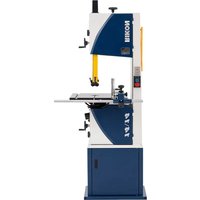
- 18" Wood/Metal Bandsaw
- Operator's Manual
- TABLE OF CONTENTS
- SPECIFICATIONS
- SAFETY INSTRUCTIONS
- SAFETY SYMBOLS
- DANGER
- WARNING
- CAUTION
- GENERAL SAFETY
- BEFORE USING YOUR MACHINE
- ELECTRICAL SAFETY
- REPLACE A DAMAGED OR WORN CORD IMMEDIATELY.
- EXTENSION CORDS
- SPECIFIC SAFETY INSTRUCTIONS FOR BAND SAWS
- SAVE THESE INSTRUCTIONS.
- Refer to them often.
- CALIFORNIA PROPOSITION 65 WARNING:
- GETTING TO KNOW YOUR MACHINE
- CONTENTS OF PACKAGE
- Unpacking, Checking Contents & Clean-up
- TABLE OF LOOSE PARTS
- TABLE OF LOOSE PARTS continued
- Rip Fence Assembly & Parts:
- Parts for Assembly on Frame:
- Tools and Tool Holder:
- Additional Tools required - not supplied
- Phillips Screwdriver
- INSTALLATION
- MOVING & INSTALLING THE BANDSAW
- ASSEMBLY
- TABLE ASSEMBLY
- RIP FENCE ASSEMBLY
- INSTALL THE HAND WHEELS
- INSTALL THE 4" DUST PORT
- INSTALL THE 90° TABLE STOP
- INSTALL THE PUSH STICK HOLDER
- INSTALL THE TOW BAR HOLDER
- ADJUSTMENTS
- TILTING THE TABLE
- SETTING THE TABLE SQUARE TO THE SAW BLADE'S SIDE
- SETTING THE TABLE SQUARE TO THE SAW BLADE'S SIDE continued
- SETTING THE TABLE SQUARE TO THE SAW BLADE'S BACK
- TRACKING THE SAW BLADE continued
- ADJUSTING THE BLADE TENSION
- ADJUSTING THE BLADE TENSION STOP
- ADJUSTING THE BLADE TENSION INDICATOR
- CHANGING THE BANDSAW BLADE
- ADJUSTING THE BLADE GUIDES
- Upper Guides:
- Lower Guides:
- ADJUSTING THE BLADE GUIDES - continued
- Lower Guides - continued:
- ADJUSTING THE BLADE GUARD - continued
- ADJUSTING THE FENCE 90° TO THE TABLE
- ADJUSTING THE FENCE TO THE TABLE
- To change the fence from vertical to horizontal:
- To change the fence from the left side of the carrier to the right side for using the rip fence to the right of the blade:
- ADJUSTING THE DRIVE BELT TENSION
- LEVELING THE TABLE INSERT
- OPERATION
- MAIN ON / OFF SWITCH
- CONTROL PANEL: ON/OFF SWITCH
- METAL CUTTING
- CUTTING PLASTIC/COMPOSITE MATERIAL
- ELECTRICAL OUTLET
- MAINTENANCE
- CHANGING THE MOTOR DRIVE BELT
- CHANGING BANDSAW TIRES
- NOTES
- TROUBLESHOOTING
- LOWER WHEEL ADJUSTMENTS
- PLEASE READ AND UNDERSTAND THESE STEPS THOROUGHLY BEFORE
- MAKING ANY ADJUSTMENTS. FAILURE TO DO SO COULD DAMAGE THE MACHINE.
- PARTS DIAGRAM
- PARTS LIST
- BLADE TENSION & TRACKING
- BLADE TENSION & TRACKING SHEET D
- PARTS DIAGRAM & PARTS LIST
- ACCESSORIES
- RIKON
- POWER TOOLS®
- 5-Year Limited Warranty
Brand : RIKON
Model : 10-342EVS
Category : Saw