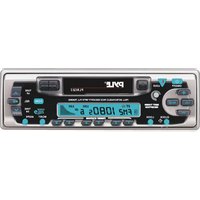
PLRG23C - Subwoofer Pyle - Free user manual and instructions
Find the device manual for free PLRG23C Pyle in PDF.


| Product Type | Car Stereo Receiver with Cassette, CD Changer Control, and Radio |
| Brand | Pyle |
| Model | PLRG23C |
| Power Supply | 12V DC (negative ground) |
| Fuse Rating | 1A (red), 6A (yellow), 0.1A (blue) for memory |
| Radio Bands | FM1, FM2, FM3, MW1, MW2 |
| Preset Stations | 18 FM / 12 MW (6 preset buttons) |
| Audio Output | 4 speakers (front/rear) with line out jacks |
| Subwoofer Output | Yes (via line out jacks) |
| Dimensions (Approx.) | 7.08 x 7.08 x 2.0 inches (180 x 180 x 50 mm) |
| Weight (Approx.) | 1.5 lbs (0.68 kg) |
| Front Panel | Detachable with release button |
| Display | LCD digital display showing frequency, clock, and functions |
| Cassette Player | Auto reverse, fast forward/rewind with auto play |
| CD Changer Control | Compatible with optional CD changer (disc search, repeat, scan, shuffle) |
| Audio Controls | Volume, Bass, Treble, Balance, Fader |
| Mono/Stereo Selection | Selectable for FM reception |
| Local/Distance (DX) Tuning | Reduces interference from strong local stations |
| Auto Memory Store | Automatically stores 6 strongest stations |
| Preset Scan | Scans memorized stations every 5 seconds |
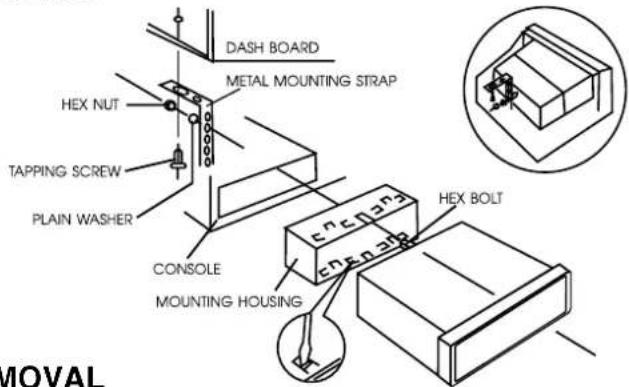
| Installation | DIN size with sleeve and removal keys |
| Safety | Do not ground speaker wires to chassis |
| Maintenance | Keep front panel clean; avoid moisture |
Frequently Asked Questions - PLRG23C Pyle
User questions about PLRG23C Pyle
0 question about this device. Answer the ones you know or ask your own.
Ask a new question about this device
Download the instructions for your Subwoofer in PDF format for free! Find your manual PLRG23C - Pyle and take your electronic device back in hand. On this page are published all the documents necessary for the use of your device. PLRG23C by Pyle.
USER MANUAL PLRG23C Pyle
Press the button to turn the power "ON" or "OFF".
2. MODE CONTROL
Press this button to select in either radio or cassette or CD changer mode.
3/4. MANUAL UP / DOWN TUNING TRACK SEEK UP / DOWN CONTROL
On radio mode, press this button will tune one frequency step higher or lower. On CD mode, press this button will locate the beginning of the track being played or will locate the beginning of the next track. When pressing more than 2 seconds, it will allow you to seek up or down on the specific track.
5. EJECT BUTTON
Depressing the eject button will stop the tape play, eject the cassette and turn on the radio.
6. TAPE SLOT
Holding the cassette lengthwise insert into the tape slot. The tape mechanism will now engage into the cassette play model.
7. LCD DIGITAL DISPLAY
The unit utilizes a digital type display which shows numerical indication of station FREQUENCY and other FUNCTIONS.
8. CLOCK
During radio operation, press this button to call the time display on the incorporated quartz clock. Pressing the button again or activating any tuning function, will return the display to station frequency read-out. During the tape operation, the time display will always be shown.
SETTING CLOCK TIME
- Press CLOCK button until the clock timing is flashing.
- Press √ tuning button to set the HOUR or press ∧ tuning button to set MINUTES.
9. PANEL RELEASE BUTTON
This button is used to release the mechanism that holds the front panel to the chassis. To detach the front panel, press the button so that the right side of the panel is released. Grasp the released side and pull it off of the chassis. To re-attach the panel, position the left side of the panel in place first and then press the right side of the panel until the mechanism locks it into place.
10. MONO/STEREO CONTROL
Press this button to select "FM STEREO" or "MONO" reception. A display reading of "ST" indicates the "STEREO" mode is selected.
11. LOCAL/DX
Press this button to prevent strong local stations from overlapping weaker stations. For normal operation, press this button again for distance.
12. CD CHANGER / PAUSE CONTROL
Press this button to control the optional CD Changer. Press the same button again to pause the disc played and the circle disc is flashing on display.
13. BAND SELECTOR
Each time this button is pressed, the radio band is changed.
The indication "FM1", "FM2", "FM3", "MW1" or "MW2" will appear on the display panel according to your selection.
14. STATION PRESET BUTTON
The PRESET BUTTONS on the unit are used to store station frequencies which you may wish to recall. Each preset button can store FM1, FM2, FM3, MW1, MW2 station frequency. Pressing the button momentarily recalls the station frequency which was memorized. There are 6 preset buttons, giving you capability of storing 18FM/12MW. NOTE: When the preset button to be memorized is kept pressed for more than 2 seconds, the receiving station frequency will be stored in the button pressed. After this, the memorized station can be recalled by tapping that button once.
On CDC Mode
Preset knob 1, press this button to search the disc numbers ahead.
Preset knob 2, press this button to search previous disc numbers.
Preset knob 3, press this button to repeat the specific track on the currently disc "RPT".
Preset knob 4, press this button to introduce the first 10 seconds of all the tracks on the currently selected disc
Preset knob 5, press this button to select disc randomly - Disc shuffle play.
15. PRE-SCAN/AUTO-STORE BUTTON
This button allows you to enjoy "Preset Memory Scan" function by pushing it within 2 seconds, and allows you enjoy "Auto Memory" function at pushing it continuously more than 2 seconds.
* PS (PRESET MEMORY SCAN)
It calls the memorized station frequencies (from 1-6) automatically every 5 seconds.
* AS (AUTO-STORE MEMORY)
It searches all station frequencies upward and memorize automatically 6 stations by catching the frequency which has scan-stop level strong on "LO" mode, weaker signal on "DX" mode or over at the time, the memorized station is shown on LCD as "CH1...6". After memorizing, auto memory function will be changed to "Preset Memory Scan" function automatically.
16. AUDIO SELECTOR
Press this button to select "VOLUME/BASS/TREBLE/BALANCE/FADER" adjustment modes. Each time button is pressed, accessed selection is displayed and + or - to adjust level as desired.
17/18. AUDIO LEVEL Down Control (- Button) / AUDIO LEVEL Up Control (+ Button)
With the exception of VOLUME, to access all other adjustment modes "BASS/TREBLE/BAL/FAD", first press SEL button then press the + or - button for selective audio control.
• VOLUME - Press + button to increase, or - to decrease sound level.
- BASS - While "BAS" is being displayed, press + to increase or - to decrease the bass level.
- TREBLE - While "TRE" is being displayed, press + button to increase or - to decrease the treble level.
- BALANCE - While "BAL" is being displayed, press + or - button to level balance of speaker right or left.
- FADER - While "FAD" is being displayed, press the AUDIO CONTROL + or - button to level balance of front speakers and LINE OUT jacks.
19. FAST FORWARD/REWIND BUTTON
At the end of tape in fast forward or rewind, the unit will automatically select play mode. To release either fast forward or rewind button from the lock position, push in the other button approximately half-way. During cassette play, press the fast forward and rewind buttons simultaneously and the reverse side of the tape will play automatically.
WIRING CONNECTION
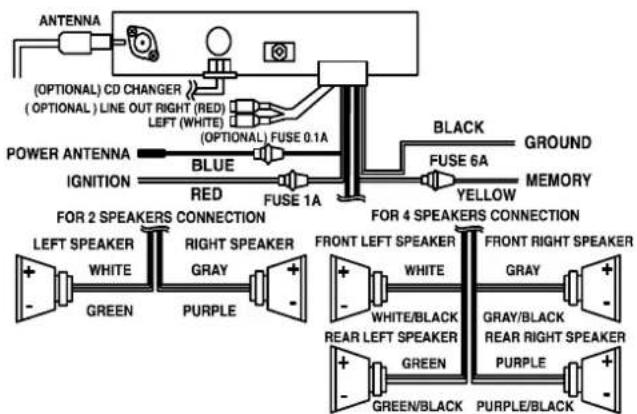
flowchart
graph TD
    A["ANTenna"] --> B["(OPTIONAL) CD CHANGER"]
    B --> C["(OPTIONAL) LINE OUT RIGHT (RED)"]
    C --> D["LEFT (WHITE)"]
    D --> E["(OPTIONAL) FUSE 0.1A"]
    E --> F["BLUE"]
    F --> G["RED"]
    G --> H["FUSE 1A"]
    H --> I["BLACK"]
    I --> J["FUSE 6A"]
    J --> K["YELLOW"]
    K --> L["GROUND"]
    L --> M["MEMORY"]
    N["POWER ANTENNA"] --> O["IGNITION"]
    O --> P["FOR 2 SPEAKERS CONNECTION"]
    P --> Q["LEFT SPEAKER"]
    P --> R["WHITE"]
    P --> S["GREEN"]
    P --> T["PURPLE"]
    U["FOR 4 SPEAKERS CONNECTION"] --> V["FRONT LEFT SPEAKER"]
    V --> W["WHITE"]
    V --> X["WHITE/BLACK"]
    V --> Y["REAR LEFT SPEAKER"]
    V --> Z["PURPLE"]
    V --> AA["GREEN/BLACK"]
    V --> AB["PURPLE/BLACK"]
    AC["FOR 2 SPEAKERS CONNECTION"] --> AD["FRONT RIGHT SPEAKER"]
    AD --> AE["WHITE"]
    AD --> AF["GRAY/BLACK"]
    AD --> AG["REAR RIGHT SPEAKER"]
    AD --> AH["PURPLE"]
    AD --> AI["GREEN/BLACK"]
CAUTION: DO NOT GROUND ANY SPEAKER WIRES TO CHASSIS (-).
INSTALLATION
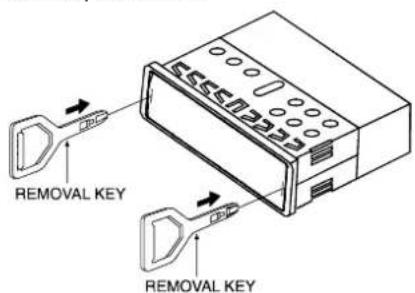
UNIT REMOVAL
- Remove Front Control Panel.
- Slightly insert the key into the slot and gently to release.
- Separate the sleeve from the unit. Keep release key in a safe place as you may need for future removal of unit should it require service.
Page. 4
P / N : 570-281804-03
- MODE CONTROL
- 3/4. MANUAL UP / DOWN TUNING TRACK SEEK UP / DOWN CONTROL
- EJECT BUTTON
- TAPE SLOT
- LCD DIGITAL DISPLAY
- CLOCK
- SETTING CLOCK TIME
- PANEL RELEASE BUTTON
- MONO/STEREO CONTROL
- LOCAL/DX
- CD CHANGER / PAUSE CONTROL
- BAND SELECTOR
- STATION PRESET BUTTON
- On CDC Mode
- PRE-SCAN/AUTO-STORE BUTTON
- AUDIO SELECTOR
- 17/18. AUDIO LEVEL Down Control (- Button) / AUDIO LEVEL Up Control (+ Button)
- FAST FORWARD/REWIND BUTTON
- WIRING CONNECTION
- INSTALLATION
- UNIT REMOVAL
Brand : Pyle
Model : PLRG23C
Category : Subwoofer